Nick Leroy – The Search Community Honors You
This is part of the say something nice about an SEO/SEM series – feel free to nominate someone over here.
Nick Leroy is 31 years old and lives with his wife and three kids (he has four year old twins) in St Paul, Minnesota…
Google Rich Snippets Not Impacted By Shorter Search Result Snippets
As you know, Google has cut down the snippet length in the search results significantly from when they increased them in December. But this should have zero impact on your rich snippets and rich cards…
Beating remarketing addiction and testing for incremental value using Google Analytics
Trying to kick remarketing ads? Contributor Andreas Reiffen discusses why you may be addicted to them and explains how KPIs directly aligned with business objectives help avoid the vicious cycle that comes from ROAS-based objectives.
Please visit Searc…
Google News Drops Editors’ Picks & Standout Meta Tag
The new version of Google News has launched last night and with that, Google has ended support for the Editors’ Picks feeds and the standout meta tag in Google News…
How to build an e-commerce SEO strategy for large retailers
Three factors deserve special attention in developing an SEO strategy for online retailers. Contributor Manish Dudharejia shares how to take on the competition using each.
Please visit Search Engine Land for the full article.
Please visit Search Engin…
Hourly Rank Tracking – One Year On
A year ago Chris Green tweeted an image of what the top 100 search results looked like when tracked hourly. Many thought it was ‘kinda cool’ at the time and the tool has been developed significantly since.
Post from Chris Green
Tamara de Lempicka Google doodle honors artist whose work focused on the Roaring ’20s
Born in Poland in 1898, de Lempicka was part of the Art Deco movement, creating artwork that blended neoclassical and Cubist styles.
Please visit Search Engine Land for the full article.
Please visit Search Engine Land for the full article.
Google News no longer supports the standout meta tag and Editors’ Pick
A few months after Google drops support for the meta news keywords tag, Google removes two other webmaster-related publisher features.
Please visit Search Engine Land for the full article.
Please visit Search Engine Land for the full article.
Time to Act: Review Responses Just Evolved from "Extra" to "Expected"
Posted by MiriamEllis
I’ve advocated the use of Google’s owner response review feature since it first rolled out in 2010. This vital vehicle defends brand reputation and revenue, offering companies a means of transforming dissatisfied consumers into satisfied ones, supporting retention so that less has to be spent on new customer acquisition. I consider review responses to be a core customer service responsibility. Yet, eight years into the existence of this feature, marketing forums are still filled with entry-level questions like:
- Should I respond to reviews?
- Should I respond to positive reviews?
- How should I respond to negative reviews?
Over the years, I’ve seen different local SEO consultants reply in differing degrees to these common threads, but as of May 11, 2018, both agencies and brands woke to a new day: the day on which Google announced it would be emailing notifications like this to consumers when a business responds to their reviews, prompting them to view the reply.
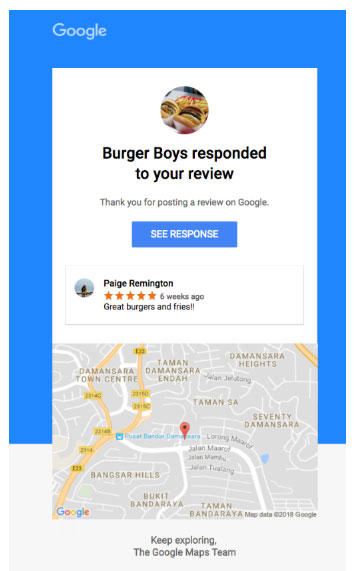
Surveys indicate that well over 50% of consumers already expect responses within days of reviewing a business. With Google’s rollout, we can assume that this number is about to rise.
Why is this noteworthy news? I’ll explain exactly that in this post, plus demo how Moz Local can be a significant help to owners and marketers in succeeding in this new environment.
When “extra” becomes “expected”
In the past, owner responses may have felt like something extra a business could do to improve management of its reputation. Perhaps a company you’re marketing has been making the effort to respond to negative reviews, at the very least, but you’ve let replying to positive reviews slide. Or maybe you respond to reviews when you can get around to it, with days or weeks transpiring between consumer feedback and brand reaction.
Google’s announcement is important for two key reasons:
1) It signals that Google is turning reviews into a truly interactive feature, in keeping with so much else they’ve rolled out to the Knowledge Panel in recent times. Like booking buttons and Google Questions & Answers, notifications of owner responses are Google’s latest step towards making Knowledge Panels transactional platforms instead of static data entities. Every new feature brings us that much closer to Google positioning itself between providers and patrons for as many transactional moments as possible.
2) It signals a major turning point in consumer expectations. In the past, reviewers have left responses from motives of “having their say,” whether that’s to praise a business, warn fellow consumers, or simply document their experiences.
Now, imagine a patron who writes a negative review of two different restaurants he dined at for Sunday lunch and dinner. On Monday, he opens his email to find a Google notification that Restaurant A has left an owner response sincerely apologizing and reasonably explaining why service was unusually slow that weekend, but that Restaurant B is meeting his complaint about a rude waiter with dead air.
“So, Restaurant A cares about me, and Restaurant B couldn’t care less,” the consumer is left to conclude, creating an emotional memory that could inform whether he’s ever willing to give either business a second chance in the future.
Just one experience of receiving an owner response notification will set the rules of the game from here on out, making all future businesses that fail to respond seem inaccessible, neglectful, and even uncaring. It’s the difference between reviewers narrating their experiences from random motives, and leaving feedback with the expectation of being heard and answered.
I will go so far as to predict that Google’s announcement ups the game for all review platforms, because it will make owner responses to consumer sentiment an expected, rather than extra, effort.
The burden is on brands
Because no intelligent business would believe it can succeed in modern commerce while appearing unreachable or unconcerned, Google’s announcement calls for a priority shift. For brands large and small, it may not be an easy one, but it should look something like this:
- Negative reviews are now direct cries for help to our business; we will respond with whatever help we can give within X number of hours or days upon receipt
- Positive reviews are now thank-you notes directly to our company; we will respond with gratitude within X number of hours or days upon receipt
Defining X is going to have to depend on the resources of your organization, but in an environment in which consumers expect your reply, the task of responding must now be moved from the back burner to a hotter spot on the stovetop. Statistics differ in past assessments of consumer expectations of response times:
- In 2016, GetFiveStars found that 15.6% of consumers expected a reply with 1–3 hours, and 68.3% expected a reply within 1–3 days of leaving a review.
- In 2017, RevLocal found that 52% of consumers expected responses within 7 days.
- Overall, 30% of survey respondents told BrightLocal in 2017 that owner responses were a factor they looked at in judging a business.
My own expectation is that all of these numbers will now rise as a result of Google’s new function, meaning that the safest bet will be the fastest possible response. If resources are limited, I recommend prioritizing negative sentiment, aiming for a reply within hours rather than days as the best hope of winning back a customer. “Thank yous” for positive sentiment can likely wait for a couple of days, if absolutely necessary.
It’s inspiring to know that a recent Location3 study found that brands which do a good job of responding to reviews saw an average conversion rate of 13.9%, versus lackluster responders whose conversion rate was 10.4%. Depending on what you sell, those 3.5 points could be financially significant! But it’s not always easy to be optimally responsive.
If your business is small, accelerating response times can feel like a burden because of lack of people resources. If your business is a large, multi-location enterprise, the burden may lie in organizing awareness of hundreds of incoming reviews in a day, as well as keeping track of which reviews have been responded to and which haven’t.
The good news is…
Moz Local can help

The screenshot, above, is taken from the Moz Local dashboard. If you’re a customer, just log into your Moz Local account and go to your review section. From the “sources” section, choose “Google” — you’ll see the option to filter your reviews by “replied” and “not replied.” You’ll instantly be able to see which reviews you haven’t yet responded to. From there, simply use the in-dashboard feature that enables you to respond to your (or your clients’) reviews, without having to head over to your GMB dashboard or log into a variety of different clients’ GMB dashboards. So easy!
I highly recommend that all our awesome customers do this today and be sure you’ve responded to all of your most recent reviews. And, in the future, if you’re working your way through a stack of new, incoming Google reviews, this function should make it a great deal easier to keep organized about which ones you’ve checked off and which ones are still awaiting your response. I sincerely hope this function makes your work more efficient!
Need some help setting the right review response tone?
Please check out Mastering the Owner Response to the Quintet of Google My Business Reviews, which I published in 2016 to advocate responsiveness. It will walk you through these typical types of reviews you’ll be receiving:
- “I love you!”
- “I haven’t made up my mind yet.”
- “There was hair in my taco…”
- “I’m actually your competitor!”
- “I’m citing illegal stuff.”
The one update I’d make to the advice in the above piece, given Google’s rollout of the new notification function, would be to increase the number of positive reviews to which you’re responding. In 2016, I suggested that enterprises managing hundreds of locations should aim to express gratitude for at least 10% of favorable reviews. In 2018, I’d say reply with thanks to as many of these as you possibly can. Why? Because reviews are now becoming more transactional than ever, and if a customer says, “I like you,” it’s only polite to say, “Thanks!”. As more customers begin to expect responsiveness, failure to acknowledge praise could feel uncaring.
I would also suggest that responses to negative reviews more strongly feature a plea to the customer to contact the business so that things can be “made right.” GetFiveStars co-founder, Mike Blumenthal, is hoping that Google might one day create a private channel for brands and consumers to resolve complaints, but until that happens, definitely keep in mind that:
- The new email alerts will ensure that more customers realize you’ve responded to their negative sentiment.
- If, while “making things right” in the public response, you also urge the unhappy customer to let you make things “more right” in person, you will enhance your chances of retaining him.
- If you are able to publicly or privately resolve a complaint, the customer may feel inspired to amend his review and raise your star rating; over time, more customers doing this could significantly improve your conversions and, possibly, your local search rankings.
- All potential customers who see your active responses to complaints will understand that your policies are consumer-friendly, which should increase the likelihood of them choosing your business for transactions.
Looking ahead
One of the most interesting aspects I’m considering as of the rollout of response notifications is whether it may ultimately impact the tone of reviews themselves. In the past, some reviewers have given way to excesses in their sentiment, writing about companies in the ugliest possible language… language I’ve always wanted to hope they wouldn’t use face-to-face with other human beings at the place of business. I’m wondering now if knowing there’s a very good chance that companies are responding to feedback could lessen the instances of consumers taking wild, often anonymous potshots at brands and create a more real-world, conversational environment.
In other words, instead of: “You overcharged me $3 for a soda and I know it’s because you’re [expletive] scammers, liars, crooks!!! Everyone beware of this company!!!”
We might see: “Hey guys, I just noticed a $3 overcharge on my receipt. I’m not too happy about this.”
The former scenario is honestly embarrassing. Trying to make someone feel better when they’ve just called you a thief feels a bit ridiculous and depressing. But the latter scenario is, at least, situation-appropriate instead of blown out of all proportion, creating an opening for you and your company to respond well and foster loyalty.
I can’t guarantee that reviewers will tone it down a bit if they feel more certain of being heard, but I’m hoping it will go that way in more and more cases.
What do you think? How will Google’s new function impact the businesses you market and the reviewers you serve? Please share your take and your tips with our community!
Sign up for The Moz Top 10, a semimonthly mailer updating you on the top ten hottest pieces of SEO news, tips, and rad links uncovered by the Moz team. Think of it as your exclusive digest of stuff you don’t have time to hunt down but want to read!
How to Write Meta Descriptions in a Constantly Changing World (AKA Google Giveth, Google Taketh Away)
Posted by Dr-Pete
Summary: As of mid-May 2018, Google has reverted back to shorter display snippets. Our data suggests these changes are widespread and that most meta descriptions are being cut off in the previous range of about 155–160 characters.
Back in December, Google made a significant shift in how they displayed search snippets, with our research showing many snippets over 300 characters. Over the weekend, they seem to have rolled back that change (Danny Sullivan partially confirmed this on Twitter on May 14). Besides the obvious question — What are the new limits? — it may leave you wondering how to cope when the rules keep changing. None of us have a crystal ball, but I’m going to attempt to answer both questions based on what we know today.
Lies, dirty lies, and statistics…
I pulled all available search snippets from the MozCast 10K (page-1 Google results for 10,000 keywords), since that’s a data set we collect daily and that has a rich history. There were 89,383 display snippets across that data set on the morning of May 15.
I could tell you that, across the entire data set, the minimum length was 6 characters, the maximum was 386, and the mean was about 159. That’s not very useful, for a couple of reasons. First, telling you to write meta descriptions between 6–386 characters isn’t exactly helpful advice. Second, we’re dealing with a lot of extremes. For example, here’s a snippet on a search for “USMC”:

Marine Corps Community Services may be a wonderful organization, but I’m sorry to report that their meta description is, in fact, “apple” (Google appends the period out of, I assume, desperation). Here’s a snippet for a search on the department store “Younkers”:

Putting aside their serious multi-brand confusion, I think we can all agree that “BER Meta TAG1” is not optimal. If these cases teach you anything, it’s only about what not to do. What about on the opposite extreme? Here’s a snippet with 386 characters, from a search for “non-compete agreement”:

Notice the “Jump to Exceptions” and links at the beginning. Those have been added by Google, so it’s tough to say what counts against the character count and what doesn’t. Here’s one without those add-ons that clocks in at 370 characters, from a search for “the Hunger Games books”:

So, we know that longer snippets do still exist. Note, though, that both of these snippets come from Wikipedia, which is an exception to many SEO rules. Are these long descriptions only fringe cases? Looking at the mean (or even the median, in this case) doesn’t really tell us.
The big picture, part 1
Sometimes, you have to let the data try to speak for itself, with a minimum of coaxing. Let’s look at all of the snippets that were cut off (ending in “…”) and remove video results (we know from previous research that these skew a bit shorter). This leaves 42,863 snippets (just under half of our data set). Here’s a graph of all of the cut-off lengths, gathered into 25 character bins (0–25, 26–50, etc.):

This looks very different from our data back in December, and is clearly clustered in the 150–175 character range. We see a few Google display snippets cut off after the 300+ range, but those are dwarfed by the shorter cut-offs.
The big picture, part 2
Obviously, there’s a lot happening in that 125–175 character range, so let’s zoom in and look at just the middle portion of the frequency distribution, broken up into smaller, 5-character buckets:

We can see pretty clearly that the bulk of cut-offs are happening in the 145–165 character range. Before December, our previous guidelines for meta descriptions were to keep them below 155 characters, so it appears that Google has more-or-less reverted to the old rules.
Keep in mind that Google uses proportional fonts, so there is no exact character limit. Some people have hypothesized a pixel-width limit, like with title tags, but I’ve found that more difficult to pin down with multi-line snippets (the situation gets even weirder on mobile results). Practically, it’s also difficult to write to a pixel limit. The data suggests that 155 characters is a reasonable approximation.
To the Wayback Machine… ?!
Should we just go back to a 155 character cut-off? If you’ve already written longer meta descriptions, should you scrap that work and start over? The simple truth is that none of us know what’s going to happen next week. The way I see it, we have four viable options:
(1) Let Google handle it
Some sites don’t have meta descriptions at all. Wikipedia happens to be one of them. Now, Google’s understanding of Wikipedia’s content is much deeper than most sites (thanks, in part, to Wikidata), but many sites do fare fine without the tag. If your choice is to either write bad, repetitive tags or leave them blank, then I’d say leave them blank and let Google sort it out.
(2) Let the … fall where it may
You could just write to the length you think is ideal for any given page (within reason), and if the snippets get cut off, don’t worry about it. Maybe the ellipsis (…) adds intrigue. I’m half-joking, but the reality is that a cut-off isn’t the kiss of death. A good description should entice people to want to read more.
(3) Chop everything at 155 characters
You could go back and mercilessly hack all of your hard work back to 155 characters. I think this is generally going to be time badly spent and may result in even worse search snippets. If you want to rewrite shorter Meta Descriptions for your most important pages, that’s perfectly reasonable, but keep in mind that some results are still showing longer snippets and this situation will continue to evolve.
(4) Write length-adaptive descriptions
Is it possible to write a description that works well at both lengths? I think it is, with some care and planning. I wouldn’t necessarily recommend this for every single page, but maybe there is a way to have our cake and eat at least half of it, too…
The 150/150 approach
I’ve been a bit obsessed with the “inverted pyramid” style of writing lately. This is a journalistic style where you start with the lead or summary of your main point and then break that down into the details, data, and context. While this approach is well suited to the web, its origins come from layout limitations in print. You never knew when your editor would have to cut your article short to fit the available space, so the inverted pyramid style helped guarantee that the most important part would usually be spared.
What if we took this approach to meta descriptions? In other words, why not write a 150-character “lead” that summarizes the page, and then add 150 characters of useful but less essential detail (when adding that detail makes sense and provides value)? The 150/150 isn’t a magic number — you could even do 100/100 or 100/200. The key is to make sure that the text before the cut can stand on its own.
Think of it a bit like an ad, with two separate lines of copy. Let’s take this blog post:
Line 1 (145 chars.)
In December, we reported that Google increased search snippets to over 300 characters. Unfortunately, it looks like the rules have changed again.
Line 2 (122 chars.)
According to our new research (May 2018), the limit is back to 155-160 characters. How should SEOs adapt to these changes?
Line 1 has the short version of the story and hopefully lets searchers know they’re heading down the right path. Line 2 dives into a few details and gives away just enough data (hopefully) to be intriguing. If Google uses the longer description, it should work nicely, but if they don’t, we shouldn’t be any worse for wear.
Should you even bother?
Is this worth the effort? I think writing effective descriptions that engage search visitors is still very important, in theory (and that this indirectly impacts even ranking), but you may find you can write perfectly well within a 155-character limit. We also have to face the reality that Google seems to be rewriting more and more descriptions. This is difficult to measure, as many rewrites are partial, but there’s no guarantee that your meta description will be used as written.
Is there any way to tell when a longer snippet (>300 characters) will still be used? Some SEOs have hypothesized a link between longer snippets and featured snippets at the top of the page. In our overall data set, 13.3% of all SERPs had featured snippets. If we look at just SERPs with a maximum display snippet length of 160 characters (i.e. no result was longer than 160 characters), the featured snippet occurrence was 11.4%. If we look at SERPs with at least one display snippet over 300 characters, featured snippets occurred at a rate of 41.8%. While that second data set is fairly small, it is a striking difference. There does seem to be some connection between Google’s ability to extract answers in the form of featured snippets and their ability or willingness to display longer search snippets. In many cases, though, these longer snippets are rewrites or taken directly from the page, so even then there’s no guarantee that Google will use your longer meta description.
For now, it appears that the 155-character guideline is back in play. If you’ve already increased some of your meta descriptions, I don’t think there’s any reason to panic. It might make sense to rewrite overly-long descriptions on critical pages, especially if the cut-offs are leading to bad results. If you do choose to rewrite some of them, consider the 150/150 approach — at least then you’ll be a bit more future-proofed.
Sign up for The Moz Top 10, a semimonthly mailer updating you on the top ten hottest pieces of SEO news, tips, and rad links uncovered by the Moz team. Think of it as your exclusive digest of stuff you don’t have time to hunt down but want to read!
The new and AI-improved Google News now available for iPhone and iPad
Google News redesign in more than 120 countries on the web, Android and iOS.
Please visit Search Engine Land for the full article.
Please visit Search Engine Land for the full article.
SearchCap: Bing crypto ads, AdWords scripts & vertical search
Below is what happened in search today, as reported on Search Engine Land and from other places across the web.
Please visit Search Engine Land for the full article.
Please visit Search Engine Land for the full article.
Getting listed: how to generate more traffic and mentions
If you think directories are dead, think again: there are plenty of new and old directories out there that can send you traffic and leads. Ann Smarty reviews the available opportunities for getting listed to generate more traffic and mentions.
The Insider’s Guide: SearchLove Boston 2018
With just under four weeks until SearchLove returns to our favourite east coast city of Boston, we thought it was time to give you a low-down on what to expect and some insider tips, including:
Work hard and play hard at SMX Advanced
Mentors, colleagues, and new friends – expand your network and make invaluable connections.
Please visit Search Engine Land for the full article.
Please visit Search Engine Land for the full article.
Pause underperforming ads with this updated AdWords script
If you are running tests on your ads but don’t know how to interpret the results, contributor Daniel Gilbert has an updated AdWords script to help you pick which ads are performing best.
Please visit Search Engine Land for the full article.
Please visit Search Engine Land for the full article.
Jesse McDonald – The Search Community Honors You
This is part of the say something nice about an SEO/SEM series – feel free to nominate someone over here.
Jesse McDonald is 29 years old and lives with his wife Jennifer in Austin, Texas…
Google Video Answers From Deadpool 2 Stars
Remember Google announced in December that Google Posts now supports selfie style video answers from celebrities…
Google: The Faster We Can Crawl, The More We Can Crawl
This seems logical, but I’ll say it anyway, since Google’s John Mueller said it on Twitter. The faster your server responds to GoogleBot, the faster GoogleBot can crawl through your site. Google’s John Mueller said “the faster we can crawl…
New: Google Dynamic Rendering To Help With JavaScript In Search
Friday I mentioned something new that Google introduced named Dynamic Rendering. Google has still not come out with anything official about it, outside of what was mentioned in the video I posted last week…