Bullish on SEO : RankBrain vs. SEOBrain
The battle between RankBrain and SEOBrain is heating up, as Google develops Artificial Intelligence to battle human innovation.
Double Google Ranking Changes in October Not Penguin Related
A new post from www.davidnaylor.co.uk. BAZINGA!
The post Double Google Ranking Changes in October Not Penguin Related appeared first on UK SEO Blog by Dave Naylor – SEO Tools, Tips & News.
Move over Google Author Rank, Make way for Google Authoritative Rank
An authoritative user is a user of one or more computer-implemented services (e.g., a social networking service) that has been determined to be authoritative (e.g., an expert) on one or more topics that can be associated with one or more queries This quote comes from a patent that was granted on Tuesday at the USPTO … Continue reading Move over Google Author Rank, Make way for Google Authoritative Rank →
The post Move over Google Author Rank, Make way for Google Authoritative Rank appeared first on SEO by the Sea.
You SEO People are Destroying News Websites with Dumb Advice
Dear Kettle: This is the pot. I am calling you black. Here is why. Earlier this year I wrote on Marketing Pilgrim that you should always update your older outbound links. I do this on my Websites because it maintains…
Ad Network Ménage à Trois: Bing, Yahoo!, Google
Yahoo! Tests Google Again
Back in July we noticed Yahoo! was testing Google-powered search results. From that post…
When Yahoo! recently renewed their search deal with Microsoft, Yahoo! was once again allowed to sell their own desktop search ads & they are only required to give 51% of the search volume to Bing. There has been significant speculation as to what Yahoo! would do with the carve out. Would they build their own search technology? Would they outsource to Google to increase search ad revenues? It appears they are doing a bit of everything – some Bing ads, some Yahoo! ads, some Google ads.
The Growth of Gemini
Since then Gemini has grown significantly:
Yahoo has moved quickly to bring search ad traffic under Gemini for advertisers that have adopted the platform. For some perspective, in September 2015, Yahoo.com produced a little over 50 percent of the clicks that took place across the Bing Ads and Gemini platforms. For advertisers adopting Gemini, Gemini produced 22 percent of combined Bing and Gemini clicks. Given the device breakdown of Yahoo’s traffic, this amounts to about two-thirds of the traffic it is able to control under the renegotiated agreement.
That growth has come at the expense of Bing ad clicks, which have fallen significantly: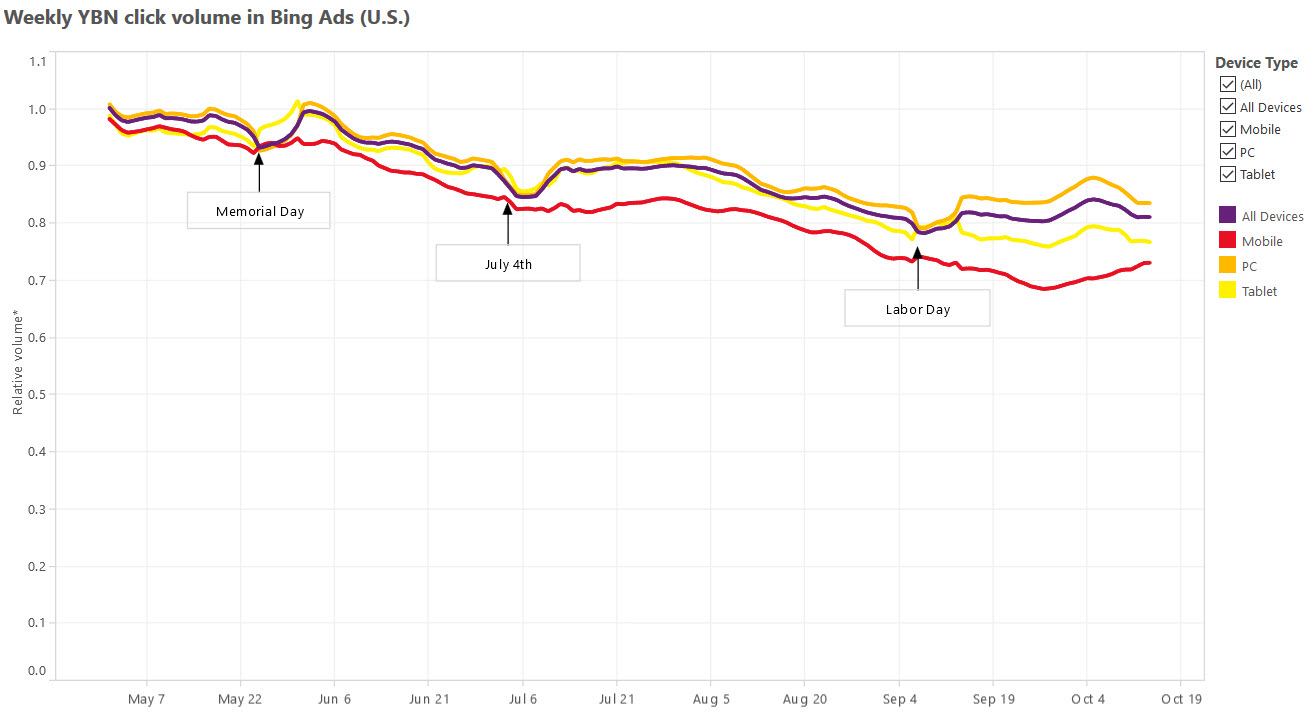
Shared Scale to Compete
Years ago Microsoft was partnered into the Yahoo!/Overture ad network to compete against Google. The idea was the companies together would have better scale to compete against Google in search & ads. Greater scale would lead to a more efficient marketplace, which would lead to better ad matching, higher advertiser bids, etc. This didn’t worked as well as anticipated. Originally under-monetization was blamed on poor ad matching. Yahoo! Panama was a major rewrite of their ad system which was supposed to fix the problem, but it didn’t.
Even if issues like bid jamming were fixed & ad matching was more relevant, it still didn’t fix issues with lower ad depth in emerging markets & arbitrage lowering the value of expensive keywords in the United States.
Understanding the Value of Search Clicks
When a person types a keyword into a search box they are expressing significant intent. When a person clicks a link to land on a page they may still have significant interest, but generally there is at least some level of fall off. If I search for a keyword the value of my click is $x, but if I click a link on a “top searches” box, the value of that click may perhaps only be 5% or 10% what the value of a hand typed search. There is less intent.
Here is a picture of the sort of “trending now” box which appears on the Yahoo! homepage.
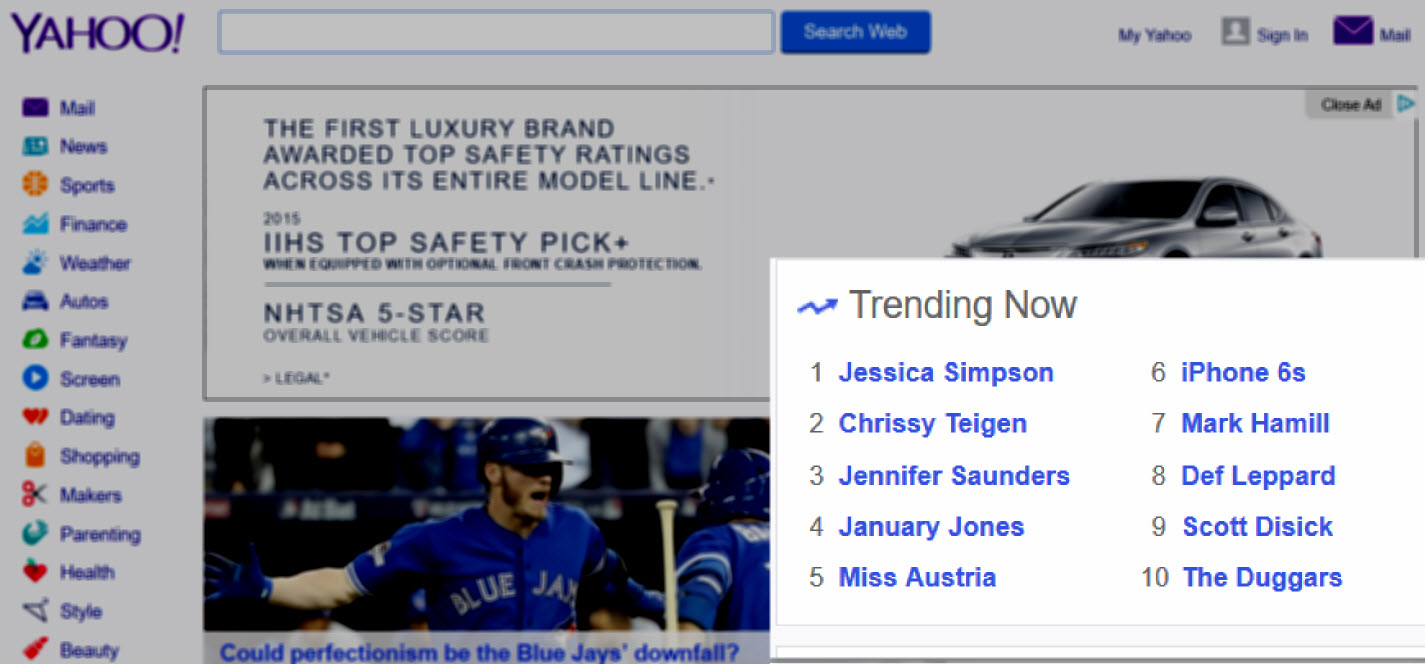
Typically those sorts of searches include a bunch of female celebrities, but then in any such box there will be one or two money terms added, like [lower blood pressure] or [iPhone 6s]. People who search for those terms might have $5 or $10 of intent, but people who click those links might only have a quarter or 50 cents of intent.
That difference in value can utterly screw an advertiser who gets their high-value keyword featured while they are sleeping or not actively monitoring & managing their ad campaign.
For what it is worth, even Google has tested some of these sort of these “search” traffic generation approaches during the last recession. On the Google AdSense network Google was buying banner ads telling people to search for [credit cards] & if they clicked on those banner ads they ended up on a search result page for [credit cards].

To this day many companies run contextual ads that drive search volume, but the difference between today & the Yahoo! which failed to monetize search is there is (at least currently) a greater focus on traffic quality.
Under-performance Due to Shady Traffic Partners
Yahoo! continued to under-perform in large part because Yahoo! had a lot of “search” partners with many lower quality traffic sources mixed in their traffic stream & they didn’t even allow advertisers to opt out of the partner network until after Yahoo! decided to exit the search market. As bad as the above sounds, it is actually worse, as some larger partners had access to advertiser information in a way that allowed them to aggressively arbitrage away the value of high advertiser bids wherever and whenever an advertiser overbid.
So you would bid thinking you were buying primarily search traffic based on the user intent of a person searching for something, but you might have been getting various layers of arbitrage of lower quality traffic, traffic from domain lander pages, or even some mix of robotic traffic from clickbots. Those $30 search ad clicks are a sure money loser if it is a clickbot software program doing the click.
And not only were some of Yahoo!’s partners driving down the value of clicks on Yahoo! itself, but Yahoo! was paying some of the larger partners in the high 80s to low 90s percent of revenue. Here is a (made up) example chart for illustration purposes, where the (made up) partner is getting a 90% TAC
| Advertiser Bid | Y! Search Clicks | Partner Clicks | Total Clicks | Total Revs | TAC | Rev after TAC | |
| No Partners | $30 | 3,000 | 0 | 3,000 | $90,000 | $0 | $90,000 |
| Bit of Arb | $25 | 3,000 | 1,000 | 4,000 | $100,000 | $22,500 | $77,500 |
| Heavy Arb | $10 | 3,000 | 6,000 | 9,000 | $90,000 | $54,000 | $36,000 |
Why did Yahoo! allow the above sort of behavior to go on? It is hard to believe they were completely unaware of what was going on, particularly when it was so obvious to outside observers. More likely it was that they were rapidly losing search share & wanted the topline revenue growth to make their quarterly number. By the time they realized what damage they had already done to their ecosystem, they were already too far down the path to correct it & were afraid to do anything which significantly hit revenues.
The rapid rise and fall of a large Yahoo! search partner named Geosign was detailed by the Canadian Financial Post, in an article which is now offline, but available via the Internet Archive Wayback Machine:
Companies fail all the time. Sometimes with little warning. But companies that are highly profitable and only weeks removed from a record-setting venture capital investment? Not so much. Yet in Geosign’s case, the cuts that began last May continued through the summer. Late last year, fewer than 100 employees remained. Today, Geosign itself no longer exists, its still-functioning website an empty reminder of its former promise. And while the national business media has, until now, overlooked the story – surprising, given the size of the investment and the fact that Google played a direct role in the outcome – within Canada’s technology and venture-capital communities, the $160-million investment is known as the deal “that didn’t go well.” When the collapse happened, even jaded industry watchers accustomed to financial debacles in the tech sector were stunned. “I’ve seen a lot of meltdowns,” says Duncan Stewart, a technology and investment analyst in Toronto. “But something happening like this, over just a few weeks, that’s unprecedented in my experience.”
Other traffic sources like domain parking have also sharply declined, due to a variety of factors like: web browsers replacing address bars with multi-purpose search boxes, shift of consumer internet traffic to mobile devices (which increases reliance on search over direct navigation & apps replace some segment of direct navigation), increased smart pricing, lower revenue sharing percentages, and Yahoo! no longer being able to offer a competitive bid against Google.
When Yahoo! shifted their search ads to Microsoft, Microsoft allowed advertisers to opt out of the partner network. Microsoft also clamped down on some of the lower quality traffic sources with smart pricing, which hit some of the arbitrage businesses hard & even forced Yahoo! to seek refunds from some of their partners for delivering low quality traffic.
Shared Scale to Compete
Microsoft launched their own algorithmic search results on Live Search & their own Microsoft adCenter search ads. Microsoft continued to lose share in search at least until they gave their search engine a memorable name in Bing. The Yahoo! Bing ad network seemed to be gaining momentum when Yahoo! signed a deal with Mozilla to become the default search provider for Firefox, but it appears Yahoo! overpaid for the deal as Yahoo! search revenues ex-TAC were off $60 million YoY in the most recent quarter.
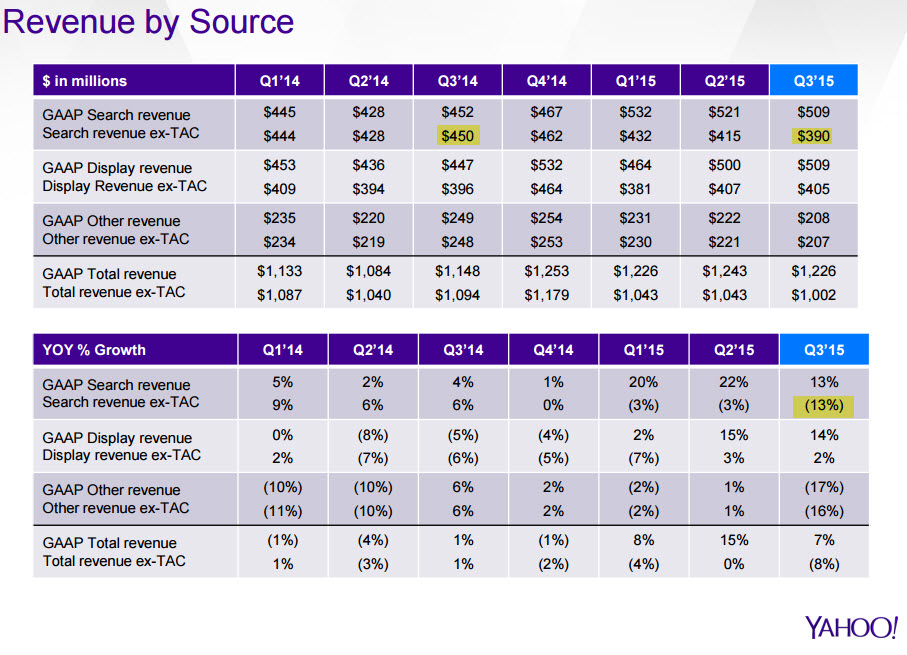
In spite of using an ad-heavy search interface Yahoo! has not grown search ad revenues as quickly as the search market has grown. Yahoo! has continually lost marketshare for years (up until the Mozilla Firefox deal). And even as Microsoft has followed Google in broadened their ad matching, a lot of the other “search” traffic partners Yahoo! once relied on to make their numbers are no longer in the marketplace to augment their data.
The Bing / Yahoo! network search traffic is now much cleaner than the Yahoo! “search” traffic quality of many years ago, but Yahoo! hasn’t replaced some of the old search partners which have died off.
Shared Scale No Longer Important?
Yahoo! increasing the share of their ad clicks which are powered by Gemini lowers the network efficiency of the Yahoo!/Bing ad network. All the talk of “synergy” driving value sort of goes up in smoke when Yahoo! shifts a significant share of their ad clicks away from the original network.
Yahoo! announced a new search deal with Google. Here’s the Tweet version…
$YHOO has signed a 3 year partnership with Google to bolster our search capabilities. This is in addition to our relationship with Microsoft— Yahoo Inc. (@YahooInc) October 20, 2015
…the underlying ethos…
“If you love something, set it free; if it comes backs it’s yours, if it doesn’t, it never was.”
…and the long version…
On October 19, 2015, Yahoo! Inc., a Delaware corporation (“Yahoo”), and Google Inc., a Delaware corporation (“Google”), entered into a Google Services Agreement (the “Services Agreement”). The Services Agreement is effective as of October 1, 2015 and expires on December 31, 2018. Pursuant to the Services Agreement, Google will provide Yahoo with search advertisements through Google’s AdSense for Search service (“AFS”), web algorithmic search services through Google’s Websearch Service, and image search services. The results provided by Google for these services will be available to Yahoo for display on both desktop and mobile platforms. Yahoo may use Google’s services on Yahoo’s owned and operated properties (“Yahoo Properties”) and on certain syndication partner properties (“Affiliate Sites”) in the United States (U.S.), Canada, Hong Kong, Taiwan, Singapore, Thailand, Vietnam, Philippines, Indonesia, Malaysia, India, Middle East, Africa, Mexico, Argentina, Brazil, Colombia, Chile, Venezuela, Peru, Australia and New Zealand.
Under the Services Agreement, Yahoo has discretion to select which search queries to send to Google and is not obligated to send any minimum number of search queries. The Services Agreement is non-exclusive and expressly permits Yahoo to use any other search advertising services, including its own service, the services of Microsoft Corporation or other third parties.
Google will pay Yahoo a percentage of the gross revenues from AFS ads displayed on Yahoo Properties or Affiliate Sites. The percentage will vary depending on whether the ads are displayed on U.S. desktop sites, non-U.S. desktop sites or on the tablet or mobile phone versions of the Yahoo Properties or its Affiliate Sites. Yahoo will pay Google fees for requests for image search results or web algorithmic search results.
Either party may terminate the Services Agreement (1) upon a material breach subject to certain limitations; (2) in the event of a change in control (as defined in the Services Agreement); (3) after first discussing with the other party in good faith its concerns and potential alternatives to termination (a) in its entirety or in the U.S. only, if it reasonably anticipates litigation or a regulatory proceeding brought by any U.S. federal or state agency to enjoin the parties from consummating, implementing or otherwise performing the Services Agreement, (b) in part, in a country other than the U.S., if either party reasonably anticipates litigation or a regulatory proceeding or reasonably anticipates that the continued performance under the Services Agreement in such country would have a material adverse impact on any ongoing antitrust proceeding in such country, (c) in its entirety if either party reasonably anticipates a filing by the European Commission to enjoin it from performing the Services Agreement or that continued performance of the Services Agreement would have a material adverse impact on any ongoing antitrust proceeding involving either party in Europe or India, or (d) in its entirety, on 60 days notice if the other party’s exercise of these termination rights in this clause (3) has collectively and materially diminished the economic value of the Services Agreement. Each party agrees to defend or settle any lawsuits or similar actions related to the Services Agreement unless doing so is not commercially reasonable (taking all factors into account, including without limitation effects on a party’s brand or business outside of the scope of the Services Agreement).
In addition, Google may suspend Yahoo’s use of services upon certain events and may terminate the Services Agreement if such events are not cured. Yahoo may terminate the Services Agreement if Google breaches certain service level and server latency specified in the Services Agreement.
In connection with the Services Agreement, Yahoo and Google have agreed to certain procedures with the Antitrust Division of the United States Department of Justice (the “DOJ”) to facilitate review of the Services Agreement by the DOJ, including delaying the implementation of the Services Agreement in the U.S. in order to provide the DOJ with a reasonable period of review.
Where Are We Headed?
Danny Sullivan mentioned the 51% of search share Yahoo! is required to deliver to Bing applies only to desktop traffic & Yahoo! has no such limit on mobile searches. In theory this could mean Yahoo! could quickly become a Google shop, with Microsoft as a backfill partner.
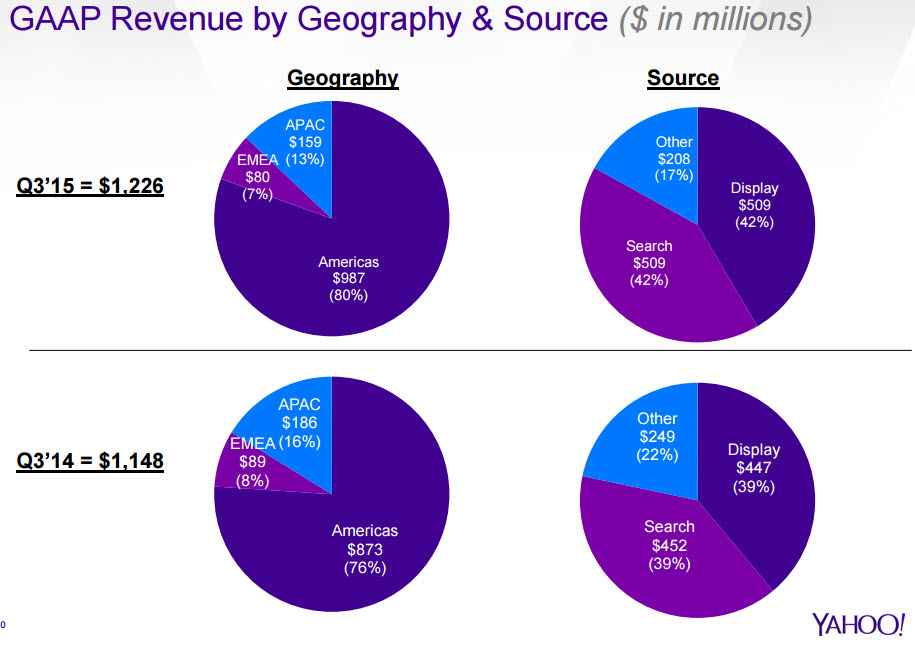
When asked about the future of Gemini on today’s investor conference call Marissa Mayer stated she expected Gemini to continue scaling more on mobile. She also stated she felt the Google deal would help Yahoo! refine their ad mix & give them additional opportunities in international markets. Yahoo! is increasingly reliant on the US & is unable to bid to win marketshare in foreign markets.
(Myopic) Learning Systems
Marissa Mayer sounded both insightful and myopic on today’s conference call. She mentioned how as they scale up Gemini the cost of that is reflected in foregone revenues from optimizing their learning systems and improving their ad relevancy. On its face, that sort of comment sounds totally reasonable.
An unsophisticated or utterly ignorant market participant might even cheer it on, without realizing the additional complexity, management cost & risk they are promoting.
Where the myopic quick win view falls flat is on the other side of the market.
Sure a large web platform can use big data to optimize their performance and squeeze out additional pennies of yield, but for an advertiser these blended networks can be a real struggle. How do they budget for any given network when a single company is arbitrarily mixing between 3 parallel networks? A small shift in Google AdWords ad spend might not be hard to manage, but what happens if an advertiser suddenly gets a bunch of [trending topic] search ad clicks? Or maybe they get a huge slug of mobile clicks which don’t work very well for their business. Do they disable the associated keyword in Yahoo! Gemini? Or Bing Ads? Or Google AdWords? All 3?’
Do they find that when they pause their ads in one network that quickly leads to the second (or third) network quickly carrying their ads across?
Even if you can track and manage it on a granular basis, the additional management time is non-trivial. One of the fundamental keys to a solid online advertising strategy is to have granular control so you can quickly alter distribution. But if you turn your ads off in one network only to find that leads your ads from the second network to get carried across that creates a bit of chaos. The more networks there are in parallel that bleed together the blurrier things get.
This sort of “overlap = bad” mindset is precisely why search engines suggest creating tight ad campaigns and ad groups. But you lose that control when things arbitrarily shift about.
To appreciate how expensive those sorts of costs can be, consider what has happened with programmatic ads:
Platforms that facilitate automated sales for media companies typically take 10% to 20% of the revenue that passes through their hands, according to the IAB report. Networks that service programmatic buys typically mark up inventory, citing the value that they add, by 30% to 50%. And then there are the essential data-management platforms, which take 10% to 15% of a buy, industry executives said.
If you are managing a client budget for paid search, how do you determine a pre-approved budget for each network when the traffic mix & quality might rapidly oscillate across the networks?
Don’t take my word for it though, read the Yahoo! Ads Twitter account
“Consumers and advertisers are overwhelmed by choice. Our industry needs solutions that eliminate fragmentation” @andrew_snyder #videonomics— YahooAds (@YahooAds) October 21, 2015
When Yahoo! tries to manage their yield they will not only be choosing among 3 parallel networks on their end, but they will also have individual advertisers making a wide variety of changes on the other end. And some of those advertisers will not only be influenced by the ad networks, but also the organic rankings which come with the ads.
If one search engine is ranking you well in the organic search results for an important keyword and another is not, then you should bid more aggressively on your ads on the search engine which is ranking your site, because by voting with your budget you may well be voting on which underlying relevancy algorithm is chosen to deliver the associated organic search results accompanying the ads.
That last point was important & I haven’t seen it mentioned anywhere yet, so it is worth repeating: your PPC ad bids may determine which search relevancy algorithm drives Yahoo! Search organic results.
Time to Quit Digging & Drop The Shovel
The other (BIG) issue is that as they give Google more search marketshare they give Google more granular data, which in turn means they
- make buying on their own network less worthy of the management cost & complexity
- make Google more of a “must buy”
- will never close the monetization gap with Google
Even today Google announced a new tool for offering advertisers granular localized search data. Search partners won’t directly benefit from those tools.
The old problem with Yahoo! was they were heavily reliant on search partners who drove down the traffic value. The future problem may well be if the marginally profitable Bing leaves the search market, Google will drive down the amount of revenue they share with Yahoo!.
If the Yahoo! Google search deal gets approved, Bing might shift back to losing money unless Microsoft buys Yahoo! after the Alibaba share spin out.
Ever track how Google’s TAC has shifted over the past decade?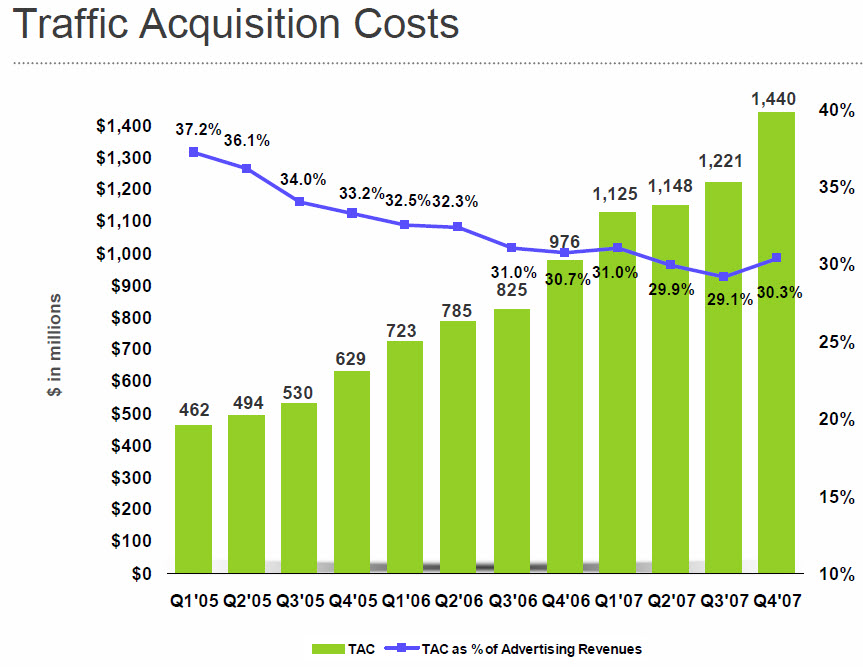
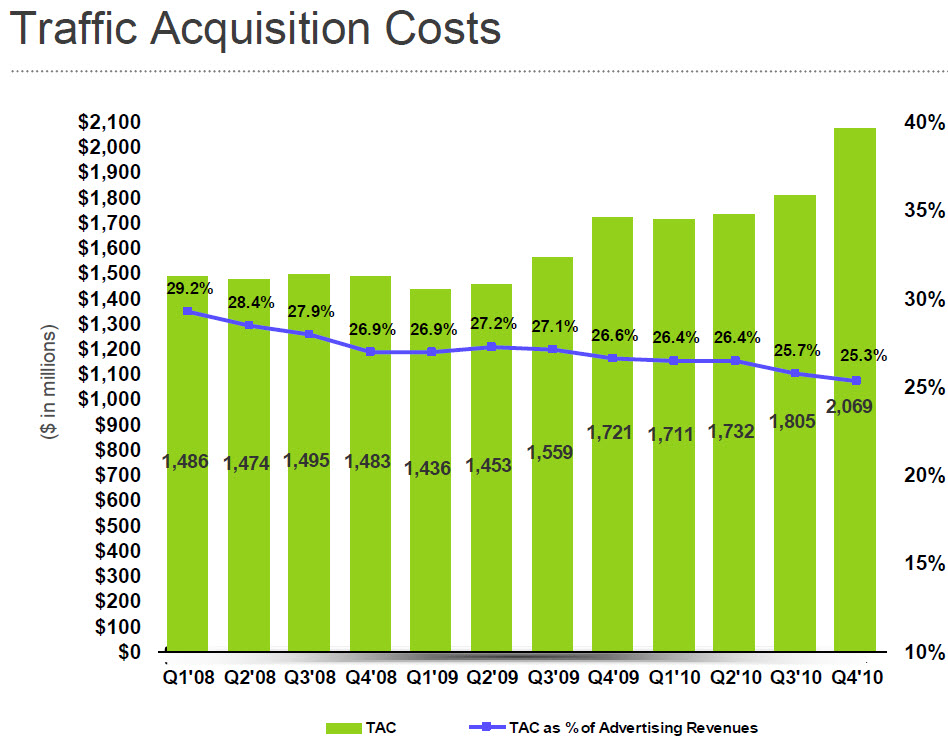
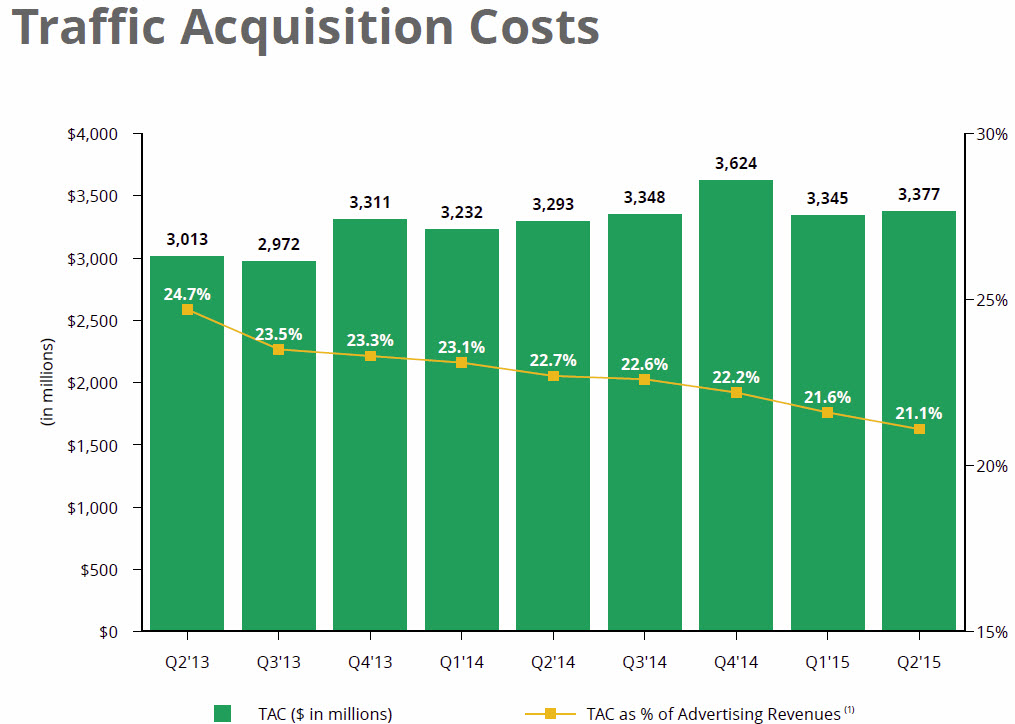
It has only been a decade so far, but MAYBE THIS TIME IS DIFFERENT.
Categories:
Ad Network Ménage à Trois: Bing, Yahoo!, Google
Yahoo! Tests Google Again
Back in July we noticed Yahoo! was testing Google-powered search results. From that post…
When Yahoo! recently renewed their search deal with Microsoft, Yahoo! was once again allowed to sell their own desktop search ads & they are only required to give 51% of the search volume to Bing. There has been significant speculation as to what Yahoo! would do with the carve out. Would they build their own search technology? Would they outsource to Google to increase search ad revenues? It appears they are doing a bit of everything – some Bing ads, some Yahoo! ads, some Google ads.
The Growth of Gemini
Since then Gemini has grown significantly:
Yahoo has moved quickly to bring search ad traffic under Gemini for advertisers that have adopted the platform. For some perspective, in September 2015, Yahoo.com produced a little over 50 percent of the clicks that took place across the Bing Ads and Gemini platforms. For advertisers adopting Gemini, Gemini produced 22 percent of combined Bing and Gemini clicks. Given the device breakdown of Yahoo’s traffic, this amounts to about two-thirds of the traffic it is able to control under the renegotiated agreement.
That growth has come at the expense of Bing ad clicks, which have fallen significantly:
Shared Scale to Compete
Years ago Microsoft was partnered into the Yahoo!/Overture ad network to compete against Google. The idea was the companies together would have better scale to compete against Google in search & ads. Greater scale would lead to a more efficient marketplace, which would lead to better ad matching, higher advertiser bids, etc. This didn’t worked as well as anticipated. Originally under-monetization was blamed on poor ad matching. Yahoo! Panama was a major rewrite of their ad system which was supposed to fix the problem, but it didn’t.
Even if issues like bid jamming were fixed & ad matching was more relevant, it still didn’t fix issues with lower ad depth in emerging markets & arbitrage lowering the value of expensive keywords in the United States.
Understanding the Value of Search Clicks
When a person types a keyword into a search box they are expressing significant intent. When a person clicks a link to land on a page they may still have significant interest, but generally there is at least some level of fall off. If I search for a keyword the value of my click is $x, but if I click a link on a “top searches” box, the value of that click may perhaps only be 5% or 10% what the value of a hand typed search. There is less intent.
Here is a picture of the sort of “trending now” box which appears on the Yahoo! homepage.
Typically those sorts of searches include a bunch of female celebrities, but then in any such box there will be one or two money terms added, like [lower blood pressure] or [iPhone 6s]. People who search for those terms might have $5 or $10 of intent, but people who click those links might only have a quarter or 50 cents of intent.
That difference in value can utterly screw an advertiser who gets their high-value keyword featured while they are sleeping or not actively monitoring & managing their ad campaign.
For what it is worth, even Google has tested some of these sort of these “search” traffic generation approaches during the last recession. On the Google AdSense network Google was buying banner ads telling people to search for [credit cards] & if they clicked on those banner ads they ended up on a search result page for [credit cards].
To this day many companies run contextual ads that drive search volume, but the difference between today & the Yahoo! which failed to monetize search is there is (at least currently) a greater focus on traffic quality.
Under-performance Due to Shady Traffic Partners
Yahoo! continued to under-perform in large part because Yahoo! had a lot of “search” partners with many lower quality traffic sources mixed in their traffic stream & they didn’t even allow advertisers to opt out of the partner network until after Yahoo! decided to exit the search market. As bad as the above sounds, it is actually worse, as some larger partners had access to advertiser information in a way that allowed them to aggressively arbitrage away the value of high advertiser bids wherever and whenever an advertiser overbid.
So you would bid thinking you were buying primarily search traffic based on the user intent of a person searching for something, but you might have been getting various layers of arbitrage of lower quality traffic, traffic from domain lander pages, or even some mix of robotic traffic from clickbots. Those $30 search ad clicks are a sure money loser if it is a clickbot software program doing the click.
And not only were some of Yahoo!’s partners driving down the value of clicks on Yahoo! itself, but Yahoo! was paying some of the larger partners in the high 80s to low 90s percent of revenue. Here is a (made up) example chart for illustration purposes, where the (made up) partner is getting a 90% TAC
| Advertiser Bid | Y! Search Clicks | Partner Clicks | Total Clicks | Total Revs | TAC | Rev after TAC | |
| No Partners | $30 | 3,000 | 0 | 3,000 | $90,000 | $0 | $90,000 |
| Bit of Arb | $25 | 3,000 | 1,000 | 4,000 | $100,000 | $22,500 | $77,500 |
| Heavy Arb | $10 | 3,000 | 6,000 | 9,000 | $90,000 | $54,000 | $36,000 |
Why did Yahoo! allow the above sort of behavior to go on? It is hard to believe they were completely unaware of what was going on, particularly when it was so obvious to outside observers. More likely it was that they were rapidly losing search share & wanted the topline revenue growth to make their quarterly number. By the time they realized what damage they had already done to their ecosystem, they were already too far down the path to correct it & were afraid to do anything which significantly hit revenues.
The rapid rise and fall of a large Yahoo! search partner named Geosign was detailed by the Canadian Financial Post, in an article which is now offline, but available via the Internet Archive Wayback Machine:
Companies fail all the time. Sometimes with little warning. But companies that are highly profitable and only weeks removed from a record-setting venture capital investment? Not so much. Yet in Geosign’s case, the cuts that began last May continued through the summer. Late last year, fewer than 100 employees remained. Today, Geosign itself no longer exists, its still-functioning website an empty reminder of its former promise. And while the national business media has, until now, overlooked the story – surprising, given the size of the investment and the fact that Google played a direct role in the outcome – within Canada’s technology and venture-capital communities, the $160-million investment is known as the deal “that didn’t go well.” When the collapse happened, even jaded industry watchers accustomed to financial debacles in the tech sector were stunned. “I’ve seen a lot of meltdowns,” says Duncan Stewart, a technology and investment analyst in Toronto. “But something happening like this, over just a few weeks, that’s unprecedented in my experience.”
Other traffic sources like domain parking have also sharply declined, due to a variety of factors like: web browsers replacing address bars with multi-purpose search boxes, shift of consumer internet traffic to mobile devices (which increases reliance on search over direct navigation & apps replace some segment of direct navigation), increased smart pricing, lower revenue sharing percentages, and Yahoo! no longer being able to offer a competitive bid against Google.
When Yahoo! shifted their search ads to Microsoft, Microsoft allowed advertisers to opt out of the partner network. Microsoft also clamped down on some of the lower quality traffic sources with smart pricing, which hit some of the arbitrage businesses hard & even forced Yahoo! to seek refunds from some of their partners for delivering low quality traffic.
Shared Scale to Compete
Microsoft launched their own algorithmic search results on Live Search & their own Microsoft adCenter search ads. Microsoft continued to lose share in search at least until they gave their search engine a memorable name in Bing. The Yahoo! Bing ad network seemed to be gaining momentum when Yahoo! signed a deal with Mozilla to become the default search provider for Firefox, but it appears Yahoo! overpaid for the deal as Yahoo! search revenues ex-TAC were off $60 million YoY in the most recent quarter.
In spite of using an ad-heavy search interface Yahoo! has not grown search ad revenues as quickly as the search market has grown. Yahoo! has continually lost marketshare for years (up until the Mozilla Firefox deal). And even as Microsoft has followed Google in broadened their ad matching, a lot of the other “search” traffic partners Yahoo! once relied on to make their numbers are no longer in the marketplace to augment their data.
The Bing / Yahoo! network search traffic is now much cleaner than the Yahoo! “search” traffic quality of many years ago, but Yahoo! hasn’t replaced some of the old search partners which have died off.
Shared Scale No Longer Important?
Yahoo! increasing the share of their ad clicks which are powered by Gemini lowers the network efficiency of the Yahoo!/Bing ad network. All the talk of “synergy” driving value sort of goes up in smoke when Yahoo! shifts a significant share of their ad clicks away from the original network.
Yahoo! announced a new search deal with Google. Here’s the Tweet version…
$YHOO has signed a 3 year partnership with Google to bolster our search capabilities. This is in addition to our relationship with Microsoft— Yahoo Inc. (@YahooInc) October 20, 2015
…the underlying ethos…
“If you love something, set it free; if it comes backs it’s yours, if it doesn’t, it never was.”
…and the long version…
On October 19, 2015, Yahoo! Inc., a Delaware corporation (“Yahoo”), and Google Inc., a Delaware corporation (“Google”), entered into a Google Services Agreement (the “Services Agreement”). The Services Agreement is effective as of October 1, 2015 and expires on December 31, 2018. Pursuant to the Services Agreement, Google will provide Yahoo with search advertisements through Google’s AdSense for Search service (“AFS”), web algorithmic search services through Google’s Websearch Service, and image search services. The results provided by Google for these services will be available to Yahoo for display on both desktop and mobile platforms. Yahoo may use Google’s services on Yahoo’s owned and operated properties (“Yahoo Properties”) and on certain syndication partner properties (“Affiliate Sites”) in the United States (U.S.), Canada, Hong Kong, Taiwan, Singapore, Thailand, Vietnam, Philippines, Indonesia, Malaysia, India, Middle East, Africa, Mexico, Argentina, Brazil, Colombia, Chile, Venezuela, Peru, Australia and New Zealand.
Under the Services Agreement, Yahoo has discretion to select which search queries to send to Google and is not obligated to send any minimum number of search queries. The Services Agreement is non-exclusive and expressly permits Yahoo to use any other search advertising services, including its own service, the services of Microsoft Corporation or other third parties.
Google will pay Yahoo a percentage of the gross revenues from AFS ads displayed on Yahoo Properties or Affiliate Sites. The percentage will vary depending on whether the ads are displayed on U.S. desktop sites, non-U.S. desktop sites or on the tablet or mobile phone versions of the Yahoo Properties or its Affiliate Sites. Yahoo will pay Google fees for requests for image search results or web algorithmic search results.
Either party may terminate the Services Agreement (1) upon a material breach subject to certain limitations; (2) in the event of a change in control (as defined in the Services Agreement); (3) after first discussing with the other party in good faith its concerns and potential alternatives to termination (a) in its entirety or in the U.S. only, if it reasonably anticipates litigation or a regulatory proceeding brought by any U.S. federal or state agency to enjoin the parties from consummating, implementing or otherwise performing the Services Agreement, (b) in part, in a country other than the U.S., if either party reasonably anticipates litigation or a regulatory proceeding or reasonably anticipates that the continued performance under the Services Agreement in such country would have a material adverse impact on any ongoing antitrust proceeding in such country, (c) in its entirety if either party reasonably anticipates a filing by the European Commission to enjoin it from performing the Services Agreement or that continued performance of the Services Agreement would have a material adverse impact on any ongoing antitrust proceeding involving either party in Europe or India, or (d) in its entirety, on 60 days notice if the other party’s exercise of these termination rights in this clause (3) has collectively and materially diminished the economic value of the Services Agreement. Each party agrees to defend or settle any lawsuits or similar actions related to the Services Agreement unless doing so is not commercially reasonable (taking all factors into account, including without limitation effects on a party’s brand or business outside of the scope of the Services Agreement).
In addition, Google may suspend Yahoo’s use of services upon certain events and may terminate the Services Agreement if such events are not cured. Yahoo may terminate the Services Agreement if Google breaches certain service level and server latency specified in the Services Agreement.
In connection with the Services Agreement, Yahoo and Google have agreed to certain procedures with the Antitrust Division of the United States Department of Justice (the “DOJ”) to facilitate review of the Services Agreement by the DOJ, including delaying the implementation of the Services Agreement in the U.S. in order to provide the DOJ with a reasonable period of review.
Where Are We Headed?
Danny Sullivan mentioned the 51% of search share Yahoo! is required to deliver to Bing applies only to desktop traffic & Yahoo! has no such limit on mobile searches. In theory this could mean Yahoo! could quickly become a Google shop, with Microsoft as a backfill partner.
When asked about the future of Gemini on today’s investor conference call Marissa Mayer stated she expected Gemini to continue scaling more on mobile. She also stated she felt the Google deal would help Yahoo! refine their ad mix & give them additional opportunities in international markets. Yahoo! is increasingly reliant on the US & is unable to bid to win marketshare in foreign markets.
(Myopic) Learning Systems
Marissa Mayer sounded both insightful and myopic on today’s conference call. She mentioned how as they scale up Gemini the cost of that is reflected in foregone revenues from optimizing their learning systems and improving their ad relevancy. On its face, that sort of comment sounds totally reasonable.
An unsophisticated or utterly ignorant market participant might even cheer it on, without realizing the additional complexity, management cost & risk they are promoting.
Where the myopic quick win view falls flat is on the other side of the market.
Sure a large web platform can use big data to optimize their performance and squeeze out additional pennies of yield, but for an advertiser these blended networks can be a real struggle. How do they budget for any given network when a single company is arbitrarily mixing between 3 parallel networks? A small shift in Google AdWords ad spend might not be hard to manage, but what happens if an advertiser suddenly gets a bunch of [trending topic] search ad clicks? Or maybe they get a huge slug of mobile clicks which don’t work very well for their business. Do they disable the associated keyword in Yahoo! Gemini? Or Bing Ads? Or Google AdWords? All 3?’
Do they find that when they pause their ads in one network that quickly leads to the second (or third) network quickly carrying their ads across?
Even if you can track and manage it on a granular basis, the additional management time is non-trivial. One of the fundamental keys to a solid online advertising strategy is to have granular control so you can quickly alter distribution. But if you turn your ads off in one network only to find that leads your ads from the second network to get carried across that creates a bit of chaos. The more networks there are in parallel that bleed together the blurrier things get.
This sort of “overlap = bad” mindset is precisely why search engines suggest creating tight ad campaigns and ad groups. But you lose that control when things arbitrarily shift about.
To appreciate how expensive those sorts of costs can be, consider what has happened with programmatic ads:
Platforms that facilitate automated sales for media companies typically take 10% to 20% of the revenue that passes through their hands, according to the IAB report. Networks that service programmatic buys typically mark up inventory, citing the value that they add, by 30% to 50%. And then there are the essential data-management platforms, which take 10% to 15% of a buy, industry executives said.
If you are managing a client budget for paid search, how do you determine a pre-approved budget for each network when the traffic mix & quality might rapidly oscillate across the networks?
Don’t take my word for it though, read the Yahoo! Ads Twitter account
“Consumers and advertisers are overwhelmed by choice. Our industry needs solutions that eliminate fragmentation” @andrew_snyder #videonomics— YahooAds (@YahooAds) October 21, 2015
When Yahoo! tries to manage their yield they will not only be choosing among 3 parallel networks on their end, but they will also have individual advertisers making a wide variety of changes on the other end. And some of those advertisers will not only be influenced by the ad networks, but also the organic rankings which come with the ads.
If one search engine is ranking you well in the organic search results for an important keyword and another is not, then you should bid more aggressively on your ads on the search engine which is ranking your site, because by voting with your budget you may well be voting on which underlying relevancy algorithm is chosen to deliver the associated organic search results accompanying the ads.
That last point was important & I haven’t seen it mentioned anywhere yet, so it is worth repeating: your PPC ad bids may determine which search relevancy algorithm drives Yahoo! Search organic results.
Time to Quit Digging & Drop The Shovel
The other (BIG) issue is that as they give Google more search marketshare they give Google more granular data, which in turn means they
- make buying on their own network less worthy of the management cost & complexity
- make Google more of a “must buy”
- will never close the monetization gap with Google
Even today Google announced a new tool for offering advertisers granular localized search data. Search partners won’t directly benefit from those tools.
The old problem with Yahoo! was they were heavily reliant on search partners who drove down the traffic value. The future problem may well be if the marginally profitable Bing leaves the search market, Google will drive down the amount of revenue they share with Yahoo!.
If the Yahoo! Google search deal gets approved, Bing might shift back to losing money unless Microsoft buys Yahoo! after the Alibaba share spin out.
Ever track how Google’s TAC has shifted over the past decade?
It has only been a decade so far, but MAYBE THIS TIME IS DIFFERENT.
Categories:
Here’s the Best Attention-Grabbing SERP Exploit Ever!
I’ll keep this one short. When placed in meta description or page content, this character ฏ๎๎๎๎๎๎๎๎๎๎๎๎๎๎๎๎๎๎๎๎๎๎๎๎๎๎๎๎ (also this one ค้้้้้้้้้้้้้้้้้้้้้้้้้้้้้) does really weird things with Google’s search results. We tested the character in the page title too but Google …
The post Here’s the Best Attention-Grabbing SERP Exploit Ever! appeared first on DEJAN.
Deprecating our AJAX crawling scheme
tl;dr: We are no longer recommending the AJAX crawling proposal we made back in 2009.
In 2009, we made a proposal to make AJAX pages crawlable. Back then, our systems were not able to render and understand pages that use JavaScript to present content to users. Because “crawlers … [were] not able to see any content … created dynamically,” we proposed a set of practices that webmasters can follow in order to ensure that their AJAX-based applications are indexed by search engines.
Times have changed. Today, as long as you’re not blocking Googlebot from crawling your JavaScript or CSS files, we are generally able to render and understand your web pages like modern browsers. To reflect this improvement, we recently updated our technical Webmaster Guidelines to recommend against disallowing Googlebot from crawling your site’s CSS or JS files.
Since the assumptions for our 2009 proposal are no longer valid, we recommend following the principles of progressive enhancement. For example, you can use the History API pushState() to ensure accessibility for a wider range of browsers (and our systems).
Questions and answers
Q: My site currently follows your recommendation and supports _escaped_fragment_. Would my site stop getting indexed now that you’ve deprecated your recommendation?
A: No, the site would still be indexed. In general, however, we recommend you implement industry best practices when you’re making the next update for your site. Instead of the _escaped_fragment_ URLs, we’ll generally crawl, render, and index the #! URLs.
Q: Is moving away from the AJAX crawling proposal to industry best practices considered a site move? Do I need to implement redirects?
A: If your current setup is working fine, you should not have to immediately change anything. If you’re building a new site or restructuring an already existing site, simply avoid introducing _escaped_fragment_ urls. .
Q: I use a JavaScript framework and my webserver serves a pre-rendered page. Is that still ok?
A: In general, websites shouldn’t pre-render pages only for Google — we expect that you might pre-render pages for performance benefits for users and that you would follow progressive enhancement guidelines. If you pre-render pages, make sure that the content served to Googlebot matches the user’s experience, both how it looks and how it interacts. Serving Googlebot different content than a normal user would see is considered cloaking, and would be against our Webmaster Guidelines.
If you have any questions, feel free to post them here, or in the webmaster help forum.
Posted by Kazushi Nagayama, Search Quality Analyst


How to Easily Optimize and Losslessly Compress your Images and Theme Files in WordPress
If you’ve ever run your website through the PageSpeed Insights tool to find out what you need to do to improve your page speed, you’ve probably gotten the following message: Optimize images Properly formatting and compressing images can save many bytes of data. Optimize the following images to reduce their size by [estimated percentage] Under… Read More
The post How to Easily Optimize and Losslessly Compress your Images and Theme Files in WordPress appeared first on Sugarrae.
How to Easily Optimize and Losslessly Compress your Images and Theme Files in WordPress
If you’ve ever run your website through the PageSpeed Insights tool to find out what you need to do to improve your page speed, you’ve probably gotten the following message: Optimize images Properly formatting and compressing images can save many bytes of data. Optimize the following images to reduce their size by [estimated percentage] Under… Read More
The post How to Easily Optimize and Losslessly Compress your Images and Theme Files in WordPress appeared first on Sugarrae.
How the Panda Algorithm Might Evaluate Your Site
Let’s step back to 2011 and once more look at the 23 questions Amit Singhal published for Webmasters who were frustrated by the Google Panda algorithm. I solved my Panda problem within 2 months as I documented in June 2011.…
An update on how we tackle hacked spam
Recently we have started rolling out a series of algorithmic changes that aim to tackle hacked spam in our search results. A huge amount of legitimate sites are hacked by spammers and used to engage in abusive behavior, such as malware download, promotion of traffic to low quality sites, porn, and marketing of counterfeit goods or illegal pharmaceutical drugs, etc.
Website owners that don’t implement standard best practices for security can leave their websites vulnerable to being easily hacked. This can include government sites, universities, small business, company websites, restaurants, hobby organizations, conferences, etc. Spammers and cyber-criminals purposely seek out those sites and inject pages with malicious content in an attempt to gain rank and traffic in search engines.
We are aggressively targeting hacked spam in order to protect users and webmasters.
The algorithmic changes will eventually impact roughly 5% of queries, depending on the language. As we roll out the new algorithms, users might notice that for certain queries, only the most relevant results are shown, reducing the number of results shown:
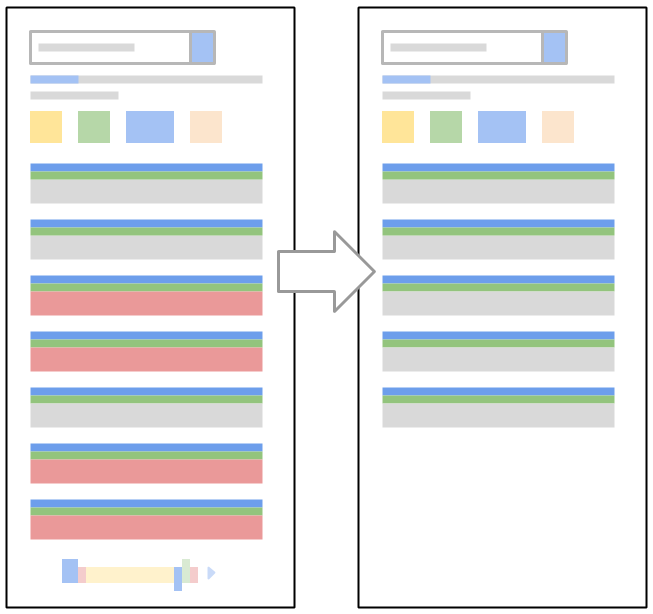
This is due to the large amount of hacked spam being removed, and should improve in the near future. We are continuing tuning our systems to weed out the bad content while retaining the organic, legitimate results. If you have any questions about these changes, or want to give us feedback on these algorithms, feel free to drop by our Webmaster Help Forums.
Posted by Ning Song, Software Engineer

Negative Impact of 301 Redirects
Redirecting four of our popular blog posts to a commercial page lowered its rankings in Google.
Redirected posts:
- https://dejanseo.com.au/hello-extortion-email/
- https://dejanseo.com.au/thin-content-update/
- https://dejanseo.com.au/google-update-may-2014/
- https://dejanseo.com.au/2nd-biggest-serp-flux-2013/
Target page:
Type of redirect: 301
Search term: SEO Brisbane
Scope: Same Domain
Initial Results
301 redirects …
The post Negative Impact of 301 Redirects appeared first on DEJAN.
First Click Free update
Around ten years ago when we introduced a policy called “First Click Free,” it was hard to imagine that the always-on, multi-screen, multiple device world we now live in would change content consumption so much and so fast. The spirit of the First Click Free effort was – and still is – to help users get access to high quality news with a minimum of effort, while also ensuring that publishers with a paid subscription model get discovered in Google Search and via Google News.
In 2009, we updated the FCF policy to allow a limit of five articles per day, in order to protect publishers who felt some users were abusing the spirit of this policy. Recently we have heard from publishers about the need to revisit these policies to reflect the mobile, multiple device world. Today we are announcing a change to the FCF limit to allow a limit of three articles a day. This change will be valid on both Google Search and Google News.
Google wants to play its part in connecting users to quality news and in connecting publishers to users. We believe the FCF is important in helping achieve that goal, and we will periodically review and update these policies as needed so they continue to benefit users and publishers alike. We are listening and always welcome feedback.
Questions and answers about First Click Free
Q: Do the rest of the old guidelines still apply?
A: Yes, please check the guidelines for Google News as well as the guidelines for Web Search and the associated blog post for more information.
Q: Can I apply First Click Free to only a section of my site / only for Google News (or only for Web Search)?
A: Sure! Just make sure that both Googlebot and users from the appropriate search results can view the content as required. Keep in mind that showing Googlebot the full content of a page while showing users a registration page would be considered cloaking.
Q: Do I have to sign up to use First Click Free?
A: Please let us know about your decision to use First Click Free if you are using it for Google News. There’s no need to inform us of the First Click Free status for Google Web Search.
Q: What is the preferred way to count a user’s accesses?
A: Since there are many different site architectures, we believe it’s best to leave this up to the publisher to decide.
(Please see our related blog post for more information on First Click Free for Google News.)
Posted by John Mueller, Google Switzerland

Link Building Outreach Platforms Compared
Find the original post on Point Blank SEO at: %%PostLink%%
In this post we’re going to compare the most popular solutions for conducting & managing link building and/or PR outreach.
Which one should I use?
After my research & testing, it pains me to give such one-dimensional answers (cue waves of criticism), but since that’s what a lot of you are looking for, here’s the TL;DR version of what you should use:
Small business owners – Google Drive / Excel ($0/anything/month) Solo person or …
Link Building Outreach Platforms Compared is a post from: Point Blank SEO
Find the original post on Point Blank SEO at: %%PostLink%%
Helping hacked sites with reconsideration requests
Thus far in 2015 we have seen a 180% increase in the number of sites getting hacked and a 300% increase in hacked site reconsideration requests. While we are working hard to help webmasters prevent hacks in the first place through efforts such as blog…
Great Storytelling With Data: Visualize Simply And Focus Obsessively
The difference between a Reporting Squirrel and Analysis Ninja? Insights. As in, the former is in the business of providing data, the latter in the business of understanding the performance implied by the data. That understanding leads to insights about why the performance occurred, which leads to so what we should do. [Sidebar] I’m experimenting […]
Great Storytelling With Data: Visualize Simply And Focus Obsessively is a post from: Occam’s Razor by Avinash Kaushik
Repeated violations of Webmaster Guidelines
In order to protect the quality of our search results, we take automated and manual actions against sites that violate our Webmaster Guidelines. When your site has a manual action taken, you can confirm in the [Manual Actions] page in Search Console wh…
Mobile-friendly web pages using app banners
When it comes to search on mobile devices, users should get the most relevant answers, no matter if the answer lives in an app or a web page. We’ve recently made it easier for users to find and discover apps and mobile-friendly web pages. However, sometimes a user may tap on a search result on a mobile device and see an app install interstitial that hides a significant amount of content and prompts the user to install an app. Our analysis shows that it is not a good search experience and can be frustrating for users because they are expecting to see the content of the web page.
Starting today, we’ll be updating the Mobile-Friendly Test to indicate that sites should avoid showing app install interstitials that hide a significant amount of content on the transition from the search result page. The Mobile Usability report in Search Console will show webmasters the number of pages across their site that have this issue.
After November 1, mobile web pages that show an app install interstitial that hides a significant amount of content on the transition from the search result page will no longer be considered mobile-friendly. This does not affect other types of interstitials. As an alternative to app install interstitials, browsers provide ways to promote an app that are more user-friendly.

App install interstitials that hide a significant amount of content provide a bad search experience

App install banners are less intrusive and preferred
App install banners are supported by Safari (as Smart Banners) and Chrome (as Native App Install Banners). Banners provide a consistent user interface for promoting an app and provide the user with the ability to control their browsing experience. Webmasters can also use their own implementations of app install banners as long as they don’t block searchers from viewing the page’s content.
If you have any questions, we’re always happy to chat in the Webmaster Central Forum.
Posted by Daniel Bathgate, Software Engineer, Google Search.

70 Useful Inbound Marketing Checklists, Cheat Sheets and Advanced Guides
 When you’re in a consulting or service -based business model – especially in digital marketing –having robust processes in place is the key to have a sustainable business.
A systematic structure for tasks to obtain certain goals (set of marketing initiatives aligned with campaign objectives) is what prolongs businesses built in this ever-evolving field.
The post 70 Useful Inbound Marketing Checklists, Cheat Sheets and Advanced Guides appeared first on Kaiserthesage.