Here’s Why Nobody Reads Your Content
How much time do you have to read this? Switch to 5 minutes version.
Our research shows that only one in five people read web content word for word. Majority scan, skip and only read key items of interest.
We …
The post Here’s Why Nobody Reads Your Content appeared first on DEJAN.
Targeting ‘Where to Buy’ Pages for Large eCommerce Sites
Find the original post on Point Blank SEO at: %%PostLink%%
Even if the post isn’t 100% directly relevant to you, there are a few tips & tidbits (i.e. my Mechanical Turk project settings, a few outreach tips, etc.) that should be useful to anyone.
I wanted a chance to share an advanced link building process that we’ve been using internally for large eCommerce sites that carry thousands of different brands in their inventory.
For these kinds of sites, there’s one type of low-hanging fruit that’s …
Targeting ‘Where to Buy’ Pages for Large eCommerce Sites is a post from: Point Blank SEO
Find the original post on Point Blank SEO at: %%PostLink%%
Web Design Resources for Non-Designers
Most of you are too busy monitoring Google’s latest algorithm updates, examining web analytics, and building links and content to stay up to date on the design world.
Usually, creative people who excel at design aren’t very good at the left-brain thinking required to succeed in the highly-technical search engine optimization industry. Likewise, very few people with the analytical mindset required for search engine optimization would do well in the free-spirited design industry.
Unfortunately, in the real world, you’re often expected to do exactly that. And while most people understand that it would be ludicrous to expect their doctor to also troubleshoot their plumbing, they don’t seem to understand why they shouldn’t expect the person responsible for their SEO to also handle their design needs from time to time.
So you’re often forced to design things for your clients from time to time. Or sometimes, you just need to whip up something for yourself instead of trying to find someone who can deliver what you need on Fiverr.
Since you probably won’t start sporting a black turtleneck and talking about crop marks, press checks, or CMYK colors anytime soon, it seems silly to shell out thousands of dollars on software you’ll only use occasionally, so I’ve compiled a list of design resources for non-designers.
The resources in this list are every bit as powerful as any of the professional-grade software, but they are free. (Some do offer premium versions with more options.) The only downside is that it might be a little bit tougher to find tutorials for some of these programs compared to the industry standard software like Adobe Photoshop or Illustrator.
Image editing

We all need to edit and create images from time to time, but if you only do it occasionally, software like Adobe Photoshop and Illustrator works out to be pretty expensive. Fortunately, there are several feature-rich image editing programs available.
- Gimp – Anything you can do with Photoshop can be done with Gimp, and it runs on Windows, Mac, and Linux. The learning curve can be steep, but it’s worth the time.
- Pixlr – If you’re used to Photoshop, this program has a very similar interface, and it even opens native .psd files with the original layers intact.
- Canva – The drag-and-drop interface of this web-based design program make graphic design quick and simple, plus it comes with a library of over one million professional stock images.
- Inkscape – Easily create illustrations, logos, technical drawings, and vector images with this free alternative to Illustrator.
- SVG Editor – If you’re obsessed about website speed, you probably love SVGs (scalable vector graphics) and this handy tool from Google make it easy to create and edit them.
3D
OK, so you’re not going to compete with Pixar anytime soon, but 3D capabilities do come in handy for designing mockups of books and DVDs, creating characters, and even complete photorealistic animations.
- Online 3d Package – This tool lets you quickly and easily create photorealistic mockups of books, boxes, DVDs, and CDs.
- Blender – If you occasionally need to create 3D renderings but can’t justify spending big bucks for professional-grade software that you’ll only use a few times, Blender is the perfect (and free) alternative.
Web design

Designing a website requires a blend of creative and technical skills. Fortunately, there are plenty of tools available to efficiently complete both. From the pretty parts, to the nuts and bolts, to the little details, here is everything you’ll need:
Palette generator – Upload an image and this tool will generate the perfect color palette to compliment it that you can download as a CSS file.
Subtle Paterns – Creating seamless backgrounds can be a pain, so instead of starting from scratch, just download from over 400 high-quality seamless background images, including textures and patterns.
Web page editors
Whether you’re building a website from scratch with a WYSIWYG editor or fine-tuning the code on an existing website with an HTML editor, web design software will probably get a lot of use in your hands. If you have the technical chops to hand code your websites, that’s ideal, but if not, or if you just don’t want to, here are several options:
- Kompozer – With a WYSIWYG editor in one tab and raw HTML in the other, on-the-fly editing with built-in FTP, Kompozer will make creating and editing web page a breeze.
- Google Webdesigner – Build HTML5-based designs and motion graphics that can run on any device without writing any code! (If you want to get your hands dirty, you can edit all HTML and CSS by hand.
- Expression Web – Microsoft offers another free web page editor which has made significant improvements since that abomination called Frontpage.
Favicon Generator – A truly polished website needs consistent branding throughout, and that means all the little details, including a favicon—that tiny little image that sits in the tab or bookmarks. Just upload an image file, such as your logo, and this handy tool will spit out the .ico files you need.
Web Developer Toolbar – This browser toolbar is available for Firefox and Chrome, and helps you troubleshoot your website and even test it at various screen sizes.
Infographics
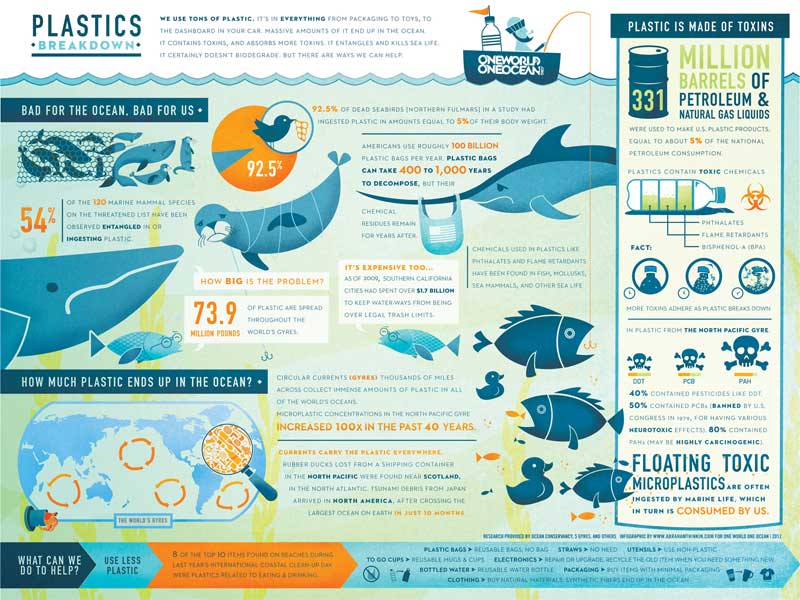
Infographics are still an effective method to earn social shares and links, and they are a great way to present a lot of data-rich information, but they can be a pain to create. Here are several tools to simplify the process that might even be better (and easier) than traditional design software.
- Infogram – Build beautiful data-driven infographics in just three steps with this free tool.
- Piktochart – With a simple point and click editor and over 4,000 graphics, icons, and template files, Piktochart makes it easy to create infographics that look exactly the way you want.
- Easel.ly – Loaded with tons of creative templates and an east-to-use interface, this is another powerful tool to create your own stunning infographics.
- Venngage – This drag and drop interface provides all the charts, maps, icons and templates you’ll need to design attention-grabbing infographics.
- Vizualize.me – Turn your boring resume into a unique visual expression of your skills and experience to stand out from the crowd.
If you are in a saturated market or have a great idea you are certain will be a success then it may make sense to splash out for a custom designed graphic, but in less competitive market some of the above quick-n-easy tools can still be remarkably effective.
Data visualization
Google Charts is a great way to create all sorts of charts, and the best part is that you can create them on the fly by passing variables in the URL.
Typography

Today you have plenty of options when it comes to font choices, so please stop using Arial, and for the love of all that is good, never use Comic Sans or I will hunt you down. You can choose from thousands of free fonts, so it’s easy to pick one that fits your project perfectly.
- Typegenius – Choosing the perfect font combo can be tough, but Typegenious makes it easy. Just pick a starter font from the drop down list and the site will recommend fonts that pair well with it.
- Google Fonts – I recommend embedding Google fonts instead hosting them on your own server because they load more quickly and there is a chance they’re already cached on visitors’ computers.
- Font Awesome – This is an awesome (hence the name) way to add all sorts of scalable icons without a load of extra http requests. Simply load one font for access to 519 icons that colored, scaled, and styled with CSS.
- DaFont – Download and instal these fonts (.ttf or .otf formats) for designing documents or images on your computer.
- What the Font – If you’ve ever experienced the rage-inducing task of figuring out what font was used when your client only has a 72dpi jpg and no idea how to track down their previous designer, then this is the tool for you. Just upload your image and it goes to work figuring what font it is.
Social media
Social media can multiply your website’s exposure exponentially, but it takes a lot of work. From branding profiles on each network to crafting engaging visual content your fans will share, you’ll have to create a lot of graphics to feed the beast. Doing that manually, the old-fashioned way is tedious and slow, so I recommend these tools to speed up your workflow.
Easy Cover Maker – Stop wasting time trying to position your cover and profile photo for your Facebook and Google+ page. This tool lets you drag everything into position in one handy interactive window, then download the image files.
Quote creators
- Quotes Cover – Just select a quote or enter your own text, apply various effects for your own unique style, and download eye catching pictures perfect for social media. It even creates the perfect dimensions based on how you intend to use it.
- Chisel – This tool has the most user-friendly interface and tons of great images and fonts to create the exact message you want to share.
- Recite This – There are plenty of images and fonts available, but the downside is you have to scroll through images one at a time, and fonts are selected randomly.
Jing – From the makers of Camtasia, this free program gives you the ability to capture images or video (up to 5 minutes long) of your computer screen, then share it with the click of a button.
Social Kit – Create cover images, profile pictures, and ad banners for Facebook, Twitter, Google+, and YouTube with this free, up-to-date Photoshop plugin.
Social media image size guide – The folks over at Sprout Social created (and maintain) this handy and comprehensive Google doc listing the image sizes for all major social media networks, and since it’s a shared document, you can have Google notify you anytime it’s updated!
Meme creators
Instead of wasting time searching for the perfect meme, why not just create your own?
Stock photos
Powerful photos can mean the difference between a dry post that visitors ignore and one that entices them to read more. The good news is you don’t have to take your own spend a fortune on stock photos because there are several free and low-cost options available.
- Unsplash – These are not your typical cheesy stock photos; they lean more towards the artistic side. New photos are uploaded every day and they’re all 100% free.
- StockVault – With over 54 thousand free images available, both artistic and corporate-style, you should be able to find the perfect photo for just about any project.
- Dreamstime & iStockPhoto – Both of these sites give you the option of a subscription model or a pay-as-you-go credits. Many images on one are available on the other, but I’ve found great images that were only on one of the two sites, so it’s worthwhile to check both.
Inspiration
Even the best designers hit a wall, creatively speaking, so it helps to look for inspiration. These sites curate the best designs around and are updated regularly, so you’ll find plenty of fresh ideas for your project.
Tutorials
Since you’re days are filled with keyword research, content development, link building, and other SEO-related tasks, you probably don’t have time to stay up-to-date on the latest design trends and techniques. No worries—with these websites, you’ll be able to find a tutorial to walk you through just about any design challenge.
- CSS-Tricks – Whenever I have a CSS question, I always slap “css tricks” on the end of my search because Chris Coyer has the most detailed, yet easy-to-understand tutorials on damn near every scenario you could imagine.
- Tuts+ – Learn everything about graphic design, web design, programming, and more with a growing library of articles and tutorials.
- Smashing Magazine – This is probably one of the most comprehensive web design resources you’ll find anywhere, going wide and deep on every aspect of web design.
About the Author
Jeremy Knauff is the founder of Spartan Media, a proud father, husband, and US Marine Corps veteran. He has spent over 15 years helping small business up to Fortune 500 companies make their mark online, and now he’s busy building his own media empire. You can follow Spartan Media on Twitter and Facebook.
Categories:
Web Design Resources for Non-Designers
Most of you are too busy monitoring Google’s latest algorithm updates, examining web analytics, and building links and content to stay up to date on the design world.
Usually, creative people who excel at design aren’t very good at the left-brain thinking required to succeed in the highly-technical search engine optimization industry. Likewise, very few people with the analytical mindset required for search engine optimization would do well in the free-spirited design industry.
Unfortunately, in the real world, you’re often expected to do exactly that. And while most people understand that it would be ludicrous to expect their doctor to also troubleshoot their plumbing, they don’t seem to understand why they shouldn’t expect the person responsible for their SEO to also handle their design needs from time to time.
So you’re often forced to design things for your clients from time to time. Or sometimes, you just need to whip up something for yourself instead of trying to find someone who can deliver what you need on Fiverr.
Since you probably won’t start sporting a black turtleneck and talking about crop marks, press checks, or CMYK colors anytime soon, it seems silly to shell out thousands of dollars on software you’ll only use occasionally, so I’ve compiled a list of design resources for non-designers.
The resources in this list are every bit as powerful as any of the professional-grade software, but they are free. (Some do offer premium versions with more options.) The only downside is that it might be a little bit tougher to find tutorials for some of these programs compared to the industry standard software like Adobe Photoshop or Illustrator.
Image editing
We all need to edit and create images from time to time, but if you only do it occasionally, software like Adobe Photoshop and Illustrator works out to be pretty expensive. Fortunately, there are several feature-rich image editing programs available.
- Gimp – Anything you can do with Photoshop can be done with Gimp, and it runs on Windows, Mac, and Linux. The learning curve can be steep, but it’s worth the time.
- Pixlr – If you’re used to Photoshop, this program has a very similar interface, and it even opens native .psd files with the original layers intact.
- Canva – The drag-and-drop interface of this web-based design program make graphic design quick and simple, plus it comes with a library of over one million professional stock images.
- Inkscape – Easily create illustrations, logos, technical drawings, and vector images with this free alternative to Illustrator.
- SVG Editor – If you’re obsessed about website speed, you probably love SVGs (scalable vector graphics) and this handy tool from Google make it easy to create and edit them.
3D
OK, so you’re not going to compete with Pixar anytime soon, but 3D capabilities do come in handy for designing mockups of books and DVDs, creating characters, and even complete photorealistic animations.
- Online 3d Package – This tool lets you quickly and easily create photorealistic mockups of books, boxes, DVDs, and CDs.
- Blender – If you occasionally need to create 3D renderings but can’t justify spending big bucks for professional-grade software that you’ll only use a few times, Blender is the perfect (and free) alternative.
Web design
Designing a website requires a blend of creative and technical skills. Fortunately, there are plenty of tools available to efficiently complete both. From the pretty parts, to the nuts and bolts, to the little details, here is everything you’ll need:
Palette generator – Upload an image and this tool will generate the perfect color palette to compliment it that you can download as a CSS file.
Subtle Paterns – Creating seamless backgrounds can be a pain, so instead of starting from scratch, just download from over 400 high-quality seamless background images, including textures and patterns.
Web page editors
Whether you’re building a website from scratch with a WYSIWYG editor or fine-tuning the code on an existing website with an HTML editor, web design software will probably get a lot of use in your hands. If you have the technical chops to hand code your websites, that’s ideal, but if not, or if you just don’t want to, here are several options:
- Kompozer – With a WYSIWYG editor in one tab and raw HTML in the other, on-the-fly editing with built-in FTP, Kompozer will make creating and editing web page a breeze.
- Google Webdesigner – Build HTML5-based designs and motion graphics that can run on any device without writing any code! (If you want to get your hands dirty, you can edit all HTML and CSS by hand.
- Expression Web – Microsoft offers another free web page editor which has made significant improvements since that abomination called Frontpage.
Favicon Generator – A truly polished website needs consistent branding throughout, and that means all the little details, including a favicon—that tiny little image that sits in the tab or bookmarks. Just upload an image file, such as your logo, and this handy tool will spit out the .ico files you need.
Web Developer Toolbar – This browser toolbar is available for Firefox and Chrome, and helps you troubleshoot your website and even test it at various screen sizes.
Infographics
Infographics are still an effective method to earn social shares and links, and they are a great way to present a lot of data-rich information, but they can be a pain to create. Here are several tools to simplify the process that might even be better (and easier) than traditional design software.
- Infogram – Build beautiful data-driven infographics in just three steps with this free tool.
- Piktochart – With a simple point and click editor and over 4,000 graphics, icons, and template files, Piktochart makes it easy to create infographics that look exactly the way you want.
- Easel.ly – Loaded with tons of creative templates and an east-to-use interface, this is another powerful tool to create your own stunning infographics.
- Venngage – This drag and drop interface provides all the charts, maps, icons and templates you’ll need to design attention-grabbing infographics.
- Vizualize.me – Turn your boring resume into a unique visual expression of your skills and experience to stand out from the crowd.
If you are in a saturated market or have a great idea you are certain will be a success then it may make sense to splash out for a custom designed graphic, but in less competitive market some of the above quick-n-easy tools can still be remarkably effective.
Data visualization
Google Charts is a great way to create all sorts of charts, and the best part is that you can create them on the fly by passing variables in the URL.
Typography
Today you have plenty of options when it comes to font choices, so please stop using Arial, and for the love of all that is good, never use Comic Sans or I will hunt you down. You can choose from thousands of free fonts, so it’s easy to pick one that fits your project perfectly.
- Typegenius – Choosing the perfect font combo can be tough, but Typegenious makes it easy. Just pick a starter font from the drop down list and the site will recommend fonts that pair well with it.
- Google Fonts – I recommend embedding Google fonts instead hosting them on your own server because they load more quickly and there is a chance they’re already cached on visitors’ computers.
- Font Awesome – This is an awesome (hence the name) way to add all sorts of scalable icons without a load of extra http requests. Simply load one font for access to 519 icons that colored, scaled, and styled with CSS.
- DaFont – Download and instal these fonts (.ttf or .otf formats) for designing documents or images on your computer.
- What the Font – If you’ve ever experienced the rage-inducing task of figuring out what font was used when your client only has a 72dpi jpg and no idea how to track down their previous designer, then this is the tool for you. Just upload your image and it goes to work figuring what font it is.
Social media
Social media can multiply your website’s exposure exponentially, but it takes a lot of work. From branding profiles on each network to crafting engaging visual content your fans will share, you’ll have to create a lot of graphics to feed the beast. Doing that manually, the old-fashioned way is tedious and slow, so I recommend these tools to speed up your workflow.
Easy Cover Maker – Stop wasting time trying to position your cover and profile photo for your Facebook and Google+ page. This tool lets you drag everything into position in one handy interactive window, then download the image files.
Quote creators
- Quotes Cover – Just select a quote or enter your own text, apply various effects for your own unique style, and download eye catching pictures perfect for social media. It even creates the perfect dimensions based on how you intend to use it.
- Chisel – This tool has the most user-friendly interface and tons of great images and fonts to create the exact message you want to share.
- Recite This – There are plenty of images and fonts available, but the downside is you have to scroll through images one at a time, and fonts are selected randomly.
Jing – From the makers of Camtasia, this free program gives you the ability to capture images or video (up to 5 minutes long) of your computer screen, then share it with the click of a button.
Social Kit – Create cover images, profile pictures, and ad banners for Facebook, Twitter, Google+, and YouTube with this free, up-to-date Photoshop plugin.
Social media image size guide – The folks over at Sprout Social created (and maintain) this handy and comprehensive Google doc listing the image sizes for all major social media networks, and since it’s a shared document, you can have Google notify you anytime it’s updated!
Meme creators
Instead of wasting time searching for the perfect meme, why not just create your own?
Stock photos
Powerful photos can mean the difference between a dry post that visitors ignore and one that entices them to read more. The good news is you don’t have to take your own spend a fortune on stock photos because there are several free and low-cost options available.
- Unsplash – These are not your typical cheesy stock photos; they lean more towards the artistic side. New photos are uploaded every day and they’re all 100% free.
- StockVault – With over 54 thousand free images available, both artistic and corporate-style, you should be able to find the perfect photo for just about any project.
- Dreamstime & iStockPhoto – Both of these sites give you the option of a subscription model or a pay-as-you-go credits. Many images on one are available on the other, but I’ve found great images that were only on one of the two sites, so it’s worthwhile to check both.
Inspiration
Even the best designers hit a wall, creatively speaking, so it helps to look for inspiration. These sites curate the best designs around and are updated regularly, so you’ll find plenty of fresh ideas for your project.
Tutorials
Since you’re days are filled with keyword research, content development, link building, and other SEO-related tasks, you probably don’t have time to stay up-to-date on the latest design trends and techniques. No worries—with these websites, you’ll be able to find a tutorial to walk you through just about any design challenge.
- CSS-Tricks – Whenever I have a CSS question, I always slap “css tricks” on the end of my search because Chris Coyer has the most detailed, yet easy-to-understand tutorials on damn near every scenario you could imagine.
- Tuts+ – Learn everything about graphic design, web design, programming, and more with a growing library of articles and tutorials.
- Smashing Magazine – This is probably one of the most comprehensive web design resources you’ll find anywhere, going wide and deep on every aspect of web design.
About the Author
Jeremy Knauff is the founder of Spartan Media, a proud father, husband, and US Marine Corps veteran. He has spent over 15 years helping small business up to Fortune 500 companies make their mark online, and now he’s busy building his own media empire. You can follow Spartan Media on Twitter and Facebook.
Categories:
App deep linking with goo.gl
Starting now, goo.gl short links function as a single link you can use to all your content — whether that content is in your Android app, iOS app, or website. Once you’ve taken the necessary steps to set up App Indexing for Android and iOS, goo.gl URLs will send users straight to the right page in your app if they have it installed, and everyone else to your website. This will provide additional opportunities for your app users to re-engage with your app.
This feature works for both new short URLs and retroactively, so any existing goo.gl short links to your content will now also direct users to your app.

Share links that ‘do the right thing’
You can also make full use of this feature by integrating the URL Shortener API into your app’s share flow, so users can share links that automatically redirect to your native app cross-platform. This will also allow others to embed links in their websites and apps which deep link directly to your app.
Take Google Maps as an example. With the new cross-platform goo.gl links, the Maps share button generates one link that provides the best possible sharing experience for everyone. When opened, the link auto-detects the user’s platform and if they have Maps installed. If the user has the app installed, the short link opens the content directly in the Android or iOS Maps app. If the user doesn’t have the app installed or is on desktop, the short link opens the page on the Maps website.
Try it out for yourself! Don’t forget to use a phone with the Google Maps app installed: http://goo.gl/maps/xlWFj.
How to set it up
To set up app deep linking on goo.gl:
- Complete the necessary steps to participate in App Indexing for Android and iOS at g.co/AppIndexing. Note that goo.gl deep links are open to all iOS developers, unlike deep links from Search currently. After this step, existing goo.gl short links will start deep linking to your app.
- Optionally integrate the URL Shortener API with your app’s share flow, your email campaigns, etc. to programmatically generate links that will deep link directly back to your app.
We hope you enjoy this new functionality and happy cross-platform sharing!
Posted by Fabian Schlup, Software Engineer


Surfacing content from iOS apps in Google Search
We’ve been helping users discover relevant content from Android apps in Google search results for a while now. Starting today, we’re bringing App Indexing to iOS apps as well. This means users on both Android and iOS will be able to open mobile app content straight from Google Search.
Indexed links from an initial group of apps we’ve been working with will begin appearing on iOS in search results both in the Google App and Chrome for signed-in users globally in the coming weeks:

How to get your iOS app indexed
While App Indexing for iOS is launching with a small group of test partners initially, we’re working to make this technology available to more app developers as soon as possible. In the meantime, here are the steps to get a head start on App Indexing for iOS:
- Add deep linking support to your iOS app.
- Make sure it’s possible to return to Search results with one click.
- Provide deep link annotations on your site.
- Let us know you’re interested. Keep in mind that expressing interest does not automatically guarantee getting app deep links in iOS search results.
If you happen to be attending Google I/O this week, stop by our talk titled “Get your app in the Google index” to learn more about App Indexing. You’ll also find detailed documentation on App Indexing for iOS at g.co/AppIndexing. If you’ve got more questions, drop by our Webmaster help forum.
Posted by Eli Wald, Product Manager

6 Actionable SEO Tips
 Technical SEO has clearly been one of the pillars that enabled many businesses to thrive in the information age.
With 3.5 billion searches being made each day (which is still stirring towards a consistent growth pattern); it only proves how more significant – and more competitive – search optimization will be for many businesses in the years to come.
The post 6 Actionable SEO Tips appeared first on Kaiserthesage.
28+ Stories of Failed Link Building Experiments
Find the original post on Point Blank SEO at: %%PostLink%%
At the heart of link building is attention to detail. If one item is out of place, then it could spell disaster for a campaign.
Therefore, it can be extremely helpful to learn what HASN’T worked. There are so many things that could go wrong, so it’s important to know what those things are, which is why I enlisted the help of some of the most brightest thinkers in the industry.
The tactical takeaways …
28+ Stories of Failed Link Building Experiments is a post from: Point Blank SEO
Find the original post on Point Blank SEO at: %%PostLink%%
But First, A Word From Our Sponsors…
Yesterday Google shared they see greater mobile than desktop search volumes in 10 countries including Japan and the United States.
3 years ago RKG shared CTR data which highlighted how mobile search ads were getting over double the CTR as desktop search ads.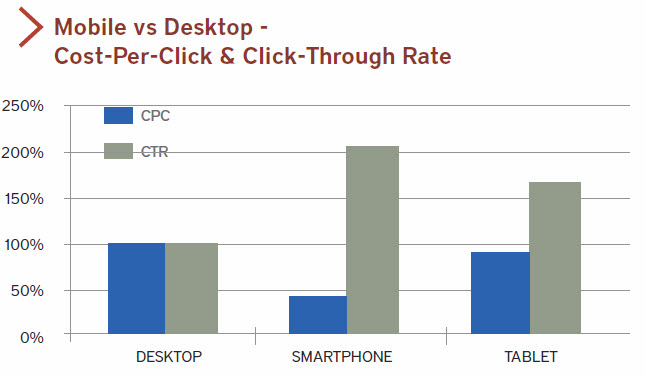
The basic formula: less screen real estate = higher proportion of user clicks on ads.
Google made a big deal of their “mobilepocalypse” update to scare other webmasters into making their sites mobile friendly. Part of the goal of making sites “mobile friendly” is to ensure it isn’t too ad dense (which in turn lowers accidental ad clicks & lowers monetization). Not only does Google have an “ad heavy” relevancy algorithm which demotes ad heavy sites, but they also explicitly claim even using a moderate sized ad unit on mobile devices above the fold is against their policy guidelines:
Is placing a 300×250 ad unit on top of a high-end mobile optimized page considered a policy violation?
Yes, this would be considered a policy violation as it falls under our ad placement policies for site layout that pushes content below the fold. This implementation would take up too much space on a mobile optimized site’s first view screen with ads and provides a poor experience to users. Always try to think of the users experience on your site – this will help ensure that users continue to visit.
So if you make your site mobile friendly you can’t run Google ads above the fold unless you are a large enough publisher that the guidelines don’t actually matter.
Update: Looks like Google updated the (utterly absurd) above policy on May 2, 2017 to now allow ads above the fold on mobile.
If you spend the extra money to make your site mobile friendly, you then must also go out of your way to lower your income.
What is the goal of the above sort of scenario? Defunding content publishers to ensure most the ad revenues flow to Google.
If you think otherwise, consider the layout of the auto ads & hotel ads Google announced yesterday. Top of the search results, larger than 300×250.

If you do X, you are a spammer. If Google does X, they are improving the user experience.
@aaronwall they will personally do everything they penalize others for doing; penalties are just another way to weaken the market.— Cygnus SEO (@CygnusSEO) May 5, 2015
The above sort of contrast is something noticed by non-SEOs. The WSJ article about Google’s new ad units had a user response stating:
With this strategy, Google has made the mistake of an egregious use of precious mobile screen space in search results. This entails much extra fingering/scrolling to acquire useful results and bypass often not-needed coincident advertising. Perhaps a moneymaker by brute force; not a good idea for utility’s sake.
That content displacement with ads is both against Google’s guidelines and algorithmically targeted for demotion – unless you are Google.
How is that working for Google partners?

According to eMarketer, by 2019 mobile will account for 72% of US digital ad spend. Almost all that growth in ad spend flows into the big ad networks while other online publishers struggle to monetize their audiences:
Facebook and Google accounted for a majority of mobile ad market growth worldwide last year. Combined, the two companies saw net mobile ad revenues increase by $6.92 billion, claiming 75.2% of the additional $9.2 billion that went toward mobile in 2013.
Back to the data RKG shared. Mobile is where the growth is…
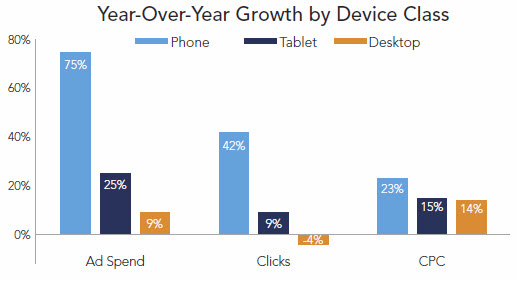
…and the smaller the screen size the more partners are squeezed out of the ecosystem…
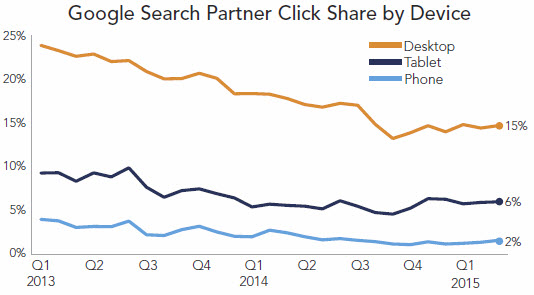
The high-intent, high-value search traffic is siphoned off by ads.
What does that leave for the rest of the ecosystem?
It is hard to build a sustainable business when you have to rely almost exclusively on traffic with no commercial intent.
One of the few areas that works well is perhaps with evergreen content which has little cost of maintenance, but even many of those pockets of opportunity are disappearing due to the combination of the Panda algorithm and Google’s scrape-n-displace knowledge graph.
.@mattcutts I think I have spotted one, Matt. Note the similarities in the content text: pic.twitter.com/uHux3rK57f— dan barker (@danbarker) February 27, 2014
Even companies with direct ad sales teams struggle to monetize mobile:
At The New York Times, for instance, more than half its digital audience comes from mobile, yet just 10% of its digital-ad revenue is attributed to these devices.
Other news websites also get the majority of their search traffic from mobile.
Why do news sites get so much mobile search traffic? A lot of it is navigational & beyond that most of it is on informational search queries which are hard to monetize (and thus have few search ads) and hard to structure into the knowledge graph (because they are about news items which only just recently happened).
If you look at the organic search traffic breakdown in your analytics account & you run a site which isn’t a news site you will likely see a far lower share of search traffic from mobile. Websites outside of the news vertical typically see far less mobile traffic. This goes back to Google dominating the mobile search interface with ads.
Mobile search ecosystem breakdown
- traffic with commercial intent = heavy ads
- limited commercial intent but easy answer = knowledge graph
- limited commercial intent & hard to answer = traffic flows to news sites
Not only is Google monetizing a far higher share of mobile search traffic, but they are also aggressively increasing minimum bids.
As Google continues to gut the broader web publishing ecosystem, they can afford to throw a few hundred million in “innovation” bribery kickback slush funds. That will earn them some praise in the short term with some of the bigger publishers, but it will make those publishers more beholden to Google. And it is even worse for smaller publishers. It means the smaller publishers are not only competing against algorithmic brand bias, confirmation bias expressed in the remote rater documents, & wholesale result set displacement, but some of their bigger publishing competitors are also subsidized directly by Google.
Ignore the broader ecosystem shifts.
Ignore the hypocrisy.
Focus on the user.
Until you are eating cat food.

Categories:
But First, A Word From Our Sponsors…
Yesterday Google shared they see greater mobile than desktop search volumes in 10 countries including Japan and the United States.
3 years ago RKG shared CTR data which highlighted how mobile search ads were getting over double the CTR as desktop search ads.
The basic formula: less screen real estate = higher proportion of user clicks on ads.
Google made a big deal of their “mobilepocalypse” update to scare other webmasters into making their sites mobile friendly. Part of the goal of making sites “mobile friendly” is to ensure it isn’t too ad dense (which in turn lowers accidental ad clicks & lowers monetization). Not only does Google have an “ad heavy” relevancy algorithm which demotes ad heavy sites, but they also explicitly claim even using a moderate sized ad unit on mobile devices above the fold is against their policy guidelines:
Is placing a 300×250 ad unit on top of a high-end mobile optimized page considered a policy violation?
Yes, this would be considered a policy violation as it falls under our ad placement policies for site layout that pushes content below the fold. This implementation would take up too much space on a mobile optimized site’s first view screen with ads and provides a poor experience to users. Always try to think of the users experience on your site – this will help ensure that users continue to visit.
So if you make your site mobile friendly you can’t run Google ads above the fold unless you are a large enough publisher that the guidelines don’t actually matter.
If you spend the extra money to make your site mobile friendly, you then must also go out of your way to lower your income.
What is the goal of the above sort of scenario? Defunding content publishers to ensure most the ad revenues flow to Google.
If you think otherwise, consider the layout of the auto ads & hotel ads Google announced yesterday. Top of the search results, larger than 300×250.
If you do X, you are a spammer. If Google does X, they are improving the user experience.
@aaronwall they will personally do everything they penalize others for doing; penalties are just another way to weaken the market.— Cygnus SEO (@CygnusSEO) May 5, 2015
The above sort of contrast is something noticed by non-SEOs. The WSJ article about Google’s new ad units had a user response stating:
With this strategy, Google has made the mistake of an egregious use of precious mobile screen space in search results. This entails much extra fingering/scrolling to acquire useful results and bypass often not-needed coincident advertising. Perhaps a moneymaker by brute force; not a good idea for utility’s sake.
That content displacement with ads is both against Google’s guidelines and algorithmically targeted for demotion – unless you are Google.
How is that working for Google partners?
According to eMarketer, by 2019 mobile will account for 72% of US digital ad spend. Almost all that growth in ad spend flows into the big ad networks while other online publishers struggle to monetize their audiences:
Facebook and Google accounted for a majority of mobile ad market growth worldwide last year. Combined, the two companies saw net mobile ad revenues increase by $6.92 billion, claiming 75.2% of the additional $9.2 billion that went toward mobile in 2013.
Back to the data RKG shared. Mobile is where the growth is…
…and the smaller the screen size the more partners are squeezed out of the ecosystem…
The high-intent, high-value search traffic is siphoned off by ads.
What does that leave for the rest of the ecosystem?
It is hard to build a sustainable business when you have to rely almost exclusively on traffic with no commercial intent.
One of the few areas that works well is perhaps with evergreen content which has little cost of maintenance, but even many of those pockets of opportunity are disappearing due to the combination of the Panda algorithm and Google’s scrape-n-displace knowledge graph.
.@mattcutts I think I have spotted one, Matt. Note the similarities in the content text: pic.twitter.com/uHux3rK57f— dan barker (@danbarker) February 27, 2014
Even companies with direct ad sales teams struggle to monetize mobile:
At The New York Times, for instance, more than half its digital audience comes from mobile, yet just 10% of its digital-ad revenue is attributed to these devices.
Other news websites also get the majority of their search traffic from mobile.
Why do news sites get so much mobile search traffic? A lot of it is navigational & beyond that most of it is on informational search queries which are hard to monetize (and thus have few search ads) and hard to structure into the knowledge graph (because they are about news items which only just recently happened).
If you look at the organic search traffic breakdown in your analytics account & you run a site which isn’t a news site you will likely see a far lower share of search traffic from mobile. Websites outside of the news vertical typically see far less mobile traffic. This goes back to Google dominating the mobile search interface with ads.
Mobile search ecosystem breakdown
- traffic with commercial intent = heavy ads
- limited commercial intent but easy answer = knowledge graph
- limited commercial intent & hard to answer = traffic flows to news sites
Not only is Google monetizing a far higher share of mobile search traffic, but they are also aggressively increasing minimum bids.
As Google continues to gut the broader web publishing ecosystem, they can afford to throw a few hundred million in “innovation” bribery kickback slush funds. That will earn them some praise in the short term with some of the bigger publishers, but it will make those publishers more beholden to Google. And it is even worse for smaller publishers. It means the smaller publishers are not only competing against algorithmic brand bias, confirmation bias expressed in the remote rater documents, & wholesale result set displacement, but some of their bigger publishing competitors are also subsidized directly by Google.
Ignore the broader ecosystem shifts.
Ignore the hypocrisy.
Focus on the user.
Until you are eating cat food.
Categories:
Google Mobilepocalypse Update
A day after the alleged major update, I thought it would make sense to highlight where we are at in the cycle.
Yesterday Google suggested their fear messaging caused 4.7% of webmasters to move over to mobile friendly design since the update was origin…
Google Mobilepocalypse Update
A day after the alleged major update, I thought it would make sense to highlight where we are at in the cycle.
Yesterday Google suggested their fear messaging caused 4.7% of webmasters to move over to mobile friendly design since the update was origin…
Consensus Bias
The Truth About Subjective Truths
A few months ago there was an article in New Scientist about Google’s research paper on potentially ranking sites based on how factual their content is. The idea is generally and genuinely absurd.
- You can’t copyright facts, which means that if this were a primary ranking signal & people focused on it then they would be optimizing their site to be scraped-n-displaced into the knowledge graph. Some people may sugar coat the knowledge graph and rich answers as opportunity, but it is Google outsourcing the cost of editorial labor while reaping the rewards.
.@mattcutts I think I have spotted one, Matt. Note the similarities in the content text: pic.twitter.com/uHux3rK57f— dan barker (@danbarker) February 27, 2014
- If Google is going to scrape, displace & monetize data sets, then the only ways to really profit are:
- focus on creating the types of content which can’t be easily scraped-n-displaced, or
- create proprietary metrics of your own, such that if they scrape them (and don’t cheat by hiding the source) they are marketing you
- In some areas (especially religion and politics) certain facts are verboten & people prefer things which provide confirmation bias of their pre-existing beliefs. End user usage data creates a “relevancy” signal out of comfortable false facts and personalization reinforces it.
- In some areas well known “facts” are sponsored falsehoods. In other areas some things slip through the cracks.
- In some areas Google changes what is considered fact based on where you are located.
How Google keeps everyone happy pic.twitter.com/KmBBzpfzdf— Amazing Maps (@Amazing_Maps) March 31, 2015
- Those who have enough money can create their own facts. It might be painting the perception of a landscape, hiring thousands of low waged workers to manipulate public perception on key issues and new technologies, or more sophisticated forms of social network analysis and manipulation to manipulate public perceptions.
- The previously mentioned links were governmental efforts. However such strategies are more common in the commercial market. Consider how Google has sponsored academic conferences while explicitly telling the people who put them on to hide the sponsorship as part of their lobbying efforts.
- Then there is the blurry area where government and commerce fuse, like when Google put about a half-dozen home team players in key governmental positions during the FTC investigation of Google. Google claimed lobbying was disgusting until they experienced the ROI firsthand.
- In some areas “facts” are backward looking views of the market which are framed, distorted & intentionally incomplete. There was a significant gap between internal voices and external messaging in the run up to the recent financial crisis. Even large & generally trustworthy organizations have some serious skeletons in their closets.
@mattcutts I wonder, what sort of impact does http://t.co/vdg3ARGSz2 have on their E-A-T? expertise +1, authority +1, trustworthiness -_?— aaron wall (@aaronwall) April 6, 2015
- In other areas the inconvenient facts get washed away over time by money.
For a search engine to be driven primarily by group think (see unity100’s posts here) is the death of diversity.
Less Diversity, More Consolidation
The problem is rarely attributed to Google, but as ecosystem diversity has declined (and entire segments of the ecosystem are unprofitable to service), more people are writing things like: “The market for helping small businesses maintain a home online isn’t one with growing profits – or, for the most part, any profits. It’s one that’s heading for a bloody period of consolidation.”
As companies grow in power the power gets monetized. If you can manipulate people without appearing to do so you can make a lot of money.
If you don’t think Google wants to disrupt you out of a job, you’ve been asleep at the wheel for the past decade— Michael Gray (@graywolf) March 13, 2015
We Just Listen to the Data (Ish)
As Google sucks up more data, aggregates intent, and scrapes-n-displaces the ecosystem they get air cover for some of their gray area behaviors by claiming things are driven by the data & putting the user first.
Those “data” and altruism claims from Google recently fell flat on their face when the Wall Street Journal published a number of articles about a leaked FTC document.
- How Google Skewed Search Results
- Inside the U.S. Antitrust Probe of Google
- Key quotes from the document from the WSJ & more from Danny Sullivan
- The PDF document is located here.
That PDF has all sorts of goodies in it about things like blocking competition, signing a low margin deal with AOL to keep monopoly marketshare (while also noting the general philosophy outside of a few key deals was to squeeze down on partners), scraping content and ratings from competing sites, Google force inserting itself in certain verticals anytime select competitors ranked in the organic result set, etc.
As damning as the above evidence is, more will soon be brought to light as the EU ramps up their formal statement of objection, as Google is less politically connected in Europe than they are in the United States:
“On Nov. 6, 2012, the night of Mr. Obama’s re-election, Mr. Schmidt was personally overseeing a voter-turnout software system for Mr. Obama. A few weeks later, Ms. Shelton and a senior antitrust lawyer at Google went to the White House to meet with one of Mr. Obama’s technology advisers. … By the end of the month, the FTC had decided not to file an antitrust lawsuit against the company, according to the agency’s internal emails.”
What is wild about the above leaked FTC document is it goes to great lengths to show an anti-competitive pattern of conduct toward the larger players in the ecosystem. Even if you ignore the distasteful political aspects of the FTC non-decision, the other potential out was:
“The distinction between harm to competitors and harm to competition is an important one: according to the modern interpretation of antitrust law, even if a business hurts individual competitors, it isn’t seen as breaking antitrust law unless it has also hurt the competitive process—that is, that it has taken actions that, for instance, raised prices or reduced choices, over all, for consumers.” – Vauhini Vara
Part of the reason the data set was incomplete on that front was for the most part only larger ecosystem players were consulted. Google engineers have went on record stating they aim to break people’s spirits in a game of psychological warfare. If that doesn’t hinder consumer choice, what does?
@aaronwall rofl. Feed the dragon Honestly these G investigations need solid long term SEOs to testify as well as brands.— Rishi Lakhani (@rishil) April 2, 2015
When the EU published their statement of objections Google’s response showed charts with the growth of Amazon and eBay as proof of a healthy ecosystem.
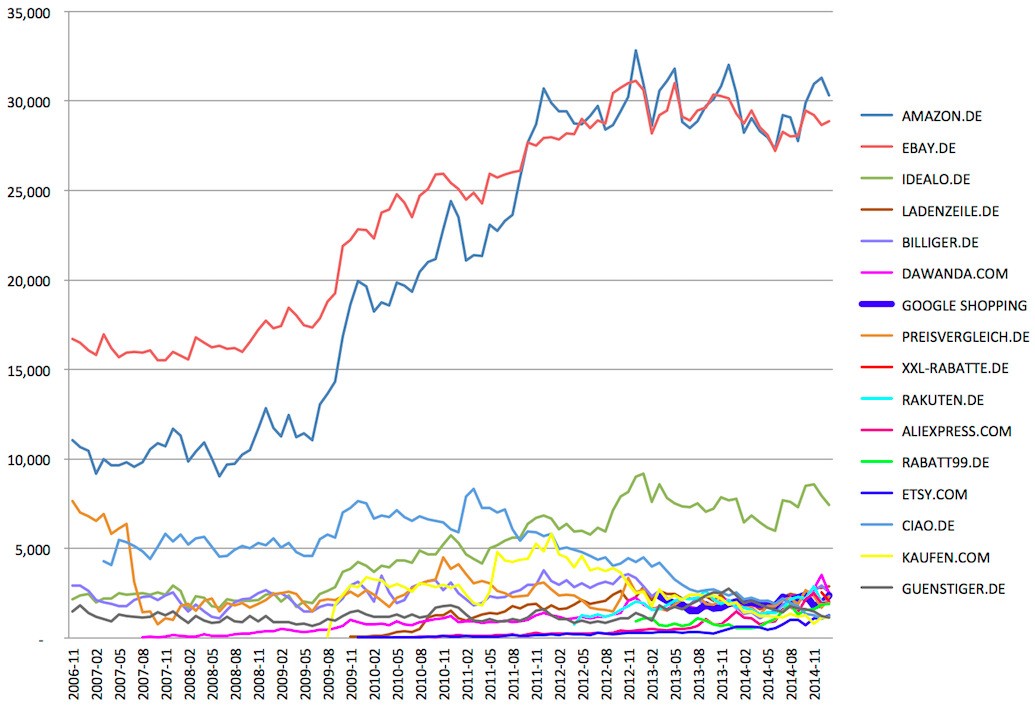
The market has been consolidated down into a few big winners which are still growing, but that in and of itself does not indicate a healthy nor neutral overall ecosystem.
The long tail of smaller e-commerce sites which have been scrubbed from the search results is nowhere to be seen in such charts / graphs / metrics.
The other obvious “untruth” hidden in the above Google chart is there is no way product searches on Google.com are included in Google’s aggregate metrics. They are only counting some subset of them which click through a second vertical ad type while ignoring Google’s broader impact via the combination of PLAs along with text-based AdWords ads and the knowledge graph, or even the recently rolled out rich product answer results.
Who could look at the following search result (during anti-trust competitive review no less) and say “yeah, that looks totally reasonable?”

Google has allegedly spent the last couple years removing “visual clutter” from the search results & yet they manage to product SERPs looking like that – so long as the eye candy leads to clicks monetized directly by Google or other Google hosted pages.
The Search Results Become a Closed App Store
Search was an integral piece of the web which (in the past) put small companies on a level playing field with larger players.
That it no longer is.
WOW. RT @aimclear: 89% of domains that ranked over the last 7 years are now invisible, #SEO extinction. SRSLY, @marcustober #SEJSummit— Jonah Stein (@Jonahstein) April 15, 2015
“What kind of a system do you have when existing, large players are given a head start and other advantages over insurgents? I don’t know. But I do know it’s not the Internet.” – Dave Pell
The above quote was about app stores, but it certainly parallels a rater system which enforces the broken window fallacy against smaller players while looking the other way on larger players, unless they are in a specific vertical Google itself decides to enter.
“That actually proves my point that they use Raters to rate search results. aka: it *is* operated manually in many (how high?) cases. There is a growing body of consensus that a major portion of Googles current “algo” consists of thousands of raters that score results for ranking purposes. The “algorithm” by machine, on the majority of results seen by a high percentage of people, is almost non-existent.” … “what is being implied by the FTC is that Googles criteria was: GoogleBot +10 all Yelp content (strip mine all Yelp reviews to build their database). GoogleSerps -10 all yelp content (downgrade them in the rankings and claim they aren’t showing serps in serps). That is anticompetitive criteria that was manually set.” – Brett Tabke
The remote rater guides were even more explicitly anti-competitive than what was detailed in the FTC report. For instance, requiring hotel affiliate sites rated as spam even if they are helpful, for no reason other than being affiliate sites.
Is Brand the Answer?
About 3 years ago I wrote a blog post about how branding plays into SEO & why it might peak. As much as I have been accused of having a cynical view, the biggest problem with my post was it was naively optimistic. I presumed Google’s consolidation of markets would end up leading Google to alter their ranking approach when they were unable to overcome the established consensus bias which was subsidizing their competitors. The problem with my presumption is Google’s reliance on “data” was a chimera. When convenient (and profitable) data is discarded on an as need basis.
Or, put another way, the visual layout of the search result page trumps the underlying ranking algorithms.
Google has still highly disintermediated brand value, but they did it via vertical search, larger AdWords ad units & allowing competitive bidding on trademark terms.
If Not Illegal, then Scraping is Certainly Morally Deplorable…
As Google scraped Yelp & TripAdvisor reviews & gave them an ultimatum, Google was also scraping Amazon sales rank data and using it to power Google Shopping product rankings.
Around this same time Google pushed through a black PR smear job of Bing for doing a similar, lesser offense to Google on rare, made-up longtail searches which were not used by the general public.
While Google was outright stealing third party content and putting it front & center on core keyword searches, they had to use “about 100 “synthetic queries”—queries that you would never expect a user to type” to smear Bing & even numerous of these queries did not show the alleged signal.
Here are some representative views of that incident:
- “We look forward to competing with genuinely new search algorithms out there—algorithms built on core innovation, and not on recycled search results from a competitor. So to all the users out there looking for the most authentic, relevant search results, we encourage you to come directly to Google. And to those who have asked what we want out of all this, the answer is simple: we’d like for this practice to stop.” – Google’s Amit Singhal
- “It’s cheating to me because we work incredibly hard and have done so for years but they just get there based on our hard work. I don’t know how else to call it but plain and simple cheating. Another analogy is that it’s like running a marathon and carrying someone else on your back, who jumps off just before the finish line.” Amit Singhal, more explicitly.
- “One comment that I’ve heard is that “it’s whiny for Google to complain about this.” I agree that’s a risk, but at the same time I think it’s important to go on the record about this.” – Matt Cutts
- “I’ve got some sympathy for Google’s view that Bing is doing something it shouldn’t.” – Danny Sullivan
What is so crazy about the above quotes is Google engineers knew at the time what Google was doing with Google’s scraping. I mentioned that contrast shortly after the above PR fiasco happened:
when popular vertical websites (that have invested a decade and millions of Dollars into building a community) complain about Google disintermediating them by scraping their reviews, Google responds by telling those webmasters to go pound sand & that if they don’t want Google scraping them then they should just block Googlebot & kill their search rankings
Learning the Rules of the Road
If you get a sense “the rules” are arbitrary, hypocritical & selectively enforced – you may be on to something:
- “The bizrate/nextag/epinions pages are decently good results. They are usually well-format[t]ed, rarely broken, load quickly and usually on-topic. Raters tend to like them” … which is why … “Google repeatedly changed the instructions for raters until raters assessed Google’s services favorably”
- and while claimping down on those services (“business models to avoid“) … “Google elected to show its product search OneBox “regardless of the quality” of that result and despite “pretty terribly embarrassing failures” ”
- and since Google knew their offerings were vastly inferior, “most of us on geo [Google Local] think we won’t win unless we can inject a lot more of local directly into google results” … thus they added “a ‘concurring sites’ signal to bias ourselves toward triggering [display of a Google local service] when a local-oriented aggregator site (i.e. Citysearch) shows up in the web results””
Google’s justification for not being transparent is “spammer” would take advantage of transparency to put inferior results front and center – the exact same thing Google does when it benefits the bottom line!
Around the same time Google hard-codes the self-promotion of their own vertical offerings, they may choose to ban competing business models through “quality” score updates and other similar changes:
The following types of websites are likely to merit low landing page quality scores and may be difficult to advertise affordably. In addition, it’s important for advertisers of these types of websites to adhere to our landing page quality guidelines regarding unique content.
- eBook sites that show frequent ads
- ‘Get rich quick’ sites
- Comparison shopping sites
- Travel aggregators
- Affiliates that don’t comply with our affiliate guidelines
The anti-competitive conspiracy theory is no longer conspiracy, nor theory.
Key points highlighted by the European Commission:
- Google systematically positions and prominently displays its comparison shopping service in its general search results pages, irrespective of its merits. This conduct started in 2008.
- Google does not apply to its own comparison shopping service the system of penalties, which it applies to other comparison shopping services on the basis of defined parameters, and which can lead to the lowering of the rank in which they appear in Google’s general search results pages.
- Froogle, Google’s first comparison shopping service, did not benefit from any favourable treatment, and performed poorly.
- As a result of Google’s systematic favouring of its subsequent comparison shopping services “Google Product Search” and “Google Shopping”, both experienced higher rates of growth, to the detriment of rival comparison shopping services.
- Google’s conduct has a negative impact on consumers and innovation. It means that users do not necessarily see the most relevant comparison shopping results in response to their queries, and that incentives to innovate from rivals are lowered as they know that however good their product, they will not benefit from the same prominence as Google’s product.
Overcoming Consensus Bias
Consensus bias is set to an absurdly high level to block out competition, slow innovation, and make the search ecosystem easier to police. This acts as a tax on newer and lesser-known players and a subsidy toward larger players.
Eventually that subsidy would be a problem to Google if the algorithm was the only thing that matters, however if the entire result set itself can be displaced then that subsidy doesn’t really matter, as it can be retracted overnight.
Whenever Google has a competing offering ready, they put it up top even if they are embarrassed by it and 100% certain it is a vastly inferior option to other options in the marketplace.
That is how Google reinforces, then manages to overcome consensus bias.
How do you overcome consensus bias?
Categories:
Consensus Bias
The Truth About Subjective Truths
A few months ago there was an article in New Scientist about Google’s research paper on potentially ranking sites based on how factual their content is. The idea is generally and genuinely absurd.
- You can’t copyright facts, which means that if this were a primary ranking signal & people focused on it then they would be optimizing their site to be scraped-n-displaced into the knowledge graph. Some people may sugar coat the knowledge graph and rich answers as opportunity, but it is Google outsourcing the cost of editorial labor while reaping the rewards.
.@mattcutts I think I have spotted one, Matt. Note the similarities in the content text: pic.twitter.com/uHux3rK57f— dan barker (@danbarker) February 27, 2014
- If Google is going to scrape, displace & monetize data sets, then the only ways to really profit are:
- focus on creating the types of content which can’t be easily scraped-n-displaced, or
- create proprietary metrics of your own, such that if they scrape them (and don’t cheat by hiding the source) they are marketing you
- In some areas (especially religion and politics) certain facts are verboten & people prefer things which provide confirmation bias of their pre-existing beliefs. End user usage data creates a “relevancy” signal out of comfortable false facts and personalization reinforces it.
- In some areas well known “facts” are sponsored falsehoods. In other areas some things slip through the cracks.
- In some areas Google changes what is considered fact based on where you are located.
How Google keeps everyone happy pic.twitter.com/KmBBzpfzdf— Amazing Maps (@Amazing_Maps) March 31, 2015
- Those who have enough money can create their own facts. It might be painting the perception of a landscape, hiring thousands of low waged workers to manipulate public perception on key issues and new technologies, or more sophisticated forms of social network analysis and manipulation to manipulate public perceptions.
- The previously mentioned links were governmental efforts. However such strategies are more common in the commercial market. Consider how Google has sponsored academic conferences while explicitly telling the people who put them on to hide the sponsorship as part of their lobbying efforts.
- Then there is the blurry area where government and commerce fuse, like when Google put about a half-dozen home team players in key governmental positions during the FTC investigation of Google. Google claimed lobbying was disgusting until they experienced the ROI firsthand.
- In some areas “facts” are backward looking views of the market which are framed, distorted & intentionally incomplete. There was a significant gap between internal voices and external messaging in the run up to the recent financial crisis. Even large & generally trustworthy organizations have some serious skeletons in their closets.
@mattcutts I wonder, what sort of impact does http://t.co/vdg3ARGSz2 have on their E-A-T? expertise +1, authority +1, trustworthiness -_?— aaron wall (@aaronwall) April 6, 2015
- In other areas the inconvenient facts get washed away over time by money.
For a search engine to be driven primarily by group think (see unity100’s posts here) is the death of diversity.
Less Diversity, More Consolidation
The problem is rarely attributed to Google, but as ecosystem diversity has declined (and entire segments of the ecosystem are unprofitable to service), more people are writing things like: “The market for helping small businesses maintain a home online isn’t one with growing profits – or, for the most part, any profits. It’s one that’s heading for a bloody period of consolidation.”
As companies grow in power the power gets monetized. If you can manipulate people without appearing to do so you can make a lot of money.
If you don’t think Google wants to disrupt you out of a job, you’ve been asleep at the wheel for the past decade— Michael Gray (@graywolf) March 13, 2015
We Just Listen to the Data (Ish)
As Google sucks up more data, aggregates intent, and scrapes-n-displaces the ecosystem they get air cover for some of their gray area behaviors by claiming things are driven by the data & putting the user first.
Those “data” and altruism claims from Google recently fell flat on their face when the Wall Street Journal published a number of articles about a leaked FTC document.
- How Google Skewed Search Results
- Inside the U.S. Antitrust Probe of Google
- Key quotes from the document from the WSJ & more from Danny Sullivan
- The PDF document is located here.
That PDF has all sorts of goodies in it about things like blocking competition, signing a low margin deal with AOL to keep monopoly marketshare (while also noting the general philosophy outside of a few key deals was to squeeze down on partners), scraping content and ratings from competing sites, Google force inserting itself in certain verticals anytime select competitors ranked in the organic result set, etc.
As damning as the above evidence is, more will soon be brought to light as the EU ramps up their formal statement of objection, as Google is less politically connected in Europe than they are in the United States:
“On Nov. 6, 2012, the night of Mr. Obama’s re-election, Mr. Schmidt was personally overseeing a voter-turnout software system for Mr. Obama. A few weeks later, Ms. Shelton and a senior antitrust lawyer at Google went to the White House to meet with one of Mr. Obama’s technology advisers. … By the end of the month, the FTC had decided not to file an antitrust lawsuit against the company, according to the agency’s internal emails.”
What is wild about the above leaked FTC document is it goes to great lengths to show an anti-competitive pattern of conduct toward the larger players in the ecosystem. Even if you ignore the distasteful political aspects of the FTC non-decision, the other potential out was:
“The distinction between harm to competitors and harm to competition is an important one: according to the modern interpretation of antitrust law, even if a business hurts individual competitors, it isn’t seen as breaking antitrust law unless it has also hurt the competitive process—that is, that it has taken actions that, for instance, raised prices or reduced choices, over all, for consumers.” – Vauhini Vara
Part of the reason the data set was incomplete on that front was for the most part only larger ecosystem players were consulted. Google engineers have went on record stating they aim to break people’s spirits in a game of psychological warfare. If that doesn’t hinder consumer choice, what does?
@aaronwall rofl. Feed the dragon Honestly these G investigations need solid long term SEOs to testify as well as brands.— Rishi Lakhani (@rishil) April 2, 2015
When the EU published their statement of objections Google’s response showed charts with the growth of Amazon and eBay as proof of a healthy ecosystem.
The market has been consolidated down into a few big winners which are still growing, but that in and of itself does not indicate a healthy nor neutral overall ecosystem.
The long tail of smaller e-commerce sites which have been scrubbed from the search results is nowhere to be seen in such charts / graphs / metrics.
The other obvious “untruth” hidden in the above Google chart is there is no way product searches on Google.com are included in Google’s aggregate metrics. They are only counting some subset of them which click through a second vertical ad type while ignoring Google’s broader impact via the combination of PLAs along with text-based AdWords ads and the knowledge graph, or even the recently rolled out rich product answer results.
Who could look at the following search result (during anti-trust competitive review no less) and say “yeah, that looks totally reasonable?”
Google has allegedly spent the last couple years removing “visual clutter” from the search results & yet they manage to product SERPs looking like that – so long as the eye candy leads to clicks monetized directly by Google or other Google hosted pages.
The Search Results Become a Closed App Store
Search was an integral piece of the web which (in the past) put small companies on a level playing field with larger players.
That it no longer is.
WOW. RT @aimclear: 89% of domains that ranked over the last 7 years are now invisible, #SEO extinction. SRSLY, @marcustober #SEJSummit— Jonah Stein (@Jonahstein) April 15, 2015
“What kind of a system do you have when existing, large players are given a head start and other advantages over insurgents? I don’t know. But I do know it’s not the Internet.” – Dave Pell
The above quote was about app stores, but it certainly parallels a rater system which enforces the broken window fallacy against smaller players while looking the other way on larger players, unless they are in a specific vertical Google itself decides to enter.
“That actually proves my point that they use Raters to rate search results. aka: it *is* operated manually in many (how high?) cases. There is a growing body of consensus that a major portion of Googles current “algo” consists of thousands of raters that score results for ranking purposes. The “algorithm” by machine, on the majority of results seen by a high percentage of people, is almost non-existent.” … “what is being implied by the FTC is that Googles criteria was: GoogleBot +10 all Yelp content (strip mine all Yelp reviews to build their database). GoogleSerps -10 all yelp content (downgrade them in the rankings and claim they aren’t showing serps in serps). That is anticompetitive criteria that was manually set.” – Brett Tabke
The remote rater guides were even more explicitly anti-competitive than what was detailed in the FTC report. For instance, requiring hotel affiliate sites rated as spam even if they are helpful, for no reason other than being affiliate sites.
Is Brand the Answer?
About 3 years ago I wrote a blog post about how branding plays into SEO & why it might peak. As much as I have been accused of having a cynical view, the biggest problem with my post was it was naively optimistic. I presumed Google’s consolidation of markets would end up leading Google to alter their ranking approach when they were unable to overcome the established consensus bias which was subsidizing their competitors. The problem with my presumption is Google’s reliance on “data” was a chimera. When convenient (and profitable) data is discarded on an as need basis.
Or, put another way, the visual layout of the search result page trumps the underlying ranking algorithms.
Google has still highly disintermediated brand value, but they did it via vertical search, larger AdWords ad units & allowing competitive bidding on trademark terms.
If Not Illegal, then Scraping is Certainly Morally Deplorable…
As Google scraped Yelp & TripAdvisor reviews & gave them an ultimatum, Google was also scraping Amazon sales rank data and using it to power Google Shopping product rankings.
Around this same time Google pushed through a black PR smear job of Bing for doing a similar, lesser offense to Google on rare, made-up longtail searches which were not used by the general public.
While Google was outright stealing third party content and putting it front & center on core keyword searches, they had to use “about 100 “synthetic queries”—queries that you would never expect a user to type” to smear Bing & even numerous of these queries did not show the alleged signal.
Here are some representative views of that incident:
- “We look forward to competing with genuinely new search algorithms out there—algorithms built on core innovation, and not on recycled search results from a competitor. So to all the users out there looking for the most authentic, relevant search results, we encourage you to come directly to Google. And to those who have asked what we want out of all this, the answer is simple: we’d like for this practice to stop.” – Google’s Amit Singhal
- “It’s cheating to me because we work incredibly hard and have done so for years but they just get there based on our hard work. I don’t know how else to call it but plain and simple cheating. Another analogy is that it’s like running a marathon and carrying someone else on your back, who jumps off just before the finish line.” Amit Singhal, more explicitly.
- “One comment that I’ve heard is that “it’s whiny for Google to complain about this.” I agree that’s a risk, but at the same time I think it’s important to go on the record about this.” – Matt Cutts
- “I’ve got some sympathy for Google’s view that Bing is doing something it shouldn’t.” – Danny Sullivan
What is so crazy about the above quotes is Google engineers knew at the time what Google was doing with Google’s scraping. I mentioned that contrast shortly after the above PR fiasco happened:
when popular vertical websites (that have invested a decade and millions of Dollars into building a community) complain about Google disintermediating them by scraping their reviews, Google responds by telling those webmasters to go pound sand & that if they don’t want Google scraping them then they should just block Googlebot & kill their search rankings
Learning the Rules of the Road
If you get a sense “the rules” are arbitrary, hypocritical & selectively enforced – you may be on to something:
- “The bizrate/nextag/epinions pages are decently good results. They are usually well-format[t]ed, rarely broken, load quickly and usually on-topic. Raters tend to like them” … which is why … “Google repeatedly changed the instructions for raters until raters assessed Google’s services favorably”
- and while claimping down on those services (“business models to avoid“) … “Google elected to show its product search OneBox “regardless of the quality” of that result and despite “pretty terribly embarrassing failures” ”
- and since Google knew their offerings were vastly inferior, “most of us on geo [Google Local] think we won’t win unless we can inject a lot more of local directly into google results” … thus they added “a ‘concurring sites’ signal to bias ourselves toward triggering [display of a Google local service] when a local-oriented aggregator site (i.e. Citysearch) shows up in the web results””
Google’s justification for not being transparent is “spammer” would take advantage of transparency to put inferior results front and center – the exact same thing Google does when it benefits the bottom line!
Around the same time Google hard-codes the self-promotion of their own vertical offerings, they may choose to ban competing business models through “quality” score updates and other similar changes:
The following types of websites are likely to merit low landing page quality scores and may be difficult to advertise affordably. In addition, it’s important for advertisers of these types of websites to adhere to our landing page quality guidelines regarding unique content.
- eBook sites that show frequent ads
- ‘Get rich quick’ sites
- Comparison shopping sites
- Travel aggregators
- Affiliates that don’t comply with our affiliate guidelines
The anti-competitive conspiracy theory is no longer conspiracy, nor theory.
Key points highlighted by the European Commission:
- Google systematically positions and prominently displays its comparison shopping service in its general search results pages, irrespective of its merits. This conduct started in 2008.
- Google does not apply to its own comparison shopping service the system of penalties, which it applies to other comparison shopping services on the basis of defined parameters, and which can lead to the lowering of the rank in which they appear in Google’s general search results pages.
- Froogle, Google’s first comparison shopping service, did not benefit from any favourable treatment, and performed poorly.
- As a result of Google’s systematic favouring of its subsequent comparison shopping services “Google Product Search” and “Google Shopping”, both experienced higher rates of growth, to the detriment of rival comparison shopping services.
- Google’s conduct has a negative impact on consumers and innovation. It means that users do not necessarily see the most relevant comparison shopping results in response to their queries, and that incentives to innovate from rivals are lowered as they know that however good their product, they will not benefit from the same prominence as Google’s product.
Overcoming Consensus Bias
Consensus bias is set to an absurdly high level to block out competition, slow innovation, and make the search ecosystem easier to police. This acts as a tax on newer and lesser-known players and a subsidy toward larger players.
Eventually that subsidy would be a problem to Google if the algorithm was the only thing that matters, however if the entire result set itself can be displaced then that subsidy doesn’t really matter, as it can be retracted overnight.
Whenever Google has a competing offering ready, they put it up top even if they are embarrassed by it and 100% certain it is a vastly inferior option to other options in the marketplace.
That is how Google reinforces, then manages to overcome consensus bias.
How do you overcome consensus bias?
Categories:
Why Growth Hacking Works
The reason growth hacking works has nothing to do with growth hacking and everything to do with blowing up organizational silos. What Is Growth Hacking? Marketers love to market. We’re forever repackaging and rebranding, even when it comes to our own profession. Can you blame us really? We’re frequently the last ones to get the […]
Bing Ads to Simplify AdWords Campaign Import Process With Upgraded URLs
The platform plans to integrate Upgraded URLs to ensure that advertisers can easily manage URLs between AdWords and Bing Ads.
March’s Google Analytics Blog Insights to Grow Your Business
Below are the highlights followed by a summary of what happened on the Google Analytics blog in March. I also discuss how you and your team can take advantage of these developments!
Highlights:
In March Google…
- Released 2 New Mobile App Analytics Reports
- Hosted a talk with Neil Hoyne on moving beyond just the conversion point
- Released a solutions guide for implementing Google Analytics via Google Tag Manager
- Released a product release notes section
1.
…
The post March’s Google Analytics Blog Insights to Grow Your Business appeared first on Seer Interactive.
Store Visits Metric Helps Google AdWords Users Measure Offline ROI
After brands like Sephora and Buffalo Wild Wings saw success with “Store Visits,” Google has opened up the feature to Australian and Canadian advertisers, while also creating a new Best Practices Guide.
Machine Learning With AdWords Scripts And Google Prediction API
In this helpful how-to, columnist Russell Savage explains how to use the Google Prediction API in conjunction with AdWords scripts to glean insights about your PPC data.
The post Machine Learning With AdWords Scripts And Google Prediction API appeared…
Google: In The News Box Will Be Impacted By The Mobile-Friendly Algorithm
So we know Google News ranking is unaffected by the upcoming mobile friendly ranking algorithm. But we wanted to know if the In The News box that shows both news publishers and non-news publishers would be impacted…