Do Popups Work for Increasing List Sign-ups? (and an OptinMonster Review)
No matter how much people might say they hate pop-ups, they work when it comes to increasing subscribers to your newsletter. Period. Back in 2011, I began testing the use of pop-ups on various sites I owned. Everyone I knew claimed they found them anno…
Do Popups Work for Increasing List Sign-ups? (and an OptinMonster Review)
No matter how much people might say they hate pop-ups, they work when it comes to increasing subscribers to your newsletter. Period. Back in 2011, I began testing the use of pop-ups on various sites I owned. Everyone I knew claimed they found them anno…
User Behaviour Data as a Ranking Signal
Note: This article was first published on Moz Blog. This version does not use hypotext functionality and will be used to test the performance of hidden content in Google’s search.
Question: How does a search engine interpret user …
The post User Behaviour Data as a Ranking Signal appeared first on DEJAN.
Virtual Real Estate Virtually Disappears
Back in 2009 Google executives were scared of not being able to retain talent with stock options after Google’s stock price cratered with the rest of the market & Google’s ad revenue growth rate slid to zero. That led them to reprice employee stock options. That is as close as Google has come to a “near death” experience since their IPO. They’ve consistently grown & become more dominant.
In November of 2009 I cringed when I saw the future of SEO in Google SERPs where the organic results were outright displaced & even some of the featured map listings had their phone numbers removed.
Investing in Search
In 2012 a Googler named Jon Rockway was more candid than Googlers are typically known for being: “SEO isn’t good for users or the Internet at large. … It’s a bug that you could rank highly in Google without buying ads, and Google is trying to fix the bug.”
It isn’t surprising Google greatly devalued keyword domain names & hit sites like eHow hard. And it isn’t surprising Demand Media is laying off staff and is rumored to be exploring selling their sites. If deleting millions of articles from eHow doesn’t drive a recovery, how much money can they lose on the rehab project before they should just let it go?
“If you want to stop spam, the most straight forward way to do it is to deny people money because they care about the money and that should be their end goal. But if you really want to stop spam, it is a little bit mean, but what you want to do, is break their spirits.” – Matt Cutts
Through a constant ex-post-facto redefinition of “what is spam” to include most anything which is profitable, predictable & accessible, Google engineers work hard to “deny people money.”
Over time SEO became harder & less predictable. The exception being Google investments like Thumbtack, in which case other’s headwind became your tailwind & a list of techniques declared off limits became a strategy guidebook.
Communications got worse, Google stopped even pretending to help the ecosystem, and they went so far as claiming that even asking for a link was spam. All the while, as they were curbing third party investment into the ecosystem (“deny them money”), they work on PR for their various investments & renamed the company from Google to Alphabet so they can expand their scope of investments.
“We also like that it means alpha‑bet (Alpha is investment return above benchmark), which we strive for!” – Larry Page
From Do/Know/Go to Scrape/Displace/Monetize
It takes a lot of effort & most people are probably too lazy to do it, but if you look at the arch of Google’s patents related to search quality, many of the early ones revolved around links. Then many focused on engagement related signals. Chrome & Android changed the pool of signals Google had access to. Things like Project Fi, Gogle Fiber, Nest, and Google’s new OnHub router give them more of that juicy user data. Many of their recently approved patents revolve around expanding the knowledge graph so that they may outright displace the idea of having a neutral third party result set for an increasing share of the overall search pie.
Searchers can instead get bits of “knowledge” dressed in various flavors of ads.
This sort of displacement is having a significant impact on a variety of sites. But for most it is a slow bleed rather than an overnight sudden shift. In that sort of environment, even volunteer run sites will eventually atrophy. They will have fewer new users, and as some of the senior people leave, eventually fewer will rise through the ranks. Or perhaps a greater share of the overall ranks will be driven by money.
Jimmy Wales stated: “It is also false that ‘Wikipedia thrives on clicks,’ at least as compared to ad-revenue driven sites… The relationship between ‘clicks’ and the things we care about: community health and encyclopedia quality is not nothing, but it’s not as direct as some think.”
Most likely the relationship *is* quite direct, but there is a lagging impact. Today’s major editors didn’t join the site yesterday & take time to rise through the ranks.
As the big sites become more closed off the independent voices are pushed aside or outright disappear.
If Google works hard enough at prioritizing “deny people money” as a primary goal, then they will eventually get an index quality that reflects that lack of payment. Plenty of good looking & well-formatted content, but a mix of content which:
- is monetized indirectly & in ways which are not clearly disclosed
- has interstitial ads and slideshows where the ads look like the “next” button & the “next” button is colored the same color as the site’s background
- is done as “me too” micro-reporting with no incremental analysis
- is algorithmically generated
Celebrating Search “Innovation”
There has been a general pattern in search innovation. Google introduces a new feature, pitches it as being the next big thing, gets people to adopt it, collects data on the impact of the feature, clamps down on selectively allowing it, perhaps removes the feature outright from organic search results, permanently adds the feature to their ad units.
This sort of pattern has happened so many times it is hard to count.
Google puts faces in search results for authorship & to promote Google+, Google realizes Google+ is a total loser & disconnects it, new ad units for local services show faces in the search results. What was distracting noise was removed, then it was re-introduced as part of an ad unit.
I’m confused didn’t Google pull authorship cuz faces in the SERPS was a bad experience for the users? pic.twitter.com/mI2NdyGzd7— Michael Gray (@graywolf) July 31, 2015
The same sort of deal exists elsewhere. Google acquires YouTube, launches universal search, offers video snippets, increases size of video snippets. Then video snippets get removed from most listings “because noise.” YouTube gets enlarged video snippets. And, after removing the “noise” of video stills in the search results Google is exploring testing video ads in the search results.
Some sites which bundle software got penalized in organic search and are not even allowed to buy AdWords ads. At an extreme degree, sites which bundled no software, but simply didn’t link to an End User Agreement (EULA) from the download page were penalized. Which leads to uncomfortable conversations like this one:
Google Support: I looked through this, and it seemed that one of the issues was a lack of an End User Agreement (EULA)
Simtec: An EULA is displayed by the setup program before installing starts. Also, the end user license agreements are linked to from here http://www.httpwatch.com/buy/orderingfaq.aspx#licensetypes
Google Support: Hmm, They do want it on the download page itself
Simtec: How come there isn’t one here? google.co.uk/chrome/browser/desktop/
Google Support: LOL
Simtec: No really?
Google Support: That’s a great question
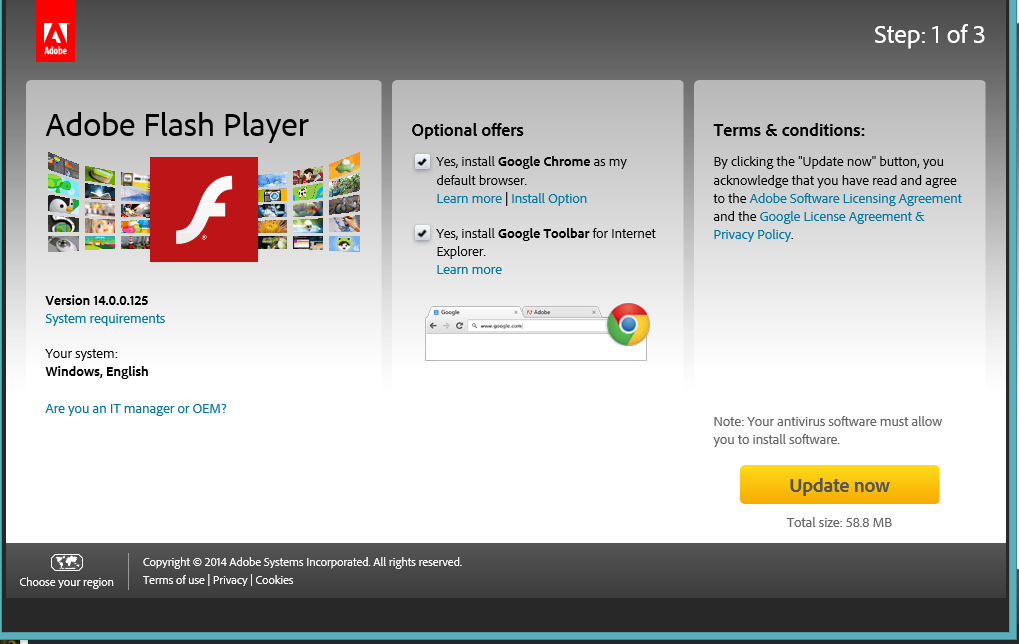
Of course, it goes without saying that much of the Google Chrome install base came from negative option software bundling on Adobe Flash security updates.
Google claimed helpful hotel affiliate sites should be rated as spam, then they put their own affiliate ads in hotel search results & even recommended hotel searches in the knowledge graph on city name searches.
Google created a penalty for sites which have an ad heavy interface. Many of Google’s search results are nothing but ads for the entire first screen.
Google search engineers have recently started complaining about interstitial ads & suggested they might create a “relevancy” signal based on users not liking those. At the same time, an increasing number of YouTube videos have unskippable pre-roll ads. And the volume of YouTube ad views is so large that it is heavily driving down Google’s aggregate ad click price. On top of this, Google also offers a survey tool which publishers can lock content behind & requires users to answer a question before they can see the full article they just saw ranking in the search results.
“Everything is possible, but nothing is real.” – Living Colour
Blue Ocean Opportunity
Amid the growing ecosystem instability & increasing hypocrisy, there have perhaps been only a couple “blue ocean” areas left in organic search: local search & brand.
And it appears Google might be well on their way in trying to take those away.
For years brand has been the solution to almost any SEO problem.
I wonder how many SEOs working for big brands have done absolutely nothing of value since 2012 yet still look like geniuses to executives.— Ross Hudgens (@RossHudgens) August 7, 2015
But Google has been increasing the cost of owning a brand. They are testing other ad formats to drive branded search clicks through more expensive ad formats like PLAs & they have been drastically increasing brand CPCs on text ads. And while that second topic has recently gained broader awareness, it has been a trend for years now: “Over the last 12 months, Brand CPCs on Google have increased 80%” – George Michie, July 30, 2013.
There are other subtle ways Google has attacked brand, including:
- penalties on many of the affiliates of those brands
- launching their own vertical search ad offerings in key big-money verticals
- investing billions in “disruptive” start ups which are exempt from the algorithmic risks other players must deal with
- allowing competitors to target competing brands not only within the search results, but also as custom affinity audiences
- linking to competing businesses in the knowledge graph
Google has recently dialed up monetization of local search quite aggressively as well. I’ve long highlighted how mobile search results are ad heavy & have grown increasingly so over time. Google has recently announced call only ad formats, a buy button for mobile ads, local service provider ads, appointment scheduling in the SERPs, direct hotel booking, etc.
And, in addition to all the above new ad formats, recently it was noticed Google is now showing 3 ads on mobile devices even for terms without much commercial intent, like [craft beer].
I like how this new-ish search box takes up a ton of space and puts all these ads right in the prime viewing area pic.twitter.com/CcYdW118gf— Jared McKiernan (@jaredmckiernan) August 18, 2015
Now that the mobile search interface is literally nothing but ads above the fold, early data shows a significant increase in mobile ad clicks. Of course it doesn’t matter if there are 2 or 3 ads, if Google shows ad extensions on SERPs with only 2 ads to ensure they drive the organic results “out of sight, out of mind.”
Earlier this month it was also noticed Google replaced 7-pack local results with 3-pack local results for many more search queries, even on desktop search results. On some of these results they only show a call button, on others they show links to sites. It is a stark contrast to the vast array of arbitrary (and even automated) ad extensions in AdWords.
Why would they determine users want to see links to the websites & the phone numbers, then decide overnight users don’t want those?
Why would Google determine for many years that 7 is a good number of results to show, and then overnight shift to showing 3?
If Google listed 7 ads in a row people might notice the absurdity of it and complain. But if Google only shows 3 results, then they can quickly convert it into an ad unit with little blowback.
You don’t have to be a country music fan to know the Austin SEO limits in a search result where the local results are now payola.
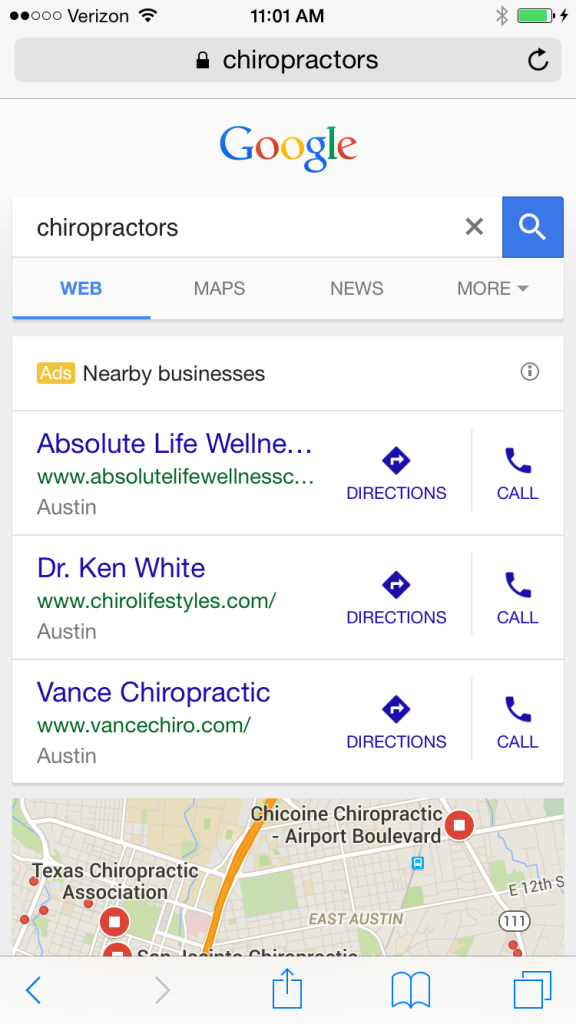
Try not to hurt your back while looking down for the organic search results!
Here are two tips to ensure any SEO success isn’t ethereal: don’t be nearby, and don’t be a business. :D
Categories:
Virtual Real Estate Virtually Disappears
Back in 2009 Google executives were scared of not being able to retain talent with stock options after Google’s stock price cratered with the rest of the market & Google’s ad revenue growth rate slid to zero. That led them to reprice employee stock options. That is as close as Google has come to a “near death” experience since their IPO. They’ve consistently grown & become more dominant.
In November of 2009 I cringed when I saw the future of SEO in Google SERPs where the organic results were outright displaced & even some of the featured map listings had their phone numbers removed.
Investing in Search
In 2012 a Googler named Jon Rockway was more candid than Googlers are typically known for being: “SEO isn’t good for users or the Internet at large. … It’s a bug that you could rank highly in Google without buying ads, and Google is trying to fix the bug.”
It isn’t surprising Google greatly devalued keyword domain names & hit sites like eHow hard. And it isn’t surprising Demand Media is laying off staff and is rumored to be exploring selling their sites. If deleting millions of articles from eHow doesn’t drive a recovery, how much money can they lose on the rehab project before they should just let it go?
“If you want to stop spam, the most straight forward way to do it is to deny people money because they care about the money and that should be their end goal. But if you really want to stop spam, it is a little bit mean, but what you want to do, is break their spirits.” – Matt Cutts
Through a constant ex-post-facto redefinition of “what is spam” to include most anything which is profitable, predictable & accessible, Google engineers work hard to “deny people money.”
Over time SEO became harder & less predictable. The exception being Google investments like Thumbtack, in which case other’s headwind became your tailwind & a list of techniques declared off limits became a strategy guidebook.
Communications got worse, Google stopped even pretending to help the ecosystem, and they went so far as claiming that even asking for a link was spam. All the while, as they were curbing third party investment into the ecosystem (“deny them money”), they work on PR for their various investments & renamed the company from Google to Alphabet so they can expand their scope of investments.
“We also like that it means alpha‑bet (Alpha is investment return above benchmark), which we strive for!” – Larry Page
From Do/Know/Go to Scrape/Displace/Monetize
It takes a lot of effort & most people are probably too lazy to do it, but if you look at the arch of Google’s patents related to search quality, many of the early ones revolved around links. Then many focused on engagement related signals. Chrome & Android changed the pool of signals Google had access to. Things like Project Fi, Gogle Fiber, Nest, and Google’s new OnHub router give them more of that juicy user data. Many of their recently approved patents revolve around expanding the knowledge graph so that they may outright displace the idea of having a neutral third party result set for an increasing share of the overall search pie.
Searchers can instead get bits of “knowledge” dressed in various flavors of ads.
This sort of displacement is having a significant impact on a variety of sites. But for most it is a slow bleed rather than an overnight sudden shift. In that sort of environment, even volunteer run sites will eventually atrophy. They will have fewer new users, and as some of the senior people leave, eventually fewer will rise through the ranks. Or perhaps a greater share of the overall ranks will be driven by money.
Jimmy Wales stated: “It is also false that ‘Wikipedia thrives on clicks,’ at least as compared to ad-revenue driven sites… The relationship between ‘clicks’ and the things we care about: community health and encyclopedia quality is not nothing, but it’s not as direct as some think.”
Most likely the relationship *is* quite direct, but there is a lagging impact. Today’s major editors didn’t join the site yesterday & take time to rise through the ranks.
As the big sites become more closed off the independent voices are pushed aside or outright disappear.
If Google works hard enough at prioritizing “deny people money” as a primary goal, then they will eventually get an index quality that reflects that lack of payment. Plenty of good looking & well-formatted content, but a mix of content which:
- is monetized indirectly & in ways which are not clearly disclosed
- has interstitial ads and slideshows where the ads look like the “next” button & the “next” button is colored the same color as the site’s background
- is done as “me too” micro-reporting with no incremental analysis
- is algorithmically generated
Celebrating Search “Innovation”
There has been a general pattern in search innovation. Google introduces a new feature, pitches it as being the next big thing, gets people to adopt it, collects data on the impact of the feature, clamps down on selectively allowing it, perhaps removes the feature outright from organic search results, permanently adds the feature to their ad units.
This sort of pattern has happened so many times it is hard to count.
Google puts faces in search results for authorship & to promote Google+, Google realizes Google+ is a total loser & disconnects it, new ad units for local services show faces in the search results. What was distracting noise was removed, then it was re-introduced as part of an ad unit.
I’m confused didn’t Google pull authorship cuz faces in the SERPS was a bad experience for the users? pic.twitter.com/mI2NdyGzd7— Michael Gray (@graywolf) July 31, 2015
The same sort of deal exists elsewhere. Google acquires YouTube, launches universal search, offers video snippets, increases size of video snippets. Then video snippets get removed from most listings “because noise.” YouTube gets enlarged video snippets. And, after removing the “noise” of video stills in the search results Google is exploring testing video ads in the search results.
Some sites which bundle software got penalized in organic search and are not even allowed to buy AdWords ads. At an extreme degree, sites which bundled no software, but simply didn’t link to an End User Agreement (EULA) from the download page were penalized. Which leads to uncomfortable conversations like this one:
Google Support: I looked through this, and it seemed that one of the issues was a lack of an End User Agreement (EULA)
Simtec: An EULA is displayed by the setup program before installing starts. Also, the end user license agreements are linked to from here http://www.httpwatch.com/buy/orderingfaq.aspx#licensetypes
Google Support: Hmm, They do want it on the download page itself
Simtec: How come there isn’t one here? google.co.uk/chrome/browser/desktop/
Google Support: LOL
Simtec: No really?
Google Support: That’s a great question
Of course, it goes without saying that much of the Google Chrome install base came from negative option software bundling on Adobe Flash security updates.
Google claimed helpful hotel affiliate sites should be rated as spam, then they put their own affiliate ads in hotel search results & even recommended hotel searches in the knowledge graph on city name searches.
Google created a penalty for sites which have an ad heavy interface. Many of Google’s search results are nothing but ads for the entire first screen.
Google search engineers have recently started complaining about interstitial ads & suggested they might create a “relevancy” signal based on users not liking those. At the same time, an increasing number of YouTube videos have unskippable pre-roll ads. And the volume of YouTube ad views is so large that it is heavily driving down Google’s aggregate ad click price. On top of this, Google also offers a survey tool which publishers can lock content behind & requires users to answer a question before they can see the full article they just saw ranking in the search results.
“Everything is possible, but nothing is real.” – Living Colour
Blue Ocean Opportunity
Amid the growing ecosystem instability & increasing hypocrisy, there have perhaps been only a couple “blue ocean” areas left in organic search: local search & brand.
And it appears Google might be well on their way in trying to take those away.
For years brand has been the solution to almost any SEO problem.
I wonder how many SEOs working for big brands have done absolutely nothing of value since 2012 yet still look like geniuses to executives.— Ross Hudgens (@RossHudgens) August 7, 2015
But Google has been increasing the cost of owning a brand. They are testing other ad formats to drive branded search clicks through more expensive ad formats like PLAs & they have been drastically increasing brand CPCs on text ads. And while that second topic has recently gained broader awareness, it has been a trend for years now: “Over the last 12 months, Brand CPCs on Google have increased 80%” – George Michie, July 30, 2013.
There are other subtle ways Google has attacked brand, including:
- penalties on many of the affiliates of those brands
- launching their own vertical search ad offerings in key big-money verticals
- investing billions in “disruptive” start ups which are exempt from the algorithmic risks other players must deal with
- allowing competitors to target competing brands not only within the search results, but also as custom affinity audiences
- linking to competing businesses in the knowledge graph
Google has recently dialed up monetization of local search quite aggressively as well. I’ve long highlighted how mobile search results are ad heavy & have grown increasingly so over time. Google has recently announced call only ad formats, a buy button for mobile ads, local service provider ads, appointment scheduling in the SERPs, direct hotel booking, etc.
And, in addition to all the above new ad formats, recently it was noticed Google is now showing 3 ads on mobile devices even for terms without much commercial intent, like [craft beer].
I like how this new-ish search box takes up a ton of space and puts all these ads right in the prime viewing area pic.twitter.com/CcYdW118gf— Jared McKiernan (@jaredmckiernan) August 18, 2015
Now that the mobile search interface is literally nothing but ads above the fold, early data shows a significant increase in mobile ad clicks. Of course it doesn’t matter if there are 2 or 3 ads, if Google shows ad extensions on SERPs with only 2 ads to ensure they drive the organic results “out of sight, out of mind.”
Earlier this month it was also noticed Google replaced 7-pack local results with 3-pack local results for many more search queries, even on desktop search results. On some of these results they only show a call button, on others they show links to sites. It is a stark contrast to the vast array of arbitrary (and even automated) ad extensions in AdWords.
Why would they determine users want to see links to the websites & the phone numbers, then decide overnight users don’t want those?
Why would Google determine for many years that 7 is a good number of results to show, and then overnight shift to showing 3?
If Google listed 7 ads in a row people might notice the absurdity of it and complain. But if Google only shows 3 results, then they can quickly convert it into an ad unit with little blowback.
You don’t have to be a country music fan to know the Austin SEO limits in a search result where the local results are now payola.
Try not to hurt your back while looking down for the organic search results!
Here are two tips to ensure any SEO success isn’t ethereal: don’t be nearby, and don’t be a business. :D
Categories:
#NoHacked: Identifying and Diagnosing Injected Gibberish URL Hacking
Today in our #NoHacked campaign, we’ll be discussing how to identify and diagnose a trending hack. Even if your site is not infected with this specific type of hack, many of these steps can be helpful for other types of hacks. Next week, we’ll be following up with a post about fixing this hack. Follow along with discussions on Twitter and Google+ using the #NoHacked tag. (Part 1, Part 2, Part 3)

Identifying Symptoms
Gibberish pages
The hallmark of this type of hacking is spammy pages that appear to be added to the site. These pages contain keyword-rich gibberish text, links, and images in order to manipulate search engines. For example, the hack creates pages like www.example.com/pf/download-2012-free-full-crack.html which contain gibberish content like below:

Cloaking
This hack often uses cloaking to avoid webmasters from detecting it. Cloaking refers to the practice of presenting different content or URLs to webmasters, visitors, and search engines. For example, the webmaster of the site might be shown an empty or HTTP 404 page which would lead the webmaster to believe the hack is no longer present. However, users who visit the page from search results will still be redirected to spammy pages, and search engines that crawl the site will still be presented with gibberish content.
Monitoring your Site
Properly monitoring your site for hacking allows you to remedy the hack more quickly and minimize damage the hack might cause. There are several ways you can monitor your site for this particular hack.
Looking for a surge in website traffic
Because this hack creates many keyword heavy URLs that are crawled by search engines, check to see if there was any recent, unexpected surges in traffic. If you do see a surge, use the Search Analytics tool in Search Console to investigate whether or not hacked pages are the source of the unusual website traffic.
Tracking your site appearance in search results
Periodically checking how your site appears in search results is good practice for all webmasters. It also allows you to spot symptoms of hacking. You can check your site in Google by using the site: operator on your site (i.e. search for site:example.com). If you see any gibberish links associated with your site or a label that says “This site may be hacked.”, your site might have been compromised.
Signing up for alerts from Google
We recommend you sign up for Search Console. In Search Console, you can check if Google has detected any hacked pages on your site by looking in the Manual Actions Viewer or Security Issues report. Search Console will also message you if Google has detected any hacked pages on your site.
Also, we recommend you set up Google Alerts for your site. Google Alerts will email you if Google finds new results for a search query. For example, you can set up a Google Alert for your site in conjunction with common spammy terms like [site:example.com cheap software]. If you receive an email that Google has returned a new query for that term, you should immediately check what pages on your site are triggering that alert.
Diagnosing your Site
Gathering tools that can help
In Search Console, you have access to the Fetch as Google tool in Search Console. The Fetch as Google tool allows you to see a page as Google sees it. This will help you to identify cloaked hacked pages. Additional tools from others, both paid and free, are listed in the appendix to this post.
Checking for hacked pages
If you’re not sure if there is hacked content on your site, the Google Hacked Troubleshooter can walk you through some basic checks. For this type of hack, you’ll want to perform a site: search on your site. Look for suspicious pages and URLs loaded with strange keywords in the search results. If you have a large number of pages on your site, you might need to try a more targeted query. Find common spam terms and append them to your site: search query like [site:example.com cheap software]. Try this with several spammy terms to see if any results show up.
Checking for cloaking on hacked pages
Because this type of hacking employs cloaking to prevent accurate detection, it’s very important that you use the Fetch as Google tool in Search Console to check the spammy pages you found in the previous step. Remember, cloaked pages can show you an HTTP 404 page that tricks you into thinking the hack is fixed even if the page is still live. You should also use Fetch as Google on your homepage as well. This type of hack often adds text or links to the homepage.
We hope this post has given you a better idea of how to identify and diagnose hacks that inject gibberish URLs on your site. Tune in next week where we’ll be explaining how to remove this hack from your site. Be sure to follow our social campaigns and share any tips or tricks you might have about staying safe on the web with the #NoHacked hashtag.
If you have any additional questions, you can post in the Webmaster Help Forums where a community of webmasters can help answer your questions. You can also join our Hangout on Air about Security on August 26.
Appendix
These are tools that scan your site and may be able to find problematic content. Other than VirusTotal, Google doesn’t run or support them.
Virus Total, Aw-snap.info, Sucuri Site Check, Wepawet: These are tools that may be able to scan your site for problematic content. Keep in mind that these scanners can’t guarantee that they will identify every type of problematic content.
Posted by Eric Kuan, Webmaster Relations Specialist & Yuan Niu, Webspam Analyst


Scalable Link Building Process Using Influencer Marketing
 Effectiveness and consistency in link building has always been about the process you put in place at the very beginning of the campaign.
That’s why it’s very critical to align your link building efforts with the site’s overall brand strategy –particularly in knowing the influencers/publishers/brands you want your brand to be associated with (to create better signals and perceived value).
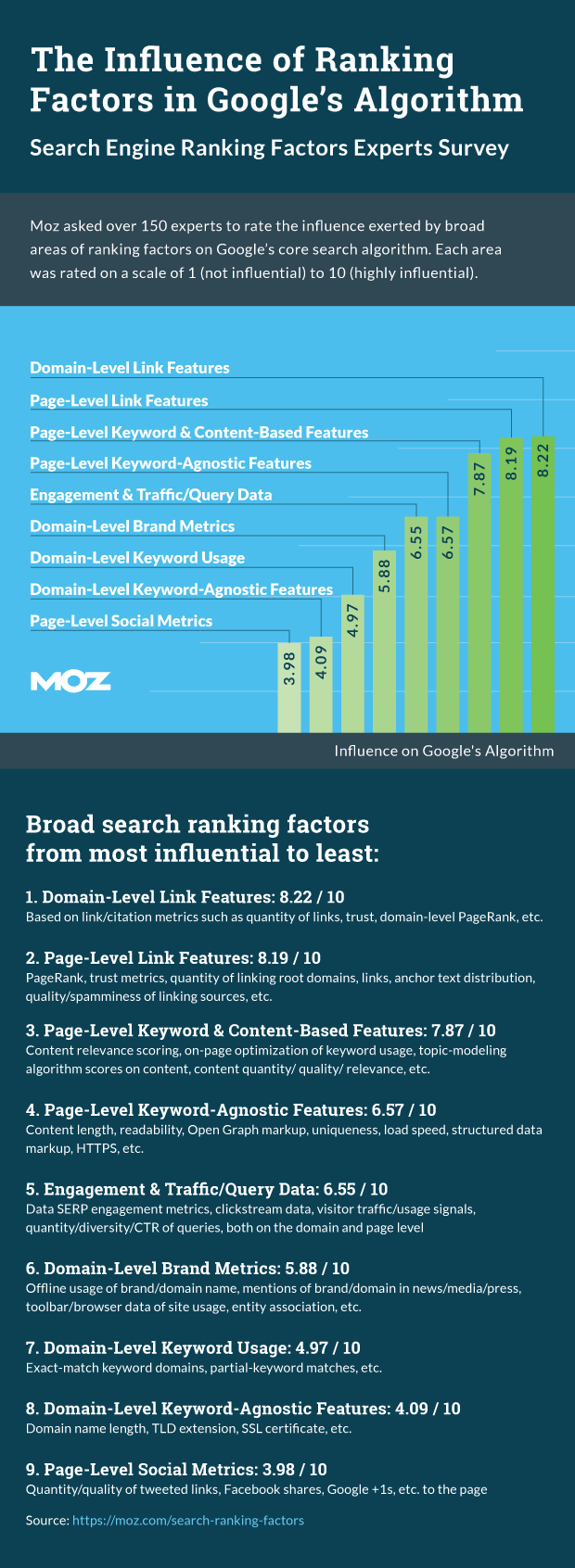
Link building is still very valuable in today’s (and even in tomorrow’s) digital marketing. Links are still a major ranking factor in Google’s search algorithm, and its importance won’t go away as long as people use it to navigate the web.
The post Scalable Link Building Process Using Influencer Marketing appeared first on Kaiserthesage.
Speed, Focus, Smart Insights: 5 Google Analytics Custom Reports FTW!
Standard reports stink. Custom reports rock! If you are a regular reader of this blog, you are quite familiar with this sentiment. I’ve expressed it often. :) [Sidebar] I’m experimenting with sharing short stories via an insightful newsletter. I’d love for you to sign up: The Marketing Analytics Intersect. Thanks! [/Sidebar] The primary reason is […]
Speed, Focus, Smart Insights: 5 Google Analytics Custom Reports FTW! is a post from: Occam’s Razor by Avinash Kaushik
#NoHacked: Using two-factor authentication to protect your site
Today in our #nohacked campaign, we’ll be talking about two-factor authentication. Follow along with discussions on Twitter and Google+ using the #NoHacked tag. (Part 1, Part 2)

There was once a time when having a relatively strong password or answering a security question was a reasonable way to protect your online accounts. However, according to a study from Stop Badware, stolen credentials is a common way for hackers to compromise websites. Additionally, even reputable sites can fall victim to hacking, potentially exposing your personal data like passwords to attackers.
Fortunately, two-factor authentication can help you keep your accounts safer. Two-factor authentication relies on an additional source of verification, in conjunction with your password, to access your account. You might have used two-factor authentication before if you have ever been prompted for a code from your phone when logging into a social media site or from a chip card reader when logging into a bank account. Two-factor authentication makes it more difficult for someone to log into your account even if they have stolen your password.
As a website owner, you should enable two-factor authentication on your accounts where possible. A compromised account can cause you to lose important personal data and valuable reputation for your site. Two-factor authentication can give you the ease of mind that your accounts and data are safer.
Google currently offers 2-Step Verification for all of its accounts, including accounts from Google Apps domains. You can use your phone, a hardware token like a Security Key, or the Google Authenticator app to verify your account. These options give you flexibility when traveling or when you don’t have access to the mobile network.
If your hosting provider, Content Management System (CMS), or any type of platform you use for managing your site doesn’t offer two-factor authentication, ask their customer support for an option to use two-factor authentication in the future.They can build two-factor authentication into their own platforms using Google’s open source code. If your platform or hoster doesn’t provide strong protection against unauthorized access consider hosting your content elsewhere. You can see a list of websites that support two-factor authentication, including what types of authentication options they offer, at https://twofactorauth.org/.
If you have any additional questions, you can post in the Webmaster Help Forums where a community of webmasters can help answer your questions. You can also join our Hangout on Air about Security on August 26.
Posted by: Eric Kuan, Webmaster Relations Specialist & Yuan Niu, Webspam Analyst

What I’ve Learned in 3 Years Running a Marketing Agency
Three years ago this August, I quit my job. The 10th also marks my 30th birthday. It might come as no surprise, then, that I’ve started to do a little reflecting about that time. At no point growing up did I ever expect be an entrepreneur. I didn’t even know I wanted to be one […]
The post What I’ve Learned in 3 Years Running a Marketing Agency appeared first on Ross Hudgens.
Introducing the Search Analytics API
With the great feedback from the Search Analytics feature in Google Search Console, we’ve decided to make this data accessible for developers via API. We hope that the Search Analytics API will help you to bake search performance data into your apps and tools.
If you’ve used any of Google’s other APIs, or maybe one of the existing Search Console APIs, then getting started will be easy! The how-to page has examples in Python that you can use as recipes for your own programs. For example, you can use the API to:
- Verify the presence of data (what’s the most recent date you can request?)
- Top 10 queries by click count
- Top 10 pages
- Top 10 queries in India
- Top 10 mobile queries in India
What will you cook up with the new API? We’re curious to see how new tools and apps that use this API will satisfy the hunger for even more information about your site’s performance in Google Search! If you’ve integrated this API into a tool, we’d love to hear about it in the comments. If you’ve run into any questions about the API, feel free to drop by our webmaster help forum.
Posted by John Mueller, Webmaster Trends Analyst, Google Switzerland

#NoHacked: How to recognise and protect yourself against social engineering
Today in our #NoHacked campaign, we’ll be talking about social engineering. Follow along with discussions on Twitter and Google+ using the #nohacked hashtag. (Part 1)

If you’ve spent some time on the web, you have more than likely encountered some form of social engineering. Social engineering attempts to extract confidential information from you by manipulating or tricking you in some way.
Phishing
You might be familiar with phishing, one of the most common forms of social engineering. Phishing sites and emails mimic legitimate sites and trick you into entering confidential information like your username and password into these sites. A recent study from Google found that some phishing sites can trick victims 45% of the time! Once a phishing site has your information, the information will either be sold or be used to manipulate your accounts. the owners will either sell it or use it to manipulate your accounts.
Other Forms of Social Engineering
As a site owner, phishing isn’t the only form of social engineering that you need to watch out for. One other form of social engineering comes from the software and tools used on your site. If you download or use any Content Management System (CMS), plug-ins, or add-ons, make sure that they come from reputable sources like directly from the developer’s site. Software from non-reputable sites can contain malicious exploits that allow hackers to gain access to your site.
For example, Webmaster Wanda was recently hired by Brandon’s Pet Palace to help create a site. After sketching some designs, Wanda starts compiling the software she needs to build the site. However, she finds out that Photo Frame Beautifier, one of her favorite plug-ins, has been taken off the official CMS plug-in site and that the developer has decided to stop supporting the plug-in. She does a quick search and finds a site that offers an archive of old plug-ins. She downloads the plug-in and uses it to finish the site. Two months later, a notification in Search Console notifies Wanda that her client’s site has been hacked. She quickly scrambles to fix the hacked content and finds the source of the compromise. It turns out the Photo Frame Beautifier plug-in was modified by a third party to allow malicious parties to access the site. She removed the plug-in, fixed the hacked content, secured her site from future attacks, and filed a reconsideration request in Search Console. As you can see, an inadvertent oversight by Wanda led to her client’s site being compromised.
Protecting Yourself from Social Engineering Attacks
Social engineering is effective because it’s not obvious that there’s something wrong with what you’re doing. However, there are a few basic things you can do protect yourself from social engineering.
- Stay vigilant: Whenever you enter confidential information online or install website software, have a healthy dose of skepticism. Check URLs to make sure you’re not typing confidential information into malicious sites. When installing website software make sure the software is coming from known, reputable sources like the developer’s site.
- Use two-factor authentication: Two-factor authentication like Google’s 2-Step Verification adds another layer of security that helps protect your account even if your password has been stolen. You should use two-factor authentication on all accounts where possible. We’ll be talking more in-depth next week about the benefits of two-factor authentication.
Additional resources about social engineering:
- Learn more about how to protect yourself from phishing attacks
- Report a Phishing Page
- Avoid and report Google scams
- Identify “phishing” and “spoofing” emails
If you have any additional questions, you can post in the Webmaster Help Forums where a community of webmasters can help answer your questions. You can also join our Hangout on Air about Security on August 26.
Posted by: Eric Kuan, Webmaster Relations Specialist & Yuan Niu, Webspam Analyst

#NoHacked: How to avoid being the target of hackers
If you publish anything online, one of your top priorities should be security. Getting hacked can negatively affect your online reputation and result in loss of critical and private data. Over the past year Google has noticed a 180% increase in the number of sites getting hacked. While we are working hard to combat this hacked trend, there are steps you can take to protect your content on the web.

Today, we’ll be continuing our #NoHacked campaign. We’ll be focusing on how to protect your site from hacking and give you better insight into how some of these hacking campaigns work. You can follow along with #NoHacked on Twitter and Google+. We’ll also be wrapping up with a Google Hangout focused on security where you can ask our security experts questions.
We’re kicking off the campaign with some basic tips on how to keep your site safe on the web.
1. Strengthen your account security
Creating a password that’s difficult to guess or crack is essential to protecting your site. For example, your password might contain a mixture of letters, numbers, symbols, or be a passphrase. Password length is important. The longer your password, the harder it will be to guess. There are many resources on the web that can test how strong your password is. Testing a similar password to yours (never enter your actual password on other sites) can give you an idea of how strong your password is.
Also, it’s important to avoid reusing passwords across services. Attackers often try known username and password combinations obtained from leaked password lists or hacked services to compromise as many accounts as possible.
You should also turn on 2-Factor Authentication for accounts that offer this service. This can greatly increase your account’s security and protect you from a variety of account attacks. We’ll be talking more about the benefits of 2-Factor Authentication in two weeks.
2. Keep your site’s software updated
One of the most common ways for a hacker to compromise your site is through insecure software on your site. Be sure to periodically check your site for any outdated software, especially updates that patch security holes. If you use a web server like Apache, nginx or commercial web server software, make sure you keep your web server software patched. If you use a Content Management System (CMS) or any plug-ins or add-ons on your site, make sure to keep these tools updated with new releases. Also, sign up to the security announcement lists for your web server software and your CMS if you use one. Consider completely removing any add-ons or software that you don’t need on your website — aside from creating possible risks, they also might slow down the performance of your site.
3. Research how your hosting provider handles security issues
Your hosting provider’s policy for security and cleaning up hacked sites is in an important factor to consider when choosing a hosting provider. If you use a hosting provider, contact them to see if they offer on-demand support to clean up site-specific problems. You can also check online reviews to see if they have a track record of helping users with compromised sites clean up their hacked content.
If you control your own server or use Virtual Private Server (VPS) services, make sure that you’re prepared to handle any security issues that might arise. Server administration is very complex, and one of the core tasks of a server administrator is making sure your web server and content management software is patched and up to date. If you don’t have a compelling reason to do your own server administration, you might find it well worth your while to see if your hosting provider offers a managed services option.
4. Use Google tools to stay informed of potential hacked content on your site
It’s important to have tools that can help you proactively monitor your site.The sooner you can find out about a compromise, the sooner you can work on fixing your site.
We recommend you sign up for Search Console if you haven’t already. Search Console is Google’s way of communicating with you about issues on your site including if we have detected hacked content. You can also set up Google Alerts on your site to notify you if there are any suspicious results for your site. For example, if you run a site selling pet accessories called www.example.com, you can set up an alert for [site:example.com cheap software] to alert you if any hacked content about cheap software suddenly starts appearing on your site. You can set up multiple alerts for your site for different spammy terms. If you’re unsure what spammy terms to use, you can use Google to search for common spammy terms.
We hope these tips will keep your site safe on the web. Be sure to follow our social campaigns and share any tips or tricks you might have about staying safe on the web with the #NoHacked hashtag.
If you have any additional questions, you can post in the Webmaster Help Forums where a community of webmasters can help answer your questions. You can also join our Hangout on Air about Security on August 26.
Posted by: Eric Kuan, Webmaster Relations Specialist and Yuan Niu, Webspam Analyst

Update on the Autocomplete API
Google Search provides an autocomplete service that attempts to predict a query before a user finishes typing. For years, a number of developers have integrated the results of autocomplete within their own services using a non-official, non-published API that also had no restrictions on it. Developers who discovered the autocomplete API were then able to incorporate autocomplete services, independent of Google Search.
There have been multiple times in which the developer community’s reverse-engineering of a Google service via an unpublished API has led to great things. The Google Maps API, for example, became a formal supported API months after seeing what creative engineers could do combining map data with other data sources. We currently support more than 80 APIs that developers can use to integrate Google services and data into their applications.
However, there are some times when using an unsupported, unpublished API also carries the risk that the API will stop being be available. This is one of those situations.
We built autocomplete as a complement to Search, and never intended that it would exist disconnected from the purpose of anticipating user search queries. Over time we’ve realized that while we can conceive of uses for an autocomplete data feed outside of search results that may be valuable, overall the content of our automatic completions are optimized and intended to be used in conjunction with web search results, and outside of the context of a web search don’t provide a meaningful user benefit.
In the interest of maintaining the integrity of autocomplete as part of Search, we will be restricting unauthorized access to the unpublished autocomplete API as of August 10th, 2015. We want to ensure that users experience autocomplete as it was designed to be used — as a service closely tied to Search. We believe this provides the best user experience for both services.
For publishers and developers who still want to use the autocomplete service for their site, we have an alternative. Google Custom Search Engine allows sites to maintain autocomplete functionality in connection with Search functionality. Any partner already using Google CSE will be unaffected by this change. For others, if you want autocomplete functionality after August 10th, 2015, please see our CSE sign-up page.
Posted by Peter Chiu on behalf of the Autocomplete team

Google+: A case study on App Download Interstitials
Many mobile sites use promotional app interstitials to encourage users to download their native mobile apps. For some apps, native can provide richer user experiences, and use features of the device that are currently not easy to access on a browser. Because of this, many app owners believe that they should encourage users to install the native version of their online property or service. It’s not clear how aggressively to promote the apps, and a full page interstitial can interrupt the user from reaching their desired content.

On Google+ mobile web, we decided to take a closer look at our own use of interstitials. Internal user experience studies identified them as poor experiences, and Jennifer Gove gave a great talk at IO last year which highlights this user frustration.
Despite our intuition that we should remove the interstitial, we prefer to let data guide our decisions, so we set out to learn how the interstitial affected our users. Our analysis found that:
- 9% of the visits to our interstitial page resulted in the ‘Get App’ button being pressed. (Note that some percentage of these users already have the app installed or may never follow through with the app store download.)
- 69% of the visits abandoned our page. These users neither went to the app store nor continued to our mobile website.
While 9% sounds like a great CTR for any campaign, we were much more focused on the number of users who had abandoned our product due to the friction in their experience. With this data in hand, in July 2014, we decided to run an experiment and see how removing the interstitial would affect actual product usage. We added a Smart App Banner to continue promoting the native app in a less intrusive way, as recommended in the Avoid common mistakes section of our Mobile SEO Guide. The results were surprising:
- 1-day active users on our mobile website increased by 17%.
- G+ iOS native app installs were mostly unaffected (-2%). (We’re not reporting install numbers from Android devices since most come with Google+ installed.)
Based on these results, we decided to permanently retire the interstitial. We believe that the increase in users on our product makes this a net positive change, and we are sharing this with the hope that you will reconsider the use of promotional interstitials. Let’s remove friction and make the mobile web more useful and usable!
(Since this study, we launched a better mobile web experience that is currently without an app banner. The banner can still be seen on iOS 6 and below.)
Posted by David Morell, Software Engineer, Google+
Posted by David Morell, Software Engineer, Google+

TLD is not a ranking factor, says Google.
There’s no inherent ranking benefit at all.
John Mueller has just published a new Q&A post called Google’s handling of new top level domains [+] addressing common questions and misconceptions around gTLDs.
The post TLD is not a ranking factor, says Google. appeared first on DEJAN.
Google’s handling of new top level domains
With the coming of many new generic top level domains (gTLDs), we’d like to give some insight into how these are handled in Google’s search. We’ve heard and seen questions and misconceptions about the way we treat new top level domains (TLDs), like .guru, .how, or any of the .BRAND gTLDs, for example:
Q: How will new gTLDs affect search? Is Google changing the search algorithm to favor these TLDs? How important are they really in search?
A: Overall, our systems treat new gTLDs like other gTLDs (like .com & .org). Keywords in a TLD do not give any advantage or disadvantage in search.
Q: What about IDN TLDs such as .みんな? Can Googlebot crawl and index them, so that they can be used in search?
A: Yes. These TLDs can be used the same as other TLDs (it’s easy to check with a query like [site:みんな]). Google treats the Punycode version of a hostname as being equivalent to the unencoded version, so you don’t need to redirect or canonicalize them separately. For the rest of the URL, remember to use UTF-8 for the path & query-string in the URL, when using non-ASCII characters.
Q: Will a .BRAND TLD be given any more or less weight than a .com?
A: No. Those TLDs will be treated the same as a other gTLDs. They will require the same geotargeting settings and configuration, and they won’t have more weight or influence in the way we crawl, index, or rank URLs.
Q: How are the new region or city TLDs (like .london or .bayern) handled?
A: Even if they look region-specific, we will treat them as gTLDs. This is consistent with our handling of regional TLDs like .eu and .asia. There may be exceptions at some point down the line, as we see how they’re used in practice. See our help center for more information on multi-regional and multilingual sites, and set geotargeting in Search Console where relevant.
Q: What about real ccTLDs (country code top-level domains) : will Google favor ccTLDs (like .uk, .ae, etc.) as a local domain for people searching in those countries?
A: By default, most ccTLDs (with exceptions) result in Google using these to geotarget the website; it tells us that the website is probably more relevant in the appropriate country. Again, see our help center for more information on multi-regional and multilingual sites.
Q: Will Google support my SEO efforts to move my domain from .com to a new TLD? How do I move my website without losing any search ranking or history?
A: We have extensive site move documentation in our Help Center. We treat these moves the same as any other site move. That said, domain changes can take time to be processed for search (and outside of search, users expect email addresses to remain valid over a longer period of time), so it’s generally best to choose a domain that will fit your long-term needs.
We hope this gives you more information on how the new top level domains are handled. If you have any more questions, feel free to drop them here, or ask in our help forums.
Posted by John Mueller, Webmaster Trends Analyst

Social Influencer Prospecting with Co-Citation
Find the original post on Point Blank SEO at: %%PostLink%%
A few Saturday nights ago, I had a bit of a eureka moment.
I’d been thinking about how we could prospect for social influencers in a way that was more data driven than the current approach of doing keyword searches on tools like Followerwonk.
An interesting feature of BuzzSumo was introduced to me a few weeks prior by AJ Ghergich (@SEO), a marketer that’s very talented when it comes to content …
Social Influencer Prospecting with Co-Citation is a post from: Point Blank SEO
Find the original post on Point Blank SEO at: %%PostLink%%
See, Think, Do, Care Winning Combo: Content +Marketing +Measurement!
There have been tons and tons of implementations around the world of my wonderfully profitable See-Think-Do-Care business framework. This is immensely gratifying. Over the last year, I’ve also worked with many companies to drive new and rapid innovation in their digital strategies using the framework. In the process, I’ve learned a whole lot more, evolved […]
See, Think, Do, Care Winning Combo: Content +Marketing +Measurement! is a post from: Occam’s Razor by Avinash Kaushik
Yahoo! Search Testing Google Search Results
Search PandaMonium
A couple days ago Microsoft announced a deal with AOL to have AOL sell Microsoft display ads & for Bing to power AOL’s organic search results and paid search ads for a decade starting in January.
The search landscape is still und…