Is Your Adwords Campaign Hijacking Your Branded SEO Traffic?
 A year or so ago, the guy in charge of local search for a fairly big brand wanted to see if we were interested in a project to research if the vendor running their Adwords campaign was “stealing” their local organic traffic by spending millions each month running PPC ads on all of their branded local queries (e.g. “[BRAND] [CITY]”, […]
The post Is Your Adwords Campaign Hijacking Your Branded SEO Traffic? appeared first on Local SEO Guide.
Code to Text Ratios Have ZERO Impact on Your Rankings…But May be Indicative of Other Problems
John Mueller gave a direct and simple “No,” to answer the question of whether code to text ratios are a ranking factor.
read more
Yelp Review Summaries Back in the Google Knowledge Panel
I am not sure whether this message has been approved by Jeremy Stoppleman but at least for now, with the new reviews from the web announced yesterday summaries now showing in the Knowledge Panel, Yelp is back. For those of you that don’t go back to the “early” days of Google Local, it would seem … Continue reading Yelp Review Summaries Back in the Google Knowledge Panel →
Related posts:
Here’s a script that copies AdWords extensions to all your campaigns
Columnist Dan Gilbert shares another script from Brainlabs that will copy your AdWords extensions across different campaigns.
The post Here’s a script that copies AdWords extensions to all your campaigns appeared first on Search Engine Land.
Please visit Search Engine Land for the full article.
10 ways to promote your WordPress blog for beginners
If you’ve just started off your WordPress blog and want everybody to read your content, then you should promote your blogs on multiple online platforms.
3 Ways to Find Answer Box Opportunities
_(1).jpg)
Answer boxes are a hot topic in our industry right now. In case you’ve been hiding under a rock on Mars for the last couple of years, I’ll briefly go over what an answer box is.
5 ways ads are killing your site (& SEO)
We often don’t consider the impact our website’s ads could have on organic search visibility, but columnist Kristine Schachinger explains why too many ads can be a bad thing for users and search engines alike.
The post 5 ways ads are killing your site…
Google Search Console Search Analytics Report Fix
Monday we reported that the Google Search Console’s Search Analytics report bugged out at the worst time, right in time for folks to not be able to see how they were hit by the Google weekend update.
Well, it was a bug and Google is now in the proce…
Google Analytics Working On Real Time Reporting Fix; Here Is A Workaround
Yesterday we reported that Google Analytics real time reporting feature was not working for many webmasters and marketers. No worries, Google is now aware of the issue and promises a fix will be out within 24 hours or so…
Search Engine Strategies, Industries First Conference Shuts Down
Sad news for the industry broke yesterday, although there is no official word from the owners of Search Engine Strategies. The conference program founded by Danny Sullivan back in November 18, 1999 in San Francisco under the Search Engine Watch brand….
Google Testing Bolder AMP Logo In Search Results
Google is testing displaying a darker and bolder AMP logo in the mobile search results. Typically the logo is grayed out a bit, but here at least as captured by Mats Tolander on Twitter…
Google To Penalize Widget Links Tactics
Google announced early this morning that they are reminding webmasters to not try to use widget links as a link building strategy…
HTTPS Migration – What You Need To Know & How We Did It
Google is encouraging webmasters to upgrade to HTTPS sooner rather than later but there’s potentially lots that can go wrong. Minimise the risk with this handy checklist and case study from Guy Levine.
Post from Guy Levine
Google reminds webmasters that widget links are against their webmaster guidelines
Don’t be surprised if a new wave of unnatural link penalties are sent out via the Google Search Console for widget links.
The post Google reminds webmasters that widget links are against their webmaster guidelines appeared first on Search Engine Land….
Which is the king of mobile: China or US? Where is the biggest opportunity?
When the enormity of the population is taken into account, how does China compare with the US on mobile?
Google Featured Snippets With Query Modifier
Pete Meyers spotted and posted on Twitter another flavor of the featured snippets…
Five keyword myths you need to forget right now
Keywords are often misunderstood in SEO, so it’s time to debunk the most popular myths around them.
Local search experiences: The good, the bad and the ugly
David Whatley of MiShop.local talked at BrightonSEO about Google local listings as the join between retail and search.
Those with healthy local listings are those that likely have organisation integration between retail and digital.
Let’s contrast a great Google Places experience with some not so good ones, using David’s examples.
Schuh – an excellent local search experience
Schuh’s Places listings are all in order, as you’d expect, including link to website, opening hours and phone number.
Note I can also click through to the Places listing for the shopping centre the store is located in.


When I click through to the website, I am sent to a store-specific URL (/stores/machester-market-street).
It is mobile optimised, but for clarity I’m including the desktop screenshot here.
Things to note:
- Location-specific stock check.
- Location-specific content in schema (reviews of this particular store are included and picked up in Google Places).
- Address, phone number and opening times consistent with Google Places.
- Local content.
- Mobile optimised site.
- Store specific page.

William Hill – a poor local search experience
As you can see from the screenshots below, lots of stores seem to lack Google Places listings.
Those that are listed have no opening times, branding or information.


It gets worse once you click through to the linked websites.
The Places link takes me to the William Hill homepage, not to a store specific page.
On desktop, store information is hard to find (see below) and there is no store information at all on William Hill’s mobile site.

Once I have clicked the stores link on the William Hill homepage I’m taken to an entirely separate website.
Here, the store finder makes you start again and input your location, even though William Hill should know you have clicked through from a Places listing.

Finally I get the information I need.
It’s obvious that William Hill’s digital team is not working with its shop team.

Other local search experiences that can be improved
Pets At Home’s Google Places listings link through to a website that isn’t mobile optimised.


Debenhams’ Places listings link to a store finder that doesn’t sit on the Debenhams website (even though it does have one here).
Nor is the store finder mobile optimised.


What have we learned?
- Google Places can be the link between retail and search.
- Listings need to be properly formatted – consistent name, address, phone number.
- Good photos, logos and keywords should be included in Places listings.
- Places listings should link to store specific web pages on your main mobile optimised site.
- These webpages should include local schema, including reviews.
- Store web pages can enhance the experience by providing local stock check, click and collect info, and content.
More on local search:
Local search experiences: The good, the bad and the ugly
David Whatley of MiShop.local talked at BrightonSEO about Google local listings as the join between retail and search.
Those with healthy local listings are those that likely have organisation integration between retail and digital.
Let’s contrast a great Google Places experience with some not so good ones, using David’s examples.
Schuh – an excellent local search experience
Schuh’s Places listings are all in order, as you’d expect, including link to website, opening hours and phone number.
Note I can also click through to the Places listing for the shopping centre the store is located in.
When I click through to the website, I am sent to a store-specific URL (/stores/machester-market-street).
It is mobile optimised, but for clarity I’m including the desktop screenshot here.
Things to note:
- Location-specific stock check.
- Location-specific content in schema (reviews of this particular store are included and picked up in Google Places).
- Address, phone number and opening times consistent with Google Places.
- Local content.
- Mobile optimised site.
- Store specific page.
William Hill – a poor local search experience
As you can see from the screenshots below, lots of stores seem to lack Google Places listings.
Those that are listed have no opening times, branding or information.
It gets worse once you click through to the linked websites.
The Places link takes me to the William Hill homepage, not to a store specific page.
On desktop, store information is hard to find (see below) and there is no store information at all on William Hill’s mobile site.
Once I have clicked the stores link on the William Hill homepage I’m taken to an entirely separate website.
Here, the store finder makes you start again and input your location, even though William Hill should know you have clicked through from a Places listing.
Finally I get the information I need.
It’s obvious that William Hill’s digital team is not working with its shop team.
Other local search experiences that can be improved
Pets At Home’s Google Places listings link through to a website that isn’t mobile optimised.
Debenhams’ Places listings link to a store finder that doesn’t sit on the Debenhams website (even though it does have one here).
Nor is the store finder mobile optimised.
What have we learned?
- Google Places can be the link between retail and search.
- Listings need to be properly formatted – consistent name, address, phone number.
- Good photos, logos and keywords should be included in Places listings.
- Places listings should link to store specific web pages on your main mobile optimised site.
- These webpages should include local schema, including reviews.
- Store web pages can enhance the experience by providing local stock check, click and collect info, and content.
More on local search:
A reminder about widget links
Google has long taken a strong stance against links that manipulate a site’s PageRank. Today we would like to reiterate our policy on the creation of keyword-rich, hidden or low-quality links embedded in widgets that are distributed across various sites.
Widgets can help website owners enrich the experience of their site and engage users. However, some widgets add links to a site that a webmaster did not editorially place and contain anchor text that the webmaster does not control. Because these links are not naturally placed, they’re considered a violation of Google Webmaster Guidelines.
Below you can find the examples of widgets which contain links that violate Google Webmaster Guidelines:
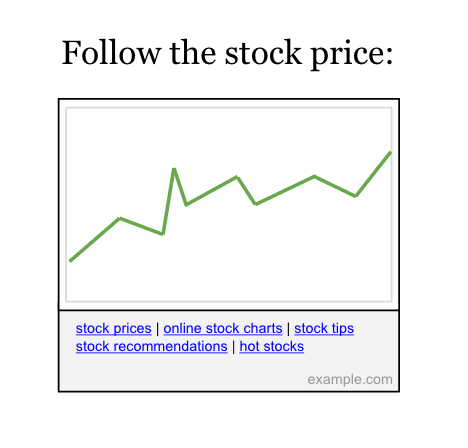

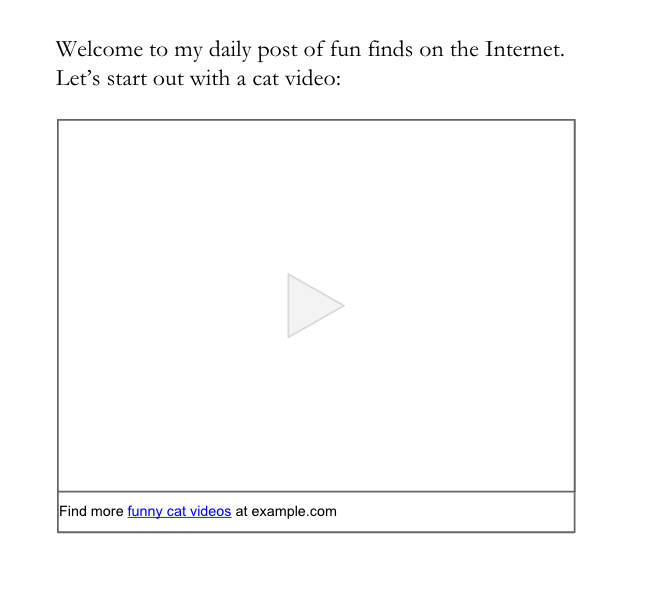
Google’s webspam team may take manual actions on unnatural links. When a manual action is taken, Google will notify the site owners through Search Console. If you receive such a warning for unnatural links to your site and you use links in widgets to promote your site, we recommend resolving these issues and requesting reconsideration.
You can resolve issues with unnatural links by making sure they don’t pass PageRank. To do this, add a rel=”nofollow” attribute on the widget links or remove the links entirely. After fixing or removing widget links and any other unnatural links to your site, let Google know about your change by submitting a reconsideration request in Search Console. Once the request has been reviewed, you’ll get a notification about whether the reconsideration request was successful or not.
Also, we would like to remind webmasters who use widgets on their sites to check those widgets for any unnatural links. Add a rel=”nofollow” attribute on those unnatural links or remove the links entirely from the widget.
For more information, please watch our video about widget links and refer to our Webmaster Guidelines on Link Schemes. Additionally, feel free to ask questions in our Webmaster Help Forums, where a community of webmasters can help with their experience.
Posted by Agnieszka Łata, Trust & Safety Search Team and Eric Kuan, Webmaster Relations Specialist

