Google Shopping Is Free – Froogle Is Back, For Real This Time
Google announced some big news – Google Shopping is now free. That means you can add your products for free to the Google Shopping tab in Google Search. Google said “Beginning next week, search results on the Google Shopping tab will consist primari…
Yesterday’s Google Indexing Issue Seems Resolved
Yesterday afternoon I reported on Search Engine Land that Google seemed to be having issues indexing new content. This was maybe for an hour or two, where if you published new content, Google would not index or show it in the search results. Based on…
Google Tests New How To Recipe Results Interface
Google seems to be testing a new interface for how to results, maybe just with recipes or maybe more wide spread. Brian Freiesleben shared this recipe result that shows the old and new interface side by side.
Google Performance Reports Filter Out Automated Queries
Google’s John Mueller said on Twitter that Google tries to filter out the automated queries from rank checking tools and similar tools in its performance reports within Google Search Console. John said “We do filter out a ton of these, but I imagine …
Google Tests Questions Box In Search Results In US For COVID-19 Queries
Google has expanded the Google Question Hub feature, where Google shows a question box in the search results. Google told me they are piloting this now in the US specifically for COVID-19 queries where Google’s search results may not have content to sa…
Effective mobile advertising strategies for 2020
As the COVID-19 pandemic forces everyone to stay indoors, mobile advertising is going to be crucial. More on how to establish and polish mobile marketing strategies
The post Effective mobile advertising strategies for 2020 appeared first on Search Engine Watch.
Up next on Live with Search Engine Land: Content marketing during COVID-19
We will dive into what brands should be communicating and ways to stand out with your content while respecting the current pandemic.
Please visit Search Engine Land for the full article.
Announcing: The Keyword Research Master Guide [New for 2020]
Posted by Cyrus-Shepard
Why a new guide?
Often in SEO, we get so preoccupied with technical SEO (pagination, site speed, the latest Python course, etc.) that we forget the basis of winning SEO begins and ends with keywords.
- Not choosing keywords before you start with SEO means shooting in the dark — a likely losing gamble if your content will succeed or not.
- Choosing the wrong keywords means wasting your time and budget on content that will never gain visibility in search results.
- Conversely, choosing smart, targeted keywords can help carve out and dominate a traffic niche that raises you above the competition.
No doubt, the difference between good SEOs and mediocre SEOs is often their keyword research strategy.
Here at Moz, a question we often hear after people finish reading the famous Beginner’s Guide to SEO is: What do I read next?
To give people a practical place to start, we wanted to provide you with concrete keyword research workflows. It’s as if you’re looking over our shoulder as we do strategic keyword research.
We also included a few intermediate-to-advanced concepts, such as keyword grouping, understanding keyword priority, and on-page keyword optimization.
And finally, we wanted to make sure it was free.
If you want, feel free to jump to the guide now, or read below about what the guide covers and how it differs from any other guide on keyword research.
THE KEYWORD RESEARCH MASTER GUIDE

1. Understanding seed keywords
We call them “seed” keywords because all your other keywords grow out of them. Finding the right seed keywords will absolutely make or break your entire keyword research strategy.
Finding the right seed keywords is about asking and answering three key questions:
- What do you think you want to rank for?
- What do you already rank for?
- What do your competitors rank for?
After this, you validate your answers with data to find the absolute best seeds.
We also show you the exact process and tools we use to extract these seeds, such as Google Search Console (shown below).

The cool thing about seed keywords is this: they grow more seeds! Once you find the right seeds, you can reiterate the process again and again to grow a complete keyword strategy for an entire site, even one that’s thousands of pages.
2. Building perfect keyword lists
This is where the rubber hits the road. Here you expand your seed keywords into complete lists. These lists support multiple pages and topics, and can even grow more seeds.

This is also the place you want to be as comprehensive as possible, in order to uncover the opportunities your competition probably missed.
3. Prioritizing keywords
Nearly any old keyword tool can give you lists of hundreds or thousands of keywords. The secret to success is knowing which keywords to prioritize and pursue.
Which keywords will actually prove profitable? Which keywords can you actually rank for?
To answer these questions, we do a deep dive into the keyword metrics that help us to prioritize our keyword lists:
- Relevance
- Monthly volume
- Keyword difficulty
- Organic click-through rate (CTR)
- Priority

Understanding how to use these metrics goes a long way in choosing the exact right keywords to invest in.
Read Chapter 3: Prioritizing Keywords
4. Grouping keywords
Keywords never exist in a vacuum. Instead, they almost always appear with other keywords.
Adding related keywords to a page is a smart strategy for increasing topical relevance. At the same time, trying to target too many keywords on the same page may dilute their relevance and make it more difficult to rank.
Here, we show you techniques to address both of these problems:
- When to create separate pages for each keyword
- How to group related keywords together

We’ll also show you some grouping tips to help set you up for your next task: on-page keyword optimization.
Read Chapter 4: Grouping Keywords
5. On-page keyword optimization
Very few keyword research guides ever even mention on-page keyword optimization.
We wanted to do better.
Because keyword research uncovers intent, this is a great starting point for on-page optimization. If you understand not only what your users are searching for, but also what they expect to find, you can better create your content to satisfy their expectations.

We’ve also included a brief overview of where and how to incorporate keywords on the page. While this section is mostly beginner level, more immediate SEOs should find the refresher useful.
Read Chapter 5: On-page Keyword Optimization
6. Tracking keyword rankings
If you’re a consultant, agency, in-house SEO, or simply work for yourself, you want to know how your keywords perform in search engines.
Traditionally, keyword tracking was synonymous with “ranking” — but times have changed. Today, with personalization, localization, and shifting competitive environments, keyword tracking has grown much more sophisticated.
In this chapter, we’ll cover:
- Traditional keyword ranking
- Local rank tracking
- Rank indexes
- Share of Voice (SOV) and visibility

By the end of this chapter, you’ll understand which type of keyword tracking is right for you, and how to report these numbers to the people who matter.
Read Chapter 6: Tracking Keyword Rankings
7. Keyword research tools and resources
Bonus time!
We couldn’t squeeze everything in the previous chapters, so we added all our extra resources here. The crème de la crème is the Keyword Research Cheat Sheet. You can download, print, share with your team, or pin to your wall.

We’ve also made a handy list of our favorite keyword research tools, along with a few other useful resources on keyword research.
THE KEYWORD RESEARCH MASTER GUIDE
We hope you enjoy! Let us know what you think in the comments below.
Sign up for The Moz Top 10, a semimonthly mailer updating you on the top ten hottest pieces of SEO news, tips, and rad links uncovered by the Moz team. Think of it as your exclusive digest of stuff you don’t have time to hunt down but want to read!
Google shouldn’t pause algorithm updates during the pandemic, expert SEOs say [Video]
While it’s not business as usual, search engines need to continue to help users, provide vital resources and fight against misinformation.
Please visit Search Engine Land for the full article.
What does Yoast SEO do?
The Yoast SEO plugin makes it easy for your site to meet the highest technical SEO standards. It also gives you the tools to bring your content to the highest standards of SEO and overall readability. Here, we’ll discuss how our plugin helps you build the best website you possibly can! Technical features of Yoast […]
The post What does Yoast SEO do? appeared first on Yoast.
Pro Tip: How to overcome obstacles to try new PPC tactics
Think outside the box with past creatives that might still be applicable to plan ahead for the next fiscal year.
Please visit Search Engine Land for the full article.
How to Prepare For Lifting Lockdowns Wherever You Are
It has “only” been 3 weeks since the UK was on lockdown, but it has been longer for other countries such as France, Spain and Italy. As we see other countries relax the lockdown, what can we do to prepare for our new freedom into a world that now has been permanently changed?
Post from Jo Juliana Turnbull
Did you know that Google employs 810 features on its SERPs?
Each feature is tailored to a certain type of search or search intent.
Please visit Search Engine Land for the full article.
TapClicks buys AdStage to expand marketing intelligence, predictive campaign optimization capabilities
The companies share a vision of a unified marketing platform. AdStage founder will head up intelligence group.
Please visit Search Engine Land for the full article.
Fake reviews problem is much worse than people know
Like a virus it infects all the major review sites, especially Google and Amazon.
Please visit Search Engine Land for the full article.
Google testing Question Hub in the U.S. for COVID-related queries
Initially launching in India and other regions where Google had content gaps, Google is now testing this in the US.
Please visit Search Engine Land for the full article.
Local Business Guide: Reach Your Customers Efficiently with Boosted Instagram Posts
The Current State of Local Advertising
A friend of mine flagged this to me:
They were receiving ads on Instagram from local businesses from across the United States.
We’re talking about someone who lives in North Carolina getting ads for a local news channel, who was actually promoting a small business, from Portland, Oregon.…
The post Local Business Guide: Reach Your Customers Efficiently with Boosted Instagram Posts appeared first on Seer Interactive.
Industry Update: Google Shopping Introduces Free Product Listings
This post was co-authored by Chris Evans & Vanessa Rodriguez.
What You Need to Know
Google announced on 4/21/2020 that they are advancing their plans to introduce free product listings into Google Shopping before the end of April in the U.S.…
The post Industry Update: Google Shopping Introduces Free Product Listings appeared first on Seer Interactive.
How Google SERP Layouts Affect Searching Behavior
Posted by Stephen_Job
There are several studies (and lots of data) out there about how people use Google SERPs, what they ignore, and what they focus on. An example is Moz’s recent experiment testing whether SEOs should continue optimizing for featured snippets or not (especially now that Google has announced that if you have a featured snippet, you no longer appear elsewhere in the search results).
Two things I have never seen tested are the actual user reactions to and behavior with SERPs. My team and I set out to test these ourselves, and this is where biometric technology comes into play.
What is biometric technology and how can marketers use it?
Biometric technology measures physical and behavioral characteristics. By combining the data from eye tracking devices, galvanic skin response monitors (which measure your sweat levels, allowing us to measure subconscious reactions), and facial recognition software, we can gain useful insight into behavioral patterns.
We’re learning that biometrics can be used in a broad range of settings, from UX testing for websites, to evaluating consumer engagement with brand collateral, and even to measuring emotional responses to TV advertisements. In this test, we also wanted to see if it could be used to help give us an understanding of how people actually interact with Google SERPs, and provide insight into searching behavior more generally.
The plan
The goal of the research was to assess the impact that SERP layouts and design have on user searching behavior and information retrieval in Google.
To simulate natural searching behavior, our UX and biometrics expert Tom Pretty carried out a small user testing experiment. Users were asked to perform a number of Google searches with the purpose of researching and buying a new mobile phone. One of the goals was to capture data from every point of a customer journey.
Participants were given tasks with specific search terms at various stages of purchasing intent. While prescribing search terms limited natural searching behavior, it was a sacrifice made to ensure the study had the best chance of achieving consistency in the SERPs presented, and so aggregated results could be gained.
The tests were run on desktop, although in the future we have plans to expand the study on mobile.
Users began each task on the Google homepage. From there, they informed the moderator when they found the information they were looking for. At that point they proceeded to the next task.

Data inputs
- Eye tracking
- Facial expression analysis
- Galvanic skin response (GSR)
Data sample
- 20 participants
Key objectives
- Understand gaze behavior on SERPs (where people look when searching)
- Understand engagement behavior on SERPs (where people click when searching)
- Identify any emotional responses to SERPs (what happens when users are presented with ads?)
- Interaction analysis with different types of results (e.g. ads, shopping results, map packs, Knowledge Graph, rich snippets, PAAs, etc.).
Research scenario and tasks
We told participants they were looking to buy a new phone and were particularly interested in an iPhone XS. They were then provided with a list of tasks to complete, each focused on searches someone might make when buying a new phone. Using the suggested search terms for each task was a stipulation of participation.
Tasks
- Find out the screen size and resolution of the iPhone XS
Search term: iPhone XS size and resolution - Find out the talk time battery life of the iPhone XS
Search term: iPhone XS talk time - Find reviews for the iPhone XS that give a quick list of pros and cons
Search term: iPhone XS reviews - Find the address and phone number of a phone shop in the town center that may be able to sell you an iPhone XS
Search term: Phone shops near me - Find what you feel is the cheapest price for a new iPhone XS (handset only)
Search term: Cheapest iPhone XS deals - Find and go on to buy a used iPhone XS online (stop at point of data entry)
Search term: Buy used iPhone XS
We chose all of the search terms first for ease of correlating data. (If everyone had searched for whatever they wanted, we may not have gotten certain SERP designs displayed.) And second, so we could make sure that everyone who took part got exactly the same results within Google. We needed the searches to return a featured snippet, the Google Knowledge Graph, Google’s “People also ask” feature, as well as shopping feeds and PPC ads.
On the whole, this was successful, although in a few cases there were small variations in the SERP presented (even when the same search term had been used from the same location with a clear cache).
“When designing a study, a key concern is balancing natural behaviors and giving participants freedom to interact naturally, with ensuring we have assets at the end that can be effectively reported on and give us the insights we require.” — Tom Pretty, UX Consultant, Coast Digital
The results
Featured Snippets
This was the finding that our in-house SEOs were most interested in. According to a study by Ahrefs, featured snippets get 8.6% of clicks while 19.6% go to the first natural search below it, but when no featured snippet is present, 26% of clicks go to the first result. At the time, this meant that having a featured snippet wasn’t terrible, especially if you could gain a featured snippet but weren’t ranking first for a term. who doesn’t want to have real estate above a competitor?
However, with Danny Sullivan of Google announcing that if you appear in a featured snippet, you will no longer appear anywhere else in the search engine results page, we started to wonder how this would change what SEOs thought about them. Maybe we would see a mass exodus of SEOs de-optimising pages for featured snippets so they could keep their organic ranking instead. Moz’s recent experiment estimated a 12% drop in traffic to pages that lose their featured snippet, but what does this mean about user behavior?
What did we find out?
In the information-based searches, we found that featured snippets actually attracted the most fixations. They were consistently the first element viewed by users and were where users spent the most time gazing. These tasks were also some of the fastest to be completed, indicating that featured snippets are successful in giving users their desired answer quickly and effectively.
All of this indicates that featured snippets are hugely important real estate within a SERP (especially if you are targeting question-based keywords and more informational search intent).


In both information-based tasks, the featured snippet was the first element to be viewed (within two seconds). It was viewed by the highest number of respondents (96% fixated in the area on average), and was also clicked most (66% of users clicked on average).
People also ask
The “People also ask” (PAA) element is an ideal place to find answers to question-based search terms that people are actively looking for, but do users interact with them?
What did we find out?
From the results, after looking at a featured snippet, searchers skipped over the PAA element to the standard organic results. Participants did gaze back at them, but clicks in those areas were extremely low, thus showing limited engagement. This behavior indicates that they are not distracting users or impacting how they journey through the SERP in any significant way.
Knowledge Graph
One task involved participants searching using a keyword that would return the Google Knowledge Graph. The goal was to find out the interaction rate, as well as where the main interaction happened and where the gaze went.
What did we find out?
Our findings indicate that when a search with purchase intent is made (e.g. “deals”), then the Knowledge Graph attracts attention sooner, potentially because it includes visible prices.

By also introducing heat map data, we can see that the pricing area on the Knowledge Graph picked up significant engagement, but there was still a lot of attention focused on the organic results.

Essentially, this shows that while the knowledge graph is useful space, it does not wholly detract from the main SERP column. Users still resort to paid ads and organic listings to find what they are looking for.
Location searches
We have all seen data in Google Search Console with “near me” under certain keywords, and there is an ongoing discussion of why, or how, to optimise for them. From a pay-per-click (PPC) point of view, should you even bother trying to appear in them? By introducing such a search term in the study, we were hoping to answer some of these questions.
What did we find out?
From the fixation data, we found that most attention was dedicated to the local listings rather than the map or organic listings. This would indicate that the greater amount of detail in the local listings was more engaging.

However, in a different SERP variant, the addition of the product row led to users spending a longer time reviewing the SERP and expressing more negative emotions. This product row addition also changed gaze patterns, causing users to progress through each element in turn, rather than skipping straight to the local results (which appeared to be more useful in the previous search).

This presentation of results being deemed irrelevant or less important by the searcher could be the main cause of the negative emotion and, more broadly, could indicate general frustration at having obstacles put in the way of finding the answer directly.
Purchase intent searching
For this element of the study, participants were given queries that indicate someone is actively looking to buy. At this point, they have carried out the educational search, maybe even the review search, and now they are intent on purchasing.
What did we find out?
For “buy” based searches, the horizontal product bar operates effectively, picking up good engagement and clicks. Users still focused on organic listings first, however, before returning to the shopping bar.
The addition of Knowledge Graph results for this type of search wasn’t very effective, picking up little engagement in the overall picture.


These results indicate that the shopping results presented at the top of the page play a useful role when searching with purchasing intent. However, in both variations, the first result was the most-clicked element in the SERP, showing that a traditional PPC or organic listing remains highly effective at this point in the customer journey.
Galvanic skin response
Looking at GSR when participants were on the various SERPs, there is some correlation between the self-reported “most difficult” tasks and a higher than normal GSR.
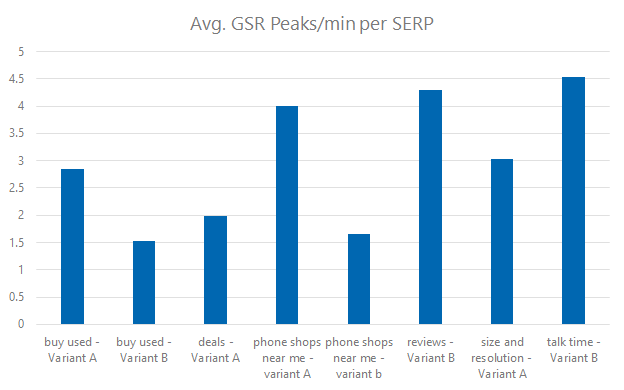
For the “talk time” task in particular, the featured snippet presented information for the iPhone XS Max, not the iPhone XS model, which was likely the cause of the negative reaction as participants had to spend longer digging into multiple information sources.

For the “talk time” SERP, the challenges encountered when incorrect data was presented within a featured snippet likely caused the high difficulty rating.
What does it all mean?
Unfortunately, this wasn’t the largest study in the world, but it was a start. Obviously, running this study again with greater numbers would be the ideal and would help firm up some of the findings (and I for one, would love to see a huge chunk of people take part).
That being said, there are some solid conclusions that we can take away:
- The nature of the search greatly changes the engagement behavior, even when similar SERP layouts are displayed. (Which is probably why they are so heavily split tested).
- Featured snippets are highly effective for information-based searching, and while they led to some 33% of users choosing not to follow through to the site after finding the answer, two-thirds still clicked through to the website (which is very different from the data we have seen in previous studies).
- Local listings (especially when served without a shopping bar) are engaging and give users essential information in an effective format.
- Even with the addition of Knowledge Graph, “People also ask”, and featured snippets, more traditional PPC ads and SEO listings still play a big role in searching behavior.
Featured snippets are not the worst thing in the world (contrary to the popular knee-jerk reaction from the SEO industry after Google’s announcement). All that has changed is that now you have to work out what featured snippets are worth it for your business (instead of trying to just claim all of them). On purely informational or educational searches, they actually performed really well. People stayed fixated on them for a fairly lengthy period of time, and 66% clicked through. However, we also have an example of people reacting badly to the featured snippet when it contained irrelevant or incorrect information.
The findings also give some weight to the fact that a lot of SEO is now about context. What do users expect to see when they search a certain way? Are they expecting to see lots of shopping feeds (they generally are if it’s a purchasing intent keyword), but at the same time, they wouldn’t expect to see them in an educational search.
What now?
Hopefully, you found this study useful and learned something new about search behavior . Our next goal is to increase the amount of people in the study to see if a bigger data pool confirms our findings, or shows us something completely unexpected.
Sign up for The Moz Top 10, a semimonthly mailer updating you on the top ten hottest pieces of SEO news, tips, and rad links uncovered by the Moz team. Think of it as your exclusive digest of stuff you don’t have time to hunt down but want to read!
3 Terrible Reasons to Avoid Smart Bidding (And 8 Great Reasons to Use it)
Raise your hand if you’ve ever been on the fence about smart bidding
When I began my digital marketing career in 2011, we thought we were doing “smart bidding” when we set a bid to $5.01 instead of $5.00; because you only need to beat your competitor’s bid by a penny, and we figured most marketers weren’t savvy enough to set bids in uneven increments.…
The post 3 Terrible Reasons to Avoid Smart Bidding (And 8 Great Reasons to Use it) appeared first on Seer Interactive.