Webmaster Forums Top AMP Questions

It has been busy here at Google Webmaster Central over the last few weeks, covering a lot of details about Accelerated Mobile Pages that we hope you have found useful. The topics have included:
- What is AMP?
- How to get started with Accelerated Mobile Pages
- How can Google Search Console help you AMPlify your site
- How to best evaluate issues with your Accelerated Mobile Pages
- Top 8 things to consider when you AMPlify a site
- How to set up Analytics on your AMP page
- How to set up Ads on your AMP page
We’ve also been seeing a few AMP questions coming to the Webmaster forums about getting started using AMP on Google Search. To help, we’ve compiled some of the most common questions we’ve seen:
Q: I’m considering creating AMP pages for my website. What is the benefit? What types of sites and pages is AMP for?
Users love content that loads fast and without any fuss – using the AMP format may make it more compelling for people to consume and engage with your content on mobile devices. Research has shown that 40% of users abandon a site that takes more than three seconds to load. The Washington Post observed an 88% decrease in article loading time and a 23% increase in returning users from mobile search from adopting AMP.
The AMP format is great for all types of static web content such as news, recipes, movie listings, product pages, reviews, videos, blogs and more.
Q: We are getting errors logged in Search Console for AMP pages; however, we already fixed these issues. Why are we still seeing errors?
The short answer is that changes to your AMP pages take about a week to be updated in Search Console. For a more in-depth answer on why, Google’s Webmaster Trends Analyst John Mueller shared a detailed post on Search Console latency challenges.
Q: Our AMP pages are not showing up on Google Search. What should we do?
Only valid AMP pages will be eligible to show on Google Search. Check the validity of your AMP pages by using the AMP HTML Web Validator, the Chrome or Opera Extension or through a more automated process such as a cron job to make sure all new content is valid.
While it’s good practise overall to include schema.org structured data in your AMP pages (we recommend JSON-LD), it’s especially important for news publishers. News content that includes valid markup properties are eligible to be shown within the Top Stories section in Google Search results. To test your structured data, try using the structured data testing tool.
If you have more questions that are not answered here, share your feedback in the comments below or on our Google Webmasters Google+ page. Or as usual, feel free to post in our Webmasters Help Forum.
Posted by Tomo Taylor, AMP Community Manager


Penguin is now part of our core algorithm
Google’s algorithms rely on more than 200 unique signals or “clues” that make it possible to surface what you might be looking for. These signals include things like the specific words that appear on websites, the freshness of content, your region and …
Penguin is now part of our core algorithm
Google’s algorithms rely on more than 200 unique signals or “clues” that make it possible to surface what you might be looking for. These signals include things like the specific words that appear on websites, the freshness of content, your region and …
8 tips to AMPlify your clients

Here is our list of the top 8 things to consider when helping your clients AMPlify their websites (and staying ahead of their curiosity!) after our announcement to expand support for Accelerated Mobile Pages.
- Getting started can be simple
If a site uses a popular Content Management System (CMS), getting AMP pages up and running is as straightforward as installing a plug-in. Sites that use custom HTML or that are built from scratch will require additional development resources.

- Not all types of sites are suitable
AMP is great for all types of static web content such as news, recipes, movie listings, product pages, reviews, videos, blogs and more. AMP is less useful for single-page apps that are heavy on dynamic or interactive features, such as route mapping, email or social networks.
- You don’t have to #AMPlify the whole site
Add AMP to a client’s existing site progressively by starting with simple, static content pages like articles, products, or blog posts. These are the “leaf” pages that users access through platforms and search results, and could be simple changes that also bring the benefits of AMP to the website. This approach allows you to keep the homepage and other “browser” pages that might require advanced, non-AMP dynamic functionality.
If you’re creating a new, content-heavy website from scratch, consider building the whole site with AMP from the start. To begin with, check out the getting started guidelines.
- The AMP Project is open source and still evolving
If a site’s use case is not supported in the AMP format yet, consider filing a feature request on GitHub, or you could even design a component yourself.
- AMP pages might need to meet additional requirements to show up in certain places
In order to appear in Google’s search results, AMP pages need only be valid AMP HTML. Some products integrating AMP might have further requirements than the AMP validation. For example, you’ll need to mark up your AMP pages as Article markup with Structured Data to make them eligible for the Google Top Stories section.
- There is no ranking change on Search
Whether a page or site has valid and eligible AMP pages has no bearing on the site’s ranking on the Search results page. The difference is that web results that have AMP versions will be labeled with an  icon.
- AMP on Google is expanding globally
AMP search results on Google will be rolling out worldwide when it launches in the coming weeks. The Top Stories carousel which shows newsy and fresh AMP content is already available in a number of countries and languages.
- Help is on hand
There’s a whole host of useful resources that will help if you have any questions:
Webmasters Help Forum: Ask questions about AMP and Google’s implementation of AMP
Stack Overflow: Ask technical questions about AMP
GitHub: Submit a feature request or contribute
What are your top tips to #AMPlify pages? Let us know in the comments below or on our Google Webmasters Google+ page. Or as usual, if you have any questions or need help, feel free to post in our Webmasters Help Forum.
Posted by Tomo Taylor, AMP Community Manager

8 tips to AMPlify your clients
Here is our list of the top 8 things to consider when helping your clients AMPlify their websites (and staying ahead of their curiosity!) after our announcement to expand support for Accelerated Mobile Pages.
- Getting started can be simple
If a site uses a popular Content Management System (CMS), getting AMP pages up and running is as straightforward as installing a plug-in. Sites that use custom HTML or that are built from scratch will require additional development resources.
- Not all types of sites are suitable
AMP is great for all types of static web content such as news, recipes, movie listings, product pages, reviews, videos, blogs and more. AMP is less useful for single-page apps that are heavy on dynamic or interactive features, such as route mapping, email or social networks.
- You don’t have to #AMPlify the whole site
Add AMP to a client’s existing site progressively by starting with simple, static content pages like articles, products, or blog posts. These are the “leaf” pages that users access through platforms and search results, and could be simple changes that also bring the benefits of AMP to the website. This approach allows you to keep the homepage and other “browser” pages that might require advanced, non-AMP dynamic functionality.
If you’re creating a new, content-heavy website from scratch, consider building the whole site with AMP from the start. To begin with, check out the getting started guidelines.
- The AMP Project is open source and still evolving
If a site’s use case is not supported in the AMP format yet, consider filing a feature request on GitHub, or you could even design a component yourself.
- AMP pages might need to meet additional requirements to show up in certain places
In order to appear in Google’s search results, AMP pages need only be valid AMP HTML. Some products integrating AMP might have further requirements than the AMP validation. For example, you’ll need to mark up your AMP pages as Article markup with Structured Data to make them eligible for the Google Top Stories section.
- There is no ranking change on Search
Whether a page or site has valid and eligible AMP pages has no bearing on the site’s ranking on the Search results page. The difference is that web results that have AMP versions will be labeled with an icon.
- AMP on Google is expanding globally
AMP search results on Google will be rolling out worldwide when it launches in the coming weeks. The Top Stories carousel which shows newsy and fresh AMP content is already available in a number of countries and languages.
- Help is on hand
There’s a whole host of useful resources that will help if you have any questions:
Webmasters Help Forum: Ask questions about AMP and Google’s implementation of AMP
Stack Overflow: Ask technical questions about AMP
GitHub: Submit a feature request or contribute
What are your top tips to #AMPlify pages? Let us know in the comments below or on our Google Webmasters Google+ page. Or as usual, if you have any questions or need help, feel free to post in our Webmasters Help Forum.
Posted by Tomo Taylor, AMP Community Manager
How to best evaluate issues with your Accelerated Mobile Pages

As you #AMPlify your site with Accelerated Mobile Pages, it’s important to keep an eye periodically on the validation status of your pages, as only valid AMP pages are eligible to show on Google Search.
When implementing AMP, sometimes pages will contain errors causing them to not be indexed by Google Search. Pages may also contain warnings that are elements that are not best practice or are going to become errors in the future.
Google Search Console is a free service that lets you check which of your AMP pages Google has identified as having errors. Once you know which URLs are running into issues, there are a few handy tools that can make checking the validation error details easier.
1. Browser Developer Tools
To use Developer Tools for validation:
- Open your AMP page in your browser
- Append “#development=1” to the URL, for example, http://localhost:8000/released.amp.html#development=1.
- Open the Chrome DevTools console and check for validation errors.
Developer Console errors will look similar to this:

2. AMP Browser Extensions
With the AMP Browser Extensions (available for Chrome and Opera), you can quickly identify and debug invalid AMP pages. As you browse your site, the extension will evaluate each AMP page visited and give an indication of the validity of the page.
|
|
When there are errors within an AMP page, the extension’s icon shows in a red color and displays the number of errors encountered. |
|
|
When there are no errors within an AMP page, the icon shows in a green color and displays the number of warnings, if any exist. |
|
|
When the page isn’t AMP but the page indicates that an AMP version is available, the icon shows in a blue color with a link icon, and clicking on the extension will redirect the browser to the AMP version. |


Using the extensions means you can see what errors or warnings the page has by clicking on the extension icon. Every issue will list the source line, source column, and a message indicating what is wrong. When a more detailed description of the issue exists, a “Learn more” link will take you to the relevant page on ampproject.org.

3. AMP Web Validator
The AMP Web Validator, available at validator.ampproject.org, provides a simple web UI to test the validity of your AMP pages.

To use the tool, you enter an AMP URL, or copy/paste your source code, and the web validator displays error messages between the lines. You can make edits directly in the web validator which will trigger revalidation, letting you know if your proposed tweaks will fix the problem.
What’s your favourite way to check the status of your AMP Pages? Share your feedback in the comments below or on our Google Webmasters Google+ page. Or as usual, if you have any questions or need help, feel free to post in our Webmasters Help Forum.
Posted by Tomo Taylor, AMP Community Manager

How to best evaluate issues with your Accelerated Mobile Pages
As you #AMPlify your site with Accelerated Mobile Pages, it’s important to keep an eye periodically on the validation status of your pages, as only valid AMP pages are eligible to show on Google Search.
When implementing AMP, sometimes pages will contain errors causing them to not be indexed by Google Search. Pages may also contain warnings that are elements that are not best practice or are going to become errors in the future.
Google Search Console is a free service that lets you check which of your AMP pages Google has identified as having errors. Once you know which URLs are running into issues, there are a few handy tools that can make checking the validation error details easier.
1. Browser Developer Tools
To use Developer Tools for validation:
- Open your AMP page in your browser
- Append “#development=1” to the URL, for example, http://localhost:8000/released.amp.html#development=1.
- Open the Chrome DevTools console and check for validation errors.
Developer Console errors will look similar to this:
2. AMP Browser Extensions
With the AMP Browser Extensions (available for Chrome and Opera), you can quickly identify and debug invalid AMP pages. As you browse your site, the extension will evaluate each AMP page visited and give an indication of the validity of the page.
|
|
When there are errors within an AMP page, the extension’s icon shows in a red color and displays the number of errors encountered. |
|
|
When there are no errors within an AMP page, the icon shows in a green color and displays the number of warnings, if any exist. |
|
|
When the page isn’t AMP but the page indicates that an AMP version is available, the icon shows in a blue color with a link icon, and clicking on the extension will redirect the browser to the AMP version. |
Using the extensions means you can see what errors or warnings the page has by clicking on the extension icon. Every issue will list the source line, source column, and a message indicating what is wrong. When a more detailed description of the issue exists, a “Learn more” link will take you to the relevant page on ampproject.org.
3. AMP Web Validator
The AMP Web Validator, available at validator.ampproject.org, provides a simple web UI to test the validity of your AMP pages.
To use the tool, you enter an AMP URL, or copy/paste your source code, and the web validator displays error messages between the lines. You can make edits directly in the web validator which will trigger revalidation, letting you know if your proposed tweaks will fix the problem.
What’s your favourite way to check the status of your AMP Pages? Share your feedback in the comments below or on our Google Webmasters Google+ page. Or as usual, if you have any questions or need help, feel free to post in our Webmasters Help Forum.
Posted by Tomo Taylor, AMP Community Manager
How can Google Search Console help you AMPlify your site?

If you have recently implemented Accelerated Mobile Pages on your site, it’s a great time to check which of your AMP pages Google has found and indexed by using Search Console.
Search Console is a free service that helps you monitor and maintain your site’s presence in Google Search, including any Accelerated Mobile Pages. You don’t have to sign up for Search Console for your AMP pages to be included in Google Search results, but doing so can help you understand which of your AMP pages are eligible to show in search results.
To get started with Search Console, create a free account or sign in here and validate the ownership of your sites.
Once you have your site set up on Search Console, open the Accelerated Mobile Pages report under Search Appearance > Accelerated Mobile Pages to see which AMP pages Google has found and indexed on your site, as shown here:

The report lists AMP-related issues for AMP pages that are not indexed, so that you can identify and address them.
Search Console also lets you monitor the performance of your AMP pages on Google Search in the Search Analytics report. This report tells you which queries show your AMP pages in Search results, lets you compare how their metrics stack against your other results and see how the visibility of your AMP pages has changed over time.
To view your AMP page metrics, such as clicks or impressions, select Search Appearance > Search Analytics > Filter by AMP.
(Note: if you’ve only just created your Search Console account or set up your AMP pages and they have not been detected yet, remember that Google crawls pages only periodically. You can wait for the scheduled regular recrawl, or you can request a recrawl.)
Have you been using Search Console to monitor your AMP pages? Give us feedback in the comments below or on our Google Webmasters Google+ page. Or as usual, if you have any questions or need help, feel free to post in our Webmasters Help Forum.
Posted by Tom Taylor, AMP Community Manager

How can Google Search Console help you AMPlify your site?
If you have recently implemented Accelerated Mobile Pages on your site, it’s a great time to check which of your AMP pages Google has found and indexed by using Search Console.
Search Console is a free service that helps you monitor and maintain your site’s presence in Google Search, including any Accelerated Mobile Pages. You don’t have to sign up for Search Console for your AMP pages to be included in Google Search results, but doing so can help you understand which of your AMP pages are eligible to show in search results.
To get started with Search Console, create a free account or sign in here and validate the ownership of your sites.
Once you have your site set up on Search Console, open the Accelerated Mobile Pages report under Search Appearance > Accelerated Mobile Pages to see which AMP pages Google has found and indexed on your site, as shown here:
The report lists AMP-related issues for AMP pages that are not indexed, so that you can identify and address them.
Search Console also lets you monitor the performance of your AMP pages on Google Search in the Search Analytics report. This report tells you which queries show your AMP pages in Search results, lets you compare how their metrics stack against your other results and see how the visibility of your AMP pages has changed over time.
To view your AMP page metrics, such as clicks or impressions, select Search Appearance > Search Analytics > Filter by AMP.
(Note: if you’ve only just created your Search Console account or set up your AMP pages and they have not been detected yet, remember that Google crawls pages only periodically. You can wait for the scheduled regular recrawl, or you can request a recrawl.)
Have you been using Search Console to monitor your AMP pages? Give us feedback in the comments below or on our Google Webmasters Google+ page. Or as usual, if you have any questions or need help, feel free to post in our Webmasters Help Forum.
UPDATE: To help ensure that your AMP implementation is working as expected, Search Console now has an enhanced AMP testing tool.
Posted by Tom Taylor, AMP Community Manager
How to get started with Accelerated Mobile Pages

Interested in Accelerated Mobile Pages but not sure how to get started? AMPlifying your site for lightning speed might be easier than you think.
If you use a Content Management System (CMS) like WordPress, Drupal, or Hatena, getting set up on AMP is as simple as installing and activating a plug-in. Each CMS has a slightly different approach to AMPlifying pages, so it’s worth checking with your provider on how to get started.
On the other hand, if your site uses custom HTML, or you want to learn how AMP works under the hood, then check out the AMP Codelab for a guided, hands-on coding experience designed to take you through the process of developing your first pages. The Codelab covers the fundamentals:
- How AMP improves the user experience of the mobile web
- The foundations of an AMP page
- AMP limitations
- How AMP web components solve common problems
- How to validate your AMP pages
- How to prepare your AMP pages for Google Search
Once you are done with the basics, why not geek out with the Advanced Concepts Codelab?
Have you tried the Codelabs or added an AMP plugin to your site? Share your feedback in the comments below or on our Google Webmasters Google+ page. Or as usual, if you have any questions or need help, feel free to post in our Webmasters Help Forum.
Posted by Tomo Taylor, AMP Community Manager

How to get started with Accelerated Mobile Pages
Interested in Accelerated Mobile Pages but not sure how to get started? AMPlifying your site for lightning speed might be easier than you think.
If you use a Content Management System (CMS) like WordPress, Drupal, or Hatena, getting set up on AMP is as simple as installing and activating a plug-in. Each CMS has a slightly different approach to AMPlifying pages, so it’s worth checking with your provider on how to get started.
On the other hand, if your site uses custom HTML, or you want to learn how AMP works under the hood, then check out the AMP Codelab for a guided, hands-on coding experience designed to take you through the process of developing your first pages. The Codelab covers the fundamentals:
- How AMP improves the user experience of the mobile web
- The foundations of an AMP page
- AMP limitations
- How AMP web components solve common problems
- How to validate your AMP pages
- How to prepare your AMP pages for Google Search
Once you are done with the basics, why not geek out with the Advanced Concepts Codelab?
Have you tried the Codelabs or added an AMP plugin to your site? Share your feedback in the comments below or on our Google Webmasters Google+ page. Or as usual, if you have any questions or need help, feel free to post in our Webmasters Help Forum.
Posted by Tomo Taylor, AMP Community Manager
What is AMP?

Users today expect mobile websites to load super fast. The reality is that it can often take several seconds. It is no surprise that 40% of people abandon a website that takes more than 3 seconds to load. To reduce the time content takes to get to a user’s mobile device we started working on the Accelerated Mobile Pages Project, an open source initiative to improve the mobile web experience for everyone.
Accelerated Mobile Pages are HTML pages that take advantage of various technical approaches to prioritize speed and a faster experience for users by loading content almost instantaneously.
Later this year, all types of sites that create AMP pages will have expanded exposure across the entire Google Mobile Search results page, like e-commerce, entertainment, travel, recipe sites and many more. Visit the “Who” page on AMPProject.org for a flavour of some of the sites already creating AMP content and try the demo at (g.co/ampdemo) to see AMP versions of pages labeled with 


In advance of AMP expanding in Google Search, over the next few weeks we’ll be posting pointers to help you #AMPlify your site. Follow along with the #AMPlify hashtag on G+ and Twitter.
Have you already built AMP pages for your site? Share your feedback in the comments below or on our Google Webmasters Google+ page. Or as usual, if you have any questions or need help, feel free to post in our Webmasters Help Forum.
Posted by Tomo Taylor, AMP Community Manager

What is AMP?
Users today expect mobile websites to load super fast. The reality is that it can often take several seconds. It is no surprise that 40% of people abandon a website that takes more than 3 seconds to load. To reduce the time content takes to get to a user’s mobile device we started working on the Accelerated Mobile Pages Project, an open source initiative to improve the mobile web experience for everyone.
Accelerated Mobile Pages are HTML pages that take advantage of various technical approaches to prioritize speed and a faster experience for users by loading content almost instantaneously.
Later this year, all types of sites that create AMP pages will have expanded exposure across the entire Google Mobile Search results page, like e-commerce, entertainment, travel, recipe sites and many more. Visit the “Who” page on AMPProject.org for a flavour of some of the sites already creating AMP content and try the demo at (g.co/ampdemo) to see AMP versions of pages labeled with
In advance of AMP expanding in Google Search, over the next few weeks we’ll be posting pointers to help you #AMPlify your site. Follow along with the #AMPlify hashtag on G+ and Twitter.
Have you already built AMP pages for your site? Share your feedback in the comments below or on our Google Webmasters Google+ page. Or as usual, if you have any questions or need help, feel free to post in our Webmasters Help Forum.
Posted by Tomo Taylor, AMP Community Manager
A reminder about widget links
Google has long taken a strong stance against links that manipulate a site’s PageRank. Today we would like to reiterate our policy on the creation of keyword-rich, hidden or low-quality links embedded in widgets that are distributed across various sites.
Widgets can help website owners enrich the experience of their site and engage users. However, some widgets add links to a site that a webmaster did not editorially place and contain anchor text that the webmaster does not control. Because these links are not naturally placed, they’re considered a violation of Google Webmaster Guidelines.
Below you can find the examples of widgets which contain links that violate Google Webmaster Guidelines:


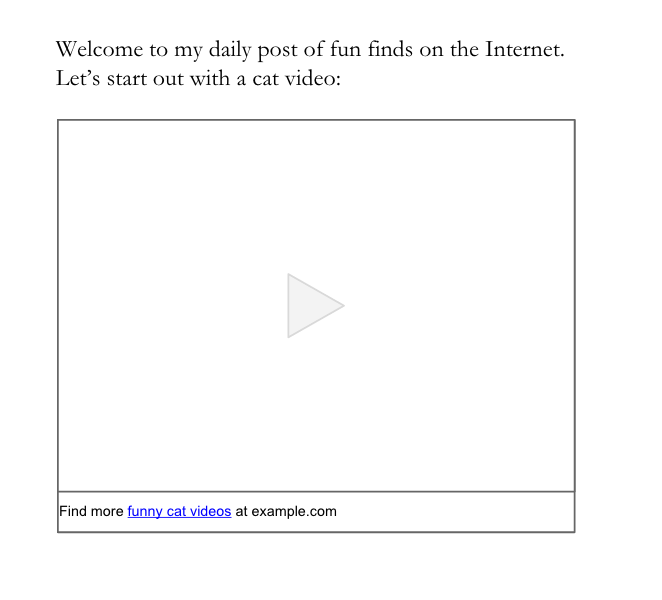
Google’s webspam team may take manual actions on unnatural links. When a manual action is taken, Google will notify the site owners through Search Console. If you receive such a warning for unnatural links to your site and you use links in widgets to promote your site, we recommend resolving these issues and requesting reconsideration.
You can resolve issues with unnatural links by making sure they don’t pass PageRank. To do this, add a rel=”nofollow” attribute on the widget links or remove the links entirely. After fixing or removing widget links and any other unnatural links to your site, let Google know about your change by submitting a reconsideration request in Search Console. Once the request has been reviewed, you’ll get a notification about whether the reconsideration request was successful or not.
Also, we would like to remind webmasters who use widgets on their sites to check those widgets for any unnatural links. Add a rel=”nofollow” attribute on those unnatural links or remove the links entirely from the widget.
For more information, please watch our video about widget links and refer to our Webmaster Guidelines on Link Schemes. Additionally, feel free to ask questions in our Webmaster Help Forums, where a community of webmasters can help with their experience.
Posted by Agnieszka Łata, Trust & Safety Search Team and Eric Kuan, Webmaster Relations Specialist

A reminder about widget links
Google has long taken a strong stance against links that manipulate a site’s PageRank. Today we would like to reiterate our policy on the creation of keyword-rich, hidden or low-quality links embedded in widgets that are distributed across various sites.
Widgets can help website owners enrich the experience of their site and engage users. However, some widgets add links to a site that a webmaster did not editorially place and contain anchor text that the webmaster does not control. Because these links are not naturally placed, they’re considered a violation of Google Webmaster Guidelines.
Below you can find the examples of widgets which contain links that violate Google Webmaster Guidelines:
Google’s webspam team may take manual actions on unnatural links. When a manual action is taken, Google will notify the site owners through Search Console. If you receive such a warning for unnatural links to your site and you use links in widgets to promote your site, we recommend resolving these issues and requesting reconsideration.
You can resolve issues with unnatural links by making sure they don’t pass PageRank. To do this, add a rel=”nofollow” attribute on the widget links or remove the links entirely. After fixing or removing widget links and any other unnatural links to your site, let Google know about your change by submitting a reconsideration request in Search Console. Once the request has been reviewed, you’ll get a notification about whether the reconsideration request was successful or not.
Also, we would like to remind webmasters who use widgets on their sites to check those widgets for any unnatural links. Add a rel=”nofollow” attribute on those unnatural links or remove the links entirely from the widget.
For more information, please watch our video about widget links and refer to our Webmaster Guidelines on Link Schemes. Additionally, feel free to ask questions in our Webmaster Help Forums, where a community of webmasters can help with their experience.
Posted by Agnieszka Łata, Trust & Safety Search Team and Eric Kuan, Webmaster Relations Specialist
Showcase your site’s reviews in Search
Today, we’re introducing Reviews from the web to local Knowledge Panels, to accompany our recently launched best-of lists and critic reviews features. Whether your site publishes editorial critic reviews, best-of places lists, or aggregates user ratings, this content can be featured in local Knowledge Panels when users are looking for places to go.
Reviews from the web
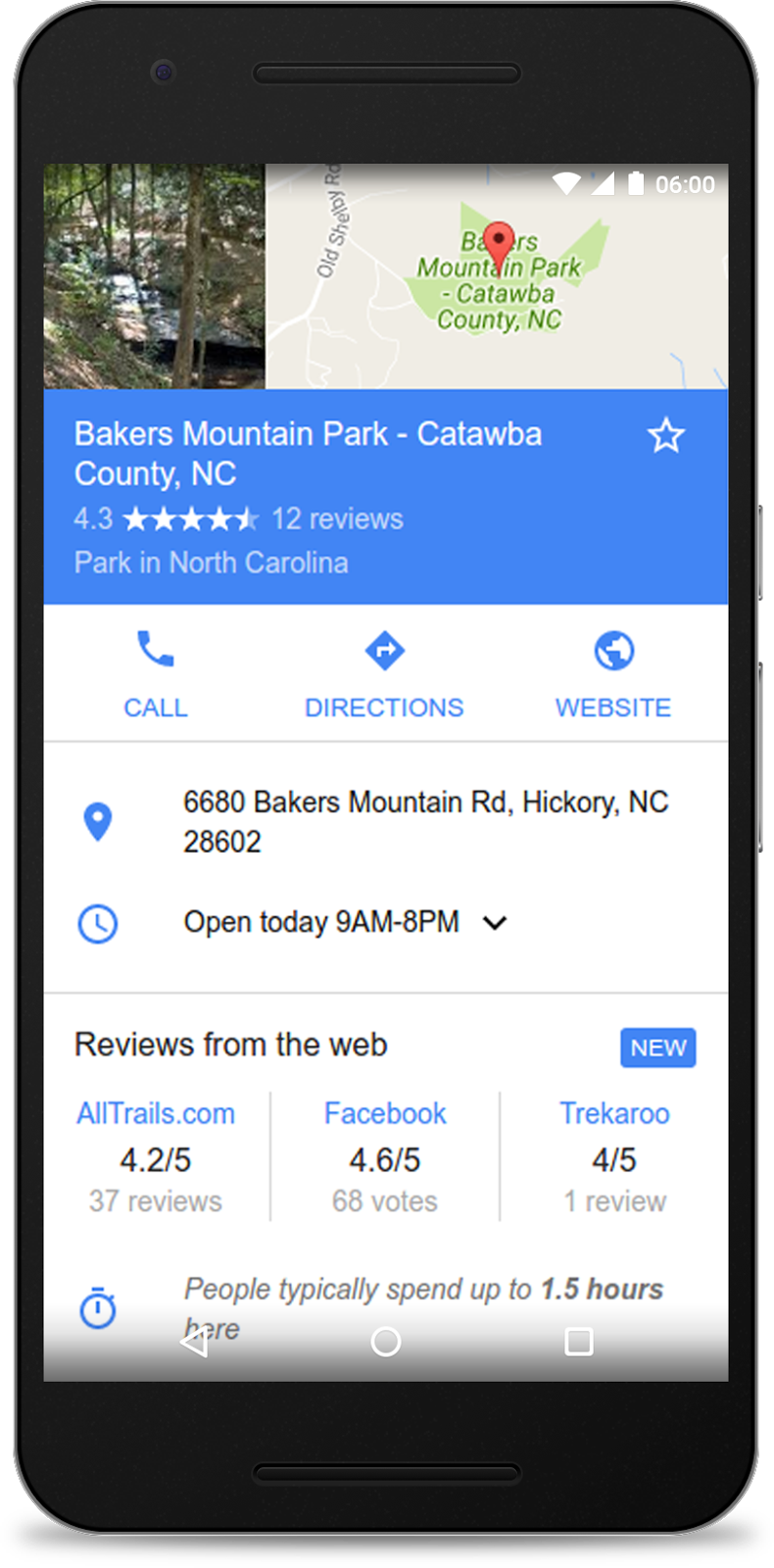
Available globally on mobile and desktop, Reviews from the web brings aggregated user ratings of up to three review sites to Knowledge Panels for local places across many verticals including shops, restaurants, parks and more.
By implementing review snippet markup and meeting our criteria, your site’s user-generated composite ratings will be eligible for inclusion. Add the Local Business markup to help Google match reviews to the right review subject and help grow your site’s coverage. For more information on the guidelines for the Reviews from the web, critic review and top places lists features, check out our developer site.
Critic reviews
In the U.S. on mobile and desktop, qualifying publishers can participate in the critic review feature in local Knowledge Panels. Critic reviews possess an editorial tone of voice and have an opinionated position on the local business, coming from an editor or on-the-ground expert. For more information on how to participate, see the details in our critic reviews page.

The local information across Google Search helps millions of people, every day, discover and share great places. If you have any questions, please visit our webmaster forums.
Posted by Ronnie Falcon, Product Manager

Showcase your site’s reviews in Search
Today, we’re introducing Reviews from the web to local Knowledge Panels, to accompany our recently launched best-of lists and critic reviews features. Whether your site publishes editorial critic reviews, best-of places lists, or aggregates user ratings, this content can be featured in local Knowledge Panels when users are looking for places to go.
Reviews from the web
Available globally on mobile and desktop, Reviews from the web brings aggregated user ratings of up to three review sites to Knowledge Panels for local places across many verticals including shops, restaurants, parks and more.
By implementing review snippet markup and meeting our criteria, your site’s user-generated composite ratings will be eligible for inclusion. Add the Local Business markup to help Google match reviews to the right review subject and help grow your site’s coverage. For more information on the guidelines for the Reviews from the web, critic review and top places lists features, check out our developer site.
Critic reviews
In the U.S. on mobile and desktop, qualifying publishers can participate in the critic review feature in local Knowledge Panels. Critic reviews possess an editorial tone of voice and have an opinionated position on the local business, coming from an editor or on-the-ground expert. For more information on how to participate, see the details in our critic reviews page.
The local information across Google Search helps millions of people, every day, discover and share great places. If you have any questions, please visit our webmaster forums.
Posted by Ronnie Falcon, Product Manager
More Safe Browsing Help for Webmasters
(Crossposted from the Google Security Blog.)
For more than nine years, Safe Browsing has helped webmasters via Search Console with information about how to fix security issues with their sites. This includes relevant Help Center articles, example URLs to assist in diagnosing the presence of harmful content, and a process for webmasters to request reviews of their site after security issues are addressed. Over time, Safe Browsing has expanded its protection to cover additional threats to user safety such as Deceptive Sites and Unwanted Software.
To help webmasters be even more successful in resolving issues, we’re happy to announce that we’ve updated the information available in Search Console in the Security Issues report.

The updated information provides more specific explanations of six different security issues detected by Safe Browsing, including malware, deceptive pages, harmful downloads, and uncommon downloads. These explanations give webmasters more context and detail about what Safe Browsing found. We also offer tailored recommendations for each type of issue, including sample URLs that webmasters can check to identify the source of the issue, as well as specific remediation actions webmasters can take to resolve the issue.
We on the Safe Browsing team definitely recommend registering your site in Search Console even if it is not currently experiencing a security issue. We send notifications through Search Console so webmasters can address any issues that appear as quickly as possible.
Our goal is to help webmasters provide a safe and secure browsing experience for their users. We welcome any questions or feedback about the new features on the Google Webmaster Help Forum, where Top Contributors and Google employees are available to help.
For more information about Safe Browsing’s ongoing work to shine light on the state of web security and encourage safer web security practices, check out our summary of trends and findings on the Safe Browsing Transparency Report. If you’re interested in the tools Google provides for webmasters and developers dealing with hacked sites, this video provides a great overview.
Posted by Kelly Hope Harrington, Safe Browsing Team

Helping users easily access content on mobile
In Google Search, our goal is to help users quickly find the best answers to their questions, regardless of the device they’re using. Today, we’re announcing two upcoming changes to mobile search results that make finding content easier for users.
Simplifying mobile search results
Two years ago, we added a mobile-friendly label to help users find pages where the text and content was readable without zooming and the tap targets were appropriately spaced. Since then, we’ve seen the ecosystem evolve and we recently found that 85% of all pages in the mobile search results now meet this criteria and show the mobile-friendly label. To keep search results uncluttered, we’ll be removing the label, although the mobile-friendly criteria will continue to be a ranking signal. We’ll continue providing the mobile usability report in Search Console and the mobile-friendly test to help webmasters evaluate the effect of the mobile-friendly signal on their pages.
Helping users find the content they’re looking for
Although the majority of pages now have text and content on the page that is readable without zooming, we’ve recently seen many examples where these pages show intrusive interstitials to users. While the underlying content is present on the page and available to be indexed by Google, content may be visually obscured by an interstitial. This can frustrate users because they are unable to easily access the content that they were expecting when they tapped on the search result.
Pages that show intrusive interstitials provide a poorer experience to users than other pages where content is immediately accessible. This can be problematic on mobile devices where screens are often smaller. To improve the mobile search experience, after January 10, 2017, pages where content is not easily accessible to a user on the transition from the mobile search results may not rank as highly.
Here are some examples of techniques that make content less accessible to a user:
- Showing a popup that covers the main content, either immediately after the user navigates to a page from the search results, or while they are looking through the page.
- Displaying a standalone interstitial that the user has to dismiss before accessing the main content.
- Using a layout where the above-the-fold portion of the page appears similar to a standalone interstitial, but the original content has been inlined underneath the fold.
Examples of interstitials that make content less accessible

An example of an intrusive popup
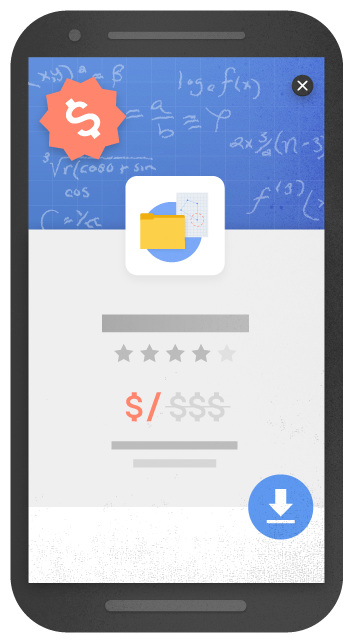
An example of an intrusive standalone interstitial
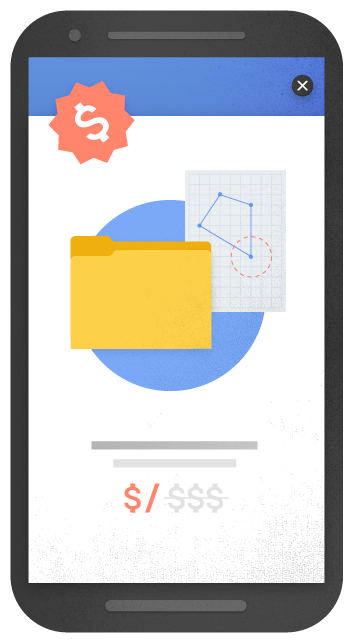
Another example of an intrusive standalone interstitial
By contrast, here are some examples of techniques that, used responsibly, would not be affected by the new signal:
- Interstitials that appear to be in response to a legal obligation, such as for cookie usage or for age verification.
- Login dialogs on sites where content is not publicly indexable. For example, this would include private content such as email or unindexable content that is behind a paywall.
- Banners that use a reasonable amount of screen space and are easily dismissible. For example, the app install banners provided by Safari and Chrome are examples of banners that use a reasonable amount of screen space.
Examples of interstitials that would not be affected by the new signal, if used responsibly
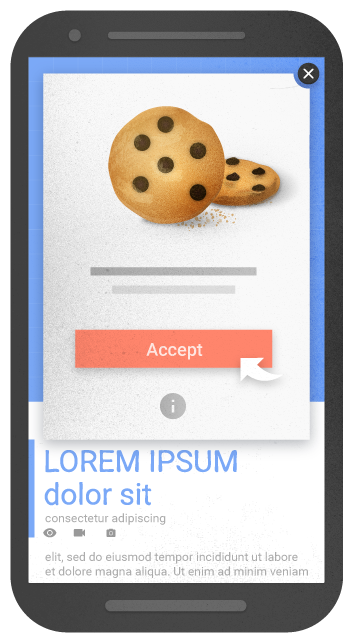
An example of an interstitial for cookie usage

An example of an interstitial for age verification
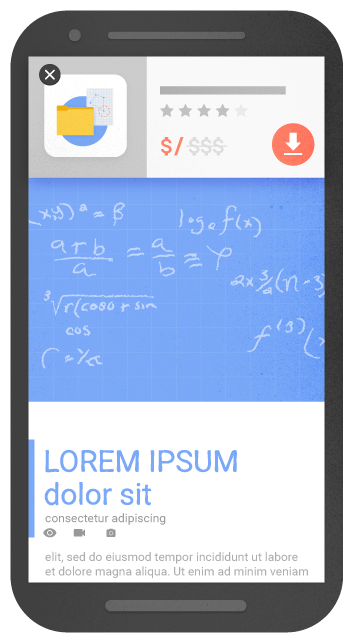
An example of a banner that uses a reasonable amount of screen space
We previously explored a signal that checked for interstitials that ask a user to install a mobile app. As we continued our development efforts, we saw the need to broaden our focus to interstitials more generally. Accordingly, to avoid duplication in our signals, we’ve removed the check for app-install interstitials from the mobile-friendly test and have incorporated it into this new signal in Search.
Remember, this new signal is just one of hundreds of signals that are used in ranking. The intent of the search query is still a very strong signal, so a page may still rank highly if it has great, relevant content. As always, if you have any questions or feedback, please visit our webmaster forums.
Posted by Doantam Phan, Product Manager

Promote your local businesses reviews with schema.org markup
Since the launch of critic reviews last year, we have been focused on supporting more types of reviews, like restaurant reviews, cafes, or any other type of a local business. Recently we’ve announced the availability of critic reviews for local businesses. By incorporating structured data to their sites, publishers can promote their content on local Knowledge Graph cards and users can enjoy a range of reviews and opinions.

Critic reviews are available across mobile, tablet and desktop, allowing publishers to increase the visibility of their reviews and expose their reviews to new audiences, whenever a local Knowledge Graph card is surfaced. English reviews for businesses in the US are already supported and we’ll very soon support many other languages and countries.

Publishers with critic reviews for local entities can get up and running by selecting snippets of reviews from their sites and annotating them and the associated business with schema.org markup. This process, detailed in our critic reviews markup instructions, allows publishers to communicate to Google which snippet they prefer, what URL is associated with the review and other metadata about the local business that allows us to ensure that we’re showing the right review for the right entity.
Google can understand a variety of markup formats, including the JSON-LD data format, which makes it easier than ever to incorporate structured data about reviews into webpages! Publishers can get started here. And as always, if you have any questions, please visit our webmaster forums.
Posted by Jaeho Kang, Software Engineer
