2015 Guide to Penalty-Safe Link Earning
Earning links clearly takes time and massive effort, but the results are worth it. Here are some tips for getting started.
Bing Insights Integrated Into Microsoft Office Word Online
Office Word Online adds Bing Insights to your document creation process.
The post Bing Insights Integrated Into Microsoft Office Word Online appeared first on Search Engine Land.
Please visit Search Engine Land for the full article.
Understanding Auction Dynamics: Why More Traffic Can Mean Less Revenue
What’s the relationship between traffic and revenue in SEM? Columnist George Michie explains.
The post Understanding Auction Dynamics: Why More Traffic Can Mean Less Revenue appeared first on Search Engine Land.
Please visit Search Engine Land for t…
Yoast’s Holiday Sale
The holidays are just around the corner! At Yoast, we truly do love Christmas and New Year’s eve. The main reason we love it so much, is because it gives people the motivation to start so many new and inspiring things each year. What are your new year’s resolutions? Do you have some big plans…
This post first appeared on Yoast. Whoopity Doo!
Mobile Search: Not Just on the Go
A new study from Yahoo shows that more and more mobile searches are happening in the home, where PCs or laptops are also available. How can marketers take advantage of this?
Annie Jump Cannon Google Logo Marks The 151st Birthday Of The Famous Female Astronomer
Cannon created the seven-scheme spectral classification system, and the mnemonic device “Oh, be a fine girl – kiss me” to help remember it.
The post Annie Jump Cannon Google Logo Marks The 151st Birthday Of The Famous Female Astronomer appeared first …
How SEO Actually Improves Content Quality
In spite of the many people that might state otherwise, SEO and content can actually be best friends – here’s a look at why.
A Replacement for PageRank?
Representatives from Google announced recently that they would no longer be updating the PageRank toolbar signals for web pages. Google had been updating those 3-4 times a year for over a decade. Does this news indicate that Google is no longer using PageRank, or that PageRank has changed in some significant way? (The ranking signal […]
The post A Replacement for PageRank? appeared first on SEO by the Sea.
Strict New “Copyright Law” Forces End Of Google News In Spain
Google has decided to shut down Google News in Spain. This drastic step will occur next week and is the result of a recently passed Spanish law that would have compelled Google to pay licensing revenues to Spanish publishers if their content appeared in Google News — even headlines. Some…
Please visit Search Engine Land for the full article.
November’s Google Analytics Blog Insights to Grow Your Business
Here’s your summary of what happened over on the Google Analytics blog, and in the analytics industry in general, in November and how you and your team can take advantage of these developments.
1. Brain Gavin Diamonds Sees 60% Increase …
The post November’s Google Analytics Blog Insights to Grow Your Business appeared first on Seer Interactive.
HTTP/2: A Fast, Secure Bedrock for the Future of SEO
Posted by Zoompf
In prior articles, we’ve written extensively about
website performance and securing your website, both factors Google has publicly announced as search ranking factors. These articles provide extensive tips using existing tools and technologies to improve your site performance and security (tips we highly recommend you follow). But did you know Google also developed and is championing a new web transport protocol called SPDY that addresses many of the inherent performance and security flaws in the web today?
In this article I will dive into more detail on how this new protocol works, why it is important to you, and how you can get started using it today.
From experiment to standard
Google created the SPDY protocol as a multi-year experiment to find a
faster way for browser and servers to communicate. The results have been so positive that the Internet Engineering Task Force (IETF) is using SPDY as the basis for HTTP/2, a replacement to the current network protocol that powers all Internet web traffic today. While technically HTTP/2 is still an evolving specification, many web browsers, web servers, networking devices, and websites already support both SPDY and HTTP/2 in its current form.
While there are some subtle differences between SPDY and HTTP/2, for the purposes of this article it’s safe to use those terms interchangeably. As HTTP/2 rises to prominence in the popular vocabulary, the SPDY vernacular will fall out of use in favor of HTTP/2. For this reason, I will simply refer to SPDY as HTTP/2 for the remainder of this article.
What problem is HTTP/2 trying to solve?
To understand why Google and the IETF are creating a new version of HTTP, we need to understand the fundamental performance limitations we have today. It helps to consider this analogy:
Imagine if all the roads in the modern world were built back during the age of horse drawn carriages: narrow, bumpy and with low speed limits (still true in some cities…). Sure it took a while to get anywhere, but the delay was mostly due to the speed of your horse. Flash forward to today: same bumpy roads, but now everyone is driving a car. Now the horse is not the bottleneck, but instead all those cars piling up on the same log jammed road!
Believe it or not, most website traffic today is not far from this analogy. The original
HTTP protocol dates back nearly 25 years. The most recent update is HTTP/1.1 which was standardized back in 1999. That is a lifetime in Internet time!
Like those narrow, bumpy roads of yore, the web back then was a very different place: smaller web pages, slower Internet connections, and limited server hardware. In a sense, the “horse” was the bottleneck. HTTP/1.1 was very much a product of those times.
For example, when web browser loads a web page using HTTP/1.1 it can requests resource (like an image, JavaScript file, etc) one at a time, per connection to the server. It looks like this:

You’ll notice the browser is spending a long time waiting on each request. While HTTP/1.1 won’t let us make multiple requests at the same time over the same connection, browsers can try and speed things up by making two connections to the same server, as shown in the diagram below:

Using two connections is a little better, but the browser still spends a lot of time waiting to get a download. And we can only download two resources at a time. We could try and making more connections to download more resource in parallel. Modern browsers try to do this and can make between 2-6 connections per server. Unfortunately this is still an poor approach, because each connection itself is used so inefficiently. Since the average web page
has over 100 resources, the delay in making all those individual requests one at a time over just a few connections added up and your page loads slowly.
You can actually see this inefficiency by looking at a waterfall chart. We discussed waterfalls in a previous Moz post on
optimizing Time To First Byte, and we also have a detailed guide on how to read waterfall charts. Most waterfall charts will show long green sections which represents the time the browser is waiting to download a resource. All that time wasted on waiting instead of downloading is a major reason why websites load slowly.
This inefficient waiting on resources is why optimizations
like combining JavaScript or CSS files can help your site load faster. But optimizations like this are just stopgap measures. While you can (and should) continue to optimize our pages to make fewer and smaller requests, we’re not going to truly evolve to the next level of performance until we “fix the roads” and improve the fundamental way in which the web communicates. Specifically, we need to find a better way to utilize those network connections.
This is where HTTP/2 comes in.
The solution: HTTP/2
At its core, HTTP/2 is about using the underlying network connections more efficiently. HTTP/2 changes how requests and responses travel on the wire, a key limitation in the prior versions of HTTP.
HTTP/2 works by making a
single connection to the server, and then “multiplexing” multiple requests over that connection to receive multiple responses at the same time. It looks like this:
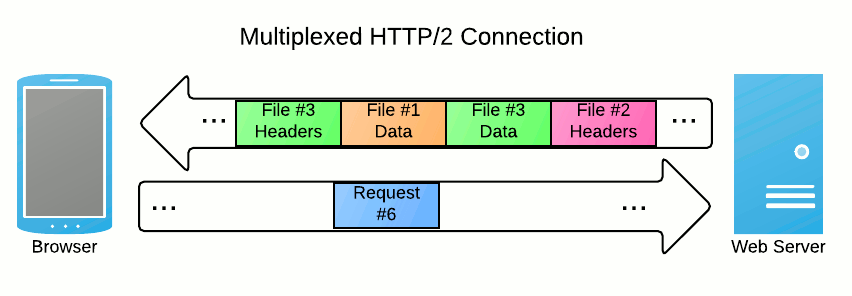
The browser is using a single connection, but it no longer requests items one at a time. Here we see the browser receives the response headers for file #3 (maybe an image), and then it receives the response body for file #1. Next it starts getting the response body for file #3, before continuing on to file #2.
Think of multiplexing like going to the grocery store and calling your spouse just once to get the full list:
“Okay we need milk, eggs, and butter. Check.” Compare this to HTTP/1.1 which is like calling your spouse over and over: “Do we need milk? Okay, bye.” “Hello me again—do we need eggs too? Yep, okay.”, “Okay sorry one last question, do we need flour too? Nope, good.”
All of that data is interwoven much more efficiently on that single connection. The server can supply the browser with data whenever it is ready. There is no more “make request; do nothing while waiting; download response” loop. While slightly more complex to understand, this approach has several advantages.
First of all, network connections don’t sit idle while you are waiting on a single resource to finish downloading. For example, instead of waiting for one image to finish downloading before starting the next, your browser could actually finish downloading image 2 before image 1 even completes.
This also prevents what is known as
head-of-line blocking: when a large/slow resource (say for example a 1 MB background image) blocks all other resources from downloading until complete. Under HTTP, browsers would only download one resource at a time per connection. HTTP/2’s multiplexing approach allows browsers to download all those other 5 KB images in parallel over the same connection and display as they become available. This is a much better user experience.
Another great performance benefit of HTTP/2 is the
“Server Push” feature: this allows the server to proactively push content to a visitor without them requesting it. So for example, when a browser visits your website, your server can actually “push” your logo image down to the browser before it even knows it needs it. By proactively pushing needed resources from the server, the browser can load pages much quicker then was previously possible.
Last, but not least: HTTP/2 works best with HTTPS. As we mentioned before, both performance
and security are an ever increasing component of search ranking. While the HTTP/2 specification technically allows for use over non-HTTPS connections, Google’s earlier SPDY protocol required HTTPS. For compatibility reasons, most web server software will only use HTTP/2 over an encrypted HTTPS connection. Getting on the HTTPS bandwagon not only protects the security of your users and is good for your search ranking, but also is the most effective way to adopt HTTP/2. For more information, see our prior post on enabling HTTPS.
The future, today!
So clearly HTTP/2 offers some great benefits for both speed and performance, but what does this mean to you right now? Well, you may be surprised to learn, HTTP/2 is already available, and can be supported by you without impacting your old users running on HTTP/1.1.
You can think of HTTP/2 just like any other protocol, or even a spoken language. For it to work, you just need an agreement from both the sender and receiver to speak the same language. In this case, the “sender” is the web browser and the receiver is your web server.
Browser support
Since it’s unlikely you will create your own web browser like Microsoft, Google, Apple or Mozilla, you will not need to worry about the “sender” side of the equation. Support for HTTP/2 in the web browser is already in widespread use across the modern browsers of today, with adoption only increasing as older browser versions age out.
In fact, the latest versions of all the major desktop web browsers already support HTTP/2. Chrome and Firefox has supported it for several years. Apple
added support to Safari in fall of 2014 with Safari 8. IE 11 supports HTTP/2, but only if you are running Windows 8.
Similarly, there is already widespread HTTP/2 adoption on smart phones as well. Android’s older web browser, helpfully named
Browser, has support HTTP/2 for several years. The current default browser for Android is Google’s Chrome browser. Mobile versions of Chrome use the same networking code as Desktop Chrome. This means that both Chrome on Android devices, as well as Chrome on iOS devices, both support HTTP/2. Apple added support to the iOS version of Safari with iOS 8.
Your best best is to look at your website analytics and see what web browsers your visitors are using. Chances are, the majority of visitors have HTTP/2 capable web browsers (you can check against this list of
desktop and mobile browsers that support HTTP/2). In that case, you can safely move on to the next step.
Web server support
While you have little control over which browsers your visitors use, you do have direct control over your web server. Put quite simply, to support HTTP/2 you need to select a web server that supports HTTP/2 and enable it. And of course, that server should also continue to support HTTP/1.1 as well because you will
always have users using older browsers.
Continuing our “spoken language” analogy from before, you can think of HTTP/1.1 and HTTP/2 as different languages like English or French. As long as both parties can speak the same language, they can communicate. If your server only supports HTTP/1.1, then visitors can only speak to it with HTTP/1.1. But, if your server also supports HTTP/2, then your users browser will also choose to speak (the faster) HTTP/2. And finally if your server does speak HTTP/2, but your users browser does not, then they will continue to speak HTTP/1.1 just as before, so there’s no danger in “breaking” your older users.
Right now, both the Apache and nginx web servers support HTTP/2. nginx supports
HTTP/2 natively, and Apache supports it via the mod_spdy module. Since Apache and nginx serve traffic for 66% of all active web servers, chances are good that your website’s server can support HTTP/2 right now.
If you aren’t using nginx or Apache you still have other options. There are a number of
smaller, more specialized projects that support HTTP/2. You can also place a reverse proxy that support HTTP/2 like HAProxy in front of your existing web server to get the same benefit as having a web server that directly supports HTTP/2.
If you run your site through a hosting provider, check with them to see which web server version they are running. Major sites like WordPress.com and CloudFlare all already offer HTTP/2 support. If your provider is not yet supporting HTTP/2, let them know this is important!
Adding HTTP/2 support
As I mentioned, HTTP/2 is simply another language your web server can use to communicate. Just as a person can learn a new language while remembering their mother tongue, your web server will continue to know how to communicate HTTP/1.1 after you add support for HTTP/2. You aren’t in danger of shutting anyone out from speaking with your site. People using newer browsers will communicate using HTTP/2, and
older browsers will continue using the older HTTP/1.1—nothing breaks. If you have the time, there really is no reason not to update your site to support HTTP/2.
Remember, HTTP/2 is just a better way to transmit web content than HTTP/1.1. Everything else about your website (the URLs, your HTML markup, your redirects or 404 pages, your page content, etc) all stays the same. This makes adding support for HTTP/2 fairly straight forward:
- Make sure your website is using HTTPS. See our previous article on implementing HTTPS without sacrificing performance.
- Verify your server software or infrastructure can support HTTP/2.
- Update and configure your server software or infrastructure to support HTTP/2.
That’s it. Your website is now using HTTP/2.
Well hopefully it is. The steps involved to update/configure your website will vary depending on your what software you use, so we cannot provide you with detailed guide. However, we did built a free tool,
SPDYCheck, which you can use to verify you have properly configured your website to HTTP/2 (aka SPDY). SPDYCheck works like a checklist, verifying each step of how a browser negotiates with your server to communicate via HTTP/2. It can tell you where in the process things are not working, and it also provides helpful recommendations like enabling Strict Transport Security. With SPDYCheck, you can be sure that everything is functioning properly, and verify that you site supports HTTP/2.
Conclusion
We all know that faster sites help improve search engine rankings, but
faster sites also offer better user experiences. Faster sites engage your users longer, and promote sharing further sharing and linking. HTTP/2 is an amazing leap forward that can help improve the performance and user experience of your website. However, HTTP/2 is not a silver bullet. Optimizations like losslessly optimizing your website’s images can have a big effect on your site’s performance and will still be needed. In short, while you should add HTTP/2 support to your website, make sure you are doing other optimizations and following performance best practices to ensure the best possible user experience. If you are looking for a place to start, or want to see how your site is doing, Zoompf’s free performance report is a great way to understand what you can do to make your website faster.
Sign up for The Moz Top 10, a semimonthly mailer updating you on the top ten hottest pieces of SEO news, tips, and rad links uncovered by the Moz team. Think of it as your exclusive digest of stuff you don’t have time to hunt down but want to read!
Yelp Update: Free Bulk Upload and Yelp Proceeds with their Lawsuit
Rarely do I have something nice to share about Yelp but this note from Justin Mosebach of YDOP Internet Marketing was a pleasant surprise: Just found this out for a client yesterday. Client is a health system with a bunch of locations. Yelp called me back (after I called support) and said that only in […]
Google Launches New AdWords Editor
Following a recap of AdWords’ 2014 highlights, vice president of product management Jerry Dischler announced AdWords Editor 11 on a livestream.
SearchCap: Google Penguin Rolls, AdWords Editors Revamped & Mobile-Friendly Lables Global
Below is what happened in search today, as reported on Search Engine Land and from other places across the web.
The post SearchCap: Google Penguin Rolls, AdWords Editors Revamped & Mobile-Friendly Lables Global appeared first on Search Engine Land.
Please visit Search Engine Land for the full article.
Google Overhauls AdWords Editor: Version 11 Released Globally
Editor now supports more bulk editing features and enables side-by-side window viewing.
The post Google Overhauls AdWords Editor: Version 11 Released Globally appeared first on Search Engine Land.
Please visit Search Engine Land for the full article….
Google Mobile Friendly Label Goes International
The mobile-friendly label in the Google mobile search results is now available in all languages.
The post Google Mobile Friendly Label Goes International appeared first on Search Engine Land.
Please visit Search Engine Land for the full article.
Google Penguin is Confirmed to Be a Continuous Thing Now
After lots of fluctuations since November especially starting from the Thanksgiving weekend, Google h
read more
Trapit & Addvocate merge while SugarString is killed
It has been an interesting week in the world of Content Marketing.
read more
November’s Google Analytics Blog Insights to Grow Your Business
Here’s your summary of what happened over on the Google Analytics blog, and in the analytics industry in general, in November and how you and your team can take advantage of these developments. 1. Brain Gavin Diamonds Sees 60% Increase in Customer Checkout with Enhanced eCommerece Who Should Care: eCommerce Businesses, practitioners The Gist: Enhanced eCommerce […]
The post November’s Google Analytics Blog Insights to Grow Your Business appeared first on SEER Interactive.
Bots: Not just killing your CTR but also your PPC budget
The recent story about negative SEO being done through bots clicking on everything but 1 specific company was interesting and also tied in to a recent article on Marketland.com about bot fraud in t
read more