Google Translate App Gets Improved Picture & Conversational Translation
The new Google Translate app for iOS and Android brings real-time camera based translation and conversational translation to iOS.
The post Google Translate App Gets Improved Picture & Conversational Translation appeared first on Search Engine Land.
Please visit Search Engine Land for the full article.
Optimizing images for SEO
If you are for instance a blogger or write articles for an online magazine or newspaper, you encounter this question on a probably daily basis: should I add an image to my article? The answer is “Yes”. Images make an article more vivid and can actually contribute to improving the SEO for your article. In this post, I’d…
This post first appeared on Yoast. Whoopity Doo!
Google PageSpeed Insights API Gets Upgraded
Google’s John Mueller announced on Google+ that the Google PageSpeed Insights API, which has been around since October 2013, has received a bit of an update yesterday…
Google Translate App For Android & iOS Get Serious On Real-World Translation
Google announced a serious update to their Google Translate app for both iOS and Android. The iOS app adds a lot more functionality…
Yes, People Shop on Their Phones Now. Get Used to It!
Consumers are searching for, looking at, and clicking extensively on specific products on their phones very frequently. Even if they don’t end up buying, they are deeply engaged in the shopping process while on their devices.
7 Dead-Simple Ways to Improve Slide Decks
Posted by EricaMcGillivray
Slide decks are a powerful way to back up any type of presentation from team meetings and sales pitches to conference keynotes and workshops. We’ve all seen presentations with poor design that takes away from talks, and at worse, completely distracts the intended audience. However, most presenters aren’t graphic designers. Slide decks can be frustrating to build, and great slide decks help communicate what an audience needs to hear.
At Moz, I’ve had the pleasure of working with many speakers on their decks, whether for a
biweekly webinar or for MozCon. And while you aren’t going to turn into a god of slide decks overnight, there are some easy ways to go from terrible to decent. Decent won’t get you heaps of praise for a deck, but it also won’t leave a sour taste in someone’s mind about your slide skills and will allow them to focus on what you actually have to say.
Here are seven simple tips to sharpen up any deck.
Download the checklist version to help you get started.
 Outline your way to success
While we all have different creative processes, I can’t recommend enough outlining your deck before you start in on the slide-building. This will help you focus. It will also let you organize the narrative of your presentation’s story.
I always refer to my outline as the “everything and the kitchen sink” version. It’s typically 2-3 times longer than my allotted time. But it helps me fine tune for the specific audience and make sure tactics (or my message, if not a how-to) stand out.
For example, a few months ago, I gave a social media 101 talk at a burlesque conference. My initial draft and brain-dump outline was way too long, and I quickly realized I could make easy cuts by removing advanced tips. I thought they were cool, but my audience was going to lose me. The tips would’ve taken away from the presentation.
 Make better presentations by outlining them.

Get readable fonts and font sizes
Use legible fonts. I know they can be boring, but that’s better than most of the audience being frustrated by not being able to read your slides. There are plenty of great free fonts if you hate Times New Roman, Arial, or Calibri, and typographers have put together cheat sheets for matching common font types with each other.
Even at conferences like MozCon where there are two 16-foot (4.8 meters) high screens, font size is still an issue. For legibility, even for the back of the room, we recommend speakers do not use lower than a 36pt font. Or no one will be able to read it.
Ideally, 48-60pt font should be your smallest range, depending on the font. Let’s face it, not all of your audience will have perfect vision.
Extra font tip: If you are using any non-standard fonts, please send the fonts to the conference organizer along with your slide decks. Or send a PDF. Fonts are embeddable in most slide deck software, but it’s best to make it easy.
For presentations, use a font no smaller than 36pt and, ideally, 48-60pt.

Keep important information away from the sides and bottom
Often times, projectors don’t line up perfectly, and there’s nothing more distracting than your words slightly sliding off screen. This is also something you can’t check beforehand at most events. So add a little padding on either side.
Additionally, unless you’re on a very tall stage, put a buffer at the bottom. Even with the raised stage of MozCon, if speakers put text or other important information near the bottom, the heads of the people in closer rows will block it. I recommend putting repetitive branding, such as your company logo or your Twitter handle there.
For assistance, here’s an example widescreen template for
PowerPoint, Keynote, and PDF that blocks off where images and text should be in your presentation.
Avoid putting important info too close to the sides or bottom of your slide decks.

Add the conference hashtag
Marketers love to tweet. I recommend that you put both your own Twitter handle and the conference hashtag on every slide to help facilitate the love. The bottom of the slide is a great place for it.
Marketers love Twitter! Don’t forget to add the conference hashtag to your presentations.

Ditch “about me” and promotional slides
Never spend more than one very condensed, slightly fun slide about yourself, and never spend more than 30 seconds on it.
A good emcee or moderator will introduce you based upon the bio you submitted with some other information from social media stalking. They’ll toot your horn. They’ll tell the audience why you’re qualified to be speaking on this topic.
If you’re presenting before clients or a small audience, who may not know you, keep it short and sweet. And if everyone knows you, no need to include it.
An audience wants you to dive right into the good stuff. If you impress the audience with your presentation, they’ll be hunting you down. And hopefully, they can do this easily because you’ve added that information to your slides. Also, a thank-you ending slide with your contact information is always a nice gesture.
Dive right into the good stuff and ditch “about me” slides to earn audience respect.

Kill those bullet points
Rarely are bullet points a good idea for your slides, unless you are making a true list. If you find yourself spending any time explaining points, it’s definitely time to break them up.
Audiences will read slides before they listen to speakers. Bullet points typically leave slides copy-heavy and speakers ignored. At least for however long it takes for someone to read the slide. Reviewing your outline is a great way to determine if those bullet points need their own slides before you start practicing your talk.
Okay, how do you break up those bullets? Let’s say you have five items on your list. Time to turn them into six slides. Slide #1: put down your list’s title, e.g. types of social media metrics to track. (Bonus points if you use a font or style signaling that you’re transitioning into a deeper dive.) Slide #2: the first bullet, e.g. conversation engagement. Slide #3: the second bullet, e.g. applause engagement, and so on until your list is exhausted.
Bullet points kill slide decks. Learn more about how and why you should remove them.

Planning anything beyond static slides? Loop in the event organizers
If you are doing anything beyond just slides—video, audio, musical production, live polling, audience participation, etc.—sync up with the conference organizers well in advance. They want to make sure you look good. Additionally, they may need to order extra equipment or do testing beforehand. And if they say no, be respectful.
If you’re trying to explain on-stage to an audience that cool thing you had planned but technical issues prevented you, you’re spending a lot of their trust in you (not to mention their attention spans) for nothing. Make sure the flashy fun works and make sure it enhances your presentation.
Making your slide deck multimedia? Contact event organizers pre-show.
Print, pin, or share this checklist.
Download the high-resolution PDF or snag the image below:

Always keep learning more
Brilliant presentations and their accompanying decks are an art form in their own right. This tips will only take you so far. Besides practice, experience, and getting help and feedback, there are a ton of resources out there to help you improve. Here are some of my favorites:
Books:
- HBR Guide to Persuasive Presentations by Nancy Duarte
- slide:ology: The Art and Science of Creating Great Presentations by Nancy Duarte
- Resonate: Present Visual Stories that Transform Audiences by Nancy Duarte
Articles:
- How to Give a Killer Presentation by Chris Anderson, curator at TED
- How to Become a Confident Public Speaker by Matthew Capala
- The Evolution of My Public Presentations by Rand Fishkin
- The Making of SearchLove by Mack Fogelson
- Too Busy To Succeed: How I let ‘busyness’ make me choke at MozCon by Adam Audette (make sure to read comments too!)
- 11 Things To NEVER Say In A Presentation by XCamilleWong
- Presentation Horrors: Don’t Do These Things by Ian Lurie
- Being a MozCon Community Speaker: A Look Inside by Zeph Snapp
Videos:
- TED: The secret structure of great talks by Nancy Duarte
- 8 Rules for Exceptional Slide Presentations – Whiteboard Friday by Rand Fishkin
- 30 Tips for Awesome Presentations – Video and Slides by Ian Lurie
Best of luck!
Sign up for The Moz Top 10, a semimonthly mailer updating you on the top ten hottest pieces of SEO news, tips, and rad links uncovered by the Moz team. Think of it as your exclusive digest of stuff you don’t have time to hunt down but want to read!
SearchCap: LinkedIn Search, Target Mobile & Google AdWords Scripts
Below is what happened in search today, as reported on Search Engine Land and from other places across the web.
The post SearchCap: LinkedIn Search, Target Mobile & Google AdWords Scripts appeared first on Search Engine Land.
Please visit Search Engine Land for the full article.
Is MapMaker’s Bad Data Grounds for Divorce?
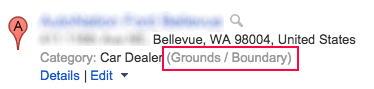 We have been playing around with Google’s MapMaker product a lot lately. While this won’t come as a shock to the seasoned local search professionals out there let me tell you, it’s a buggy product. Just the other day I had it return auto-suggest results in what I think was Dutch. While UI glitches are […]
The post Is MapMaker’s Bad Data Grounds for Divorce? appeared first on Local SEO Guide.
Master LinkedIn Search for Faster Access to People and Jobs
In order to support the demand for its platform, LinkedIn has been working to improve the functionality of its search.
Google Translate to Now Include Real-Time Automated Translation
Although Microsoft has introduced their version of a real-time automated translater that works through Skype, enabling voice to be translated into spoken and written word, Google recently announced
read more
Here’s An AdWords Script That Lets You Optimize Bids Every Hour Of The Day
Columnist Daniel Gilbert shares Brainlabs’ AdWords script that lets you set 24 different hourly bid multipliers, 7 days a week.
The post Here’s An AdWords Script That Lets You Optimize Bids Every Hour Of The Day appeared first on Search Engine Land.
Please visit Search Engine Land for the full article.
Google Image Search Bug Impacting Windows 7 Users
There are several reports of a bug with Google Image search starting back last week that have gone unanswered in the Google Web Search Help forums.
It seems that this is impacting Windows 7 users who are trying to click on images within Google Image s…
CSS Positioning With Google In 2015
SEOs have been using CSS positioning for years and years as a way to get the more important content positioned in the source code above the more boiler plate content, such as headers, navigation and so on.
But now with the way Google fully renders you…
Does The Google SEO Advice Need To Get More Specific?
I spend a lot of time here documenting what Google spokespeople are saying in terms of SEO and webmaster advice. Often, I don’t spend the time going into all of the alternatives around the statement…
Target’s Mobile Site Shows The Value Of An SEO Spring Clean (Sorry, Target!)
Columnist Chris Liversidge gets back to basics by taking a look at how to tackle a common SEO problem: duplicate content.
The post Target’s Mobile Site Shows The Value Of An SEO Spring Clean (Sorry, Target!) appeared first on Search Engine Land.
Please visit Search Engine Land for the full article.
A negative SEO case study: how to spot an attack & fix it
It can be seen as a reaction to Google’s success in clamping down on dodgy linkbuilding – it’s now more difficult for spammers to game the system in their own favour so they have to attack the competition instead.
One of the contributors to the search trends article was Nick Fettiplace, SEO director at Jellyfish, an agency that was subject to a negative SEO attack last year.
They’ve been kind enough to share the data relating to the attack, which was presumably undertaken by one of its competitors.
I should point out here that Jellyfish doesn’t know who was behind it and isn’t trying to point the finger of blame at anyone in particular.

So, how did it go down?
Evidence of a negative SEO attack
This graph shows how Jellyfish’s search rankings were trending in 2014 in relation to several comparative SEO agencies.
The decline towards the end of the timeline occurred when Google implemented the Penguin 3.0 update which sought to penalise low quality backlinks.
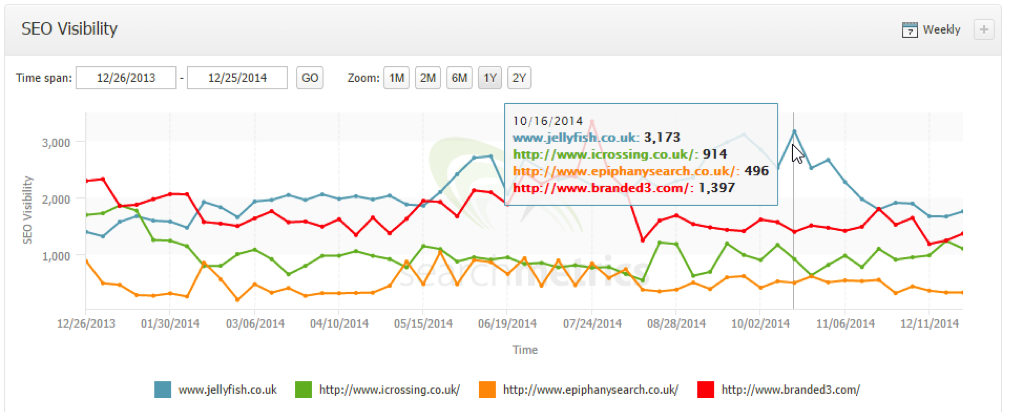
The agency’s senior SEO manager, Jonathan Verrall, said that he typically checks for changes in the site’s link profile every week, so they were able to quickly diagnose the problem.
Closer analysis of the company’s backlink profile shows that there was a sudden spike of links in October and then again in November.

Data pulled from Cognitive SEO shows that from the beginning of August through to October there was hardly any suspect link activity, but in October there was a sudden spike with more than 1,700 new links that were seen as unnatural or suspect.
Obviously this kind of action is going to ring alarm bells with Google and is likely to lead to a ranking penalty.

Where were the links hosted?
Analysis of the suspect links showed that they had been posted as comments on thousands of websites.
This is a tactic known as ‘comment spamming’, whereby the guilty party uses spamming software to quickly post thousands of links in the comments section on blogging sites.
Econsultancy is often the target of these kind of comment spamming campaigns, though our spam filter usually keeps them at bay.
That said, before we upgraded our filter last year these comments would often slip through and in my early days at Econsultancy I was naïve enough to wonder why high profile agencies would resort to such flagrant and obviously spammy tactics.
What was the target?
Cognitive SEO’s backlink tool showed that the attack was primarily aimed at Jellyfish’s SEO training page.

All the links used exact match anchor text for ‘SEO training’ which, coupled with the fact that the landing page had been optimised to within an inch of its life (quite legitimately, and as one would expect from an SEO agency), meant that Google rightly thought something was afoot.
Consequently the agency was penalised and began to lose visibility in search rankings.
Backlink removal
Verrall used several different site and web crawling tools to make sure he had identified all the dodgy backlinks, then set about the long-winded process of asking sites to remove them.
He said that the amount of effort involved with getting links removed depends on the type of website. Webmasters at link farms, such as link directories, article directories and blog networks, tend to ask for removal payments.
But thankfully Verrall says that these types of sites are generally a thing of the past. However…
…if you are looking to get links changed or removed from established websites who treasure their readership, they tend to be very accommodating and will change backlinks quite happily.
We get link removal requests fairly regularly at Econsultancy and in general we ignore them as it’s often clear that the person making the request is the guilty party (I’m not suggesting that’s the case with Jellyfish).
Our old content director Chris Lake wrote an interesting article discussing the various link removal requests we receive and explaining why they’re such a pain in the behind.
It took Jellyfish three days to get through the first round of emails to webmasters, which were followed up with a second round of emails to those that didn’t respond.
If any sites still failed to respond to the request or refused to remove the link then Jellyfish was forced to upload them to the Google Disavow tool.
However, disavowing links can bring its own problems, as Google likes to see that you’ve made a conscious effort to remove the offending links.
According to Verrall:
It’s also good to keep a log of the removal progress within your disavow file by using the comment functionality.
We typically keep track of the removal process in a cloud based spreadsheet which we reference within the disavow file just in case a member of the Web spam team manually reviews our efforts.
The road to recovery
All the dodgy links have now been removed or disavowed, but the recovery process isn’t a quick fix.
Though the attack was swiftly identified and fixed, Verrall said he will need to wait until the next Penguin update to see if the site has fully recovered.
LinkedIn Gives Search A Promotion By Adding Better Post Results & Richer, Personalized Listings
Whether looking for people, jobs or posts, LinkedIn’s new customized search functionality will help you find ’em faster.
The post LinkedIn Gives Search A Promotion By Adding Better Post Results & Richer, Personalized Listings appeared first on Search Engine Land.
Please visit Search Engine Land for the full article.
Google AdSense Hedging
A WebmasterWorld thread has a publisher who has a friend, who was solicited by someone to prepay/buy his Google AdSense revenues up-front, before he earns the money…
Google Report Child Trafficking Quick Answer
Google is proud to announce a new quick answer they have for a search on [report child trafficking].
Google’s head of search, Amit Singhal said on Google+ that “Every bit counts” when combatting human trafficking…