Father’s Day Logos & Themes From Google, Bing & Dogpile
Today is Father’s day and the day is now over for me at 7:30pm ET, I am exhausted, I have a lot of young kids. :)
In any event, the search engines, at least some of them, have special logos and themes for the day. Google and Bing and even Dogpile have…
Using Google Tag Manager to Dynamically Generate Schema/JSON-LD Tags
Posted by serpschris
[Estimated read time: 7 minutes]
One of the biggest takeaways from SearchFest in Portland earlier this year was the rapidly rising importance of semantic search and structured data — in particular Schema.org. And while implementing Schema used to require a lot of changes to your site’s markup, the JSON-LD format has created a great alternative to adding microdata to a page with minimal code.

Check out Mike Arnesen’s deck from his SearchFest talk, “Understanding & Facilitating Semantic Search,” for a great overview on using structured data.
What was even more exciting was the idea that you could use Google Tag Manager to insert JSON-LD into a page, allowing you to add Schema markup to your site without having to touch the site’s code directly (in other words, no back and forth with the IT department).
Trouble is, while it seemed like Tag Manager would let you insert a JSON-LD snippet on the page no problem, it didn’t appear to be possible to use other Tag Manager features to dynamically generate that snippet. Tag Manager lets you create variables by extracting content from the page using either CSS selectors or some basic JavaScript. These variables can then be used dynamically in your tags (check out Mike’s post on semantic analysis for a good example).
So if we wanted to grab that page URL and pass it dynamically to the JSON-LD snippet, we might have tried something like this:

But that doesn’t work. Bummer.
Meaning that if you wanted to use GTM to add the the BlogPosting Schema type to each of your blog posts, you would have to create a different tag and trigger (based on the URL) for each post. Not exactly scalable.
But, with a bit of experimentation, I’ve figured out a little bit of JavaScript magic that makes it possible to extract data from the existing content on the page and dynamically create a valid JSON-LD snippet.
Dynamically generating JSON-LD
The reason why our first example doesn’t work is because Tag Manager replaces each variable with a little piece of JavaScript that calls a function — returning the value of whatever variable is called.
We can see this error in the Google Structured Data Testing Tool:

The error is the result of Tag Manager inserting JavaScript into what should be a JSON tag — this is invalid, and so the tag fails.
However, we can use Tag Manager to insert a JavaScript tag, and have that JavaScript tag insert our JSON-LD tag.
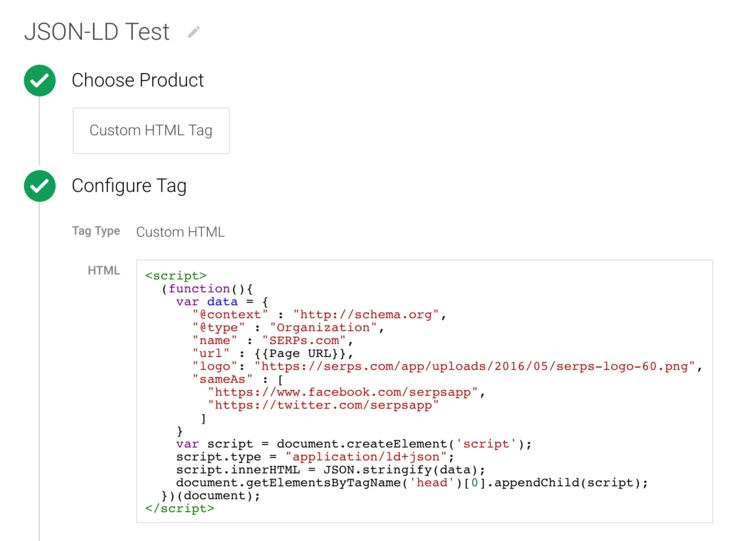
If you’re not super familiar with JavaScript, this might look pretty complicated, but it actually works the exact same way as many other tags you’re probably already using (like Google Analytics, or Tag Manager itself).
Here, our Schema data is contained within the JavaScript “data” object, which we can dynamically populate with variables from Tag Manager. The snippet then creates a script tag on the page with the right type (application/ld+json), and populates the tag with our data, which we convert to JSON using the JSON.stringify function.
The purpose of this example is simply to demonstrate how the script works (dynamically swapping out the URL for the Organization Schema type wouldn’t actually make much sense). So let’s see how it could be used in the real world.
Dynamically generating Schema.org tags for blog posts
Start with a valid Schema template
First, build out a complete JSON/LD Schema snippet for a single post based on the schema.org/BlogPosting specification.

Identify the necessary dynamic variables
There are a number of variables that will be the same between articles; for example, the publisher information. Likewise, the main image for each article has a specific size generated by WordPress that will always be the same between posts, so we can keep the height and width variables constant.
In our case, we’ve identified 7 variables that change between posts that we’ll want to populate dynamically:
Create the variables within Google Tag Manager
- Main Entity ID: The page URL.
- Headline: We’ll keep this simple and use the page title.
- Date Published and Modified: Our blog is on WordPress, so we already have meta tags for “article:published_time” and “article:modified_time”. The modified_time isn’t always included (unless the post is modified after publishing), but the Schema specification recommends including it, so we should set dateModified to the published date if it there isn’t already a modified date. In some circumstances, we may need to re-format the date — fortunately, in this case, it’s already in the ISO 860 format, so we’re good.
- Author Name: In some cases we’re going to need to extract content from the page. Our blog lists the author and published date in the byline. We’ll need to extract the name, but leave out the time stamp, trailing pipe, and spaces.


- Article Image: Our blog has Yoast installed, which has specified image tags for Twitter and Open Graph. Note: I’m using the meta twitter:image instead of the og:image tag value due to a small bug that existed with the open graph image on our blog when I wrote this.
- Article Description: We’ll use the meta description.
Here is our insertion script, again, that we’ll use in our tag, this time with the properties swapped out for the variables we’ll need to create:
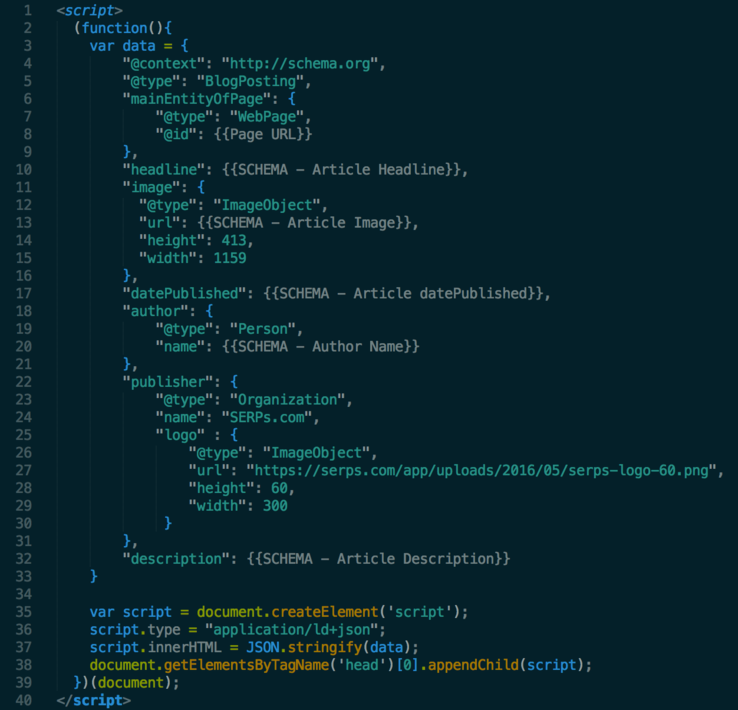
I’m leaving out dateModified right now — we’ll cover than in a minute.
Extracting meta values
Fortunately, Tag Manager makes extracting values from DOM elements really easy — especially because, as is the case with meta properties, the exact value we need will be in one of the element’s attributes. To extract the page title, we can get the value of the <title> tag. We don’t need to specify an attribute name for this one:

For meta properties, we can extract the value from the content attribute:

Tag Manager also has some useful built-in variables that we can leverage — in this case, the Page URL:

Processing page elements
For extracting the author name, the markup of our site makes it so that just a straight selector won’t work, meaning we’ll need to use some custom JavaScript to grab just the text we want (the text of the span element, not the time element), and strip off the last 3 characters (” | “) to get just the author’s name.
In case there’s a problem with this selector, I’ve also put in a fallback (just our company name), to make sure that if our selector fails a value is returned.

Testing
Tag Manager has a great feature that allows you to stage and test tags before you deploy them.

Once we have our variables in place, we can enter the Preview mode and head to one of our blog posts:

Here we can check the values of all of our variables to make sure that the correct values are coming through.
Finally, we set up our tag, and configure it to fire where we want. In this case, we’re just going to fire these tags on blog posts:

And here’s the final version of our tag.
For our dateModified parameter, we added a few lines of code that check whether our modified variable is set, and if it’s not, sets the “dateModified” JSON-LD variable to the published date. You can find the raw code here.

Now we can save the tag, deploy the current version, and then use the Google Structured Data Testing Tool to validate our work:

Success!!
This is just a first version of this code, which is serving to test the idea that we can use Google Tag Manager to dynamically insert JSON-LD/Schema.org tags. However after just a few days we checked in with Google Search Console and it confirmed the BlogPosting Schema was successfully found on all of our blog posts with no errors, so I think this is a viable method for implementing structured data.

Structured data is becoming an increasingly important part of an SEO’s job, and with techniques like this we can dramatically improve our ability to implement structured data efficiently, and with minimal technical overhead.
I’m interested in hearing the community’s experience with using Tag Manager with JSON-LD, and I’d love to hear if people have success using this method!
Happy tagging!
Sign up for The Moz Top 10, a semimonthly mailer updating you on the top ten hottest pieces of SEO news, tips, and rad links uncovered by the Moz team. Think of it as your exclusive digest of stuff you don’t have time to hunt down but want to read!
Father’s Day Google doodle follows in same footsteps as Mother’s Day doodle
The images used to replace the Google logo for both Mother’s Day and Father’s Day include shoes atop a welcome mat.
The post Father’s Day Google doodle follows in same footsteps as Mother’s Day doodle appeared first on Search Engine Land.
Please visit Search Engine Land for the full article.
Google AdWords testing click to SMS ad extension
Wouldn’t it be cool to allow prospects to text you for more information? Well, Google is testing an ad format that lets your prospect message you.
The post Google AdWords testing click to SMS ad extension appeared first on Search Engine Land.
Please …
SearchCap: Google time filters, local search reporting & more
Below is what happened in search today, as reported on Search Engine Land and from other places across the web.
The post SearchCap: Google time filters, local search reporting & more appeared first on Search Engine Land.
Please visit Search Engine Land for the full article.
Should publishers and content marketers be playing the platform game?
The early 2000s saw the advent of platforms on the web: somewhere that bloggers and publishers could host their content without having … read more
3 digital marketing opportunities for franchises
Columnist Jason Decker explores often-neglected tactics that can give you an edge in a local market.
The post 3 digital marketing opportunities for franchises appeared first on Search Engine Land.
Please visit Search Engine Land for the full article…
Google Search Analytics Adds Compare Options Across Queries, Pages, Countries, Devices & Search Types
Yesterday we reported that Google added compare option for search analytics queries but it is more than that. As Jennifer Slegg noticed and posted on Twitter they also added it across the Search Analytics across Queries, Pages, Countries…
Search Buzz Video Recap: Google Algorithm Shifts, AdWords Green Ad Label, SEO Tips & DMOZ
This week in search, I explain that this may be the last week I try this new microphone…
What your boss actually wants from your local search reports
Do you ever find your eyes glazing over when putting together and presenting your regular local search reports? Columnist Lydia Jorden explains how to develop a revenue-based report that will be sure to impress both your client and your boss.
The post…
Search in Pics: SEO & Chromebook cookies, Beatmania IIDX & Google garden
In this week’s Search In Pictures, here are the latest images culled from the web, showing what people eat at the search engine companies, how they play, who they meet, where they speak, what toys they have and more. Google Chromebook birthday cookies: Source: Google+ I Love SEO cookie:…
Please visit Search Engine Land for the full article.
Announcing the 2016 Landy Awards sponsors and supporting partners…
Learn more about the early supporters of the second annual Search Engine Land Awards program & celebratory Gala taking place on September 28th in NYC.
The post Announcing the 2016 Landy Awards sponsors and supporting partners… appeared first on Search Engine Land.
Please visit Search Engine Land for the full article.
Five of the most interesting search marketing news stories of the week
It’s Friday once again, and time for a round-up from the world of search marketing. This week we have App Store search … read more
Google is removing the custom date range search filter for mobile users
Mobile searchers on Google will no longer be able to use the custom date range search filter. To access that feature, they need to go to the desktop version of Google.
The post Google is removing the custom date range search filter for mobile users a…
Majestic SEO vs Moz Vs aHrefs vs Search Console – Which Is Best?
The Debate: Which Link Data Provider is the Best One? For as long as I can remember the competition to be the best link data provider in the SEO industry has raged on. Moz vs Majestic, what’s aHref’s index size? And, so on. It’s a tough job; a high volume, low unit value sort of […]
The post Majestic SEO vs Moz Vs aHrefs vs Search Console – Which Is Best? appeared first on Builtvisible.
Help center in Yoast SEO
In Yoast SEO 3.2 we added a new feature called the help center. The help center is meant to help you figure out all the settings in Yoast SEO. To do that it contains a ton of training videos. In Yoast SEO 3.3, which we released this week, we added knowledge base search to this […]
Google Mobile Search Dropping Custom Date Range Search Filter
AJ from Google quietly announced in the Google Web Search Help forums that Google is dropping the custom date range search filter specifically on mobile searches…
Google: Do Not Do Extended A/B Testing With The Same A/B Test
We’ve covered how Google handles A/B testing and that they are cool with it. But someone asked in a Google Hangout on Google+ how long is too long for an A/B test. John Mueller from Google wouldn’t give a specific time frame but he said don’t let it st…
Google Manual Actions Recoveries Will Display In Search Console Within Days
In a Google Hangout on Google+ this morning with Google’s John Mueller, he said that when you recover from a Google Manual Action and you get the notice, it should also show up in the manual actions viewer within Google Search Console within a day or t…
Google: Rewriting Product Descriptions Won’t Help You Win
The Web Promo folks had an excellent Q&A on duplicate content with Google’s John Mueller and Andrey Lipattsev and SEOs including Ammon Johns, Bill Slawski, Eric Enge and Jennifer Slegg…