Will Pokémon GO become a marketing platform for local businesses?
Nintendo’s Pokémon Go, a free augmented reality (AR) mobile game, is on fire.
The Search Marketer’s Guide to ItemRef & ItemID
Posted by Mike_Arnesen
Structured data has never been more important than it is today. We’ll talk about why briefly below, but that’s not what this post is about. This post is about giving you a new tool to add to your semantic SEO tool belt. My goal is to empower you implement semantic markup and structured data with greater ease and enable you to architect a more robust and complete web of linked data on your website (and beyond).
Structured data is more important than ever
I don’t think that’s an exaggeration. When Schema.org launched in June of 2011, search marketers gained access to an incredibly powerful tool: an extensive vocabulary, agreed upon by the world’s leading search engines, with which we could give our data meaningful structure.
However, there were two things holding us back from realizing the dream of a truly semantic web.
- The difficulty of actually implementing said markup on our sites.
- The markup’s limited utility in actually achieving some kind of tangible SEO return on our investment.
I believe JSON-LD’s big day at Google was a watershed moment in making implementation less daunting and, hopefully in the coming years, ubiquitous across the web (well, at least more so). Now that we have rapidly growing JSON-LD support from Google and powerful semantic attributes like Itemref and Itemid, the ability to give structure to the unstructured is within everyone’s reach.
The tangible SEO return has also never been greater! Beyond tried and true rich snippets for star ratings, pricing, availability, and breadcrumbs in search, we’re seeing richer and richer results, previews, and cards show up in Google. These are powered by, you guessed it, structured data and, more often than not, the recommended format is in JSON-LD. In light of Google’s recent launch of Rich Cards (starting with Recipes and Movies, but sure to be expanding to other Schema types soon), Top Stories with AMP, and Knowledge Panel Critic Reviews (which is currently by request and with Google approval only), we need flexible models for structuring bigger and bigger data sets.
Through using itemref and itemid, you’ll be able to mark up your data that much easier to keep up with the rapid evolution of semantic SEO. You’ll also be positioned to fully capitalize on new search features, regardless of whether or not they require JSON-LD or in-line microdata (remember that while Google is now all about JSON-LD, they’re not the only game in town).
That’s enough of an intro; let’s talk itemref and itemid.
What are itemref & itemid?
At their core, itemref and itemid are just HTML attributes. They’re actually very similar to other attributes that you’re already familiar with if you’ve worked with semantic markup before.
The 3 most common attributes in semantic SEO
Let’s quickly recap what itemscope, itemtype, and itemprop do. Feel free to skip to the next section, though it never hurts to brush up.
Itemscope: an attribute without a value that defines the scope of an semantic entity within your data. Everything within that itemscope is considered a part of that entity and everything outside of it is separate.
<div itemscope></div>
Itemtype: an attribute that goes hand-in-hand with itemscope and that does have a value. The value of the itemtype attribute is going to specify the type of entity you’re marking up and is most commonly a link to a URL on schema.org.
<div itemscope itemtype="http://schema.org/Person/" ></div>
Itemprop: an attribute used to declare specific attributes of your entity (e.g. itemprop= “name”, itemprop=”description”, etc.)
<div itemscope itemtype="http://schema.org/Person/" >
    <h1 itemprop="name">Mike Arnesen</h1>
</div>
The 2 hidden attributes in semantic SEO
It’s fairly easy to guess what itemref and itemid are just by looking at their names, but it’s a little harder to figure out how to use them (don’t worry, we’ll get to that part later).
Itemref: an attribute that allows you to reference other data points outside of the itemscope.
<div itemscope itemtype="http://schema.org/Person/" itemref="phone" ></div>
Itemid: an attribute that allows you to give an entity a unique identifier. This entity can then be used to flesh out another entity as an embedded entity.
<div itemid="http://www.upbuild.io/#upbuildOrg"
itemscope itemtype="http://schema.org/Organization" ></div>
But why do we even need these?
The challenge with inline markup
The challenge we face with inline microdata is that it’s brittle and breaks easily. It’s also very rigid in terms of implementation. Itemref and itemid help us overcome that!
Consider the page below:

The primary entity that you want to mark up on this page is a Product, but you’ll likely want to mark up the BreadcrumbList as well. Assuming that each highlighted area lives in its own <div> tag, you have some potential issues.
- If you declare your itemtype=”product” on the overarching <div> that contains all three areas, you forfeit the opportunity to mark up breadcrumbs. Why? Because a BreadcrumbList isn’t a valid a property of a Product.
- If you declare your itemtype=”product” on the blue <div>, you can still mark up the breadcrumbs on the red <div>, but you won’t be able connect the data in the green <div> to your main Product and your structured data won’t validate since offers (AKA, the price) is required.
Traditionally, you’d have a make a non-ideal compromise or have a developer change how the whole page was structured. There’s no way around it; that sucks!
How itemref and itemid empower you
With itemid and itemref, you can write semantic markup that reaches across disparate <div> tags and pulls in the data points you need without requiring any restructuring.

So what’s the difference between these two tags and when do you use one over the other?
- Use itemref when you need to populate itemprops in your primary entity. For example, if the commentCount of a blog post was written in a <div> outside of the main post’s body.
- Use itemid when you need to populate itemprops where the expected type (more on expected types from Schema.org) is another entity (not just a simple data point). For example, if you wanted to declare the publisher of a blog post, you’d want to point to a complete Organization entity (complete with a name, logo, URL, and perhaps even founder, address, contact points, etc.)
How to use itemref
An easy way to conceptualize the use of itemref is to imagine connecting a data blob to the semantic entity you’re working on. I first heard the term “data blob” from Jarno van Driel, someone who I’d consider my Itemref and Itemid Sensei, and I think it’s a fitting description.
Data blob
noun | ˈdā-tə- bläb
a blob of data that just hangs around doing nothing special, until it’s called into service by another entity. More formally, a discoverable resource within a document.

To keep this brief, let’s assume you’ve already marked up your Primary Entity to the best of your ability and, for the purposes of demonstration, let’s say we’re marking up a blog post (AKA, BlogPosting). Furthermore, let’s say that the one itemprop data point we can’t get at using traditional means is the commentCount for the blog post; it’s in a <div> that’s completely outside the scope of the blog post’s body.

In order to solve this, we’ll want to mark up the commentCount as a data blob that contains an unlinked and unused commentCount property. There are three main steps:
Step 1: In the <div>, <span>, or other HTML element that contains the commentCount, add an itemscope attribute. That’s it. In a deviation from the norm, you don’t want to follow that by specifying an itemtype. That’s why it’s called a data blob; it’s independent data without a type. In fact, when you eventually test this in Google’s Structured Data Testing Tool, you’ll see it pick up on an “Unspecified Type.” That’s fine; just ignore it.

The finished tag should look like this:
<div itemscope>...</div>
Step 2: Wrap a new <span> tag around the comment count itself and specify what itemprop this is going to be. At this point, it’s a property of nothing and that’s okay.
Now the finished tag should look like this:
<div itemscope>
    <span itemprop="commentCount">108</span>
</div>
Step 3: Lastly, you’ll want to create a unique identifier for this data blob (so you can reference it later). To do that, just add a basic id to the tag.
The updated tag will look like this:
<div itemscope>
    <span itemprop="commentCount" id="comments">108</span>
</div>
Sidenote: Can Itemref Be Used with Meta Tags? Yes! Just go through Step 2 and Step 3 on meta tags in your <head> and you can reference them from an entity in your <body> tag using itemref! However, with meta tags there’s no need to add an itemscope; skip Step 1.
Now we come to my favorite part: hooking the data blob into the main entity. It’s incredibly simple.
Step 4: Find and edit the itemscope/itemtype declaration for your Primary Entity. In this case, it’ll look like this:
<div itemscope itemtype="http://schema.org/BlogPosting">
Step 5: Within that tag, add the itemref attribute and reference the unique id that you created in Step 3 above.
The finished tag will look like this:
<div itemscope itemtype="http://schema.org/BlogPosting" itemref="comments">
Bonus: You can reference more than one data blob in the same itemref attribute! Just add them one after the other, separated by spaces.
E.g., itemref=”comments wordcount citation alternativeHeadline”

Boom! Now you’re cooking with itemref! Where before you had a pantry full of data that didn’t really go together, now you have an entity that is completely baked and you’re ready to roll.

How to use itemid
Using itemid is actually very similar and may even involve less new code than itemref. Since you use itemid when you want to reference another complete entity, this might be an entity that’s already on the page. If that’s the case, you just add a quick bit of markup and you’re good to go.
In the visual below, what we want to do is use the Secondary Entity to populate an itemprop of the Primary Entity.

Using our blog post example, let’s say we want to reference an Organization entity to populate the publisher itemprop of the BlogPosting entity.

Here’s how we do that:
Step 1: Mark up the Secondary Entity just as you normally would. If you already have that entity on your page and it’s fully marked up, that’s less work for you!
Step 2: In the opening itemscope/itemtype declaration of that entity, add an itemid attribute and give this secondary entity a unique fragment identifier.
It should look like this:
<div itemid="#mozOrg" itemscope itemtype="http://schema.org/organization" >...</div>
And now we make the magic happen!
Step 3: Within your Primary Entity, add a <link> tag wherever you want to call in the Secondary Entity and specify the itemprop you want your Secondary Entity to populate. Use a simple href attribute to point to the fragment identifier from Step 2.
It should look like this:
<div itemscope itemtype="http://schema.org/blogPosting">
    <link itemprop="publisher" href="#mozOrg"/>
</div>
Bonus: You can reference this secondary entity from multiple other entities and populate multiple itemprops, too! If this post were a company announcement on moz.com and Moz were both the publisher and the author, both of those properties could reference #mozOrg.
That’s it! Now, regardless of where these two entities live in the DOM (i.e., in your page’s source code), they’ll be linked together and can create something awesome.

“By your powers combined, I am a great blog post!”

Extending the power of itemid to JSON-LD
I can hear some readers asking, “The days of microdata are over! Now that Google’s going to support JSON-LD for everything, who cares?”
First, Google isn’t the only game in town and they don’t yet support JSON-LD for all Schema.org types (but, honestly, I think they will soon). That said, I still think it’s good practice to continue implementing structured data that less evolved crawlers can use.
Second, even though itemref can’t be used within the JSON-LD data model, itemid most definitely can, although in JSON-LD the property is called @id! And boy, does it come in handy.
Let’s talk about why you would use this and then we’ll get into how.
Why @id is great with JSON-LD
The why is pretty straightforward — just like when you’re using microdata, you are likely to have multiple JSON-LD entities on your site and, quite frequently, these will be housed in different scripts in the source code (or in different tags delivered via a tag management tool). Using @id, you can maintain your JSON-LD for each semantic entity separately and just make references between each entity as needed.
For example, consider the blog post you’re currently reading which has structured data for a BlogPosting delivered in JSON-LD. You could avoid having to include all the data for your publisher (the Organization known as Moz) in your JSON-LD script and instead reference a dedicated JSON-LD script for it.
You could host two independent JSON-LD scripts in your page <head> and link them using @id.

In this example, using @id is more cool than useful; it doesn’t save that much time or effort. In fact, it’ll add a bit more code to the page if you’re including two separate JSON-LD scripts (for a BlogPost and an Organization) on every page rather than doing it all in one tag.
Dealing with repetition
But what about when a single entity can be used to populate multiple properties in your JSON-LD? That’s where @id could save you a ton of time and hassle.
Imagine you have an Article page where you want to include structured data about the article’s publisher (#publisher), a video pertaining to the article (published by #publisher), and the article’s author (who worksFor #publisher). Suddenly, having the ability to leverage a single definition of the Publisher entity is very valuable!
Going deeper
If you’re not already sold on @id yet, here’s where it gets crazy. When you use @id with JSON-LD, you can extend its utility massively.
You can use @id in a JSON-LD script to reference
entities on other pages and even other websites!
Let that sink in.

What this means is that you can deliver JSON-LD on every blog post that references an Organization JSON-LD tag on the homepage. You don’t need to repeat that data on each page or update every instance if a datapoint ever changes.
Here are just a few use cases in which you’d want to host JSON-LD for specific entities in centralized locations and reference them throughout your whole site.
- Hosting your Organization JSON-LD on your company homepage and then using it as:
- The publisher property on BlogPostings
- The worksFor property on Person (on your team profiles)
- Hosting Person JSON-LD for key personnel on your About page and then using those entities as:
- The author properties on BlogPostings
- The performer properties on Events
- (If you’re a local business) Hosting Place JSON-LD about your city on a dedicated landing page and using it as:
- The areaServed property on LocalBusiness
- The eligibleRegion property on Offer
- The foundingLocation property on Organization
- The jobLocation on property JobPosting
With all of these scenarios, you can use @id to reference entities on other pages to create a literal web of linked data on your website!
How to use @id in JSON-LD
Here’s how to use @id in your JSON-LD.
Step 1: Edit your JSON-LD and give the entity a fragment identifier (e.g., #eru). This uses essentially the same format as the @type property, so you pretty much just copy that. Repeat this process for every JSON-LD script that defines an entity that you want to be able to reference.
The modification to your JSON-LD should look something like this.
<script type="application/ld+json">
{
    "@context": "http://schema.org",
    "@type": "Organization",
    "@id": "#mozOrg",
    "name": "Moz",
  …
}
</script>
Step 2: In order to reference one of those entities from JSON-LD on another page, provide an @id in the place of a value for the property in question. For example, instead of just providing a text string of “Moz” for the “publisher” on this BlogPosting, we’d refer to the uniquely identified entity by using its @id.
The modification to your JSON-LD would look a bit like this:
<script type="application/ld+json">
{
    "@context": "http://schema.org",
    "@type": "BlogPosting",
    "publisher": {
    "@id": "#mozOrg"
    }
    …
}
</script>
Now, if the entity you’re pointing to lives on a different page, just use the absolute path rather than the relative one. “#mozOrg” becomes “https://moz.com/#mozOrg”
But wait. There’s more!
This is the part that really blew my mind. Remember that you can reference entities not just on your own website, but on OTHER websites as well. Doing so is really simple, though you do need to have the ability to slightly modify the JSON-LD on both sites.
The possibilities here are insane! Just picture the semantic associations we’re forming on this post alone!

The good news
The process is exactly the same as what’s described above (using @id on your own website), but you definitely need to use the absolute path.
The bad news
This is super hard to validate without building your own web crawler. By their nature, the structured data validation tools that are available to us (like Google’s Structured Data Testing Tool, the Structured Data Linter, or Yandex’s Structured Data Validator) only fetch the one URL that they’re fed. They’re not going to go out and crawl the URLs where the other linked data lives and show you the full picture that their crawlers may be able to get.
In the future, I’m hoping to share concrete proof that Google recognizes linked structured data across domains. Until then, the more cross-site structured data we create, the better our chances are of showing that this works!
Itemref & itemid in action
This wouldn’t be a very good tutorial if it didn’t leave you with something to fiddle with. The code example below will show you how to use itemref in microdata, itemid in microdata, @id to reference entities on the same page, @id to reference entities on other pages (hint: there may be a really cool entity over at https://moz.com/rand/about/#rand if you want to check it out), and @id to reference entities on other websites.
See the Pen The Search Marketer’s Guide to Itemref & Itemid by UpBuild (@upbuild) on CodePen.
You can even run this example’s URL through the Structured Data Testing Tool to see how Google interprets all the associations. Click here to see!

Until we meet again
I hope that this post has either given you some new tools that will help solve your structured data problems or has stoked your curiosity to see what’s possible with advanced JSON-LD. Good luck out there and happy optimizing!
Sign up for The Moz Top 10, a semimonthly mailer updating you on the top ten hottest pieces of SEO news, tips, and rad links uncovered by the Moz team. Think of it as your exclusive digest of stuff you don’t have time to hunt down but want to read!
SearchCap: Google percentage ratings, PPC & Asia
Below is what happened in search today, as reported on Search Engine Land and from other places across the web.
The post SearchCap: Google percentage ratings, PPC & Asia appeared first on Search Engine Land.
Please visit Search Engine Land for the full article.
Google AdWords Express Advertising Dashboard Broken
Several Google AdWords advertisers who leverage the AdWords Express ad system are reporting in a Google Advertising Help thread that the numbers on their dashboard are off.
Instead of showing any numbers, it shows zeros. It shows “0 views, 0 clicks….
Was There a Google Algorithm Update in June or July?
The rumormill is whispering about a potential algorithm update, like a 301 update. Not everyone is seeing changes, but some are.
read more
Google testing ratings percentage instead of yellow ratings stars in text ads
Attention-grabbing yellow is replaced with a light gray font.
The post Google testing ratings percentage instead of yellow ratings stars in text ads appeared first on Search Engine Land.
Please visit Search Engine Land for the full article.
3 common mistakes made in do-it-yourself PPC
Trying to manage your business’s paid search advertising on your own? Columnist Pauline Jakober outlines some common pitfalls to avoid.
The post 3 common mistakes made in do-it-yourself PPC appeared first on Search Engine Land.
Please visit Search En…
Five reasons why you should invest in social customer service
If you’re a business in 2016, chances are that you’ve invested time and resources into maintaining a social media presence, to promote your brand and engage with consumers.
7 lessons to jump-start your digital marketing in Asia
Looking to expand your business to Asia and not sure what to expect? Contributor Eli Schwartz shares insights gleaned from living and working overseas.
The post 7 lessons to jump-start your digital marketing in Asia appeared first on Search Engine Lan…
Google: Disavow Links File Needs To Be On Canonical Version For Manual Actions
John Mueller in the Friday morning’s Google Hangout on Google+ said at the 54 minute mark that if you get a manual action and you want to submit a reconsideration request…
Google: There Is No Penalty For Not Linking Out Externally
I am not sure where these myths come from…
Google: Short Articles Won’t Penalize Your Site; Think About Users
Google’s John Mueller covered lots and lots of myths this past Friday in the Google Hangout on Google+. He said at the 34:37 minute mark that having short articles won’t give you a Google penalty. He also said that even some long articles can be confu…
Maybe Why Google Dropped Authorship As A Ranking Signal?
Now, I do not know if authorship was ever a ranking signal but I assume Google tested it to see if it should be. And we now know Google said it is safe to remove authorship…
14 influencer marketing essentials for SEO success
The following 14 points should hopefully help you to capitalise more on the valuable SEO that is so often left behind when working with an influencer.
Seven ways to make your boring product page sizzle
I have some bad news: you are probably missing out on a lot of sales. Why? Because your product page is not effective enough.
Pokemon Go – A Glimpse into the Future of Local Marketing
The wild uptake of Pokemon Go over the weekend demonstrates in a show not tell way the power of these sorts of virtual reality experiences to create real world buzz and traffic. If you are not familiar with it (hard to believe that it was actually competing for news cycles), it is essentially a version … Continue reading Pokemon Go – A Glimpse into the Future of Local Marketing →
Related posts:
How to speak your graphic designer’s language
I am not a graphic designer. I do not pretend to intimately understand their frustrations, or even that all of them share the same frustrations. However, after perusing Reddit and talking to some of my friends who are graphic designers, I realized copywriters and graphic designers deal with a lot of the same bullsh*t. Without […]
The post How to speak your graphic designer’s language appeared first on Builtvisible.
Common Crawl Errors for Google News
Google Search Console’s Crawl Errors report has a special section for Google News. Read about the causes and solutions for some common News crawl errors.
Post from Barry Adams
One Formula to Rule Them All: SEO Data Analysis Made Easy in Excel
Posted by Jeremy_Gottlieb
Working in SEO, I always find myself poring over data and looking for ways to expedite the analysis process. Analyzing data can often be tedious, mind-numbing, and boring work, so anything that can be done to speed up finding that needle in the haystack is almost always a good idea. A few months ago, I began using a formula in Excel to categorize data and I’m constantly finding new ways to use it.
It took a little bit of time and practice to remember the formula, to understand how it works and how to troubleshoot it if it breaks, but the time and energy put into learning it have been dwarfed by the rewards I’ve seen from employing it successfully. If you take the time to learn this formula, I promise that it will be worth it — you’ll easily be able to cut down thousands (or more) of rows in Excel into bite-sized chunks for easy insight-pulling and data presentation.
Without further ado, I present to you:
=if(isnumber(search(“string 1”, [beginning cell])),”Category 1”, if(isnumber(search(“string 2”, [beginning cell])),”Category 2”, “Other”)
I apologize if I’ve confused you already. I’ll dive into the formula deeper, explaining its meaning and providing 3 different use cases for how it can help you speed up your work.
Use Case #1: Keyword research
When I’m doing keyword research for a client and I’m staring down a list (likely thousands of rows long) of potential keywords to analyze and their search volumes, I try to lump similar ones together to see patterns of similarity. At Distilled (we’re hiring, btw!), I might use a tool like Brightedge or SEMrush to see the queries a website has visibility for. Additionally, I could just put a topic into Google Keyword Planner and receive an output of similar terms per Google. Export your results in a CSV file and you’ll have your starting point for data analysis. You might even wonder how the formula I mentioned before could even be useful because Google Keyword Planner provides an “Ad Group” column, so one should easily be able to know how to divide up the provided keywords.
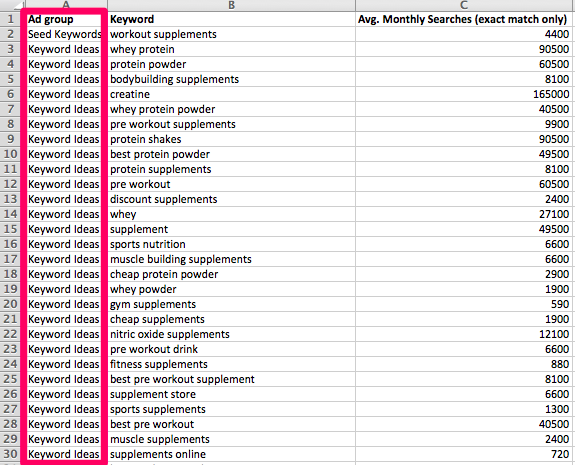
Problem is, the output is often divided up between “Seed Keywords” and “Keyword Ideas”, neither of which is helpful for segmenting keyword cohorts. The screenshot above captures the queries and search volumes around related terms for “workout supplements” (note the “Seed Keyword” in cell A2 compared to all others.)
But what if I want to break down this entire list (681 queries, obviously all not shown in the screenshot) to find out how many queries include the word “supplement?” Or perhaps I want to know how many contain “muscle”; I can do that too.
The first thing I’m going to do is remove column A (Ad group) because it’s completely useless. I’m then going to add a column to the right of our search volume column and label it “Category.” At this point we’ll come up with our initial ideas for categorization, so let’s go with “supplement” and “muscle.” In cell C2 we’ll type the formula:
=if(isnumber(search(“supplement”,A2)),”Supplement”, if(isnumber(search(“muscle”,A2)),”Muscle”,”Other”))
Translated, this formula says: Search cell A2 and if “supplement” is found, return the category “Supplement.” If “supplement” is not found, look for “muscle,” and if that is found, return “Muscle” as the category. If neither “supplement” nor “muscle” are found, return “Other” as the category.
I can continue to add specifications to the formula as I see fit; “other” would just keep getting pushed back as other strings get searched for. The screenshot below shows this formula in action:

The real power of this formula is that it can be used across the entire dataset, removing the need for someone to manually go through and categorize each keyword. Double-clicking on the bottom-right corner of cell C2 (where our sheet now says Supplement) will apply the formula to all cells in column C, as long as there’s a value next to it in column B (this is a rule of Excel, not the formula). The screenshot below shows the effects of applying the formula to all of the data. Notice how the formula has changed from analyzing cell A2 to cell A19 within cell C19, where the formula is being applied.

“Muscle” isn’t listed as a category in the screenshot, but it is listed as a category later in the dataset. I also need to point out a deficiency in the formula at this point. Where a particular query includes more than one of the strings we’re trying to categorize for, it will return a category for the first positive string match it finds. Row 29 is a good example of this. In this particular scenario, the query is “muscle supplements,” but because the formula looks for “supplement” before it looks for “muscle,” and it found a positive match in “supplement,” it categorizes the cell as “Supplement.”
In the cells where neither “supplement” nor “muscle” were found, it returns “other.” At this point, we add a filter to the data set and can filter out all “muscle” and “supplement” queries to reveal exactly what makes up “other.”

Looking at this list, queries containing “protein” seem to be a sizable percentage of the list, so we can add that as a category as well. From here we can add in a pivot table and sort by search volume and count of keywords. Click here to learn more about pivot tables.

From here we can gain a perspective of where we should be targeting our efforts and where we need to focus more. “Other,” at this point, is still too large a category, so I’d go in and refine it further to create more categories to find out how we can make this even more actionable.
Use Case #2: Disavow work
Google claims that a new Penguin update is “getting closer and closer,” but the actual release date is still unknown. What is known is that monitoring your backlink profile for spammy and manipulative links is a pretty smart idea. I recommend being proactive and analyzing opportunities to disavow certain links if you think they could be a potential liability. My colleague Sergey Stefoglo recently wrote a piece on how to do a backlink audit in 30 minutes, but if you plan on manually inspecting your referring domains (and you should), this categorization formula can help.
Depending on the size of your site, you could potentially be dealing with thousands or millions of linking root domains, so you’d need to start somewhere and cut your list down. One way is to sort the domains by some sort of metric (I often use trust flow from Majestic). I use the formula to look for common words that are associated with spammy domains like “submit,” “seo,” “directory,” “free,” “drugs,” and “articles,” though there are certainly many more (“.xyz” is another I’ve seen frequently). The formula finds any of the specified queries within your list of linking root domains, allowing you to quickly identify those as spam and add them to your disavow list. The screenshot below shows a sample site’s link profile sorted by “Spam,” using the filters above as criteria and then by ascending order of trust flow. The formula used in this case is slightly longer than our previous example, but follows the same pattern.
=IF(ISNUMBER(SEARCH(“submit”,A2)),”Spam”,IF(ISNUMBER(SEARCH(“seo”,A2)),”Spam”,
IF(ISNUMBER(SEARCH(“directory”,A2)),”Spam”,IF(ISNUMBER(SEARCH(“free”,A2)),”Spam”,
IF(ISNUMBER(SEARCH(“drugs”,A2)),”Spam”,IF(ISNUMBER(SEARCH(“articles”,A2)),”Spam”,
IF(ISNUMBER(SEARCH(“.xyz”,A2)),”Spam”,”Other”)))))))

In many cases, your link profile will have spammy links that come from legitimate-sounding domains. This formula won’t be able to filter out all of the spam, but it often helps remove at least some of the domains from your list. Also, it’s possible that some of the domains now flagged as spam by the formula may actually be legitimate websites. You should always analyze the output of this formula just to make sure it’s worked properly. Again, it serves as a starting point for your disavow work and can hopefully cut down on some of the domains, but it is by no means the only thing you should be looking at.
Use Case #3: Parsing Analytics
Another really cool use case for this categorization formula is data analysis from Google Analytics. For my clients, I’m often analyzing information about traffic to a client’s site from organic channels. I’ll change the displayed number of results from 10 to 2,500 and export the data. Once exported, I may want to know which types of pages tend to get the most traffic, convert at the highest rate, bring in the most money, or the opposite of all of these.
As each client’s site is different, you’d be looking for different things on each site. Ideally, the site will have an established subfolder structure like example.com/blog/article-1, example.com/supplements/product-1, or example.com/toys/gadget-1. With these common features in the URLs, you’d be able to label them whatever you’d like, perhaps “blog” or “supplements” or “toys,” and use this categorization to break down what types of pages work best and where can improvement be made.
For one client, I exported their data from Google Search Console and broke out their pages by “comparison,” “reviews,” “alternatives,” and “other.” From this, I was able to identify where we could possibly improve, establish what was working, and have more concrete data to show the client.

Conclusion
Categorization will not solve any SEO or digital marketing problems for you, but it can make data analysis much faster and visually compelling. The faster you can identify opportunities, the more time you’ll actually have for making recommendations and an impact for your business or client.
This formula is so versatile that it can be used for nearly anything. I hope that you find clever ways for it to make your data analysis easier and less tedious. As each site is different, it’s impossible to say exactly which strings you should be looking for in any given scenario, but if you can take away from this post an understanding of the power of this formula and how to re-create it, you’ll find quite quickly it can be used for more tasks than you can dream up. Please comment or share your ideas for how to use this formula in the comments section below or at my Twitter handle, @mr_jeremyg.
Sign up for The Moz Top 10, a semimonthly mailer updating you on the top ten hottest pieces of SEO news, tips, and rad links uncovered by the Moz team. Think of it as your exclusive digest of stuff you don’t have time to hunt down but want to read!
Twitter Poll – How Does Google Index Content on the Web?
I thought this was an interesting question to ask people because I think it’s often misunderstood. Google treats content found at different URLs as if it is different content, even though it might be the same, such as in the following examples: http://www.example.com https://www.example.com http://example.com http://example.com/index.htm http://example.com/Index.htm http://example.com/default.asp One of the most interesting papers I’ve … Continue reading Twitter Poll – How Does Google Index Content on the Web? →
The post Twitter Poll – How Does Google Index Content on the Web? appeared first on SEO by the Sea.