Why I still hate LinkedIn Ads
Like a lot of marketers, I find LinkedIn Ads frustrating. The thing is, by making just a few needed improvements, both LinkedIn itself and advertisers could greatly benefit.
Google AdWords Extends Expanded Text Ads Deadline To January 31, 2017
Google announced they have given AdWords advertisers more time to convert over from the standard text ads format to the expanded text ads format that went live in July but has been in testing since April.
Now you have until January 31…
Google AdWords To Kill Off Campaign Experiments
In February, Google launched campaign drafts and experiments for AdWords and then also pushed it out for display ads. Well, it didn’t last long…
Bing Ads App Now Supports Bulk Campaign Editing
Bing announced on the Bing Ads blog that the new Bing Ads mobile app now supports the ability to do bulk editing of your Bing Ads campaigns. You can now enable or pause the statuses of multiple campaigns, ad groups, ads…
New: Google Schema For Courses
Google has added a new search based schema markup to the developer documents. This one is a search Rich Card results format specifically for courses. Aaron Bradley spotted this first and posted it on Twitter…
Google Does Have A Launch Date For Penguin 4.0
In about one month it will be a full two years since the last official Google Penguin update, aka Penguin 3.0. We think Google is close to launching Penguin 4.0, the real time version, because they are working on an announcement for it…
Tagging posts properly for users and SEO
Tags for a post can be hard to choose: in this post I’ll explain why they’re important and how to choose them. One of the hardest things as your site becomes bigger is creating and maintaining a site structure that actually makes sense. Tags and categories can help create that structure, allowing people to easily […]
10 Common Outreach Mistakes
Following hard on the heels of Builtvisible’s new guide on promoting content to publishers, here are ten more tips to help you steer clear of an outreach disaster. Here’s what you should avoid when pitching a blogger or a publisher: 1. Rude or Perfunctory Pitches You’d think this would be common sense, but apparently not. […]
The post 10 Common Outreach Mistakes appeared first on Builtvisible.
How strategic is your content strategy? Test yourself with five key principles
19 ways to tell… Top 5 signs that… What Bridget Jones can teach us about…
Google announces two mobile-first product innovations at DMEXCO
Sridhar Ramaswamy, Google’s SVP of Ads & Commerce made two major product announcements this morning at DMEXCO 2016.
Building a network: taking offline connections online
Gustavo Pelogia gives some advice around how to connect with like minded people at events and how to keep in touch after the event is over to build longer term relationships – which could benefit both you and them.
Post from Russell O’Sullivan
How to get started with Accelerated Mobile Pages

Interested in Accelerated Mobile Pages but not sure how to get started? AMPlifying your site for lightning speed might be easier than you think.
If you use a Content Management System (CMS) like WordPress, Drupal, or Hatena, getting set up on AMP is as simple as installing and activating a plug-in. Each CMS has a slightly different approach to AMPlifying pages, so it’s worth checking with your provider on how to get started.
On the other hand, if your site uses custom HTML, or you want to learn how AMP works under the hood, then check out the AMP Codelab for a guided, hands-on coding experience designed to take you through the process of developing your first pages. The Codelab covers the fundamentals:
- How AMP improves the user experience of the mobile web
- The foundations of an AMP page
- AMP limitations
- How AMP web components solve common problems
- How to validate your AMP pages
- How to prepare your AMP pages for Google Search
Once you are done with the basics, why not geek out with the Advanced Concepts Codelab?
Have you tried the Codelabs or added an AMP plugin to your site? Share your feedback in the comments below or on our Google Webmasters Google+ page. Or as usual, if you have any questions or need help, feel free to post in our Webmasters Help Forum.
Posted by Tomo Taylor, AMP Community Manager


How to get started with Accelerated Mobile Pages
Interested in Accelerated Mobile Pages but not sure how to get started? AMPlifying your site for lightning speed might be easier than you think.
If you use a Content Management System (CMS) like WordPress, Drupal, or Hatena, getting set up on AMP is as simple as installing and activating a plug-in. Each CMS has a slightly different approach to AMPlifying pages, so it’s worth checking with your provider on how to get started.
On the other hand, if your site uses custom HTML, or you want to learn how AMP works under the hood, then check out the AMP Codelab for a guided, hands-on coding experience designed to take you through the process of developing your first pages. The Codelab covers the fundamentals:
- How AMP improves the user experience of the mobile web
- The foundations of an AMP page
- AMP limitations
- How AMP web components solve common problems
- How to validate your AMP pages
- How to prepare your AMP pages for Google Search
Once you are done with the basics, why not geek out with the Advanced Concepts Codelab?
Have you tried the Codelabs or added an AMP plugin to your site? Share your feedback in the comments below or on our Google Webmasters Google+ page. Or as usual, if you have any questions or need help, feel free to post in our Webmasters Help Forum.
Posted by Tomo Taylor, AMP Community Manager
The Top CMS Platforms by Usage in 2016 [Data Visualization]
We’ve teamed up with HostingFacts, Trellis and BuiltWith to create this data visualization of the top content management systems based on usage statistics this year. Note: The data we’ve compiled were only for non-ecommerce CMS. The Top 10 CMS Platforms based on usage: Share this Image On Your Site <p><strong>Please include attribution to HostingFacts.com with […]
The post The Top CMS Platforms by Usage in 2016 [Data Visualization] appeared first on Kaiserthesage.
Here’s How to Generate and Insert Rel Canonical with Google Tag Manager
Posted by luciamarin
This post was originally in YouMoz, and was promoted to the main blog because it provides great value and interest to our community. The author’s views are entirely his or her own and may not reflect the views of Moz, Inc.
In this article, we’re going to learn how to create the rel canonical URL tag using Google Tag Manager, and how to insert it in every page of our website so that the correct canonical is automatically generated in each URL.
We’ll do it using Google Tag Manager and its variables.
Why send a canonical from each page to itself?
Javier Lorente gave us a very good explanation/reminder at the 2015 SEO Salad event in Zaragoza (Spain). In short, there may be various factors that cause Google to index unexpected variants of a URL, and this is often beyond our control:
- External pages that display our website but use another URL (e.g., Google’s own cache, other search engines and content aggregators, archive.org, etc.). This way, Google will know which one is the original page at all times.
- Parameters that are irrelevant to SEO/content such as certain filters and order sequences
By including this “standard” canonical in every URL, we are making it easy for Google to identify the original content.
How do we generate the dynamic value of the canonical URL?
To generate the canonical URL, dynamically we need to force it to always correspond to the “clean” (i.e., absolute, unique, and simplified) URL of each page (taking into account the www, URL query string parameters, anchors, etc.).
Remember that, in summary, the URL variables that can be created in GTM (Google Tag Manager) correspond to the following components:
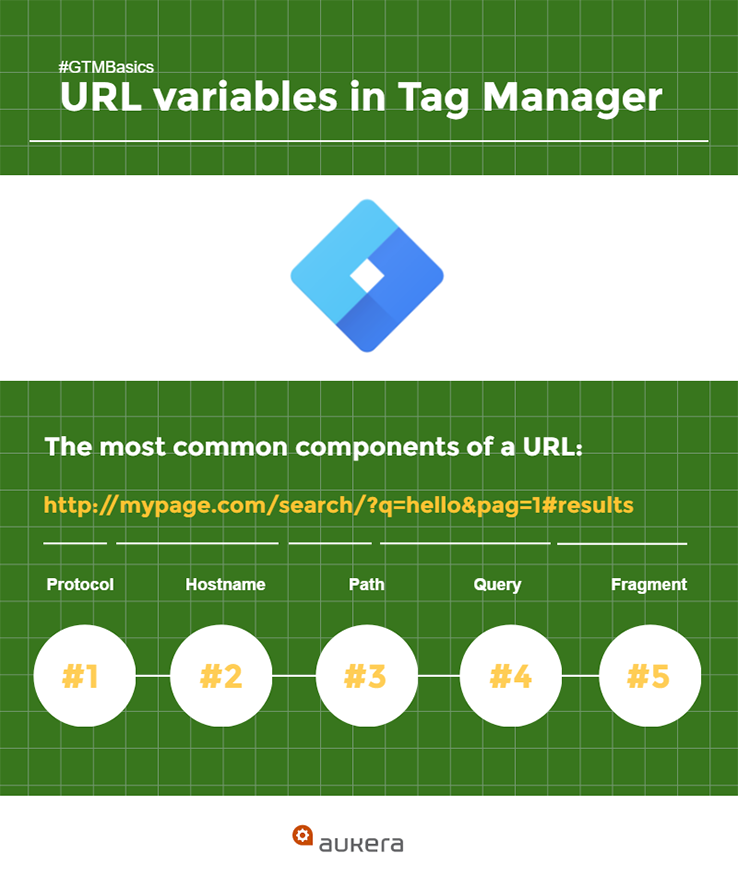
We want to create a unique URL for each page, without queries or anchors. We need a “clean” URL variable, and we can’t use the {{Page URL}} built-in variable, for two reasons:
- Although fragment doesn’t form part of the URL by default, query string params does
- Potential problems with protocol and hostname, if different options are admitted (e.g., SSL and www)
Therefore, we need to combine Protocol + Host + Path into a single variable.
Now, let’s take a step-by-step look at how to create our {{Page URL Canonical}} variable.
1. Create {{Page Protocol}} to compile the section of the URL according to whether it’s an http:// or https://

Note: We’re assuming that the entire website will always function under a single protocol. If that’s not the case, then we should substitute the {{Page Protocol}} variable for plain text in the final variable of Step #4. (This will allow us to force it to always be http/https, without exception.)
2. Create {{Page Hostname Canonical}}
We need a variable in which the hostname is always unique, whether or not it’s entered into the browser with the www. The hostname canonical must always be the same, regardless of whether or not it has the www. We can decide based on which one of the domains is redirected to the other, and then keep the original as the canonical.
How do we create the canonical domain?
- Option 2.1: Redirect the domain with www. to a domain without www. via 301
Our canonical URL is WITHOUT www. We need to create Page Hostname, but make sure we always remove the www:
- Option 2.2: Redirect the domain without www. to a domain with www. via 301
Our canonical URL is WITH www. We need to create Page Hostname without www (like before), and then insert the www in front using a constant variable:

3. Enable the {{Page Path}} built-in variable
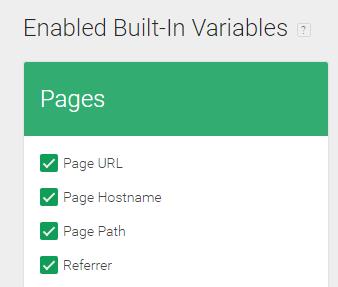
Note: Although we have the {{Page Hostname}} built-in variable, for this exercise it’s preferable not to use it, as we’re not 100% sure how it will behave in relation to the www (e.g., in this instance, it’s not configurable, unlike when we create it as a GTM custom variable).
4. Create {{Page URL Canonical}}
Link the three previous variables to form a constant variable:
{{Page Protocol}}://{{Page Hostname Canonical}}{{Page Path}}
Summary/Important notes:
- Protocol: returns http / https (without ://), which is why we enter this part by hand
- Hostname: we can force removal of the www. or not
- Path: included from the slash /. Does not include the query, so it’s perfect. We use the built-in option for Page Path.

Now that we have created {{Page URL Canonical}}, we could even populate it into Google Analytics via custom dimensions. You can learn to do that in this Google Analytics custom dimensions guide.
How can we insert the canonical into a page using Tag Manager?
Let’s suppose we’ve already got a canonical URL generated dynamically via GTM: {{Page URL Canonical}}.
Now, we need to look at how to insert it into the page using a GTM tag. We should emphasize that this is NOT the “ideal” solution, as it’s always preferable to insert the tag into the <head> of the source code. But, we have confirming evidence from various sources that it DOES work if it’s inserted via GTM. And, as we all know, in most companies, the ideal doesn’t always coincide with the possible!
If we could insert content directly into the <head> via GTM, it would be sufficient to use the following custom HTML tag:
<link href=”{{Page URL Canonical}}” />
But, we know that this won’t work because the inserted content in HTML tags usually goes at the end of the </body>, meaning Google won’t accept or read a <link rel=”canonical”> tag there.
So then, how do we do it? We can use JavaScript code to generate the tag and insert it into the <head>, as described in this article, but in a form that has been adapted for the canonical tag:
<script>
 var c = document.createElement('link');
 c.;
 c.href = {{Page URL Canonical}};
 document.head.appendChild(c);
</script>
And then, we can set it to fire on the “All Pages” trigger. Seems almost too easy, doesn’t it?

How do we check whether our rel canonical is working?
Very simple: Check whether the code is generated correctly on the page.
How do we do that?
By looking at the DevTools Console in Chrome, or by using a browser plugin like like Firebug that returns the code generated on the page in the DOM (document object model). We won’t find it in the source code (Ctrl+U).
Here’s how to do this step-by-step:
- Open Chrome
- Press F12
- Click on the first tab in the console (Elements)

- Press Ctrl+F and search for “canonical”
- If the URL appears in the correct form at the end of the <head>, that means the tag has been generated correctly via Tag Manager

That’s it. Easy-peasy, right?
So, what are your thoughts?
Do you also use Google Tag Manager to improve your SEO? Why don’t you give us some examples of when it’s been useful (or not)?
Sign up for The Moz Top 10, a semimonthly mailer updating you on the top ten hottest pieces of SEO news, tips, and rad links uncovered by the Moz team. Think of it as your exclusive digest of stuff you don’t have time to hunt down but want to read!
Google bumps Expanded Text Ad deadline to January 31, 2017
Issues a set of dos and dont’s for testing expanding text ads.
The post Google bumps Expanded Text Ad deadline to January 31, 2017 appeared first on Search Engine Land.
Please visit Search Engine Land for the full article.
SearchCap: Google AdWords login, keyword planner bug & Bing Ads bulk editing
Below is what happened in search today, as reported on Search Engine Land and from other places across the web.
The post SearchCap: Google AdWords login, keyword planner bug & Bing Ads bulk editing appeared first on Search Engine Land.
Please visit Search Engine Land for the full article.
Bing Ads apps keep getting more useful, now with bulk editing
Hints of more improvements to come.
The post Bing Ads apps keep getting more useful, now with bulk editing appeared first on Search Engine Land.
Please visit Search Engine Land for the full article.
Two weeks to SMX East – Register now!
In two weeks, SEOs and SEMs will gather at largest search marketing conference on the East Coast: SMX East. Don’t miss your chance to get the latest SEO and SEM tactics and connect with other search marketers. Here’s what you’ll get: Tactics you can use immediately. SMX East offers 50+ sessions…
Please visit Search Engine Land for the full article.
29 Prime, SubPrime, Bankrupt
As many of you know 29 Prime has not been a favorite Local SEO of mine. They lied, dissembled, prevaricated and misled thousands of small business folks. They have now gone into Chapter 7 Bankruptcy. I was alerted to their bankruptcy by Regina Martinez, with whom I had been corresponding over the past year about how … Continue reading 29 Prime, SubPrime, Bankrupt →
Related posts: