SearchCap: AdWords updates, Bing Ads Valentine’s Day trends & voice search
Below is what happened in search today, as reported on Search Engine Land and from other places across the web.
The post SearchCap: AdWords updates, Bing Ads Valentine’s Day trends & voice search appeared first on Search Engine Land.
Please visit Search Engine Land for the full article.
AdWords Managed Accounts can finally share negative keyword lists across accounts
Create a single list of negative keywords that can be applied to campaigns within an MCC.
The post AdWords Managed Accounts can finally share negative keyword lists across accounts appeared first on Search Engine Land.
Please visit Search Engine Land…
Google Showing Rich Cards In Over 10% Of Search Results
Rank Ranger, a software based Google tracking tool, posted on Twitter that it seems Google has been displaying more rich cards in the search results since after the new year.
They said they now are tracking that on average…
Bing Ads shares Valentine’s Day CPC & CTR trends, including surprising mobile stats
Mobile plays a significant role, accounting for nearly half of all Valentine’s Day-related searches on Bing.
The post Bing Ads shares Valentine’s Day CPC & CTR trends, including surprising mobile stats appeared first on Search Engine Land.
Please visit Search Engine Land for the full article.
5 B2B marketing tips to jump-start your 2017 results
Columnist Jessica Cameron provides B2B marketing tips for starting your new year off on the right foot.
The post 5 B2B marketing tips to jump-start your 2017 results appeared first on Search Engine Land.
Please visit Search Engine Land for the full a…
Data-driven attribution: the cure for discount code abuse?
When measuring the effectiveness of discount codes, retailers often get it wrong. In this article, we’ll look at how data-driven attribution can help businesses better understand where discount codes produce the best ROI.
Essential voice search strategies for 2017
Are you prepared for the rise in voice search? Columnist Sherry Bonelli discusses how voice search will impact local businesses.
The post Essential voice search strategies for 2017 appeared first on Search Engine Land.
Please visit Search Engine Land…
Ask Yoast: importance of keyword strategy
Optimizing your site or page for words that people don’t use doesn’t make any sense. That’s why you have to do proper keyword research. You’ll have to get inside the heads of your audience and find out what words they use while searching. There should always be a keyword strategy behind the keywords you pick. Keyword […]
Best SEO Tools for 2017
A collection of some of my favourite SEO tools, and the best SEO Tools you can buy in 2017.
Read the full article here Best SEO Tools for 2017
Check Your SEO For FREE With Our Free Help Tool
© Copyright 2006-2017 Shaun Anderson http://www.hobo-web.co.uk/
Which Google algorithm changes impacted marketers most in 2016 – and what can we expect from 2017?
Between the long-awaited rollout of Penguin 4.0, a strengthening of Google’s mobile-friendly ranking signal and the ‘Possum’ algorithm update impacting local search, 2016 was an interesting year for Google algorithm changes – and 2017 promises to be just as eventful.
SEO Has a Younger Sibling: It’s On-Site Search, and It Deserves Attention
Posted by JP_Sherman
On-site search, also known as internal search, is a critical yet undervalued and underrepresented tactic in the search industry. In 2014,eConsultancy released a report that showed that 15% of companies dedicate resources to optimizing the on-site search experience, 42% fold on-site search into other online measurement responsibilities, and 42% of companies ignore on-site search. This report was released more than two years ago and after some extensive Googling, some Duck Duck Go-ing, and some slight Bing-ing, I couldn’t find any reputable site releasing similar, more recent, reports.
Wait a minute… Nearly 84% of companies don’t actively optimize or measure their on-site search?
Consider the following benefits of active on-site search optimization:
- On average, 30% of visitors will perform an on-site search
- When comparing revenue gained from people who performed an on-site search vs. people who did not perform an on-site search, the people who performed an on-site search generated more revenue than those who did not.
- Performing an on-site search is a strong behavioral predictor of intent to convert:
- People who perform a site-search are twice as likely to convert.
- People who perform an on-site search are more likely to return to the site with an intent to purchase.
- In the research, companies had an average overall ecommerce conversion rate of 2.77%. However, the conversion rate nearly doubled to 4.63% from people who used on-site search and found what they were looking for.
Data sources: eConsultancy, ConversionXL
It’s honestly surprising that, in an industry that focuses so intently on data-driven marketing and conversion optimization, we don’t put more effort into on-site search, harnessing users who are engaged and interested in our content and serves. My point is that for a tactic that can become an incredible force multiplier, there’s so little information on it.
Okay, okay, you’re kinda starting to rant. What are my first steps to understanding on-site search?
The first thing you need to understand before starting to optimize your on-site search is what data is being collected by analytics from your on-site search platform. For this exercise, it’s irrelevant whether you’re using Solr, the Google Search Appliance, or a baked-in search platform that came with your content management system.
Ultimately, the goal is to understand “Search Quality” by quantifying it:
When discussing quantifying on-site search, I tend to use the metaphor of resolution. I started playing video games as a kid and that’s continued to today. So, seeing little blocky characters evolve into something incredibly complex is a part of my experience. Clever designers were able to create experiences using only 8-bit resolution. As hardware grew more capable, 16-, 32-, and 64-bit consoles became more mainstream. Each generation of hardware supported greater resolution and the amount of visual information become more complex, more immersive, and more descriptive.
This is how I view measuring and quantifying on-site search. Start by understanding the basic metrics. Start with 8-bit resolution. This is where you’ll start seeing patterns emerge and behaviors evolve. As your experience grows, add more complexity to your metrics, look at the interplays between different types of content, look at how your on-site search results change as your content changes, look at the time it takes for people to find what they’re looking for. It won’t take too long to where you’re looking at your on-site search data at 64-bit resolution.

As your measurement resolution improves, you can understand the story deeper and with more clarity, and can use that understanding to impact greater change.
Search behavior
Search behavior is the measure of the quantitative actions a user takes on your website. This includes keywords, clicks, and calculated measurements like CTR. Measuring search behavior allows the search professional to see if any changes to the way on-site search works results in a net benefit to on-site search.
How to quanitify search behavior
The simplest metric to use to examine user behavior is CTR.
First of all, there’s an implicit assumption that clicks signal that the user has found something useful and the click is a signal of that found value. Not all clicks are indicators of search success, and there are users that click multiple links on a SERP as a way to refine their search. For now, in our 8-bit world, we need to understand that assumption, yet it’s important to measure overall CTR as a signal of search quality.
When you first start looking at SERP CTR, it’s likely yours will be low. When I first started measuring on-site search, we used the Google Search Appliance and never surpassed a 24% SERP CTR. The first question I was asked was “What’s a good on-site search CTR?” I was able to answer this by examining our different content types (blogs, videos, articles, etc). What I found through customer surveys was that a higher CTR generally correlated with a higher satisfaction with the search experience. The surprising part? Fewer people than expected had a “neutral” experience. This showed me that when it comes to on-site search, people are happy (and remember) a good search experience and people are frustrated (and remember) a poor search experience. The room for a neutral feeling has a very small window. If we had a greater than 65% CTR on our search results, we would be able to show a positive search experience and a greater chance for conversion, assuming that a good search experience meant that the user was able to find what they were looking for.
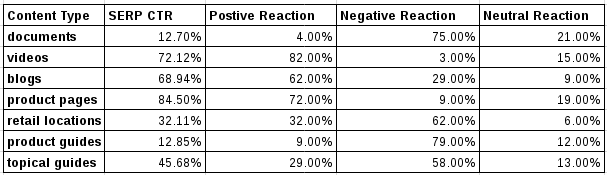
Higher-resolution metrics on CTR can include different elements of the SERP:
- Filter Section CTR
- Promoted Section CTR
- Category Result CTR
- Sponsored Result CTR
- Natural Search CTR

Understanding how all of these SERP elements influence clicks can identify opportunities for CTR optimization with either better results or a better UI. This is probably the most superficial metric to measure behavior — I haven’t even mentioned keyword refinements, revenue per search, revenue per keyword, or conversions gained through search. All are very important to measure the overall success of on-site search, but probably deserve their own article.
Search findability
Findability is the measurement of how a user finds the content they’re looking for. Findability is directly tied to the content’s rank for particular keywords. When the on-site SERP shows the results, knowing which piece of content the user clicks on, combined with the average rank of that content, can reveal if good content is being clicked, thus making it “findable.”
How to quantify findability
I take a fairly simple approach to measuring findability. I take a look at it from a content-level perspective. For each piece of content, I measure the SERP impressions, the amount of times a piece of content shows up in the top ten results. I look at the average rank, then measure the CTR of the piece of content. Using this information I can identify pieces of content that show up a lot in the SERP and have a low CTR. Looking at the average rank tells me if, on average, the content is seen. If it has an average rank of less than 10 (such as “content 2” in the table below) there’s a reason why it shows up frequently but rarely gets clicked on, despite being in a good ranking position. Conversely, when I look at “content 5,” I see that it has high impressions, low clicks, high rank, and a low CTR. I then take a look at this piece of content to see if I can make it rank a bit higher in our on-site search. If I see the CTR improve, then I’ve increased its findability as well as its value.

A higher-resolution version of findability would include the number of keywords that trigger an impression and a visibility scoring model that would describe how “visible” a piece of content is. Factoring in clicks and CTR into the visibility model would give you an overall findability score that could quickly identify valuable content that is not found and non-valuable content that is frequently found.

Result set quality
Determining result set quality is answering the question, “How good are the results for given keywords?” For example, if a common search term on your site is “shoes” and your top result is the page where the user can filter down to the right kind of shoe, and that page is in the pathway to a good conversion rate, then that’s a good result for the keyword. However, if the results for “shoes” are more general — “athletic shoes,” “red shoes,” “ballet shoes” — and the results for this keyword have a poor conversion rate, then the result set quality can be improved.
I use a fairly simple method to make sure that my results are performing according to the best interests of the company. I look at the number of times a SERP appeared and then measure the number of times that SERP resulted in a conversion or a consumption (a user reading a page that doesn’t have a call-to-action on it). Then, looking at the successful events that occur after a SERP occurs, I have a metric that I can track, trend, and show the value of on-site search.

Which metrics are core to measuring on-site search?
At the most basic level, these are the metrics we’ll need to start measuring on-site search. Many of the nuances we’re measuring in SEO applies to onsite-search as well. While most of these metrics we likely already know, I want to describe them in the context of on-site search.
- Query
- A query is a package of information that is sent to the search platform. While “query” and “keyword” can generally be interchanged, keywords and keyword phrases have meaning because they’re a part of language. A query is a packet of information because it is the “thing” that is sent to the search engine to be parsed, recognized, and compared against a body of documents.
- Keyword
- A keyword or keyword phrase is the representation of user intent, expressed in words. A query is an abstraction of the keyword phrase. Keywords and phrases are essentially bags of words to be compared against other, larger bags of words.
- Instance/Impression
- An instance (also impression) is the number of times or the frequency that a keyword or keyword phrase is entered into the search bar and sent to the search engine.
- Click
- In the context of on-site search, a click occurs when a piece of content returned by the search engine is clicked.
- CTR
- The click-through rate of on-site search is measured by clicks/instances. CTR is a calculated metric, but critical to understand the success of individual keywords as well as the overall health of the search engine.
- Rank
- Rank is a measurement of the position of content in the SERP. Rank can be expressed in two different ways. Rank for keyword is the number where a piece of content sits for a given keyword. Average Rank measures the average of where a particular piece of content ranks over a set of keywords.
- Examples:
- For keyword “x,” document “y” is at rank 4
- For document “y,” the average rank is 2.3 for keywords “a, b, c, d, & e”
- Conversion
- For content found through on-site search, a conversion is the number of times the user completed an action such as a purchase, lead gen, or consumption.
- Conversion is a quantitative metric that is binary. The user either converted or they didn’t.
- Consumption
- Consumption is a qualitative measurement for content that doesn’t have a clear conversion point. For sites or pages that are information-oriented (rather than conversion-oriented), it’s generally described as “it is likely that the user consumed this document.”
- Examples:
- A user scrolled to the bottom of the content and spent more than “x” time on page
- A user shared the document via social media
- A user commented on the document
- A user viewed this page after search and before conversion.
- Search with No Results/SNR
- A search with no results is a search that didn’t match any documents, resolving in 0 results on the SERP.
- Unicorn Searches
- A keyword query that has an instance of 1 for a given time range.
That’s a long list of ways to measure on-site search. How can I apply these to understanding it?
While measuring the “On-Site Search Pillars” of search behavior, search findability, & result set quality is the ultimate goal to truly understanding on-site search, the most basic pillar and arguably the most important one is search behavior. Understanding customer behavior as they interact with on-site search is likely the very first thing we’d want to start measuring to get actionable information.
Here are five ways to start understanding and optimizing your on-site search.
1: Keymatch critical keywords
Keymatching is a system that’s available in most enterprise search platforms that generally puts up to three recommended results at the very top of the SERP, right above the natural results. Keymatching is non-algorithmic and often includes a way (like Google AdWords) to match keywords to content. Usually there’s a visual element to separate it from the natural results, such as “recommended results.” Think of keymatching as Adwords for your own site. You can promote new products or increase the visibility of highly converting products. See the keymatch for “heartbleed” on Red Hat’s Customer Portal SERP. Right below the recommended results (keymatch) are the natural results:

For example, when the heartbleed vulnerability was identified, I created a keymatch for specific terms that, when searched, would trigger our keymatch system to display our Heartbleed Detector app. Based upon our search volume, we knew that people would want to check to see if they were vulnerable first, then look for a solution. We used our keymatch system to make the top of the funnel very clear.
Another strategy that’s more focused on ecommerce is to keymatch terms that match to promotions or sales you’re having. For a site that’s selling apparel where all their socks are on sale, keymatching will give the user the information that all socks are discounted.
2: Get a good overview of the health of your on-site search.
To do this, look at the overall on-site search CTR. Don’t worry about what it is at the moment; this is about understanding how well things are performing in the real world. Use this metric to get a strategic view of how search is performing. If you see that your on-site search CTR is lower than you want it to be, look at the top keywords searched, then repeat the searches on your on-site search.
It’s very likely that your top searches are “high volume but low intent” keywords. You might be looking at top-of-funnel keywords like “shoes,” “insurance plans,” or “sci-fi movies.” Is there a good landing page on your site so that the user can funnel down to what they’re looking for? Generally, these low-intent keywords are from people who may not know what they’re looking for, but will know it when they see it.
Use either a keymatch system or a boosting system to push top-of-funnel pages to the top of the search results. If you don’t have these types of pages, you’ll know that you’re going to need them. What’s a boosting system, you ask? Boosting is a term that adds relevancy to a piece of content or even content types to rank higher in the natural SERP.
For example, imagine that the term “red shoes” resulted in on-site natural results for different types of red shoes. However, data shows that people looking for “red shoes” convert at a much higher rate for the imaginary “Red” brand that has a shoe line. One way we can improve the natural search results for this scenario is to boost the brand “Red” for queries including “red shoes.” While you can force content to the very top, keep in mind that boosting is a broadsword solution that may cause collateral search damage and unintended consequences to your search results. However, if the data supports such a broad change, using a boost in your on-site search platform is a good tool to use smartly.
3: Look at individual pieces of content in the context of on-site search performance.
From the perspective of an individual piece of content, it will likely show up for a variety of keywords. Looking at the data from on-site search at the content level will reveal what keywords trigger that piece of content to show up in the top 10 results.
The first step is to look at how much traffic that piece of content gets from on-site search. Secondly, look at the clicks and CTR. Notice that in the following example, most keywords deliver a decent CTR except one. This piece of content delivers no clicks, no revenue, and ultimately no value to the user. This is a powerful signal to the business to look at why this piece of content ranks for that keyword. Sometimes, on-site search can deliver poor or irrelevant results. The solution here is to either fix the content so it delivers value or use your ability to de-boost that piece of content for that keyword.

Clearly, this content works with other keywords, so the problem may not be the content, but the fact that it ranks for a keyword that has no relevance to the content. To understand on-site search’s weight in generating revenue, compare the revenue and conversion rates with other marketing channels such as SEO, email, direct, or social.
4: Use searches with no results to enhance content
If you have people searching for things that deliver no results and the frequency is significant, this is a great way to give your content team information on what to write about next. For example, the site ThinkGeek had an April Fool’s joke about a Tauntaun sleeping bag. I talked to someone at ThinkGeek and they mentioned that even though the product wasn’t real, they started seeing several hundreds of searches for that product on their site. What was surprising to them was that the searches not only increased, but continued well after the April Fool’s joke. As a result, they actually made that sleeping bag and it became a customer hit. While it wasn’t only found via on-site search, the consistency of mentions in social media, on-site search, and customer service convinced them to actually make it.

5: When it comes to UI/UX, test snippet UI, test SERP UI, test everything
Don’t accept the out-of-the-box search UI. Test putting images or embedded videos into the snippet. Test putting linkable “top level” breadcrumb navigation into the snippet. Create good A/B tests to see what will increase clicks and conversions. Talk to internal stakeholders, talk to your users, and find out how they use search. Once you know what your critical business goals are around on-site search, testing the UI can significantly increase CTR and conversions.
Great, thanks… Now I want to do all the things. Where do I start?
I know that I’ve covered a lot of topics that really require a lot of nuance, a lot of industry-specific idiosyncrasies, and other considerations to on-site search. Because there’s not a lot of current information or even communities that surround on the non-development side of on-site search, I can understand that there might be questions about how do I start using this information.
My advice: start by understanding what your search platform is. Do you use IBM Websphere for your ecommerce platform? Do you use Apache Solr? Google Search Appliance? Elasticsearch? Look deeply to what the features of your ecommerce or search platform has. If you haven’t already, hook up your analytics platform to your on-site search and start collecting data. I’ve found that many times, when companies have set up their analytics, they don’t apply basic metrics to their on-site search. Look at the data you have and start setting up experiments. Try to make a piece of content rank higher in your on-site search. Experiment with meta-keyword tags (yes… Google and other search engines ignore it, but generally, on-site search engines still love meta keywords). Start small experiments to prove that you can increase revenue by making small changes. Once you understand your search platform, once you’re seeing small changes you’ve made that have positive results, dig deeper. Share your experiences (I’d love to hear them) and find people to collaborate with. I cannot claim that I know everything, but what I hope to have done is created a small group of enthusiastic people who can work together to create even more information on this oft-ignored, but oh-so-useful subject.
Some acknowledgements:
Red Hat isn’t just about open source technology, it’s about being an open organization. With that open and collaborative mindset, I want to share my thanks and deep appreciation to some people who helped me with this article. Linda Caplinger, Jairus Mitchell, & Thomas Stokes are brilliant people who provided feedback, suggestions, and welcome critiques.
Sign up for The Moz Top 10, a semimonthly mailer updating you on the top ten hottest pieces of SEO news, tips, and rad links uncovered by the Moz team. Think of it as your exclusive digest of stuff you don’t have time to hunt down but want to read!
How to Choose the Best Ecommerce Platform for SEO (January 2017)
Research Methodology
The first step was to create a list of the most widely-used shopping cart platforms in Europe and the U.S (source: BuiltWith.com); Danny Richman then
read more
SearchCap: Attribution models, local authenticity & more
Below is what happened in search today, as reported on Search Engine Land and from other places across the web. From Search Engine Land: Brand vs. local Knowledge Graph result: Which is better? Jan 6, 2017 by Tony Edward Columnist Tony Edward explains …
Bricks & Mortar Stores Getting New Local 3 Pack Treatment at Google?
It appears that Google is either broadly testing or perhaps rolling out (or maybe they did this last week and I missed it) a more visual 3 pack with fewer direct contact CTAs for bricks and mortar locations. It appears, at least for now that professionals like lawyers, doctors, insurance agents and service businesses like … Continue reading Bricks & Mortar Stores Getting New Local 3 Pack Treatment at Google? →
Brand vs. local Knowledge Graph result: Which is better?
Columnist Tony Edward explains which Knowledge Graph results are appropriate in different scenarios. Which one is right for your business?
The post Brand vs. local Knowledge Graph result: Which is better? appeared first on Search Engine Land.
Please …
Choosing an attribution model: When, not which
Wondering which attribution model is best for your business? Columnist Amy Bishop believes that depends on what question you’re trying to answer.
The post Choosing an attribution model: When, not which appeared first on Search Engine Land.
Please vis…
The importance of local authenticity
When deciding which local businesses to patronize, consumers choose ones they know and trust. Columnist Brian Smith shares tips for marketers looking to help their businesses cultivate a strong image within their local communities.
The post The import…
Google to start overriding call extension numbers with location-specific phone numbers in ads
Advertisers that depend on calls going to a central phone number for conversion tracking and other reasons will face a challenge as of January 19, 2017.
The post Google to start overriding call extension numbers with location-specific phone numbers in…
Five most interesting search marketing news stories of the week
This week, we’ve got stories from Bing, Google and Instagram, plus a look at how a new search engine powered by AI is transforming scientific research, and why the fake information epidemic could be damaging to local search.
How to Kickstart an SEO Audit for Your Startup – Whiteboard Friday
Posted by randfish
Launching a startup is a huge task all on its own. While it can be a challenge to factor SEO into the mix, it’s an incredibly important consideration. In today’s Whiteboard Friday, Rand shares a comprehensive plan to kick off your new SEO audit and grab a piece of that organic search pie from the get-go.
Pro tip: For easy listening, this video is broken up into 9 chapters that correspond with the transcript below.
 Click on the whiteboard image above to open a high-resolution version in a new tab!
Video Transcription
Hi, everyone down at StartCon. Thank you so much for having me. My name is Rand Fishkin. I’m the co-founder of Moz, and today I’m going to be talking to all of you and to Whiteboard Friday fans everywhere about how to kick-start an SEO audit for your startup.
So what I’ve done here is I’ve taken our classic SEO pyramid, sort of you’ve got to start with a strong base and work your way up. Well, I flipped it, because, in an audit scenario, we’re actually going to start from the bottom and work our way to the top. So I’ve inverted our pyramid. We’re going to start with crawling and accessibility, and we’re going to work all the way up to conversion.
Now, SEO in a startup setting can be challenging. I’m going to assume that your startup has already launched your website or your web content, your application, and that now you’ve just realized, “Wait, maybe we should do some of that SEO stuff.” And yes, you should. Let me make three big reasons, three big cases why you should.
- Search traffic is among the highest percentage of all referral traffic on the web. So whereas social traffic sends approximately 5% to 6% of all the web’s referral traffic, search engines send about 28% or 29% of all the web’s referring traffic. This is data according to SimilarWeb who has a large clickstream panel that they look at.
- Organic search traffic is more than 90% of all the clicks that go to search results. So 90% of the clicks are going to organic, 10% or actually less than 10% are going to the paid results. Companies around the world are spending $40, $50, $60 billion a year or more on Google’s paid search results alone. That organic stuff is a competitive advantage because it means low cost of customer acquisition. It tends to mean higher retention. It tends to mean higher conversion rates. Very, very attractive traffic.
- Searches are a specific request from a user that says, “I want this thing and I want it right now.” That’s some of the most powerful traffic you can possibly be in front of on the web, and, as a result, the startups that can get their product, their service, their company, their brand in front of those searchers can have an outsized impact.
Now, we need to kick off this audit.
Crawling, indexing, and website structure

What I’ve essentially done here is taken sort of the top three things to be thinking about for each of these and detailed them for you. So when it comes to crawling and web structure, we want:
1. Everything on one sub and root domain.
I can’t tell you how many times I’ve seen startups use blog.startup.com, or use startupblog.com. Or they blog only on Medium.com instead of blogging on their own site and using Medium as an additional network to amplify that content. Or they put everything on their app and their app is one page, and so Google can’t index anything except that one page. Generally, all of these are terrible ideas. If you can, keep everything in subfolders, or if you call them subdirectories, of your website. Don’t separate out your content on to multiple sites, and don’t build anything on somebody else’s site unless you’re also using it on your site and just referring back. You want to use Medium, that’s great. You want to use Facebook, great. You want to use LinkedIn Publishing, fantastic. Always have the “Here’s the link to the original” and point it to your website.
2. You can sign up for Google Search Console (it is free).
That will help you identify a lot of crawl errors and issues. If you work with a professional SEO, chances are they’re going to use a tool like OnPage.org or Screaming Frog or Moz’s Crawl. Those are all good too. They can provide a little bit more extra detail.
3. Eliminate duplicates, search URLs, and thin pages
One of the things that you will want to do, when you’re looking at your site, is eliminate duplicates, search URLs, meaning pages on your site that are essentially just search results — Google does not like your search results in their search results — and thin pages, pages that have very little content. You might think, “Oh, but they target some extra keywords for me.” Yeah, but Google considers your site as a whole. If you have thousands of pages with very thin content, they’re going to rank your other content lower, and that is not a good thing. You do not want that.
Keyword research & targeting

1. Make a big, broad list.
You could do this in Excel. You could do it in a Google Spreadsheet. You could do it in a tool like Keyword Explorer. I want you to use a bunch of different sources. I want you to look at keywords that your competitors are ranking for. You can find that from lots of different tools. You could use something like Keyword Explorer. You could use SEMrush. You could use KeyCompete. You could use SpyFu. There are lots and lots of tools that allow you to do this.I want you to also use the related and suggested search terms that come up when you search for the key terms and phrases you’re already targeting in Google. I want you to use semantically-connected terms and terms that are in the format of questions. A lot of folks like Answer The Public. Moz also has the filter in Keyword Explorer for queries that are in the form of questions. These will give you a big, big, broad list.
2. From there, you’re going to need some metrics:
- You want volume, you can get that from Google’s AdWords Keyword Tool. You will have to either start an account and pay some money for some paid search ads. Otherwise, Google only shows you these terrible things. Or you’re going to have to use a third-party tool like a SEMrush or a Keyword Explorer.
- You want difficulty, so you want to know how hard it will be to rank. That is not the same as the Competition Score that you get from AdWords. Competition in AdWords is just the competition in the paid search results. Not the same thing as how difficult it will be to rank in the organic search results.
- You want to know click-through rate opportunity. If there are lots of ads above the fold, if there’s a knowledge graph, if there’s an answer box up top there, that’s going to drive clicks away from the organic results, and you need to know that before you choose to target a keyword.
3. Prioritize by the importance to you and to your company.
You’re going to use these metrics and you’re going to prioritize by the importance to you, to your company. You’re going to prioritize by the ease, the difficulty, and by the traffic, which is some function of the click-through rate opportunity and the volume, in order to choose right keywords for you. You’re going to prioritize that big list that you’ve got, and then you’re going to start targeting. We are going to create content that targets those searchers and serves them well.
Accessible content that delights searchers

Why do I say delight searchers here in this third section? Well, because content that merely serves your purposes, that ranks and maybe gets one or two percent of people to convert on your site, give you their email address or sign up for whatever it is you have to sign up for, a free trial, or a subscription to your software, that’s fine. But you’re probably going to be outranked by someone who does a fantastic job of serving searchers before putting their own interests into the mix. If you put your interest ahead of searcher’s interest, over time, someone else is going to take that traffic away from you and Google’s going to rank them first.
1. Don’t just serve your own interest, your own funnel.
Satisfy those searchers.
2. You can use low engagement metrics to identify poorly performing URLs.
So if you filter in your Google Analytics, your Omniture, whatever you’ve got, by pages that receive traffic from Google referrals and then you look at bounce rate, you look at time on site, you look at pages per visit, and you see pages that are very low on those metrics, well, that is going to tell you, you are not doing a great job of serving those searchers. Google will probably, over time, push you down, push your competitors up. That’s a bad thing.
We want content that is doing a great job of delighting searchers. It has to serve both their implicit and explicit query. The explicit part of the query, that’s usually obvious. The implicit part can be a, “What do they really want to do after that, once they have that answer?”
Keyword use & on-page optimization

Next, we’re going to take that content and we are going to optimize it for search engines and searchers. That means using keywords intelligently and doing some smart on-page optimization.
Now, classic SEO kinds of things, some of them no longer apply. The meta keywords tag, for example, that’s gone. We don’t need to do the same sort of every little variation of a keyword demands a different page that we used to do in the past. But things like…
1. Keyword use in the title, the URL, the meta description, the headline, and inside the content still matter.
What we should be doing nowadays, though, is taking all the keywords that share the same searcher intent, where the searcher is trying to essentially accomplish the same thing. Let’s say I’m a mobile phone directory and I have a bunch of reviews of mobile phone devices. “Best mobile phones, best cell phones, best smartphones, best smartphones 2016,” guess what? They all share the same searcher intent. I should have one page targeting all those keywords, not a separate one for each one.
2. All the keywords that share the same intent get one URL.
Snippet, markup, & schema
 This is essentially where I’m trying to stand out from the pack in Google search results. If you’ve performed a search in the last five years, you know that it doesn’t just look like 10 blue links anymore. There are a lot more rich options for how your snippet, the search engine result position that you appear in, can look to searchers, and that can drive a lot more traffic.
1. Check out Schema.org.
So check out Schema.org and check out the types of results in your specific field or industry or that go with your content that could be met by schema that Google supports right now.
2. Look at your keyword research for the types of results that already appear in your SERPs.
You should be taking a look in your keyword research at the types of results that already appear in your search engine result pages. So if you check out your keywords, you’re using a tool like Keyword Explorer, you can see here’s a distribution of search results that contain images, ones that contain news results, ones that contain recipe-rich snippets, ones that contain video, whatever it is, and then you can choose to do those.
3. Identify “answer box” opportunities.
15%, just about 15% of all search queries in Google today have an answer box of some kind. An answer box, meaning that featured snippet up at what we call result number 0, before the top 10, usually right after the ads. That can drive a tremendous amount more traffic. If you have answer box opportunities, you can take those from your competitors, or you can have your snippet appear in there. There’s a great presentation from Doctor Pete that you can check out on Moz or a Whiteboard Friday on that same topic as well.
Alternative formats & engines
 Next, we want to think about non-Google sources of traffic or non-google.com web search sources of traffic. For example:
1. YouTube is the second largest search engine in the world.
YouTube is the second-largest search engine in the world, ahead of even Baidu, ahead of Bing, ahead of Yahoo. If you are doing video content, you should be thinking about YouTube. Even if you’re not doing video content, you should be checking YouTube’s search volume to see if lots of people are searching on YouTube for answers to the questions that your business could answer with video.
2. Consider alternative search formats like images, news, and apps.
You also want to consider alternative search formats, like images, news, and apps in lots of spaces. For example, in home decor and home repair, image search is very, very popular. Obviously, in spheres like politics and technology, news is very popular. For lots of kinds of queries, apps are very popular, particularly those ones that happen on mobile and have a clear app use or need around them.
3. Check out Google Maps if you’re in local.
If you are in the local space, you’re going to want to check out Google Maps, which can send a tremendous amount of traffic. Through there, you can use a tool like Moz Local or Yext for that.
4. Ecommerce should pay attention to engines like Amazon or Etsy.
If you’re in ecommerce and you’re selling a physical product, there might be engines like Amazon or Etsy, where you could and should be putting your product.
Links and amplification
 Yes, links still matter. Yes, they are still critical for rankings. You will need a lot of links from good places that are editorially pointing to your content, to your website, in order to rank well.
You also want to earn other forms of amplification that will then lead to links. Social sharing is one of the big ones. Word of mouth is obviously a big one. Lots of forms of advertising can eventually lead to links through awareness and those sorts of things.
1. Before you ever create content, ask the question: Who will help amplify this and why?
If you don’t have a great answer to that question, and I mean a specific list of people or a specific list of outlets, you shouldn’t hit Publish. Go and do that work first and every piece of content that you create will have more success in terms of amplification and reach and link potential and the potential to earn an audience. And why are you creating content if no one’s going to see it? This isn’t a forest. You don’t need no trees falling.
2. You want to choose a link flywheel that’s going to earn you links over time.
There are a few different structures.
- News and press tends to be a good structure that earn links over time in a flywheel sort of format.
- Content marketing tends to be one.
- Partnerships tend to be one.
- Embedded content tends to be one.
These flywheels tend to encounter friction, and that’s where you use these smart hacks, like submissions to certain kinds of directories that are editorial and high-quality, or outreach on a one-to-one basis. But you don’t want to be doing these one-to-one kinds of hacky link building unless it’s in the service of a flywheel that’s going to move faster over time and grow your link profile while you’re asleep.
Conversion and funnel optimization
 So you’ve done all this stuff to serve searchers well, to earn their trust and their traffic, and now we have to realize two things.
1. Conversion takes time and it takes a lot of visits.
In fact, WordStream, Larry Kim, did some great research showing that, over time, on a second or third or fourth visit, conversion rates move up by hundreds of percents versus that first visit.
Don’t expect that you’re going to rank for a keyword, drive someone to your site for the first time and convert them instantly. That rarely happens. Sometimes, but rarely. What’s generally going to happen is that you’re going to earn that click first, and then, over time, you’re going to earn them back again, maybe through social channels, maybe through amplification, through word of mouth, through type-in traffic, through a branded search, through another completely unrelated search. Then eventually, they’ll find their way back to you, and on the third or fourth or fifth visit, they will convert.
So we have to be thinking about: How can I delight people? How can I brand them? Then, eventually, I want to draw them back to my website and close the deal through my funnel. That’s what conversion optimization is when it works in the organic world.
FAQ
Okay. We’re through this very, very basic audit process. A few frequently asked questions that I always get from startups:
A. “Should I get a consultant, an agency, or should I do it in-house?”
- If you know that SEO is going to be a long-term, competitive advantage that you continue to invest in and it’s going to be something you need to do for the life of your company, you should go in-house as soon as possible.
- If, however, it’s (SEO) more like a nice-to-have and it’s a helpful marketing channel, but it’s not a core competency and you’re not going to build the company’s marketing strategy around it, consultant or agency can work just fine. And there are some great ones, by the way.
B. PPC versus SEO.
- Paid search is easy to invest in. It is high-cost, but it’s fast to get started. For this reason, it’s incredibly competitive, and it tends to be the case that people are bidding at or very close to their maximum ROI to spend ratio, meaning, unless, you have an incredible business model that’s way better than all your competitors, there’s not usually a lot of competitive advantages to be earned in return on investment or in cost of customer acquisition to lifetime value ratio in PPC.
- SEO, on the other hand, takes a long time. It’s a lot of investment. This is often a six-month or a year process before you start earning big returns, and, therefore, very few people invest in it strategically. It is a much bigger competitive advantage.
C. I get this from a lot of folks, especially in the technical world. “Can’t Google just figure this all out?”
- No, they absolutely cannot. If you ignore these things and choose not to invest strategically and specifically in SEO, Google will not just figure it out. That has never happened to anyone who has made SEO a true competitive advantage in their startup, in their company’s marketing channels. It’s just not how it works.
D. “Does social media impact SEO?”
- The answer is yes, but indirectly. When you do good things on social, they can lead to good links. They can lead to good engagement on your site, which is certainly a positive signal for Google, and they can lead to word of mouth, which can result in branded searches and more clickstream traffic to your site, and all these sorts of things that Google can see. But if you think that buying a bunch of likes or a bunch of tweets on Fiverr is going to help your page rank higher, yeah, you’re in for, well, five dollars of pain. Fiverr is quite cheap.
All right, everyone. Thank you so much for having me on StartCon. Thanks for watching me on Whiteboard Friday. And I hope to see you around Moz and maybe down in Australia sometime in the near future. Take care.
Video transcription by Speechpad.com
Sign up for The Moz Top 10, a semimonthly mailer updating you on the top ten hottest pieces of SEO news, tips, and rad links uncovered by the Moz team. Think of it as your exclusive digest of stuff you don’t have time to hunt down but want to read!