Mind the store: Using AdWords to drive offline sales
Store visits from online ads can be reported in AdWords. Columnist and Googler Matt Lawson explains what you should be doing with this info — and how you can get similar insights even without qualifying for store visit conversions.
The post Mind the …
Integrated Marketing Analytics: Creating a single source of data truth
Creating a single source of data truth to optimize marketing investments and performance may seem like a daunting task. But it can be simple with the right approach and technology. Join Cardinal Path’s David Booth and IBM’s Andrew Douglas to learn the right ingredients and best practices to get…
Please visit Search Engine Land for the full article.
4 mistakes that brands are still making on social media
Social media continues to baffle many brands which don’t use it properly to engage with their audience. Hannah Butcher shows some common mistakes to avoid.
Post from Hannah Butcher
How to build links without creating content: 5 examples
Link building and content marketing often complement each other, but columnist Andrew Dennis notes that there are plenty of ways to build links, even if you don’t have the resources to create content.
The post How to build links without creating conte…
Survey: 60 percent of voice users want more “answers” and fewer search results
Making calls, searching, texting and map lookups were the most common use cases for voice.
The post Survey: 60 percent of voice users want more “answers” and fewer search results appeared first on Search Engine Land.
Please visit Search Engine Land for the full article.
Yoast SEO 4.1: Mobile snippets and German readability
As you might know, we’ve added quite a few new features to Yoast SEO over the last few months. Today marks the release of Yoast SEO 4.1, the first of many releases to come in the new year. Besides fixing some bugs, this version comes with two major new features: a mobile snippet preview and full […]
Google Maps Highlights Robert E. Lee’s Birthday Instead Of Martin Luther King Yesterday For Some
Yesterday was Martin Luther King Jr. Day in the United States but in some states, instead of Google showing adjusted holiday hours for Martin Luther King…
Tell Google What Technical SEO Topic They Should Write About
Gary Illyes from Google posted on Twitter asking webmasters and SEOs “what (technical) topic would you be interested in reading on the Official Google Webmaster Blog…
Google: Crawl Rate & Crawl Demand = Crawl Budget
Several weeks ago, Google told us crawl budget is not what we think it is and promised to write a blog post explaining what Google defines as crawl budget. Well, Gary Illyes posted on the Google blog What Crawl Budget Means for Googlebot…
Google: The Mobile Friendly Icons Confused Searchers Initially
Google’s John Mueller said in a YouTube hangout on the other day at the 9:20 mark into the video that when Google launched the mobile friendly label in the mobile search results…
Google Algorithm Update On January 16th, MLK Day?
Yesterday was a US holiday, so overall there was less people working, searching and buying online. But…
MozBar Revived! How We Rebuilt MozBar to be More Robust Than Ever—Plus a Brand-New Feature
Posted by Roxana_Nelson
2016 was quite a year for MozBar…
I’m so pleased to announce that we’ve completely rebuilt the foundation for MozBar, making it more robust and reliable, and we’ve launched a new MozBar Premium feature: On-Page Content Suggestions!
But before we get into the fun, new feature stuff, I want to be completely transparent about some of the challenges we faced early last year:
So what the heck exactly happened in the first half of 2016?
We had a roadmap of features that we wanted to release in 2016, but soon realized MozBar hadn’t been built to support the growth we had planned for it going forward. We wanted to continue to innovate but it just wasn’t scalable.
For the longest time, all MozBar projects were shipped by a small, self-contained team consisting of a product manager (yours truly), a designer, and our contract developer. In May, our rockstar contract developer left to pursue his own projects. We had big dreams for MozBar but now found ourselves without a developer, without a process, and with big scalability issues on the horizon.
In the midst of all this, we found a major vulnerability to our API via MozBar. It was putting too much pressure on our servers and negatively affecting data for our users. To address this, we urgently needed to add in security layers, such as requiring a login and a CAPTCHA. This ended up being a really complicated process. As we attempted to roll out fixes, one new fix seemed to inevitably break something else. It was no fault of anyone person, just a symptom of the mounting technical debt we had accrued. Avid MozBar users quickly noticed the problems we were having. It was making their jobs harder — the antithesis of what MozBar was created for. We could not let this go on.
We knew what we needed to do.
We created a dedicated MozBar team to work all-hands-on-deck to rebuild MozBar from the ground up to make it fast, reliable, and ready to launch a new feature by the end of the year. And I’m happy to say, we did it! We made stabilizing MozBar our number-one priority and were able to build a new backend service that would resolve the data issues that plagued MozBar throughout all of summer 2016. This brand-new foundation would also give us a solid ground to launch innovative new features in a smart, sustainable way. After we stabilized MozBar, our first order of business was to revamp the Page Optimization feature of MozBar Premium (exclusive to Moz Pro customers) and add On-Page Content Suggestions!
How can On-Page Content Suggestions help you?
Content Suggestions helps you easily find ideas for the page you are optimizing to help build your topical authority. These suggestions are topics that are influencing the SERP for the keyword you’re optimizing for. Use these content suggestions to beef up any thin content on your page and become the expert on your topic. As a bonus, you can even use content suggestions as a keyword list to help round out keywords you’re already researching.
How does it work? We take the top results for the keyword you’re optimizing for, extract the most popular topics, then order them by frequency. Sound familiar? This feature also lives in Moz Pro.

The benefit of having this feature in MozBar as well is that you now have the flexibility to analyze any page and keyword combination, not just ones you are tracking in your campaigns. And it’s super easy to use! Just enter a keyword you would like to optimize a page for, hit enter, and all of your page optimization factors and on-page content suggestions are surfaced in one view:

Be sure to check out an upcoming MozBar tutorial post from Brian, Moz’s very own product trainer, and sign up for the first-ever MozBar webinar he’ll be hosting next week. Also keep an eye out for Rand’s deep-dive post on how to get the biggest bang for your buck with On-Page Content Suggestions. You will not want to miss these.
I am so incredibly proud of the MozBar team and all of the contributions they’ve made to the toolbar in the past year. We know we still have room to improve and grow; believe me, there’s a long list of things to do. There’s also a long list of exciting new features that we have planned for you, too!
And most importantly, we are so appreciative of all of you who’ve stuck with us, have been vocal about issues as they pop up, and worked directly with us to troubleshoot issues that you’ve encountered. If it weren’t for your feedback, support, and patience, we’d be in the dark, so thank you.
Sign up for The Moz Top 10, a semimonthly mailer updating you on the top ten hottest pieces of SEO news, tips, and rad links uncovered by the Moz team. Think of it as your exclusive digest of stuff you don’t have time to hunt down but want to read!
The sense and nonsense of XML sitemaps
Fact: if your website is set up the right way, you shouldn’t need an XML sitemap at all. You shouldn’t need to think about your category’s XML sitemaps or about including images in your post’s XML sitemap. But why do we keep talking about them like it’s the most important thing ever for SEO? It’s an almost daily […]
Five proven SEO strategies for retailers to use in 2017
Optimizing your ecommerce site for better rankings should be a top priority for any growth-focused business owner.
Martin Luther King Jr. Day – Google Doodle
Today is Martin Luther King Jr. Day – a very important day in the U.S. It commemorates the birthday of Birthday of Martin Luther King, Jr. which was on January 15, 1929. But the day is observed on the following Monday…
Google On Negative SEO: Keeps Competitors Busy While You Get To Move Forward
We’ve covered the topic of negative SEO to exhaustion but hey, Google’s John Mueller had a nice line about it this morning.
Someone asked him what they should do now that their competitor started a negative SEO attack against them…
What We Learned From Analyzing 1.4 Million Featured Snippets
Posted by Ghergich
What you should know about featured snippets
Recently my agency Ghergich & Co. teamed up with SEMrush to conduct an in-depth study on featured snippets. SEMrush generously compiled and shared 1,400,000 featured snippets from their database for us to analyze.
What makes this study different?
Our study focused on 30 questions, prepositions, and comparison search phrases instead of a random set of keywords.
Anecdotally, many other SEOs and I saw that pages that answer questions — such as who, what, when, where, and how — tend to be great at earning featured snippets.
Our goal was to see if our “gut feelings” were backed by data. In most cases they were, but with a few surprising caveats. Let’s dive into the findings.
Featured snippet questions

Group findings
- The questions group as a whole is fantastic at earning featured snippets, especially paragraph snippets.
- “How” (46.91%) and “Have” (17.71%) significantly outperformed the other questions when it came to earning lists.
- “Which” (16.20%) was the top performer by a wide margin for earning tables.
Breakdown of featured snippet questions:

Featured snippet prepositions

Group findings
- The prepositions group, as a whole, earned lists at the highest rate of any group.
- “For” (11.38%) was best at earning table snippets.
- “Like” (94.09%) was the best at earning paragraph snippets.
Breakdown of featured snippet prepositions

Featured snippet comparisons

Group findings
- The comparison group as a whole excelled at earning tables.
- “Price” (38.56%) keywords earned tables at more than double the rate any other keyword in the group.
- Our “SEO gut” told us “vs” and “versus” keywords would rock at earning tables. Our gut was wrong. Instead, they were fantastic at earning paragraph snippets (99%).
Breakdown of featured snippet comparisons

Featured snippets overall breakdown

I find it interesting that each group of keywords had a very telling overall pattern.
The comparison group earning 11.72% tables seems like a low number. Remember, though, that the content has to exist in the top 10 search results and be in a proper table format.
In my opinion, there are many cases where Google simply does not have a good table to show, so it defaults to an easier format, like paragraphs.
Optimal featured snippet lengths

Key findings: Featured snippet paragraph lengths
The optimal length of a featured snippet paragraph is roughly 40 to 50 words, or around 300 characters. An earlier study by SEMrush also showed 40 to 50 words to be sweet spot for paragraphs, so I feel confident in this number.

Key findings: Featured snippet list lengths
The average number of items in a list was four, but that number is not what we should focus on. Instead, focus on the maximum number of items in the list. Here’s why that matters:

When creating a list, it’s a good idea to make it longer than the eight-item maximum (when possible). This prompts Google to display the “More Items…” text, which can lead to better engagement.
For that same reason, make each bulleted item have enough words in it so Google truncates each item. This can also be helpful if your list is shorter than eight items.
Key findings: Featured snippet table lengths
Like with lists, focus on the fact that Google is going to show a maximum of three columns and up to nine rows per table.

A few things are going on here:
- You can see Google is showing “143 more rows,” just like it does with lists.
- However, the website Restaurant Meal Prices is actually outranking the best source for this information: Denny’s themselves.
- The problem is that Denny’s does not have their data formatted the way Google wants to display it — in a table.
- Google used to show “more columns,” but seems to have dropped that support and now just picks the most relevant 3 rows.
- Clearly my new low-carb diet is not affecting my search behavior.
Practical application #1: Snatch featured snippets from competitors
Here’s how:
- Review your top 10 rankings for keywords that show featured snippets, but that someone else is ranking for.
- Check to see if your content matches the format of the featured snippet.
- If you have a format issue, fix it. If the format is correct, tweak your answer to better match search intent.
- Once you upload your new content, use Search Console to force Google to quickly re-crawl that page.
- You may earn the snippet within 30 minutes, but it will most likely take a few days.
- If more than a week goes by, repeat steps three and four.
Examples
I ran steps one and two on Moz’s The Beginner’s Guide to SEO, which is a great example of what foundational SEO content should look like. Let’s look at some low-hanging fruit.
Keyword: “How search engines work”

Moz ranks #1, but Google believes that Makeuseof.com is doing a better job of answering the search’s intent.
Keyword: “What is link building”
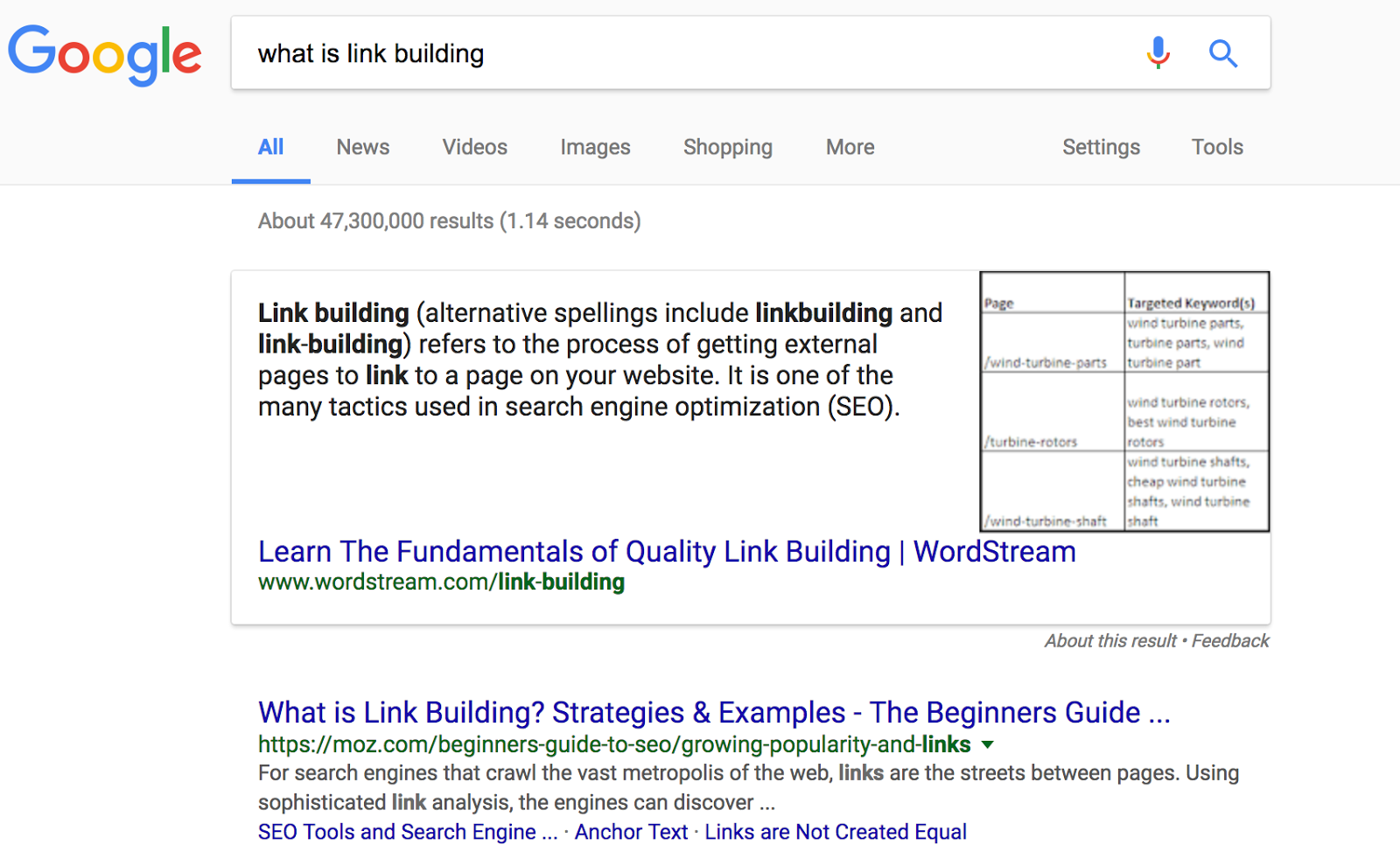
Again, Moz’s guide is ranking #1, but it isn’t earning the featured snippet. These are just two examples out of many I was able to quickly find for The Beginners Guide to SEO.
I believe Moz could snatch featured snippets like these with simple text or format tweaks. The same opportunities are likely there for your site as well.
Bonus: Once you are in a good place with this process, expand it to featured snippet keywords you rank 11th through 20th on. Typically, with a content refresh and some internal linking or promotion, you can move those to at least the 10th position in Google. Once you do that, you can earn the snippet.
Practical application #2: Earn featured snippets during content production
It’s easier to snatch snippets than to earn them from scratch, so start there. However, you are constantly creating new content, right? …Right?
When you craft new content, tailor it to earn featured snippets right out of the gate.
Here’s how:
- Compile a list of keywords in your niche that show snippets you don’t rank in the top 20 for.
- Create new content optimized for the format Google uses to display the snippet.
- Start with content that reaches people in the bottom of the funnel, like comparisons.. The volume is low, but the conversions can be high.
- Rinse and repeat.
Using this technique will give your editorial team a break. I’ve had the pleasure of presenting with Chris Bennett several times. To paraphrase one of his key points about content creation: When you use data to fuel topic ideation, content creation becomes more about resources and less about brainstorming.
Bonus: Once you’re in a groove with new content production, you can branch out to keywords you think Google would show a featured snippet for if the optimized content existed.
Keyword: “How to choose keywords”

Moz ranks second. To earn a featured snippet, it could incorporate a list format on this page or encourage a contributor to create a new post formatted specifically for this topic.
Remember, you don’t have to create an ordered list. For example, consider the following:
Fine, but not necessary:
- Collect Underpants
- ???
- Profit!
This format works, too:
- Collect Underpants: The collecting of underpants is a proven way to 10x…
- ???: This second step has been shrouded in mystery. However, if you RT this post, give me your email and five of your richest and most gullible friends’ emails, I will show you exactly how to…
- Profit!: I know what you’re thinking: Wow! This is too good to be true! But it’s not! Simply input your credit card number to unlock my automated underpants-collection and profit-making system. Believe me!
Closing thoughts
Do your site a favor. Conduct a featured snippet audit and start snatching, earning, and creating data-driven content targeted toward featured snippets.
Do yourself a favor. Follow people like Dr. Pete, Rob Bucci, Eric Enge, Cyrus Shepard, and Glenn Gabe on Twitter. They all share studies, insights, and presentations on featured snippets (among other things). I plan to share a lot more snippets as well, so feel free to follow me, too: @SEO (shameless plug).
Lastly, be sure to snag the raw numbers in this Google Doc.
Sign up for The Moz Top 10, a semimonthly mailer updating you on the top ten hottest pieces of SEO news, tips, and rad links uncovered by the Moz team. Think of it as your exclusive digest of stuff you don’t have time to hunt down but want to read!
Google Structured Data Testing Tool Validates Multi-Typed Entities MTE
Brad Brewer posted on Twitter that the Google Structured Data Testing Tool now supports MTE, multi-typed entities.
This can be used for the hotel schema markup said Brad. Here is a screen shot of the tool showing the support for the MTE…
Google Has Search Quality Raters In Tons Of Countries
The Google quality raters are contractors who work to test and judge experiments in the Google search results. They do not influence the rankings but rather give Google’s engineers more data points to judge how well the algorithms are working…
…
Google explains what “crawl budget” means for webmasters
Google says crawl demand and crawl rate make up GoogleBot’s crawl budget for your web site.
The post Google explains what “crawl budget” means for webmasters appeared first on Search Engine Land.
Please visit Search Engine Land for the full article.