How to amplify your content marketing with influencer-driven writing contests
The purpose of a content marketing campaign is almost never a boost in sales: People who want to consume and share information rarely intend to buy. Content marketing is mostly about influencing the influencer, i.e. those people who can impact your customers’ buying decisions.
Why SEO is getting vertical-specific
Universal Ranking Factors for everybody? – Forget it!
This means that anyone trying to do SEO following the same old strategies is going to be left behind by people who are applying specific techniques to meet the requirements of their industry. The bread and butter can only get you so far – now you need real meat.
Google’s algorithm is learning constantly – learning how users behave and learning what types of content work best in different contexts, including what suits searches related to different vertical industry sectors. What elements are important for retail/ecommerce searches for example, or searches related to travel or finance?
While the golden rule across all industries is: relevant, high quality content performs better in search, there are some vertical-specific nuances it’s important to appreciate. Because what’s relevant to one search term may be way off the mark for another.
Here’s a snapshot of some key differences Searchmetrics has discovered from studies analysing the search and content optimisation rules for finance, travel and ecommerce/online retail verticals.
HTTPS – Security is sexy!
Let’s start with some technical SEO. Google confirmed back in August 2014 that it was pushing HTTPS as a ranking signal, but uptake across the web has been neither universal nor uniform.
And looking at the data, we can see why, as Google seems to prioritize secure data transfer more in some industries than others.
Over half of finance pages in position #1 (and 46% across the top 10) use HTTPS, but the top travel result uses encryption less than one fifth of the time (23% across the top 10).
(Click to enlarge)
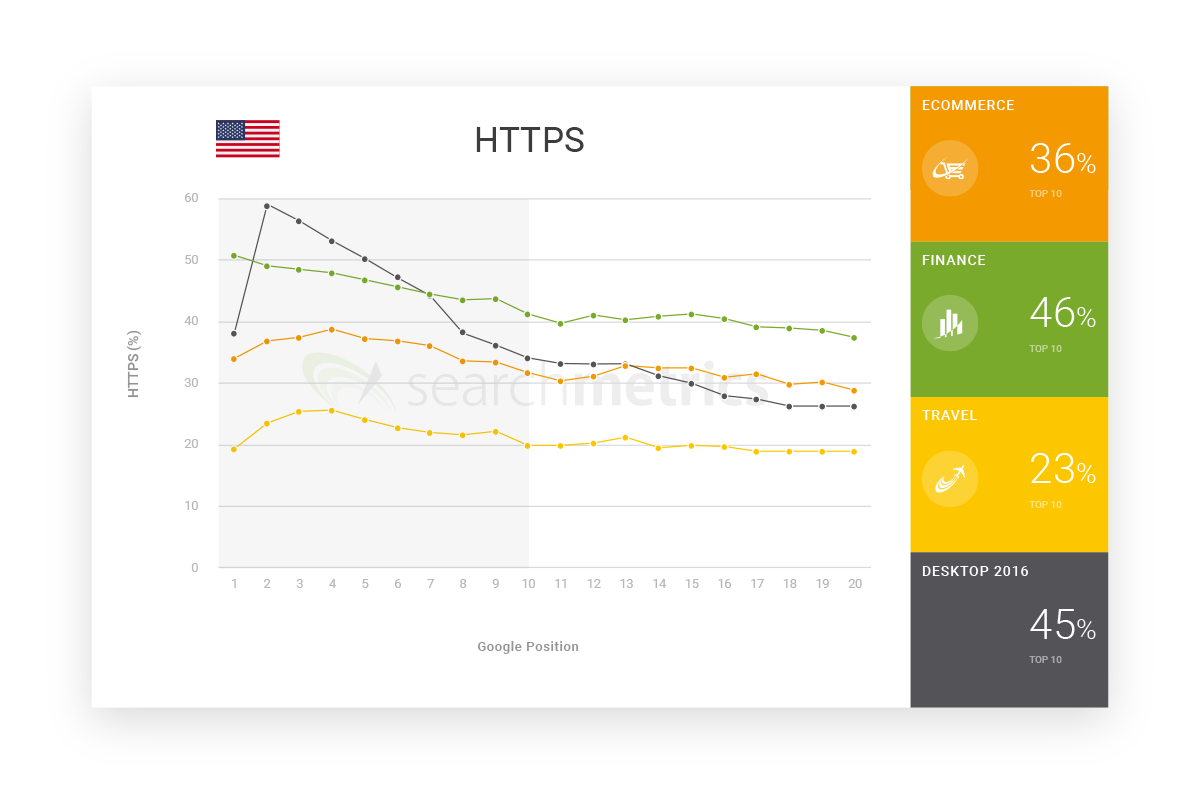
These stark differences reflect Google’s attempts to match its results to the user intent. People looking for financial information – where they may often be asked to enter personal details – are more concerned about security than those simply looking at ideas for their next city break. Furthermore, a travel site that does switch to HTTPS will likely limit its flexibility regarding display advertising, and could thereby jeopardise its revenue for little gain.
This is a simple, yet clear example of how different industries have to respond to the needs of their users and not apply a simple one-size-fits-all approach to website optimization.
Word count – How long should my content be?
One of the main questions any writer asks – for many people going all the way back to college assignments – is “How long does it have to be then?”
How do we find out the answer to this question? A pretty basic – though ultimately useless – strategy is “the longer, the better”.
While in general, longer texts have a higher chance of being more comprehensive, someone searching for “When are peaches ripe?” doesn’t necessarily want hundreds of recipes for fruit salad; they probably just want to know how to tell when peaches are ripe. This needs some explanation, but not thousands and thousands of words.
The top result for this query, from starkbros.com, is shown in a direct answer box and comes in at under 500 words, but sticks closely to the topic, covering smell, touch, sight and taste.

This simple example demonstrates that it’s not just a case of “the longer, the better”, and that the optimal length of a text depends very much on the search query, more specifically: the intention behind it. To find out what kind of word count you should be aiming for in your industry, it’s essential to know what kind of texts top-ranking competitor pages are using. That’s why you need data.
This graph shows the average word counts for high ranking pages in three different industries: ecommerce, finance and travel, as well as the benchmark word count for all keywords, regardless of industry.
(Click to enlarge)

The differences are clear. Travel is way out in front, with over 2,500 words for pages in Google’s top 10. So, in travel, you really should be getting wordy if you want to appear on the first search results page.
Readers of travel blogs want enough detailed description to get a good impression of their destination and people planning the more serious side of a holiday want the answers to all their questions on visa requirements, travel insurance and which jabs they should get if they want to make it home again.
By contrast, pages ranking in the top 10 for finance keywords have about 800 fewer words than travel sites. This suggests that finance URLs that perform well tend to be more focused on rather more specific topics.
This doesn’t mean leaving out important details, but it could mean that it’s often better to have a separate URL for another (related) topic rather than trying to cram everything onto one landing page. Finance topics are generally more complex than travel reports, and so readers don’t want to be distracted and/or confused by a text going off at tangents or trying to sell them a product they’re not (currently) looking for.
If I’m off to the Greek islands, I might well be interested in the story of Theseus and the minotaur. But if I’m trying to choose a pension plan, I’m probably not interested in the history of Goldman Sachs. Google knows that – because it has learned, and still learns from user data – and it uses this experience to serve the different search intentions with what it considers the most relevant content.
Images – How many pictures do I need alongside my thousand words?
Web content isn’t just about text. Other media, such as images, videos or interactive graphics are often a great way of communicating information and capturing user engagement. But how are web editors supposed to know how many images to include in an article?
The answer is there is no fixed rule – it is again dependent on the user’s search intent. Images might be great for a search like “top NHL players” but not so good for “NHL all time stats.”
The page (underneath) with a direct answer for “top NHL players” is from epsn.com and has a large images for every player on its top 100 list, whereas the wikipedia.org page with a direct answer for “NHL all time stats” has zero large images. Google understands that stats nuts aren’t interested in pictures, which is why the most relevant result for this query is one with lots of tables and lots of numbers.

Intent matters – Left: espn.com’s picture gallery of players. Right: wikipedia.org’s statistics tables.
This example shows two search terms that are thematically very close, yet differ greatly in intent, meaning that different content is evaluated as relevant for each.
As with word count, we measured the number of images of at least 200 x 200 pixels across different industries and found that pages appearing in the top 20 Google results for ecommerce/retail searches use the most images on the page, followed by those for travel searches and then finance.
(Click to enlarge)

The higher image count in retail may be because users – and Google – have come to appreciate that the most relevant retail results present a catalogue style overview of many product images and descriptions, making it easier to compare similar products.
Travel pages serve a different purpose to those in retail, but they go big on images too, to inspire and communicate emotions. Travel sites in Google’s top 10 have an average 2.15 large images and, at the same time, they have a 40% larger file size and take almost three seconds longer to load than for general search results. Google understands that if you are researching a holiday you value sites with more high-quality images than those that have fast loading pages.
No context, no relevance
By now, most webmasters have hopefully got the message that you have to be relevant to achieve good rankings. So now the big question everyone should be asking is: “What is relevant?”
The answer is that it all depends on context, on your industry vertical, your audience – ultimately on each and every keyword people are searching for – as well as on the device they are using. That’s the level of detail Google is applying so that’s the level of detail we need to use too.
This might sound daunting, but SEOs and content marketers who use the right data and who have the skill to analyse it effectively can give themselves a real advantage in creating relevant content for their vertical. They can engage users and move up the rankings in Google search.
Econsultancy subscribers can download our SEO Best Practice Guide, a complete guide to your SEO.
Why SEO is getting vertical-specific
Universal Ranking Factors for everybody? – Forget it!
This means that anyone trying to do SEO following the same old strategies is going to be left behind by people who are applying specific techniques to meet the requirements of their industry. The bread and butter can only get you so far – now you need real meat.
Google’s algorithm is learning constantly – learning how users behave and learning what types of content work best in different contexts, including what suits searches related to different vertical industry sectors. What elements are important for retail/ecommerce searches for example, or searches related to travel or finance?
While the golden rule across all industries is: relevant, high quality content performs better in search, there are some vertical-specific nuances it’s important to appreciate. Because what’s relevant to one search term may be way off the mark for another.
Here’s a snapshot of some key differences Searchmetrics has discovered from studies analysing the search and content optimisation rules for finance, travel and ecommerce/online retail verticals.
HTTPS – Security is sexy!
Let’s start with some technical SEO. Google confirmed back in August 2014 that it was pushing HTTPS as a ranking signal, but uptake across the web has been neither universal nor uniform.
And looking at the data, we can see why, as Google seems to prioritize secure data transfer more in some industries than others.
Over half of finance pages in position #1 (and 46% across the top 10) use HTTPS, but the top travel result uses encryption less than one fifth of the time (23% across the top 10).
(Click to enlarge)
These stark differences reflect Google’s attempts to match its results to the user intent. People looking for financial information – where they may often be asked to enter personal details – are more concerned about security than those simply looking at ideas for their next city break. Furthermore, a travel site that does switch to HTTPS will likely limit its flexibility regarding display advertising, and could thereby jeopardise its revenue for little gain.
This is a simple, yet clear example of how different industries have to respond to the needs of their users and not apply a simple one-size-fits-all approach to website optimization.
Word count – How long should my content be?
One of the main questions any writer asks – for many people going all the way back to college assignments – is “How long does it have to be then?”
How do we find out the answer to this question? A pretty basic – though ultimately useless – strategy is “the longer, the better”.
While in general, longer texts have a higher chance of being more comprehensive, someone searching for “When are peaches ripe?” doesn’t necessarily want hundreds of recipes for fruit salad; they probably just want to know how to tell when peaches are ripe. This needs some explanation, but not thousands and thousands of words.
The top result for this query, from starkbros.com, is shown in a direct answer box and comes in at under 500 words, but sticks closely to the topic, covering smell, touch, sight and taste.
This simple example demonstrates that it’s not just a case of “the longer, the better”, and that the optimal length of a text depends very much on the search query, more specifically: the intention behind it. To find out what kind of word count you should be aiming for in your industry, it’s essential to know what kind of texts top-ranking competitor pages are using. That’s why you need data.
This graph shows the average word counts for high ranking pages in three different industries: ecommerce, finance and travel, as well as the benchmark word count for all keywords, regardless of industry.
(Click to enlarge)
The differences are clear. Travel is way out in front, with over 2,500 words for pages in Google’s top 10. So, in travel, you really should be getting wordy if you want to appear on the first search results page.
Readers of travel blogs want enough detailed description to get a good impression of their destination and people planning the more serious side of a holiday want the answers to all their questions on visa requirements, travel insurance and which jabs they should get if they want to make it home again.
By contrast, pages ranking in the top 10 for finance keywords have about 800 fewer words than travel sites. This suggests that finance URLs that perform well tend to be more focused on rather more specific topics.
This doesn’t mean leaving out important details, but it could mean that it’s often better to have a separate URL for another (related) topic rather than trying to cram everything onto one landing page. Finance topics are generally more complex than travel reports, and so readers don’t want to be distracted and/or confused by a text going off at tangents or trying to sell them a product they’re not (currently) looking for.
If I’m off to the Greek islands, I might well be interested in the story of Theseus and the minotaur. But if I’m trying to choose a pension plan, I’m probably not interested in the history of Goldman Sachs. Google knows that – because it has learned, and still learns from user data – and it uses this experience to serve the different search intentions with what it considers the most relevant content.
Images – How many pictures do I need alongside my thousand words?
Web content isn’t just about text. Other media, such as images, videos or interactive graphics are often a great way of communicating information and capturing user engagement. But how are web editors supposed to know how many images to include in an article?
The answer is there is no fixed rule – it is again dependent on the user’s search intent. Images might be great for a search like “top NHL players” but not so good for “NHL all time stats.”
The page (underneath) with a direct answer for “top NHL players” is from epsn.com and has a large images for every player on its top 100 list, whereas the wikipedia.org page with a direct answer for “NHL all time stats” has zero large images. Google understands that stats nuts aren’t interested in pictures, which is why the most relevant result for this query is one with lots of tables and lots of numbers.
Intent matters – Left: espn.com’s picture gallery of players. Right: wikipedia.org’s statistics tables.
This example shows two search terms that are thematically very close, yet differ greatly in intent, meaning that different content is evaluated as relevant for each.
As with word count, we measured the number of images of at least 200 x 200 pixels across different industries and found that pages appearing in the top 20 Google results for ecommerce/retail searches use the most images on the page, followed by those for travel searches and then finance.
(Click to enlarge)
The higher image count in retail may be because users – and Google – have come to appreciate that the most relevant retail results present a catalogue style overview of many product images and descriptions, making it easier to compare similar products.
Travel pages serve a different purpose to those in retail, but they go big on images too, to inspire and communicate emotions. Travel sites in Google’s top 10 have an average 2.15 large images and, at the same time, they have a 40% larger file size and take almost three seconds longer to load than for general search results. Google understands that if you are researching a holiday you value sites with more high-quality images than those that have fast loading pages.
No context, no relevance
By now, most webmasters have hopefully got the message that you have to be relevant to achieve good rankings. So now the big question everyone should be asking is: “What is relevant?”
The answer is that it all depends on context, on your industry vertical, your audience – ultimately on each and every keyword people are searching for – as well as on the device they are using. That’s the level of detail Google is applying so that’s the level of detail we need to use too.
This might sound daunting, but SEOs and content marketers who use the right data and who have the skill to analyse it effectively can give themselves a real advantage in creating relevant content for their vertical. They can engage users and move up the rankings in Google search.
Econsultancy subscribers can download our SEO Best Practice Guide, a complete guide to your SEO.
How to Write Marketing Case Studies That Convert
Posted by kerryjones
In my last post, I discussed why your top funnel content shouldn’t be all about your brand. Today I’m making a 180-degree turn and covering the value of content at the opposite end of the spectrum: content that’s directly about your business and offers proof of your effectiveness.
Specifically, I’m talking about case studies.
I’m a big believer in investing in case studies because I’ve seen firsthand what happened once we started doing so at Fractl. Case studies were a huge game changer for our B2B marketing efforts. For one, our case studies portfolio page brings in a lot of traffic – it’s the second most-visited page on our site, aside from our home page. It also brings in a significant volume of organic traffic, being our fourth most-visited page from organic searches. Most importantly, our case studies are highly effective at converting visitors to leads – about half of our leads view at least one of our case studies before contacting us.
Assuming anyone who reads the Moz Blog is performing some type of marketing function, I’m zeroing in on how to write a compelling marketing case study that differentiates your service offering and pulls prospects down the sales funnel. However, what I’m sharing can be used as a framework for creating case studies in any industry.
Get your client on board with a case study
Marketers shy away from creating case studies for a few reasons:
- They’re too busy “in the weeds” with deliverables.
- They don’t think their results are impressive enough.
- They don’t have clients’ permission to create case studies.
While I can’t help you with #1 and #2 (it’s up to you to make the time and to get the results deserving of a case study!), I do have some advice on #3.
In a perfect world, clients would encourage you to share every little detail of your time working together. In reality, most clients expect you to remain tight-lipped about the work you’ve done for them.

Understandably, this might discourage you from creating any case studies. But it shouldn’t.
With some compromising, chances are your client will be game for a case study. We’ve noticed the following two objections are common regarding case studies.
Client objection 1: “We don’t want to share specific numbers.”
At first it you may think, “Why bother?” if a client tells you this, but don’t let it hold you back. (Truth is, the majority of your clients will probably feel this way).
In this instance, you’ll want your case study to focus on highlighting the strategy and describing projects, while steering away from showing specific numbers regarding short and long-term results. Believe it or not, the solution part of the case study can be just as, or more, compelling than the results. (I’ll get to that shortly.)
And don’t worry, you don’t have to completely leave out the results. One way to get around not sharing actual numbers but still showing results is to use growth percentages.
Specific numbers: “Grew organic traffic from 5,000 to 7,500 visitors per month”
Growth percentage: “Increased organic traffic by 150%”
We do this for most of our case studies at Fractl, and our clients are totally fine with it.
Client objection 2: “We don’t want to reveal our marketing strategy to competitors.”
A fear of giving away too much intel to competitors is especially common in highly competitive niches.
So how do you get around this?
Keep it anonymous. Don’t reveal who the client is and keep it vague about what niche they’re in. This can be as ambiguous as referring to the client as “Client A” or slightly more specific (“our client in the auto industry”). Instead, the case study will focus on the process and results – this is what your prospects care about, anyway.
Gather different perspectives
Unless you were directly working with the client who you are writing the case study about, you will need to conduct a few interviews to get a full picture of the who, what, how, and why of the engagement. At Fractl, our marketing team puts together case studies based on interviews with clients and the internal team who worked on the client’s account.
The client
Arrange an interview with the client, either on a call or via email. If you have multiple contacts within the client’s team, interview the main point of contact who has been the most involved in the engagement.
What to ask:
- What challenge were you facing that you hired us to help with?
- Had you previously tried to solve this challenge (working with another vendor, using internal resources, etc.)?
- What were your goals for the engagement?
- How did you benefit from the engagement (short-term and long-term results, unexpected wins, etc.)?
You’ll also want to run the case study draft by the client before publishing it, which offers another chance for their feedback.
The project team
Who was responsible for this client’s account? Speak with the team behind the strategy and execution.
What to ask:
- How was the strategy formed? Were strategic decisions made based on your experience and expertise, competitive research, etc.?
- What project(s) were launched as part of the strategy? What was the most successful project?
- Were there any unexpected issues that you overcame?
- Did you refine the strategy to improve results?
- How did you and the client work together? Was there a lot of collaboration or was the client more hands-off? (Many prospective clients are curious about what their level of involvement in your process would look like.)
- What did you learn during the engagement? Any takeaways?
Include the three crucial elements of a case study
There’s more than one way to package case studies, but the most convincing ones all have something in common: great storytelling. To ensure you’re telling a proper narrative, your case study should include the conflict, the resolution, and the happy ending (but not necessarily in this order).
We find a case study is most compelling when you get straight to the point, rather than making someone read the entire case study before seeing the results. To grab readers’ attention, we begin with a quick overview of conflict-resolution-happy ending right in the introduction.
For example, in our Fanatics case study, we summarized the most pertinent details in the first three paragraphs. The rest of the case study focused on the resolution and examples of specific projects.

Let’s take a look at what the conflict, resolution, and happy ending of your case study should include.
The Conflict: What goal did the client want to accomplish?
Typically serving as the introduction of the case study, “the conflict” should briefly describe the client’s business, the problem they hired you to work on, and what was keeping them from fixing this problem (ex. lack of internal resources or internal expertise). This helps readers identify with the problem the client faced and empathize with them – which can help them envision coming to you for help with this problem, too.
Here are a few examples of “conflicts” from our case studies:
- “Movoto engaged Fractl to showcase its authority on local markets by increasing brand recognition, driving traffic to its website, and earning links back to on-site content.”
- “Alexa came to us looking to increase awareness – not just around the Alexa name but also its resources. Many people had known Alexa as the site-ranking destination; however, Alexa also provides SEO tools that are invaluable to marketers.”
- “While they already had strong brand recognition within the link building and SEO communities, Buzzstream came to Fractl for help with launching large-scale campaigns that would position them as thought leaders and provide long-term value for their brand.”
The Resolution: How did you solve the conflict?
Case studies are obviously great for showing proof of results you’ve achieved for clients. But perhaps more importantly, case studies give prospective clients a glimpse into your processes and how you approach problems. A great case study paints a picture of what it’s like to work with you.
For this reason, the bulk of your case study should detail the resolution, sharing as much specific information as you and your client are comfortable with; the more you’re able to share, the more you can highlight your strategic thinking and problem solving abilities.
The following snippets from our case studies are examples of details you may want to include as part of your solution section:
What our strategy encompassed:
“Mixing evergreen content and timely content helped usher new and existing audience members to the We Are Fanatics blog in record numbers. We focused on presenting interesting data through evergreen content that appealed to a variety of sports fans as well as content that capitalized on current interest around major sporting events.” – from Fanatics case study
How strategy was decided:
“We began by forming our ideation process around Movoto’s key real estate themes. Buying, selling, or renting a home is an inherently emotional experience, so we turned to our research on viral emotions to figure out how to identify with and engage the audience and Movoto’s prospective clients. Based on this, we decided to build on the high-arousal feelings of curiosity, interest, and trust that would be part of the experience of moving.
We tapped into familiar cultural references and topics that would pique interest in the regions consumers were considering. Comic book characters served us well in this regard, as did combining publicly available data (such as high school graduation rates or IQ averages) with our own original research.” – from Movoto case study
Why strategy was changed based on initial results:
“After analyzing the initial campaigns, we determined the most effective strategy included a combination of the following content types designed to achieve different goals [case study then lists the three types of content and goals]…
This strategy yielded even better results, with some campaigns achieving up to 4 times the amount of featured stories and social engagement that we achieved in earlier campaigns.” – from BuzzStream case study
How our approach was tailored to the client’s niche:
“In general, when our promotions team starts its outreach, they’ll email writers and editors who they think would be a good fit for the content. If the writer or editor responds, they often ask for more information or say they’re going to do a write-up that incorporates our project. From there, the story is up to publishers – they pick and choose which visual assets they want to incorporate in their post, and they shape the narrative.
What we discovered was that, in the marketing niche, publishers preferred to feature other experts’ opinions in the form of guest posts rather than using our assets in a piece they were already working on. We had suspected this (as our Fractl marketing team often contributes guest columns to marketing publications), but we confirmed that guest posts were going to make up the majority of our outreach efforts after performing outreach for Alexa’s campaigns.” – from Alexa case study
Who worked on the project:
Since the interviews you conduct with your internal team will inform the solution section of the case study, you may want to give individuals credit via quotes or anecdotes as a means to humanize the people behind the work. In the example below, one of our case studies featured a Q&A section with one of the project leads.

The Happy Ending: What did your resolution achieve?
Obviously, this is the part where you share your results. As I mentioned previously, we like to feature the results at the beginning of the case study, rather than buried at the end.
In our Superdrug Online Doctor case study, we summarized the overall results our campaigns achieved over 16 months:

But the happy ending isn’t finished here.
A lot of case studies fail to answer an important question: What impact did the results have on the client’s business? Be sure to tie in how the results you achieved had a bottom-line impact.
In the case of Superdrug Online Doctor, the results from our campaigns lead to a 238% increase in organic traffic. This type of outcome has tangible value for the client.

You can also share secondary benefits in addition to the primary goals the client hired you for.
In the case of our client Busbud, who hired us for SEO-oriented goals, we included examples of secondary results.
Busbud saw positive impacts beyond SEO, though, including the following:
- Increased blog traffic
- New partnerships as a result of more brands reaching out to work with the site
- Brand recognition at large industry events
- An uptick in hiring
- Featured as a “best practice” case study at an SEO conference
Similarly, in our Fractl brand marketing case study, which focused on lead generation, we listed all of the additional benefits resulting from our strategy.

How to get the most out of your case studies
You’ve published your case study, now what should you do with it?
Build a case study page on your site
Once you’ve created several case studies, I recommend housing them all on the same page. This makes it easy to show off your results in a single snapshot and saves visitors from searching through your blog or clicking on a category tag to find all of your case studies in one place. Make this page easy to find through your site navigation and internal links.

While it probably goes without saying, make sure to optimize this page for search. When we initially created our case study portfolio page, we underestimated its potential to bring in search traffic and assumed it would mostly be accessed from our site navigation. Because of this, we were previously using a generic URL to house our case study portfolio. Since updating the URL from “frac.tl/our-work” to “frac.tl/content-marketing-case-studies,” we’ve jumped from page 2 to the top #1–3 positions for a specific phrase we wanted to rank for (“content marketing case studies”), which attracts highly relevant search traffic.
Use case studies as concrete proof in blog posts and off-site content
Case studies can serve as tangible examples that back up your claims. Did you state that creating original content for six months can double your organic traffic? On its own, this assertion may not be believable to some, but a case study showing these results will make your claim credible.
In a post on the Curata blog, my colleague Andrea Lehr used our BuzzStream case study to back up her assertion that in order to attract links, social shares, and traffic, your off-site content should appeal to an audience beyond your target customer. Showing the results this strategy earned for a client gives a lot more weight to her advice.

On the same note, case studies have high linking potential. Not only do they make a credible citation for your own off-site content, they can also be cited by others writing about your service/product vertical. Making industry publishers aware that you publish case studies by reaching out when you’ve released a new case study can lead to links down the road.
Repurpose your case studies into multiple content formats
Creating a case study takes a lot of time, but fortunately it can be reused again and again in various applications.
Long-form case studies
While a case study featured on your site may only be a few hundred words, creating a more in-depth version is a chance to reveal more details. If you want to get your case study featured on other sites, consider writing a long-form version as a guest post.
Most of the case studies you’ll find on the Moz Blog are extremely detailed:
- How We Ranked #1 for a High Volume Keyword in Under 3 Months walks through the 8-step process used to achieve the impressive result called out in the headline.
- The Anatomy of a $97 Million Page: A CRO Case Study offers much greater detail and insights than the case studies featured on the Conversion Wizards site.
- The Roadmap for Creating Share-Worthy Content with Massive Distribution used one of our campaign case studies to illustrate our overall process for creating shareable widely-shared content.
Video
HubSpot has hundreds of case studieson its site, dozens of which also feature supplemental video case studies, such as the one below for Eyeota.

Don’t feel like you have to create flashy videos with impressive production value, even no-frills videos can work. Within its short case study summaries, PR That Converts embeds videos of clients talking about its service. These videos are simple and short, featuring the client speaking to their webcam for a few minutes.

Speaking engagements
Marketing conferences love case studies. Look on any conference agenda, and you’re sure to notice at least a handful of speaker presentations focused on case studies. If you’re looking to secure more speaking gigs, including case studies in your speaking pitch can give you a leg up over other submissions – after all, your case studies are original data no one else can offer.
My colleague Kelsey Libert centered her MozCon presentation a few years ago around some of our viral campaign case studies.

Sales collateral
As I mentioned at the beginning of this post, many of our leads view the case studies on our site right before contacting us about working together. Once that initial contact is made, we don’t stop showing off our case studies.
We keep a running “best of” list of stats from our case studies, which allows us to quickly pull compelling stats to share in written and verbal conversations. Our pitch and proposal decks feature bite-sized versions of our case studies.

Consider how you can incorporate case studies into various touch points throughout your sales process and make sure the case studies you share align with the industry and goals of whoever you’re speaking with.
I’ve shared a few of my favorite ways to repurpose case studies here but there are at least a dozen other applications, from email marketing to webinars to gated content to printed marketing materials. I even link to our case studies page in my email signature.

My last bit of advice: Don’t expect immediate results. Case studies typically pay off over time. The good news is it’s worth the wait, because case studies retain their value – we’re still seeing leads come in and getting links to case studies we created three or more years ago. By extending their lifespan through repurposing, the case studies you create today can remain an essential part of your marketing strategy for years to come.
Sign up for The Moz Top 10, a semimonthly mailer updating you on the top ten hottest pieces of SEO news, tips, and rad links uncovered by the Moz team. Think of it as your exclusive digest of stuff you don’t have time to hunt down but want to read!
SearchCap: Google event schema penalty, knowledge graph local panels & fake reviews
Below is what happened in search today, as reported on Search Engine Land and from other places across the web.
The post SearchCap: Google event schema penalty, knowledge graph local panels & fake reviews appeared first on Search Engine Land.
Please visit Search Engine Land for the full article.
How your website redesign can sabotage your paid search efforts
Relaunching a website can be very exciting for a business, but columnist Pauline Jakober warns that without careful planning, a redesign can damage your PPC program.
The post How your website redesign can sabotage your paid search efforts appeared fir…
Google warns webmasters not to use misleading event markup
Google can penalize your website if you use event markup in a misleading manner.
The post Google warns webmasters not to use misleading event markup appeared first on Search Engine Land.
Please visit Search Engine Land for the full article.
Looking to get out of the SEO business? Good!
The SEO industry is becoming more difficult than ever, and columnist Jeremy Knauff explains why that is a great thing for the industry as a whole.
The post Looking to get out of the SEO business? Good! appeared first on Search Engine Land.
Please vis…
A reminder about “event” markup
Lately we’ve been receiving feedback from users seeing non-events like coupons or vouchers showing up in search results where “events” snippets appear. This is really confusing for users and also against our guidelines, where we have added additional clarification.
So, what’s the problem?
We’ve seen a number of publishers in the coupons/vouchers space use the “event” markup to describe their offers. And as much as using a discount voucher can be a very special thing, that doesn’t make coupons or vouchers events or “saleEvents”. Using Event markup to describe something that is not an event creates a bad user experience, by triggering a rich result for something that will happen at a particular time, despite no actual event being present.
Here are some examples to illustrate the issue:

Since this creates a misleading user experience, we may take manual action on such cases. In case your website is affected by such a manual action, you will find a notification in your Search Console account. If a manual action is taken, it can result in structured data markup for the whole site not being used for search results.
While we’re specifically highlighting coupons and vouchers in this blogpost, this applies to all other non-event items being annotated with “event” markup as well — or, really, for applying a type of markup to something other than the type of thing it is meant to describe.
For more information, please visit our developer documentation or stop by our Webmaster Forum in case you have additional questions!
Posted by Sven Naumann, Trust & Safety Search Team


A reminder about “event” markup
Lately we’ve been receiving feedback from users seeing non-events like coupons or vouchers showing up in search results where “events” snippets appear. This is really confusing for users and also against our guidelines, where we have added additional clarification.
So, what’s the problem?
We’ve seen a number of publishers in the coupons/vouchers space use the “event” markup to describe their offers. And as much as using a discount voucher can be a very special thing, that doesn’t make coupons or vouchers events or “saleEvents”. Using Event markup to describe something that is not an event creates a bad user experience, by triggering a rich result for something that will happen at a particular time, despite no actual event being present.
Here are some examples to illustrate the issue:
Since this creates a misleading user experience, we may take manual action on such cases. In case your website is affected by such a manual action, you will find a notification in your Search Console account. If a manual action is taken, it can result in structured data markup for the whole site not being used for search results.
While we’re specifically highlighting coupons and vouchers in this blogpost, this applies to all other non-event items being annotated with “event” markup as well — or, really, for applying a type of markup to something other than the type of thing it is meant to describe.
For more information, please visit our developer documentation or stop by our Webmaster Forum in case you have additional questions!
Posted by Sven Naumann, Trust & Safety Search Team
Want to speak at SMX West? Here’s how
The agenda for our upcoming SMX West show is live and we’ve opened up our “speaking pitch” form for select sessions for the show, taking place on March 13 – 15, 2018 at the McEnery Convention Center in San Jose, California. To increase the odds of being selected, be sure to…
Please visit Search Engine Land for the full article.
Google showing knowledge graph data in local panels
Google is merging the local panel and knowledge graph panels into one for some searches related to big companies with many local venues.
The post Google showing knowledge graph data in local panels appeared first on Search Engine Land.
Please visit S…
Jill Whalen – The Search Community Honors You
Jill Whalen, currently 56 years old, was literally one of the pioneers in the SEO industry…
Google: Measure Page Speed To When Users Can Interact With Your Page
There are a lot of tools out there that measure your page speed, numerous tools from Google and many tools from third party developers. But not all of them measure the same thing…
Google: Your Structured Data Should Match Visible Content
Google’s John Mueller said that if you implement structured data on a page, that structured data should match the content visible on your page…
Google Engineer Cites Complexities Around AI Algorithms Explaining Themselves
Google has been saying for a year or so that they are moving from a mobile first world to an artificial intelligence first world but we’ve been told, at least in search, machine learning won’t take over the algorithm – at least not yet…
Readability ranks!
Does it pay off to write a text that is nice and easy to read? Will readable content lead to higher rankings and more traffic? Is readability a ‘ranking factor’? At Yoast, we are strong believers in writing texts that are nice and easy to read. We’ve developed an entire tool to help people write […]
The post Readability ranks! appeared first on Yoast.
How to hire the right SEO agency
Organic search accounts for 51% of the traffic brands receive on average. To capitalize on this opportunity, brands often partner with an SEO agency to add firepower to their existing marketing efforts. However, with so many agencies all promising so much, how can brands ensure they select the right company?
Knowledge Graph Eats Featured Snippets, Jumps +30%
Posted by Dr-Pete
Over the past two years, we’ve seen a steady and substantial increase in Featured Snippets on Google SERPs. In our 10,000-keyword daily tracking set, Featured Snippets have gone from about 5.5% of queries in November 2015 to a recent high of just over 16% (roughly tripling). Other data sets, with longer tail searches, have shown even higher prevalence.

Near the end of October (far-right of the graph), we saw our first significant dip (spotted by Brian Patterson on SEL). This dip occurred over about a 4-day period, and represents roughly a 10% drop in searches with Featured Snippets. Here’s an enhanced, 2-week view (note: Y-axis is expanded to show the day-over-day changes more clearly):

Given the up-and-to-the-right history of Featured Snippets and the investments people have been making optimizing for these results, a 10% drop is worthy of our attention.
What happened, exactly?
To be honest, when we investigate changes like this, the best we can usually do is produce a list of keywords that lost Featured Snippets. Usually, we focus on high-volume keywords, which tend to be more interesting. Here’s a list of keywords that lost Featured Snippets during that time period:
- CRM
- ERP
- MBA
- buddhism
- web design
- anger management
- hosting
- DSL
- ActiveX
- ovulation
From an explanatory standpoint, this list isn’t usually very helpful – what exactly do “web design”, “buddhism”, and “ovulation” have in common (please, don’t answer that)? In this case, though, there was a clear and interesting pattern. Almost all of the queries that lost Featured Snippets gained Knowledge Panels that look something like this one:

These new panels account for the vast majority of the lost Featured Snippets I’ve spot-checked, and all of them are general Knowledge Panels coming directly from Wikipedia. In some cases, Google is using a more generic Knowledge Graph entry. For example, “HDMI cables”, which used to show a Featured Snippet (dominated by Amazon, last I checked), now shows no snippet and a generic panel for “HDMI”:

In very rare cases, a SERP added the new Knowledge Panel but retained the Featured Snippet, such as the top of this search for “credit score”:

These situations seemed to be the exceptions to the rule.
What about other SERPs?
The SERPs that lost Featured Snippets were only one part of this story. Over the same time period, we saw an explosion (about +30%) in Knowledge Panels:

This Y-axis has not been magnified – the jump in Knowledge Panels is clearly visible even at normal scale. Other tracking sites saw similar, dramatic increases, including this data from RankRanger. This jump appears to be a similar type of descriptive panel, ranging from commercial keywords, like “wedding dresses” and “Halloween costumes”…

…to brand keywords, like “Ray-Ban”…

Unlike definition boxes, many of these new panels appear on words and phrases that appear to be common knowledge and add little value. Here’s a panel on “job search”…

I suspect that most people searching for “job search” or “job hunting” don’t need it defined. Likewise, people searching for “travel” probably weren’t confused about what travel actually is…

Thanks for clearing that up, Google. I’ve decided to spare you all and leave out a screenshot for “toilet” (go ahead and Google it). Almost all of these new panels appear to be driven by Wikipedia (or Wikidata), and most of them are single-paragraph definitions of terms.
Were there other changes?
During the exact same period, we also noticed a drop in SERPs with inline image results. Here’s a graph of the same 2-week period reported for the other features:

This drop almost exactly mirrors the increase in Knowledge Panels. In cases where the new panels were added, those panels almost always contain a block of images at the top. This block seems to have replaced inline image results. It’s interesting to note that, because image blocks in the left-hand column consume an organic position, this change freed up an organic spot on the first page of results for those terms.
Why did Google do this?
It’s likely that Google is trying to standardize answers for common terms, and perhaps they were seeing quality or consistency issues in Featured Snippets. In some cases, like “HDMI cables”, Featured Snippets were often coming from top e-commerce sites, which are trying to sell products. These aren’t always a good fit for unbiased definitions. Its also likely that Google would like to beef up the Knowledge Graph and rely less, where possible, on outside sites for answers.
Unfortunately, this also means that the answers are coming from a much less diverse pool (and, from what we’ve seen, almost entirely from Wikipedia), and it reduces the organic opportunity for sites that were previously ranking for or trying to compete for Featured Snippets. In many cases, these new panels also seem to add very little. Someone searching for “ERP” might be helped by a brief definition, but someone searching for “travel” is unlikely looking to have it explained to them.
As always, there’s not much we can do but monitor the situation and adapt. Featured Snippets are still at historically high levels and represent a legitimate organic opportunity. There’s also win-win, since efforts invested in winning Featured Snippets tend to improve organic ranking and, done right, can produce a better user experience for both search and website visitors.
Sign up for The Moz Top 10, a semimonthly mailer updating you on the top ten hottest pieces of SEO news, tips, and rad links uncovered by the Moz team. Think of it as your exclusive digest of stuff you don’t have time to hunt down but want to read!
Video backgrounds suck and should be banned from your website
“I just love those video backgrounds and we need them on our new website.” No, you don’t. “They are so engaging and set a friendly mood.” No, they don’t. “It’s an amazing new feature and it helps conversion.” No, it doesn’t. Besides that, the conversation is annoying me. Video backgrounds suck big time. Our good […]
The post Video backgrounds suck and should be banned from your website appeared first on Yoast.