Google to add support for higher quality images in search, swipe up images & 3D images
Google Images is often overlooked, but it can be a great source of traffic. Here are some new features coming to image search you should pay attention to.
Please visit Search Engine Land for the full article.
Digital marketing strategy guide for B2B industrial manufacturers
Most of the time, people that gather information to find suppliers are engineers, managers, and CEOs. How to create a content strategy that speaks to them?
The post Digital marketing strategy guide for B2B industrial manufacturers appeared first on Search Engine Watch.
Google now rolling out podcast results in search
Can you hear me now? Yes, Google is now showing podcast results in search.
Please visit Search Engine Land for the full article.
What’s technical SEO? 8 technical aspects everyone should know
An SEO Basics post about technical SEO might seem like a contradiction in terms. Nevertheless, some basic knowledge about the more technical side of SEO can mean the difference between a high ranking site and a site that doesn’t rank at all. Technical SEO isn’t easy, but here we’ll explain – in layman’s language – […]
The post What’s technical SEO? 8 technical aspects everyone should know appeared first on Yoast.
If you’re not remarketing keywords, you’re missing out
Targeting methods have moved beyond keywords and SMBs should now be interacting with potential customers alongside their entire purchase cycle.
Please visit Search Engine Land for the full article.
Competitor Analysis: A Structured Approach

This blog post is for you if you need a structured way to do competitor analysis that allows you to focus and prioritise tasks without missing out on any important information.
Google teases Google Ads app, Local campaigns announcements ahead of Google Marketing Live next week
Google Marketing Live will be held May 14.
Please visit Search Engine Land for the full article.
There’s a new Speed Report coming to Google Search Console
You can request beta access to this new speed report today.
Please visit Search Engine Land for the full article.
An SEO’s Guide to Writing Structured Data (JSON-LD)
Posted by briangormanh
The Schema.org vocabulary is the ultimate collab.
Thanks to a mutual handshake between Google, Microsoft, Yahoo, and Yandex, we have a library of fields we can use to highlight and more aptly define the information on web pages. By utilizing structured data, we provide search engines with more confidence (i.e. a better understanding of page content), as Alexis Sanders explains in this wonderful podcast. Doing so can have a number of positive effects, including eye-catching SERP displays and improved rankings.
If you’re an SEO, how confident are you in auditing or creating structured data markup using the Schema.org vocabulary? If you just shifted in your seat uncomfortably, then this is the guide for you. In it, I aim to demystify some of the syntax of JSON-LD as well as share useful tips on creating structured data for web pages.
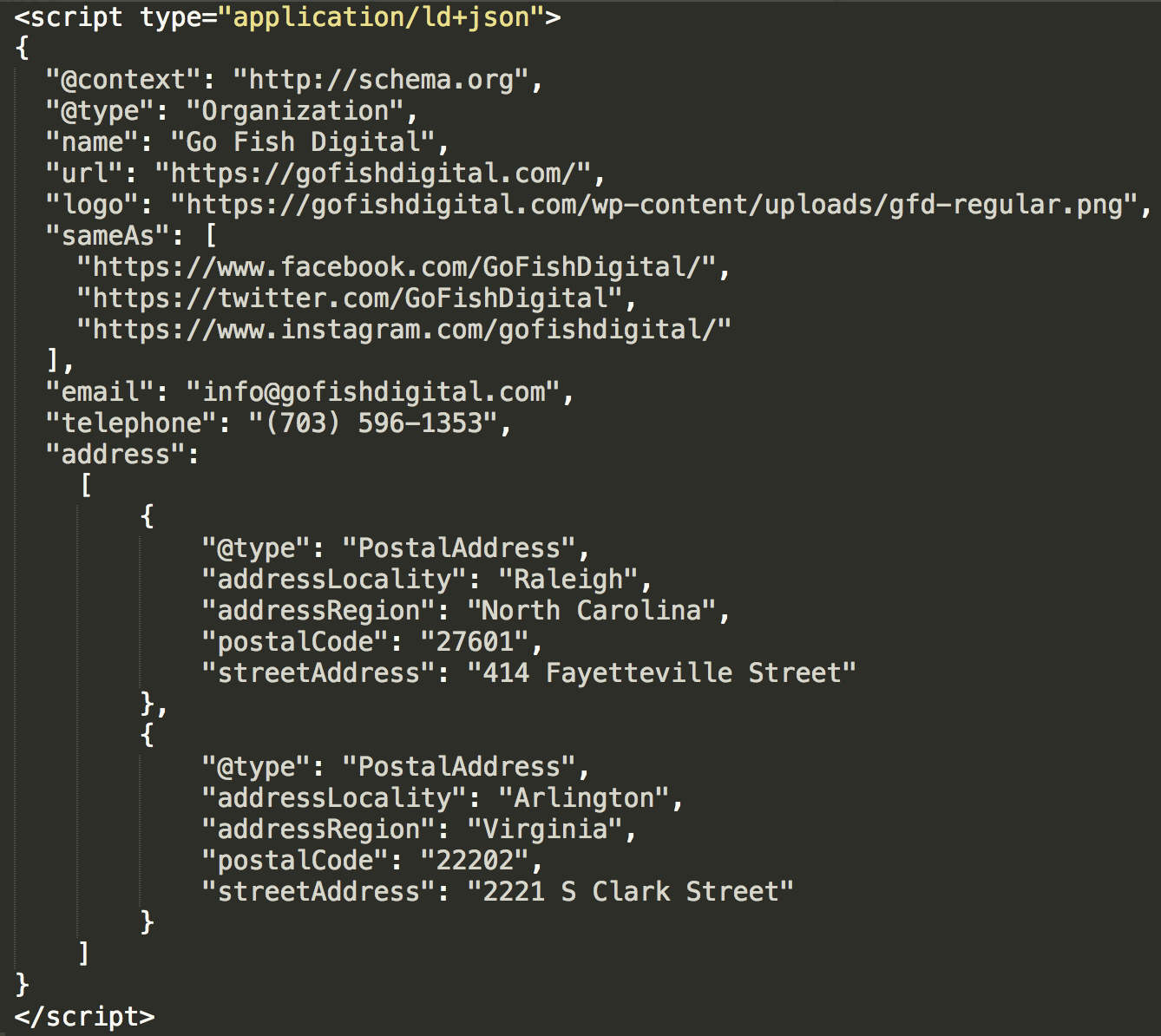
Understanding the syntax of JSON-LD
While there’s a couple of different ways you can mark up on-page content, this guide will focus on the format Google prefers; JSON-LD. Additionally, we won’t get into all of its complexities, but rather, those instances most commonly encountered by and useful to SEOs.
Curly braces
The first thing you’ll notice after the opening <script> tag is an open curly brace. And, just before the closing </script> tag, a closed curly brace.
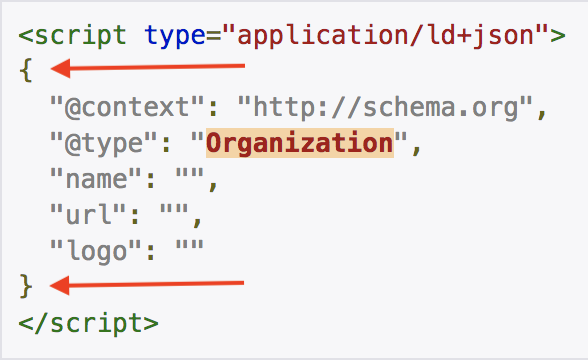
All of our structured data will live inside these two curly braces. As we build out our markup, we’re likely to see additional curly braces, and that’s where indentation really helps keep things from getting too confusing!
Quotation marks
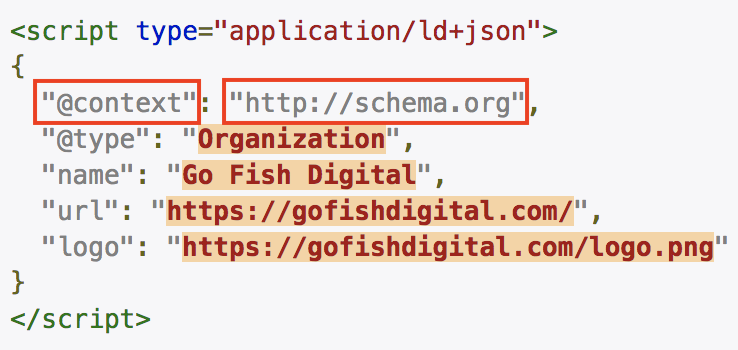
The next thing you’ll notice is quotation marks. Every time we call a Schema type, or a property, or fill in a field, we’ll wrap the information in quotation marks.
Colons
Next up are colons (no giggling). Basically, every time we call a type or a property, we then need to use a colon to continue entering information. It’s a field separator.
Commas
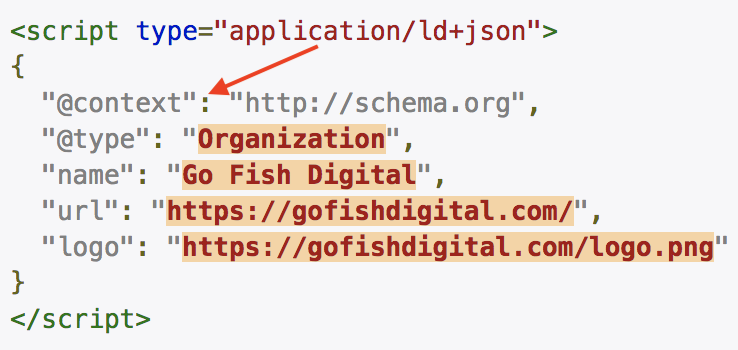
Commas are used to set the expectation that another value (i.e. more information) is coming.
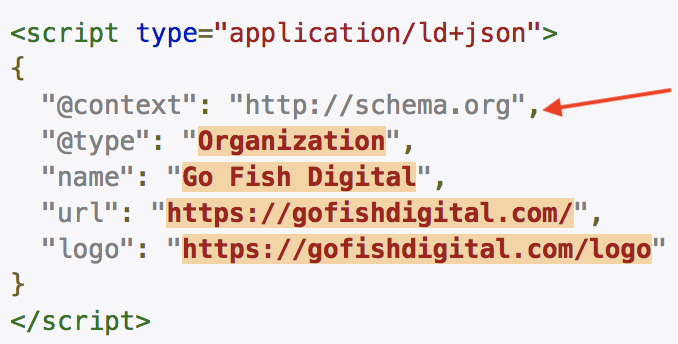
Notice that after the informational field for the “logo” property is filled, there is no comma. That is because there is no additional information to be stated.
Brackets
When we’ve called a property that includes two or more entries, we can use an open bracket and a closed bracket as an enclosure.
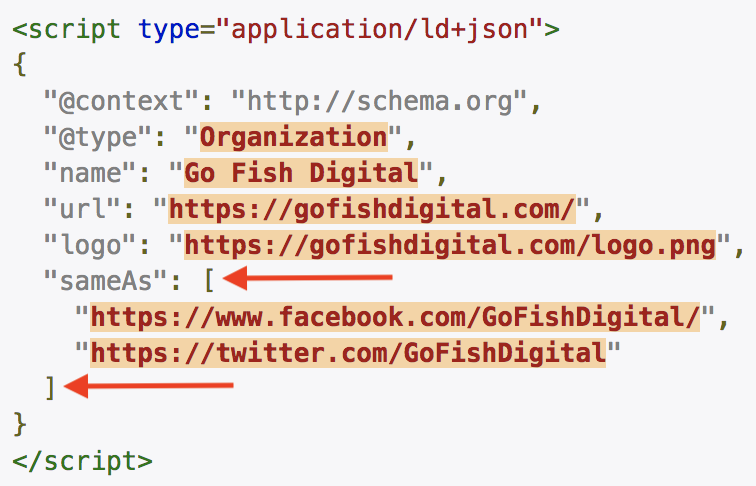
See how we’ve included Go Fish Digital’s Facebook and Twitter profiles within the “sameAs” property? Since there’s more than one entry, we enclose the two entries within brackets (I call this an array). If we only included the Facebook URL, we wouldn’t use brackets. We’d simply wrap the value (URL) in quotes.
Inner curly braces
Whenever we’ve called a property that has an expected “type,” we’ll use inner curly braces to enclose the information.
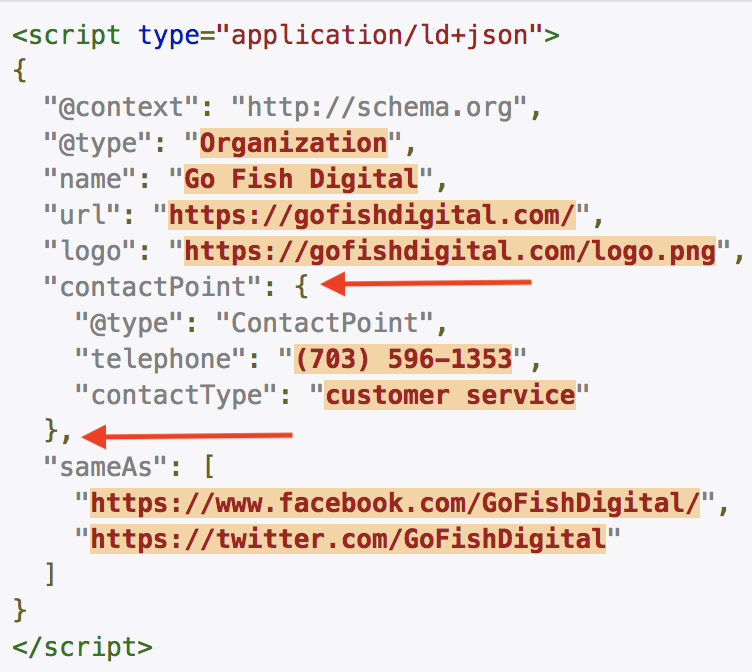
In the above image, the “contactPoint” property was called. This particular property has an expected type of “ContactPoint.” Isn’t that nice and confusing? We’ll go over that in more detail later, but for now just notice that after the “contactPoint” property is called, an inner curly brace was opened. On the very next line, you’ll see the ContactPoint type called. The properties within that type were stated (“telephone” and “contactType”), and then the inner curly braces were closed out.
There’s something else in this use case that, if you can understand now, will save you a lot of trouble in the future:
Look how there’s no comma after “customer service.” That’s because there is no more information to share within that set. But there is a comma after the closed inner curly brace, since there is more data to come (specifically, the “sameAs” property).
Creating structured data markup with an online generator
Now that we know a little bit about syntax, let’s start creating structured data markup.
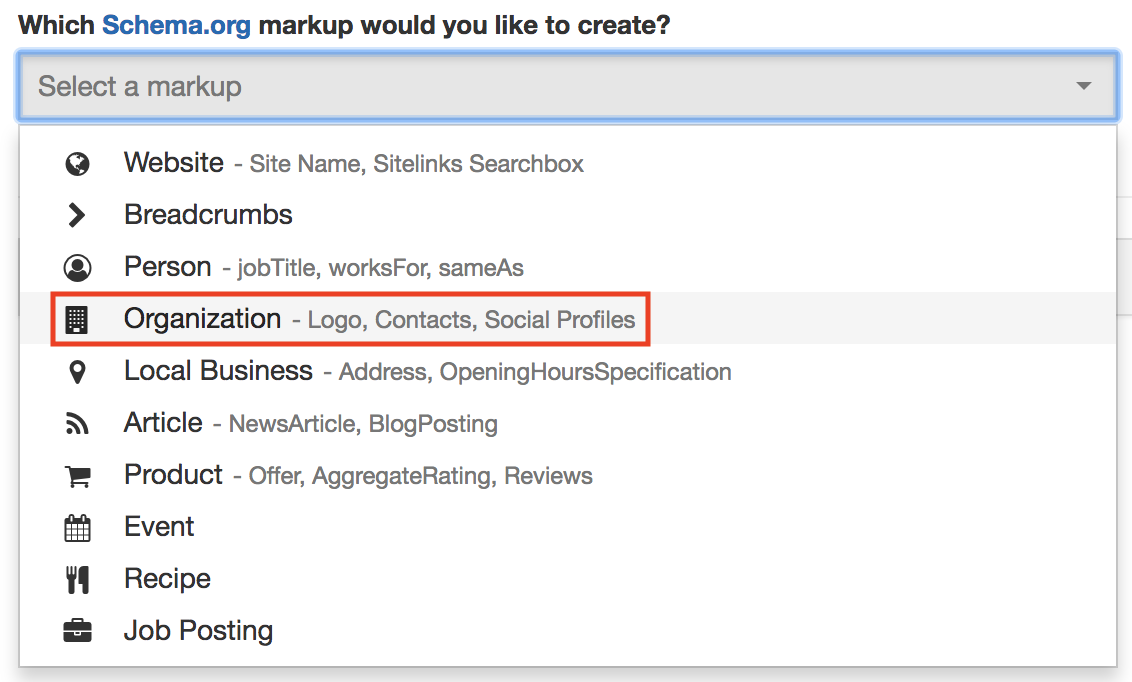
Online generators are great if you’re a beginner or as a way to create baseline markup to build off of (and to save time). My favorite is the Schema markup generator from Merkle, and it’s the one I’ll be using for this portion of the guide.
Next, you’ll need to choose a page and a markup type. For this example, I’ve chosen https://gofishdigital.com/ as our page and Organization as our markup type.
After filling in some information, our tool has created some fantastic baseline markup for the home page:
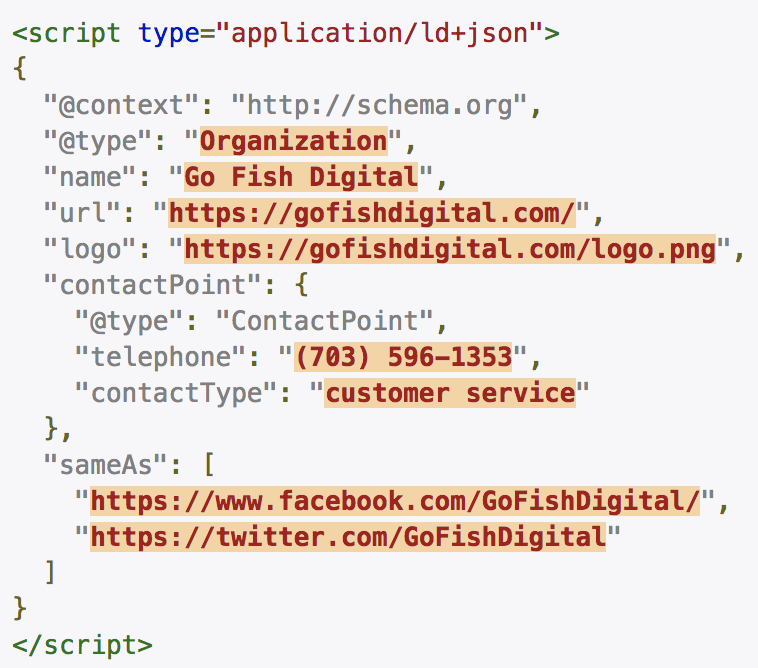
Hopefully, after our lesson on syntax, you can read most (or all) of this example without a problem!
Creating custom structured data markup with a text editor
Baseline markup will do just fine, but we can go beyond the online generator presets, take full control, and write beautiful custom structured data for our page. On https://schema.org/Organization, you’ll see all the available properties that fall under the Organization markup type. That’s a lot more than the online tools offer, so let’s roll up our sleeves and get into some trouble!
Download a text editor
At this point, we have to put the training wheels away and leave the online tools behind (single tear). We need somewhere we can edit and create custom markup. I’m not going to be gentle about this — get a text editor NOW. It is well worth the money and will serve you far beyond structured data markup. I’ll be using my favorite text editor, Sublime Text 3.
Pro tip: Go to View > Syntax > Javascript > JSON to set your syntax appropriately.
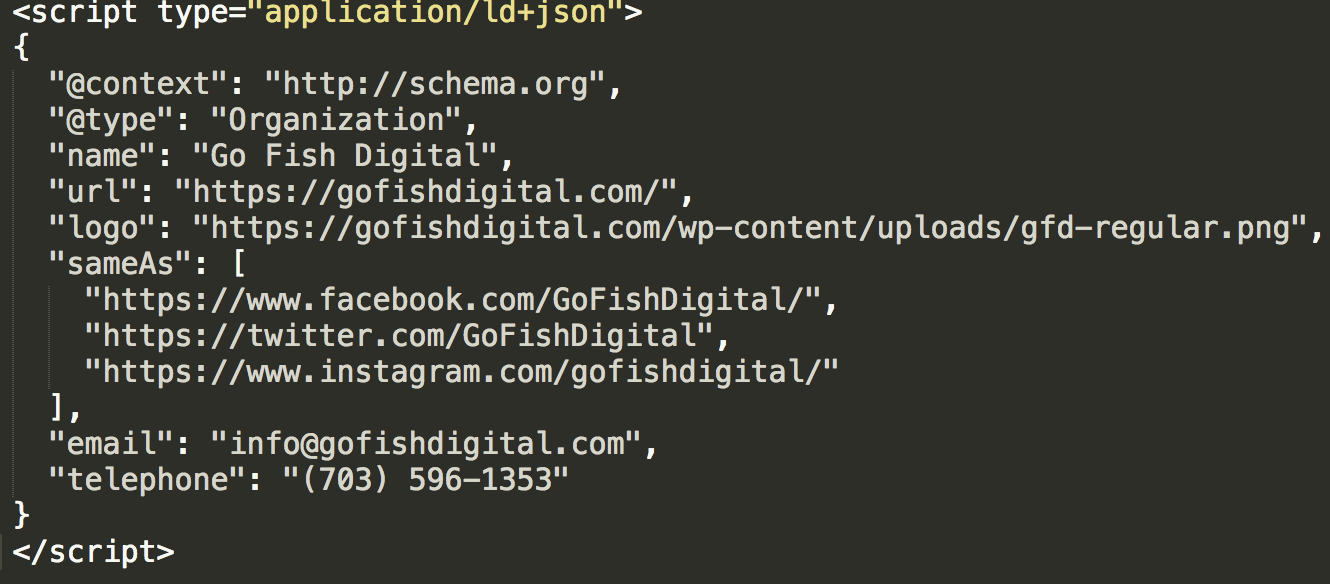
I’ve gone ahead and pasted some baseline Organization markup from the generator into Sublime Text. Here’s what it looks like:
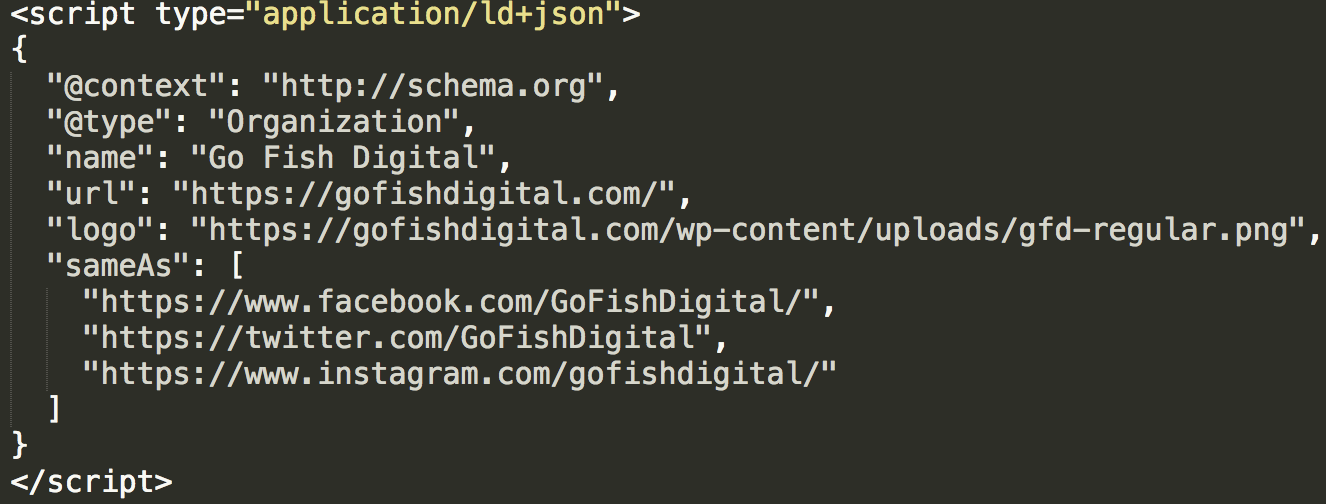
Adding properties: Easy mode
The page at https://schema.org/Organization has all the fields available to us for the Organization type. Our baseline markup doesn’t have email information, so I reviewed the Schema page and found this:

The first column shows that there is a property for email. Score! I’ll add a comma after our closing bracket to set up the expectation for more information, then I’ll add the “email” property:
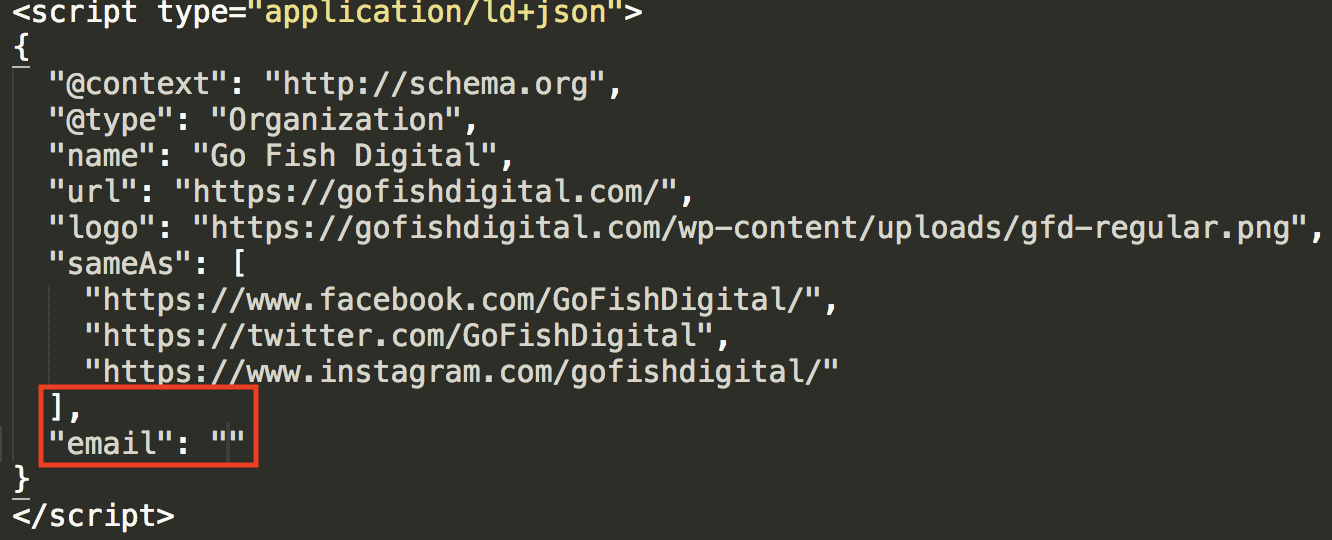
The second column on Schema.org is the “expected type.” This time, it says “text,” which means we can simply type in the email address. Gosh, I love it when it’s easy.
Let’s keep pushing. I want to make sure our phone number is part of this markup, so let’s see if there’s a property for that…

Bingo. And the expected type is simply “text.” I’m going to add a comma after the “email” property and toss in “telephone.” No need to highlight anything in this example; I can tell you’re getting the hang of it.
Adding properties: Hard mode
Next, we’re going to add a property that’s a bit more complicated — the “address” property. Just like “email” and “telephone,” let’s track it on https://schema.org/Organization.

So, I do see “text,” but I also see an expected type of “PostalAddress.” The name of the game with data markup is: if you can be more specific, be more specific. Let’s click on “PostalAddress” and see what’s there.
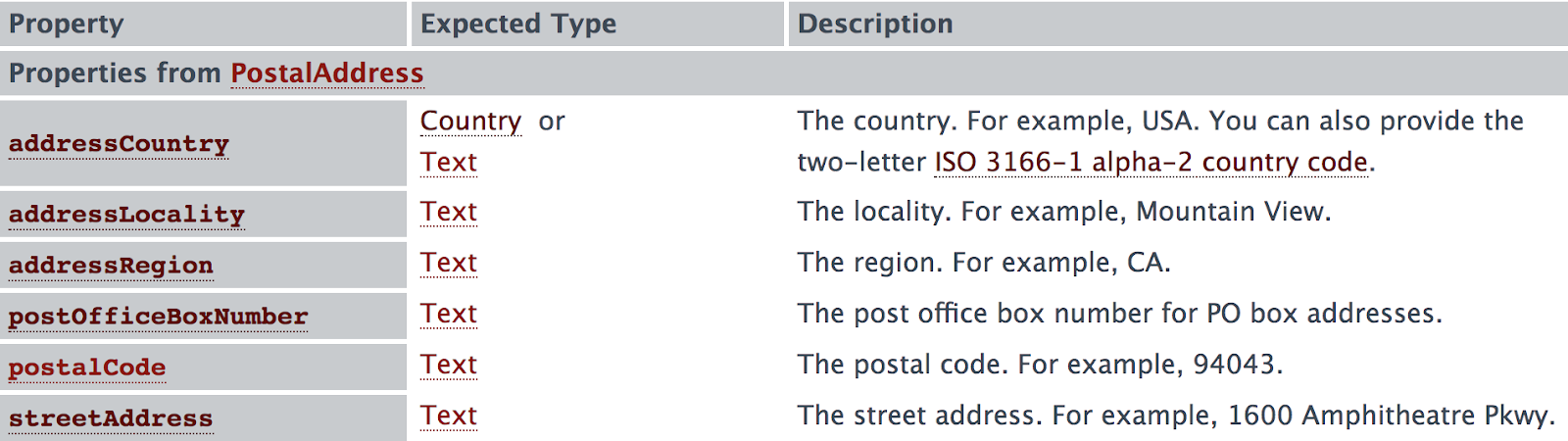
I see a number of properties that require simple text values. Let’s choose some of these properties and add in our “address” markup!
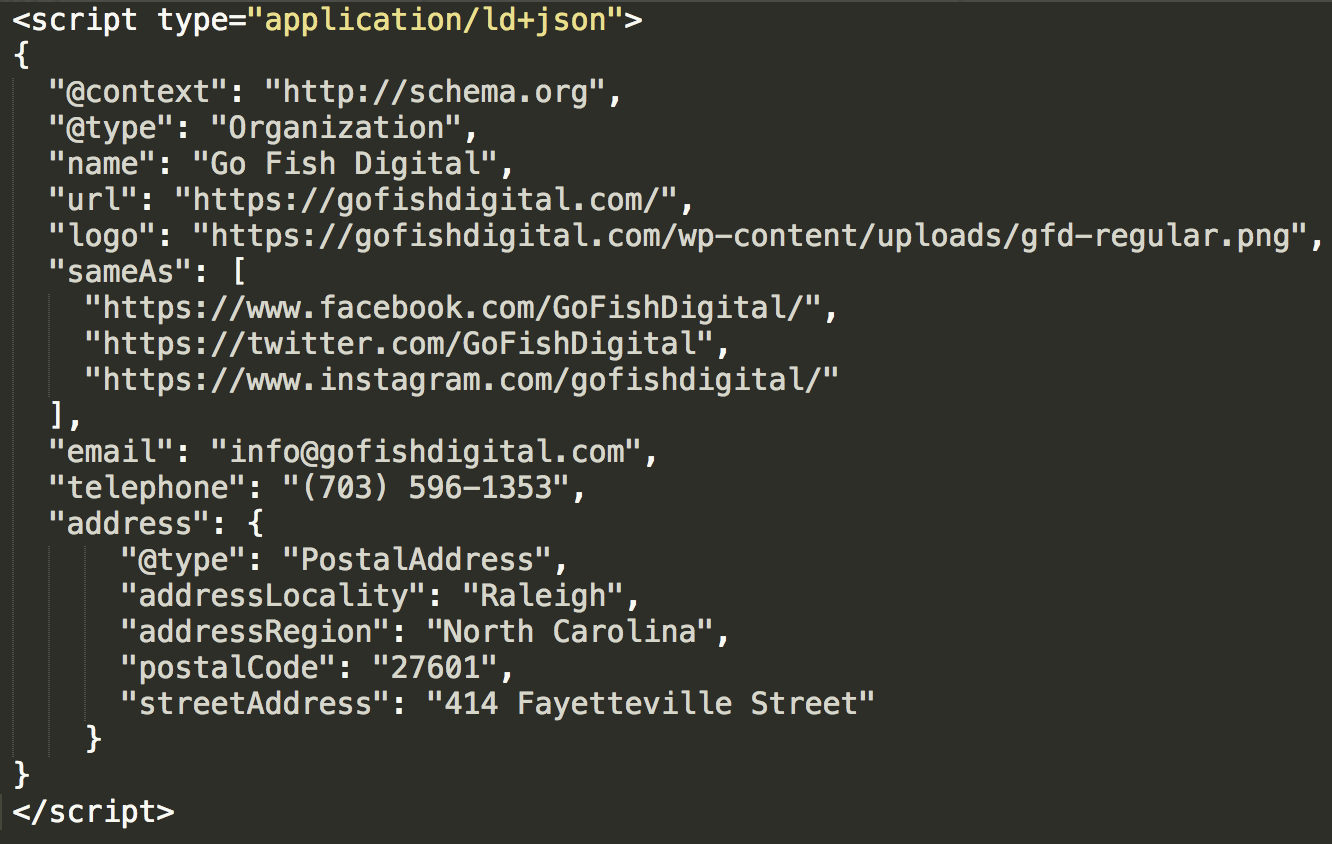
Here are the steps I took to add this markup:
- Placed a comma after the “telephone” property
- Called the “address” property
- Since the “address” property has an expected type, I opened inner curly braces
- Called the “PostalAddress” type
- Called the properties within the “PostalAddress” type
- Closed out the inner curly braces
Can you spot all that from the image above? If so, then congratulations — you have completed Hard Mode!
Creating a complex array
In our discussion about brackets, I mentioned an array. Arrays can be used when a property (e.g. “sameAs”) has two or more entries.
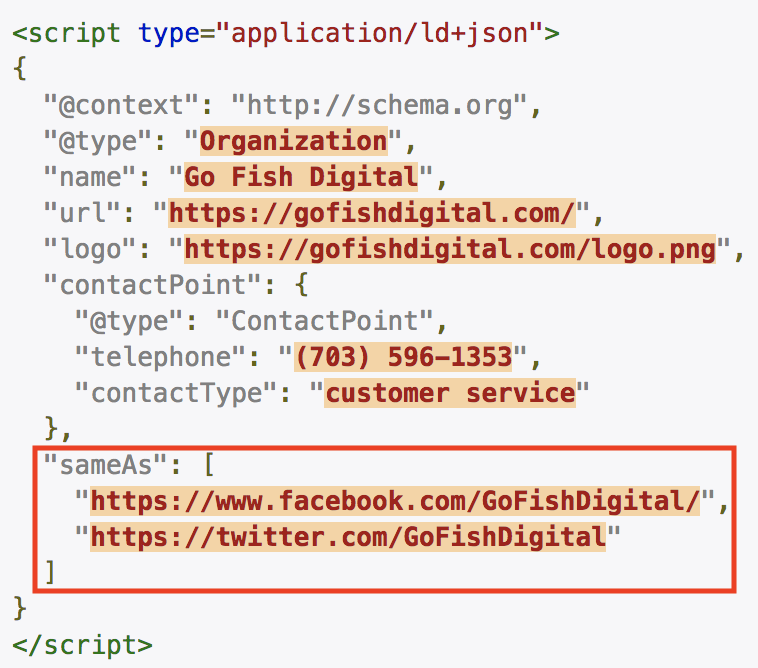
That’s a great example of a simple array. But there will be times when we have to create complex arrays. For instance, Go Fish Digital has two different locations. How would we create an array for that?
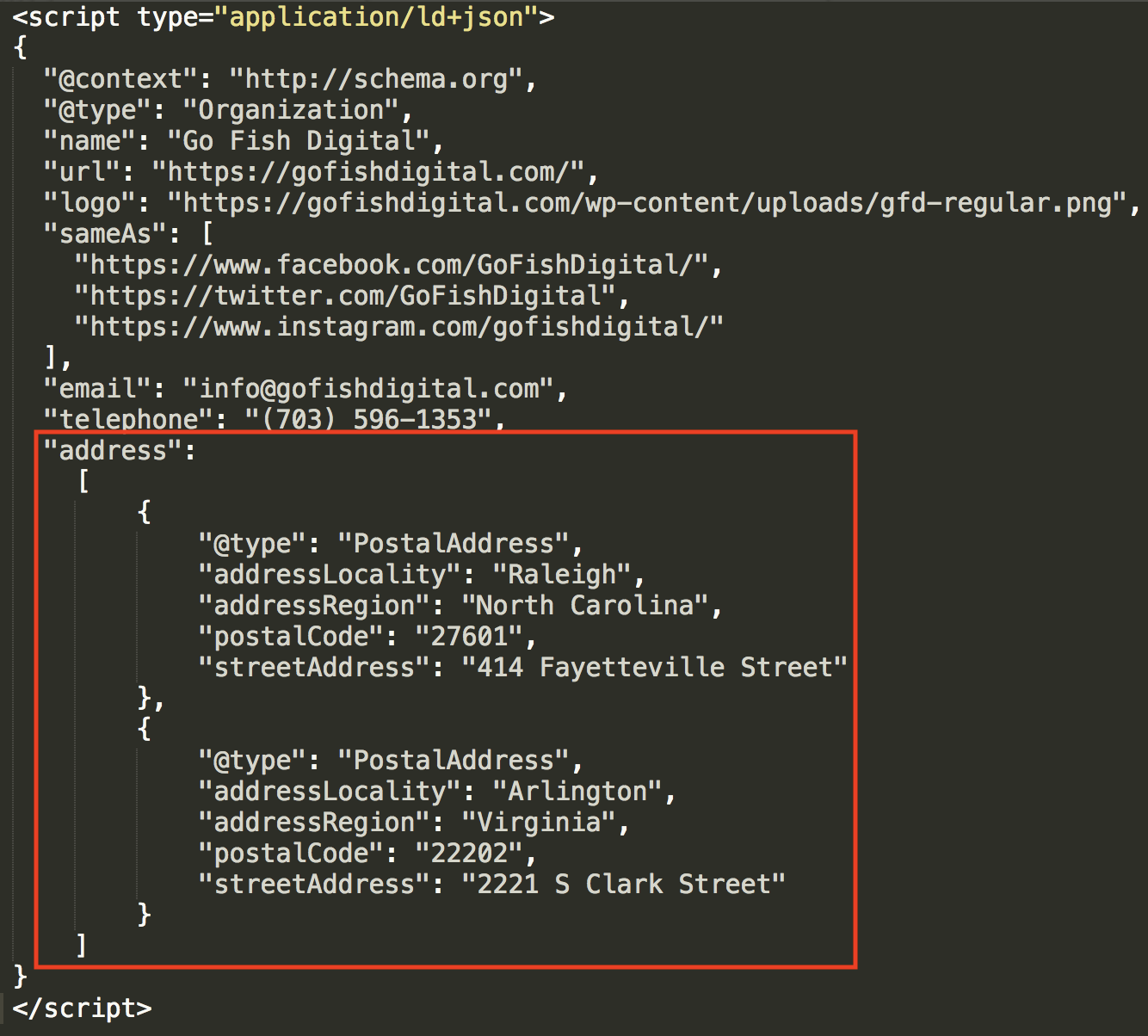
It’s not all that complex if we break it down. After the North Carolina information, you’ll see a closed inner curly brace. I just entered a comma and then added the same type (PostalAddress) and properties for the Virginia location. Since two entries were made for the “address” property, I enclosed the entire thing in brackets.
Creating a node array using @graph
On April 16th, 2019, Joost de Valk from Yoast announced the arrival of Yoast SEO 11.0, which boasted new structured data markup capabilities. You can get an overview of the update in this post and from this video. However, I’d like to dive deeper into a particular technique that Yoast is utilizing to offer search engines fantastically informative, connected markup: creating a node array using @graph (*the crowd gasps).
The code opens with “@graph” and then an open bracket, which calls an array. This is the same technique used in the section above titled “Creating a Complex Array.” With the array now open, you’ll see a series of nodes (or, Schema types):
- Organization
- WebSite
- WebPage
- BreadcrumbList
- Article
- Person
I’ve separated each (see below) so you can easily see how the array is organized. There are plenty of properties called within each node, but the real magic is with “@id.”
Under the WebSite node, they call “@id” and state the following URL: https://yoast.com/#website. Later, after they’ve established the WebPage node, they say the web page is part of the yoast.com website with the following line:
“isPartOf”:{“@id”:”https://yoast.com/#website“}.
How awesome is that? They established information about the website and a specific web page, and then made a connection between the two.
Yoast does the same thing under the Article node. First, under WebPage, they call “@id” again and state the URL as https://yoast.com/wordpress-seo/#webpage. Then, under Article, they tell search engines that the article (or, blog post) is part of the web page with the following code:
“isPartOf”:{“@id”:”https://yoast.com/wordpress-seo/#webpage“}
As you read through the markup below, pay special attention to these two things:
- The 6 nodes listed above, each separated to better visualization
- The “@id” and “isPartOf” calls, which define, establish, and connect items within the array
Bravo, Yoast!
Source page: https://yoast.com/wordpress-seo/
<script type=”application/ld+json”>
{“@context”:”https://schema.org“,
“@graph”:[
{
“@type”:”Organization“,
“@id”:”https://yoast.com/#organization“,
“name”:”Yoast”,
“url”:”https://yoast.com/“,
“sameAs”:[
“https://www.facebook.com/yoast“,
“https://www.instagram.com/yoast/“,
“https://www.linkedin.com/company/1414157/“,
“https://www.youtube.com/yoast“,
“https://www.pinterest.com/yoast/“,
“https://en.wikipedia.org/wiki/Yoast“,
“logo”:{“@type”:”ImageObject”,
“@id”:”https://yoast.com/#logo“,
“url”:”https://yoast.com/app/uploads/2015/09/Yoast-Logo-Icon-120×120.png“,
“caption”:”Yoast”},
“image”:{“@id”:”https://yoast.com/#logo“}},
{
“@type”:”WebSite“,
“@id”:”https://yoast.com/#website“,
“url”:”https://yoast.com/“,
“name”:”Yoast”,
“publisher”:{“@id”:”https://yoast.com/#organization“},
“potentialAction”:{“@type”:”SearchAction”,
“target”:”https://yoast.com/?s={search_term_string}“,
“query-input”:”required name=search_term_string”}},
{
“@type”:”WebPage“,
“@id”:”https://yoast.com/wordpress-seo/#webpage“,
“url”:”https://yoast.com/wordpress-seo/“,
“inLanguage”:”en-US”,
“name”:”WordPress SEO Tutorial u2022 The Definitive Guide u2022 Yoast”,
“isPartOf”:{“@id”:”https://yoast.com/#website“},
“image”:{“@type”:”ImageObject”,
“@id”:”https://yoast.com/wordpress-seo/#primaryimage“,
“url”:”https://yoast.com/app/uploads/2008/04/WordPress_SEO_definitive_guide_FI.png“,
“caption”:””},
“primaryImageOfPage”:{“@id”:”https://yoast.com/wordpress-seo/#primaryimage“},
“datePublished”:”2019-03-28T14:05:01+00:00″,
“dateModified”:”2019-04-11T12:24:14+00:00″,
“description”:”This is the ONLY tutorial you’ll need to hugely increase your search engine traffic by improving your WordPress SEO. Want higher rankings? Read on!”,
“breadcrumb”:{“@id”:”https://yoast.com/wordpress-seo/#breadcrumb“}},
{
“@type”:”BreadcrumbList“,
“@id”:”https://yoast.com/wordpress-seo/#breadcrumb“,
“itemListElement”:[
{
“@type”:”ListItem”,
“position”:1,
“item”:
{“@type”:”WebPage”,
“@id”:”https://yoast.com/“,
“url”:”https://yoast.com/“,
“name”:”Home”}},
{
“@type”:”ListItem”,
“position”:2,
“item”:{“@type”:”WebPage”,
“@id”:”https://yoast.com/seo-blog/“,
“url”:”https://yoast.com/seo-blog/“,
“name”:”SEO blog”}},
{
“@type”:”ListItem”,
“position”:3,
“item”:{“@type”:”WebPage”,
“@id”:”https://yoast.com/tag/wordpress/“,
“url”:”https://yoast.com/tag/wordpress/“,
“name”:”WordPress”}},
{
“@type”:”ListItem”,
“position”:4,
“item”:{“@type”:”WebPage”,
“@id”:”https://yoast.com/wordpress-seo/“,
“url”:”https://yoast.com/wordpress-seo/“,
“name”:”WordPress SEO: the definitive guide”}}]},
{
“@type”:”Article“,
“@id”:”https://yoast.com/wordpress-seo/#article“,
“isPartOf”:{“@id”:”https://yoast.com/wordpress-seo/#webpage“},
“author”:{“@id”:”https://yoast.com/about-us/team/joost-de-valk/#author“,
“name”:”Joost de Valk”},
“publisher”:{“@id”:”https://yoast.com/#organization“},
“headline”:”WordPress SEO: the definitive guide”,
“datePublished”:”2019-03-28T14:05:01+00:00″,
“dateModified”:”2019-04-11T12:24:14+00:00″,
“commentCount”:”4″,
“mainEntityOfPage”:”https://yoast.com/wordpress-seo/#webpage“,
“image”:{“@id”:”https://yoast.com/wordpress-seo/#primaryimage“},
“keywords”:”Content SEO, Google Analytics, Mobile SEO, Security, Site Speed, Site Structure, Technical SEO, WordPress, Yoast SEO”},
{
“@type”:”Person“,
“@id”:”https://yoast.com/about-us/team/joost-de-valk/#author“,
“name”:”Joost de Valk”,
“image”:{“@type”:”ImageObject”,
“@id”:”https://yoast.com/#personlogo“, “url”:”https://yoast.com/app/uploads/2018/09/avatar_user_1_1537774226.png“,
“caption”:”Joost de Valk”},
“description”:”Joost de Valk is the founder and Chief Product Officer of Yoast and the Lead Marketing & Communication for WordPress.org. He’s a digital marketer, developer and an Open Source fanatic.”,
“sameAs”:[
“https://www.facebook.com/jdevalk“,
“http://www.linkedin.com/in/jdevalk“,
“https://twitter.com/jdevalk“]}
]}</script
Troubleshooting your markup
With all these brackets, braces, and commas in play, mistakes can happen. So how do we detect and fix them?
Sublime Text error reporting
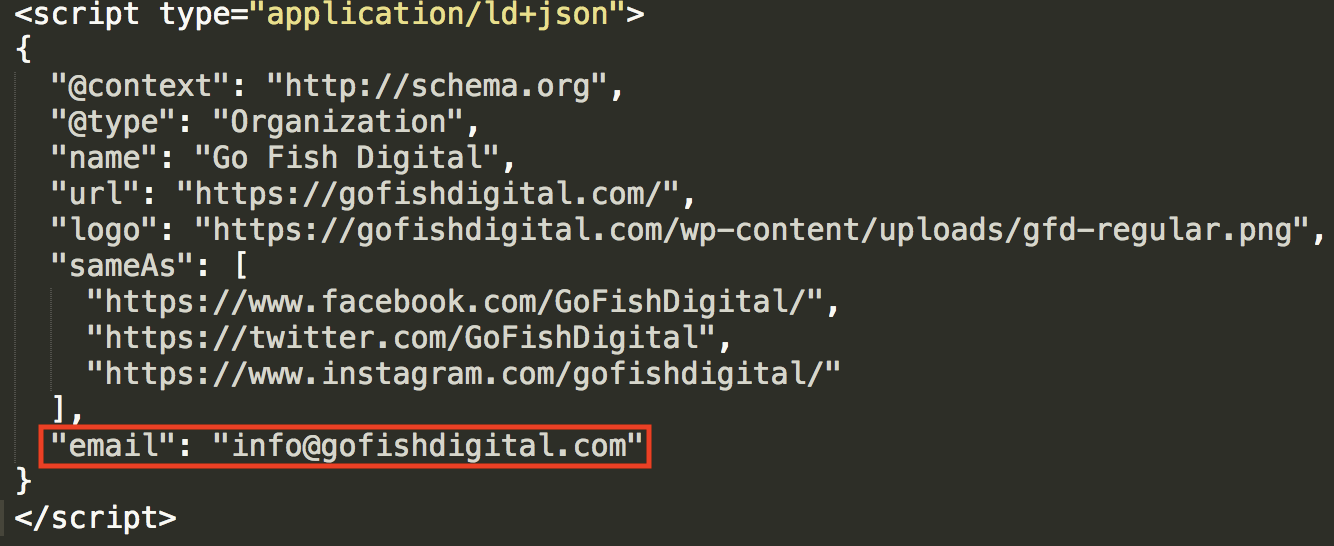
If you followed my pro tip above and set your syntax to JSON, Sublime Text will highlight certain errors for you.
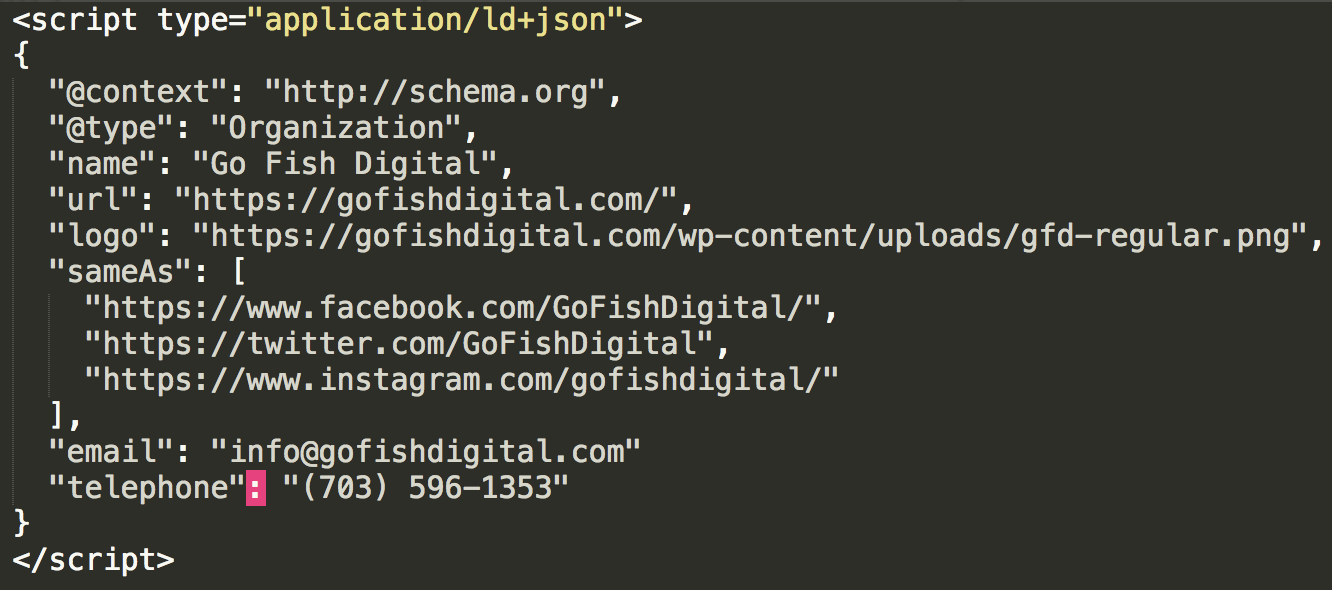
Sublime Text has detected an error and made a highlight. It’s important to note that errors are “reported” in three ways:
- The error is the highlighted item.
- The error is somewhere on the highlighted line.
- The error is somewhere in a previous field.
In this case, it’s the third option. Did you spot it? There’s a missing comma after “info@gofishdigital.com.”
Honestly, this error reporting can be confusing at first, but you’ll quickly get used to it and will start pinpointing the mistake(s) fairly easily.
Google’s structured data tool error reporting
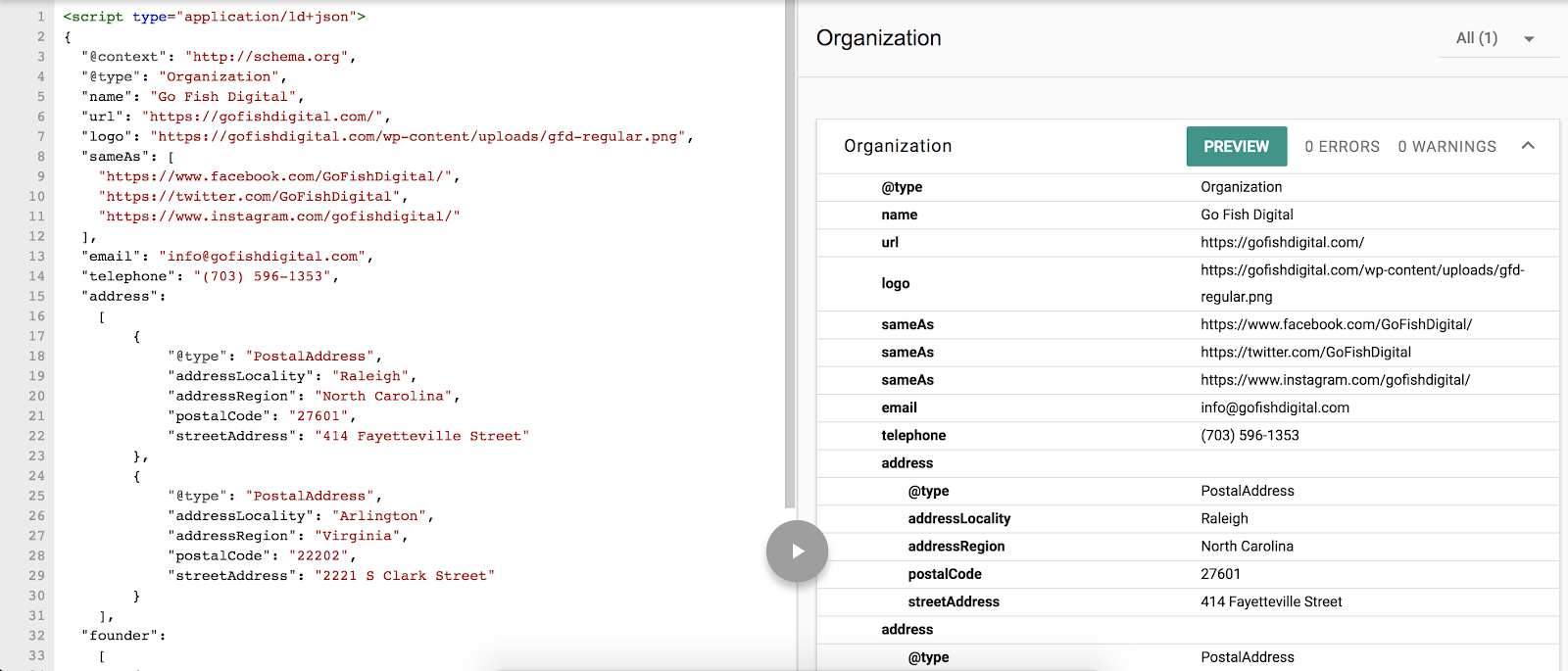
Go to https://search.google.com/structured-data/testing-tool > New Test > Code Snippet. Paste and run your code. If there is an error, this is what you’ll see:
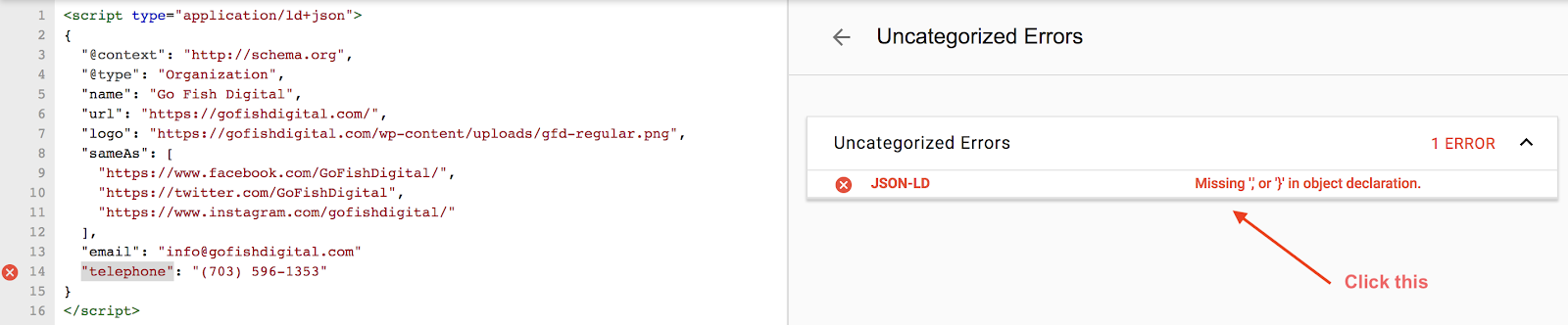
Click the error report and the tool will highlight the field after the error. As you’ll see, the missing comma after “info@gofishdigital” has caused the tool to highlight “telephone.” The logic there is that without the comma, that line actually is the error. It makes logical sense, but can be confusing, so it’s worth pointing out.
Sublime Text’s “hidden” underscore feature
Validating structured data markup can be maddening, and every little trick helps. As your structured data gets more complicated, the number of sections and brackets and curly braces is likely to increase. Sublime Text has a feature you may not have noticed that can help you keep track of everything!
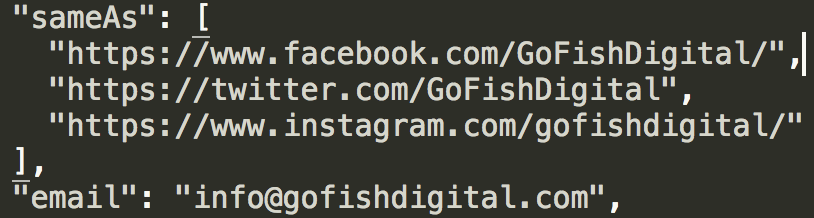
In the above image, I’ve placed my cursor on the first line associated with the “sameAs” property. Look closely and you’ll notice that Sublime Text has underscored the brackets associated with this grouping. If the cursor is placed anywhere inside the grouping, you’ll need those underscores.
I often use this feature to match up my brackets and/or curly braces to be sure I haven’t left any out or added in an extra.
Validating your structured data
Of course, the ultimate goal of all this error checking is to get your code to validate. The troubleshooting tips above will help you develop a bulletproof method of error checking, and that you’ll end up with the euphoric feeling that validated markup gives!
Using Google search for unique cases
The lessons and examples in this guide should provide a solid, versatile knowledge base for most SEOs to work with. But you may run into a situation that you’re unsure how to accommodate. In those cases, Google it. I learned a lot about JSON-LD structured data and the Schema vocabulary by studying use cases (some that only loosely fit my situation) and fiddling with the code. You’ll run into a lot of clever and unique nesting techniques that will really get your wheels spinning.
Structured data and the future of search
The rumblings are that structured data is only going to become more important in moving forward. It’s one of the ways Google gathers information about the web and the world in general. It’s in your best interest as an SEO to untie the knot of JSON-LD structured data and the Schema vocabulary, and I hope this guide has helped do that.
Sign up for The Moz Top 10, a semimonthly mailer updating you on the top ten hottest pieces of SEO news, tips, and rad links uncovered by the Moz team. Think of it as your exclusive digest of stuff you don’t have time to hunt down but want to read!
Google confirms store visits, store sales reporting data incorrect from 4/28 on
The problem is tied to the Google Ads reporting bug identified on May 2.
Please visit Search Engine Land for the full article.
Google bans adverts for anti-censorship sites in China
Despite Google and China’s interesting history, Google’s latest movements have been speculatively characterized as attempts to regain favor with China.
The post Google bans adverts for anti-censorship sites in China appeared first on Search Engine Watch.
New in structured data: FAQ and How-to
Over the last few weeks, we’ve been discussing structured data: first providing best practices and then showing how to monitor it with Search Console. Today we are announcing support for FAQ and How-to structured data on Google Search and the Google Assistant, including new reports in Search Console to monitor how your site is performing.



In this post, we provide details to help you implement structured data on your FAQ and how-to pages in order to make your pages eligible to feature on Google Search as rich results and How-to Actions for the Assistant. We also show examples of how to monitor your search appearance with new Search Console enhancement reports.
Disclaimer: Google does not guarantee that your structured data will show up in search results, even if your page is marked up correctly. To determine whether a result gets a rich treatment, Google algorithms use a variety of additional signals to make sure that users see rich results when their content best serves the user’s needs. Learn more about structured data guidelines.
How-to on Search and the Google Assistant
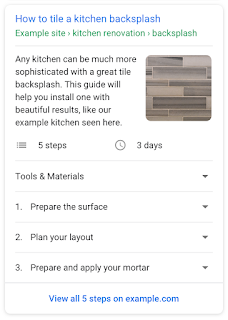
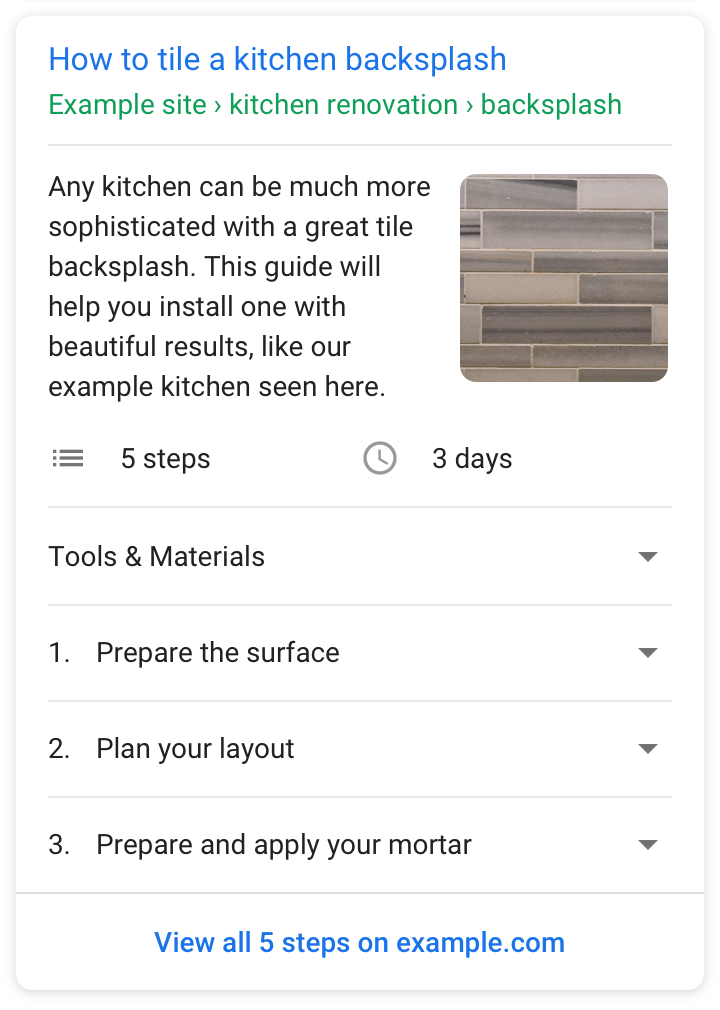
How-to rich results provide users with richer previews of web results that guide users through step-by-step tasks. For example, if you provide information on how to tile a kitchen backsplash, tie a tie, or build a treehouse, you can add How-to structured data to your pages to enable the page to appear as a rich result on Search and a How-to Action for the Assistant.
Add structured data to the steps, tools, duration, and other properties to enable a How-to rich result for your content on the search page. If your page uses images or video for each step, make sure to mark up your visual content to enhance the preview and expose a more visual representation of your content to users. Learn more about the required and recommended properties you can use on your markup in the How-to developer documentation.

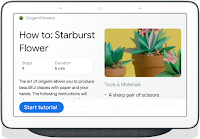
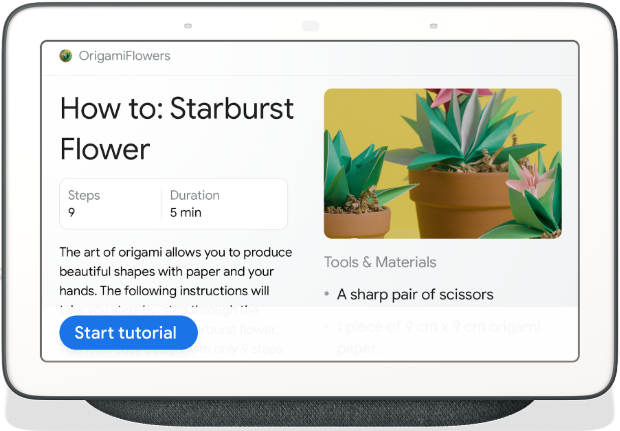
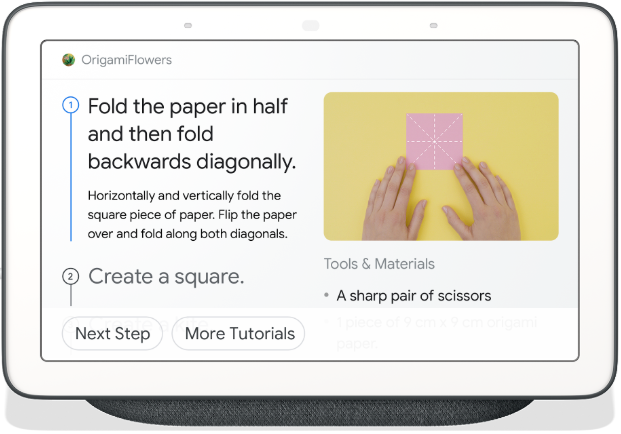
Your content can also start surfacing on the Assistant through new voice guided experiences. This feature lets you expand your content to new surfaces, to help users complete tasks wherever they are, and interactively progress through the steps using voice commands.
As shown in the Google Home Hub example below, the Assistant provides a conversational, hands-free experience that can help users complete a task. This is an incredibly lightweight way for web developers to expand their content to the Assistant. For more information about How-to for the Assistant, visit Build a How-to Guide Action with Markup.
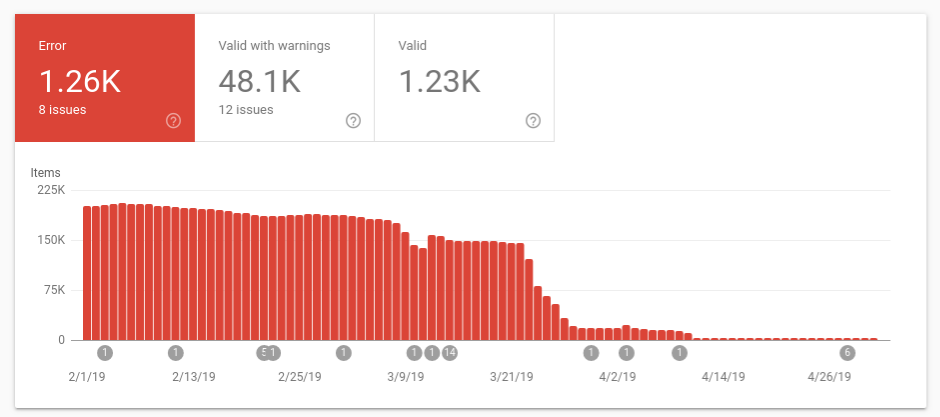
To help you monitor How-to markup issues, we launched a report in Search Console that shows all errors, warnings and valid items for pages with HowTo structured data. Learn more about how to use the report to monitor your results.
 |
FAQ on Search and the Google Assistant
An FAQ page provides a list of frequently asked questions and answers on a particular topic. For example, an FAQ page on an e-commerce website might provide answers on shipping destinations, purchase options, return policies, and refund processes. By using FAQPage structured data, you can make your content eligible to display these questions and answers to display directly on Google Search and the Assistant, helping users to quickly find answers to frequently asked questions.
FAQ structured data is only for official questions and answers; don’t add FAQ structured data on forums or other pages where users can submit answers to questions – in that case, use the Q&A Page markup.
You can learn more about implementation details in the FAQ developer documentation.
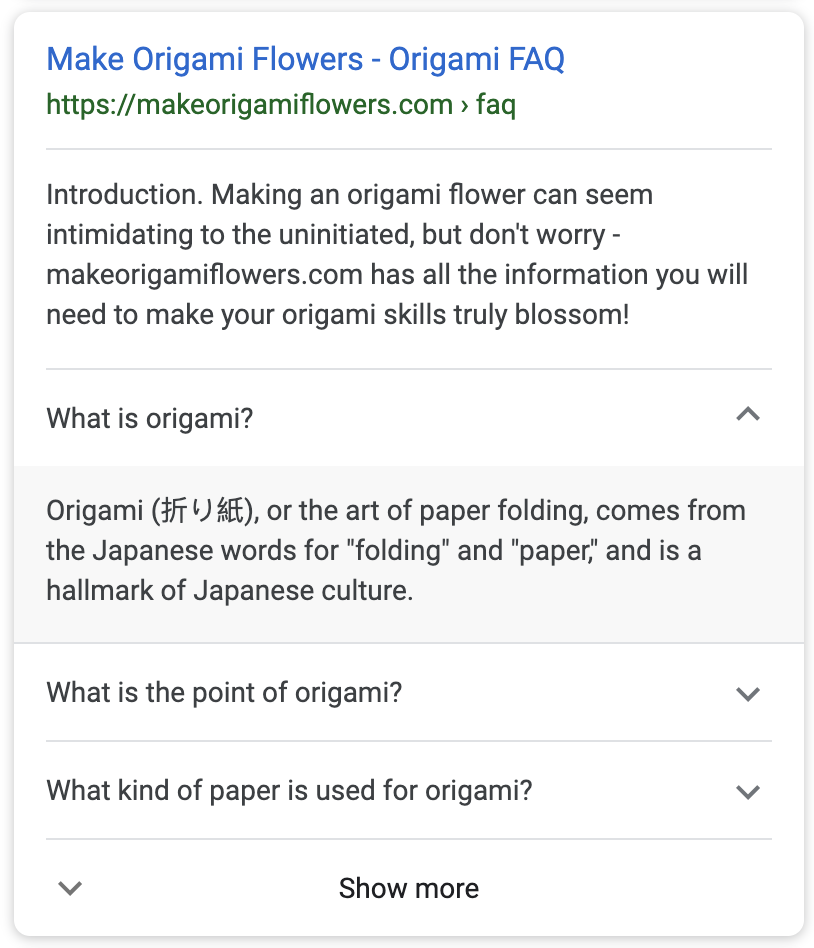
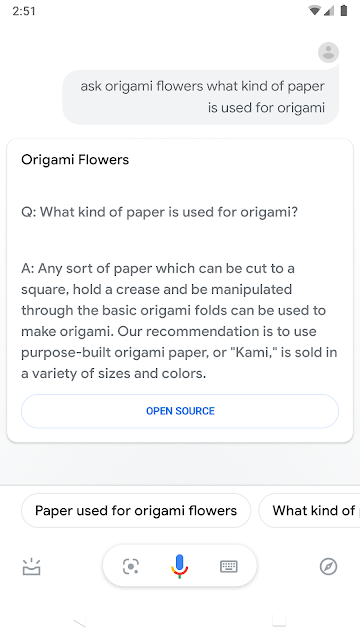
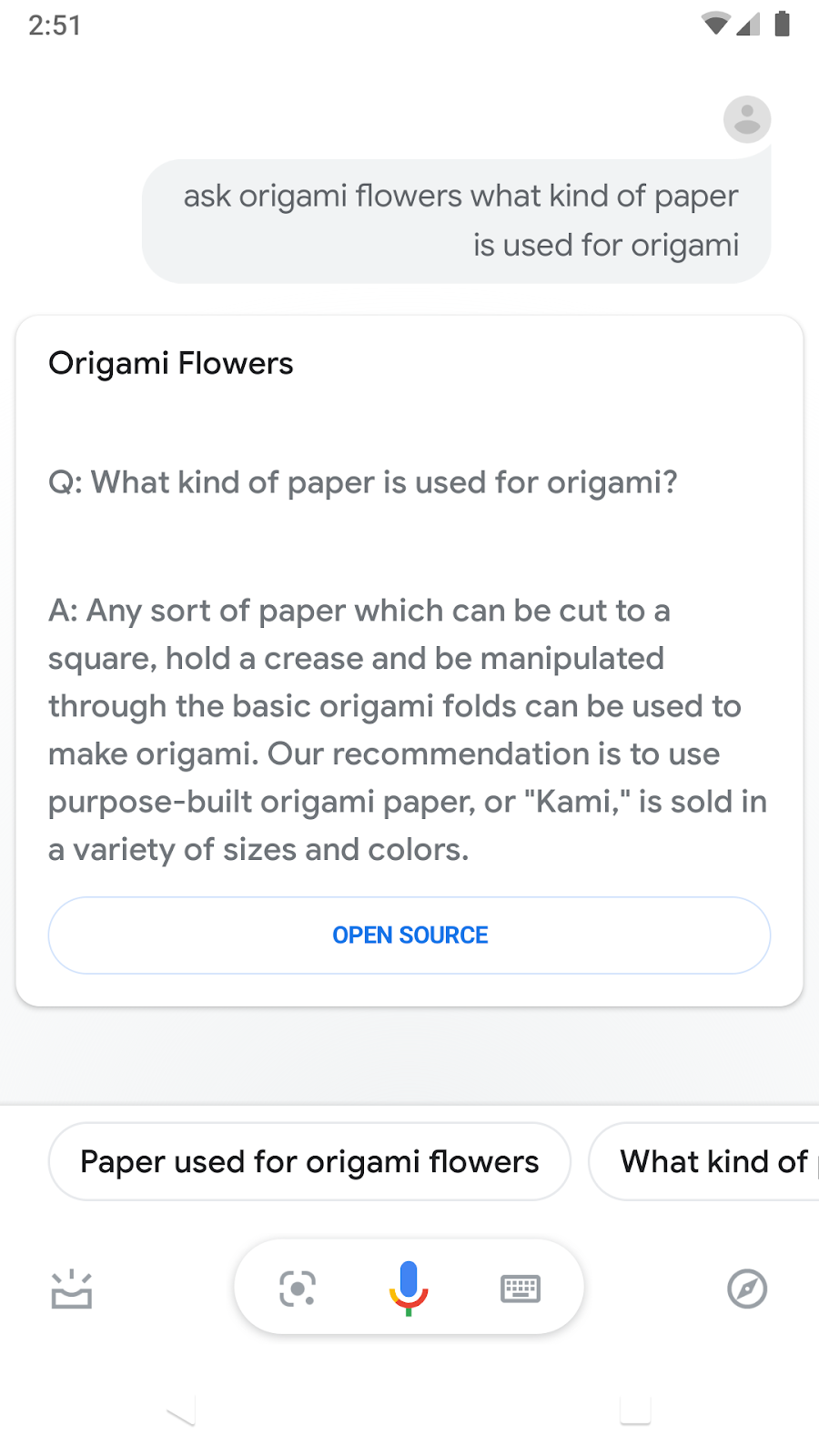
To provide more ways for users to access your content, FAQ answers can also be surfaced on the Google Assistant. Your users can invoke your FAQ content by asking direct questions and get the answers that you marked up in your FAQ pages. For more information, visit Build an FAQ Action with Markup.
To help you monitor FAQ issues and search appearance, we also launched an FAQ report in Search Console that shows all errors, warnings and valid items related to your marked-up FAQ pages.
We would love to hear your thoughts on how FAQ or How-to structured data works for you. Send us any feedback either through Twitter or our forum.
Posted by Daniel Waisberg, Damian Biollo, Patrick Nevels, and Yaniv Loewenstein


MozCon 2019: Acceptance. Education. Donuts
Posted by PJ_Howland
We’re digital marketers; we make our living in a constantly changing (and consistently misunderstood) industry. It’s easy to feel like even those who are closest to us don’t really get what we do. Take me, for example, I once mentioned algorithms to my grandmother, and ever since then, she’s been absolutely (and adamantly) sure that I work with clocks. Did she think I said analog?
But despite the dynamic nature of marketing, Moz has always been a solid rock at the center of the storm. It’s been here since the beginning, a place where all the marketing nerds and SEO geeks could hang our hats and feel understood.
And MozCon feels like the culmination of that culture of acceptance.
MozCon: Helping you build your best self
As I’ve chatted with the good folks at Moz about this year’s MozCon, it’s clear to me that they pay attention to data. Why do I say that? Because they’re doubling down on making this year their most actionable year ever. As a past attendee, I can say that hearing that MozCon’s biggest focus is a dedication to actionable tactics gets me excited.
The creative media surrounding MozCon have an under-the-sea theme going on. These nautical nods are setting us all up for the deep dive into digital marketing we’re sure to see this year. Since there’s a good chance that most of us marketers never made it to prom (just me? Okay then…), it’s kind of fun to get a second chance to experience oceanic decor in a congregate environment (What, you’ve never dreamed about being Marty McFly at his parent’s Enchantment Under the Sea dance? Was I the only one?)
The point is that the upcoming MozCon is poised to do what it does so well: Offer a delightful mix of predictability and variety, presented in a way that’s designed to improve us without reforming us. New players will share the stage with established thought leaders and strategists. Innovation will go hand in hand with cherished tradition.
After looking at the initial agenda, here are a few of the front runner speakers and sessions I’m excited for in particular.
Casie Gillette — Thanks for the Memories: Creating Content People Remember
Digital marketers like data, right?
[Cue nodding heads and incoherent mumblings]
While I certainly love data, I also struggle with data. Sometimes I rely on the data so much that I become hesitant to take risks. And if there’s one thing our industry as a whole can improve on, it’s taking more risk.
Casie is taking to the stage with a mission to teach us how to make content memorable. With the promise that MozCon 2019 will be more tactical and strategic than ever before, I am earnestly giddy (feel free to picture that emotion however the mood takes you) to hear about what I can do to take a step back from the data, and instead put it on the line for something my audience will never forget.
Shannon McGuirk: How to Supercharge Link Building with a Digital PR Newsroom
Link-building, anyone? Yeah, it’s still a thing. After all, if you link-build it, they will come. Shannon promises to teach us how to set up a “digital PR room.” AKA, a link-earning machine! It sounds like she’s pulling back the entire curtain and will be showing us some concrete link-building tactics. I know how many hours go into earning a single link, so I am eagerly awaiting a process that scales.
Ross Simmonds — Keyword’s Aren’t Enough: How to Uncover Content Ideas Worth Chasing
Like many SEOs, I’m a firm believer in the power of valuable content. So when I hear about a session titled, “Keyword’s Aren’t Enough: How to Uncover Content Ideas Worth Chasing,” it’s eye-catching. Maybe more than eye-catching, it’s paradigm challenging. I love keywords, LOVE’em! Content marketing without keywords makes me a little uneasy. Let’s just say keywords are at the center of most of my strategy for content marketing decisions. I’m glad I have time to prepare my mind for what mad brilliance Ross will be sharing this year at MozCon.
Heather Physioc — Mastering Branded Search
Before I even jump into Heather’s digital game, let’s start with her taste in music. Her walk-on music was strong last year — real strong.
. @HeatherPhysioc I don’t know who chooses the walk-on music. But you win! Ready to listen to everything you have to say. #mozcon2018
— PJ Howland (@askPJHowland) July 10, 2018
This year Heather is going to be chatting us up on branded search. At one glance I’m like, “Okay, color me intrigued…” Branded search seems so surface-level, but knowing Heather, it will be an engaging presentation replete with answers to (what I thought were) unanswerable questions about branded search. Heather has a background in working with enterprise brands, so for me, the opportunity to learn how to leverage big brand names for unique perspectives on what many may think is a pretty straightforward subject, is one I don’t dare pass up. Very excited for what’s sure to be a wild ride.
Britney Muller — Topic TBD, but looking forward to it nonetheless
I’ve never left a conference with more notes from a single session that I have from Britney’s MozCon address in 2017. I recall her sharing her trepidation about being the lead SEO for Moz. A quick project Britney took on was gutting some old and thin pages on Moz.com — about 70,000 community pages if my notes from the event are correct. But shortly, Moz.com saw a modest organic traffic bump. Britney is fearless as an SEO, and there’s something beyond the sheer value of case studies here. As SEOs, we too should be fearless in our work. I’m looking forward to Britney sharing data, insights, and her gutsy spirit with all of us.
Moz with Benefits…
Speakers and sessions are cool and all, but can I just say that all the little extras MozCon has to offer are amazing.
Networking is something that every conference touts. And sure we all like networking, cause that’s what we have to say right? What’s the phrase? “If you’re not networking, you’re not working”? At MozCon, networking is not a chore; it’s easy and enjoyable. Even productive. From an agency perspective, it’s a cool place outside the office to connect with clients too.
And how have I gotten this far and not mentioned the food at MozCon? The meals are excellent, but can I say a word about the snacks? Moz does not skimp when it comes to eats. Sure, I talked about some cool speakers and topics above, but you know what’s actually stolen my heart at MozCon? Top Pot donuts. I may be that guy that leaves a session 5 minutes early just to get a head start on these donuts. Does that mean I might miss out on valuable insights or strategies? Absolutely it does, and I don’t care. My goal has always been to get a couple of donuts down the hatch before I run into someone I know. That way, when they see me with a donut in each hand, they think that’s all I’ve had.
“Just two donuts this time, PJ?”
“Yeah, haha, just two…” Suckers.
Donuts aside, Moz cares immensely about their community and has done everything possible to make this the best year yet. So come as you are, and leave as you were… only better. The Moz culture of acceptance and education stands to deliver a MozCon experience that will keep you going throughout the year.
I can’t wait to take a deep dive into the sea of SEO with all of my fellow marketing geeks. And if you want to chat, I’ll be the guy hovering around the donut table.
Well, what did I miss?
For all the long-time MozCon attendees out there, what are you excited for?
Which speakers and sessions are you looking forward to most?
Do you have any favorite moments from years past?
Where are you grabbing dinner in the city?
Sign up for The Moz Top 10, a semimonthly mailer updating you on the top ten hottest pieces of SEO news, tips, and rad links uncovered by the Moz team. Think of it as your exclusive digest of stuff you don’t have time to hunt down but want to read!
Google Search adds support for FAQ and How-to structured data
Google now supports more structured data and adds two new enhancement reports within Google Search Console.
Please visit Search Engine Land for the full article.
Should we be paying for Google My Business features?
Paying for GMB features would be a handy new revenue stream for Google, but how it manages trust features – and spam – in a pay-to-play model is the real concern.
Please visit Search Engine Land for the full article.
Should we be paying for Google My Business features?
Paying for GMB features would be a handy new revenue stream for Google, but how it manages trust features – and spam – in a pay-to-play model is the real concern.
Please visit Search Engine Land for the full article.
How to use Google advanced search operators to find indexation and technical SEO issues
We SEOs like our tools. Each one is instrumental in uncovering aspects of a site we might not have thought about or trawl information that would take years to do manually. One of the best tools, however, is often underutilised: Google itself. Google has the advantage of not only being free but storing exactly which […]
The post How to use Google advanced search operators to find indexation and technical SEO issues appeared first on Builtvisible.
How to use Google advanced search operators to find indexation and technical SEO issues
We SEOs like our tools. Each one is instrumental in uncovering aspects of a site we might not have thought about or trawl information that would take years to do manually. One of the best tools, however, is often underutilised: Google itself. Google has the advantage of not only being free but storing exactly which […]
The post How to use Google advanced search operators to find indexation and technical SEO issues appeared first on Builtvisible.
Mobile Shopping Experiences: Native Apps or Mobile Websites?
Has the mobile shopping experience changed with the growth of native apps investments over ecommerce websites for retailers in the UK? Lauren Irwin shares her thoughts and research on State of Digital.
Post from Lauren Irwin
Google Search Weirdness: Hmm… the results for your search don’t seem very relevant
I have seen numerous reports of Google showing very weird search results, or lack there of, followed by a message that reads “Hmm… the results for your search don’t seem very relevant.” It just seems like some weird bug, a possible plugin that is im…