Google Falafel Doodle
Today on Google’s home page is an animated falafel. I’ll be honest, I am not a huge falafel fan and yes, I’ve had my share since I visit the middle east (Israel) every now and then. But for some reason, today, June 18th, Google decided to celebrate t…
Google Doesn’t Have A Fixed Time To Snapshot Rendered Content But…
The folks at Screaming Frog said on Twitter that their tests indicate GoogleBot is willing to wait about five seconds for its snapshot of rendered content. John Mueller of Google said that time sounds reasonable but they do not have a specific time b…
Google Search Console Missing Image Search Traffic Between June 5th & 7th
Google posted on the data anomalies page that due to an internal issue Search Console did not capture some image search statistics from June 5th through June 7th.
New Google User Interface Updates: Refine Layers, Mini-Carousels, Shopping Toggle, Mortgage Calculator & More
There are just so many Google user interface tests that are going on now, some are live, some are being tested, I don’t have enough time to put them into their own stories. So let me document some of them below, not all of them. In summary, the ones I…
Google Duplex Bookings Tested In Mobile Search
Google is testing bookings using Google Duplex, but I have yet to see how it looks as a user when they use Google search to book a reservation. Thibault Adda shared screen shots of this being tests on an Olive Garden in Florida.
Did Google’s Site Diversity Update Live Up to its Promise?
Posted by Dr-Pete
On June 6th, on the heels of a core update, Google announced that a site diversity update was also rolling out. This update offered a unique opportunity, because site diversity is something we can directly measure. Did Google deliver on their promise, or was this announcement mostly a PR play?

There are a lot of ways to measure site diversity, and we’re going to dive pretty deep into the data. If you can’t wait, here’s the short answer — while Google technically improved site diversity, the update was narrowly targeted and we had to dig to find evidence of improvement.
How did average diversity improve?
Using the 10,000-keyword MozCast set, we looked at the average diversity across page-one SERPs. Put simply, we measured how many unique sub-domains were represented within each results page. Since page one of Google can have less than ten organic results, this was expressed as a percentage — specifically, the ratio of unique sub-domains to total organic results on the page. Here’s the 30-day graph (May 19 – June 17):

A site diversity of 90 percent on a 10-result SERP would mean that nine out of ten sub-domains were unique, with one repeat. It’s hard to see, but between June 6th and 7th, average diversity did improve marginally, from 90.23 percent to 90.72 percent (a 0.49 percent improvement). If we zoom in quite a bit (10x) on the Y-axis, we can see the trend over time:

Zooming in to just a 10 percent range (85–95 percent diversity), you can see that most of the change happened in a single day, and the improvement has remained in place for the week since the update. Even zooming in, though, the improvement hardly seems impressive.
Was the improvement more isolated?
Being as fair to Google as possible, we need to consider one of their follow-up statements:

What if Google improved the worst-case scenarios, but it wasn’t immediately clear when we averaged out all SERPs? We can isolate situations with more than two listings from the same site by looking specifically at SERPs with a site diversity score of 80 percent or better (eight out of ten sub-domains are unique). Here’s the 30-day graph for just those cases:

On June 6th, 84.58 percent of sites in our data set had a diversity of 80 percent or better. On June 7th, that increased to 86.68 percent — a 2.1 percent improvement. Let’s dig even deeper to see what’s happening for individual counts.
How did the impact break down?
A single data point doesn’t tell us much about what’s happening within each of the buckets. For this analysis, I’m going to use the exact duplicate count, since percentages can get a bit confusing once we have to put them in bins. Another complication is that, on occasion, two sites have more than one organic result — this brings down the overall diversity of the SERP, but doesn’t necessarily mean that one site is dominating.
So, what if we look just at the count of the dominant site (the site with the most duplicates) across the 10,000 SERPs? We’ll compare June 6th (blue) to June 7th (purple):

For slightly over half of SERPs in our data set, there were no duplicates (every site had one listing), and this number didn’t change much after the update. The number of sites with two listings (i.e. one duplicate) increased pretty noticeably after the update (up by 346 SERPs). This was offset almost entirely by a decrease in SERPs with three to five listings (down by 345 SERPs across the three bins).
The numbers get too small to see at 5K scale after the four-count SERPs, so I’ll restrict the Y-axis:

SERPs with dominant sites owning six to ten organic listings accounted for only 117 of 10,000 SERPs (just over 1 percent) on June 6th. After the update, this actually went up a tiny bit, to 119 SERPs.
We still see SERPs where one site dominates, and that story didn’t change much after the update. That said, these six to ten-count SERPs are fairly rare. Looking at the keywords, we also see that many of them have brand or navigational intent. Here are a few keywords where we still see a ten-count:
- “kohl’s hours”
- “macy’s hotel collection”
- “lowes outlet”
- “dillard’s sales”
- “edd unemployment”
Many dominant-intent searches show site-links in the #1 position (which allow up to six additional links from one site). It’s hard to say why Google isn’t using site-links in these extreme cases. These may be situations where the intent isn’t quite as clear, but we can only speculate based on looking at a handful of examples. Keep in mind, too, that Google determines intent algorithmically, so it can shift over time.
This isn’t an easy problem. Site diversity isn’t a lever you can pull in isolation, especially when it’s left to the algorithm. Reducing repetition too much could harm quality, in some cases (especially SERPs with brand intent). Similarly, many algorithm updates unrelated to diversity seem to have unintended consequences for site diversity.
So, what’s the final verdict?
When evaluating site diversity, we have to be careful relying too much on anecdotes. Anecdotally, there are definitely SERPs where a single domain seems to have too much power. For example, here’s the main results column on a search for “pure green coffee extract” (I’ve removed a local pack for the purposes of this post):

The shopping results at the top suggest commercial intent, but the organic results are a mix of informational and commercial results. Amazon has a block of five product results, and this is not a situation where the query suggests brand or navigational intent (I haven’t indicated any specific interest in Amazon).
It’s easy to cherry-pick, and we can certainly say that Google hasn’t solved the problem, but what are the broader results telling us? It’s fair to say that there was some amount of improvement, and the improvement tracked with Google’s public statements. SERPs with three to five results (two to four duplicates) from the dominant site decreased a bit — in most cases, these SERPs still had two results from the dominant site (one duplicate).
Even isolating the change, though, it was fairly small, and there was no improvement for SERPs where six to ten results came from the dominant domain. This may be because many of those queries had strong brand or navigational intent, and the six to ten count SERPs were rare both before and after the update.
While the improvements were real and Google’s statements were technically accurate, the impact of the site diversity update doesn’t feel on par with a pre-announcement and the PR it received. Regarding the state of site diversity in SERPs, Google has made minor improvements but still has work to do.
Sign up for The Moz Top 10, a semimonthly mailer updating you on the top ten hottest pieces of SEO news, tips, and rad links uncovered by the Moz team. Think of it as your exclusive digest of stuff you don’t have time to hunt down but want to read!
Leaning into SEO as Google shifts from search engine to portal
How to prepare your company for Google’s new customer journey for search.
Please visit Search Engine Land for the full article.
Google to add attribution to licensed lyrics providers
Google responds to the allegations that it scraped Genius lyrics without paying for that content.
Please visit Search Engine Land for the full article.
UX matters for search: Here are two reasons why
Your search engine marketing success hinges upon your site’s UX. Two elements of UX that are particularly relevant to SEO.
The post UX matters for search: Here are two reasons why appeared first on Search Engine Watch.
Why search needs to be combined with awareness for maximum impact
TV and display will drive better performing search queries, which in turn can indicate the effectiveness of those channels themselves.
Please visit Search Engine Land for the full article.
Bye Bye Preferred Domain setting
As we progress with the migration to the new Search Console experience, we will be saying farewell to one of our settings: preferred domain.
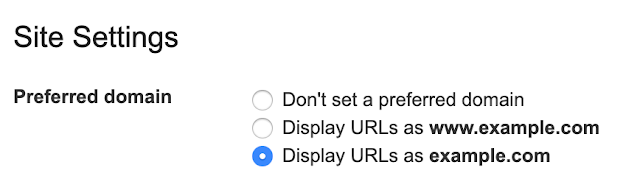
It’s common for a website to have the same content on multiple URLs. For example, it might have the same content on http://example.com/ as on https://www.example.com/index.html. To make things easier, when our systems recognize that, we’ll pick one URL as the “canonical” for Search. You can still tell us your preference in multiple ways if there’s something specific you want us to pick (see paragraph below). But if you don’t have a preference, we’ll choose the best option we find. Note that with the deprecation we will no longer use any existing Search Console preferred domain configuration.
You can find detailed explanations on how to tell us your preference in the Consolidate duplicate URLs help center article. Here are some of the options available to you:
- Use rel=”canonical” link tag on HTML pages
- Use rel=”canonical” HTTP header
- Use a sitemap
- Use 301 redirects for retired URLs
Send us any feedback either through Twitter or our forum.
Posted by Daniel Waisberg, Search Advocate


SMX Overtime: When to use automation to improve account performance
PPC expert Duane Brown answers questions from SMX Advanced about what works, and what doesn’t, in smart shopping campaigns, automated bidding and third-party automation tools.
Please visit Search Engine Land for the full article.
Google Search Console drops preferred domain setting
Make sure to watch your Google search results to see if this impacts the canonical URL Google shows in its search results.
Please visit Search Engine Land for the full article.
Stop Copying Your Competitors – Do What They’re Not Doing And Get Better Links
Competitor research is valuable but not always the answer to secure links. There are many cases where original thinking will serve you better.
Post from Sean Potter
5 Ways You Might Mess up When Running SEO Split Tests
Posted by sam.nemzer
SEO split testing is a relatively new concept, but it’s becoming an essential tool for any SEO who wants to call themselves data-driven. People have been familiar with A/B testing in the context of Conversion Rate Optimisation (CRO) for a long time, and applying those concepts to SEO is a logical next step if you want to be confident that what you’re spending your time on is actually going to lead to more traffic.
At Distilled, we’ve been in the fortunate position of working with our own SEO A/B testing tool, which we’ve been using to test SEO recommendations for the last three years. Throughout this time, we’ve been able to hone our technique in terms of how best to set up and measure SEO split tests.
In this post, I’ll outline five mistakes that we’ve fallen victim to over the course of three years of running SEO split tests, and that we commonly see others making.
What is SEO Split testing?
Before diving into how it’s done wrong (and right), it’s worth stopping for a minute to explain what SEO split testing actually is.
CRO testing is the obvious point of comparison. In a CRO test, you’re generally comparing a control and variant version of a page (or group of pages) to see which performs better in terms of conversion. You do this by assigning your users into different buckets, and showing each bucket a different version of the website.
In SEO split testing, we’re trying to ascertain which version of a page will perform better in terms of organic search traffic. If we were to take a CRO-like approach of bucketing users, we would not be able to test the effect, as there’s only one version of Googlebot, which would only ever see one version of the page.
To get around this, SEO split tests bucket pages instead. We take a section of a website in which all of the pages follow a similar template (for example the product pages on an eCommerce website), and make a change to half the pages in that section (for all users). That way we can measure the traffic impact of the change across the variant pages, compared to a forecast based on the performance of the control pages.

For more details, you can read my colleague Craig Bradford’s post here.
Common SEO Split Testing Mistakes
1. Not leaving split tests running for long enough
As SEOs, we know that it can take a while for the changes we make to take effect in the rankings. When we run an SEO split test, this is borne out in the data. As you can see in the below graph, it takes a week or two for the variant pages (in black) to start out-stripping the forecast based on the control pages (in blue).

It’s tempting to panic after a week or so that our test might not be making a difference, and call it off as a neutral result. However, we’ve seen over and over again that things often change after a week or two, so don’t call it too soon!
The other factor to bear in mind here is that the longer you leave it after this initial flat period, the more likely it is that your results will be significant, so you’ll have more certainty in the result you find.
A note for anyone reading with a CRO background — I imagine you’re shouting at your screen that it’s not OK to leave a test running longer to try and reach significance and that you must pre-determine your end date in order for the results to be valid. You’d be correct for a CRO test measured using standard statistical models. In the case of SEO split tests, we measure significance using Bayesian statistical methods, meaning that it’s valid to keep a test running until it reaches significance and you can be confident in your results at that point.
2. Testing groups of pages that don’t have enough traffic (or are dominated by a small number of pages)
The sites we’ve been able to run split tests on using Distilled ODN have ranged in traffic levels enormously, as have the site sections on which we’ve attempted to run split tests. Over the course of our experience with SEO split testing, we’ve generated a rule of thumb: if a site section of similar pages doesn’t receive at least 1,000 organic sessions per day in total, it’s going to be very hard to measure any uplift from your split test. If you have less traffic than that to the pages you’re testing, any signal of a positive or negative test result would be overtaken by the level of uncertainty involved.
Beyond 1,000 sessions per day, in general, the more traffic you have, the smaller the uplift you can detect. So far, the smallest effect size we’ve managed to measure with statistical confidence is a few percent.
On top of having a good amount of traffic in your site section, you need to make sure that your traffic is well distributed across a large number of pages. If more than 50 percent of the site section’s organic traffic is going to three or four pages, it means that your test is vulnerable to fluctuations in those pages’ performance that has nothing to do with the test. This may lead you to conclude that the change that you are testing is having an effect when it is actually being swayed by an irrelevant factor. By having the traffic well distributed across the site section, you ensure that these page-specific fluctuations will even themselves out and you can be more confident that any effect you measure is genuine.
3. Bucketing pages arbitrarily
In CRO tests, the best practice is to assign every user randomly into either the control and variant group. This works to ensure that both groups are essentially identical, because of the large number of users that tends to be involved.
In an SEO split test, we need to apply more nuance to this approach. For site sections with a very large number of pages, where the traffic is well distributed across them, the purely random approach may well lead to a fair bucketing, but most websites have some pages that get more traffic, and some that get less. As well as that, some pages may have different trends and spikes in traffic, especially if they serve a particular seasonal purpose.
In order to ensure that the control and variant groups of pages are statistically similar, we create them in such a way that they have:
- Similar total traffic levels
- Similar distributions of traffic between pages within them
- Similar trends in traffic over time
- Similarity in a range of other statistical measures
4. Running SEO split tests using JavaScript
For a lot of websites, it’s very hard to make changes, and harder still to split test them. A workaround that a lot of sites use (and that I have recommended in the past), is to deploy changes using a JavaScript-based tool such as Google Tag Manager.
Aside from the fact that we’ve seen pages that rely on JavaScript perform worse overall, another issue with this is that Google doesn’t consistently pick up changes that are implemented through JavaScript. There are two primary reasons for this:
- The process of crawling, indexing, and rendering pages is a multi-phase process — once Googlebot has discovered a page, it first indexes the content within the raw HTML, then there is often a delay before any content or changes that rely on JavaScript are considered.
- Even when Googlebot has rendered the JavaScript version of the page, it has a cut-off of five seconds after which it will stop processing any JavaScript. A lot of JavaScript changes to web pages, especially those that rely on third-party tools and plugins, take longer than five seconds, which means that Google has stopped paying attention before the changes have had a chance to take effect.
This can lead to inconsistency within tests. For example, if you are changing the format of your title tags using a JavaScript plugin, it may be that only a small number of your variant pages have that change picked up by Google. This means that whatever change you think you’re testing doesn’t have a chance of demonstrating a significant effect.
5. Doing pre/post tests instead of A/B tests
When people talk colloquially about SEO testing, often what they mean is making a change to an individual page (or across an entire site) and seeing whether their traffic or rankings improve. This is not a split test. If you’re just making a change and seeing what happens, your analysis is vulnerable to any external factors, including:
- Seasonal variations
- Algorithm updates
- Competitor activity
- Your site gaining or losing backlinks
- Any other changes you make to your site during this time
The only way to really know if a change has an effect is to run a proper split test — this is the reason we created the ODN in the first place. In order to account for the above external factors, it’s essential to use a control group of pages from which you can model the expected performance of the pages you’re changing, and know for sure that your change is what’s having an effect.
And now, over to you! I’d love to hear what you think — what experiences have you had with split testing? And what have you learned? Tell me in the comments below!
Sign up for The Moz Top 10, a semimonthly mailer updating you on the top ten hottest pieces of SEO news, tips, and rad links uncovered by the Moz team. Think of it as your exclusive digest of stuff you don’t have time to hunt down but want to read!
Genius: We Caught Google Red Handed Stealing Our Lyrics
The Wall Street Journal reported that Genius, the lyrics web site, has said they caught Google literally red handed stealing lyrics from their web site without any attribution or payment. Google denies it and says they license the lyrics from a third…
Google: We Do Not Prioritize Portal Web Sites In Rankings
Google’s John Mueller said Google does not give priority to a portal web site over a static web site in its search rankings. John Mueller from Google said on Twitter “No, portals are not prioritized,” when asked if Google favors portals.
Google Posts Tests “Related To Your Search” – Showing You Relevant Google Posts
Claire Carlile posted a screen shot on Twitter of Google showing a new section to display Google Posts in a Google local panel. The new section is named “related to your search” and seems to show Google Posts that are more relevant to your search quer…
Google Tests Hotel Search Box Without Local Identifier
Sergey Alakov posted on Twitter screen shots of Google showing the hotel finder box but without putting in the location of the searcher. So you searched for [hotel] and Google asks you to enter in the location of the hotel you are looking to book and …
Google: Core Update Is Not Like The Panda Algorithm
Danny Sullivan from Google said on Twitter over the weekend that the Google core updates are not like the old or new Google Panda algorithms. He said “the core update isn’t like Panda of old (and no, it’s not like Panda of new, either).”