How to showcase your events on Google Search
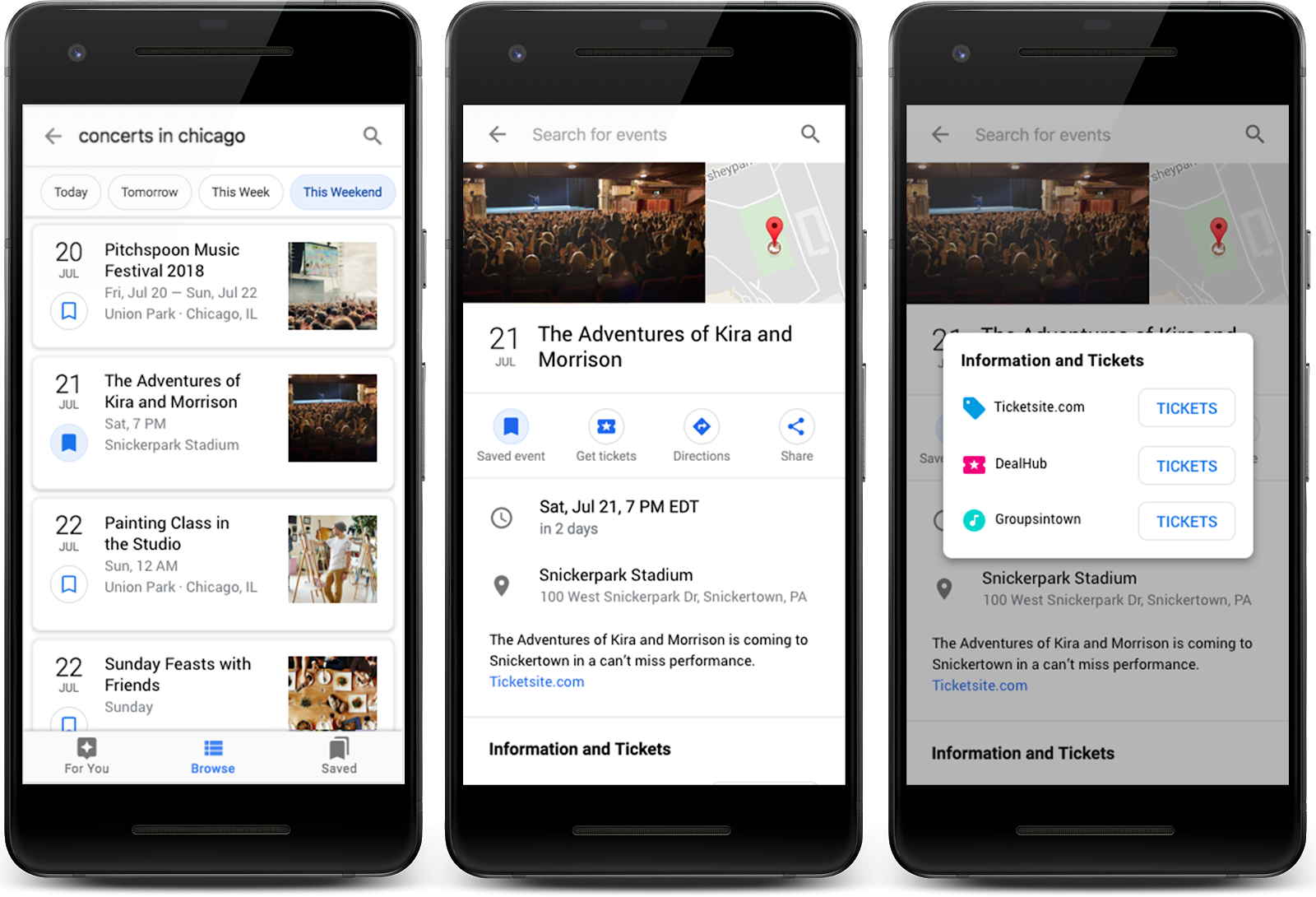
It’s officially 2020 and people are starting to make plans for the year ahead. If you produce any type of event, you can help people discover your events with the event search experience on Google.
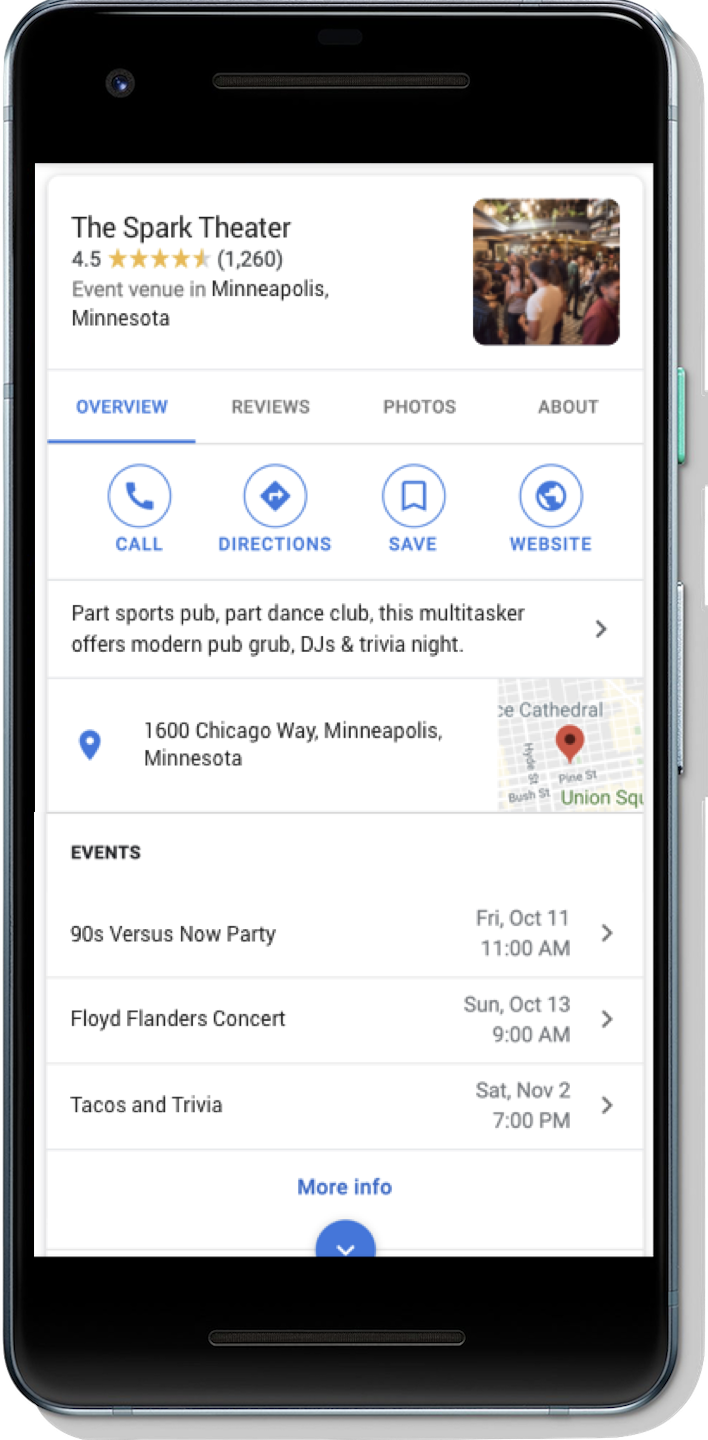
Have a concert or hosting a workshop? Event markup allows people to discover your event when they search for “concerts this weekend” or “workshops near me.” People can also discover your event when they search for venues, such as sports stadiums or a local pub. Events may surface in a given venue’s Knowledge Panel to better help people find out what’s happening at that respective location.
Launching in new regions and languages
We recently launched the event search experience in Germany and Spain, which brings the event search experience on Google to nine countries and regions around the world. For a full list of where the event search experience works, check out the list of available languages and regions.
How to get your events on Google
There are three options to make your events eligible to appear on Google:
- If you use a third-party website to post events (for example, you post events on ticketing websites or social platforms), check to see if your event publisher is already participating in the event search experience on Google. One way to check is to search for a popular event shown on the platform and see if the event listing is shown. If your event publisher is integrated with Google, continue to post your events on the third-party website.
- If you use a CMS (for example, WordPress) and you don’t have access to your HTML, check with your CMS to see if there’s a plugin that can add structured data to your site for you. Alternatively, you can use the Data Highlighter to tell Google about your events without editing the HTML of your site.
- If you’re comfortable editing your HTML, use structured data to directly integrate with Google. You’ll need to edit the HTML of the event pages.
Follow best practices
If you’ve already implemented event structured data, we recommend that you review your structured data to make sure it meets our guidelines. In particular, you should:
- Make sure you’re including the required and recommended properties that are outlined in our developer guidelines.
- Make sure your event details are high quality, as defined by our guidelines. For example, use the description field to describe the event itself in more detail instead of repeating attributes such as title, date, location, or highlighting other website functionality.
- Use the Rich Result Test to test and preview your structured data.
Monitor your performance on Search
You can check how people are interacting with your event postings with Search Console:
- Use the Performance Report in Search Console to show event listing or detail view data for a given event posting in Search results. You can automatically pull these results with the Search Console API.
- Use the Rich result status report in Search Console to understand what Google could or could not read from your site, and troubleshoot rich result errors.

If you have any questions, please visit the Webmaster Central Help Forum.
Posted by Emily Fifer, Product Manager


‘Made in USA’ ad extensions spotted on Bing
The latest automated extension test from Microsoft Advertising.
Please visit Search Engine Land for the full article.
Smart Shopping campaigns: How to test and extract more value from automated campaigns
Kirk Williams of Zato Marketing says Smart Shopping campaigns are worth testing when you understand how they work.
Please visit Search Engine Land for the full article.
How to use the AMP status report to identify page errors, validate fixes
Google’s latest Search Console training video explains how to troubleshoot your AMP pages.
Please visit Search Engine Land for the full article.
Google Images to replace dimensions overlay on image thumbnails
Google will instead show product, recipe, video, and soon, licensable labels in place of that dimensions information.
Please visit Search Engine Land for the full article.
A look at performance post Google’s average position sunset: Top vs side
I took a look at CPC and CTR to see how performance varied after the average position sunset and how these metrics vary on Google.com vs. Search partners.
The post A look at performance post Google’s average position sunset: Top vs side appeared first on Search Engine Watch.
Your Landing Pages Can Make or Break Your Business
Ready-made landing pages are looking more and more like the ideal solution for businesses unwilling to spend thousands on generating lots of bespoke pages.
Post from Milosz Krasinski
SMX Advanced registration is open!
Secure your seat today and lock in lowest rates — up to $900 off on-site prices.
Please visit Search Engine Land for the full article.
Google Patent Related To Medic Update? Website Representation Vector For Classifying Web Sites.
Bill Slawski posted about a new Google patent application filed in August of 2018 that was just revealed last week named Website Representation Vector to Generate Search Results and Classify Website. This patent can explain a lot around the August 201…
Google In Europe Now Shows Other Local Search Providers
This comes as no surprise, Google has been testing it for a while after the EU has required them to do something for anti-competitive reasons. Now Google is showing other search providers for local results. They did this for other verticals as well in …
Google Image Search Adds New Image License Metadata
Google announced that you can now use markup and metadata to tell Google about the image licensing rights and details. When you add this metadata and when Google decides to show the results in image search, Google may show a new Licensable badge for t…
Competition forces retailers to rethink the role of branded, non-branded and trademark traffic
The saturated Google Ads landscape is forcing retailers to reconsider the value of traffic at every stage of the shopping journey, particularly at the top of the funnel.
Please visit Search Engine Land for the full article.
Are H1 Tags Necessary for Ranking? [SEO Experiment]
Posted by Cyrus-Shepard
In earlier days of search marketing, SEOs often heard the same two best practices repeated so many times it became implanted in our brains:
- Wrap the title of your page in H1 tags
- Use one — and only one — H1 tag per page
These suggestions appeared in audits, SEO tools, and was the source of constant head shaking. Conversations would go like this:
“Silly CNN. The headline on that page is an H2. That’s not right!”
“Sure, but is it hurting them?”
“No idea, actually.”
Over time, SEOs started to abandon these ideas, and the strict concept of using a single H1 was replaced by “large text near the top of the page.”
Google grew better at content analysis and understanding how the pieces of the page fit together. Given how often publishers make mistakes with HTML markup, it makes sense that they would try to figure it out for themselves.
The question comes up so often, Google’s John Muller addressed it in a Webmaster Hangout:
“You can use H1 tags as often as you want on a page. There’s no limit — neither upper nor lower bound.
H1 elements are a great way to give more structure to a page so that users and search engines can understand which parts of a page are kind of under different headings, so I would use them in the proper way on a page.
And especially with HTML5, having multiple H1 elements on a page is completely normal and kind of expected. So it’s not something that you need to worry about. And some SEO tools flag this as an issue and say like ‘oh you don’t have any H1 tag’ or ‘you have two H1 tags.’ From our point of view, that’s not a critical issue. From a usability point of view, maybe it makes sense to improve that. So, it’s not that I would completely ignore those suggestions, but I wouldn’t see it as a critical issue.
Your site can do perfectly fine with no H1 tags or with five H1 tags.”
Despite these assertions from one of Google’s most trusted authorities, many SEOs remained skeptical, wanting to “trust but verify” instead.
So of course, we decided to test it… with science!
Craig Bradford of Distilled noticed that the Moz Blog — this very one — used H2s for headlines instead of H1s (a quirk of our CMS).


We devised a 50/50 split test of our titles using the newly branded SearchPilot (formerly DistilledODN). Half of our blog titles would be changed to H1s, and half kept as H2. We would then measure any difference in organic traffic between the two groups.
After eight weeks, the results were in:

To the uninitiated, these charts can be a little hard to decipher. Rida Abidi of Distilled broke down the data for us like this:
Change breakdown – inconclusive
- Predicted uplift: 6.2% (est. 6,200 monthly organic sessions)
- We are 95% confident that the monthly increase in organic sessions is between:
- Top: 13,800
- Bottom: -4,100
The results of this test were inconclusive in terms of organic traffic, therefore we recommend rolling it back.
Result: Changing our H2s to H1s made no statistically significant difference
Confirming their statements, Google’s algorithms didn’t seem to care if we used H1s or H2s for our titles. Presumably, we’d see the same result if we used H3s, H4s, or no heading tags at all.
It should be noted that our titles still:
- Used a large font
- Sat at the top of each article
- Were unambiguous and likely easy for Google to figure out
Does this settle the debate? Should SEOs throw caution to the wind and throw away all those H1 recommendations?
No, not completely…
Why you should still use H1s
Despite the fact that Google seems to be able to figure out the vast majority of titles one way or another, there are several good reasons to keep using H1s as an SEO best practice.
Georgy Nguyen made some excellent points in an article over at Search Engine Land, which I’ll try to summarize and add to here.
1. H1s help accessibility
Screen reading technology can use H1s to help users navigate your content, both in display and the ability to search.
2. Google may use H1s in place of title tags
In some rare instances — such as when Google can’t find or process your title tag — they may choose to extract a title from some other element of your page. Oftentimes, this can be an H1.
3. Heading use is correlated with higher rankings
Nearly every SEO correlation study we’ve ever seen has shown a small but positive correlation between higher rankings and the use of headings on a page, such as this most recent one from SEMrush, which looked at H2s and H3s.
To be clear, there’s no evidence that headings in and of themselves are a Google ranking factor. But headings, like Structured Data, can provide context and meaning to a page.
As John Mueller said on Twitter:

What’s it all mean? While it’s a good idea to keep adhering to H1 “best practices” for a number of reasons, Google will more than likely figure things out — as our experiment showed — if you fail to follow strict H1 guidelines.
Regardless, you should likely:
- Organize your content with hierarchical headings — ideally H1, H2s, H3s, etc.
- Use a large font headline at the top of your content. In other words, make it easy for Google, screen readers, and other machines or people reading your content to figure out the headline.
- If you have a CMS or technical limitations that prevent you from using strict H1s and SEO best practices, do your best and don’t sweat the small stuff.
Real-world SEO — for better or worse — can be messy. Fortunately, it can also be flexible.
Sign up for The Moz Top 10, a semimonthly mailer updating you on the top ten hottest pieces of SEO news, tips, and rad links uncovered by the Moz team. Think of it as your exclusive digest of stuff you don’t have time to hunt down but want to read!
Google: Quality Raters Help Us Understand If Our Signals Produce Good Results
Danny Sullivan at Google again explained what the role of the search quality raters are. Again, for those who do not know, Google search quality raters are not Google employees, they are third-party contractors. They grade search results and the sites …
Vlog #48: Dixon Jones – SEO Legend Mastering Links Tools & Now Semantic Tools
Dixon Jones has been doing SEO since 1998, you may know him mostly from his work at Majestic.com but he has been in the SEO industry since before there was an industry…
Google Penalties Can Reoccur – Your Site Is Not Immune
John Mueller from Google said just because a web site was once penalized, it does not mean it cannot be penalized again for the same issue. It is not like when you get a specific virus, that if you survive it, you become immune to getting that specific…
UX Design Checklist Series: Accessible Design
A few months ago, I found myself in a full leg brace following knee surgery. Everyday things I took for granted (like sitting in a chair!) suddenly became very challenging. There are a handful of particularly stressful moments I remember well, but the moments I remember most are all the small gestures people did to help me—from the receptionist at my doctor’s office who brought out a little footstool so I could comfortably sit down, to the bus driver who pulled up *seamlessly* to a high curb so I could step off with ease—those people made choices, and those choices helped me.…
The post UX Design Checklist Series: Accessible Design appeared first on Seer Interactive.
Display and search advertising: Top three strategies to expand your audience across channels
Digital marketers have unlimited tools at their disposal. Three strategies to effectively combine search and display advertising for maximum results.
The post Display and search advertising: Top three strategies to expand your audience across channels appeared first on Search Engine Watch.
Audience Research in Marketing: Start With Data You Already Have
Audience Research: Start With the Data You Already Have
Conducting audience research may seem like a daunting task. Yes, it’s a bit of work, but trust me, it’s worth it and can yield valuable insights that can help you cobble together a far more informed approach than if you were working on hypotheses alone.…
The post Audience Research in Marketing: Start With Data You Already Have appeared first on Seer Interactive.
Readability: Dumbing down or opening up?
Writing a readable text can be daunting. Especially if the topic of your blog is difficult or extremely technical. Is it really necessary to focus on readability if your audience is used to your jargon? Well, although your audience might be up to the task of reading your lingo, the entire purpose of SEO is […]
The post Readability: Dumbing down or opening up? appeared first on Yoast.