Make the most of your search budget with call analytics
With call analytics, inbound calls can be tracked to their marketing source at the keyword and campaign levels, and followed through the conversion funnel to identify the most profitable campaigns.
Please visit Search Engine Land for the full article….
Search Engine Land Awards Deadline Extension Due to COVID-19
Due to the current situation with COVID-19, we will be extending our submission deadlines to give applicants more time.
Please visit Search Engine Land for the full article.
The email marketing landscape 2019 and way ahead for 2020
The email marketing landscape drawn from 2019 and the way ahead for marketing professionals in 2020. Hyper-personalization, integrating social, and more.
The post The email marketing landscape 2019 and way ahead for 2020 appeared first on Search Engine Watch.
Google Event Schema For Virtual, Postponed & Canceled Events
Google has added some timely new properties for event schema. You can now mark your events with these additional properties. These new properties are for the eventStatus property sets under schema.org.
Bing: We Will Continue To Update & Improve Ranking Models
Yesterday we reported that 58% of SEOs would like to see Google stop with the Google algorithm updates during this time. But 42% said Google should continue. Google really has not commented but Bing’s Frederic Dubut said Bing will continue to update …
Are Emojis In FAQ Schema Going Away?
Eliav Lankri asked me yesterday if Google is now preventing emojis from showing up in the FAQ schema rich results. I had a hard time finding any examples of emojis showing in these FAQ results but I did find one. Did you all notice a reduction in emo…
Vlog #55: Martha van Berkel On Structure Data Adoption & How Schema Helps With Google Rankings
Martha van Berkel is the CEO of Schema App, which is a platform that does structured data and schema at scale. She worked at Cisco for 14 years starting at the beginning doing customer support…
Video: Martha van Berkel talks about structured data
Does adding schema help improve your search rankings? Google says no but…
Please visit Search Engine Land for the full article.
Brands, especially restaurants, need FAQs and ‘coronapages’ fast
There are a number of common questions your customers are probably asking in search that aren’t being answered.
Please visit Search Engine Land for the full article.
SMX Overtime: Creating great content, FAQs and how to navigate approval limitations
Digital marketing strategist Ashley Segura answers questions from SMX West about how retailers and brands should be thinking about content and more.
Please visit Search Engine Land for the full article.
US Democratic Party Symbol Was A Rat In Google’s Knowledge Panel
Last night for a period of time, if you searched for [democratic party] or similar searches, the knowledge panel showed a rat as the symbol of the party, not the official donkey. Google fixed the issue after a couple hours but this just shows how cert…
Bing: Use 302s For URLs That May Change In Two Days, Otherwise Go 301
Fabrice Canel from Microsoft Bing said on Twitter “preferable to use a 302 redirect if your destination URL may change within 2 days, else 301 is recommended.” So if your redirects will be in place for less than two days, go with a 302 – otherwise, Bi…
How to Query the Google Search Console API
Posted by briangormanh
If you’ve been an SEO for even a short time, you’re likely familiar with Google Search Console (GSC). It’s a valuable tool for getting information about your website and its performance in organic search. That said, it does have its limitations.
In this article, you’ll learn how to get better-connected data out of Google Search Console as well as increase the size of your exports by 400%.
Google Search Console limitations
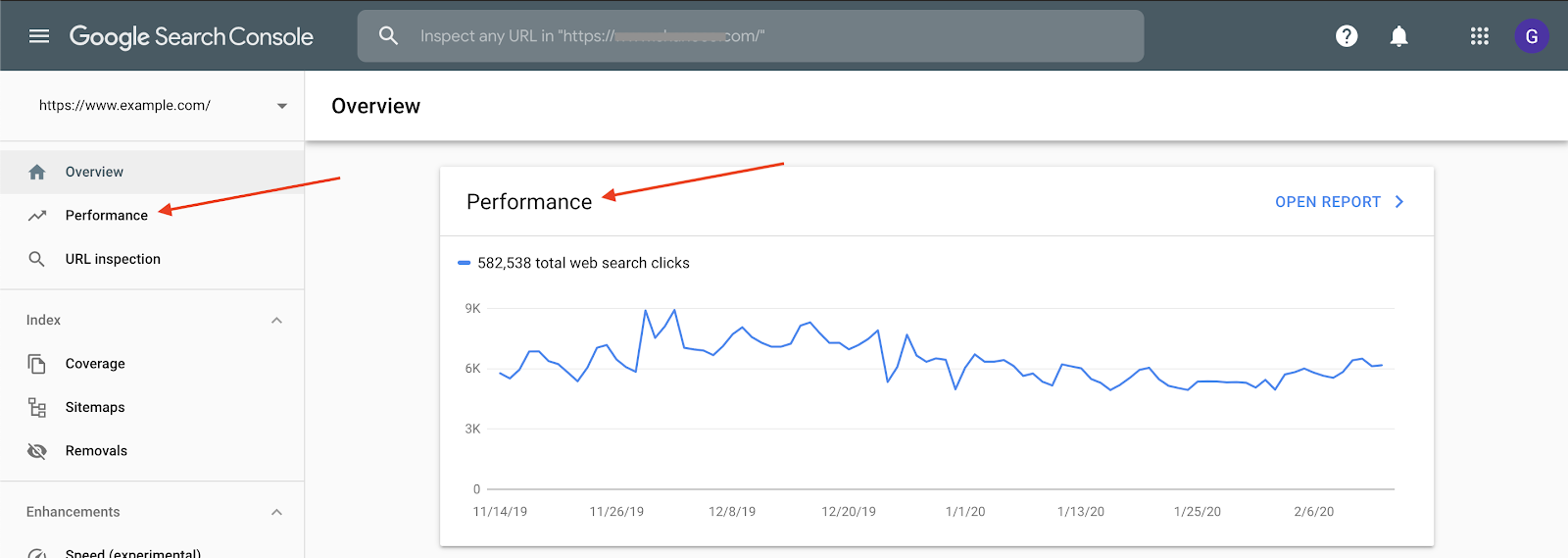
While GSC has a number of sections, we’ll be focusing on the “Performance” report. From the GSC dashboard, there are two ways you can access this report:
Once inside the “Performance” report, data for queries and pages can be accessed:
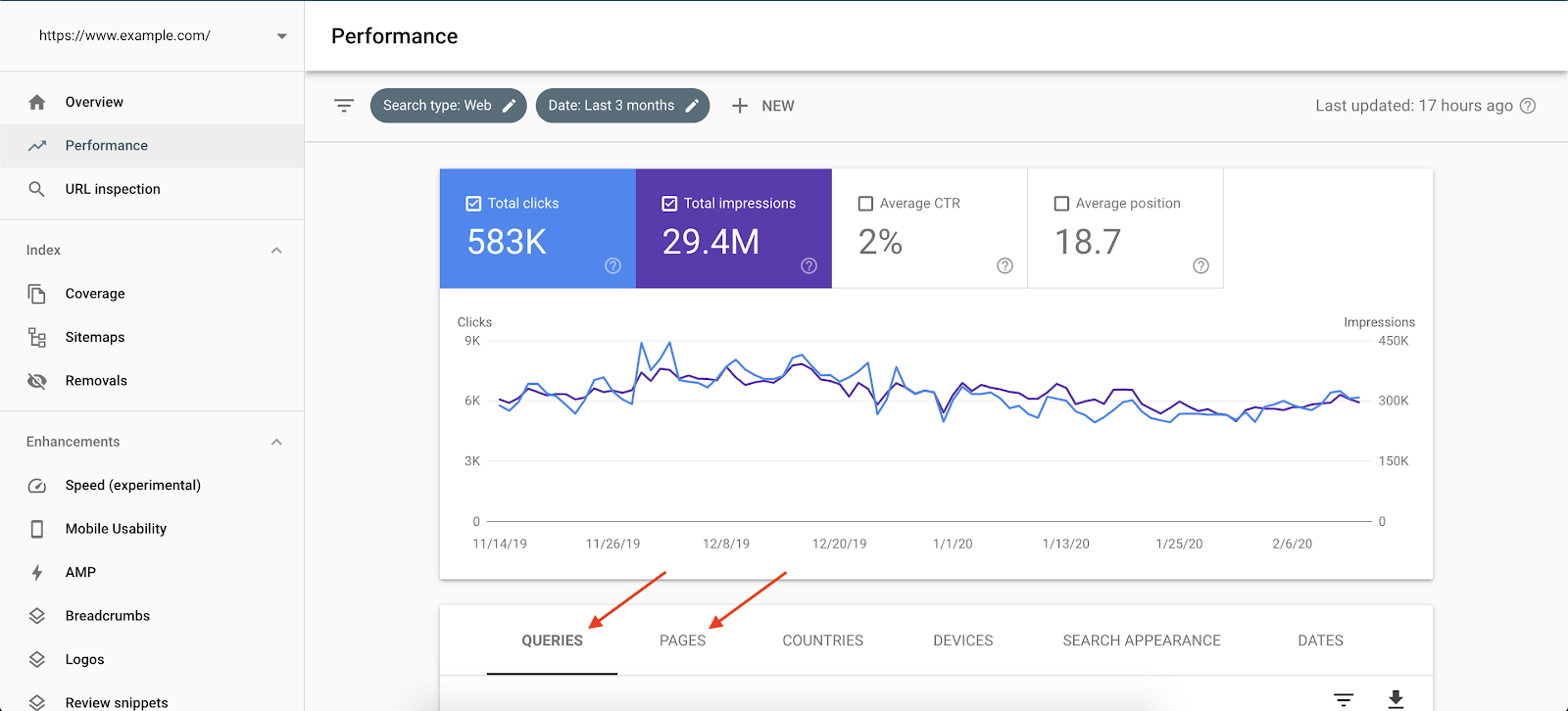
This reveals one of the issues with GSC: Query and page data is separated.
In other words, if I want to see the queries a specific page is ranking for, I have to first click “Pages,” select the page, and then click “back” to “Queries.” It’s a very cumbersome experience.
The other (two-part) issue is with exporting:
- Performance data for queries and pages must be exported separately.
- Exports are limited to 1,000 rows.
We’ll look to solve these issues by utilizing the GSC API.
What is the Google Search Console API?
Now we know the GSC user interface does have limitations: Connecting query data with page data is tricky, and exports are limited.
If the GSC UI represents the factory default, the GSC API represents our custom settings. It takes a bit more effort, but gives us more control and opens up more possibilities (at least in the realm of query and page data).
The GSC API is a way for us to connect to the data within our account, make more customized requests, and get more customized output. We can even bypass those factory default settings like exports limited to 1,000 rows, for instance.
Why use it?
Remember how I said earlier that query and page data is separated in the “vanilla” GSC UI? Well, with the API, we can connect query data with the page that query ranks for, so no more clicking back and forth and waiting for things to load.
Additionally, we saw that exports are limited to 1,000 rows. With the API, we can request up to 5,000 rows, an increase of 400%!
So let’s hook in, make our request, and get back a more robust and meaningful data set.
Setup
Log in to the appropriate GSC account on this page (upper right corner). For instance, if my website is example.com and I can view that Search Console account under admin@email.com, that’s the account I’ll sign into.
Enter the URL of the appropriate GSC account:
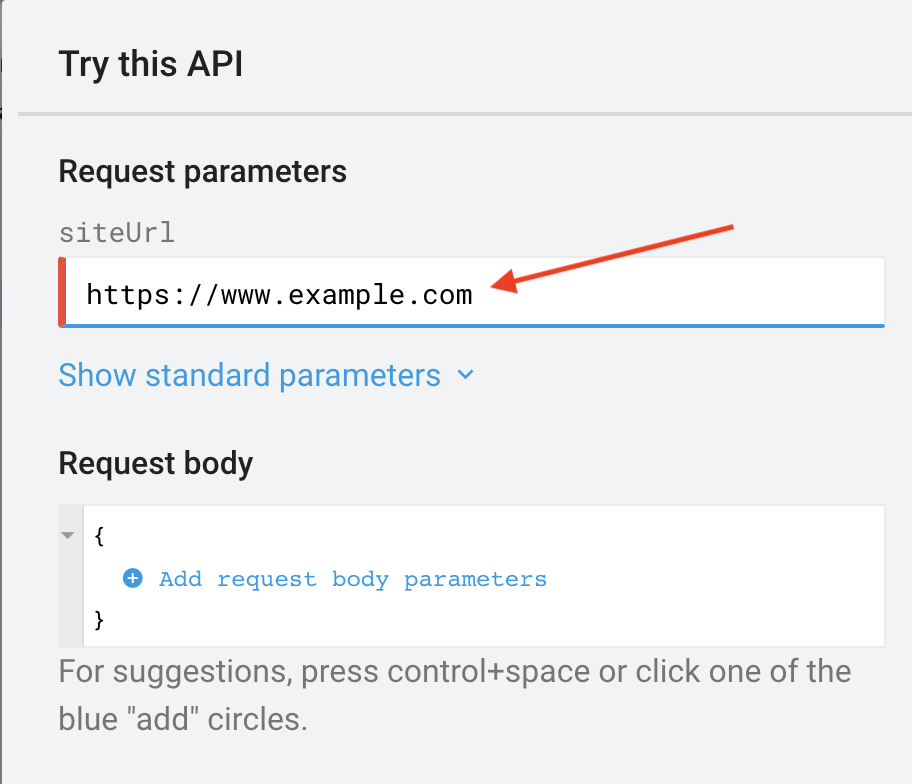
Set up your request:
- Set startDate. This should be formatted as: YYYY-MM-DD.
- Set endDate.
- Set dimensions. A dimension can be:
- query
- page
- device
- and/or country
- dimension (a dimension can be: query, page, device, or country)
- operator (an operator can be: contains, notContains, equals, notEquals)
- expression (an expression can be any value associated with the dimensions)
The page shared in step one makes all of this setup pretty easy, but it can be tedious and even confusing for some. I’ve done all the fussing for you and have created JSON you can edit quickly and easily to get the API return you’d like.
Unfiltered request
The following request will be unfiltered. We’ll set our preferred dates, dimensions, and a row limit, and then make our request.
The order in which you place your dimensions is the order in which they’ll be returned.
The API will return data for desktop, mobile, and tablet, separated out. The numbers you see in the GSC user interface — clicks, for instance — are an aggregate of all three (unless you apply device filtering).
Remember, your dimensions can also include “country” if you’d like.
{
“startDate”: “2019-11-01”,
“endDate”: “2020-01-31”,
“dimensions”:
[
“query”,
“page”,
“device”
],
“rowLimit”: 3000
}
Filtered request
This version of our request will include filters in order to be more specific about what is returned.
Filters are stated as dimension/operator/expression. Here are some examples to show what’s possible:
- query contains go fish digital
- page equals https://gofishdigital.com/
- device notContains tablet
It looks like you can only apply one filter per dimension, just like in the normal GSC user interface, but if you know differently, let us know in the comments!
{
“startDate”: “2019-11-01”,
“endDate”: “2020-01-31”,
“dimensions”:
[
“query”,
“page”,
“device”
],
“dimensionFilterGroups”:
[
{
“filters”:
[
{
“dimension”: “device”,
“operator”: “notContains”,
“expression”: “tablet”
}
]
}
],
“rowLimit”: 3000
}
Choose a template, unfiltered or filtered, and fill in your custom values (anything after a colon should be updated as your own value, unless you like my presets).
Execute the request
So there you have it! Two request templates for you to choose from and edit to your liking. Now it’s time to make the request. Click into the “Request body”, select all, and paste in your custom JSON:
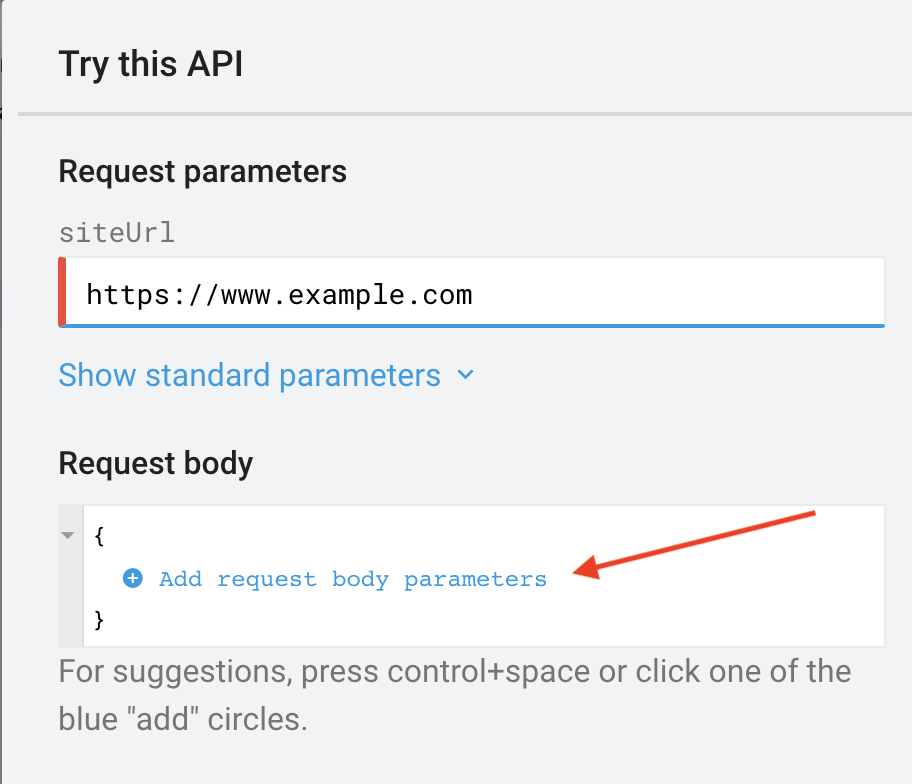
This is where you could manually set up your request keys and values, but as I stated earlier, this can be tedious and a little confusing, so I’ve done that work for you.
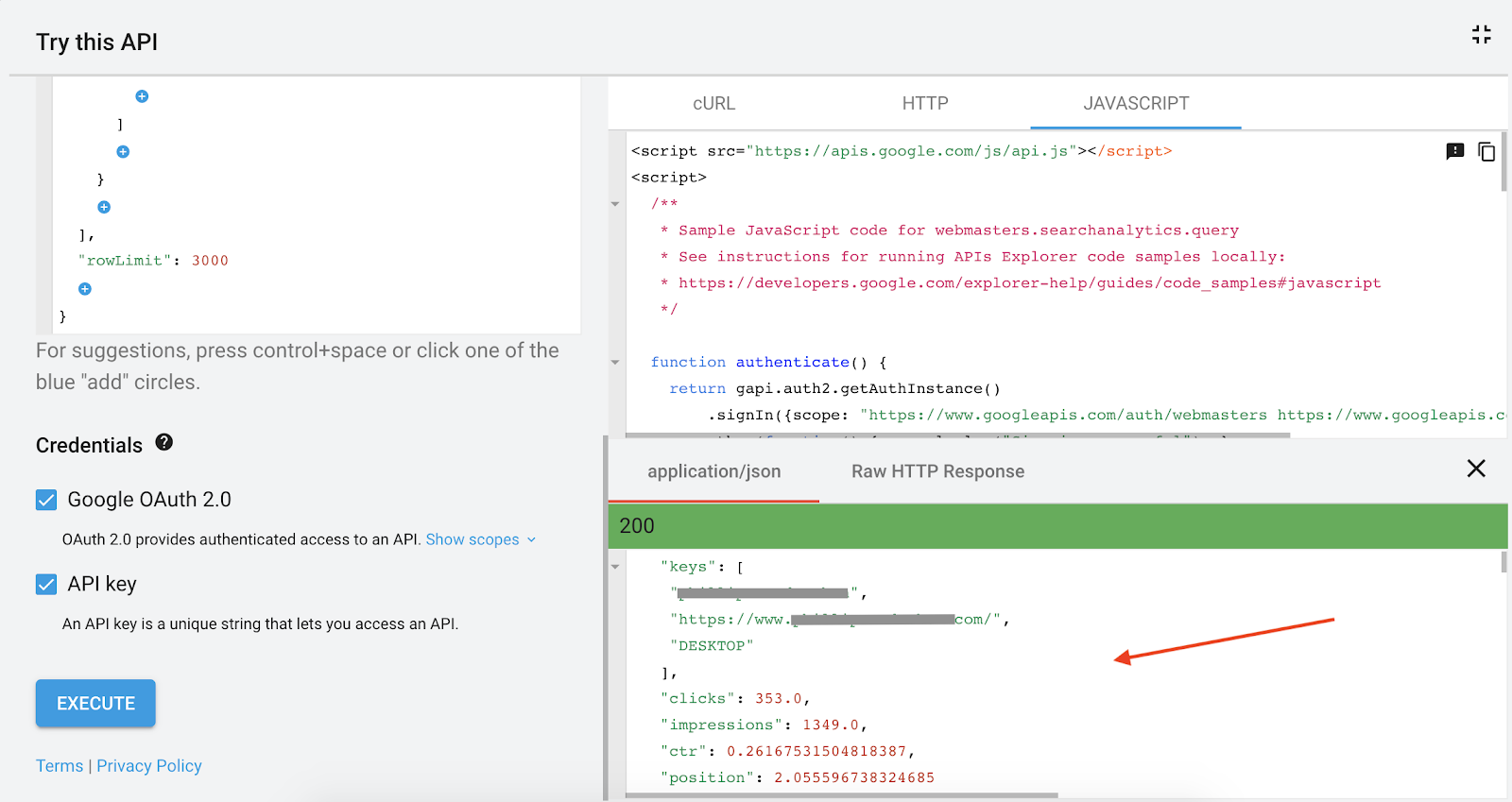
Scroll down and click “Execute.” You may be prompted to sign-in here as well.
If everything was entered correctly and the request could be satisfied, the API will return your data. If you get an error, audit your request first, then any other steps and inputs if necessary.
Click into the box in the lower right (this is the response from the API), select all, and copy the information.
Convert from JSON to CSV
Excel or Sheets will be a much better way to work with the data, so let’s convert our JSON output to CSV.
Use a converter like this one and paste in your JSON output. You can now export a CSV. Update your column headers as desired.
Query your own data
Most SEOs are pretty comfortable in Excel, so you can now query your request output any way you’d like.
One of the most common tasks performed is looking for data associated with a specific set of pages. This is done by adding a sheet with your page set and using VLOOKUP to indicate a match.
The API output being in a spreadsheet also allows for the most common actions in Excel like sorting, filtering, and chart creation.
Get more out of Google Search Console
GSC offers important data for SEOs, and the GSC API output offers not only more of that data, but in a format that is far less cumbersome and more cohesive.
Today, we overcame two obstacles we often face in the standard GSC user interface: the query/page connection and limited exports. My hope is that utilizing the Google Search Console API will take your analyses and insights to the next level.
While my JSON templates will cover the most common scenarios in terms of what you’ll be interested in requesting, Google does offer documentation that covers a bit more ground if you’re interested.
Do you have another way of using the GSC API? Is there another API you commonly use as an SEO? Let me know in the comments!
Sign up for The Moz Top 10, a semimonthly mailer updating you on the top ten hottest pieces of SEO news, tips, and rad links uncovered by the Moz team. Think of it as your exclusive digest of stuff you don’t have time to hunt down but want to read!
New properties for virtual, postponed, and canceled events
In the current environment and status of COVID-19 around the world, many events are being canceled, postponed, or moved to an online-only format. Google wants to show users the latest, most accurate information about your events in this fast-changing e…
Google My Business Using Duplex To Call Businesses To See Hour Changes Or Closures
Google said it is using Duplex, Google’s AI based phone calling service, to call businesses to check if business hours have changed or if the business has closed. Google wrote “using our artificial intelligence (AI) technology Duplex where possible to…
60% Of SEOs Prefer If Google Pause Algorithm Updates During COVID-19 Outbreak
Yesterday I asked should Google pause algorithm updates based on some folks in the SEO community thinking Google should. I posted a poll and within 24 hours it now has over 1,100 results. Almost 60% of SEOs said they would prefer if Google stopped pus…
Google Chrome Mixed Content Does Not Fully Impact Google Search
Google made it so that Chrome would show a site is not secure when there is mixed content. But does that impact how the page ranks in Google search? Not currently.
Sellers start feeling the strains on Amazon’s fulfillment systems amid coronavirus buying frenzy
The company has halted shipments of non-essential items to its warehouses and stopped most of its ads on Google.
Please visit Search Engine Land for the full article.
Sellers start feeling the strains on Amazon’s fulfillment systems
The company has halted shipments of non-essential items to its warehouses and stopped most of its ads on Google.
Please visit Search Engine Land for the full article.
Yahoo and other Verizon-owned search sites favor Verizon media properties [Study]
Study compared rankings for the same queries across six Bing-powered search sites, including Bing itself.
Please visit Search Engine Land for the full article.