There’s no Google Search widget for the iOS 10 Search screen: why that matters
Google search could be on the iOS Search screen with a widget, if it wanted. Why isn’t it offering that option to its users?
The post There’s no Google Search widget for the iOS 10 Search screen: why that matters appeared first on Search Engine Land.
Please visit Search Engine Land for the full article.
How mobile is transforming the restaurant order and delivery business
To date the leaders of restaurant takeaway and delivery have prospered, largely, on an open approach, that allows customers to choose between mobile web and apps.
Google Warns Shopify Users: AdWords Conversions May Be Double Counted
Cassie from Google posted in the Google AdWords Help forums that those that use Shopify for their e-commerce sites and AdWords conversion tracking need to consider updating their conversion count to avoid unexpected duplicate conversion metrics…
…
Google Mobile Showing Image Thumbnails In Some Search Result Snippets
In August, we caught Google testing showing image thumbnails in mobile search results. Well…
Google Tests A Whiter Desktop Search Experience
Google is constantly testing user interfaces, we cover some but not all of them. This one was brought to my attention by AbhisheK Kasaudhan on Twitter.
This tests gives you a whiter, what looks to be more spacious, desktop search experience…
…
Google To Update Their JavaScript Recommendations & Guidelines
Google’s John Mueller said in a Webmaster Hangout ten days ago (yea, I’ve been saving this one) on YouTube at the 37:40 mark that Google is working…
Three small businesses rocking local social media marketing
Here are some recent examples of local and small business campaigns that are rocking social media…
Interview with Boris Veldhuijzen van Zanten (TNW)
Now this a quote we love: “…being patient and providing quality pays off…“. It’s one of the lessons Boris Veldhuijzen van Zanten, co-founder of The Next Web (TNW), shared with us in this interview. TNW owns one of the most visited tech news sites, and they organize large tech events around the world. Besides that, TNW also offers gadgets for […]
How can Google Search Console help you AMPlify your site?

If you have recently implemented Accelerated Mobile Pages on your site, it’s a great time to check which of your AMP pages Google has found and indexed by using Search Console.
Search Console is a free service that helps you monitor and maintain your site’s presence in Google Search, including any Accelerated Mobile Pages. You don’t have to sign up for Search Console for your AMP pages to be included in Google Search results, but doing so can help you understand which of your AMP pages are eligible to show in search results.
To get started with Search Console, create a free account or sign in here and validate the ownership of your sites.
Once you have your site set up on Search Console, open the Accelerated Mobile Pages report under Search Appearance > Accelerated Mobile Pages to see which AMP pages Google has found and indexed on your site, as shown here:

The report lists AMP-related issues for AMP pages that are not indexed, so that you can identify and address them.
Search Console also lets you monitor the performance of your AMP pages on Google Search in the Search Analytics report. This report tells you which queries show your AMP pages in Search results, lets you compare how their metrics stack against your other results and see how the visibility of your AMP pages has changed over time.
To view your AMP page metrics, such as clicks or impressions, select Search Appearance > Search Analytics > Filter by AMP.
(Note: if you’ve only just created your Search Console account or set up your AMP pages and they have not been detected yet, remember that Google crawls pages only periodically. You can wait for the scheduled regular recrawl, or you can request a recrawl.)
Have you been using Search Console to monitor your AMP pages? Give us feedback in the comments below or on our Google Webmasters Google+ page. Or as usual, if you have any questions or need help, feel free to post in our Webmasters Help Forum.
UPDATE: To help ensure that your AMP implementation is working as expected, Search Console now has an enhanced AMP testing tool.
Posted by Tom Taylor, AMP Community Manager


How can Google Search Console help you AMPlify your site?
If you have recently implemented Accelerated Mobile Pages on your site, it’s a great time to check which of your AMP pages Google has found and indexed by using Search Console.
Search Console is a free service that helps you monitor and maintain your site’s presence in Google Search, including any Accelerated Mobile Pages. You don’t have to sign up for Search Console for your AMP pages to be included in Google Search results, but doing so can help you understand which of your AMP pages are eligible to show in search results.
To get started with Search Console, create a free account or sign in here and validate the ownership of your sites.
Once you have your site set up on Search Console, open the Accelerated Mobile Pages report under Search Appearance > Accelerated Mobile Pages to see which AMP pages Google has found and indexed on your site, as shown here:
The report lists AMP-related issues for AMP pages that are not indexed, so that you can identify and address them.
Search Console also lets you monitor the performance of your AMP pages on Google Search in the Search Analytics report. This report tells you which queries show your AMP pages in Search results, lets you compare how their metrics stack against your other results and see how the visibility of your AMP pages has changed over time.
To view your AMP page metrics, such as clicks or impressions, select Search Appearance > Search Analytics > Filter by AMP.
(Note: if you’ve only just created your Search Console account or set up your AMP pages and they have not been detected yet, remember that Google crawls pages only periodically. You can wait for the scheduled regular recrawl, or you can request a recrawl.)
Have you been using Search Console to monitor your AMP pages? Give us feedback in the comments below or on our Google Webmasters Google+ page. Or as usual, if you have any questions or need help, feel free to post in our Webmasters Help Forum.
Posted by Tom Taylor, AMP Community Manager
6 reasons you need a Content Marketing Strategy
A content marketing strategy makes a big difference in success. You need to understand your audience needs and combine it with what your business needs
Post from Bas van den Beld
How To Support Data with Real-Life Interviews – Whiteboard Friday
Posted by rcancinoWith all the data that today’s marketers can access, there’s often still no substitute for the quality of information you can get from interviewing real people. In today’s Whiteboard Friday, we welcome Rebekah Cancino — a partner at …
SearchCap: Google images, mobile shopping & election hub
Below is what happened in search today, as reported on Search Engine Land and from other places across the web.
The post SearchCap: Google images, mobile shopping & election hub appeared first on Search Engine Land.
Please visit Search Engine Land for the full article.
Possible Google Mobile Update Causes Widespread Drop In Rankings
Few things can cause such a stir in the SEO world as a significant change in Google rankings, not least because such changes are so unusual.
read more
Is Google showing fewer image boxes in its search results?
You are now 50% less likely to see the image box show up in your Google search results page. Is it a bug or a feature?
The post Is Google showing fewer image boxes in its search results? appeared first on Search Engine Land.
Please visit Search Engin…
Free Google AdWords Keyword Suggestion Tool Alternative

Google recently made it much harder to receive accurate keyword data from the AdWords keyword tool.
They have not only grouped similar terms, but then they broadened out the data ranges to absurdly wide ranges like 10,000 to 100,000 searches a month. Only active AdWords advertisers receive (somewhat?) decent keyword data. And even with that, there are limitations. Try to view too many terms and you get:
“You’ve reached the maximum number of page views for this day. This page now shows ranges for search volumes. For a more detailed view, check back in 24 hours.”
Jennifer Slegg shared a quote from an AdWords advertiser who spoke with a representative:
“I have just spoken to a customer service manger from the Australia support help desk. They have advised me that there must be continuous activity in your google ad-words campaign (clicks and campaigns running) for a minimum of 3-4 months continuous in order to gain focused keyword results. If you are seeing a range 10-100 or 100-1k or 1k -10k its likely your adwords account does not have an active campaign or has not had continuous campaigns or clicks.”
So you not only need to be an advertiser, but you need to stay active for a quarter-year to a third of a year to get decent data.
Part of the sales pitch of AdWords/PPC was that you can see performance data right away, whereas SEO investments can take months or years to back out.
But with Google outright hiding keyword data even from active advertisers, it is probably easier and more productive for those advertisers to start elsewhere.
There are many other keyword data providers (Wordtracker, SEMrush, Wordze, Spyfu, KeywordSpy, Keyword Discovery, Moz, Compete.com, SimilarWeb, Xedant, Ubersuggest, KeywordTool.io, etc.) And there are newer entrants like the Keyword Keg Firefox extension & the brilliantly named KeywordShitter).
In light of Google’s push to help make the web more closed-off & further tilt the web away from the interests of searchers toward the interest of big advertisers*, we decided to do the opposite & recently upgraded our keyword tool to add the following features…
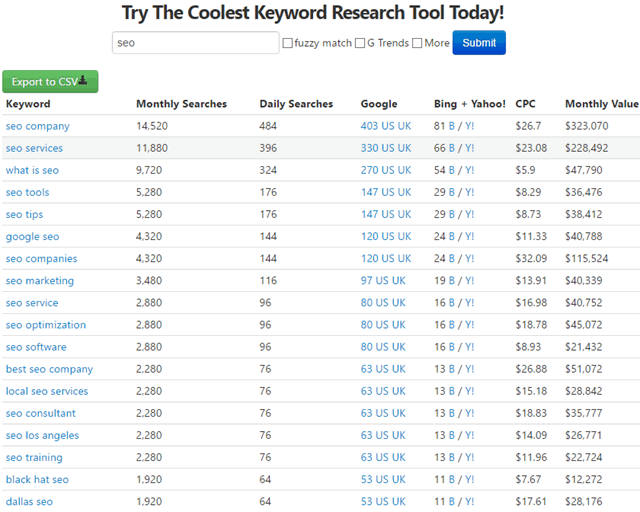
- expanded the results per search to 500
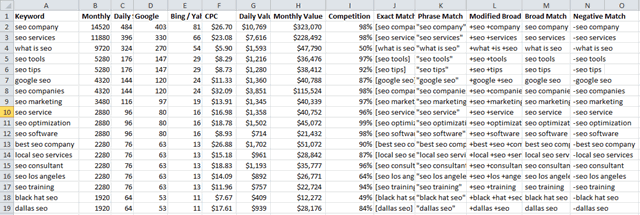
- we added negative match and modified broad match to the keyword export spreadsheet (along with already having phrase, broad & exact match)
Our keyword tool lists estimated search volumes, bid prices, cross links to SERPs, etc. Using it does require free account registration to use, but it is a one-time registration and the tool is free. And we don’t collect phone numbers, hard sell over the phone, etc. We even shut down our paid members area, so you are not likely to receive any marketing messages from us anytime soon.
Export is lightning quick AND, more importantly, we have a panda in our logo!
Here is what the web interface looks like
And here is an screenshot of data in Excel with the various keyword match types
If the tool looks like it is getting decent usage, we may upgrade it further to refresh the data more frequently, consider adding more languages, add a few more reference links to related niche sites in the footer cross-reference section, and maybe add a few other features.
“Every market has some rules and boundaries that restrict freedom of choice. A market looks free only because we so unconditionally accept its underlying restrictions that we fail to see them.” — Ha-Joon Chang
Categories:
Free Google AdWords Keyword Suggestion Tool Alternative
Google recently made it much harder to receive accurate keyword data from the AdWords keyword tool.
They have not only grouped similar terms, but then they broadened out the data ranges to absurdly wide ranges like 10,000 to 100,000 searches a month. Only active AdWords advertisers receive (somewhat?) decent keyword data. And even with that, there are limitations. Try to view too many terms and you get:
“You’ve reached the maximum number of page views for this day. This page now shows ranges for search volumes. For a more detailed view, check back in 24 hours.”
Jennifer Slegg shared a quote from an AdWords advertiser who spoke with a representative:
“I have just spoken to a customer service manger from the Australia support help desk. They have advised me that there must be continuous activity in your google ad-words campaign (clicks and campaigns running) for a minimum of 3-4 months continuous in order to gain focused keyword results. If you are seeing a range 10-100 or 100-1k or 1k -10k its likely your adwords account does not have an active campaign or has not had continuous campaigns or clicks.”
So you not only need to be an advertiser, but you need to stay active for a quarter-year to a third of a year to get decent data.
Part of the sales pitch of AdWords/PPC was that you can see performance data right away, whereas SEO investments can take months or years to back out.
But with Google outright hiding keyword data even from active advertisers, it is probably easier and more productive for those advertisers to start elsewhere.
There are many other keyword data providers (Wordtracker, SEMrush, Wordze, Spyfu, KeywordSpy, Keyword Discovery, Moz, Compete.com, SimilarWeb, Xedant, Ubersuggest, KeywordTool.io, etc.) And there are newer entrants like the Keyword Keg Firefox extension & the brilliantly named KeywordShitter).
In light of Google’s push to help make the web more closed-off & further tilt the web away from the interests of searchers toward the interest of big advertisers*, we decided to do the opposite & recently upgraded our keyword tool to add the following features…
- expanded the results per search to 500
- we added negative match and modified broad match to the keyword export spreadsheet (along with already having phrase, broad & exact match)
Our keyword tool lists estimated search volumes, bid prices, cross links to SERPs, etc. Using it does require free account registration to use, but it is a one-time registration and the tool is free. And we don’t collect phone numbers, hard sell over the phone, etc. We even shut down our paid members area, so you are not likely to receive any marketing messages from us anytime soon.
Export is lightning quick AND, more importantly, we have a panda in our logo!
Here is what the web interface looks like
And here is an screenshot of data in Excel with the various keyword match types
If the tool looks like it is getting decent usage, we may upgrade it further to refresh the data more frequently, consider adding more languages, add a few more reference links to related niche sites in the footer cross-reference section, and maybe add a few other features.
“Every market has some rules and boundaries that restrict freedom of choice. A market looks free only because we so unconditionally accept its underlying restrictions that we fail to see them.” — Ha-Joon Chang
Categories:
7 advanced tips for Google Shopping ads
As we edge closer to the holidays, it’s time to make the most of your Google Shopping campaigns. Columnist David Rekuc reveals seven tips to help you bring your shopping campaigns up a notch.
The post 7 advanced tips for Google Shopping ads appeared f…
What Designers and Marketers Can Learn from Pixar
Pixar is a renowned computer animation film studio that has captured hearts around the world ever since they released their first feature, Toy Story in 1995. How do they do it? Recently, Seer’s Creative Team went on a little field trip to investigate.…
The post What Designers and Marketers Can Learn from Pixar appeared first on Seer Interactive.
Let’s Talk Voice Search
Voice search is the fastest growing type of search at present. We take a look at what it entails and how we can optimise for this growing trend.
Post from Luke Monaghan