Google: We Try To Launch All Our Algorithms Globally Now
Back in the day, Google use to launch specific algorithms in different regions. Like with Panda, when it launched, it launched in English regions only at first. Then it was pushed to other language afterwards…
Google AdWords Also Testing Orange Ad Label
Google this week has been busy testing new colors for the ad label. Last year they went from yellow to green with the ad label. This week we spotted Google testing green outlined ad labels and also a black ad label…
Google Horizontal Scrollable Local Pack Ads
Google seems to be testing yet another format for the local pack ads. @SilverbackStrat shared a screen shot with me showing a local ad pack which looks like the AMP carousel. A horizontal scrollable set of cards that you can scroll or flick to get mo…
Protect your site from user generated spam
As a website owner, you might have come across some auto-generated content in comments sections or forum threads. When such content is created on your pages, not only does it disrupt those visiting your site, but it also shows some content that you may not want to be associated with your site to Google and other search engines.
In this blog post, we will give you tips to help you deal with this type of spam in your site and forum.
Some spammers abuse sites owned by others by posting deceiving content and links, in an attempt to get more traffic to their sites. Here are a few examples:
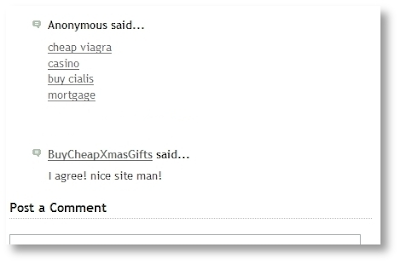
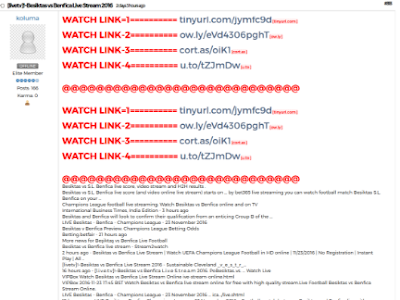
Comments and forum threads can be a really good source of information and an efficient way of engaging a site’s users in discussions. This valuable content should not be buried by auto-generated keywords and links placed there by spammers.
There are many ways of securing your site’s forums and comment threads and making them unattractive to spammers:
- Keep your forum software updated and patched. Take the time to keep your software up-to-date and pay special attention to important security updates. Spammers take advantage of security issues in older versions of blogs, bulletin boards, and other content management systems.
- Add a CAPTCHA. CAPTCHAs require users to confirm that they are not robots in order to prove they’re a human being and not an automated script. One way to do this is to use a service like reCAPTCHA, Securimage and Jcaptcha .
- Block suspicious behavior. Many forums allow you to set time limits between posts, and you can often find plugins to look for excessive traffic from individual IP addresses or proxies and other activity more common to bots than human beings. For example, phpBB, Simple Machines, myBB, and many other forum platforms enable such configurations.
- Check your forum’s top posters on a daily basis. If a user joined recently and has an excessive amount of posts, then you probably should review their profile and make sure that their posts and threads are not spammy.
- Consider disabling some types of comments. For example, It’s a good practice to close some very old forum threads that are unlikely to get legitimate replies.
If you plan on not monitoring your forum going forward and users are no longer interacting with it, turning off posting completely may prevent spammers from abusing it. - Make good use of moderation capabilities. Consider enabling features in moderation that require users to have a certain reputation before links can be posted or where comments with links require moderation.
If possible, change your settings so that you disallow anonymous posting and make posts from new users require approval before they’re publicly visible.
Moderators, together with your friends/colleagues and some other trusted users can help you review and approve posts while spreading the workload. Keep an eye on your forum’s new users by looking on their posts and activities on your forum. - Consider blacklisting obviously spammy terms. Block obviously inappropriate comments with a blacklist of spammy terms (e.g. Illegal streaming or pharma related terms) . Add inappropriate and off-topic terms that are only used by spammers, learn from the spam posts that you often see on your forum or other forums. Built-in features or plugins can delete or mark comments as spam for you.
- Use the “nofollow” attribute for links in the comment field. This will deter spammers from targeting your site. By default, many blogging sites (such as Blogger) automatically add this attribute to any posted comments.
- Use automated systems to defend your site. Comprehensive systems like Akismet, which has plugins for many blogs and forum systems are easy to install and do most of the work for you.
For detailed information about these topics, check out our Help Center document on User Generated Spam and comment spam. You can also visit our Webmaster Central Help Forum if you need any help.
Posted by Anouar Bendahou, Search Quality Strategist, Google Ireland


Protect your site from user generated spam
As a website owner, you might have come across some auto-generated content in comments sections or forum threads. When such content is created on your pages, not only does it disrupt those visiting your site, but it also shows some content that you may not want to be associated with your site to Google and other search engines.
In this blog post, we will give you tips to help you deal with this type of spam in your site and forum.
Some spammers abuse sites owned by others by posting deceiving content and links, in an attempt to get more traffic to their sites. Here are a few examples:
Comments and forum threads can be a really good source of information and an efficient way of engaging a site’s users in discussions. This valuable content should not be buried by auto-generated keywords and links placed there by spammers.
There are many ways of securing your site’s forums and comment threads and making them unattractive to spammers:
- Keep your forum software updated and patched. Take the time to keep your software up-to-date and pay special attention to important security updates. Spammers take advantage of security issues in older versions of blogs, bulletin boards, and other content management systems.
- Add a CAPTCHA. CAPTCHAs require users to confirm that they are not robots in order to prove they’re a human being and not an automated script. One way to do this is to use a service like reCAPTCHA, Securimage and Jcaptcha .
- Block suspicious behavior. Many forums allow you to set time limits between posts, and you can often find plugins to look for excessive traffic from individual IP addresses or proxies and other activity more common to bots than human beings. For example, phpBB, Simple Machines, myBB, and many other forum platforms enable such configurations.
- Check your forum’s top posters on a daily basis. If a user joined recently and has an excessive amount of posts, then you probably should review their profile and make sure that their posts and threads are not spammy.
- Consider disabling some types of comments. For example, It’s a good practice to close some very old forum threads that are unlikely to get legitimate replies.
If you plan on not monitoring your forum going forward and users are no longer interacting with it, turning off posting completely may prevent spammers from abusing it. - Make good use of moderation capabilities. Consider enabling features in moderation that require users to have a certain reputation before links can be posted or where comments with links require moderation.
If possible, change your settings so that you disallow anonymous posting and make posts from new users require approval before they’re publicly visible.
Moderators, together with your friends/colleagues and some other trusted users can help you review and approve posts while spreading the workload. Keep an eye on your forum’s new users by looking on their posts and activities on your forum. - Consider blacklisting obviously spammy terms. Block obviously inappropriate comments with a blacklist of spammy terms (e.g. Illegal streaming or pharma related terms) . Add inappropriate and off-topic terms that are only used by spammers, learn from the spam posts that you often see on your forum or other forums. Built-in features or plugins can delete or mark comments as spam for you.
- Use the “nofollow” attribute for links in the comment field. This will deter spammers from targeting your site. By default, many blogging sites (such as Blogger) automatically add this attribute to any posted comments.
- Use automated systems to defend your site. Comprehensive systems like Akismet, which has plugins for many blogs and forum systems are easy to install and do most of the work for you.
For detailed information about these topics, check out our Help Center document on User Generated Spam and comment spam. You can also visit our Webmaster Central Help Forum if you need any help.
Posted by Anouar Bendahou, Search Quality Strategist, Google Ireland
How to prepare for voice search
Voice search is picking up steam. You can now use your voice to search the web, play music, navigate home, order sushi or get the latest football results. Not a day goes by without news stories about search assistants like Amazon’s Alexa, Apple’s Siri, Microsoft’s Cortana or Google’s – uh – nameless service. It seems […]
How to prepare for voice search
Voice search is picking up steam. You can now use your voice to search the web, play music, navigate home, order sushi or get the latest football results. Not a day goes by without news stories about search assistants like Amazon’s Alexa, Apple’s Siri, Microsoft’s Cortana or Google’s – uh – nameless service. You might […]
Six most interesting search marketing news stories of the week
Welcome to our weekly round-up of all the latest news and research from the world of search marketing and beyond.
Is Google My Business Cutting Back on Live Support?
Two weeks ago I saw that Google had eliminated a public Help file URL from which a user could contact Google My Business support. This evening I saw this Tweet from Miriam Ellis: Hey @GoogleMyBiz, been on hold on your phone support for half an hour. Anyone manning Twitter right now? — Miriam Ellis (@Miriam_Ellis_) … Continue reading Is Google My Business Cutting Back on Live Support? →
SearchCap: Google Maps parking, iProspect report & Google’s spinner
Below is what happened in search today, as reported on Search Engine Land and from other places across the web.
The post SearchCap: Google Maps parking, iProspect report & Google’s spinner appeared first on Search Engine Land.
Please visit Search Engine Land for the full article.
Local U Deep Dive: Bricks & Mortar Key Performance Indicators Case Study
This week’s Deep Dive at LocalU, with Mary Bowling and myself, looks at the data behind a discussion between by myself and David Mihm for StreetFight magazine about Key Performance Indicators (KPIs) and local. We dig into the details of a case study for a single location and ask the questions: What are the critical KPI’s for a location-based business? How can … Continue reading Local U Deep Dive: Bricks & Mortar Key Performance Indicators Case Study →
Be the first to see the updated SMX West agenda
Search Marketing Expo — SMX West — returns for its 10th year completely retooled with tactic-rich sessions for SEOs and SEMs. Programmed by the Search Engine Land team, the agenda features 60+ sessions, keynotes, clinics and special tracks by Google and Bing to fit your experience and…
Please visit Search Engine Land for the full article.
Google Maps will tell you how hard it will be to find parking
Now you can plan enough time not just for driving to your destination but also the time it takes to park at your destination with the Google Maps app.
The post Google Maps will tell you how hard it will be to find parking appeared first on Search Engi…
The essential guide to pharma SEM
Columnist Justin Freid explains the basics of getting your PPC campaigns up and running in the highly regulated industry of prescription drug advertising.
The post The essential guide to pharma SEM appeared first on Search Engine Land.
Please visit S…
Do organic keyword rankings matter anymore?
With all the ways search engine results pages have evolved over the years, columnist Julian Connors explores the question of whether SEO is still a wise investment.
The post Do organic keyword rankings matter anymore? appeared first on Search Engine L…
What’s love got to do with Valentine’s Day?
Looking to woo consumers this Valentine’s Day? Columnist Mona Elesseily shares insights from Bing Ads (and her own experience) to help your holiday ads flourish.
The post What’s love got to do with Valentine’s Day? appeared first on Search Engine Land.
Please visit Search Engine Land for the full article.
Google “spinner” Easter Egg returns interactive spinning wheel at top of results
Do a search for the word “spinner” and you’ll get an interactive spinning wheel that lets you choose anywhere from two to twenty numbers.
The post Google “spinner” Easter Egg returns interactive spinning wheel at top of results appeared first on Search Engine Land.
Please visit Search Engine Land for the full article.
Bessie Coleman, First Female African American Pilot Very Own Google Doodle
Today on the Google home page in the United States is a special logo, aka Doodle, for Bessie Coleman. Bessie Coleman was the first female pilot of African American descent and was also the first African American woman to hold a pilot license…
…
Google AdSense Stats & Earnings Reports Currently Broken Today
If you login to your Google AdSense account this morning, at least right now, you will see you have zero earnings. As you dig deeper, you will see Google is reporting zero pageviews, clicks, RPM, CPC, impressions and zero data across the board for all…
The Google Spinner In Search
you do a search in Google for [spinner], Google will show you an interactive spin wheel. This works…