How to effectively segment accounts with multiple locations
What’s the best account structure for multilocation business advertisers? Columnist Matt Umbro shares some setups that allow you to easily view performance by location for efficient management and reporting.
The post How to effectively segment account…
Search in Pics: Google champagne glass, mouthwash & trees holding up office
In this week’s Search In Pictures, here are the latest images culled from the web, showing what people eat at the search engine companies, how they play, who they meet, where they speak, what toys they have and more. Google champagne glass: Source: Twitter Google mouthwash: Source: Twitter…
Please visit Search Engine Land for the full article.
Writing with Markdown for Better Content & HTML: Why & How To – Whiteboard Friday
Posted by wrttnwrd
Content creation is hard enough without adding bad HTML into the mix. Echoing his recent talk at MozCon, we’re excited to welcome Ian Lurie from Portent, Inc. on this episode of Whiteboard Friday. Learn how to cut out the cruddy code produced from writing in word processors by adopting Markup and text editors as your go-to writing solution.
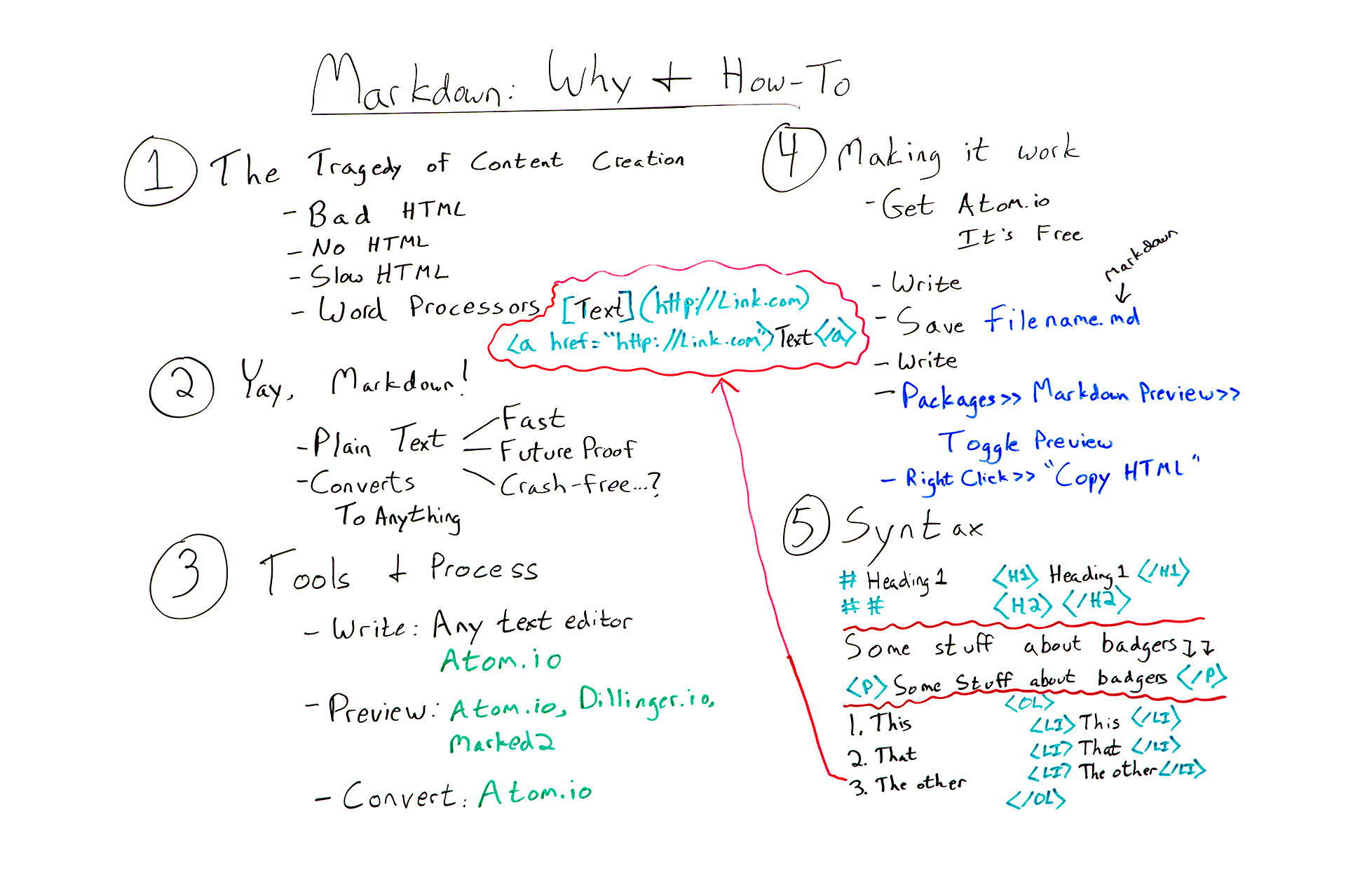
Click on the whiteboard image above to open a high-resolution version in a new tab!
Video Transcription
Hey, Moz fans. My name’s Ian Lurie. I am the CEO and founder of Portent Inc. I am also the Chief Content Badger there. I’m here today to talk to you about Markdown and how you can use Markdown to avoid all sorts of content and HTML tragedies.
1. The tragedy of content creation
So first thing you’ve got to understand: The one great tragedy of content creation is HTML. If you’re a writer or producer or someone like that and you’re creating content, you always run into the problem of trying to get that blog post live or trying to get that page live or whatever else, and you end up with one of four possibilities.
- You get bad HTML, because you’re trying to write it yourself and you don’t know how. I’m one of those people, at least I was until recently.
- You have no HTML at all because you can’t do it, and there’s no one else to do it, so you end up pasting plain text directly into your word processor.
- You get really slow HTML, because it takes you a long time to punch in all of those tags, or you can find a producer, but it’s going to take a long time to find that producer.
- You get really bad HTML, because you write in a word processor, like Word or OpenText or something like that, and you save as HTML, which delivers something that would make any decent HTML programmer pretty much weep tears of blood because it looks so horrible. It adds all this extra stuff. It doesn’t render correctly in most browsers, so you don’t want to do that either.
So the problem is: How do you create HTML as a writer, without having it interfere with your writing process, right? You don’t want to be typing stuff in and all of a sudden you have to stop to write in tags. Without slowing things down because you don’t want to have to go back and edit all the HTML either. How do you do that?
2. Yay, markdown!
Well, yay for us, there’s this thing called Markdown, and Markdown was created by a developer who runs a blog called Daring Fireball, and I will link to the Markdown Syntax Guide on that site so you can very easily look at it and see it. It is designed to be a really simple way to write in plain text and, with a few simple characters, tag it so that it will turn into really clean, really good HTML.
The great things about Markdown:
- You do write in plain text, so any text editor. You can use one on your phone. You can use one on your laptop. It can be TextEdit, Notepad, anything. I’m going to name a specific text editor in a minute that I think is the best one for you to use. But it could be anything, and you can edit it in anything. It’s fully portable.
- That means it’s really fast, right? Text editors don’t bog down with updates, generally. They don’t run into those kinds of problems, so they run really, really fast.
- Text is future-proof. When the day comes that we’re no longer reading stuff in text and opening text files, we’ll all be communicating directly head-to-head, and we won’t worry about all this stuff anyway because you won’t need HTML. I’m getting a little bit ahead of myself, but it is future-proof, because 50 years from now you will still be able to open a plain text file.
- It’s relatively crash-free. I’ve always said I’ve never had a text editor crash. It’s true. I’ve never had one, but as soon as I say that, everybody starts raising their hands and saying, “I had my text editor crash.” Maybe it’s because you’re on Windows. I don’t know. I shouldn’t say that. But it’s relatively crash-free, all right? So it’s much more stable than using a word processor.
So you’ve got all these big advantages. You’ve still got the problem of how are you going to turn it into what you want it to be?
- Well, Markdown converts to just about anything. If you’re willing to go out and study the tools and learn more advanced things like Pandoc, which I’m not going to really talk about today, you can convert Markdown into Word documents. You can convert them into HTML. You can convert them into slides. I’ve turned them directly into PDFs. You can even do this really fancy typesetting with a piece of software called LaTeX. So there is nothing you can’t do with Markdown.
3. Tools & process
How do you do it? Well, the first thing is you need certain tools to fit a process. Like almost any writing process, you write, you preview, and then you convert. If you do that in Microsoft Word, you use Microsoft Word to do your writing, you use Word to do your preview, and then you convert by either saving the file and giving it to someone else, or converting it to PDF or, and please don’t do this, converting it to HTML.
If you’re doing Markdown…
- You do your writing in any text editor. I will strongly recommend Atom.io, and you’ll see why in a minute. And I’ll include a link in the text. But just understand Atom.io has many, many advantages. It’s really lightweight. It’s fast. It’s built to handle Markdown, so everything you need is built into it. There’s tons of advantages.
- Then you preview it. Well, you can use a website called Dillinger.io. You can use a piece of software on the Mac called Marked 2. But the best way is to just use Atom.io, because it has preview built into it.
- Then you convert it to HTML, and again you can use Atom.io.
I should point out just five to seven days ago, I talked about using a tool called Sublime Text. Sublime Text is excellent for this. I hadn’t fully tested Atom.io yet. I have now, and I’m actually switching. I’ve been using Sublime Text for probably five years now. I’m very sorry Sublime folks, but I’m actually switching to Atom.io, because as a primarily Markdown writer and a very basic text writer, it’s very good for me.
4. Making it work
So now it’s time to actually get to work, right? So you need to go and download Atom.io. Install it. It’s free, by the way. It costs nothing. Did I mention free? Like zero dollars.
- You start writing. Usually, as soon as I start writing, I…
- Save my file and then I save it a lot. And again, because it’s a text editor, saving only takes a couple seconds, so it’s much, much easier. You save it whatever you want your file name to be with a .md on the end. The .md tells Atom.io and, by the way, almost any other Markdown-literate tool out there, that this is a Markdown file so that when you open it, it will highlight your syntax correctly. I’m going to get to syntax in a minute, but it will highlight and differentiate between the markup and the actual words and sentences that you’re writing. So it’s very easy to spot that you formatted something as a heading, for example.
- You do more writing. You keep saving. Always save it. They don’t crash. I’ve never had them crash, but apparently other people have.
- Then you go to Packages in the menu, click Markdown Preview and you click TogglePreview. Now, you can do that at the very start, and then what you’ll have is two parallel panes where in one pane you’re doing your writing, and in the other one it’s showing you exactly how the page is going to look. Or you can just do it at the end. I do it at the end because it’s distracting. I don’t like seeing how it’s going to look at the same time.
- You right-click in that preview. You click Copy HTML, and you’ll have flawless HTML. I mean flawless. It even converts little single quotes and double quotes to the correct smart quote, so double left-hand, double right-hand curly quotes, whatever.
5. Syntax
Syntax is really simple. Again, I’m going to link to the syntax. I’m not going to give you the complete course on the syntax. The truth is this is 50% of what you’ll probably need right here.

But just as an example, if you want to do a level one heading, you do a single pound sign or a hash, a space, and then whatever your text is. When you convert it to HTML, it will automatically become H1, heading one, closing H1. Same thing with H2. You just do two hashes. You can imagine what you do for H3. It’s three hashes.

Paragraphs are created automatically. So if you write some text and you hit Enter or return twice, you’ll get a clean paragraph. If you want, by the way, for this to be a hard break instead, then you just do two spaces and then return, and it’ll put a BR there instead of a paragraph.

Lists become lists, and this is one of the toughest things for writers. It was always the thing that slows me down the most is lists are pretty complicated in HTML. Well, here, you just go one, two, three, just normally your text, and when you save it and convert it, it’s going to become order list, list item, list item, list item, closing order list. It’s that easy. If you want to do a bulleted list, you just use asterisks instead. It’ll do the same thing.

Links, I got really excited so I had to add this up here. Links are also really simple and in fact, again, super simplified in Markdown. What you’ve got here is you put your text in brackets, then in parentheses you put your web address. It will convert to a full link with the text as your proper link text. You can do the same thing with images. All you do is add an exclamation mark at the start.
So Markdown really lets you take your skills as a writer, focus on those skills, write really well, and convert it to equally good HTML. Then you’ve got HTML that’s ready to be pasted into WordPress or whatever other system you want, or just to be used as a separate page.
That’s it. I hope you have fun working with Markdown, and please leave any questions you have in the comments and I will get to them and answer them as quickly as I can. Thanks.
Video transcription by Speechpad.com
Sign up for The Moz Top 10, a semimonthly mailer updating you on the top ten hottest pieces of SEO news, tips, and rad links uncovered by the Moz team. Think of it as your exclusive digest of stuff you don’t have time to hunt down but want to read!
Matt Cutts Still Giving Webmasters SEO Help
Over three years ago, Matt Cutts stepped away from Google eventually joining the government workforce and officially resigning as every one expected to happen over the months.
But Matt is still offering webmasters SEO advice.
Best Practices for Building an On-Demand Content Strategy
We are now in the age of the self-educated buyer. Two-thirds of buyers complete their decision-making before they contact a sales rep. They take in content in their own way, on their own time. To deal with this new reality, you must have an effective o…
Google Crawl Limit Per Page Now Couple Hundred Megabytes
Last time we reported this, I think, was when Google was able to crawl 10 megabytes per page. Well now that is up to a couple hundred megabytes per page.
Google Hints At Data Changes In New Google Search Console; More Of It
As you know, the new Google Search Console beta is in the works and Google actually admitted to it the other day. Yesterday…
Google: Our SEO Starter Guide From 2010 Is Still Relevant
In September 2010, about seven years ago, Google released their “Search Engine Optimization Starter Guide”…
Google Quality Raters Review Algorithms, Not Individual Web Sites
SEOs are somewhat obsessed with the Google quality raters despite Google saying repeatedly that these consultant do not have direct access to change any of the rankings for any of the sites in their index…
SearchCap: Google quality raters update, Google shopping cards & mobile-first
Below is what happened in search today, as reported on Search Engine Land and from other places across the web.
The post SearchCap: Google quality raters update, Google shopping cards & mobile-first appeared first on Search Engine Land.
Please visit Search Engine Land for the full article.
Designing content for the mobile-first index
Your mobile pages will soon become the default versions used in Google search rankings. How can you make sure they provide good content that’s easy to read on a smaller screen? Columnist Patrick Stox has some ideas.
The post Designing content for the …
In-House SEOs & Outside SEO Consultants Have A Lot In Common
 Last night I attended a gathering of mostly in-house SEOs in San Francisco, many from brands we all know. One of the goals of the event was to provide an open forum to share some of our current SEO challenges to get feedback from each other. It was amazing, or perhaps not, how remarkably consistent […]
The post In-House SEOs & Outside SEO Consultants Have A Lot In Common appeared first on Local SEO Guide.
What We Learned in July 2017: The Digital Marketing Month in a Minute
.jpg)
July has been a month greater than the sum of its parts. While perhaps no one story has dominated the web, the long-term implications of many of this month’s stories should be given great consideration.
Top 6 tips for SEO for SaaS
Do you handle SEO for a software as a service (SaaS) company? Columnist Janet Driscoll Miller discusses how to address some of the unique challenges of this space with six helpful tips.
The post Top 6 tips for SEO for SaaS appeared first on Search Eng…
Not ad creep: Images labeled ‘Product’ in Google Images part of new badges markup
The “Product” badges have the look of an ad, but are powered by rich markup schema.
The post Not ad creep: Images labeled ‘Product’ in Google Images part of new badges markup appeared first on Search Engine Land.
Please visit Search Engine Land for the full article.
Dolores del Río Google doodle celebrates iconic film star from Golden Age of Mexican cinema
Del Río is credited with being the first Latin American actress to become a major Hollywood film star.
The post Dolores del Río Google doodle celebrates iconic film star from Golden Age of Mexican cinema appeared first on Search Engine Land.
Please visit Search Engine Land for the full article.
Google Shopping shakes up mobile product card unit ads with swipeable carousel, filters
Stores are shown in cards instead of a list.
The post Google Shopping shakes up mobile product card unit ads with swipeable carousel, filters appeared first on Search Engine Land.
Please visit Search Engine Land for the full article.
Google updates quality raters guidelines with details around non-English language web pages
Google made some small tweaks to their quality raters guidelines on July 27, 2017. The previous update, on March 14, 2017, was much larger.
The post Google updates quality raters guidelines with details around non-English language web pages appeared …
Google’s constantly evolving search experience – and how it changes the game for local SEO
The importance of local SEO cannot be understated when you consider the dominance of mobile and the sky-high user expectations of being shown the most relevant results – and Google clearly recognizes this. Here’s how recent Google innovations like Jobs by Google, Allo and Google Reserve are changing local search.