The Dos and Don’ts of Getting Started with Pinterest Advertising
In September 2018, Pinterest reported that 250 million people used the social platform every month, which is 25% more than the number of people who used Pinterest in September 2017. This year-over-year growth is astounding since Pinterest is a lot younger than other social platforms (launched in 2010).…
The post The Dos and Don’ts of Getting Started with Pinterest Advertising appeared first on Seer Interactive.
[GUEST POST] How I Got 3X More Performance from a Team Member Than Anyone Else Could
At one point in my content strategy role, I gained a new adjacent responsibility and the team member that came with it. Initially, I was excited because I’d have an extra set of hands to help get work done. But that my enthusiasm quickly dampened.…
The post [GUEST POST] How I Got 3X More Performance from a Team Member Than Anyone Else Could appeared first on Seer Interactive.
3 types of silos killing your marketing team
Live Webinar: Wednesday, February 6, at 1:00 PM ET (10:00 AM PT)
Please visit Search Engine Land for the full article.
SearchCap: Quora keyword targets, Angular SEO & old stock SEO
Below is what happened in search today, as reported on Search Engine Land and from other places across the web.
Please visit Search Engine Land for the full article.
Five growth hack ideas for SEO
Five things you can do for free to boost organic search results. Tip #4: How just one word in a title can cause a 59% increase in organic traffic.
The post Five growth hack ideas for SEO appeared first on Search Engine Watch.
Learn how to manage product unavailability without hurting your SEO
When your e-commerce site has out-of-stock products, here are strategies to manage your indexed pages and turn the customer experience into a sale.
Please visit Search Engine Land for the full article.
Page Speed Optimization: Metrics, Tools, and How to Improve
Posted by BritneyMuller
Page speed is an important consideration for your SEO work, but it’s a complex subject that tends to be very technical. What are the most crucial things to understand about your site’s page speed, and how can you begin to improve? In this week’s edition of Whiteboard Friday, Britney Muller goes over what you need to know to get started.

Click on the whiteboard image above to open a high resolution version in a new tab!
Video Transcription
Hey, Moz fans. Welcome to another edition of Whiteboard Friday. Today we’re going over all things page speed and really getting to the bottom of why it’s so important for you to be thinking about and working on as you do your work.
At the very fundamental level I’m going to briefly explain just how a web page is loaded. That way we can sort of wrap our heads around why all this matters.
How a webpage is loaded

A user goes to a browser, puts in your website, and there is a DNS request. This points at your domain name provider, so maybe GoDaddy, and this points to your server where your files are located, and this is where it gets interesting. So the DOM starts to load all of your HTML, your CSS, and your JavaScript. But very rarely does this one pull all of the needed scripts or needed code to render or load a web page.
Typically the DOM will need to request additional resources from your server to make everything happen, and this is where things start to really slow down your site. Having that sort of background knowledge I hope will help in us being able to triage some of these issues.
Issues that could be slowing down your site
What are some of the most common culprits?
- First and foremost is images. Large images are the biggest culprit of slow loading web pages.
- Hosting can cause issues.
- Plugins, apps, and widgets, basically any third-party script as well can slow down load time.
- Your theme and any large files beyond that can really slow things down as well.
- Redirects, the number of hops needed to get to a web page will slow things down.
- Then JavaScript, which we’ll get into in a second.
But all of these things can be a culprit. So we’re going to go over some resources, some of the metrics and what they mean, and then what are some of the ways that you can improve your page speed today.
Page speed tools and resources
The primary resources I have listed here are Google tools and Google suggested insights. I think what’s really interesting about these is we get to see what their concerns are as far as page speed goes and really start to see the shift towards the user. We should be thinking about that anyway. But first and foremost, how is this affecting people that come to your site, and then secondly, how can we also get the dual benefit of Google perceiving it as higher quality?
We know that Google suggests a website to load anywhere between two to three seconds. The faster the better, obviously. But that’s sort of where the range is. I also highly suggest you take a competitive view of that. Put your competitors into some of these tools and benchmark your speed goals against what’s competitive in your industry. I think that’s a cool way to kind of go into this.
Chrome User Experience Report
This is Chrome real user metrics. Unfortunately, it’s only available for larger, popular websites, but you get some really good data out of it. It’s housed on Big ML, so some basic SQL knowledge is needed.
Lighthouse
Lighthouse, one of my favorites, is available right in Chrome Dev Tools. If you are on a web page and you click Inspect Element and you open up Chrome Dev Tools, to the far right tab where it says Audit, you can run a Lighthouse report right in your browser.

What I love about it is it gives you very specific examples and fixes that you can do. A fun fact to know is it will automatically be on the simulated fast 3G, and notice they’re focused on mobile users on 3G. I like to switch that to applied fast 3G, because it has Lighthouse do an actual run of that load. It takes a little bit longer, but it seems to be a little bit more accurate. Good to know.
Page Speed Insights
Page Speed Insights is really interesting. They’ve now incorporated Chrome User Experience Report. But if you’re not one of those large sites, it’s not even going to measure your actual page speed. It’s going to look at how your site is configured and provide feedback according to that and score it. Just something good to be aware of. It still provides good value.
Test your mobile website speed and performance
I don’t know what the title of this is. If you do, please comment down below. But it’s located on testmysite.thinkwithgoogle.com. This one is really cool because it tests the mobile speed of your site. If you scroll down, it directly ties it into ROI for your business or your website. We see Google leveraging real-world metrics, tying it back to what’s the percentage of people you’re losing because your site is this slow. It’s a brilliant way to sort of get us all on board and fighting for some of these improvements.
Pingdom and GTmetrix are non-Google products or non-Google tools, but super helpful as well.
Site speed metrics
So what are some of the metrics?
First paint
We’re going to go over first paint, which is basically just the first non-blank paint on a screen. It could be just the first pixel change. That initial change is first paint.
First contentful paint
First contentful paint is when the first content appears. This might be part of the nav or the search bar or whatever it might be. That’s the first contentful paint.
First meaningful paint
First meaningful paint is when primary content is visible. When you sort of get that reaction of, “Oh, yeah, this is what I came to this page for,” that’s first meaningful paint.
Time to interactive
Time to interactive is when it’s visually usable and engage-able. So we’ve all gone to a web page and it looks like it’s done, but we can’t quite use it yet. That’s where this metric comes in. So when is it usable for the user? Again, notice how user-centric even these metrics are. Really, really neat.
DOM content loaded
The DOM content loaded, this is when the HTML is completely loaded and parsed. So some really good ones to keep an eye on and just to be aware of in general.
Ways to improve your page speed
HTTP/2
HTTP/2 can definitely speed things up. As to what extent, you have to sort of research that and test.
Preconnect, prefetch, preload
Preconnect, prefetch, and preload really interesting and important in speeding up a site. We see Google doing this on their SERPs. If you inspect an element, you can see Google prefetching some of the URLs so that it has it faster for you if you were to click on some of those results. You can similarly do this on your site. It helps to load and speed up that process.
Enable caching & use a content delivery network (CDN)
Caching is so, so important. Definitely do your research and make sure that’s set up properly. Same with CDNs, so valuable in speeding up a site, but you want to make sure that your CDN is set up properly.
Compress images
The easiest and probably quickest way for you to speed up your site today is really just to compress those images. It’s such an easy thing to do. There are all sorts of free tools available for you to compress them. Optimizilla is one. You can even use free tools on your computer, Save for Web, and compress properly.
Minify resources
You can also minify resources. So it’s really good to be aware of what minification, bundling, and compression do so you can have some of these more technical conversations with developers or with anyone else working on the site.
So this is sort of a high-level overview of page speed. There’s a ton more to cover, but I would love to hear your input and your questions and comments down below in the comment section.
I really appreciate you checking out this edition of Whiteboard Friday, and I will see you all again soon. Thanks so much. See you.
Video transcription by Speechpad.com
Sign up for The Moz Top 10, a semimonthly mailer updating you on the top ten hottest pieces of SEO news, tips, and rad links uncovered by the Moz team. Think of it as your exclusive digest of stuff you don’t have time to hunt down but want to read!
Advice on evaluating new software tools for your workflow
The creative field evolves at a rapid pace, constantly pushing designers and developers to adapt their workflows to the new landscape. Luckily, tools and software evolve just as fast, but there’s a catch. Every popular tool will claim that it’s the solution to all your problems, that it’ll save you time, make you money and […]
The post Advice on evaluating new software tools for your workflow appeared first on Builtvisible.
Angular Universal: What you need to know for SEO
Learn the five steps to make Angular play nicely with search engine bots and index your site.
Please visit Search Engine Land for the full article.
How did the Gillette video impact search traffic?
Gillette’s “The Best a Man Can Be” ad sparked lots of coverage. The real question is, “What impact did that video have on search traffic?” The trends since.
The post How did the Gillette video impact search traffic? appeared first on Search Engine Watch.
Quora adds search-like keyword targeting, Auction Insights for advertisers
Keyword targeting offers the intent targeting of search and can be more granular than topic targeting. Auction Insights offer competitive visibility.
Please visit Search Engine Land for the full article.
SearchCap: Digital agency survey results, Bing Webmaster Tools, Google Search Console
Below is what happened in search today, as reported on Search Engine Land and from other places across the web.
Please visit Search Engine Land for the full article.
Client in-housing, competition for talent top digital agency concerns
Marketing Land’s first Digital Agency Survey finds the sector is weathering digital transformation well, but the growth of data-driven marketing has made it clear where they need to hire.
Please visit Search Engine Land for the full article.
Bing lets webmasters submit 10,000 URLs per day through Webmaster Tools
How about a 1000x increase in the number of URLs you can submit to Bing in a day?
Please visit Search Engine Land for the full article.
YouTube SEO: Optimizing your channel in 5 steps
YouTube has more than 1.8 billion monthly users — almost rivaling Facebook’s 2.27bn. Here are five pointers for best YouTube channel optimization.
The post YouTube SEO: Optimizing your channel in 5 steps appeared first on Search Engine Watch.
What type of content should a cornerstone article be?
Cornerstone content is a crucial aspect of your SEO strategy, as it’ll help you rank for your most competitive keywords. In a nutshell, it means you create a handful of comprehensive, superbly written articles and optimize them for your most important keywords. Then, you link to these awesome articles in other pages and blogs, which […]
The post What type of content should a cornerstone article be? appeared first on Yoast.
Dynamic Rendering with Rendertron
Many frontend frameworks rely on JavaScript to show content. This can mean Google might take some time to index your content or update the indexed content.
A workaround we discussed at Google I/O this year is dynamic rendering. There are many ways to implement this. This blog post shows an example implementation of dynamic rendering using Rendertron, which is an open source solution based on headless Chromium.
Which sites should consider dynamic rendering?
Not all search engines or social media bots visiting your website can run JavaScript. Googlebot might take time to run your JavaScript and has some limitations, for example.
Dynamic rendering is useful for content that changes often and needs JavaScript to display.
Your site’s user experience (especially the time to first meaningful paint) may benefit from considering hybrid rendering (for example, Angular Universal).
How does dynamic rendering work?

Dynamic rendering means switching between client-side rendered and pre-rendered content for specific user agents.
You will need a renderer to execute the JavaScript and produce static HTML. Rendertron is an open source project that uses headless Chromium to render. Single Page Apps often load data in the background or defer work to render their content. Rendertron has mechanisms to determine when a website has completed rendering. It waits until all network requests have finished and there is no outstanding work.
This post covers:
- Take a look at a sample web app
- Set up a small express.js server to serve the web app
- Install and configure Rendertron as a middleware for dynamic rendering
The sample web app
The “kitten corner” web app uses JavaScript to load a variety of cat images from an API and displays them in a grid.
 |
| Cute cat images in a grid and a button to show more – this web app truly has it all! Here is the JavaScript: |
const apiUrl = ‘https://api.thecatapi.com/v1/images/search?limit=50’;
const tpl = document.querySelector(‘template’).content;
const container = document.querySelector(‘ul’);
function init () {
fetch(apiUrl)
.then(response => response.json())
.then(cats => {
container.innerHTML = ”;
cats
.map(cat => {
const li = document.importNode(tpl, true);
li.querySelector(‘img’).src = cat.url;
return li;
}).forEach(li => container.appendChild(li));
})
}
init();
document.querySelector(‘button’).addEventListener(‘click’, init);
The web app uses modern JavaScript (ES6), which isn’t supported in Googlebot yet. We can use the mobile-friendly test to check if Googlebot can see the content:
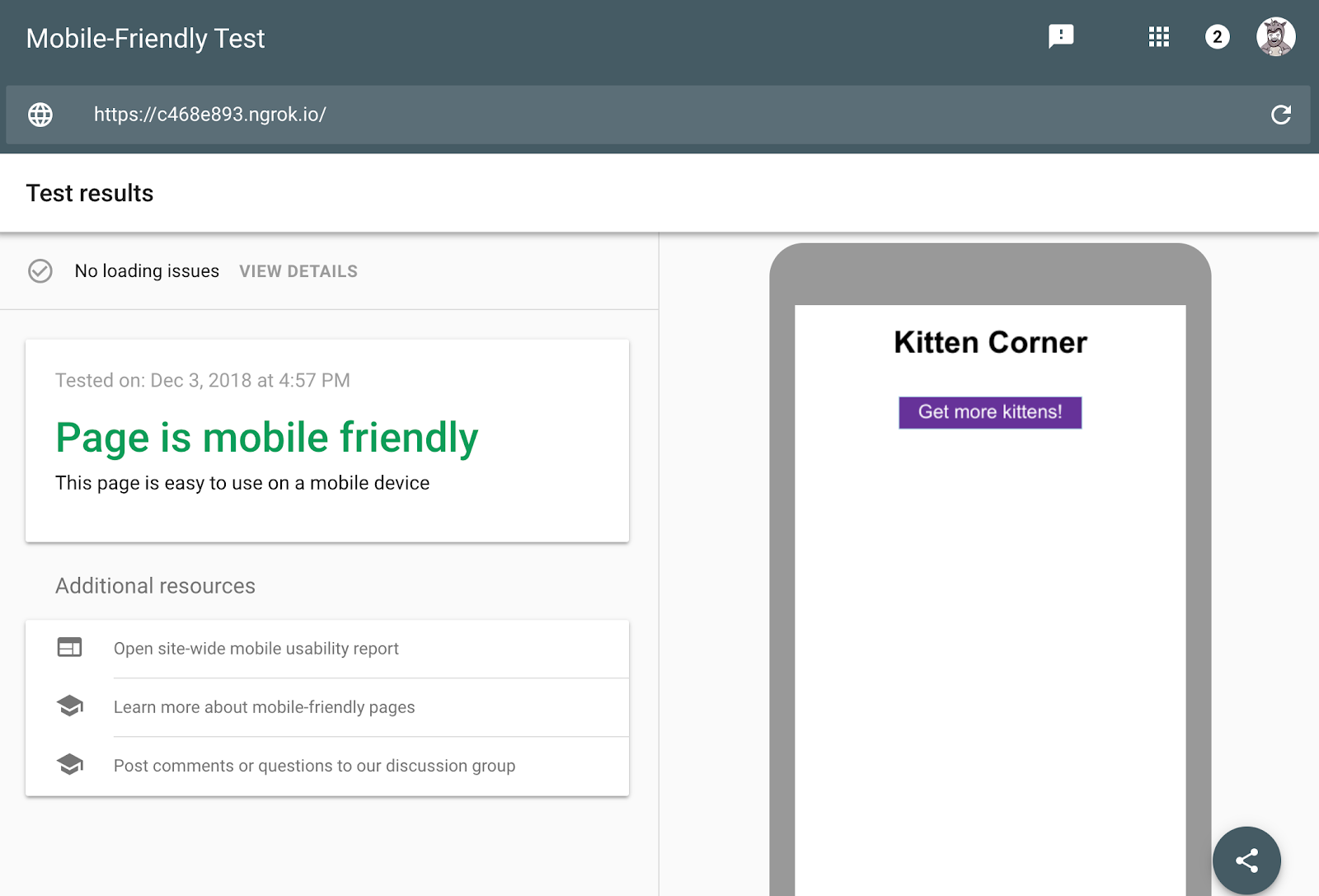 |
| The mobile-friendly test shows that the page is mobile-friendly, but the screenshot is missing all the cats! The headline and button appear but none of the cat pictures are there. |
While this problem is simple to fix, it’s a good exercise to learn how to setup dynamic rendering. Dynamic rendering will allow Googlebot to see the cat pictures without changes to the web app code.
Set up the server
To serve the web application, let’s use express, a node.js library, to build web servers.
The server code looks like this (find the full project source code here):
const express = require(‘express’);
const app = express();
const DIST_FOLDER = process.cwd() + ‘/docs’;
const PORT = process.env.PORT || 8080;
// Serve static assets (images, css, etc.)
app.get(‘*.*’, express.static(DIST_FOLDER));
// Point all other URLs to index.html for our single page app
app.get(‘*’, (req, res) => {
res.sendFile(DIST_FOLDER + ‘/index.html’);
});
// Start Express Server
app.listen(PORT, () => {
console.log(`Node Express server listening on http://localhost:${PORT} from ${DIST_FOLDER}`);
});
You can try the live example here – you should see a bunch of cat pictures, if you are using a modern browser. To run the project from your computer, you need node.js to run the following commands:
npm install –save express rendertron-middleware node server.js
Then point your browser to http://localhost:8080. Now it’s time to set up dynamic rendering.
Deploy a Rendertron instance
Rendertron runs a server that takes a URL and returns static HTML for the URL by using headless Chromium. We’ll follow the recommendation from the Rendertron project and use Google Cloud Platform.
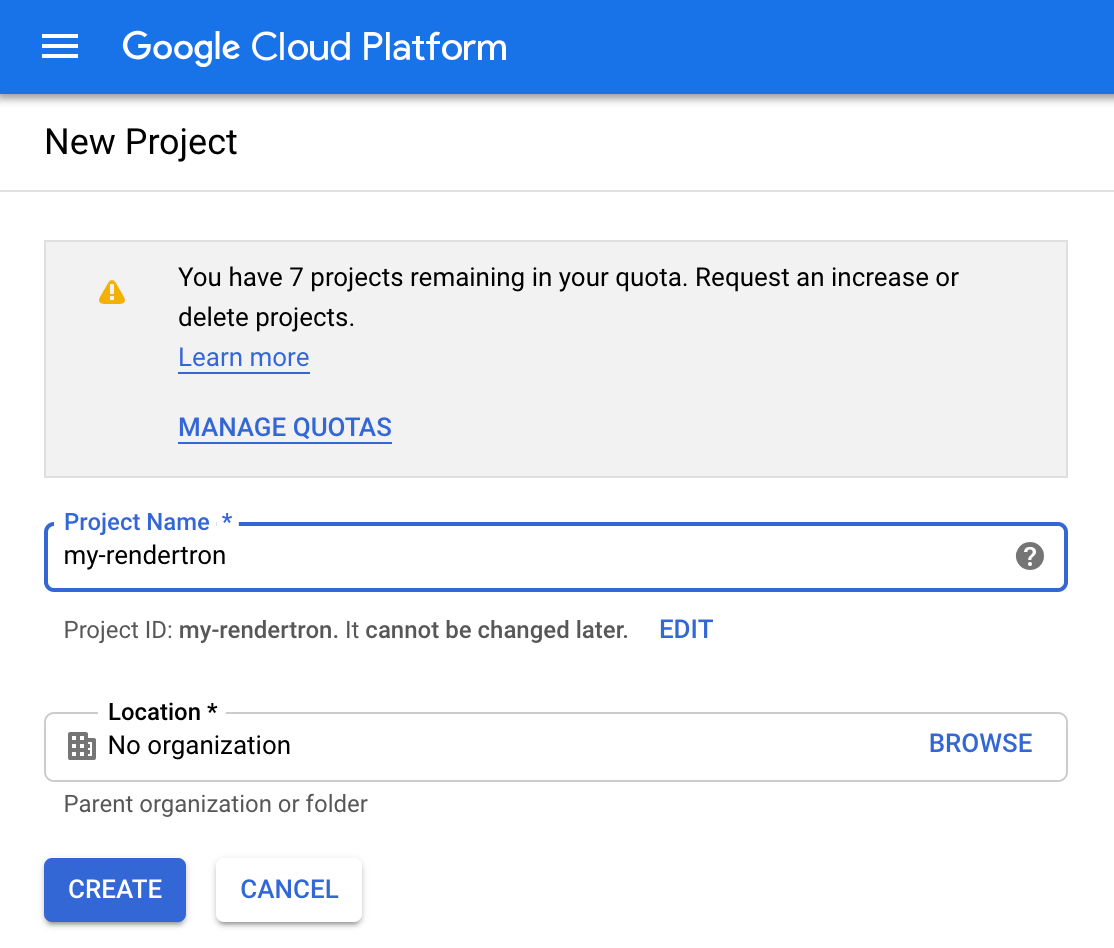 |
| The form to create a new Google Cloud Platform project. |
Please note that you can get started with the free usage tier, using this setup in production may incur costs according to the Google Cloud Platform pricing.
-
Create a new project in the Google Cloud console. Take note of the “Project ID” below the input field.
-
Install the Google Cloud SDK as described in the documentation and log in.
- Clone the Rendertron repository from GitHub with:
git clone https://github.com/GoogleChrome/rendertron.git
cd rendertron
- Run the following commands to install dependencies and build Rendertron on your computer:
npm install && npm run build
- Enable Rendertron’s cache by creating a new file called config.json in the rendertron directory with the following content:
{ “datastoreCache”: true }
- Run the following command from the rendertron directory. Substitute YOUR_PROJECT_ID with your project ID from step 1.
gcloud app deploy app.yaml –project YOUR_PROJECT_ID
-
Select a region of your choice and confirm the deployment. Wait for it to finish.
-
Enter the URL YOUR_PROJECT_ID.appspot.com (substitute YOUR_PROJECT_ID for your actual project ID from step 1 in your browser. You should see Rendertron’s interface with an input field and a few buttons.
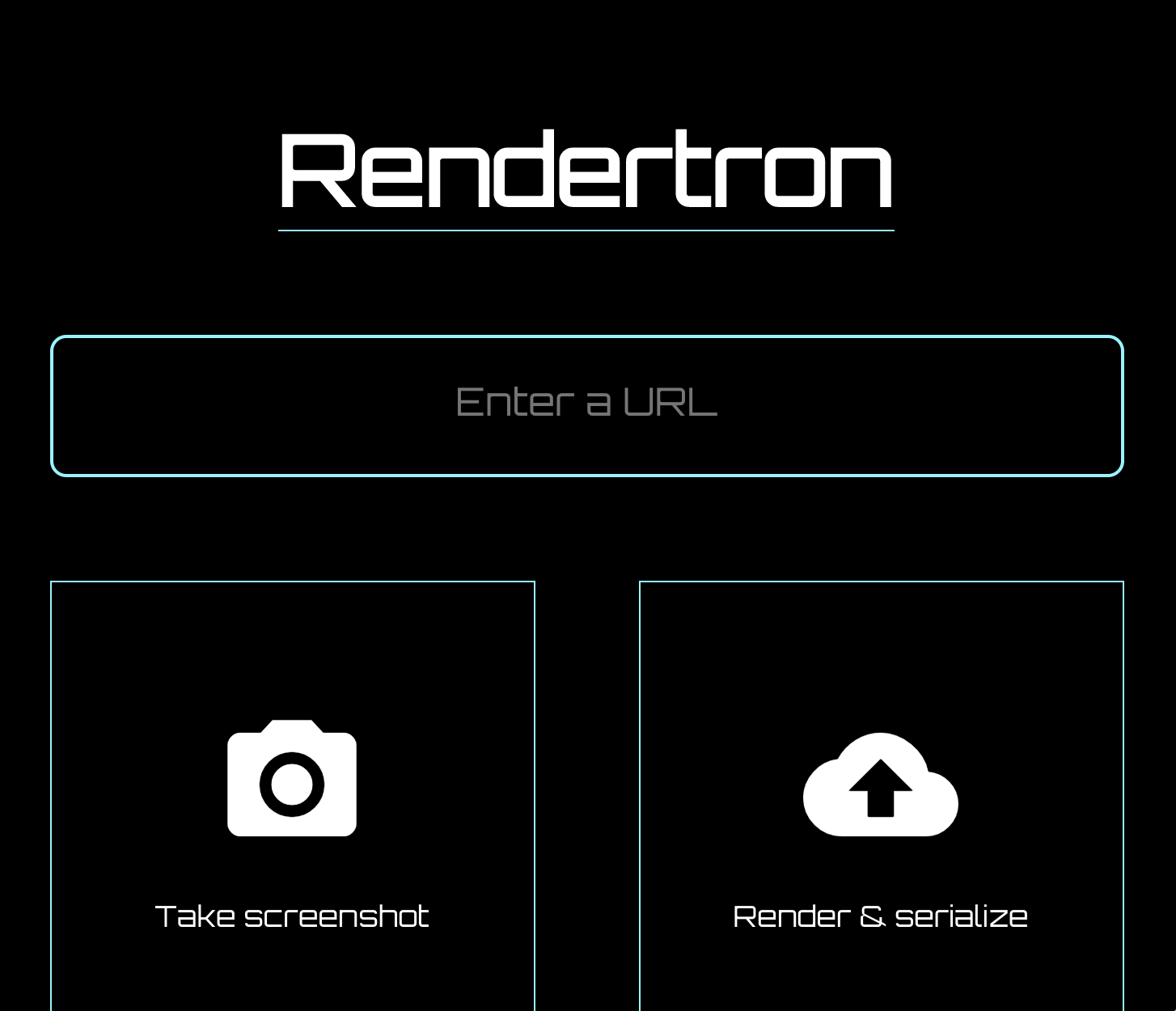 |
| Rendertron’s UI after deploying to Google Cloud Platform |
When you see the Rendertron web interface, you have successfully deployed your own Rendertron instance. Take note of your project’s URL (YOUR_PROJECT_ID.appspot.com) as you will need it in the next part of the process.
Add Rendertron to the server
The web server is using express.js and Rendertron has an express.js middleware. Run the following command in the directory of the server.js file:
npm install –save rendertron-middleware
This command installs the rendertron-middleware from npm so we can add it to the server:
const express = require(‘express’);
const app = express();
const rendertron = require(‘rendertron-middleware’);
Configure the bot list
Rendertron uses the user-agent HTTP header to determine if a request comes from a bot or a user’s browser. It has a well-maintained list of bot user agents to compare with. By default this list does not include Googlebot, because Googlebot can execute JavaScript. To make Rendertron render Googlebot requests as well, add Googlebot to the list of user agents:
const BOTS = rendertron.botUserAgents.concat(‘googlebot’);
const BOT_UA_PATTERN = new RegExp(BOTS.join(‘|’), ‘i’);
Rendertron compares the user-agent header against this regular expression later.
Add the middleware
To send bot requests to the Rendertron instance, we need to add the middleware to our express.js server. The middleware checks the requesting user agent and forwards requests from known bots to the Rendertron instance. Add the following code to server.js and don’t forget to substitute “YOUR_PROJECT_ID” with your Google Cloud Platform project ID:
app.use(rendertron.makeMiddleware({
proxyUrl: ‘https://YOUR_PROJECT_ID.appspot.com/render’,
userAgentPattern: BOT_UA_PATTERN
}));
Bots requesting the sample website receive the static HTML from Rendertron, so the bots don’t need to run JavaScript to display the content.
Testing our setup
To test if the Rendertron setup was successful, run the mobile-friendly test again.
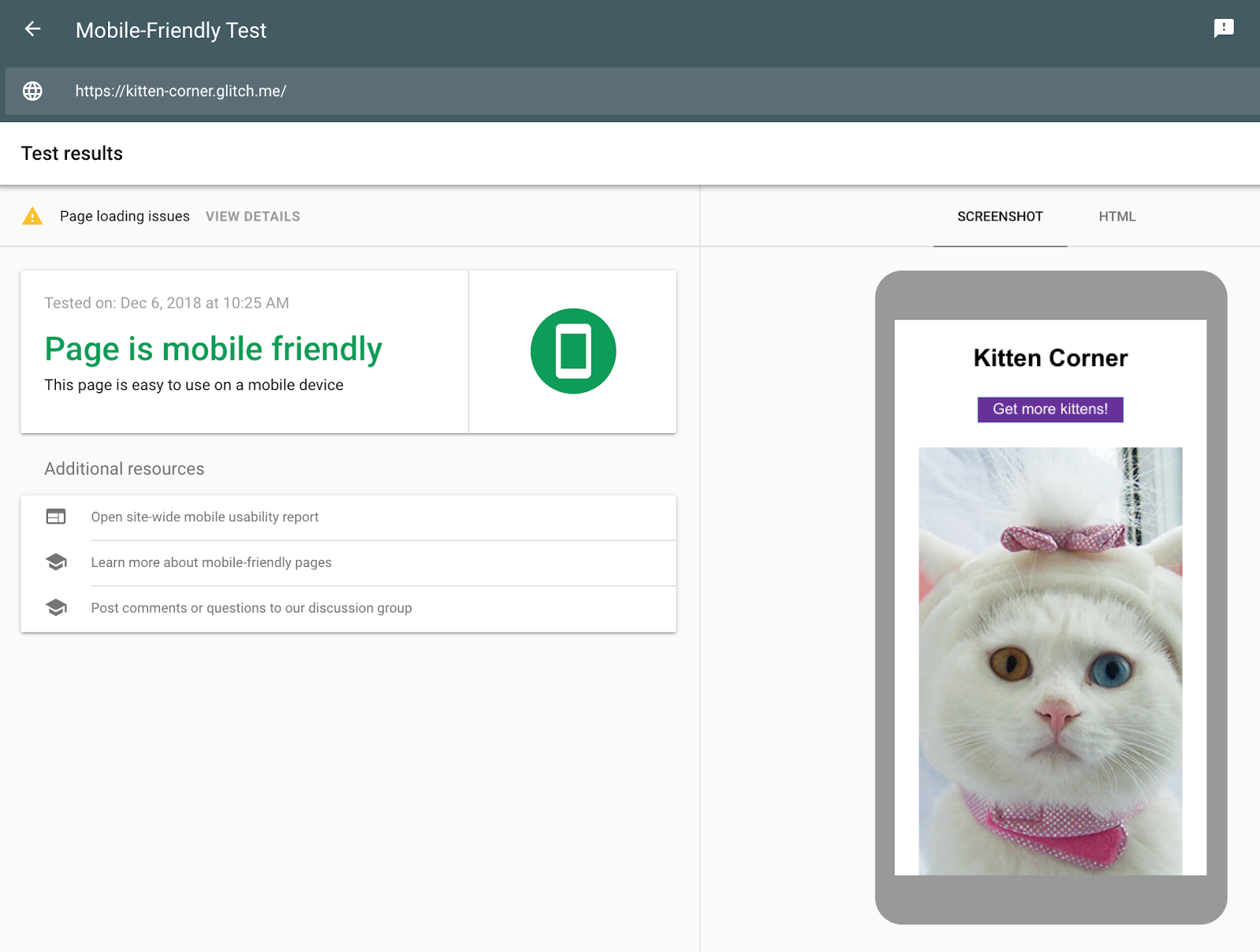
Unlike the first test, the cat pictures are visible. In the HTML tab we can see all HTML the JavaScript code generated and that Rendertron has removed the need for JavaScript to display the content.
Conclusion
You created a dynamic rendering setup without making any changes to the web app. With these changes, you can serve a static HTML version of the web app to crawlers.
Post content Posted by Martin Splitt, Open Web Unicorn


How Long Will it Take for Your New Website to Rank in Google?
How long does it take for a new website to start ranking in Google? It’s a simple question with a complex answer, as Lee Wilson explains in this article.
Post from Lee Wilson
New Google Search Console Ports Security Issues Section
Google has ported another feature from the old Search Console to the new, the security issues section. Google said on Twitter “We hope you don’t need to use a Security Issues tab” but if you do, it has been migrated to the new Search Console.
Bing: 90% Or More Of Their Core Ranking Algorithm Uses Machine Learning
Yesterday at SMX West, I did a panel named Man vs Machine covering algorithms versus guidelines and during the Q&A portion, I asked the Bing reps Frédéric Dubut and Nagu Rangan what percentage of the core ranking algorithm is AI or machine learning based. To my surprise, they guessed over 90%.