Who’s speaking at SMX Advanced?
Check out the lineup of incredibly smart search marketers coming to speak at SMX Advanced, June 3-5 in Seattle!
Please visit Search Engine Land for the full article.
‘Google Guarantee’ local listings appearing in Google Home results
The Google Guarantee has been associated with Local Services ads, but the two programs are technically distinct.
Please visit Search Engine Land for the full article.
Local-Services ads appearing in Google Home voice results
The company is not yet disclosing the fact that some of the results are ads.
Please visit Search Engine Land for the full article.
How to Diagnose and Solve JavaScript SEO Issues in 6 Steps
Posted by tomek_rudzki
It’s rather common for companies to build their websites using modern JavaScript frameworks and libraries like React, Angular, or Vue. It’s obvious by now that the web has moved away from plain HTML and has entered the era of JS.
While there is nothing unusual with a business willing to take advantage of the latest technologies, we need to address the stark reality of this trend: Most of the migrations to JavaScript frameworks aren’t being planned with users or organic traffic in mind.
Let’s call it the JavaScript Paradox:
- The big brands jump on the JavaScript hype train after hearing all the buzz about JavaScript frameworks creating amazing UXs.
- Reality reveals that JavaScript frameworks are really complex.
- The big brands completely butcher the migrations to JavaScript. They lose organic traffic and often have to cut corners rather than creating this amazing UX journey for their users (I will mention some examples in this article).
Since there’s no turning back, SEOs need to learn how to deal with JavaScript websites.

But that’s easier said than done because making JavaScript websites successful in search engines is a real challenge both for developers and SEOs.
This article is meant to be a follow-up to my comprehensive Ultimate Guide to JavaScript SEO, and it’s intended to be as easy to follow as possible. So, grab yourself a cup of coffee and let’s have some fun — here are six steps to help you diagnose and solve JavaScript SEO issues.
Step 1: Use the URL inspection tool to see if Google can render your content
The URL inspection tool (formerly Google Fetch and Render) is a great free tool that allows you to check if Google can properly render your pages.
The URL inspection tool requires you to have your website connected to Google Search Console. If you don’t have an account yet, check Google’s Help pages.
Open Google Search Console, then click on the URL inspection button.

In the URL form field, type the full URL of a page you want to audit.
Then click on TEST LIVE URL.

Once the test is done, click on VIEW TESTED PAGE.

And finally, click on the Screenshot tab to view the rendered page.

Scroll down the screenshot to make sure your web page is rendered properly. Ask yourself the following questions:
- Is the main content visible?
- Can Google see the user-generated comments?
- Can Google access areas like similar articles and products?
- Can Google see other crucial elements of your page?

Why does the screenshot look different than what I see in my browser? Here are some possible reasons:
- Google encountered timeouts while rendering.
- Some errors occurred while rendering. You probably used some features that are not supported by Google Web Rendering Service (Google uses the four-year-old Chrome 41 for web rendering, which doesn’t support many modern features).
- You blocked crucial JavaScript files for Googlebot.
Step 2: Make sure you didn’t block JavaScript files by mistake
If Google cannot render your page properly, you should make sure you didn’t block important JavaScript files for Googlebot in robots.txt
TL;DR: What is robots.txt?
It’s a plain text file that instructs Googlebot or any other search engine bot if they are allowed to request a page/resource.
Fortunately, the URL Inspection tool points out all the resources of a rendered page that are blocked by robots.txt.

But how can you tell if a blocked resource is important from the rendering point of view?
You have two options: Basic and Advanced.
Basic
In most cases, it may be a good idea to simply ask your developers about it. They created your website, so they should know it well.
Obviously, if the name of a script is called content.js or productListing.js, it’s probably relevant and shouldn’t be blocked.
Unfortunately, as for now, URL Inspection doesn’t inform you about the severity of a blocked JS file. The previous Google Fetch and Render had such an option:
Advanced
Now, we can use Chrome Developer Tools for that.
For educational purposes, we will be checking the following URL: http://botbenchmarking.com/youshallnotpass.html
Open the page in the most recent version of Chrome and go to Chrome Developers Tools. Then move to the Network tab and refresh the page.
Finally, select the desired resource (in our case it’s YouShallNotPass.js), right-click, and choose Block request URL.

Refresh the page and see if any important content disappeared. If so, then you should think about deleting the corresponding rule from your robots.txt file.
Step 3: Use the URL Inspection tool for fixing JavaScript errors
If you see Google Fetch and Render isn’t rendering your page properly, it may be due to the JavaScript errors that occurred while rendering.
To diagnose it, in the URL Inspection tool click on the More info tab.

Then, show these errors to your developers to let them fix it.
Just ONE error in the JavaScript code can stop rendering for Google, which in turn makes your website not indexable.
Your website may work fine in most recent browsers, but if it crashes in older browsers (Google Web Rendering Service is based on Chrome 41), your Google rankings may drop.
Need some examples?
- A single error in the official Angular documentation caused Google to be unable to render our test Angular website.
- Once upon a time, Google deindexed some pages of Angular.io, an official website of Angular 2+.
If you want to know why it happened, read my Ultimate Guide to JavaScript SEO.
Side note: If for some reason you don’t want to use the URL Inspection tool for debugging JavaScript errors, you can use Chrome 41 instead.
Personally, I prefer using Chrome 41 for debugging purposes, because it’s more universal and offers more flexibility. However, the URL Inspection tool is more accurate in simulating the Google Web Rendering Service, which is why I recommend that for people who are new to JavaScript SEO.
Step 4: Check if your content has been indexed in Google
It’s not enough to just see if Google can render your website properly. You have to make sure Google has properly indexed your content. The best option for this is to use the site: command.
It’s a very simple and very powerful tool. Its syntax is pretty straightforward: site:[URL of a website] “[fragment to be searched]”. Just take caution that you didn’t put the space between site: and the URL.
Let’s assume you want to check if Google indexed the following text “Develop across all platforms” which is featured on the homepage of Angular.io.

Type the following command in Google: site:angular.io “DEVELOP ACROSS ALL PLATFORMS”

As you can see, Google indexed that content, which is what you want, but that’s not always the case.
Takeaway:
- Use the site: command whenever possible.
- Check different page templates to make sure your entire website works fine. Don’t stop at one page!
If you’re fine, go to the next step. If that’s not the case, there may be a couple of reasons why this is happening:
- Google still didn’t render your content. It should happen up to a few days/weeks after Google visited the URL. If the characteristics of your website require your content to be indexed as fast as possible, implement SSR.
- Google encountered timeouts while rendering a page. Are your scripts fast? Do they remain responsive when the server load is high?
- Google is still requesting old JS files. Well, Google tries to cache a lot to save their computing power. So, CSS and JS files may be cached aggressively. If you can see that you fixed all the JavaScript errors and Google still cannot render your website properly, it may be because Google uses old, cached JS and CSS files. To work around it, you can embed a version number in the filename, for example, name it bundle3424323.js. You can read more in Google Guides on HTTP Caching.
- While indexing, Google may not fetch some resources if it decides that they don’t contribute to the essential page content.

Step 5: Make sure Google can discover your internal links
There are a few simple rules you should follow:
- Google needs proper <a href> links to discover the URLs on your website.
- If your links are added to the DOM only when somebody clicks on a button, Google won’t see it.
As simple as that is, plenty of big companies make these mistakes.
Proper link structure
Googlebot, in order to crawl a website, needs to have traditional “href” links. If it’s not provided, many of your webpages will simply be unreachable for Googlebot!
I think it was explained well by Tom Greenway (a Google representative) during the Google I/O conference:

Please note: if you have proper <a href> links, with some additional parameters, like onClick, data-url, ng-href, that’s still fine for Google.
A common mistake made by developers: Googlebot can’t access the second and subsequent pages of pagination
Not letting Googlebot discover pages from the second page of pagination and beyond is a common mistake that developers make.
When you open the mobile versions for Gearbest, Aliexpress and IKEA, you will quickly notice that, in fact, they don’t let Googlebot see the pagination links, which is really weird. When Google enables mobile-first indexing for these websites, these websites will suffer.
How do you check it on your own?
If you haven’t already downloaded Chrome 41, get it from Ele.ph/chrome41.
Then navigate to any page. For the sake of the tutorial, I’m using the mobile version of AliExpress.com. For educational purposes, it’s good if you follow the same example.
Open the mobile version of the Mobile Phones category of Aliexpress.

Then, right-click on View More and select the inspect button to see how it’s implemented.

As you can see, there are no <a href>, nor <link rel> links pointing to the second page of pagination.
There are over 2,000 products in the mobile phone category on Aliexpress.com. Since mobile Googlebot is able to access only 20 of them, that’s just 1 percent!
That means 99 percent of the products from that category are invisible for mobile Googlebot! That’s crazy!
These errors are caused by the wrong implementation of lazy loading. There are many other websites that make similar mistakes. You can read more in my article “Popular Websites that May Fail in Mobile First Indexing”.
TL;DR: using link rel=”next” alone is too weak a signal for Google
Note: it’s common to use “link rel=”next’ to indicate pagination series. However, the discoveries from Kyle Blanchette seem to show that “link rel=”next” alone is too weak a signal for Google and should be strengthened by the traditional <a href> links.

John Mueller discussed this more:
“We can understand which pages belong together with rel next, rel=”previous”, but if there are no links on the page at all, then it’s really hard for us to crawl from page to page. (…) So using the rel=”next” rel=”previous” in the head of a page is a great idea to tell us how these pages are connected, but you really need to have on-page, normal HTML links.

Don’t get me wrong — there is nothing wrong with using <link rel=”next”>. On the contrary, they are beneficial, but it’s good to combine these tags with traditional <a href> links.
Checking if Google can see menu links
Another important step in auditing a JavaScript website is to make sure Google can see your menu links. To check this, use Chrome 41.
For the purpose of the tutorial, we will use the case of Target.com:

To start, open any browser and pick some links from the menu:
- https://www.target.com/c/clothing/-/N-5xtd3 -> Clothing
- https://www.target.com/c/shoes/-/N-55b0t -> Shoes
- https://www.target.com/c/furniture/-/N-5xtnr -> Furniture
Next, open Chrome 41. In the Chrome Developer Tools (click Ctrl + Shift + J), navigate to the elements tab.
The results? Fortunately enough, Google can pick up the menu links of Target.com.

Now, check if Google can pick up the menu links on your website and see if you’re on target too.
Step 6: Checking if Google can discover content hidden under tabs
I have often observed that in the case of many e-commerce stores, Google cannot discover and index their content that is hidden under tabs (product descriptions, opinions, related products, etc). I know it’s weird, but it’s so common.
It’s a crucial part of every SEO audit to make sure Google can see content hidden under tabs.
Open Chrome 41 and navigate to any product on Boohoo.com; for instance, Muscle Fit Vest.

Click on Details & Care to see the product description:
“DETAILS & CARE
94% Cotton 6% Elastane. Muscle Fit Vest. Model is 6’1″ and Wears UK Size M.“
Now, it’s time to check if it’s in the DOM. To do so, go to Chrome Developers Tools (Ctrl + Shift + J) and click on the Network tab.
Make sure the disable cache option is enabled.

Click F5 to refresh the page. Once refreshed, navigate to the Elements tab and search for a product description:

As you can see, in the case of boohoo.com, Google is able to see the product description.
Perfect! Now take the time and check if your website is fine.
Wrapping up
Obviously, JavaScript SEO is a pretty complex subject, but I hope this tutorial was helpful.
If you are still struggling with Google ranking, you might want to think about implementing dynamic rendering or hybrid rendering. And, of course, feel free to reach out to me on Twitter about this or other SEO needs.
Sign up for The Moz Top 10, a semimonthly mailer updating you on the top ten hottest pieces of SEO news, tips, and rad links uncovered by the Moz team. Think of it as your exclusive digest of stuff you don’t have time to hunt down but want to read!
Check your Google Ads account like a PRO with “PPC CheckMate” methodology
With the “PPC Checkmate” methodology you can quickly check an ad account’s effectiveness. In this post, Gianpaolo explains it all!
Post from Gianpaolo Lorusso
How to conduct a content migration audit
Here’s how to determine exactly what content needs to be migrated and what can be safely retired with little to no impact.
Please visit Search Engine Land for the full article.
Google Webmaster Team Ends The Google+ Community
As you know, Google+ is closing down tomorrow, April 2nd – this is no April Fools joke. And one of the more active communities on Google+ for SEOs was the Google Webmasters community. The other day they posted a goodbye to Google+ and asked you follo…
Is Google Showing Knowledge Panel In Featured Snippet?
Dan Shure noticed Google showing a knowledge panel on the left side, where it looks like it is in the featured snippet box area. It almost seems like a bug or photoshopped but I can personally replicate this myself for the query – [radio history].
…
You Got Work To Do If Robotted Out Pages Is Out Ranking Your Content In Google
Google’s John Mueller said on Twitter that if your content on your site is being outranked by robotted out pages, then you got work to do. In short, if you have a page on your site that you used the robots.txt file to tell Google not to crawl and it s…
Google: Links Not Shown In Search Console Are Generally Irrelevant
Google’s John Mueller was answering questions around an old topic of Google showing only a sample of links in the link report in Google Search Console. He said that generally if the links are not shown in the tool then they are “pretty irrelevant over…
Google featured snippets: A short guide for 2019
Why do “lower authority” sites beat out higher ones for featured snippets? Why are images sometimes from other sites? What kind of content ranks?
The post Google featured snippets: A short guide for 2019 appeared first on Search Engine Watch.
Bing takes over Yahoo ad delivery: Five things to prepare
The biggest impact here will be in the advertiser workflow. Great news for those seeking efficiency and less time spent on the Bing platform.
The post Bing takes over Yahoo ad delivery: Five things to prepare appeared first on Search Engine Watch.
What the numbers tell us about the current voice search opportunity
Since we can’t segment voice from typed interactions in performance reports easily, it’s helpful optimization for voice search overlaps with traditional search.
Please visit Search Engine Land for the full article.
Google Ranking Update Fluctuations Continue (3/29-4/1)
These fluctuations won’t die down, it seems like we’ve been reporting these tremors and fluctuations a lot since the beginning of the year and even more so since the release of the March 12th core update. We are seeing more chatter around these fluctu…
Now Live for Your SEO Learning Pleasure: The NEW Beginner’s Guide to SEO!
Posted by FeliciaCrawfordIt feels like it’s been a king’s age since we first began our long journey to rewrite and revamp the Beginner’s Guide to SEO. For all the long months of writing and rewriting, of agonizing over details and deleting/replaci…
Plugin tips for A/B testing, profiling and more!
Today’s roundup highlights some useful WordPress plugins. They’re either new, or have recently been updated with interesting features. From A/B testing to profiling and more… And of course, I have some bonus links for you as well! A/B testing made easy Testing between two versions, to see which one works best, is called A/B testing. […]
The post Plugin tips for A/B testing, profiling and more! appeared first on Yoast.
Google Ads API v1_1 out: Update client libraries for new features
The latest version incorporates new features for ads, conversions, reporting as well as Hotel Ads, App campaigns and more.
Please visit Search Engine Land for the full article.
Build Brand Authenticity Using Customer Generated Content
Live Webinar: Tuesday, April 9, at 1:00 PM ET (10:00 AM PT)
Please visit Search Engine Land for the full article.
Topical SEO: 7 Advanced Concepts of Link Relevance & Google Rankings
Posted by Cyrus-Shepard
Links matter for SEO. A lot.
Most marketers understand that links to websites count as “votes” on the web. Google — and other search engines — use these votes to rank web pages in search results. The more votes a page accumulates, the better that page’s chances of ranking in search results.
This is the popularity part of Google’s algorithm, described in the original PageRank patent. But Google doesn’t stop at using links for popularity. They’ve invented a number of clever ways to use links to determine relevance and authority — i.e. what is this page about and is it a trusted answer for the user’s search query?
To rank in Google, it’s not simply the number of votes you receive from popular pages, but the relevance and authority of those links as well.
The principals Google may use grow complex quickly, but we’ve included a number of simple ways to leverage these strategies for more relevant rankings at the bottom of the post.
1. Anchor text
In the beginning, there was the original PageRank patent, which changed the way search engines worked. It talked about anchor text a lot:
“Thus, even though the text of the document itself may not match the search terms, if the document is cited by documents whose titles or backlink anchor text match the search terms, the document will be considered a match.”
In a nutshell, if a page links to you using the anchor text “hipster pizza,” there’s a good chance your page is about pizza — and maybe hipsters.
If many pages link to you using variations of “pizza”— i.e. pizza restaurant, pizza delivery, Seattle pizza — then Google can see this as a strong ranking signal.
(In fact, so powerful is this effect, that if you search Google for “hipster pizza” here in Seattle, you’ll see our target for the link above ranking on the first page.)

How to leverage Anchor Text for SEO:
Volumes could be written on this topic. Google’s own SEO Starter Guide recommends a number of anchor text best practices, among them:
- Use (and seek) descriptive anchor text that describes what your page is about
- Avoid generic anchor text, off-topic anchor text
- Keep anchor text concise – no more than a few words
While some Google patents discuss ignoring links with irrelevant anchor text, other Google patents propose looking at the text surrounding the anchor text for additional context, so keep that in mind.
A word of caution: While optimizing your anchor text is good, many SEOs over the years have observed that too much of a good thing can hurt you. Natural anchor text on the web is naturally varied.
Check out the variety of anchor text to Moz’s page on Domain Authority, illustrated here using Link Explorer.

Over-optimization can signal manipulation to Google, and many SEOs recommend a strategy of anchor text variety for better rankings.
Additional Resources:
2. Hub and authority pages
In the early days of Google, not long after Larry Page figured out how to rank pages based on popularity, the Hilltop algorithm worked out how to rank pages on authority. It accomplished this by looking for “expert” pages linking to them.
An expert page is a document that links to many other topically relevant pages. If a page is linked to from several expert pages, then it is considered an authority on that topic and may rank higher.

A similar concept using “hub” and “authority” pages was put forth by Jon Kleinberg, a Cornell professor with grants from Google and other search engines. Kleinberg explains:
“…a good hub is a page that points to many good authorities; a good authority is a page that is pointed to by many good hubs.”
– Authoritative Sources in a Hyperlinked Environment (PDF)
While we can’t know the degree to which these concepts are used today, Google acquired the Hilltop algorithm in 2003.
How to leverage Authority Pages for SEO:
A common practice of link builders today is to seek links from “Resource Pages.” These are basically Hub/Expert pages that link out to helpful sites around a topic. Scoring links on these pages can often help you a ton.
Additional Resources: Resource Page Link Building
3. Reasonable Surfer
All links are not created equal.
The idea behind Google’s Reasonable Surfer patent is that certain links on a page are more important than others, and thus assigned increase weight. Examples of more important links include:
- Prominent links, higher up in the HTML
- Topically relevant links, related to both the source document and the target document.
Conversely, less important links include:
- “Terms of Service” and footer links
- Banner ads
- Links unrelated to the document
Because the important links are more likely to be clicked by a “reasonable surfer,” a topically relevant link can carry more weight than an off-topic one.
“…when a topical cluster associated with the source document is related to a topical cluster associated with the target document, the link has a higher probability of being selected than when the topical cluster associated with the source document is unrelated to the topical cluster associated with the target document.”
– United States Patent: 7716225

How to leverage Reasonable Surfer for SEO:
The key with leveraging Reasonable Surfer for SEO is simply: work to obtain links that are more likely to get clicked.
This means that you not only benefit from getting links from prominent areas of high-traffic pages, but the more relevant the link is to the topic of the hosting page, the more benefit it may provide.
Neither page topics/anchor texts have to be an exact match, but it helps if they are in the same general area. For example, if you were writing about “baseball,” links with relevant anchor text from pages about sports, equipment, athletes, training, exercise, tourism, and more could all help boost rankings more than less relevant links.
4. Topic-sensitive PageRank
Despite rumors to the contrary, PageRank is very much alive and well at Google.
PageRank technology can be used to distribute all kinds of different ranking signals throughout a search index. While the most common examples are popularity and trust, another signal is topical relevance, as laid out in this paper by Taher Haveliwala, who went on to become a Google software engineer.
The original concept works by grouping “seed pages” by topic (for example, the Politics section of the New York Times). Every link out from these pages passes on a small amount of Topic-Sensitive PageRank, which is passed on through the next set of links, and so on.

In the example above, 2 identical pages target “Football”. Both have the same number of links, but the first one has more relevant Topic-Sensitive PageRank from a linking sports page. Hence, it ranks higher.
How to leverage topic-sensitive PageRank for SEO:
The concept is simple. When obtaining links, try to get links from pages that are about the same topic you want to rank for. Also, get links from pages that are themselves linked to by authoritative pages on the same topic.
5. Phrase-based indexing
Phrase-based indexing can be a tough concept for SEOs to wrap their heads around.
What’s important to understand is that phrase-based indexing allows search engines to score the relevancy of any link by looking for related phrases in both the source and target pages. The more related phrases, the higher the score.
In the example below, the first page with the anchor text link “US President” may carry more weight because the page also contains several other phrases related to “US President” and “John Adams.”

In addition to ranking documents based on the most relevant links, phrase-based indexing allows search engines to consider less relevant links as well, including:
- Discounting spam and off-topic links: For example, an injected spam link to a gambling site from a page about cookie recipes will earn a very low outlink score based on relevancy and would carry less weight.
- Fighting “Google Bombing”: For those that remember, Google bombing is the art of ranking a page highly for funny or politically-motivated phrases by “bombing” it with anchor text links, often unrelated to the page itself. Phrase-based indexing can stop Google bombing by scoring the links for relevance against the actual text on the page. This way, irrelevant links can be discounted.
How to leverage phased-based indexing for SEO:
Beyond anchor text and the general topic/authority of a page, it’s helpful to seek links from pages with related phrases.
This is especially helpful for on-page SEO and internal linking — when you optimize your own pages and link to yourself. Some people use LSI keywords for on-page optimization, though evidence that this helps SEO is disputed.
Solid keyword research typically provides a starting point to identify related keyword phrases. Below are closely related phrases to “best SEO tools” found using Keyword Explorer.

6. Local inter-connectivity
Local inter-connectivity refers to a reranking concept that reorders search results based on measuring how often each page is linked to by all the other pages.
To put it simply, when a page is linked to from a number of high-ranking results, it is likely more relevant than a page with fewer links from the same set of results.
This also provides a strong hint as to the types of links you should be seeking: pages that already rank highly for your target term.
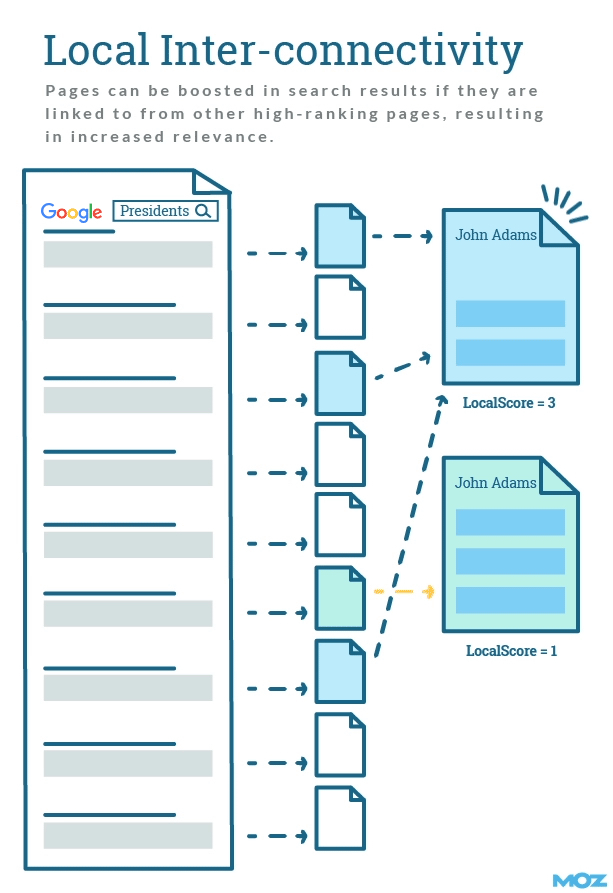
How to leverage local inter-connectivity for SEO:
Quite simply, one of the easiest ways to rank is to obtain topically relevant links from sites that already rank for the term you are targeting.
Oftentimes, links from page 1 results can be quite difficult to obtain, so it’s helpful to look for links that:
- Rank for variations of your target terms
- Are further down in Google’s results pages
- Rank well for different, but still topically-related terms
7. The golden question
If the above concepts seem complex, the good news is you don’t have to actually understand the above concepts when trying to build links to your site.
To understand if a link is topically relevant to your site, simply ask yourself the golden question of link building: Will this link bring engaged, highly qualified visitors to my website?
The result of the golden question is exactly what Google engineers are trying to determine when evaluating links, so you can arrive at a good end result without understanding the actual algorithms.

How to leverage the golden question for SEO:
Above all else, try to build links that bring engaged, high-value visitors to your site.
If you don’t care about the visitors a link may bring, why should Google care highly about the link?
SEO tips for topically relevant links
Consider this advice when thinking about links for SEO:
- DO use good, descriptive anchor text for your links. This applies to internal links, outlinks to other sites, and links you seek from non-biased external sites.
- DO seek relationships from authoritative, topically relevant sites. These include sites that rank well for your target keyword and “expert” pages that link to many authority sites. (For those interested, Majestic has done some interesting work around Topical Trust Flow.)
- DO seek links from relevant pages. This includes examining the title, body, related phrases, and intent of the page to ensure its relevance to your target topic.
- DO seek links that people are likely to click. The ideal link is often both topically relevant and placed in a prominent position.
- AVOID generic or non-descriptive anchor text.
- AVOID over-optimizing your links. This includes repetitive use of exact match anchor text and keyword stuffing.
- AVOID manipulative link building. Marie Haynes has written an excellent explanation of the kinds of unnatural links that you likely want to avoid at all costs.
Finally, DO try to earn and attract links to your site with high quality, topically relevant content.
Big thanks to Bill Slawski and his blog SEO by the Sea, which acted as a starting point of research for many of these concepts.
What are your best tips around topically relevant links? Let us know in the comments below!
Note: A version of this post was published previously, and has since been substantially updated. Big thanks to Bill Slawski and his blog SEO by the Sea, which acted as a starting point of research for many of these concepts.
Sign up for The Moz Top 10, a semimonthly mailer updating you on the top ten hottest pieces of SEO news, tips, and rad links uncovered by the Moz team. Think of it as your exclusive digest of stuff you don’t have time to hunt down but want to read!
Matt Cutts, Still Leaves Honeypot Traps For SEOs
Matt Cutts, the former Google spam fighting lead, now the Administrator of the United States Digital Service, said on Twitter that he still has a “few honeypot traps” to catch SEOs and then will report them for fun.