How and where to fight for your marketing budget
While many businesses should consider reduced top-of-funnel ad spend, very few should abandon it altogether. You’ll want to ensure you are in a position to power back during the recovery.
Please visit Search Engine Land for the full article.
Google delays mobile-first indexing deadline to March 2021
Due to the pandemic, Google pushed the deadline from September 2020.
Please visit Search Engine Land for the full article.
Prepare for mobile-first indexing (with a little extra time)
Mobile-first indexing has been an ongoing effort of Google for several years. We’ve enabled mobile-first indexing for most currently crawled sites, and enabled it by default for all the new sites. Our initial plan was to enable mobile-first indexing for all sites in Search in September 2020. We realize that in these uncertain times, it’s not always easy to focus on work as otherwise, so we’ve decided to extend the timeframe to the end of March 2021. At that time, we’re planning on switching our indexing over to mobile-first indexing.
For the sites that are not yet ready for mobile-first indexing, we’ve already mentioned some issues blocking your sites in previous blog posts. Now that we’ve done more testing and evaluation, we have seen a few more issues that are worth mentioning to better prepare your sites.
Make sure Googlebot can see your content
In mobile-first indexing, we will only get the information of your site from the mobile version, so make sure Googlebot can see the full content and all resources there. Here are some things to pay attention to:
Robots meta tags on mobile version
You should use the same robots meta tags on the mobile version as those on the desktop version. If you use a different one on the mobile version (such as noindex or nofollow), Google may fail to index or follow links on your page when your site is enabled for mobile-first indexing.
Lazy-loading on mobile version
Lazy-loading is more common on mobile than on desktop, especially for loading images and videos. We recommend following lazy-loading best practices. In particular, avoid lazy-loading your primary content based on user interactions (like swiping, clicking, or typing), because Googlebot won’t trigger these user interactions.
For example, if your page has 10 primary images on the desktop version, and the mobile version only has 2 of them, with the other 8 images loaded from the server only when the user clicks the “+” button:

(Caption: desktop version with 10 thumbnails / mobile version with 2 thumbnails)
In this case, Googlebot won’t click the button to load the 8 images, so Google won’t see those images. The result is that they won’t be indexed or shown in Google Images. Follow Google’s lazy-loading best practices, and lazy load content automatically based on its visibility in the viewport.
Be aware of what you block
Some resources have different URLs on the mobile version from those on the desktop version, sometimes they are served on different hosts. If you want Google to crawl your URLs, make sure you’re not disallowing crawling of them with your robots.txt file.
For example, blocking the URLs of .css files will prevent Googlebot from rendering your pages correctly, which can harm the ranking of your pages in Search. Similarly, blocking the URLs of images will make these images disappear from Google Images.
Make sure primary content is the same on desktop and mobile
If your mobile version has less content than your desktop version, you should consider updating your mobile version so that its primary content (the content you want to rank with, or the reason for users to come to your site) is equivalent. Only the content shown on the mobile version will be used for indexing and ranking in Search. If it’s your intention that the mobile version has less content than the desktop version, your site may lose some traffic when Google enables mobile-first indexing for your site, since Google won’t be able to get the full information anymore.
Use the same clear and meaningful headings on your mobile version as on the desktop version. Missing meaningful headings may negatively affect your page’s visibility in Search, because we might not be able to fully understand the page.
For example, if your desktop version has the following tag for the heading of the page:
<h1>Photos of cute puppies on a blanket</h1>
Your mobile version should also use the same heading tag with the same words for it, rather than using headings like:
<h1>Photos</h1> (not clear and meaningful)
<div>Photos of cute puppies on a blanket</div> (not using a heading tag)
Check your images and videos
Make sure the images and videos on your mobile version follow image best practices and video best practices. In particular, we recommend that you perform the following checks:
Image quality
Don’t use images that are too small or have a low resolution on the mobile version. Small or low-quality images might not be selected for inclusion in Google Images, or shown as favorably when indexed.
For example, if your page has 10 primary images on the desktop version, and they are normal, good quality images. On the mobile version, a bad practice is to use very small thumbnails for these images to make them all fit in the smaller screen:

(Caption: desktop version with normal thumbnails / mobile version tiny thumbnails)
In this case, these thumbnails may be considered “low quality” by Google because they are too small and in a low resolution.
Alt attributes for images
As previously mentioned, remember that using less-meaningful alt attributes might negatively affect how your images are shown in Google Images.
For example, a good practice is like the following:
<img src="dogs.jpg" alt="A photo of cute puppies on a blanket"> (meaningful alt text)
While bad practices are like the following:
<img src="dogs.jpg" alt> (empty alt text)
<img src="dogs.jpg" alt="Photo"> (alt text not meaningful)
Different image URLs between desktop and mobile version
If your site uses different image URLs for the desktop and mobile version, you may see a temporary traffic loss from Google Images while your site transitions to mobile-first indexing. This is because the image URLs on the mobile version are new to the Google indexing system, and it takes some time for the new image URLs to be understood appropriately. To minimize a temporary traffic loss from search, review whether you can retain the image URLs used by desktop.
Video markup
If your desktop version uses schema.org’s VideoObject structured data to describe videos, make sure the mobile version also includes the VideoObject, with equivalent information provided. Otherwise our video indexing systems may have trouble getting enough information about your videos, resulting in them not being shown as visibly in Search.
Video and image placement
Make sure to position videos and images in an easy to find location on the mobile version of your pages. Videos or images not placed well could affect user experience on mobile devices, making it possible that Google would not show these as visibly in search.
For example, assume you have a video embedded in your content in an easy to find location on desktop:

On mobile, you place an ad near the top of the page which takes up a large part of the page. This can result your video being moved off the page, requiring users to scroll down a lot to find the video:
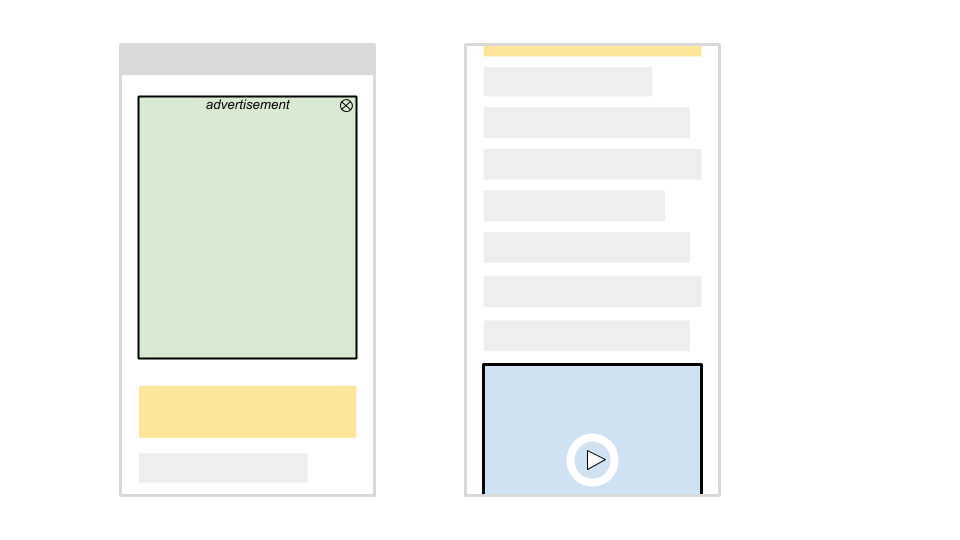
(Caption: video on mobile is much less visible to users)
In this case, the page might not be deemed a useful video landing page by our algorithms, resulting in the video not being shown in Search.
You can find more information and more best practices in our developer guide for mobile-first indexing.
Mobile-first indexing has come a long way. It’s great to see how the web has evolved from desktop to mobile, and how webmasters have helped to allow crawling and indexing to match how users interact with the web! We appreciate all your work over the years, which has helped to make this transition fairly smooth. We’ll continue to monitor and evaluate these changes carefully. If you have any questions, please drop by our Webmaster forums or our public events.
Posted by Yingxi Wu, Google Mobile-First Indexing team


Proximity Third: A Deeper Dive into a Local Ranking Factors Surprise
Posted by MiriamEllis

Image credit: J.B. Hill
What’s the good of a survey if it doesn’t result in at least a few surprises?
I know my own eyebrows leapt skyward when the data first came in from the Moz State of the Local SEO Industry 2020 Survey and I saw that, in a break with tradition, participants had placed user-to-business proximity at a lowly third place in terms of influencing Google local pack rankings. Just a year ago, our respondents had voted it #1.
If you’re feeling startled, too, here’s our chance to take a more granular look at the data and see if we can offer some useful theories for proximity’s drop in perceived dominance.
First, a quick definition of user-to-business proximity

What do local SEOs mean when they speak of user-to-business proximity? Imagine an Internet searcher is standing in Golden Gate Park in San Francisco, looking on their phone, laptop or other device for “pizza”. Local SEOs observe that it’s more typical for Google to show that person Pasquale’s Pizzeria, right next to the park, than to show them Yummy Pizza across town in the Glen Park neighborhood.
Make an identical query as you move around your city and you’re likely to see the local pack and mapped results change a little or a lot, depending on the competitiveness, density and diversity of local commerce in your town, relative to where you are standing when you search.
In 2014, the annual survey of world class local SEO experts known as the Local Search Ranking Factors survey rated proximity as having the 8th greatest influence on local pack rankings. By 2017 and in subsequent editions, proximity had hit #1. As mentioned, the 2019 Moz State of the Local SEO Industry report placed it first. But this year, something changed…
Proximity third: the data

Our large survey group of over 1,000 respondents ranked Google My Business elements (keywords in name, categories, etc.) and Google review elements (count, sentiment, owner responses, etc.) as having a greater influence on local pack rankings than does user-to-business proximity.
Now, let’s take a closer look at which participants ordered ranking influence in this way.
GMB elements ranked #1
It’s fascinating to see that, on average, agency workers rated Google My Business elements as having the most influence on local pack rankings. These would be practitioners who are presumably working directly with local clients on a day-to-day basis and continuously studying local packs.

Google review elements ranked #2

Overall, Google review elements rank second, and within this statistic, it’s survey takers who market one small local business who rate the influence of reviews most highly, on average. These would presumably be independent business owners or their in-house marketing staff who are regularly eyeing the local packs to see what seems to move the needle.
Proximity ranked #3

Overall, the proximity of the searcher to the place of business ranks third, and within this group, it’s agency workers who, on average, rate the influence of proximity most highly. So, again, it’s this group of marketing professionals who are contributing to the depiction of proximity being of less influence than GMB factors.
Three theories for making sense of the proximity shift
I was startled enough by the data to begin considering how to account for it. I came up with three different theories that helped make more sense of this to me, personally.
1. Could respondents just be wrong?
Certainly, it’s fair to ask this. I’ll be honest — my first reaction to the data when it crossed my desk was, “Wait…this can’t be right. How can proximity be in third place?”
I thought about how the long-running Local Search Ranking Factors project, which is confined to local SEO experts, has been placing proximity first for several years, and how our survey group is inclusive of every type of job title involved in marketing local businesses. Owners, creative directors, writers, in-house and agency SEOs, and many other types of practitioners contribute to marketing local businesses and participate in our initiative. Could it be that respondents who don’t do day-to-day SEO work swayed this result?
But I stopped asking that question when I saw that it was, in fact, agency workers who had contributed most to this view of GMB factors outweighing proximity. Digital marketing brands offering local SEO as a service can’t be summarily written off as mistaken. So, next, I asked myself what these agency workers could be seeing that would make them rank proximity lower than two other factors.
2. Could “it depends” be making absolutes impossible?
Here’s the thing: sophisticated local SEO practitioners know that there actually is no absolute #1 local ranking factor. What shows up in a local pack depends hugely on Google’s understanding of intent and its varied treatment of different industries and keywords.
For example, Google can decide that for a query like “coffee near me”, the user wants the closest option, and will cluster results in a tight proximity to the searcher. Meanwhile, a customer in any location looking for “used car dealership” may see results skewed to a certain part of town where there’s an auto row filled with such businesses — a phenomenon long ago dubbed the “industry centroid” effect. But, for the user seeking something like “sports arena”, Google can believe there’s a willingness to drive further away and can make up a local pack of businesses all over a city, or even all over a state.
So, the truth is, dubbing any factor #1 is an oversimplification we put up with for the sake of giving some order to the chaos of Google results. Proximity may be the dominant influence for some queries, but definitely not for all of them.
Taking this into consideration, it could well be that our survey’s respondents who work at agencies are observing such a diversity of behavior from Google that they are losing confidence in pinning it all down to proximity as the leading factor. And this leads me to my third theory.
3. Could a desire for control be at play here?

Proximity can be problematic. In a separate question in our survey in which we asked whether Google’s emphasis on proximity was always generating high quality results, only 38.6% of respondents felt satisfied. Most of us are frequently encountering local pack results that may be closest, but not best. This can leave agencies and business owners feeling a bit dubious about Google and even a bit helpless about acting in an environment that often ranks mere nearness over quality.
Unless a business is willing to move to a different location which Google appears to be favoring for core search phrase targets, proximity isn’t really something you can optimize for. In this scenario, what is left to local business marketers that they can control?
Of course — it’s GMB factors and reviews. You can control what you name your business, what categories you choose, your use of Google posts and Q&A, your photos, videos, and description. You can control your review acquisition campaigns and your rate and quality of owner responses.
Seeing respondents weigh GMB elements above proximity made me wonder if the strong desire for being able to have some control over local pack outcomes might subconsciously cause subjects to give a slight bump to factors they can observably influence. I’m not a psychologist, but I know I’m always writing here at Moz about focusing on what you can control. It could be that this internal emphasis might cause me to give more importance to factors other than proximity. Just a theory, but one to consider, and I’d love to hear in the comments if you have different hypotheses!
Can we know the truth?
I was so intrigued by our survey’s results that I ran a very quick Twitter poll to take another snapshot of current sentiment about proximity. Most of my followers are interested in or involved with local SEO, so I was eager to see the outcome of this:
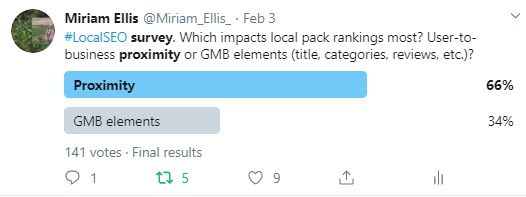
While a robust 66% placed proximity first, an interesting 34% didn’t. In other words, there just isn’t total agreement about this topic. Most revealingly, more than one respected SEO tweeted back at me, “It depends.”
This is why I believe that my second theory above is likely as close to the truth as we’re going to get. All surveys which aggregate anecdotal opinion must take into account the variety of respondents’ experiences. Consider:
- If my agency specializes in working with convenience stores or coffee shops, proximity may well be ruling my workday because Google draws such a tight net around users for my target keywords.
- If most of my clients operate tourist attractions or B2B brands, it could be that reviews or the names on Google Business profiles appear to shape my world much more than proximity does.
- Or, I may have such a wide array of clients, each experiencing different Google behavior, that my overall confidence in putting proximity first has simply eroded the more I observe the variations in the results.
What we can say with certainty is that there has been a year-over-year shift in how participants in the Moz State of the Local SEO Industry 2020 survey rate the influence of proximity. They believe it’s less dominant than it was just a year ago. Knowing this may not change your local pack strategy, because as we’ve noted, you could never do much to influence proximity in the first place.
What takeaway can we glean, then, if there is no absolute #1 local ranking factor upon which all parties agree? I’d boil it down to this: our survey shows that participants are heavily focused on GMB factors and reviews. In your competitive landscape, awareness of these elements is lively, and your ability to compete means taking an active approach to managing what you can control.
Moz Local software offers one smart solution for taking maximum charge of your Google Business Profiles, and I’ll close here with my short list of links to assist you in marketing local businesses in Google’s competitive environment:
- 2020 Local SEO Success: How to Feed, Fight, and Flip Google
- Simple Spam Fighting: The Easiest Local Rankings You’ll Ever Earn
- I Want to Rank Beyond My Location: A Guide to How This Works
- How to Find Your True Local Competitors
- The Ultimate Cheat Sheet for Taking Full Control of Your Google Business Profiles
Curious about what other insights you’ll find in our survey? Download the full, free Moz State of the Local SEO Industry 2020 report.
To help us serve you better, please consider taking the 2020 Moz Blog Reader Survey, which asks about who you are, what challenges you face, and what you’d like to see more of on the Moz Blog.
Sign up for The Moz Top 10, a semimonthly mailer updating you on the top ten hottest pieces of SEO news, tips, and rad links uncovered by the Moz team. Think of it as your exclusive digest of stuff you don’t have time to hunt down but want to read!
New Changes to Google Discovery Campaigns & Ads
Back in 2019, Google rolled out Discovery Campaigns as a Beta. Seer launched these net new campaigns across several clients to see what the visually appealing ads could do for reaching clients’ goals and saw tons of success!
Sessions Increased +153% YoY with the Discovery Campaign
For one client, in particular, we had been seeing a decrease in homepage views Year Over Year for several months.…
The post New Changes to Google Discovery Campaigns & Ads appeared first on Seer Interactive.
Five ways SEO and web design go together
SEO Expert at UENI, Javier Bello discusses how SEO and web design can work together to create a successful business and attract more visitors to your site.
The post Five ways SEO and web design go together appeared first on Search Engine Watch.
Guide to Core Web Vitals for SEOs and Developers
What you need to know about Google’s latest set of key user experience metrics for Web Developers.
Please visit Search Engine Land for the full article.
How to Prepare Your Analytics for a Domain Migration
Prep Your Analytics for a Domain Migration
When migrating your site to a new domain, adding a new subdomain, or adding redirects to your site, there can be various implications on your SEO rankings and page authority.
Additionally, If you use Google Analytics, Google Tag Manager, and other tools to analyze your data with, it’s likely that your site’s domain is involved in the configuration of your analytics tools.…
The post How to Prepare Your Analytics for a Domain Migration appeared first on Seer Interactive.
GoogleBot Will Continue To Pass A User-Agent Despite Chrome Changes
Google’s John Mueller and Martin Splitt confirmed on Twitter that GoogleBot, despite what Chrome does, will continue to pass along the user agent when it crawls web sites. John said “my understanding is that we’ll continue to use “Googlebot” in the U…
Google: No Need To Worry About Duplicate Content With Site Migrations
Google’s John Mueller said there is no need to worry about duplicate content when you are migrating content from one site to another. John said “there’s no need to worry about duplicate content if you’re migrating it from one site to another.”
Google My Business Notification For Duplicate Listings
Hot off the coattails of Google now sending notifications of Google My Business listing suspensions, Google is sending other notices as well. Here is a notice from Google that says your profile has been marked as a duplicate.
Google Search Console Performance Reports News Filter
You can now slice and dice your Google Search Console Performance report by news content versus web, image or video content. Google just added a new filter under the performance report “search type” option for “News.”
Google site command bug being fixed
Google is working on fixing this issue.
Please visit Search Engine Land for the full article.
Bing published WordPress plugin to submit content immediately to Bing’s search index
You can now get your WordPress content indexed immediately using Bing Webmaster Tools plugin.
Please visit Search Engine Land for the full article.
Google Local Panel Listing With Two Phone Numbers
Francastro notified me on Twitter of a local panel he spotted in the Google search results that lists not one, but two different phone numbers. I am not sure if I’ve seen this before so I figured I share his screen shot here.
Google Brings Back The Twitter Carousel
Google has brought back the Twitter carousel in the Google search results last night. It was removed after Twitter had an embarrassing hack back on July 15th or so. Four days later, Google brought back the feature after doing a security review on its …
Microsoft Advertising offers free stock images for Audience ads
A new partnership with Shutterstock opens up the stock image library to advertisers.
Please visit Search Engine Land for the full article.
Replay: The ins and outs of Shopify SEO
Go Fish Digital’s Chris Long and The Economist Store’s Ron Diorio share what SEOs and store owners need to know about setting up shop on the burgeoning e-commerce platform.
Please visit Search Engine Land for the full article.
Join us online Oct 6-8 for MarTech
Identify, evaluate, and implement time-saving, profit-generating marketing technologies all from the comfort and safety of your own computer.
Please visit Search Engine Land for the full article.
News filter added to Google Search Console performance report
You can now filter your News traffic in Google’s performance report.
Please visit Search Engine Land for the full article.