Google My Business New Performance Metrics
Colan Nielsen spotted a new analytics dashboard for Google My Business data named performance metrics. It is a bit tricky to get to, but it is available via the updated inline editing features. They also don’t seem to match up with the Google My Busin…
New Publishers Say Their Content Is Not Being Ranked In Google News
There are a nice number of vocal SEOs and online publishers who have been complaining all year long about their new online publishing news web sites are not being indexed and ranked in Google News. It is hard for me to debug any of this but they aske…
Google Search Customized Headers Based On Query
This is wild, I mean, I think it is a bit over the top even for Google. Google is changing the background heading image for the Google search results based on your query. If you search for things like [creative ideas], [ideas for christmas], [flower i…
Wasteful Wednesday with Wil Reynolds #12 – Keyword of the Week “Jobs” Part II
Watch the Video:
Read the Transcript:
What’s up y’all, Wil Reynolds here for another Wasteful Wednesday.
This Wednesday, we’re going to talk about showing up for “jobs searches”. You probably don’t want to market yourself when someone’s looking for a job and your company.…
The post Wasteful Wednesday with Wil Reynolds #12 – Keyword of the Week “Jobs” Part II appeared first on Seer Interactive.
Microsoft Advertising Editor gets updated with recommendations and campaign-level targeting
The new features are designed to help advertisers with bulk campaign management and optimize performance.
Please visit Search Engine Land for the full article.
Creative Diversification — More Hooks and Less Risk for Link Building
Posted by GeorgeRoot
As digital PRs we can often get stuck with our “campaign goggles” on, especially in the ideation and production stage of a creative campaign.
By this I mean, you have a preconceived idea of where you’d like your campaign to be featured, what kind of headlines you want it to achieve, and how people should read your data and story.
As we all know, we can’t control the outcomes of a campaign, but we can certainly push them in the right direction.
To give your link building campaigns the best chance in the outreach stage, you need to make sure there is enough creative diversification during the production process, especially for data-led pieces and surveys. This opens up your “journalist pool” and gives you a ton more people to outreach to with a potential interest in your piece.
What is creative diversification?
Creative diversification is how you minimize the amount of risk in your link building campaign by ensuring your idea has enough breadth during the production process. It doesn’t matter what format you’re using for each campaign — you always need to confirm it’s diverse enough to stand up in a changing news landscape. You want to develop an idea that can naturally explore multiple angles and sectors in the outreach phase. This flexibility needs to be set up before production, by exploring the potential outcomes and headlines you’re going after before you have them.
Find related topics
In the production stage, we obviously need to focus on our fundamental topic. This is often the domain’s main reason for being. It could be finance, travel, fashion — you get the picture.
Then you want to start branching out and overlaying topics: finance + students, travel + safety, fashion + Elon Musk, and so on. You’re attempting to grab subtopics of interest.
Every link builder will have a different approach to discovering these topics, but the simplest way to get started is to grab a piece of paper and start scribbling ideas by word association. Just write as much as you can and you’ll find there’s lots of closely-related topic areas your content could delve into. (Tools like BuzzSumo would be invaluable here, but if you’re after a free alternative, I have been enjoying playing with AlsoAsked.com lately for related topic inspiration. Nothing is going to beat existing news content, though.)
It’s also crucial to think about topic relevance, because if you question a tenuous link between your domain and topic matter, you can be certain journalists will, too. Link relevance is a whole other conversation to be had, but as long as it aligns with your client’s goals and you’re happy with showing them the link/coverage in full, you can’t go far wrong.
As a team at Root, we scrutinize our data points and approaches a lot in the production phase of each campaign and we find that championing personal expertise and curiosity often leads to some interesting statistics. My own passion for veganism gave us a unique angle which proved fruitful when we went out with a third round of outreach for our recent COVID-19 spending campaign.
Take off your campaign goggles
If the idea for your new campaign was born from your mind, you’re emotionally and personally invested whether you like it or not. You’ll need to put these feelings aside to engage with as many potential angles as possible from the start.
When I say you need to take off your campaign goggles, you need to (preferably with a colleague) tear apart the campaign and think about where you can add further value. It’s best to approach this objectively, so if you can tackle a colleague’s campaign and vice-versa, even better.
Some link builders will look at their angles and opportunities only once the content has been created and consider it an outreach decision. Success is definitely possible this way, but you’re stopping yourself from being as successful as you might have been had you thoroughly drilled into your content before and during the production process.
Highlight the key areas and approaches you’d like to tackle beforehand and you can feed this into your outreach strategy later on.
Make sector-specific data for journalists
When creating media lists and discovering relevant journalists, link builders can often be encouraged to rush through and ignore the content itself. If you know what they’re writing about, both on Twitter and in publications, you can begin to think about what data you could craft specifically for them.
In the campaign I mention in this blog, we focused on side-hustle data related to the fundamental topic of how people are earning their money during the pandemic, which was directly influenced by journalists.
The journalist who covered this specific topic in USA Today fortunately tweeted a lot about the stories he was working on, so it made it incredibly easy for us to tailor some content toward his interest and later offer him the type of unique data he wanted.

Aside from keeping tabs on Twitter, you can also find out what they’re interested in through Google Discover and Reddit to understand what’s being talked about and what is topical.
I know many digital PRs review key publications directly on a regular basis and have big Feedly feeds or watch insight roundups on YouTube instead. Either way, thinking about what a journalist will need in the next few weeks is imperative to early planning and ensuring your campaign is diverse enough from the get-go.
Diversify outreach with hash URLs
Another way you can make certain your content is diversified and prepared for a breadth of outreach is through the use of URL fragments or “hash URLs”. In the case of our coronavirus spending research campaign, we used article hooks on the page to provide anchor links from the table of contents at the top which then allowed us to offer another layer of personalization.
The key findings or headlines section in a table of contents is an essential piece to any long-form data campaign and makes it incredibly easy for journalists and readers to find the most relevant statistics to them in literally seconds.
If you’ve never implemented this yourself, there’s a simpler way than hooks — you just need to know your HTML basics. (Please excuse me if I butcher this description as a non-dev!) Place id=”#subject” within the heading tag, so it would look like: <h2 id=”#subject”>.
In the example below, a BBC journalist used the URL with “#vegetarian” when referencing our statistics about plant-based food usage. This came from the ID tag and meant the journalist could link directly to the bits of research that was relevant to their article.

On top of that, we could send journalists semi-personalized links in our outreach, too. It’s a win-win and is best practice for users and search engine crawlers to navigate your long-form content anyway.
This is a literal manifestation of your creative diversification process early on, as it’s now been produced and each hash URL is an extra asset pointing journalists to the most relevant data for them.
Creative diversification in action
The campaign I’ve mentioned in this piece was a lengthy, yet simple, survey campaign for a fin-tech client asking Americans about their spending habits during the pandemic. We secured a range of coverage, but the three biggest placements we landed (BBC, CNBC, and USA Today) all covered different angles and data points from each other, but from this one survey, and that wasn’t an accident.
In the production stage, we knew we needed to focus on the campaign fundamentals: spending during the pandemic. Our related topics led us to grocery store spending and another leap encouraged us to look at food choices (were American’s eating more veg during lockdown? Hmm). These topics were still closely related to our core focus (finances) and therefore useful for our outreach in terms of securing relevant and high quality links.
When it came to the outreach strategy, we prioritized landing placements tied directly to the campaign fundamentals, then the related topics fed into the consecutive rounds which we chose depending on the strength of the data we received from the survey.
If you’re thinking in the production process that there’s too much going on with too many angles, you may have just created multiple mini content campaigns for yourself.
We’ve found time and time again that the simpler stories and slimmer, more targeted outreach emails will land placements way more often than bloated emails trying to offer up far too much content at once.
That’s not to say that you should automatically split up larger pieces of content, but your outreach should be the final step in diversifying your piece. A data analysis research piece that taps into multiple sectors should simply highlight the most relevant information to the journalist in bite-size sections. We gave grocery spend data to retail business journalists, vegan food consumption data to food writers, and side-hustle data to those writing on the latest employment trends.
The next time you’re creating a content campaign, have your team (even if that’s just you) ruthlessly find new sectors, journalists, and angles to target, to ensure your next piece is as diverse as possible. Creative diversification = more hooks and less risk.
To help us serve you better, please consider taking the 2020 Moz Blog Reader Survey, which asks about who you are, what challenges you face, and what you’d like to see more of on the Moz Blog.
Sign up for The Moz Top 10, a semimonthly mailer updating you on the top ten hottest pieces of SEO news, tips, and rad links uncovered by the Moz team. Think of it as your exclusive digest of stuff you don’t have time to hunt down but want to read!
Google Ads Guide: How to Leverage Responsive Search Ads
Flirting with the idea of implementing Google’s Responsive Search Ads? Look no further. Here’s the guide you need to push you in the right direction.
Have you ever wondered what ad copy resonates best with your target audience?
“Yes!” you exclaim.…
The post Google Ads Guide: How to Leverage Responsive Search Ads appeared first on Seer Interactive.
Google Ads Launches Image Extensions Beta
What are image extensions?
In July 2020, Google announced that they would be launching an image extension beta program. Image extensions show alongside your ads on the search engine results page (SERP) with the goal of giving your ads greater visibility as well as improving overall performance.…
The post Google Ads Launches Image Extensions Beta appeared first on Seer Interactive.
Bing Shopping opens up to free product listings
The new offering launches with a small volume of traffic in the U.S. this month.
Please visit Search Engine Land for the full article.
Seerfest 2020: We’re Coming for You, World
Seerfest 2020: Streaming Worldwide This Fall
Your charity-driven, 1-day marketing conference
WHEN: Thursday, October 22, 2020
WHERE: Worldwide 🌎
COST: 100% of Sales donated to our charity partner — to be announced shortly!
Sign Up to Be Notified
FOR SPEAKER ANNOUNCEMENT & EARLY BIRD TICKET SALE
Ticket Includes:
 1-Day Virtual Marketing Conference
 8 Speakers Focused on Where People & Data Intersect
 100% of Ticket Sales Go To Charity
 Network with Data-Loving Digital Marketers
2020 Charity Partner: Announcing Soon
We’re excited to announce our 2020 charity partnership in the coming weeks!…
The post Seerfest 2020: We’re Coming for You, World appeared first on Seer Interactive.
Google Ads Performance Planner Added Shared Budgets, Shared Access & Conversion Delays
Google announced three new features to the Google Ads performance planner. These new features include support for shared budgets, shared access for viewing and editing and it now accounts for conversion delays.
How to use in-market audiences for better search campaigns
Audience targeting has is crucial to enterprise marketing campaigns. Discover all the tricks and tips to use in-market audiences for better optimized search campaigns.
The post How to use in-market audiences for better search campaigns appeared first on Search Engine Watch.
Google’s new features for product, job and recipe activity cards usher users along their journey
Instead of showing content users previously clicked on, the cards in these verticals facilitate comparison shopping, new job listings and related recipes.
Please visit Search Engine Land for the full article.
Protect your brand and campaign with validation (part one)
What about idea validation? James Brockbank recently reminded the digital PR community of a critical point – ideation is an incredibly important, if not the most important, part of digital PR. While I think every step of digital PR is as crucial as each other, I do believe ideation – and, specifically, the validation of […]
The post Protect your brand and campaign with validation (part one) appeared first on Builtvisible.
Identify and fix AMP Signed Exchange errors in Search Console
Signed Exchanges (SXG) is a subset of the emerging family of specifications called Web Packaging, which enables publishers to safely make their content portable, while still keeping the publisher’s integrity and attribution. In 2019, Google Search started linking to signed AMP pages served from Google’s cache when available. This feature allows the content to be prefetched without loss of privacy, while attributing the content to the right origin.
Today we are happy to announce that sites implementing SXG for their AMP pages will be able to understand if there are any issues preventing Google from serving the SXG version of their page using the Google AMP Cache.
Use the AMP report to check if your site has any SXG related issues – look for issues with ‘signed exchange’ in their name. We will also send emails to alert you of new issues as we detect them.

To help with debugging and to verify a specific page is served using SXG, you can inspect a URL using the URL Inspection Tool to find if any SXG related issues appear on the AMP section of the analysis.
You can diagnose issues affecting the indexed version of the page or use the “live” option which will check validity for the live version currently served by your site.
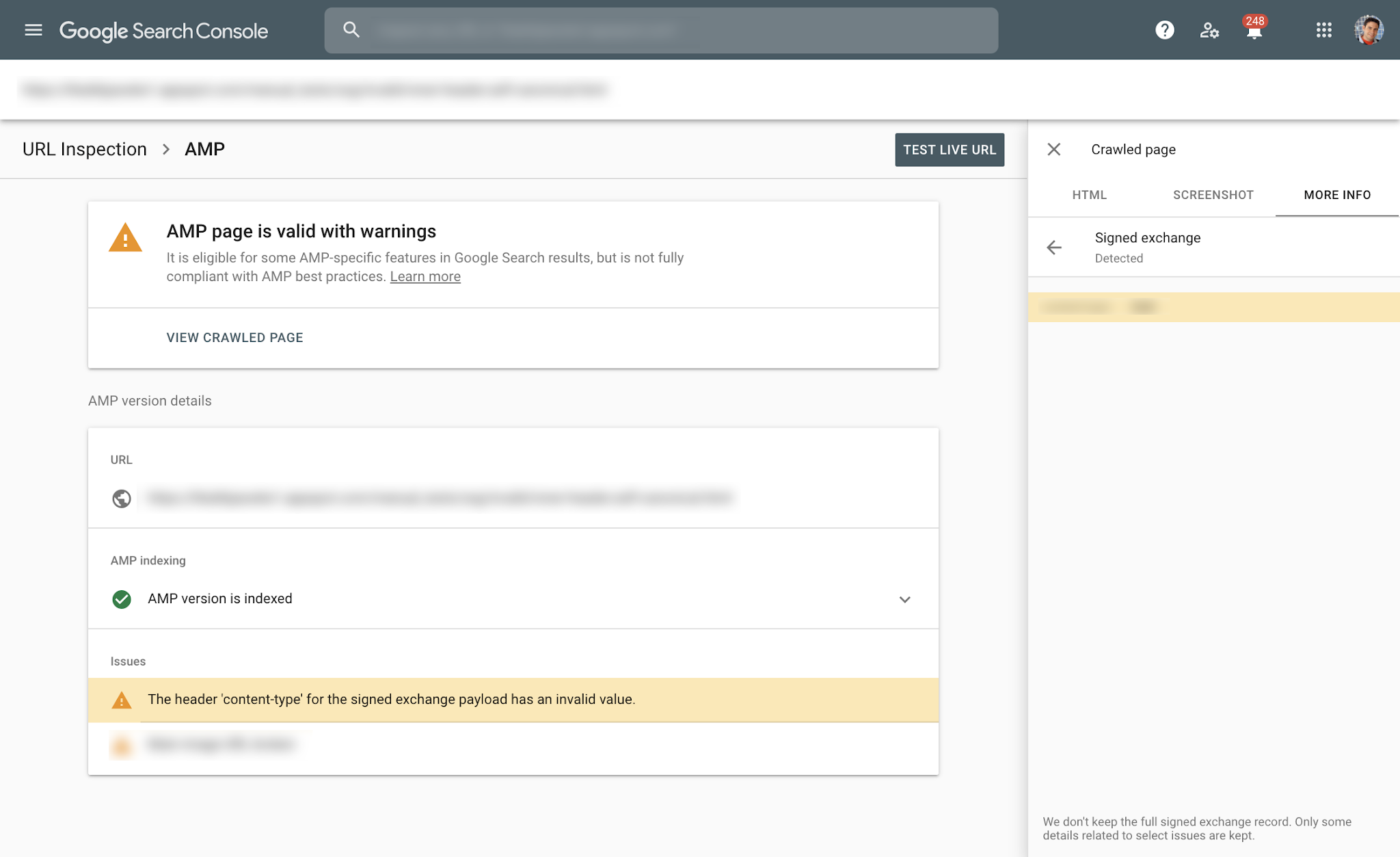
To learn more about the types of SXG issues we can report on, check out this Help Center Article on SXG issues. If you have any questions, feel free to ask in the Webmasters community or the Google Webmasters Twitter handle.
Posted by Amir Rachum, Search Console Software Engineer & Jeffrey Jose, Google Search Product Manager.


Google Local Panel Displays Awkward Positioned Map
Last week a few folks noticed an awkward positioned map box in the local knowledge panel section in Google Search. Well, it is still there, several days later. Here is a screen shot and yes, I can replicate this myself.
Google Trailer Video Thumbnail & Hides Thumbnails For In This Video Highlights
Google is showing video thumbnails in the trailer section that you can navigate through to see additional videos. At the same time, Google seems to be testing removing the thumbnails from the in this video key moments section videos.
New Google Search Console AMP Reports Signed Exchange Issues
Google has upgraded the AMP enhancement report within Google Search Console to show Signed Exchange related issues. Google noted that this does not impact your rankings in Google search, that this is just a reporting update within Google Search Consol…
Bing Webmaster Tools To Add Some Sort Of Crawl Report
Bing said sometime next month a new tool or report will be coming to the new Bing Webmaster Tools that will show details that the old crawl report showed, including the response codes.
Why machine learning and understanding searcher intent is so important to search
Write for the user, don’t get bogged down in keywords – it is all about searcher intent.
Please visit Search Engine Land for the full article.