Don’t “Live. Die. Repeat.” Your Keyword Mistakes
Even Hollywood makes branding and SEO mistakes. Contributor Stoney deGeyter shows us how we can learn from a recent example.
The post Don’t “Live. Die. Repeat.” Your Keyword Mistakes appeared first on Search Engine Land.
Please visit Search Engine Land for the full article.
Clean up your bad backlinks
With the new year just around the corner, Yoast has decided to provide you with a head start for your website. The general idea: clean up your entire site for 2015. In this post, we will go beyond on-site optimization and explain a bit more about bad backlinks for your website. Bad backlinks, or low quality…
This post first appeared on Yoast. Whoopity Doo!
3 Sneaky Ways to Bid on Competitor Keywords
It is possible to bid on competitor brands and get decent quality scores and traffic, so here are three sneaky ways to bid on competitor keywords.
Nest + Google Now = Google’s Now Predicting How Your Home Should Run
Google takes Google Now to the next level but integrating your home appliances directly into voice search and predictive search behavior.
The post Nest + Google Now = Google’s Now Predicting How Your Home Should Run appeared first on Search Engine Land.
Please visit Search Engine Land for the full article.
The SEO’s 2015 wishlist: what would you like to see happen in search?
We’ve already asked the SEO community what they think will happen in search next year, and now it’s time to reveal what search experts would like to see happen in their industry in 2015.
Here’s what they came up with…
Penguin integration
Nick Fettiplace, SEO director at Jellyfish
I’d really like to see Penguin finally become more closely integrated into the core Google algorithm, similarly to how the Panda algorithm was in 2013.
We saw a lot of frustration throughout 2014 from those who had worked endlessly in correcting their algorithmically penalised backlink profiles but were yet to see any kind of recovery due to the Penguin 3.0 update taking so long to surface.
By the time the update took place on October 17 2014, it had been 12 months since the previous major update.

Google’s John Mueller recently suggested that they were getting closer to a greater integration of Penguin into the core algorithm, so this move is definitely on their roadmap.
To me, this will have a positive impact on organic search.
(Related post: Penguin 3.0: what’s it all about?)
Pitching to bloggers
Andrew Girdwood, media innovations director at DigitasLBi
I would like to pitch an editorial idea to a blogger without getting a ratecard response “I’ll blog about this if you pay me to” in 2015.
I make that wish as a busy blogger.
(Related post: Five lessons for effective blogger outreach)
Data insight
Ruth Attwood, advanced search consultant at 4Ps
This is an obvious and continuous development – but always worth mentioning – with an increasing number of clients implementing tools like Google Tag Manager, the importance of turning information and data into insight increases.
Clients will surely value more insight across data from content, SEO and PPC as this trend continues.
I am wondering what kind of tech, accessible to ‘beginners’ can help us get ahead.
Successful content community
Andrew Girdwood, DigitasLBi
I would love to see someone make a success of a blogger and/or content community. This is a chance for a win-win between publishers and the agencies that wish to influence them.
As a blogger I don’t like having to hunt through the web for ways to detect the latest viral video attempt.
One of this year’s greatest viral videos
As a marketer I dislike having to hunt through the web for a blogger who might be interested in our latest viral video attempt.
(Related post: The 10 most common mistakes of blogger outreach)
Give us back our (not provided)
Will Critchlow, founder and CEO of Distilled
The release of some excellent new data to replace the loss of keyword (not provided) data.
I’m not holding my breath, but I think it’s a shame because I think that if Google didn’t have such a dominant position, competition would push them to provide better ways to measure the value of organic search and I think it remains a crucial issue as the marketing mix continues to evolve.
(Related post: Has (not provided) become a major barrier to effective SEO?)
Access to Webmaster Console
Andrew Girdwood, DigitasLBi
I would like better access to keyword data via Google’s Webmaster Console.
The data provided in the downloads is even more limited than the integration the console allows, and the console doesn’t allow for enough analysis.
Implied links
Nick Fettiplace, Jellyfish
There is much talk around brand mentions beginning to serve as ‘implied links’ across the web.
So for example, the mention of your brand name across relevant or authoritative websites would start contributing more prominently as a ranking factor for your website, even if it is not backlinked.
Building your brand just got even more important!
For me, this also creates greater opportunities for better integration of your wider marketing strategies with your SEO strategy.
The relationship between the two will become closer and more powerful.
So it is important for marketeers to begin ‘tying together’ their channel activities in a smarter way, knowing that what they do ‘over here’ is now more likely to affect performance ‘over there’ and vice-versa.
User experience
Ruth Attwood, 4Ps
User experience needs to be a higher priority for brands.
Taking technology and using it to create a better and more joined up user experience as they go along their purchase journey, ensures that they are not lost, confused or irritated by the process.
Putting customers back into the heart of strategies for brands means that they need to think about delivering a killer UX (particularly on sites that are technically decent).
Google News Still Available In Spain Despite Closure Deadline
News outlets such as the Wall Street Journal and AP are reporting that Google News España has shut down. However it appears to still be up and available on the site. As Barry Schwartz points out, if you visit news.google.es you’re directed to the following help page. The page offers an…
Please visit Search Engine Land for the full article.
Wassily Kandinsky Google Logo Shares The Abstract Artist’s Style With Users Around The World
Today’s Google Doodle pays tribute to the “Father of Abstract Art” on what would have been the painter’s 148th birthday.
The post Wassily Kandinsky Google Logo Shares The Abstract Artist’s Style With Users Around The World appeared first on Search Engine Land.
Please visit Search Engine Land for the full article.
How to Make Sure Your Link Dev Isn’t Working Against All Your Other Marketing (and Vice Versa)
In order to make sure you’re getting the most out of your link-building efforts, there needs to be strong communication between all members of your organization.
Wanted: Session Ideas For SMX London
Do you have a topic you’d like to see covered in a session at SMX London 2015 on May 20-21, 2015? Something you’d like to see covered in depth, or a discussion of strategies and tactics for getting the most out your search marketing campaigns? If so, we’d like to hear from you. Anyone can…
Please visit Search Engine Land for the full article.
Your Start-to-Finish Guide to Using Google’s Disavow Tool
Posted by MarieHaynes
Have you used Google’s disavow tool? You might want to. If you have been actively involved in SEO for your website over the last few years, there is a good chance that you have unnatural links pointing to your site. These can hurt you in the eyes of Google’s Penguin algorithm. Or, in some cases they can even get you a manual unnatural links penalty.
In this article we will talk about some very practical things that will help you when using the disavow tool. These tips should help you whether you are an experienced SEO or a small business owner who is trying to clean up a few unnatural links.
What is the disavow tool?
Introduced in October of 2013, the disavow tool is Google’s way of allowing you to ask Google not to count certain links that point to your site. You can find the tool
here. And here is Google’s documentation on how to use the tool.
The scariest part of this documentation is this:

Using the disavow tool incorrectly can hurt you. You should only be disavowing links that you know were made with the intention of manipulating Google’s results. Many articles have been written to help site owners decide which links are unnatural. But, there are not many articles written that take you through the process of auditing and disavowing your links from start to finish.
My hope is that this article will help answer any questions you have about using Google’s disavow tool. If there is something that I haven’t covered, then leave a comment below and I will do my best to answer.
Creating an audit spreadsheet
There are many services out there that can give you a list of your links. Some of these are great resources for organizing your links into a manageable format. I’m not a fan of services that try to audit your links for you as I believe that manually reviewing each link is necessary. But, some of these tools may be useful when it comes to putting a link auditing spreadsheet together. This
Moz post contains a good review of many of the tools that are out there.
If you would like to create your own list of backlinks rather than using a tool or a program, then here is what I would recommend:
First, download your links from all available sources
You will want to start by downloading your links from Webmaster Tools. When you go to Search Traffic –> Links to your site –> More, you’ll see this:
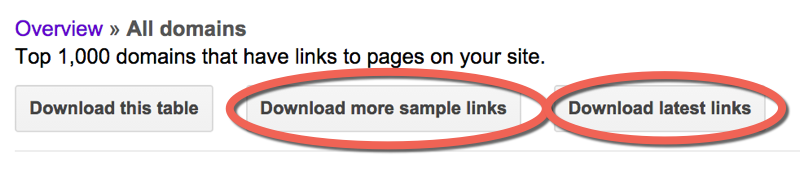
Download both the sample links and the latest links.
Disavow Tip: If you have a site that has more than 1,000 linking domains, sometimes you can get more links from Webmaster Tools by downloading the sample list of links daily for a few days.
I would also recommend downloading links from the following sources:
- majestic.com – Majestic has an option where you can get your links for free if you follow steps to verify your site. It’s definitely worth it.
- opensiteexplorer.org – This is Moz’s tool. It won’t give you as many links as Majestic, but occasionally you can find some links in there that are not in the other sources.
- ahrefs.com – This is a paid option. In my opinion, it is worth the money. I will often get links reported in ahrefs that are not found in any of the other sources.
Combine the links into one big spreadsheet
As you get your spreadsheet from each source, find the column that contains the url of the sites linking to you. Copy this entire column into a new spreadsheet. You can do this in Excel or in Google Docs. In the last year or so, Google Docs has gotten much better at handling large amounts of data. As such, the directions I’m going to give in this tutorial are for use in Google Docs as not everyone may have access to Excel. If you have a Google login or a Gmail account you have access to Google Docs.
You’ll end up with a big spreadsheet containing every link reported by each of the tools. At this point, this spreadsheet will contain a lot of duplication, but don’t worry, we will deal with this soon.
(Note: It’s not a bad idea to also include other columns that may help you with your audit such as the anchor text or nofollowed status, but for the sake of simplicity in this tutorial, we will just include the urls.)
Break these urls down to the subdomain level
Create a new column to the left of your urls. At the top type in the following formula:
=left(B1,find(“/”,B1,9)-1)
Then, highlight column A and press CTRL-D. This will fill the formula down the column and you will end up with something that looks like this:

Now, highlight column A and we’ll ask the spreadsheet to convert the formula results to values. You need to do this in order to be able to copy and paste in this column. To do this, do CTRL-C to copy and then select Edit –> Paste Special –> Paste Values Only.
Now we’re going to use the Find and Replace feature to break these down to the subdomain level. Keep column A highlighted and click Edit –> Find and Replace, and type in
http://. Leave the replace field blank and press “Replace All”.
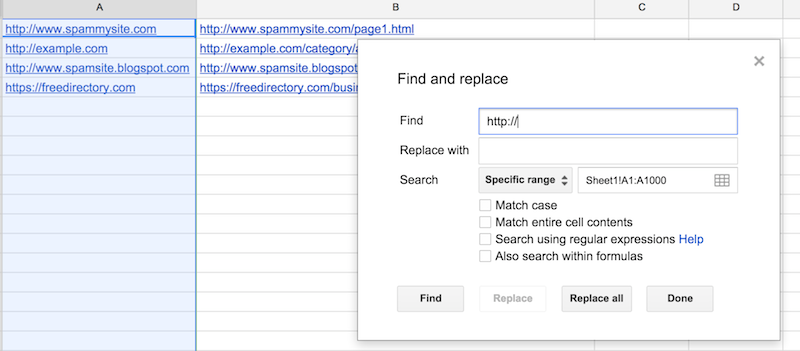
Now do the same thing for the following phrases:
https://
www.
Don’t forget the period after “www.”!
Once this is complete, then column A contains the domains/subdomains of each url.

De-duplicate so you just have one link from each domain
Now what we are going to to is dedupe this list so that we just have one link from each domain. Most spreadsheets have a dedupe function built in. However, I have found that when you are dealing with a large number of rows, this will often crash the spreadsheet, so what I do is first, sort column A using alphabetical order, and then create a new column to the left of my domains and add the following formula:
=if(B1=B2,”duplicate”,”unique”)
Copy this down so that the spreadsheet will now show you which entries are duplicates. You can then filter this column to show only the duplicates and delete each of these rows.
What you will be left with is one url from each domain linking to you.
Audit!
Now you need to visit each url on your spreadsheet and make a decision on whether or not you should keep links from this domain or disavow. On your spreadsheet, mark each url as either “disavow” or “keep”:

In some cases, I’ll mark some links as “debatable” and then review them again once I have seen all of the links in a link profile. Sometimes there are patterns of unnatural linking that only become visible after reviewing a good portion of the backlinks.
Here are the questions that I would ask when looking at each link:
- Was this link made solely for SEO purposes?
- Does this link truly, honestly have the possibility of directing clients your way?
- Would you be worried if a Google employee or a competitor saw this link?
Disavow tip: When Google penalizes a site, or affects it algorithmically because of unnatural links, their goal is to demote sites who have been actively cheating. Every site has weird looking links that make you think, “Where the heck did that come from?” But there is no need to go disavowing everything that you don’t recognize. Penguin will not affect a site just because it has some odd looking links.
If you’re having a hard time deciding which links to disavow, then here are some resources that give more advice on how to make disavow decisions:
- Link Audit Guide for Effective Link Removals & Risk Mitigation
- What is an Unnatural Link? An in-depth Look at the Google Quality Guidelines
- Is That Directory Link Unnatural?
After reading those, if you are still unsure about the majority of your links and whether or not they should be disavowed, then it may be best to hire someone who is experienced in disavow work to do this audit for you.
Making your disavow file
Add “domain:” in front of the domains
Once you have finished assessing each link, you’ll want to filter your disavow column so that you just see the links that you have decided to disavow.
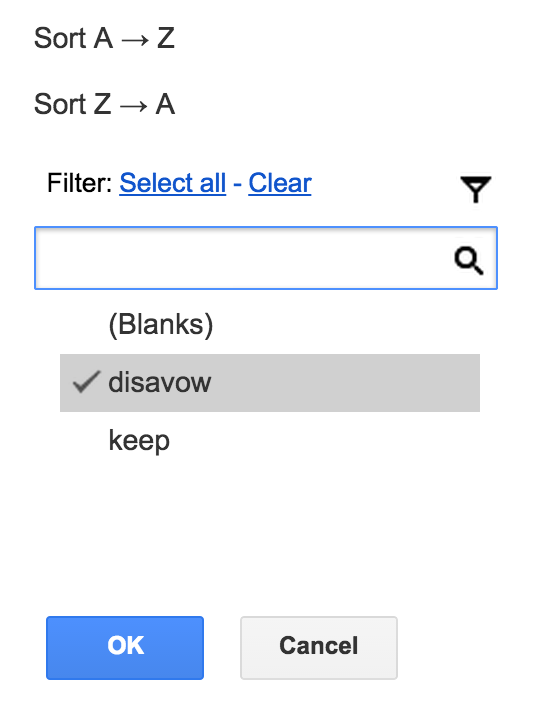
Then, create a new sheet on your spreadsheet, copy your domains column and paste it into this new sheet:
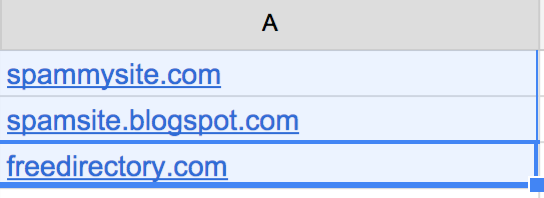
Now we’re going to add “domain:” in front of each domain name.
Disavow tip: You ALWAYS want to disavow on the domain level. If you disavow on the url level, you run a very high risk of missing bad links. For example, if you are disavowing a link on http://www.example.com/article.html, that same link may also exist on http://www.example.com/articles/ and http://www.example.com/tag/links, and http://www.example.com/article.html?utm=fb and so on.
To add “domain:” in front of each domain name, type the following formula into B1:
=”domain:”&A1
Copy this formula down the entire column. Then, as before, do a copy and then paste special –> paste as values.
Now you’ve got your disavow directives in column B:

Make a text file
Your disavow file has to be a .txt file in UTF-8 format or 7-bit ASCII. There are a few ways that you can do this. On my Mac, what I do is open TextEdit, copy and paste my “domain:example.com” column (column B), and then click “Format” –> “Make plain text”. I then save this as a .txt file.
Another option that works well is to create a new Google Doc document, copy the disavow directives into this document and then click “File” –> “Download As” –> “Plain text”.
Disavow tip: There are many other ways to make a .txt file. But sometimes these files create odd characters that can throw errors when you file the file. If you are getting odd errors once you file, then try creating your text file using the Google Doc method mentioned above. This seems to be the most reliable way to produce a text file that Google won’t reject.
What about comments?
I have seen disavow files that look like this:
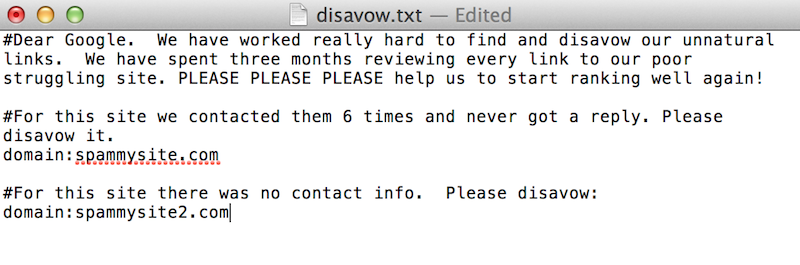
You can leave a comment in your disavow file by starting a line with a “#”. However, no Google employee will look at your disavow file. It is completely machine processed. Comments are there just for your own use. I will insert comments where it might be useful for me when I’m editing the disavow file in the future. For example, I might say the following:
#The following links were disavowed on December 16, 2014. These links are ones that we know are low quality directory links.
Filing your disavow
To file your disavow file, go to the disavow tool, and select your site from the dropdown list.
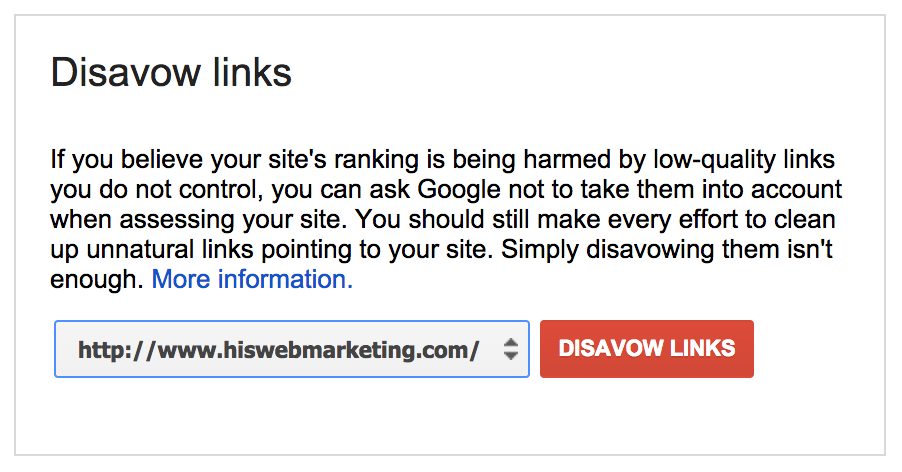
Click “disavow links” and then “disavow links” again and then “choose file”. This is where you will upload the .txt file that we just created.
If you’ve been successful, then you’ll see something that looks like this:
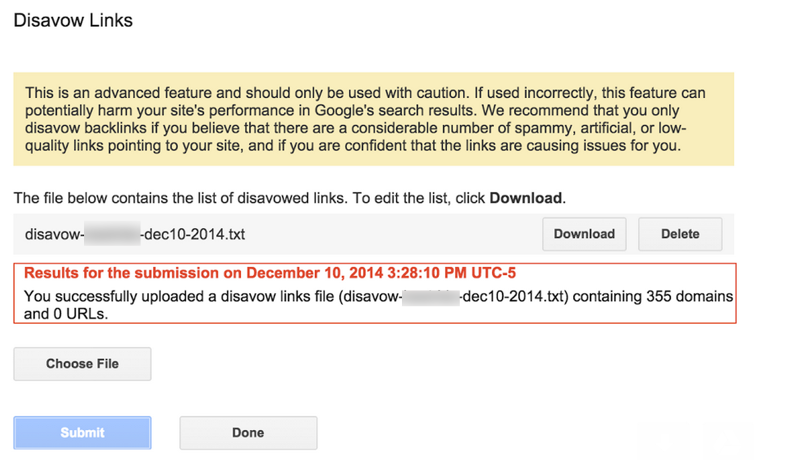
But, you may find that you have errors:
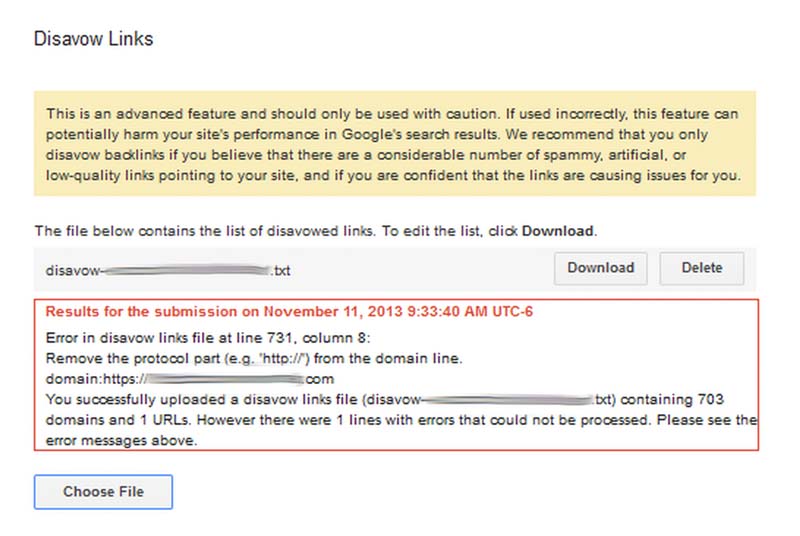
Common errors
Here are some things to look for if you have an error message:
- If you have typed “domain:http://www.example.com“, you need to remove the http://www.
- Sometimes the backlink tools will give you domains with odd characters in them that the disavow tool doesn’t like. For example, sometimes ahrefs.com will give me domains that look like this:
| _¼_¡_á_ü_____ü__„â_µ„Û___µ„â.„Û„ã.com |
If I try to disavow
domain:_¼_¡_á_ü_____ü__„â_µ„Û___µ„â.„Û„ã.com, that’s going to throw errors. These domains never resolve. I just delete them from my disavow.
- Look for domains with ports attached. For example, you may see domain:example.com:8080 on your list. Just remove the :8080. A colon will cause your disavow to throw an error.
As mentioned above, if you are getting errors and you can’t figure out why, try formatting your file with a Google Doc and saving as a .txt. This usually works for me.
Modifying your disavow file
If you have unnatural links, then it is a really good idea to do regular checks of your backlinks. I have several clients for which I do monthly backlink audits and even though they are not currently building links, each month I will see a good number of new unnatural links. Many of these are old links from as early as 2006 that are just surfacing now. Some are new spammy links that perhaps are the result of previous automated processes that continue to propagate. And some may even be attempts at negative SEO. My point is that most sites that I have seen that needed to have disavow work done will need to continually update their disavow file.
Disavow tip: When you upload a new disavow file, you are COMPLETELY REWRITING your old file. If your old file has 300 domains in it and you want to add 30 new domains, your new file will have 330 domains in it.
In order to update your disavow file, you’ll need to go to the disavow tool, select your site, select “disavow links” and again, “disavow links” and “download”. I have no idea why, but Google will give you your file in the form of a .csv and not a .txt file. What I do next is copy column A and paste it in either TextEdit (on a Mac) or into a Google Doc. You can then add your new links and save the file as a .txt and file it as before.
When does the disavow start to work?
As soon as you upload your disavow file, Google will start to apply the disavow directives to each link of yours as they crawl the web. Let’s say that I have a link on
http://www.spammysite.com/article.html
and I have disavowed
domain:spammysite.com
The next time that Google crawls
http://www.spammysite.com/article.html, or any other page on this domain that links to you, they will apply an invisible nofollow tag to each link that points to your site. This means that these links will no longer be included in algorithmic calculations (i.e. Penguin) for your site. If your site is affected by the Penguin algorithm, you will not likely see changes right away. You will need to wait until Google reruns the Penguin algorithm and regathers information about your links. Google has hinted that soon this will happen continuously rather than on a sporadic basis. Hopefully this will mean that sites will be able to escape Penguin quicker. You’ll still need to wait for Google to recrawl all of the links on your disavow file though. John Mueller from Google has said that it can take up to a year for all of your links to get recrawled. However, in my experiments, the longest a link took to be disavowed was three months. Most links were disavowed within a month.
Should you be removing links as well as disavowing?
This is a subject that deserves its own article. In fact, I have written a full article about this
here. In general, if there is a link that I control, and I know I can easily remove it, then removing it is the best option. But, if you are dealing with an algorithmic issue such as Penguin, in my opinion, there is no need to go on an exhaustive email campaign to ask site owners to remove links. These campaigns are expensive and depending on the niche, the success rate is often very low. If you have a manual penalty, however, then yes, you need to make attempts to remove every unnatural link.
Can you reavow a link?
What if you made a mistake and included domains in your disavow file that were actually good links? You can remove a disavow directive by modifying your disavow file so that it no longer contains that domain and then re-uploading it. However, Matt Cutts commented earlier in the year that it takes much longer to reavow a link than to disavow it. You would think that the next time it was crawled, Google would remove the invisible “nofollow”, however, there is some type of lag time built in before the link starts to count again. The purpose of this is to make it harder for spammers to find ways to cheat the system.
Questions?
You need to be careful when using the disavow tool. But, this doesn’t mean that the average webmaster cannot use it. If you know you have low quality links pointing to your site, then this tool can be a good way to ask Google to not to count these links against you. Still, I have found that in over two years of helping people use this tool, questions often arise. If you have questions I’ll do my best to answer. Or, if you have used the disavow tool and have hints to add, I’d love to hear your comments!
Sign up for The Moz Top 10, a semimonthly mailer updating you on the top ten hottest pieces of SEO news, tips, and rad links uncovered by the Moz team. Think of it as your exclusive digest of stuff you don’t have time to hunt down but want to read!
Facebook Drops Microsoft’s Bing to Do Its Own Search Thing
Facebook’s relationship status with Microsoft’s Bing has changed to “it’s complicated.”
SearchCap: Spain Wants Back, Google News Archive & AdWords Countdown
Below is what happened in search today, as reported on Search Engine Land and from other places across the web. From Search Engine Land: New Widget In AdWords Makes Countdown Copy Easy Quickly set up dynamic countdowns in ads without having to type var…
New Widget In AdWords Makes Countdown Copy Easy
Quickly set up dynamic countdowns in ads without having to type variable strings.Quickly set up dynamic countdowns in ads without having to type variable strings.
The post New Widget In AdWords Makes Countdown Copy Easy appeared first on Search Engine…
Google Faces Potential $19M Privacy Fine In The Netherlands
Google continues to face potential fines for failing to change its privacy policy in Europe. Since the company introduced its “simplified privacy policy” in 2012 it has faced Europe-wide criticism and the threat of fines for violating local data protection laws. Multiple government data…
Please visit Search Engine Land for the full article.
The difference, or lackthereof, between ads and content
A recent article by Marketing Magazine interviewed Red Bee Media to understand the difference between content and ad
read more
Google Revamps “The Customer Journey to Online Purchase” Tool
The company has improved its marketing tool “The Customer Journey to Online Purchase” with a few updates.
Apple: Can Local Search Embedded in Spotlight as a Default Move the Needle?
Google has long been the top dog in local search. Along the way they bested IYPs, Driving Direction sites and Mapping companies. Google left more than a few, like CitySearch and Yahoo Local, among the walking dead and severely limited the growth options for the likes of the Groupons and Navteqs of the world. They have […]
Google Public DNS and Location-Sensitive DNS Responses
Webmaster level: advanced
Recently the Google Public DNS team, in collaboration with Akamai, reached an important milestone: Google Public DNS now propagates client location information to Akamai nameservers. This effort significantly improves the accuracy of approximately 30% of the location-sensitive DNS responses returned by Google Public DNS. In other words, client requests to Akamai hosted content can be routed to closer servers with lower latency and greater data transfer throughput. Overall, Google Public DNS resolvers serve 400 billion responses per day and more than 50% of them are location-sensitive.
DNS is often used by Content Distribution Networks (CDNs) such as Akamai to achieve location-based load balancing by constructing responses based on clients’ IP addresses. However, CDNs usually see the DNS resolvers’ IP address instead of the actual clients’ and are therefore forced to assume that the resolvers are close to the clients. Unfortunately, the assumption is not always true. Many resolvers, especially those open to the Internet at large, are not deployed at every single local network.
To solve this issue, a group of DNS and content providers, including Google, proposed an approach to allow resolvers to forward the client’s subnet to CDN nameservers in an extension field in the DNS request. The subnet is a portion of the client’s IP address, truncated to preserve privacy. The approach is officially named edns-client-subnet or ECS.
This solution requires that both resolvers and CDNs adopt the new DNS extension. Google Public DNS resolvers automatically probe to discover ECS-aware nameservers and have observed the footprint of ECS support from CDNs expanding steadily over the past years. By now, more than 4000 nameservers from approximately 300 content providers support ECS. The Google-Akamai collaboration marks a significant milestone in our ongoing efforts to ensure DNS contributes to keeping the Internet fast. We encourage more CDNs to join us by supporting the ECS option.
For more information about Google Public DNS, please visit our website. For CDN operators, please also visit “A Faster Internet” for more technical details.
Posted by Yunhong Gu, Tech Lead, Google Public DNS


Google Brings Back The Google News Archives
Google has brought back the ability to search the news archive this weekend…
SEOs Required To Take Polygraph Lie Detector Tests
Jenny Mugridge posted at Cre8asite Forums saying that her former employer is now requiring all new and existing SEOs in the company to take polygraph tests…