Facebook’s new Legacy feature
As of last week, Facebook implemented a new “Legacy” feature. This feature lets you choose a Legacy Contact who can take over the account if something is to happen to you.
read more
SearchCap: Google On Link Building, Mobile User Interface Tests & Local SEO
Below is what happened in search today, as reported on Search Engine Land and from other places across the web.
The post SearchCap: Google On Link Building, Mobile User Interface Tests & Local SEO appeared first on Search Engine Land.
Please visit Search Engine Land for the full article.
Google: The Submit To Index Feature Is For Critical Cases
In Google Webmaster Tools, there is an option to fetch and render as GoogleBot would crawl your pages. After the page has been fetched…
Google’s John Mueller: I’d Avoid Link Building In General
In a Google+ live hangout with Google’s John Mueller on last Friday morning, John answered the question, “is link building in anyway way good…
Google Has Issues Crawling Recursive Redirects
Ever see a web page that when you visit it, it just keeps redirecting back to itself…
Boost Traffic, Rank, Engagement & Sales – Attend SMX West in Two Weeks!
Search Engine Land’s SMX West conference returns to San Jose in just two weeks! Here all that’s in store: Up-to-date Tactics: SMX West sessions provide you with the latest SEO tactics to cope with algorithm changes, understand evolving paid advertising options and leverage emerging platforms…
Please visit Search Engine Land for the full article.
Local SEO For Franchises Means Teamwork
Contributor Chris Marentis explores the unique SEO challenges and opportunities for franchisees and franchisors.
The post Local SEO For Franchises Means Teamwork appeared first on Search Engine Land.
Please visit Search Engine Land for the full arti…
Google: Try To Avoid Link Building Because It Can Do More Harm Than Good
Google’s webmaster trends analyst, John Mueller, recommends you do not focus on link building and if you do, it may lead to more harm for your web site than anything good.
The post Google: Try To Avoid Link Building Because It Can Do More Harm Than Go…
Google Mobile Testing New Loading User Interface
Google testing a new slick mobile user interface for navigating through the mobile search results.
The post Google Mobile Testing New Loading User Interface appeared first on Search Engine Land.
Please visit Search Engine Land for the full article.
…
Of Site Moves and Search
All you need to know in order to produce a successful site move in the search engines is to understand what’s changing, when, and most importantly why?
The First Pillar of SEO: Technology
The technical foundation of SEO starts with ensuring your site can be fully crawled by search engines. Barry Adams explains how he approaches this aspect.
Post from Barry Adams
Google Tests New Mobile Loading Slide Outs & Loading Patterns
Ruben Gomez spotted yet another Google test, this one on the mobile interface…
Google Testing 3D & Push-Like Arrows On AdSense Ads
Google seems to be testing yet a slightly different format for their arrows on their AdSense ad units.
A WebmasterWorld thread has one user who posted a picture of an AdSense unit that had an arrow that looked slightly 3D or shadowed…
Updating Your Website? Avoid These 4 Common SEO Landmines
Whatever the reason and whatever the scope, you’ve decided to update your website and if you’re going to be successful, you’ll need to pay careful attention to your SEO throughout the process.
Craft, Customers & Critics: Investing in Discovery
Do you and your teams have enough information gathered in discovery to make good choices about digital marketing strategies to support your business objectives? Whether you’re part of an agency or in-house with a brand, marketers are often pushed to go directly to work without the context and audience understanding discovery provides. There are many effective ecosystems in place that command excellence because of their investment in discovery.
Learn how NASA and Proctor & Gamble invest in discovery to improve outcomes.
Post from Lisa Williams
How Hashtags Work on Twitter, Instagram, Google Plus, Pinterest, Facebook, Tumblr, and Flickr
Posted by AnnSmarty
This post was originally in YouMoz, and was promoted to the main blog because it provides great value and interest to our community. The author’s views are entirely his or her own and may not reflect the views of Moz, Inc.
A hashtag is the wonder of the past decade. It was born to address the need to organize and make sense of the overwhelming social media buzz. Thanks to active and creative user adoption, hashtag support has been added to most popular social media platforms.
This article shows how different social media sites make use of hashtags. Most importantly, it shares some insight into how you can make the most effective use of hashtags for your brand.
Twitter hashtags don’t support special characters like +, !, $, %, -, ^, &, *, etc. They do support letters, numbers and _ (underscore).
There are no hashtag limits (length, number) as long as you keep your message within 140 characters (which is already limiting in itself).
 While Twitter hashtags are reported to increase engagement, the most efficient way to use them is through hosting and participating in Twitter chats. Here’s a detailed tutorial on hosting a Twitter chat.
Event hashtags (conferences, festivals, etc.) also work very well on Twitter. You don’t need to actually be in an event to network with people through the official hashtag. Event organizers usually market the official hashtag very well, which means additional exposure for you if you use it.
Twitter search results are ranked by most popular. You can switch to “All” results, which are filtered by date.

Useful Twitter Hashtag Tools:
- Hashtagify tracks trending hashtags and shows “related” hashtags for any base terms you provide.
- TwChat lets you discover, participate in, and easily host Twitter chats. It’s also a useful tool for monitoring and archiving any hashtag streams.
Like Twitter, Instagram hashtags don’t support special characters like +, !, $, %, -, ^, &, *, etc. They do support numbers and _.
You can add up to 30 hashtags to a single photo. You can even tag your photo after publishing it. Simply list your hashtags in the comments. (Note that you can only do this for your own uploads.)
Instagram hashtags
increase your following dramatically, especially if you use hot and trending hashtags.
The best use of hashtags on Instagram is to participate in hashtag games like #tbt and #MondayBlues. Both can make your Instagram posting very consistent (e.g., you have a theme for every day of the week) and increase your following and interactions.) In my experience, people are very willing to click these specific hashtags to see the photos of other participants.
Location-based hashtags also work very well for Instagram. I use both abbreviated and full location names (#la and #losangeles, for instance).
Instagram search results are sorted by “most recent”.
Use Websta to track hot hashtags on Instagram.
Google Plus
The only official rule for Google Plus hashtag character support is “no spaces”. However, you may have trouble using any characters (which are not letters, numbers or underscore) because Google Plus will attempt to drop them from the linked part of the hashtag.
There’s no way to make a hashtag with numbers only (e.g., #2015).
Google Plus has perceived hashtags differently from the very start. Instead of letting users organize and monitor their conversations, Google Plus hashtags allow for greater exploration of the platform, by Google and users.
This explains why Google Plus updates are auto-hashtagged, meaning that they are added automatically by Google when the topic is clearly discerned.
There are no known limits to the number of hashtags you can add to Google Plus posts.
Google Plus hashtags seem to work great for exposing your updates to a wider range of people. I haven’t found any research to back this up, but I’ve personally seen them work this way. Any time I use hashtags on Google Plus, I see more people outside of my extended circles like and comment on my content:

Unlike Twitter and Instagram, “specific” hashtags (e.g., games, events, and locations) don’t seem to work well on Google Plus. Instead, I try to let Google understand what my update is about by using descriptive hashtags (e.g., #marketingtips).
Google Plus hashtag search results
seem to be ranked by popularity. Moreover, search results are powered by “related” hashtags. Sometimes the result will even miss your initial search term.

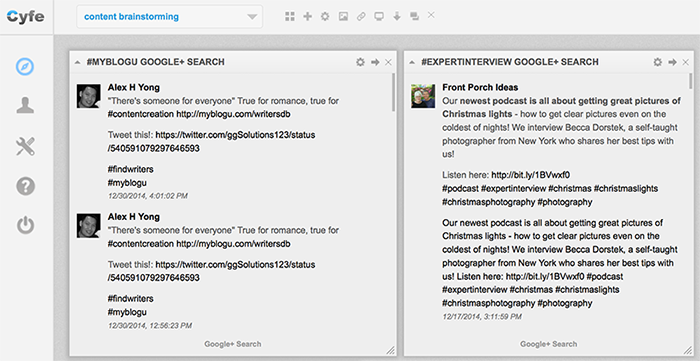
Cyfe is the only tool I know of that supports searching and archiving Google Plus hashtag results.
Pinterest hashtags have been quietly supported for some time. “Supported” means the word after the # is clickable (and only in the description).
There are no official rules or limitations on the number of hashtags you can add to a Pinterest post, and Pinterest hashtags seem to support the same set of characters as most other social platforms do.

Pinterest hashtag support remains limited. If you search Pinterest by a hashtag, search results will include all types of words and phrases from the hashtag. This makes using Pinterest hashtag almost pointless.

The only reasonable way to use Pinterest hashtags is to use them for branding, especially for cross-promotion (to further spread awareness of your event, Twitter chat, etc.).
Tumblr
Tumblr hashtags work similarly to Wordpress tags. They will be linked only in the “tags” field. You can’t create an in-text hashtag by simply adding # in front of a word.
Unlike Wordpress, Tumblr hashtags improve the discoverability of your updates across the whole platform.
Here’s a quick example: I am not really active on Tumblr, but I do post random updates from time to time.
I treat Tumblr more as a curation tool rather than a social media network, so I’ve never cared about hashtags or if my updates get any visibility, which they didn’t until I used a few hashtags in
this post. That day I saw a sudden spike in activity on my pretty abandoned Tumblr blog!

[Note: I did nothing special to create the spike. All I did was adding a few hashtags. Seems pretty easy, right?]
You can have spaces, apostrophes, commas, dots, and many other symbols in your Tumblr hashtags.

There are no limitations as to how many hashtags you can use on Tumblr, but only the first five hashtags you use are searchable. Your update will only make it to the search results if it’s an original one, not a re-blog, so don’t bother adding tags if you re-blog.
Any hashtag search will bring up users who recently used those hashtags for you to follow, which means that hashtags are huge for acquiring followers on Tumblr.

Tumblr filters hashtag search results by “most popular” by default. You can switch this to “most recent”.
Furthermore, Tumblr has a “track your tags”
feature which allows anyone to add hashtag search results to their “favorite search”. There are no stats available as to which hashtags are tracked by more people, though.
Flickr
Flickr allows all sorts of symbols to be typed after the #, but
seems to only link letters and numbers. While serving the same goal (e.g., organizing photos), Flickr tags and hashtags do behave slightly differently.
- Clicking on a Flickr tag brings you to search/?tags= page, where you can filter by license, search for groups, and more.
- Clicking on a Flickr hashtag brings you to /explore/ page, which shows related [hash]tags and the photos with the same tags (yes, that’s confusing). These results are sorted by “most recent” by default, although you can switch to “most interesting.”

It’s still not quite clear whether hashtags improve visibility on Flickr, or how different they are from tags, which have existed on the platform for ages. The fact that Flickr hashtags were announced and are now proactively supported in the iOS app may indicate that the whole point of a hashtag on Flickr is to make it easier to organize your photos from the iPhone.
Facebook hashtags support the standard set of characters that most popular social platforms support.

There are no limitations as to the number of hashtags you can add to a Facebook update.
Facebook hashtag search is somewhat weird. Try searching for #california, for example. You’ll likely end up landing on a Facebook page instead of a hashtag search results page.

An easier way to generate hashtag search results is to simply add the hashtag after facebook.com/hashtag/ (e.g., facebook.com/hashtag/dogs).
You can also bring up hashtag search results by clicking on any hashtag in your Facebook stream. Facebook’s ranking algorithm is complicated. It seems to be a mix of lots of factors, including how closely you are related to the person posting the update, how often you interact with him/her, how popular the actual update is, etc.
I don’t use hashtags on Facebook beyond random cross-posting from Instagram. I have also seen quite a few of my friends become irritated when someone uses hashtags, so I guess it’s too early to tell. With Instagram’s help, however, hashtags may ultimately become widely adopted by Facebook users.
To sum up…
| Google Plus | Tumblr | Flickr | |||||
|
Introduced |
August 23, 2007 | January 27, 2011 | September 25, 2013 | N/A | June 12, 2013 | August 18, 2009 | March 17, 2013 |
|
Supported characters |
Letters, numbers and _ | Letters, numbers and _ | Letters, numbers and _ ()no numbers-only hashtags | Letters, numbers and _ | Letters, numbers and _ | Any | Letters and numbers |
|
Limitations |
None | 30 hashtags per update, max | None | None | None | None | None |
|
|
Brand events and hold / participate in Twitter chats | Build a brand following by participating in Instagram games |
Allow Google Plus to better understand what your update is about |
[Don’t work for discover-ability. May still be used for branding and cross-promotion] | [Don’t really work for discover-ability. Getting used more often thanks to cross-posting from Instagram] | Organize your updates and build your following | Make it easier to organize your photos from mobile device |
|
Search results |
Are ranked by most popular (You can switch to “All” which are filtered by date) | Are sorted by “most recent” | Seem to be ranked by most popular (No way to change) | Are ranked by most popular | Are ranked by many factors, including relation and popularity | Are ranked by most popular by default (You can switch to most recent) | Are ranked by most recent by default (You can switch to most interesting) |
|
Best tools |
Hashtagify & TwChat | Websta | Cyfe | – | – | – | – |
(All images in this post were created by the author)
Sign up for The Moz Top 10, a semimonthly mailer updating you on the top ten hottest pieces of SEO news, tips, and rad links uncovered by the Moz team. Think of it as your exclusive digest of stuff you don’t have time to hunt down but want to read!
Love Quotes & Tech Themed Valentine’s Day Google Logos Help Searchers Get In The Mood
Google’s serving up 5 different Valentine’s Day doodles today, along with quick answer “love quotes” on its search results page.
The post Love Quotes & Tech Themed Valentine’s Day Google Logos Help Searchers Get In The Mood appeared first on Search Engine Land.
Please visit Search Engine Land for the full article.
SearchCap: Google Webmaster Data Delayed, Mobile Friendly Web Sites & Search Pictures
Below is what happened in search today, as reported on Search Engine Land and from other places across the web.
The post SearchCap: Google Webmaster Data Delayed, Mobile Friendly Web Sites & Search Pictures appeared first on Search Engine Land.
Please visit Search Engine Land for the full article.
#SESLON: Mobile Is the Future, No Seriously, It Really Is, Says Google
At his SES London keynote, Google’s Ian Carrington discussed the evolution of digital marketing, which has become synonymous with mobile.
Google Webmaster Tools Data Stopped Updating Almost A Week Ago
Are you concerned that your Google Webmaster Tools reports have not updated in a week? Don’t be, everyone else has the same issue.
The post Google Webmaster Tools Data Stopped Updating Almost A Week Ago appeared first on Search Engine Land.
Please vi…