Google SEO: Should Titles & H1 Tags Be Exactly The Same?
The other week, I reported that with Google News specifically, the recommendation is that your titles and H1s be consistent.
Now a Google Webmaster Help thread
Click-to-Call and the Big Data Gap
Typical analytics tools may not give marketers enough visibility into the $4 billion that is spent on mobile search advertising.
The Importance Of Search Data In Your Marketing
When it comes to data utility, search has other digital marketing channels beat hands down. Contributor Alistair Dent explains how to use this and other bits of customer data without spending big bucks.
The post The Importance Of Search Data In Your …
Apple Pay Could Mean Shoppable Paths for Mobile Search
A new mobile ad feature allows users to save mobile offers to Apple Pay and Google Wallet with the tap of a finger. This new technology could mean better solutions for search offerings.
New SEO Myths and Lies in 2015
Since the pseudoscientific brigade continues to publish false and misleading statements about really simple technical stuff, let’s just round up the latest SEO lies and myths for another round of debunkery. We have 10 months left in the year. Maybe…
Does Your PPC Campaign Pass the Mobile Test?
Here are three questions marketers must ask before launching a mobile PPC campaign.
Spotlight On: Yelp’s Rosie Akenhead
Yelp’s manager of local business outreach for the U.K. and Ireland spoke with SEW about recent additions to Yelp, as well as the time she Yelped a taxidermist.
6 Tips From the Monty Python School of SEO
What kind of SEO takeaways can you get from classic Monty Python sketches?
Here’s How Badly Google Is Killing Its Digital Media Competitors (for Now)
Google isn’t just dominating search, but digital advertising across the board.
Paid Search Tips For Winning at eCommerce
Paid Search (PPC) is a great source of eCommerce business. In this article Laura Phillips looks at tips to help you quickly and effectively improve your conversion rate.
Post from Laura Phillips
Marketing Budgets 2015
Overview
The Marketing Budgets 2015 Report, published by Econsultancy in association with Oracle Marketing Cloud, is a guide for the health of the marketing industry. It looks at the extent to which companies are increasing their budgets across a range of channels and technologies, comparing online and offline budgets while also looking at the balance between acquisition and retention marketing. The report compares spending trends – and ability to measure ROI – across different ‘traditional’ and digital channels.
Almost 600 companies participated in this research, which took the form of an online survey between December 2014 and January 2015.
What you’ll learn from this research
The report reveals marketers’ priorities for the next 12 months, while exploring the extent to which companies are committed to investing in marketing, the channels they are focusing their investment on, and the challenges they face in improving their capabilities in this area.
Key findings from the report
- Digital marketing budgets are set to reach an all-time high
- Investment in digital marketing technology surges back
- Marketers look beyond paid media, but ROI measurement issues hold them back
- Acquisition marketing continues to be front of mind
Features of the report
This 64-page report looks in detail at how companies are allocating their online and offline marketing budgets in 2015. It explores the following areas:
- Marketing focus
- Marketing budgets
- Investment in technology
- Marketing effectiveness and ROI
- Barriers to further investment
- Most important area of digital focus in 2014
Who should read this report?
The report is essential reading for both in-house marketers and agency professionals around the world, as well as those outside who want to understand how marketing budgets and investment is evolving within the digital and traditional marketing fields.
Become Intelligent: Use Google Analytics Intelligence Alerts to your Advantage
Posted by Martijn_Scheijbeler
This post was originally in YouMoz, and was promoted to the main blog because it provides great value and interest to our community. The author’s views are entirely his or her own and may not reflect the views of Moz, Inc.
Everybody remembers being in college, writing down activities in a logbook, hoping the hours they worked on a project were enough for a sufficient grade. After two years as an online marketer/SEO, I realized what makes writing down activities so important.
The intent of this post is to save you from making the same mistakes I made. If you’re working for a brand, you probably want to make sure you’re on top of all your KPIs, but few of us are able to carefully track our valued metrics 24 hours a day.
So in addition to providing you with some useful insights into why it’s so important to write down everything you do, I’ll also give you some useful tips on how to get this started with the tools you likely already use. Most importantly, I’ll show you how to keep track of drastic changes in web traffic and user engagement.
How Meta Robots & XML Issues Impacted My Perception of Web Analytics
To give you an example of why it’s useful to keep track of what you and your team are working on, let me take you back to an incident I experienced roughly two years ago. My team tested an upgrade for functionally, but forgot to check the involved technical SEO elements. After a massive drop in keyword positions for all of our top (landing) pages, we did our best to retrace our steps. In the process, we discovered we had implemented the META robots noindex tag on all pages. I’d love to say I’m joking, but our drop in search traffic says otherwise.
I think you get the point—and that it’s probably best if I don’t tell you about the time that we returned XML to Google instead of proper HTML—record everything. To this end, I’m going to share my insights into what I like to track on a daily and weekly basis via Google Intelligence Events, and share occurred events with our team, using the annotations of Google Analytics for our sites. I’m also hoping to hear your ideas on anything I’m missing so that we can learn from each other.
Rebecca Lehman made
a great start back in 2011 with this, but in the past years a lot of new metrics and dimensions have been added to Google Analytics, making it easier to keep track of even more changes.
What are Google Intelligence Alerts?
Analytics monitors your website’s traffic to detect significant statistical variations, and then automatically generates alerts, or Intelligence Events, when those variations occur. – Google Analytics Help Guides
Google Analytics provides you with predefined alerts that guide you through certain changes in engagement, traffic or visitor data, but they are hard to notice if you’re not looking at your web analytics on an hourly basis. However, you are able to add custom intelligence alerts that update you of any changes that are important to you (e.g., when your traffic increases by 10% day over a single day). The tool makes it possible for you to respond faster to changing data, and you can also use it to keep your colleagues up to date.
Google Intelligence Alerts enable you to monitor your web analytics in many different ways, but they’re not without their disadvantages. Let’s look at both sides of the argument:
| Advantages | Disadvantages |
| You’ll be notified within 24 hours. | You’re not able to share intelligence alerts with your colleagues. |
| If you live in the US, you can get texts message alerts of important changes. | If you don’t live in the US, you can’t receive text messages. |
| You can keep track of almost every metric and dimension in Google Analytics. | Setting up a large number of alerts is a time-consuming process. |
| You can use your intelligence alerts in multiple properties as they belong to your personal Google Analytics account and data. |
Note: The email reports from Intelligence Alerts have a certain delay. Hopfully Google Analytics will improve this delay in the future, but for now it’s the best we have to work with.
Why is this useful for you?
I’ve provided you with just one example of how Intelligence Alerts can be useful. Now let me give you more insight into why it’s easier for you to keep track of changes with Google Alerts. The average e-commerce store has thousands of products, each of which is likely to be impacted by seasonal preferences such as who’s buying umbrellas in mid-summer. But what if it suddenly starts raining and your warehouse is running out of umbrellas? What if you could set up alerts to see if sudden product categories change in performance based on your data in Google Analytics?

Overview
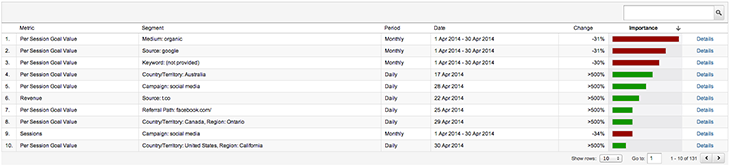
Image: personal screenshots
On the left side of your Google Analytics Reporting dashboard you have the ability to view the daily, weekly and monthly automatic alerts that Google has already triggered for you. This overview provides the most important metrics and dimensions for your site. For example, the screenshot below shows you the change in views throughout April 2014 for one of my accounts. Naturally, by clicking on details you are provided with more details on the period.
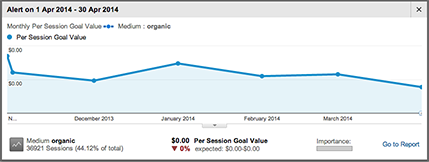
Image: personal screenshots
As you can see, the detailed view shows you the metrics again so that you can determine how importance each change is to you business. In this case, the graph tells you what the per-session goal value is, so you can see the weekly progress this metric made and why it triggered an automatic alert.
Daily, weekly, and monthly events
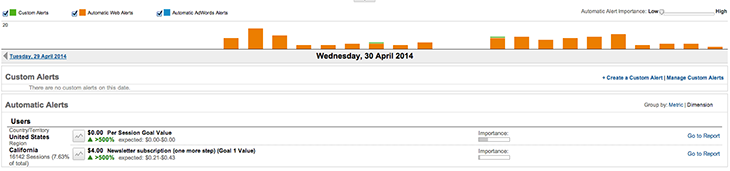
Image: personal screenshots
The daily, weekly and monthly events provide you with a detailed view on more specific intelligence alerts, as well as the alerts you’ve created yourself. (I’ll cover this in more detail in the next section.) On top of this, it enables you to change the importance of the alerts, as well as the alert category, including Custom Alerts, Automatic Web Alerts and, and Automatic Adwords Alerts.
The table contains an overview of the triggered alerts based on the settings you select. The links on the right side will guide you directly to the right report, where you can take a deeper look at each metric/dimension.

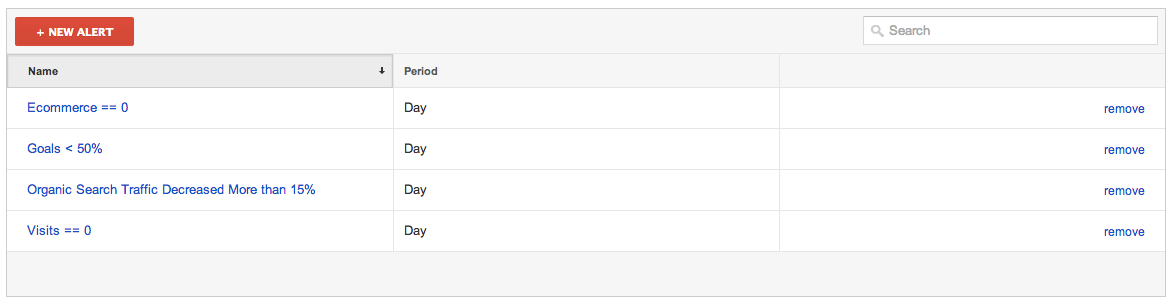
Image: personal screenshots
Overview: In the Admin of your Google Analytics View you’re able to see an overview of current intelligence alerts. Click the New Alert button at the top.
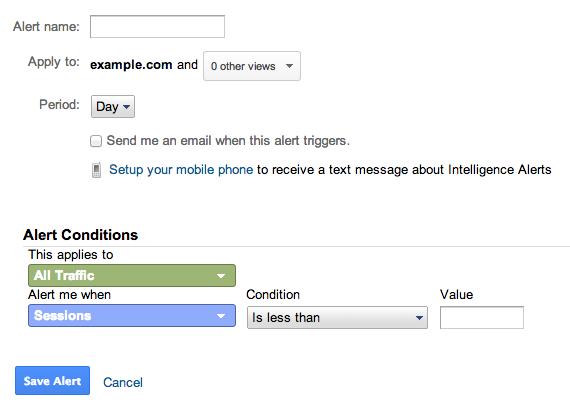
Image: personal screenshots
Now you have the opportunity to add a name to the alert and select the profiles you would like this intelligence event to apply to. By selecting the time period, you will be able to compare the current day, week or month to its previous variant. By setting the alert conditions, you have the opportunity to select the metrics and dimensions that must change in order to trigger a notification.

To save you some time, I’ve created a couple dozen intelligence alerts. The only things you need to do are log into your Google Analytics account and make sure you’re ready to get overwhelmed with weekly or daily alerts. Seriously, though, don’t feel compelled to add all of the alerts. Select only those that have the most value for you and your business.
Error/panic
A couple of alerts could help you monitor the status of your site and the Google Analytics integration into the site itself. You’ll likely want to know when certain tracking codes are removed and pages trigger errors:
- No traffic
- No goal completions
- No e-commerce conversions
- 404 Tracking (based on this great blog post)
- Revenue drop of XX% or no revenue
- Referrals from your own domain (this alert tells you that a tracking code is missing on certain pages)
Engagement
These alerts are ideal for publishers with lots of traffic:
Traffic sources
If you suddenly have more traffic, but don’t know where the traffic is coming from, the alerts for traffic sources could come in very handy:
- Increase / Decrease in direct traffic
- Increase / Decrease in organic traffic
- Increase / Decrease in paid traffic
- Increase / Decrease in referral traffic from a specific source
E-commerce
Monitoring the conversion rate for different browsers will make you aware of any problems your site has playing nice with certain browsers:
Google AdWords
If you’re running Google AdWords, you undoubtedly have alerts set up. But it would be handy to know the performance onsite and to see the corresponding spend associated with it if your spend goes up or down.

In the long term, Google Analytics Annotations will really help you review statistics year-over-year. If something noteworthy happens, add an annotation to the date in Google Analytics. It’s fairly simple to do, and will provide you, your colleagues, your manager, etc. with an idea of what’s going on with your site and why.
My favorite annotations are reports of bugs, new website features, and UX/ CRO improvements to popular pages.
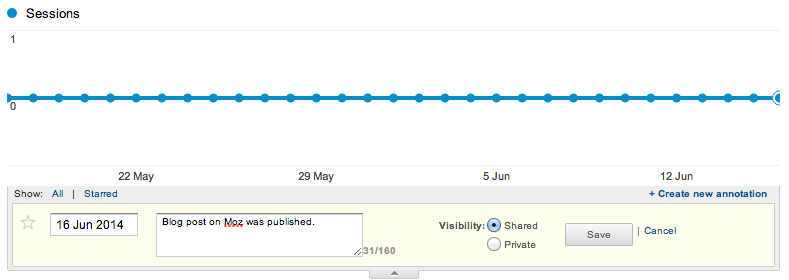
Image: personal screenshots
P.S. Dear Google Analytics product managers, if one of you is reading this, please make adding annotations available via the
Google Analytics Management API. It would make it so much cooler if, for example, we could add a new annotation to our data for every new post in WordPress.
TL;DR: Intelligence Alerts automatically keep you up to date on pre-configured changes in your data. With a daily email updates, you’ll never miss important changes associated with your website’s data, traffic or engagement.
Please let me know in the comments what your favorite intelligence alerts are and how you use them to your advantage. If you have any other tools that you use to keep yourself informed, don’t hesitate to share them.
Sign up for The Moz Top 10, a semimonthly mailer updating you on the top ten hottest pieces of SEO news, tips, and rad links uncovered by the Moz team. Think of it as your exclusive digest of stuff you don’t have time to hunt down but want to read!
SearchCap: Yahoo Search Share, Google Red Slow Icons & Green Stars
Below is what happened in search today, as reported on Search Engine Land and from other places across the web.
The post SearchCap: Yahoo Search Share, Google Red Slow Icons & Green Stars appeared first on Search Engine Land.
Please visit Search Engine Land for the full article.
Google Tests Live Chat in Search Results
The search giant is experimenting with integrating Google Hangouts into its search results.
Mobile Responsive Sites Boost Search Rankings for SMBs
While most SMBs know that mobile responsive sites boost Google rankings, many don’t know that pain points in mobile search could be costing both clicks and rank.
Study: Google Now Displays Rich Answers For 19.45% Of Queries
Rich answers are now displaying for targeted queries at a rate or 19.45% for targeted queries, according to a new study by Stone Temple Consulting.
The post Study: Google Now Displays Rich Answers For 19.45% Of Queries appeared first on Search Engine …
Fledgling App Uses Twitter’s Keyword Search to Win an Audience
Acorns, a brand-new finance app, recently created a hyper-targeted Twitter campaign using keyword search to serve ads to a mobile-first audience.
How Travel Advertisers Should Actually Be Using Search Marketing Benchmarks
Contributor Lori Weiman of The Search Monitor shares data to help travel and hospitality marketers gauge their success.
The post How Travel Advertisers Should Actually Be Using Search Marketing Benchmarks appeared first on Search Engine Land.
Please …
Google Mobile Displaying “Slow” Label In Search Results For Slow Sites?
It seems like Google may be testing a new label in the search results for slow sites. K Neeraj Kayastha posted a screen shot of the “Slow” label in a Google+ community and said he spotted this on his Android device searching in incognito mode…
…
Google Webmaster Tools Sending Warnings To Update WordPress Plugins
Jackson Lo posted a screenshot on Twitter that Google Webmaster Tools is notifying him to update a plugin that he uses on his WordPress site.
It says that Google is aware he is using an outdated version of Slider Revolution…