A new tool to disavow links
Webmaster level: Advanced
Today we’re introducing a tool that enables you to disavow links to your site. If you’ve been notified of a manual spam action based on “unnatural links” pointing to your site, this tool can help you address the issue. If you haven’t gotten this notification, this tool generally isn’t something you need to worry about.
First, a quick refresher. Links are one of the most well-known signals we use to order search results. By looking at the links between pages, we can get a sense of which pages are reputable and important, and thus more likely to be relevant to our users. This is the basis of PageRank, which is one of more than 200 signals we rely on to determine rankings. Since PageRank is so well-known, it’s also a target for spammers, and we fight linkspam constantly with algorithms and by taking manual action.
If you’ve ever been caught up in linkspam, you may have seen a message in Webmaster Tools about “unnatural links” pointing to your site. We send you this message when we see evidence of paid links, link exchanges, or other link schemes that violate our quality guidelines. If you get this message, we recommend that you remove from the web as many spammy or low-quality links to your site as possible. This is the best approach because it addresses the problem at the root. By removing the bad links directly, you’re helping to prevent Google (and other search engines) from taking action again in the future. You’re also helping to protect your site’s image, since people will no longer find spammy links pointing to your site on the web and jump to conclusions about your website or business.
If you’ve done as much as you can to remove the problematic links, and there are still some links you just can’t seem to get down, that’s a good time to visit our new Disavow links page. When you arrive, you’ll first select your site.
Today we’re introducing a tool that enables you to disavow links to your site. If you’ve been notified of a manual spam action based on “unnatural links” pointing to your site, this tool can help you address the issue. If you haven’t gotten this notification, this tool generally isn’t something you need to worry about.
First, a quick refresher. Links are one of the most well-known signals we use to order search results. By looking at the links between pages, we can get a sense of which pages are reputable and important, and thus more likely to be relevant to our users. This is the basis of PageRank, which is one of more than 200 signals we rely on to determine rankings. Since PageRank is so well-known, it’s also a target for spammers, and we fight linkspam constantly with algorithms and by taking manual action.
If you’ve ever been caught up in linkspam, you may have seen a message in Webmaster Tools about “unnatural links” pointing to your site. We send you this message when we see evidence of paid links, link exchanges, or other link schemes that violate our quality guidelines. If you get this message, we recommend that you remove from the web as many spammy or low-quality links to your site as possible. This is the best approach because it addresses the problem at the root. By removing the bad links directly, you’re helping to prevent Google (and other search engines) from taking action again in the future. You’re also helping to protect your site’s image, since people will no longer find spammy links pointing to your site on the web and jump to conclusions about your website or business.
If you’ve done as much as you can to remove the problematic links, and there are still some links you just can’t seem to get down, that’s a good time to visit our new Disavow links page. When you arrive, you’ll first select your site.

You’ll then be prompted to upload a file containing the links you want to disavow.

The format is straightforward. All you need is a plain text file with one URL per line. An excerpt of a valid file might look like the following:
# Contacted owner of spamdomain1.com on 7/1/2012 to
# ask for link removal but got no response
domain:spamdomain1.com
# Owner of spamdomain2.com removed most links, but missed these
http://www.spamdomain2.com/contentA.html
http://www.spamdomain2.com/contentB.html
http://www.spamdomain2.com/contentC.html
In this example, lines that begin with a pound sign (#) are considered comments and Google ignores them. The “domain:” keyword indicates that you’d like to disavow links from all pages on a particular site (in this case, “spamdomain1.com”). You can also request to disavow links on specific pages (in this case, three individual pages on spamdomain2.com). We currently support one disavowal file per site and the file is shared among site owners in Webmaster Tools. If you want to update the file, you’ll need to download the existing file, modify it, and upload the new one. The file size limit is 2MB.
One great place to start looking for bad links is the “Links to Your Site” feature in Webmaster Tools. From the homepage, select the site you want, navigate to Traffic > Links to Your Site > Who links the most > More, then click one of the download buttons. This file lists pages that link to your site. If you click “Download latest links,” you’ll see dates as well. This can be a great place to start your investigation, but be sure you don’t upload the entire list of links to your site — you don’t want to disavow all your links!
One great place to start looking for bad links is the “Links to Your Site” feature in Webmaster Tools. From the homepage, select the site you want, navigate to Traffic > Links to Your Site > Who links the most > More, then click one of the download buttons. This file lists pages that link to your site. If you click “Download latest links,” you’ll see dates as well. This can be a great place to start your investigation, but be sure you don’t upload the entire list of links to your site — you don’t want to disavow all your links!
To learn more about the feature, check out our Help Center, and we’d welcome your comments and questions in our forum. You’ll also find a video about the tool and a quick Q&A below.
We would reiterate that we built this tool for advanced webmasters only. We don’t recommend using this tool unless you are sure that you need to disavow some links to your site and you know exactly what you’re doing.
Q: Will most sites need to use this tool?
A: No. The vast, vast majority of sites do not need to use this tool in any way. If you’re not sure what the tool does or whether you need to use it, you probably shouldn’t use it.
Q: If I disavow links, what exactly does that do? Does Google definitely ignore them?
A: This tool allows you to indicate to Google which links you would like to disavow, and Google will typically ignore those links. Much like with rel=”canonical”, this is a strong suggestion rather than a directive—Google reserves the right to trust our own judgment for corner cases, for example—but we will typically use that indication from you when we assess links.
Q: How soon after I upload a file will the links be ignored?
A: We need to recrawl and reindex the URLs you disavowed before your disavowals go into effect, which can take multiple weeks.
Q: Can this tool be used if I’m worried about “negative SEO”?
A: The primary purpose of this tool is to help clean up if you’ve hired a bad SEO or made mistakes in your own link-building. If you know of bad link-building done on your behalf (e.g., paid posts or paid links that pass PageRank), we recommend that you contact the sites that link to you and try to get links taken off the public web first. You’re also helping to protect your site’s image, since people will no longer find spammy links and jump to conclusions about your website or business. If, despite your best efforts, you’re unable to get a few backlinks taken down, that’s a good time to use the Disavow Links tool.
In general, Google works hard to prevent other webmasters from being able to harm your ranking. However, if you’re worried that some backlinks might be affecting your site’s reputation, you can use the Disavow Links tool to indicate to Google that those links should be ignored. Again, we build our algorithms with an eye to preventing negative SEO, so the vast majority of webmasters don’t need to worry about negative SEO at all.
Q: I didn’t create many of the links I’m seeing. Do I still have to do the work to clean up these links?
A: Typically not. Google normally gives links appropriate weight, and under normal circumstances you don’t need to give Google any additional information about your links. A typical use case for this tool is if you’ve done link building that violates our quality guidelines, Google has sent you a warning about unnatural links, and despite your best efforts there are some links that you still can’t get taken down.
Q: I uploaded some good links. How can I undo uploading links by mistake?
A: To modify which links you would like to ignore, download the current file of disavowed links, change it to include only links you would like to ignore, and then re-upload the file. Please allow time for the new file to propagate through our crawling/indexing system, which can take several weeks.
Q: Should I create a links file as a preventative measure even if I haven’t gotten a notification about unnatural links to my site?
A: If your site was affected by the Penguin algorithm update and you believe it might be because you built spammy or low-quality links to your site, you may want to look at your site’s backlinks and disavow links that are the result of link schemes that violate Google’s guidelines.
Q: If I upload a file, do I still need to file a reconsideration request?
A: Yes, if you’ve received notice that you have a manual action on your site. The purpose of the Disavow Links tool is to tell Google which links you would like ignored. If you’ve received a message about a manual action on your site, you should clean things up as much as you can (which includes taking down any spammy links you have built on the web). Once you’ve gotten as many spammy links taken down from the web as possible, you can use the Disavow Links tool to indicate to Google which leftover links you weren’t able to take down. Wait for some time to let the disavowed links make their way into our system. Finally, submit a reconsideration request so the manual webspam team can check whether your site is now within Google’s quality guidelines, and if so, remove any manual actions from your site.
Q: Do I need to disavow links from example.com and example.co.uk if they’re the same company?
A: Yes. If you want to disavow links from multiple domains, you’ll need to add an entry for each domain.
Q: What about www.example.com vs. example.com (without the “www”)?
A: Technically these are different URLs. The disavow links feature tries to be granular. If content that you want to disavow occurs on multiple URLs on a site, you should disavow each URL that has the link that you want to disavow. You can always disavow an entire domain, of course.
Q: Can I disavow something.example.com to ignore only links from that subdomain?
A: For the most part, yes. For most well-known freehosts (e.g. wordpress.com, blogspot.com, tumblr.com, and many others), disavowing “domain:something.example.com” will disavow links only from that subdomain. If a freehost is very new or rare, we may interpret this as a request to disavow all links from the entire domain. But if you list a subdomain, most of the time we will be able to ignore links only from that subdomain.
Posted by Jonathan Simon, Webmaster Trends Analyst


Automatic Google Pagerank Update Monitor
Google Pagerank isn’t as useful a metric as it used to be, and on it’s own, has little to do with where you actually rank for a particular keyword. However, while Google themselves state it an indication of the reputation of a page, it is worth having…
Make the web faster with mod_pagespeed, now out of Beta
If your page is on the web, speed matters. For developers and webmasters, making your page faster shouldn’t be a hassle, which is why we introduced mod_pagespeed in 2010. Since then the development team has been working to improve the functionality, quality and performance of this open-source Apache module that automatically optimizes web pages and their resources. Now, after almost two years and eighteen releases, we are announcing that we are taking off the Beta label.
We’re committed to working with the open-source community to continue evolving mod_pagespeed, including more, better and smarter optimizations and support for other web servers. Over 120,000 sites are already using mod_pagespeed to improve the performance of their web pages using the latest techniques and trends in optimization. The product is used worldwide by individual sites, and is also offered by hosting providers, such as DreamHost, Go Daddy and content delivery networks like EdgeCast. With the move out of beta we hope that even more sites will soon benefit from the web performance improvements offered through mod_pagespeed.
mod_pagespeed is a key part of our goal to help make the web faster for everyone. Users prefer faster sites and we have seen that faster pages lead to higher user engagement, conversions, and retention. In fact, page speed is one of the signals in search ranking and ad quality scores. Besides evangelizing for speed, we offer tools and technologies to help measure, quantify, and improve performance, such as Site Speed Reports in Google Analytics, PageSpeed Insights, and PageSpeed Optimization products. In fact, both mod_pagespeed and PageSpeed Service are based on our open-source PageSpeed Optimization Libraries project, and are important ways in which we help websites take advantage of the latest performance best practices.
To learn more about mod_pagespeed and how to incorporate it in your site, watch our recent Google Developers Live session or visit the mod_pagespeed product page.
Posted by Joshua Marantz and Ilya Grigorik, Google PageSpeed Team

Rich snippets guidelines
Webmaster level: All
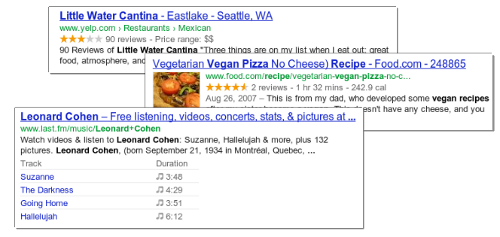
Traditional, text-only, search result snippets aim to summarize the content of a page in our search results. Rich snippets (shown above) allow webmasters to help us provide even better summaries using structured data markup that they can add to their pages. Today we’re introducing a set of guidelines to help you implement high quality structured data markup for rich snippets.
Once you’ve correctly added structured data markup to you site, rich snippets are generated algorithmically based on that markup. If the markup on a page offers an accurate description of the page’s content, is up-to-date, and is visible and easily discoverable on your page and by users, our algorithms are more likely to decide to show a rich snippet in Google’s search results.
Alternatively, if the rich snippets markup on a page is spammy, misleading, or otherwise abusive, our algorithms are much more likely to ignore the markup and render a text-only snippet. Keep in mind that, while rich snippets are generated algorithmically, we do reserve the right to take manual action (e.g., disable rich snippets for a specific site) in cases where we see actions that hurt the experience for our users.
To illustrate these guidelines with some examples:
- If your page is about a band, make sure you mark up concerts being performed by that band, not by related bands or bands in the same town.
- If you sell products through your site, make sure reviews on each page are about that page’s product and not the store itself.
- If your site provides song lyrics, make sure reviews are about the quality of the lyrics, not the quality of the song itself.
In addition to the general rich snippets quality guidelines we’re publishing today, you’ll find usage guidelines for specific types of rich snippets in our Help Center. As always, if you have any questions or feedback, please tell us in the Webmaster Help Forum.
Posted by Jeremy Lubin, Consumer Experience Specialist, & Pierre Far, Webmaster Trends Analyst

Google Webmaster Guidelines updated
Webmaster level: All
Today we’re happy to announce an updated version of our Webmaster Quality Guidelines. Both our basic quality guidelines and many of our more specific articles (like those on links schemes or hidden text) have been reorganized and expanded to provide you with more information about how to create quality websites for both users and Google.
The main message of our quality guidelines hasn’t changed: Focus on the user. However, we’ve added more guidance and examples of behavior that you should avoid in order to keep your site in good standing with Google’s search results. We’ve also added a set of quality and technical guidelines for rich snippets, as structured markup is becoming increasingly popular.
We hope these updated guidelines will give you a better understanding of how to create and maintain Google-friendly websites.
Posted by Betty Huang & Eric Kuan, Google Search Quality Team

Keeping you informed of critical website issues
Webmaster level: All
Having a healthy and well-performing website is important, both to you as the webmaster and to your users. When we discover critical issues with a website, Webmaster Tools will now let you know by automatically sending an email with more information.
We’ll only notify you about issues that we think
have significant impact on your site’s health or search performance and
which have clear actions that you can take to address the issue. For
example, we’ll email you if we detect malware on your site or see a
significant increase in errors while crawling your site.
For most sites these kinds of issues will occur
rarely. If your site does happen to have an issue, we cap the number of
emails we send over a certain period of time to avoid flooding your inbox.
If you don’t want to receive any email from Webmaster Tools you can
change your email delivery
preferences.
We hope that you find this change a useful way to
stay up-to-date on critical and important issues regarding your site’s
health. If you
have any questions, please let us know via our
Webmaster
Help Forum.
Posted by John Mueller, Webmaster Trends Analyst, Google Zürich

Structured Data Testing Tool
Webmaster level: All
Today we’re excited to share the launch of a shiny new version of the rich snippet testing tool, now called the structured data testing tool. The major improvements are:
Today we’re excited to share the launch of a shiny new version of the rich snippet testing tool, now called the structured data testing tool. The major improvements are:
- We’ve improved how we display rich snippets in the testing tool to better match how they appear in search results.
- The brand new visual design makes it clearer what structured data we can extract from the page, and how that may be shown in our search results.
- The tool is now available in languages other than English to help webmasters from around the world build structured-data-enabled websites.
Here’s what it looks like:
The new structured data testing tool works with all supported rich snippets and authorship markup, including applications, products, recipes, reviews, and others.
Try it yourself and, as always, if you have any questions or feedback, please tell us in the Webmaster Help Forum.
Written by Yong Zhu on behalf of the rich snippets testing tool team


Answering the top questions from government webmasters
Webmaster level: Beginner – Intermediate
Government sites, from city to state to federal agencies, are extremely important to Google Search. For one thing, governments have a lot of content — and government websites are often the canonical source of information that’s important to citizens. Around 20 percent of Google searches are for local information, and local governments are experts in their communities.
That’s why I’ve spoken at the National Association of Government Webmasters (NAGW) national conference for the past few years. It’s always interesting speaking to webmasters about search, but the people running government websites have particular concerns and questions. Since some questions come up frequently I thought I’d share this FAQ for government websites.
Question 1: How do I fix an incorrect phone number or address in search results or Google Maps?
Although managing their agency’s site is plenty of work, government webmasters are often called upon to fix problems found elsewhere on the web too. By far the most common question I’ve taken is about fixing addresses and phone numbers in search results. In this case, government site owners really can do it themselves, by claiming their Google+ Local listing. Incorrect or missing phone numbers, addresses, and other information can be fixed by claiming the listing.
Most locations in Google Maps have a Google+ Local listing — businesses, offices, parks, landmarks, etc. I like to use the San Francisco Main Library as an example: it has contact info, detailed information like the hours they’re open, user reviews and fun extras like photos. When we think users are searching for libraries in San Francisco, we may display a map and a listing so they can find the library as quickly as possible.
If you work for a government agency and want to claim a listing, we recommend using a shared Google Account with an email address at your .gov domain if possible. Usually, ownership of the page is confirmed via a phone call or post card.
Question 2: I’ve claimed the listing for our office, but I have 43 different city parks to claim in Google Maps, and none of them have phones or mailboxes. How do I claim them?
Use the bulk uploader! If you have 10 or more listings / addresses to claim at the same time, you can upload a specially-formatted spreadsheet. Go to www.google.com/places/, click the “Get started now” button, and then look for the “bulk upload” link.
If you run into any issues, use the Verification Troubleshooter.
Question 3: We’re moving from a .gov domain to a new .com domain. How should we move the site?
We have a Help Center article with more details, but the basic process involves the following steps:
- Make sure you have both the old and new domain verified in the same Webmaster Tools account.
- Use a 301 redirect on all pages to tell search engines your site has moved permanently.
- Don’t do a single redirect from all pages to your new home page — this gives a bad user experience.
- If there’s no 1:1 match between pages on your old site and your new site (recommended), try to redirect to a new page with similar content.
- If you can’t do redirects, consider cross-domain canonical links.
- Make sure to check if the new location is crawlable by Googlebot using the Fetch as Google feature in Webmaster Tools.
- Use the Change of Address tool in Webmaster Tools to notify Google of your site’s move.
- Have a look at the Links to Your Site in Webmaster Tools and inform the important sites that link to your content about your new location.
- We recommend not implementing other major changes at the same time, like large-scale content, URL structure, or navigational updates.
- To help Google pick up new URLs faster, use the Fetch as Google tool to ask Google to crawl your new site, and submit a Sitemap listing the URLs on your new site.
- To prevent confusion, it’s best to retain control of your old site’s domain and keep redirects in place for as long as possible — at least 180 days.
What if you’re moving just part of the site? This question came up too — for example, a city might move its “Tourism and Visitor Info” section to its own domain.
In that case, many of the same steps apply: verify both sites in Webmaster Tools, use 301 redirects, clean up old links, etc. In this case you don’t need to use the Change of Address form in Webmaster Tools since only part of your site is moving. If for some reason you’ll have some of the same content on both sites, you may want to include a cross-domain canonical link pointing to the preferred domain.
Question 4: We’ve done a ton of work to create unique titles and descriptions for pages. How do we get Google to pick them up?
First off, that’s great! Better titles and descriptions help users decide to click through to get the information they need on your page. The government webmasters I’ve spoken with care a lot about the content and organization of their sites, and work hard to provide informative text for users.
Google’s generation of page titles and descriptions (or “snippets”) is completely automated and takes into account both the content of a page as well as references to it that appear on the web. Changes are picked up as we recrawl your site. But you can do two things to let us know about URLs that have changed:
- Submit an updated XML Sitemap so we know about all of the pages on your site.
- In Webmaster Tools, use the Fetch as Google feature on a URL you’ve updated. Then you can choose to submit it to the index.
- You can choose to submit all of the linked pages as well — if you’ve updated an entire section of your site, you might want to submit the main page or an index page for that section to let us know about a broad collection of URLs.
Question 5: How do I get into the YouTube government partner program?
For this question, I have bad news, good news, and then even better news. On the one hand, the government partner program has been discontinued. But don’t worry, because most of the features of the program are now available to your regular YouTube account. For example, you can now upload videos longer than 10 minutes.
Did I say I had even better news? YouTube has added a lot of functionality useful for governments in the past year:
- You can now broadcast live streaming video to YouTube via Hangouts On Air (requires a Google+ account).
- You can link your YouTube account with your Webmaster Tools account, making it the “official channel” for your site.
- Automatic captions continue to get better and better, supporting more languages.
I hope this FAQ has been helpful, but I’m sure I haven’t covered everything government webmasters want to know. I highly recommend our Webmaster Academy, where you can learn all about making your site search-engine friendly. If you have a specific question, please feel free to add a question in the comments or visit our really helpful Webmaster Central Forum.
Posted by Jason Morrison, Search Quality Team

Site Errors Breakdown
Webmaster level: All
Today we’re announcing more detailed Site Error information in Webmaster Tools. This information is useful when looking for the source of your Site Errors. For example, if your site suffers from server connectivity problems, your server may simply be misconfigured; then again, it could also be completely unavailable! Since each Site Error (DNS, Server Connectivity, and Robots.txt Fetch) is comprised of several unique issues, we’ve broken down each category into more specific errors to provide you with a better analysis of your site’s health.
Site Errors will display statistics for each of your site-wide crawl errors from the past 90 days. In addition, it will show the failure rates for any category-specific errors that have been affecting your site.
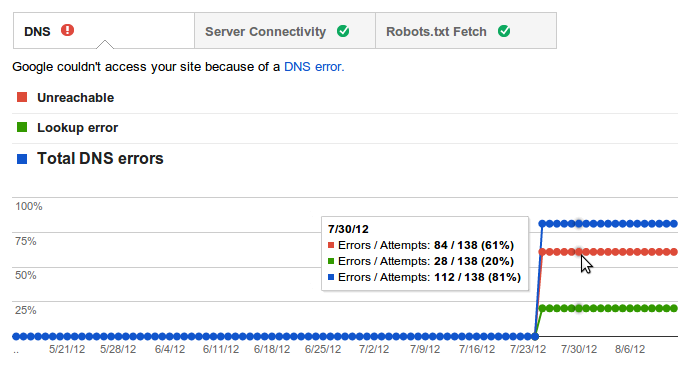
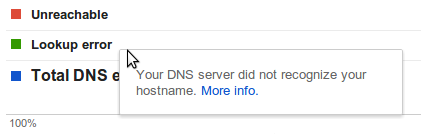
If you’re not sure what a particular error means, you can read a short description of it by hovering over its entry in the legend. You can find more detailed information by following the “More info” link in the tooltip.
We hope that these changes will make Site Errors even more informative and helpful in keeping your site in tip-top shape. If you have any questions or suggestions, please let us know through the Webmaster Tools Help Forum.
Written by Cesar Cuenca and Tiffany Wang, Webmaster Tools Interns

Search Queries Alerts in Webmaster Tools
Webmaster level: All
We know many of you check Webmaster Tools daily (thank you!), but not everybody has the time to monitor the health of their site 24/7. It can be time consuming to analyze all the data and identify the most important issues. To make it a little bit easier we’ve been incorporating alerts into Webmaster Tools. We process the data for your site and try to detect the events that could be most interesting for you. Recently we rolled out alerts for Crawl Errors and today we’re introducing alerts for Search Queries data.
The Search Queries feature in Webmaster Tools shows, among other things, impressions and clicks for your top pages over time. For most sites, these numbers follow regular patterns, so when sudden spikes or drops occur, it can make sense to look into what caused them. Some changes are due to differing demand for your content, other times they may be due to technical issues that need to be resolved, such as broken redirects. For example, a steady stream of clicks which suddenly drops to zero is probably worth investigating.
The alerts look like this:

We know many of you check Webmaster Tools daily (thank you!), but not everybody has the time to monitor the health of their site 24/7. It can be time consuming to analyze all the data and identify the most important issues. To make it a little bit easier we’ve been incorporating alerts into Webmaster Tools. We process the data for your site and try to detect the events that could be most interesting for you. Recently we rolled out alerts for Crawl Errors and today we’re introducing alerts for Search Queries data.
The Search Queries feature in Webmaster Tools shows, among other things, impressions and clicks for your top pages over time. For most sites, these numbers follow regular patterns, so when sudden spikes or drops occur, it can make sense to look into what caused them. Some changes are due to differing demand for your content, other times they may be due to technical issues that need to be resolved, such as broken redirects. For example, a steady stream of clicks which suddenly drops to zero is probably worth investigating.
The alerts look like this:

We’re still working on the sensitivity threshold of the messages and welcome your feedback in our help forums. We hope the new alerts will be useful. Don’t forget to sign up for email forwarding to receive them in your inbox.
Posted by Javier Tordable, Tech Lead, Webmaster Tools

Configuring URL Parameters in Webmaster Tools
Webmaster Level: Intermediate to Advanced
We recently filmed a video (with slides available) to provide more information about the URL Parameters feature in Webmaster Tools. The URL Parameters feature is designed for webmasters who want to help Google crawl their site more efficiently, and who manage a site with — you guessed it — URL parameters! To be eligible for this feature, the URL parameters must be configured in key/value pairs like item=swedish-fish or category=gummy-candy in the URL http://www.example.com/product.php?item=swedish-fish&category=gummy-candy.
Guidance for common cases when configuring URL Parameters. Music in the background masks the ongoing pounding of my neighbor’s construction!
URL Parameter settings are powerful. By telling us how your parameters behave and the recommended action for Googlebot, you can improve your site’s crawl efficiency. On the other hand, if configured incorrectly, you may accidentally recommend that Google ignore important pages, resulting in those pages no longer being available in search results. (There’s an example provided in our improved Help Center article.) So please take care when adjusting URL Parameters settings, and be sure that the actions you recommend for Googlebot make sense across your entire site.
Written by Maile Ohye, Developer Programs Tech Lead
