
If you are a webmaster or business owner preparing for a website migration, this article is for you. You can keep the rankings your old site has earned and transfer them to your new site when you migrate from one domain to another. Sometimes this can be complicated, and sometimes not.
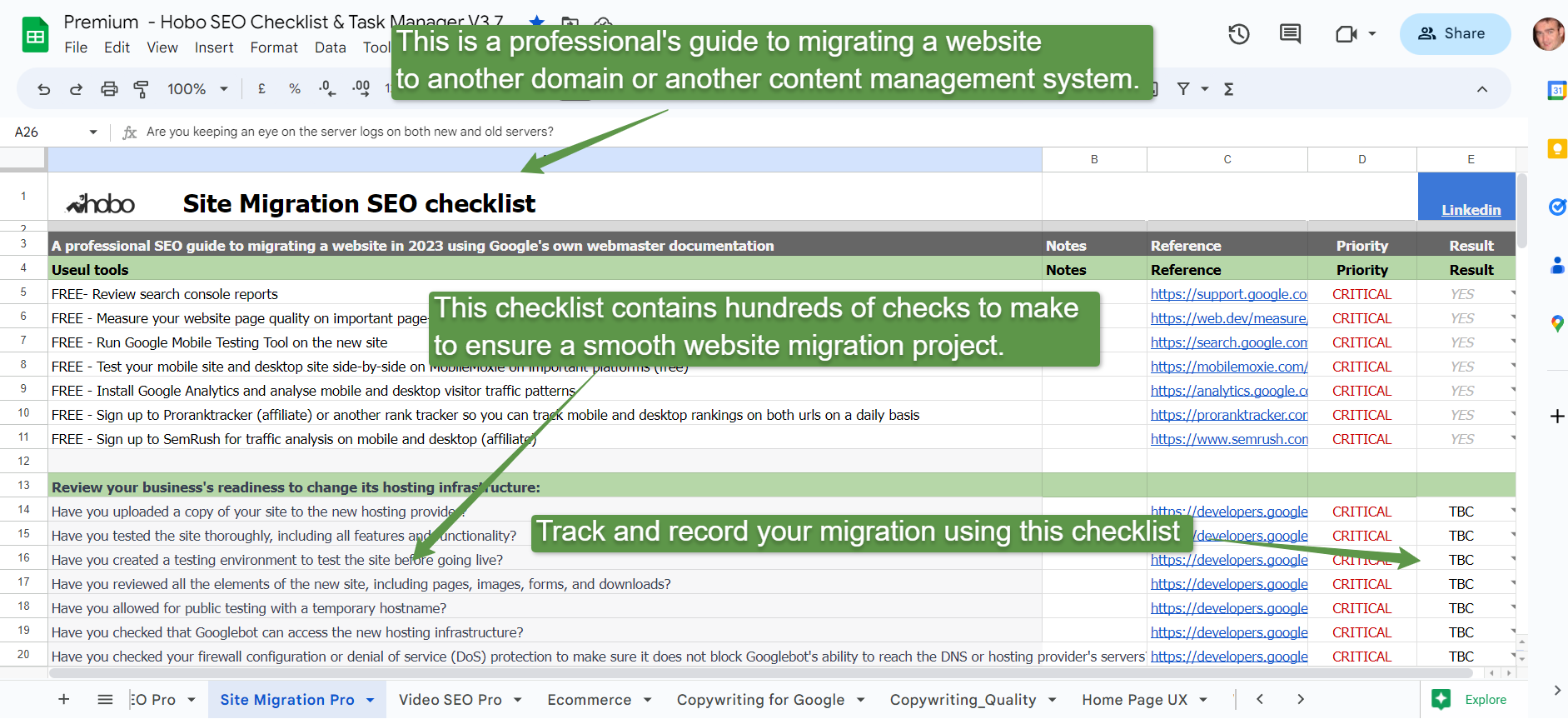
If you are looking for a professional checklist for migrating your website, visit the website migration SEO checklist.
I’ve 20 years of experience migrating websites.
This is what I would do if I was migrating your website:
Key Points:
- Keep the same domain ownership details on both the old and new domain
- Keep URL structure, page LAYOUT, and FUNCTIONALITY on the new target site identical to the old URL
- Register all versions of your site in Google Search Console (SC or AKA Webmaster Tools) (that’s 4 versions at the last count unless you use the domain property feature in SC)
- Use 301 redirects to redirect to ONE canonical HTTPS version of the new TARGET URL (add a self-referring Canonical Link Element to the new TARGET URL)
- Fix all on-site errors like 400 and 500 errors before you migrate (ideally)
- Find all inbound broken backlinks to the site and redirect them to “equivalent content”
- Use 301 redirects on all other versions of the domain, pointing to one canonical version of the new domain (TARGET URL)
- Minimize redirect chains across your site (not only can Google be expected to only follow about 5-10 redirects in a chain, employing fewer redirects will speed up your site).
- Avoid redirecting any links to category pages unless extremely relevant, as per advice from Google
- Avoid redirecting links en-mass to NON-equivalent content e.g. Home page, as per advice from Google
- Re-point existing redirected links to better, more equivalent content (as you are recommended to do this in the Panda document)
- Redirect really out-of-date links (you absolutely want to keep) to pages of secondary importance that are as relevant as possible to your existing content.
- To avoid throwing link equity away, you might create HIGH-LEVEL IN-DEPTH TOPIC PAGES on your site and redirect (or use canonical redirects) any related expired content that has INCOMING BACKLINKS, to this topic page (and keep it updated, folding content from old pages, where relevant and there is traffic opportunity, to create TOPIC pages that are focused on the customer e.g. information pages)
- Avoid unnecessary redirects in links in internal pages on the site
- If you have no real reason to redirect a page, and no equivalent content to redirect it to, then serve a 404. or even better, a server response 410 (GONE FOREVER). You should only be implementing 301s if you have some signal of quality pointing to that particular URL that is worth keeping.
- Submit a new optimized sitemap to Google Search Console for the Target URL
- Compare old site robots.txt with new Target URL robots.txt
- Ensure redirected domains redirect through a canonical redirect and this too has any chains minimized, although BE SURE to audit the backlink profile for any redirects you point at a page as with reward comes punishment if those backlinks are toxic (another example of Google opening up the war that is technical SEO on a front that isn’t, and in fact is converse, to building backlinks to your site).
- Disavow all low-quality or paid backlinks pointing to these domains, and upload the disavow file to all domains.
Good luck!
If you are looking for a website migration service, see the website migration services that keep Google rankings.
Changing your website’s domain name
QUOTE: “How do I move from one domain to another domain and try to preserve the rankings as best as possible?…do a 301 permanent redirect to the new location (assuming that you’re you’re moving for all time and eternity so this is the good case for a permanent or 301 redirect if you were planning to undo this later or it’s temporary then you’d use a 302 redirect)…. search engines should be able to follow the trail of all the 301 redirects” Matt Cutts, Google, 2011
PS – I’ve quoted Google’s John Mueller a lot in this article:

Why should I care about redirects when I move domain?
QUOTE: “if you really want to move your website then you should try to [use] 301 redirects” John Mueller, Google
301 Redirects are an incredibly important and often overlooked area of search engine optimisation. Properly implemented 301 Redirects are THE cornerstone SEO consideration in any website migration project. You can use 301 redirects to redirect pages, sub-folders or even entire websites and preserve Google rankings that the old page, sub-folder or website(s) enjoyed. Rather than tell Google via a 404, 410 or some other instruction that a page isn’t here anymore, you can permanently redirect an expired page to a relatively similar page to preserve any link equity that old page might have.
Redirecting multiple old pages to one new page works too if the information is there on the new page that ranked the old page. Pages should be thematically connected if you want the redirects to have a SEO benefit.
My general rule of thumb is to make sure the information (and keywords) on the old page are featured prominently in the text of the new page – stay on the safe side.
QUOTE: “If you need to change the URL of a page as it is shown in search engine results, we recommend that you use a server-side 301 redirect. This is the best way to ensure that users and search engines are directed to the correct page.” Google, 2018
If you fail to implement proper redirects when migrating a website from one domain to another you will instantly lose any traffic to your website you currently enjoy, with new visitors often greeted by the dreaded 404 page and soft-404s applied by Google if they do not trust the redirect in a way that helps visitors.
If that’s not reason enough, failing to employ redirects will unquestionably impact on any good rankings your site also enjoys.
How do I redirect visitors and search engines to my new site?
QUOTE: “301s happen at a page level so just because you see one 301 on one page of the old domain does not mean the entire domain has completely migrated.” Matt Cutts, Google
You redirect any visitor, including search engines, to ANY PAGE on the domain using the same technique: ‘301 permanent redirects’.
Can you transfer rankings from an old domain to another?
QUOTE: “How do I move from one domain to another domain and try to preserve the rankings as best as possible?…do a 301 permanent redirect to the new location.” Matt Cutts, Google, 2011
Yes. If you are planning a rebrand, for example, and need to change website addresses, ensure you 301 redirect all visitors to the new domain (and also redirect any relevant internal pages to internal pages on the new domain).
It is also important to convey your old domain’s search engine rankings to the new web address – or your website will effectively be starting from zero visibility, in search engines at any rate.
How long do I keep 301 redirects in place?
I do not think the video above actually answers this question in a very meaningful way.
The real answer is….Forever. Until you die, or the website does. Whatever comes first. As soon as you remove 301s you break a connection that Google counts on to determine your domain reputation and individual page quality scores.
This is incredibly important of course if you HAVE some domain reputation or site quality scores of note.
Note: A 301 permanent redirect is ONLY permanent as long as the 301 redirect command is in place on the source server. Remove the redirect command, and Google will index pages as it did before you implemented the redirects.
John Mueller also gave us advice in this area:
QUOTE: “So from our point of view, when we look at 301 redirects and permanent site move situations, we do expect that 301 redirect to be there for the long run. So that could be something maybe a year, or ideally even longer than a year, so that we can really be sure that everything that was pointing at the old URLs is pointing at the new URLs. And also if users are going to those pages directly, through bookmarks that they might have saved, through old links that are out there on the web, then they might still be kind of clicking on those old links and they expect to land on the final page.” John Mueller, Google, 2016
and:
QUOTE: “Ideally, you would have that redirect there for a long run, but I know from a practical point of view at some point you have to say oh, it’s finished, we can’t pay the domain name anymore, the other guy wants to do something else with the domain name, so at some point you are going to cut that off, but I’d really aim for something at least like a year. And if you have access, you can look at the server logs and see how many people are actually being redirected there. And if you notice after a year there’s still a lot of normal people being redirected, maybe you can figure out how they are reaching the old domain, is it like an important link you forgot to get updated on the web, is it just lots of people with bookmarks and you can’t really fix their own bookmarks, that’s kind of what I would aim for there, at least a year.” John Mueller, Google 2016
My 2 cents? I would keep important server-side redirects in place, wherever they are, FOREVER if you want to get the most SEO BENEFIT.
Will redirects dilute PageRank?
No.
QUOTE: “30x redirects don’t lose PageRank anymore.” Gary IIlyes, Google 2016
and:
QUOTE: “Do I lose “link juice” from the redirects? No, for 301 or 302 redirects from HTTP to HTTPS no PageRank is lost.” John Mueller, Google 2016
How long does it take for Google to implement a full site migration?
It can take quite some time for Google to totally ‘forget’ about your old domain. You may see old URLs somewhat frustratingly still appear in the SERPs.
QUOTE: “Anytime you do a bigger change on your website if you redirect a lot of URLs or if you go from one domain to another or if you change your site’s structure then all of that does take time for things to settle down so we can follow that pretty quickly we can definitely forward the signals there but that doesn’t mean that’ll happen from one day to next” John Mueller, Google 2016
Is there a limit to the amount of 301 redirects Google will follow in a ‘chain‘?
YES. Over my nearly 20 years of experience in this field, I’ve often heard the limit to be about 5 or 6 although Matt Cutts said it was risky even up at the 4, 5 and 6 hops in the chain.
Google confirmed (2017) that it will follow up to 5 redirects. See the official confirmation in the video below (from John Mueller).
QUOTE: “We follow up to five redirect steps in a redirect chain if it’s a server-side redirect.” John Mueller, Google
I would NOT rely on that MANY redirect in a chain, though, so try to ensure you have as FEW redirects in any chain of redirects at all times to avoid Google changing how it works in this area – e.g. how many redirects Google will honour in the future.
And it does change, often enough in plenty of areas to cause you future challenges.
Does Google treat 302’s the same as 301’s?
QUOTE: “I think there’s a big misconception with 302 redirects being bad for your website and your PageRank and that’s definitely not the case. When we see a 302, we’ll assume it’s a temporary redirect at first. However, if we feel it’s more of a permanent redirect, then we do treat it as a 301. Both of these redirects do pass PageRank.” John Mueller, Google, 2015
Essentially YES. A 302 Temporary Redirect is not ideal, but Google has said it treats 302 redirects left in place essentially like 301’s. John Meuler said in a Hangout that Google also treats 302s in a chain like 301s (although again that is far from ideal).
Still – it is better to be as exact as possible with Google to ensure you get the results you need. When permanently redirecting – use a 301 redirect.
Should I use a 301 or a 302 redirect?
For me I stick with a 301 redirect 99.9% of the time and only use a 302 when someone explains to me exactly why it needs to be a 302 in this instance – that keeps me right:
In short, for 301 redirects or 302 redirects e.g. this image and advice from John Meuller:
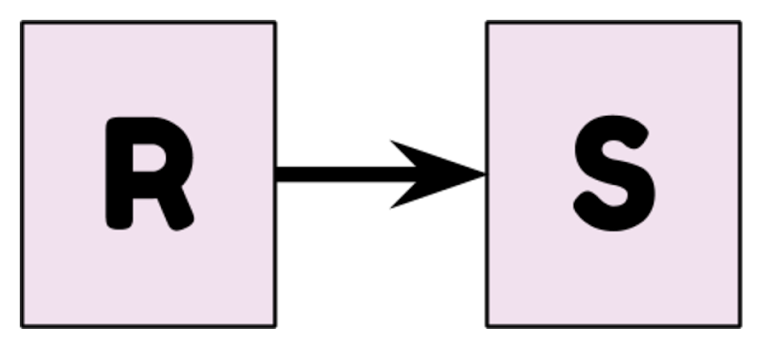
- 301 (permanent): “S” tends to get indexed, the redirect is cached
- 302 (temporary): “R” tends to get indexed, the redirect isn’t cached
HOW TO PROCEED
Audit, monitor and minimise your redirect chains and any URLs you have pointing at content that is not VERY EQUIVALENT to maximise link equity.
Should I tell Google about my change of domain?
YES. I’ve always found it pretty painless although I can appreciate it’s easy to screw up if you don’t know what you’re doing. Now you can actually tell Google about your domain name change in Google Webmaster Tools.
QUOTE: “If you’ve moved your site to a new domain, you can use the Change of address tool to tell Google about your new URL. We’ll update our index to reflect your new URL. Changes will stay in effect for 180 days, by which time we’ll have crawled and indexed the pages at your new URL. The change of address tool is safe, because only verified site owners can use it. You can check the tool at any time to see the information provided to Google about your domains.” Google, 2010
This new tool from Google will be handy for some, though, you’ll still need to know your way about some technical aspects to use it. See moving your website to another domain. UPDATE – Also see Google announcing support of the cross-domain rel=”canonical” link element.
Sign up for our Free SEO training course to find out more.
Redirect Non-WWW to WWW (or vice versa)
QUOTE: “The preferred domain is the one that you would liked used to index your site’s pages (sometimes this is referred to as the canonical domain). Links may point to your site using both the www and non-www versions of the URL (for instance, http://www.example.com and http://example.com). The preferred domain is the version that you want used for your site in the search results.” Google, 2018
Your site probably has canonicalisation issues (especially if you have an e-commerce website) and it might start at the domain level and this can exacerbate duplicate content problems on your website.
Simply put, https://www.hobo-web.co.uk/ can be treated by Google as a different URL than http://hobo-web.co.uk/ even though it’s the same page, and it can get even more complicated.
Its thought REAL Pagerank can be diluted if Google gets confused about your URLs and speaking simply you don’t want this PR diluted (in theory).
That’s why many, including myself, redirect non-www to www (or vice versa) if the site is on a Linux/Apache server (in the htaccess file –
Options +FollowSymLinks
RewriteEngine on
RewriteCond %{HTTP_HOST} ^hobo-web.co.uk [NC]
RewriteRule ^(.*)$ https://www.hobo-web.co.uk/$1 [L,R=301]
This is a MUST HAVE best practice. Basically, you are redirecting all ranking signals to one canonical version of a URL. It keeps it simple when optimising for Google. Do not mix the two types of www/non-www on site when linking your internal pages.
Note Google asks you which domain you prefer to set as your canonical domain in Google Webmaster Tools.
QUOTE: “Note: Once you’ve set your preferred domain, you may want to use a 301 redirect to redirect traffic from your non-preferred domain, so that other search engines and visitors know which version you prefer.” Google
Some redirects may be treated as soft 404 error pages
Can it be surmised that Google might label certain 301 redirects (that DO NOT redirect to VERY EQUIVALENT CONTENT) as SOFT 404 and so devalue all signals associated with them?
Will this be the same for e-commerce sites?
What Are Soft 404 Pages?
Typically:
QUOTE: “A soft 404 means that a URL on your site returns a page telling the user that the page does not exist and also a 200-level (success) code to the browser. (In some cases, instead of a “not found” page, it might be a page with little or no usable content–for example, a sparsely populated or empty page.)” Google, 2018
From my experience, not all soft 404 are created with enough volume to be a problem on most sites, but some auto-generated pages on some sites can produce soft 404 at a content level that with enough number that can cause indexation challenges.
QUOTE: “Returning a code other than 404 or 410 for a non-existent page (or redirecting users to another page, such as the homepage, instead of returning a 404) can be problematic. Firstly, it tells search engines that there’s a real page at that URL. As a result, that URL may be crawled and its content indexed. Because of the time Googlebot spends on non-existent pages, your unique URLs may not be discovered as quickly or visited as frequently and your site’s crawl coverage may be impacted (also, you probably don’t want your site to rank well for the search query” GOOGLE, 2020
However, Google will also treat certain mismatched or incorrect redirects as soft-404 type pages, too.
And this is a REAL problem and a marked change from the way Google worked say ten years ago.
It essentially means that Google is not going to honour your redirect instruction and that means you are at risk of knobbling any positive signals you are attempting to transfer through a redirect.
301 redirecting expired pages to your home page may result in ‘soft-404s’
QUOTE: “So the 301 redirect from all pages to the home page, that would be something that we see as a soft 404s” John Mueller, Google
NO – not for SEO benefit anyways. Google classes many improperly redirected links as soft 404s e.g. if you redirect a lot of URLs to your home page, for instance, is an example Google has given us. When redirecting visitors (and treat Googlebot as a visitor), ALWAYS redirect them to equivalent pages or you risk losing positive ranking signals the old URL has.
For Googlebot – think about the keywords, topics and concepts of the pages you are redirecting to. If they are a good match – Googlebot usually has no problem with that, in my 20 years experience – and will honour your request to redirect rankings.
I always try to find a relevant page to redirect one from another – it’s a good user experience, and that’s a good thing to focus on if you are trying to rank high in Google this year.
NEVER redirect to your home page – always redirect to an internal page, if you choose to redirect at all.
301 redirects from products to categories may result in soft-404s
A common challenge for lots of e-commerce and classified sites.
Q: Should you 301 redirect old, irrelevant product pages that are no longer relevant to your site, to an existing category or sub-category page on your site?
A: Maybe not, according to John Mueller of Google in a recent video – at least when it comes to classified listings (although advice is offered on e-commerce sites, too)
“Working on a very large classified website listings with millions of listings that expire every month. What are the best practices for indexation?”
John’s response to using EXPIRATION dates for content (that might even still, produce soft 404s at the content level) is not what I am interested in; it is advice on managing expired pages:
301 redirecting to a category, for example, is something we would probably pick up as a soft 404
Q: What about listings, or pages, with “lots of backlinks” from other sites?
If you have an equivalent page that replaces the old one, then redirect to that, apparently.
404 pages are the best practice when you have no exact equivalent content on the site, even when you have backlinks to the URLs in question!
Redirect to “equivalent content“
The message is out of date content can be a ‘bad user experience’ (it will depend on the query, of course) and ONLY REDIRECT content to EQUIVALENT CONTENT – ESPECIALLY if you have backlinks pointing to these pages and you want them to count.
OPINION: Should You Adhere to this Advice From Google?
I think you should lean towards what Google says, where possible.
Experienced SEOs redirect pages, of course, to conserve traffic, ‘link equity’ and ‘domain trust’ or ‘domain authority’ (which is useful metaphorically speaking, but is a metric we are told Google doesn’t have, although they DO understand something about the quality, trust, expertise and online business authority they can expect from a domain).
QUOTE: “So domain authority is kind of a theme picked up by SEO companies or SEO tools. So it’s not really something that we have here at Google.” John Mueller, Google 2017
Maybe this ‘something’ is kind of a quality score (maybe just a big logarithmic number) they have for your domain (after Google algorithms and spam fighters have looked for anything that they should demote you for*). Perhaps your score ‘votes’ for where your content ranks in Google and is then exposed to proxies for user satisfaction like pogo-sticking and the long click that impact this quality score to determine rankings for set periods. Entity optimisation and query re-writing obfuscate all this now, of course. Pure conjecture, of course, that I find myself wondering about.
Sometimes when Google hints at even a slight change in direction as it can end up having a bigger impact much further down the line.
I think the direction I see at least is that Google is hinting at eating away at your site’s ability to rank through any technical manipulation (outside of doing technical SEO absolutely correctly) .e.g exactly the same direction they took with Google Panda (promoting resource quality sometimes before keyword matching) and manual unnatural link decision making (link building) – oh, and Penguin.
You certainly don’t want to take a chance losing link value, whatever it is, and the best course of action is to listen to Google when they say they are cutting the grass and minimise your exposure IF they are going to basically just IGNORE some of your redirected links that don’t match what Google wants.
So, does that mean links that don’t redirect to very equivalent content won’t count as much in the future? I proceed with that understanding and expectation.
Would it be reasonable to assume you could make a page more relevant to redirected incoming links, by simply adding more keyword-specific content that is relevant to the actual links (and the context of the page linking to it)?
Maybe I am reading into that too much, for it would only be useful to know if you had a very old relatively popular site that went through multiple URL structures over many years).
How to use 301 redirects properly to preserve rankings in Google
I’ve stuck with the same method over the years when it comes to redirects.
If a PARTICULAR CANONICAL HEAD KEYWORD is IMPORTANT (even perhaps a SYNONYM or LONG TAIL VARIANT) and I think a particular 301 REDIRECT has some positive impact on how Google judges the quality or relevance the page, I will make sure the CANONICAL HEAD KEYWORD and SYNONYMS are on the FINAL PAGE I redirect Google to (which is the one that will be rated and cached).
RELEVANT REDIRECTS TO RELEVANT CONTENT.
If I want to boost the relevance of that page for that KEYWORD at the center of any redirects, I will ensure the new page content is updated and expanded upon if it is of genuine interest to a user.
Also, note, Google has recently said certain redirects to your home page will also count as soft 404. Don’t expect Toolbar Pagerank to pass via https redirects, for instance, as Toolbar Pagerank is dead.
A temporary or permanent redirect is only ‘in place’ as long as the instruction to do so REMAINS in place in, for instance, your htaccess file. Remove your redirect code, and a permanent redirect just became a temporary redirect and you can lose the benefit of the redirect,
A 302 redirect left in place usually functions as a 301, although I still would not rely on a 302 to function as a 301, based on previous experience (so I make all my redirects 301).
In my experience, a 301 redirect is what most want to use, if a redirect is necessary
Perhaps Google is giving those who will chase it another element to optimise to keep the traffic you already get, and succeed above others who will not take the measures, in this case, to optimise their redirects.
This may end up being another example where to optimise you need to dig down to a level where you need to learn how to be a htaccess / apache optimiser (which I am not, just as I am not a professional copywriter or CSS or mobile wizard).
Fortunately, you can still get away with keeping (whatever it is) as simple, fast and as canonical as possible and that is what I try and do.
Rel=Canonical can be treated as 301 redirects (kind of)
QUOTE: “We canonical page a) to page b) then after one months we do no index on page a, does page B drop in ranking because the related signals from a are not transferred anymore?”, John Mueller, Google, 2018
John explains two scenarios:
QUOTE: “in general when you have a canonical from one page to the other one and we notice its a confirmed thing and the same content is up on both of these pages and you you have the internal links also pointing to your new canonical then usually we kind of treat that as a redirect…… if you’ve moved all of those signals to the redirect target already then if the original page drops out then it’s gone it doesn’t really have any role anymore because there’s nothing attached to that original URL anymore.” John Mueller, Google 2018
That’s fine, when pages have only signals from internal links on your site, and the canonical redirect was never a critically important redirect.
When you run into trouble is when the page you are trying to redirect signals from has links from EXTERNAL sources e.g. has some link equity…. Such as backlinks from other websites pointing to page a).
QUOTE: “so if there’s a “redirect” (e.g. a canonical link element from page a) to b))) in place and we do forward those signals if after some time the redirect (to page b)) drops out and a lot of the signals are still applying to the old URL (page a)) then that could be a bit of a problem. (for page b))” John Mueller, Google 2018
Yes, that is a problem for page b) and your website health in general if page a) 404s at some point in the future e.g. disappears completely. You can totally short-cut your rankings if all the signals are pointing to page a) again and you are trying to rank page b).
In my experience, relying on canonicals as redirects is something that should be used only as a temporary measure. Google can, and will, ignore canonical tags for any number of reasons and this could severely impact your traffic a few months down the line if messed up.
QUOTE: “It’s possible that we picked this up and we say oh this is good enough but if the pages are not equivalent if they’re not really the same then it’s also possible that our algorithms look at this and say well this rel canonical is probably accidentally set like this and we should ignore it” John Mueller, Google 2018
If you want to redirect Google and get the most benefit out of your SEO efforts, you should ideally use 301 redirects when you have the option.
Can I merge multiple domains and redirect them to consolidate rankings?
Say you have multiple older sites that are ranking in Google for a lot of terms and there is an opportunity to redirect them to your primary site – will you keep those Google rankings? Yes, if done properly.
If you keep most of these quality signals intact, merging old domains and redirecting them to similar content shouldn’t be a problem. You MUST simply remember to redirect pages to equivalent content.
Be very careful, though, as Google is under no obligation to redirect domains and transfer rankings, and has said as much.
And it is going to take TIME to see the fruits of your labour:
QUOTE: “This kind of site-merging will always take time, but you make it significantly harder by not doing the merge consistently or cleanly. Redirect them all, set canonicals, crawl all of your old domain URLs to check, etc. A clean migration takes time, a hacky migration with an attempt to get short-term advantages will just take much longer. Aim for the final result.” John Mueller, Google 2018
Make sure these domains are not already blacklisted in Google for previous web spam violations before you implement any redirects!
Getting loads of unnatural links too fast to a domain may invite a Notice of Unnatural Links and an eventual penalty from the webspam team – especially if you own the domains in question, and if your intent is interpreted as manipulation.
QUOTE: “Cleaning up these kinds of link issue can take considerable time to be reflected by our algorithms (we don’t have a specific time in mind, but the mentioned 6-12 months is probably on the safe side)” John Mueller, Google 2018
NOTE: If you are buying domains for redirect purposes, I would ensure they are on topic with the theme of the website your are redirecting to, and even that is not 100% guaranteed to work.
QUOTE: “Sometimes we recognize that a new site is completely unrelated to an old site. So for example if you go out and buy an old domain name, it might have been a church website for 10 years. If we recognise your new website is really not the same as it was, then we need to understand that difference and say that, these links, they apply to the old website but they don’t apply to the new one.” John Mueller, Google 2016
Googles Matt Cutts said something similar a decade ago:
QUOTE: “Google tries to reset pagerank/links for all expired domains to zero when they are registered by someone new. They don’t try to penalize the expired domain, but they also don’t want to give credit for the previous owner’s links” Matt Cutts, Google, 2008
Case study
I needed to 301 an ageing, out-of-date satellite site (or mini-site) into the principal website of the company I was employed by.
The goal was to keep visitors and Google rankings.
Managing multiple sites in a niche usually means some of those sites get neglected. Often, a lot of the mini-sites won’t get the required time and effort it takes to actually convert the traffic earned to leads and sales.
Information on satellite sites can often end up more out-of-date than the primary site. In this case, the decision was made to redirect lower-quality mini sites to the main corporate site to ensure the more conversion friendly corporate site ranked for the competitive term the mini-site had earned.
The image below shows the results when I redirected a mini-site that ranked no1 for a valuable query to the main site.
This was a long time ago but it still works almost exactly today as it did then.
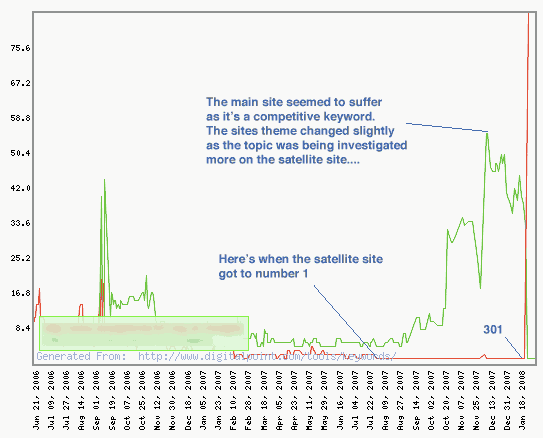
You can see from the illustration above and below when I achieved the no1 position with the satellite site, the actual corporate site was actually heading in a slightly different direction.
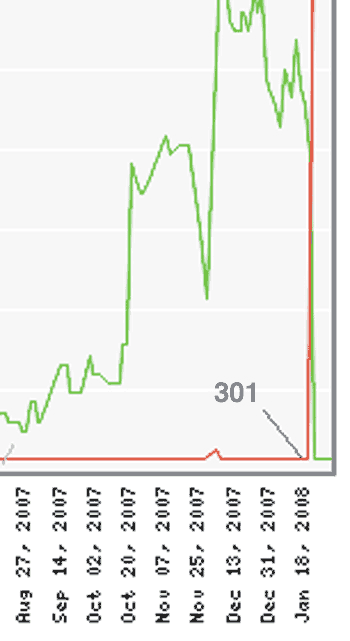
Essentially I wanted to make the main company site (in Green) be the number one result, and basically, I wanted the mini-site to disappear from Google but transfer all its good rankings (as well as 600 visitors a day) to the corporate site.
I completed this employing the perfectly white-hat search engine friendly 301 Permanent Redirect in the .htaccess file on the old site (in red) to the corporate site (in Green). redirect 301 /old.htm http://www.example.com/new.htm I ensured the new page on the corporate site was basically very similar in theme to page that Google currently ranked at No1 in the SERPs, so Googlebot wouldn’t think I was up to anything other than transfer rankings I had earned.
The end result is always (if done correctly) very satisfying as:
- The main site now ranks no1 in Google
- The main site now has absorbed the authority and trust of the old page which should help it’s overall domain reputation in the search engines.
- The page is now branded with the corporate id = better brand visibility
- Inexperienced link builders will be scratching their head for a while to come wondering what has happened and how the main site actually ranks at No1 in their attempt to reverse-engineer that particular SERP.
The images illustrate it worked exactly as expected.
The result of this simple strategy was a ‘new’ no1 position, with better branding and better conversion attributes, and 600 more visitors to the main site each day. It’s still like that today.
Things work very much the same although Google has raised the quality bar in some instances, and I would be careful.
Can I 301 multiple outdated pages to a new higher quality page?
QUOTE: “Don’t redirect many old URLs to one irrelevant destination, such as the home page of the new site. This can confuse users and might be treated as a soft 404 error. However, if you have consolidated content previously hosted on multiple pages to a new single page, it is acceptable to redirect the older URLs to that new, consolidated page.” Google Webmaster Guidelines, 2021
YES. Sometimes content becomes stale and you end up with lots of pages that are essentially redundant in Google. Sometimes, this type of content can actually hurt your rankings in Google.
You can permanently redirect any and all out-of-date content to equivalent new pages that stand a better chance of ranking in Google for important keywords.
Google advises server-side redirects are OK for this purpose – and so are CANONICAL LINK ELEMENTS – so I use them.
You can change the focus of a redirect but that’s a bit black hat for me and can be abused – I don’t really talk about that sort of thing on this blog.
But it’s worth knowing. You also need to keep these redirects in place in your .htaccess file going forward. Redirecting multiple old pages to one new page works for me, if the text-based information, and especially target key phrases, is mentioned, and prominent, on the new page.
In my own experience, and confirmed by talking to some people who worked at Google, I can say that a 301 redirect is usually only permanent until Google recrawls the links – so, these redirects CAN be changed later, although if you know the redirect will be temporary, you are recommended (by Google and Bing) to use a 302 Temporary redirect.
I usually employ 301s and have changed them back and forth multiple times over the years, with no issues.
Do pages need to be identical for 301 redirects to work?
NO – not in my experience. BUT only redirect users and Googlebot to HIGHLY equivalent pages where possible. Google is getting MORE and MORE strict with this guideline, as detailed by Google’s John Mueller in a recent tweet:
QUOTE: “301-redirecting for 404s makes sense if you have 1:1 replacement URLs, otherwise we’ll probably see it as soft-404s and treat like a 404.” John Mueller, Google, 2017
A good rule of thumb with any redirects (that you want to get the most benefit from) is to give visitors what they are expecting when they click on a link.
I often redirect many old URLs to one URL – if it’s relevant and a good user experience – but I avoid redirecting irrelevant pages to irrelevant destinations.
My general rule of thumb is to make sure the information (and keywords) on the old page are present in the new page copy.
Most SEO already know the power of a redirect, and how you (could, at least historically) use a 301 redirect to push even totally unrelated pages to the top of Google (for a time – sometimes a very long time.
Google is much better at preventing this sort of manipulation.
Can I transfer a Google penalty to my new domain with redirects?
This is a grey area but essentially yes. Do due diligence on any domain you are redirecting to your main site – you don’t want to redirect a site you own with a toxic link profile to your primary website, for instance. I would disavow those links first at the source website AND add those links to your own website disavow file.
There are nuances to this.
For instance, if you OWN BOTH SITES, and one is penalised or has a manual action against it from the webspam team, you are not going to lift the penalty just by redirecting the domain to another domain.
If you want to transfer old positive signals to your new domain, things need to be equivalent on the new domain. If things are 100% equivalent e.g. you have just cloned the site content, then Google may well transfer the negative signals from the old domain to the new domain – and they even attempt to this WITHOUT redirects in place in some cases (probably as an anti-spam measure):
QUOTE: “It kind of depends on how we find the website but if it’s essentially the same website just on a different domain then we’ll see that still as a kind of a site move and forward those links as well so if you start a completely different or new website on a new domain then that’s something we’ll see that as something completely separate whereas if you essentially copy the whole side to new domain then that’s still kind of a site move for us. It’s not a great site move it’s not one where I say this is a recommended way to move a website but we still see that essentially this is the same content this content move to a different domain and we can try to forward the signals ….. if we if we can recognize that this is essentially a site move that was just done incorrectly then we’ll try to help the webmaster by by treating it appropriately we sometimes see that for example if you’re on a free host or you can’t set up redirect or for some reason you have a technical problem on your server and you can’t set up redirect will try to pick that up and use that as a kind of a site move type it’s not a great way to handle a site move so if you really want to move your website then you should try to do the 301 redirects but if you can’t do the redirects we can sometimes help out algorithmically….” John Mueller, Google
So – you can NEGATIVE SEO yourself, in practice, but this is much harder to do if you are trying to negative SEO a domain you do not own, by just redirecting toxic links to another domain.
Bear in mind, though, while many SEO claim negative SEO is ‘easy’, Google says:
QUOTE: “we haven’t seen a single case a single one where those toxic link campaigns work” Gary Illyes Nov 2016
… and in my experience, you can certainly ‘negative SEO’ yourself!
You can even essentially ‘negative SEO’ yourself by not implementing a switch to HTTPS properly!
Use 301 redirects to switch your website to HTTPS
Like many SEO, I’ve naturally been telling all my clients to consider switching to HTTPS asap since Google said to a few years back to do so.
NOT because of any claimed ranking boost, but because it is the trend that Google prefers HTTPS – and it is more secure.
Google Chrome Will Mark Your HTTP Website ‘insecure’.
Now that Google Chrome is marking your website ‘insecure’ if it is NOT HTTPS, it is probably time to make switching to HTTPS a priority if it hasn’t been up to now.
This is quite a different issue, especially if you sell online, or take people’s information, and is just another example of the web evolving to focus on security and quality.
Time permitting, I still think you should clean your site up (e.g. remove redundant pages) before a switch to https to get the maximum benefit from such a move.
That time, though, may have run out.
Obviously, Chrome marking your site insecure could well be a sales conversion killer.
Why Is Google Chrome Marking My Website Insecure?
This goes way back to 2014, and is not unexpected:
QUOTE: “Proposal – We, the Chrome Security Team, propose that user agents (UAs) gradually change their UX to display non-secure origins as affirmatively non-secure. We intend to devise and begin deploying a transition plan for Chrome in 2015. The goal of this proposal is to more clearly display to users that HTTP provides no data security.“ GOOGLE, 2014
and
QUOTE: “Chrome pushing forward on marking plain HTTP as outright insecure is an incredibly strong and pro-user move,” Eric Mill, a technologist who’s been working on web encryption, told Motherboard. ”Despite how common plain HTTP can still be today, it *is* outright insecure, and a real and present danger to users and to the open web.” Google
Should I move my website to HTTPS?
Yes!
Do you need to register the HTTPS version of a site as a ‘change of address’ in Google Search Console?
No. A Google spokesperson said (2017):
QUOTE: ‘We treat already automatically propagate signals between HTTP and HTTPS, so a site move request in GSC would be placebo’ Gary Illyes, 2017
Clean up your site before a changeover To HTTPS
While not absolutely necessary, when I say clean up my site before I move to HTTPS, I mean:
- getting rid of redundant pages on my site and sorting obvious low-quality issues before I move to HTTPS
- reducing the number of redirect paths to important pages on the site
- reducing the amount of broken or misdirected links on pages on the site to lay down a clean, internal linking solution for the future
- speeding up a website load times
- disavowing all known low-quality backlinks
- reconnecting broken backlinks to pages on the website
- preparing templates for new internal linking requirements that minimise any redirects
Essentially – I work with sites with a lot of site-quality issues, and fixing them before you move has benefits in managing the site and anything you need to do in the future.
Moving to HTTPS can add a layer of complexity to some sites, so in some cases, cleaning up before you move makes analysing the impact easier, later.
As an SEO, telling clients to move to https (which is going to probably negatively impact organic traffic levels for up to a few weeks at least (sometimes months)) is not exactly news they want to hear.
This is compounded by the fact that Quality Rating Issues on a site are more important to tackle heads on, than prioritising moving to a secure server for an elusive ranking boost.
Moving to HTTPS is important from a security point of view, of course, but fixing quality issues is more important for me (as that is what I am hired to do).
I think, though, with this (not unexpected) move from Google chrome, migrating to HTTPS is going to have to be up there as a priority too.
Both for security reasons and conversion reasons.
Do I need to register my site with Google Search Console?
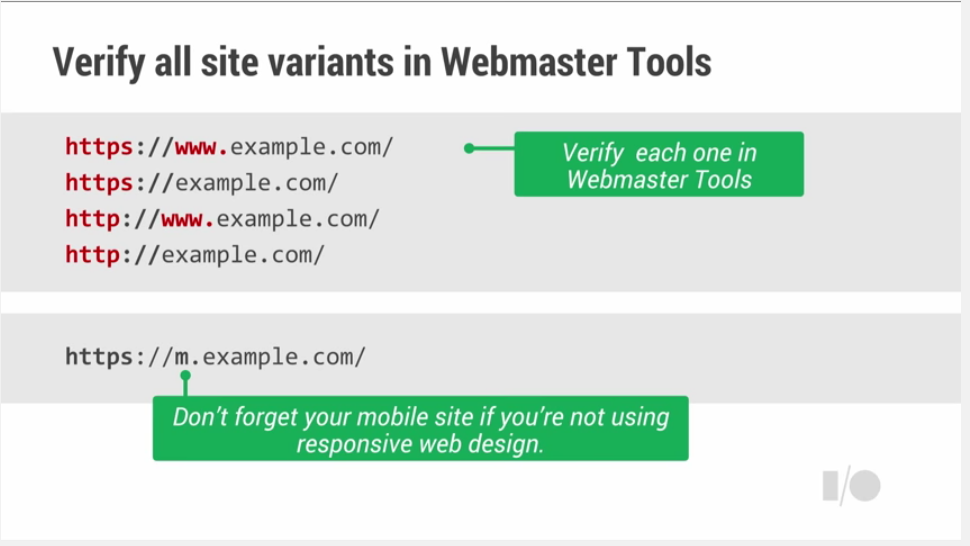
YES. Make sure your site is in a manageable shape, then:
- Register all versions of your site in Google Search Console (AKA Webmaster Tools) (that’s 4 versions at the last count)
- Disavow all low-quality backlinks pointing to these domains, and upload the disavow file to all domains
- Make sure you have preferably 301 redirects on all other versions of the domain, pointing to one canonical version of the domain
I have witnessed fallout in early instances where a disavow was in place on the HTTP site, but not migrated to the HTTPS version by Google. Google neglected to point out to us in the beginning that was necessary.
It could be said that Google prioritises migrating a penalty to another totally different domain over migrating the preventive penalty measures you put in place in good faith in a switch to HTTPS on the same domain.
That seems a little unhelpful.
You can ask yourself why we need the unnecessary complication of 4 versions of Webmaster tools, and 4 disavow files to manage all this, to ‘optimise’ a website in organic listings.
But – I would not switch to HTTPS without registering with Search Console first.
Google’s advice on moving to HTTPS
The following advice is from John Mueller, 2016:
Planning on moving to HTTPS? Here are 13 FAQs! help center at https://support.google.com/webmasters/answer/6073543
# Do I need to set something in Search Console? No, just add the HTTPS site there. The change-of-address setting doesn’t apply for HTTP -> HTTPS moves.
# How can we do an A/B test? Don’t cloak to Googlebot specifically, use 302 redirects + rel=canonical to HTTP if you want to test HTTPS but not have it indexed. Don’t block via robots.txt . More about A/B testing athttps://googlewebmastercentral.blogspot.ch/2012/08/website-testing-google-search.html (302 redirects aren’t cached.)
# Will the rel=canonical guarantee that the HTTP URL is indexed? No, but it’s a very strong signal when picking the indexed URL.
# What’s the next step after testing? Follow our site-move documentation (https://support.google.com/webmasters/answer/6033049 ). Use 301 redirects from HTTP to HTTPS, confirm the new version by adding a rel=canonical on the HTTPS page, pointing to itself, and submit sitemaps including both HTTP & HTTPS URLs with new change-dates (in the long run, just keep the HTTPS sitemap).
# What about the robots.txt file? The HTTPS site uses the HTTPS robots.txt file. Check that it’s reachable or serves a 404 result code, and check that your HTTP URLs aren’t blocked by the HTTP robots.txt file.
# Is it OK to have just some pages on HTTPS? Yes, no problem! Start with a part, test it, add more.
# Should I move everything together, or is it fine to do sections? Moving in sections is fine.
# Will I see a drop in search? Fluctuations can happen with any bigger site change. We can’t make any guarantees, but our systems are usually good with HTTP -> HTTPS moves.
# Which certificate do I need? For Google Search, any modern certificate that’s accepted by modern browsers is acceptable.
# Do I lose “link juice” from the redirects? No, for 301 or 302 redirects from HTTP to HTTPS no PageRank is lost.
# Will we see search keywords in Google Analytics when we’re on HTTPS? This won’t change with HTTPS, you can see the search queries in Search Console.
# How can I test how many pages were indexed? Verify HTTP / HTTPS separately in Search Console, use Index Status for a broad look, or the sitemaps indexed counts for sitemap URLs.
# How long will a move from HTTP to HTTPS take? There are no fixed crawl frequencies, it depends on the size of your site, and the speed of crawling that’s possible. The move takes place on a per-URL basis.
How do you implement 301 redirects on Apache servers?
It takes only a few lines of code to achieve this change of address in some instances. It is usually a simple if sometimes drawn out process.
The time it takes to complete a typical project is dependent on how large and how complex the website is if you are aiming to redirect the entire site, including internal pages, to exactly the correct urls on the new site.
Success is often dependent on your access to particular files on your host server, or the CMS your website is constructed with.
I can discuss my experience with Apache servers where I use “.htaccess” files and 301 permanent redirects. NOTE – some of this code may need to be modified depending on your setup:
EXAMPLE: Redirecting to a new domain: ( NOTE: on Linux servers, you need the Apache Mod-Rewrite moduled enabled):
Options +FollowSymLinks
RewriteEngine on
RewriteRule (.*) https://www.hobo-web.co.uk/$1 [R=301,L]
EXAMPLE – Redirecting one version of your domain to the WWW version of your domain
Options +FollowSymlinks
RewriteEngine on
rewritecond %{http_host} ^hobo-web.co.uk [nc]
rewriterule ^(.*)$ https://www.hobo-web.co.uk/$1 [r=301,nc]
EXAMPLE – Redirecting one page on a site to another equivalent page on the same domain:
redirect 301 /how-to-do-keyword-research/ http://www.hobo-web.co.uk/how-to-do-keyword-research/
With a 301 permanent redirect instruction at your server level, the age, authority, and reputation of your old website in Google are transferred to this new web address.
With visitors redirected as soon as you apply the 301 redirects, search engines soon notice the change of address. If you have a very large and complex site, it could take a long time for Google to completely forget about your old site.
Upon successful implementation, the new domain ranks where the old domain once ranked.
This method has worked for most professionals for over twenty years and still works today.
You can also tell Google you’ve made the change, too, but Google still needs you to also stick to traditional methods like I describe above as well as registering any change at Google Webmaster Tools (AKA Google Search Console).
How to implement 301 redirects using PHP
Example code:
<?
Header( “HTTP/1.1 301 Moved Permanently” );
Header( “Location: https://www.hobo-web.co.uk/” );
?>
How to implement 301 redirects using ASP
Example code:
<%@ Language=VBScript %>
<%
Response.Status=”301 Moved Permanently”
Response.AddHeader “Location”,”https://www.hobo-web.co.uk/”
%>
How to implement 301 redirects using ASP.net
Example code:
<script runat=”server”>
private void Page_Load(object sender, System.EventArgs e)
{
Response.Status = “301 Moved Permanently”;
Response.AddHeader(“Location”,”https://www.hobo-web.co.uk/”);
}
</script>
How to implement 301 redirects on IIS servers
Example IIS Redirect:
This example from Webconfs, 2019 explains:
“1) In internet services manager, right click on the file or folder you wish to redirect 2) Select the radio titled “a redirection to a URL” 3) Enter the redirection page 4) Check “The exact URL entered above” and the “A permanent redirection for this resource” and 5) Click on ‘Apply’”
How can I test if my redirects are working properly?
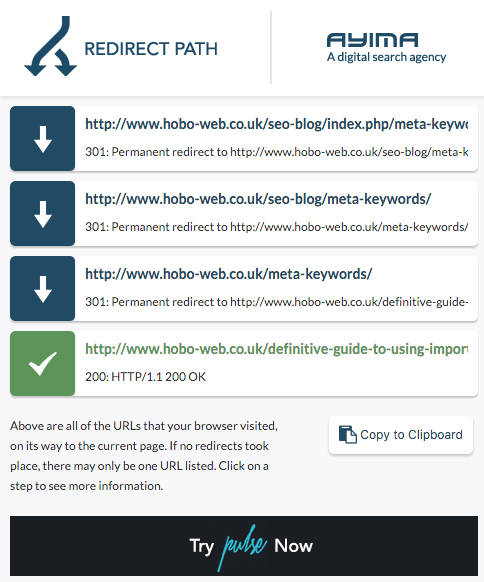
You can use an excellent little chrome plugin called Redirect Path to quickly check your redirects are in place and working correctly.
Need help?
Contact me.
Sign up for our Free SEO training course to find out more or view our free SEO checklist.
Disclaimer
Disclaimer: “Whilst I have made every effort to ensure that the information I have provided is correct, It is not advice. I cannot accept any responsibility or liability for any errors or omissions. The author does not vouch for third party sites or any third party service. Visit third party sites at your own risk. I am not directly partnered with Google or any other third party. This website uses cookies only for analytics and basic website functions. This article does not constitute legal advice. The author does not accept any liability that might arise from accessing the data presented on this site. Links to internal pages promote my own content and services.” Shaun Anderson, Hobo