
If you are a website owner, marketer, or developer learning about the benefits of a fast website, this article is for you. This article investigates the latest research and makes a case for why you should focus on improving your website download times.
This guide is backed by the author’s 20-plus years of professional experience in website accessibility, design, development and latterly, SEO (search engine optimisation). In that time, he has personally designed and built hundreds of websites (including for the public sector in the years 2001-2025), including for universities (including Caledonian University), colleges (including Cardonald College, Glasgow College of Nautical Studies and North Glasgow College for whom he won the SFEU Scottish Colleges Marketing Awards Gold Award in 2006), government and law (SCCRC), cathedrals (Dunblane) and the NHS (NHS Lanarkshire Sexual Health, Healthy Gay Scotland and NHS GPAS to name a few), as well as thousands of sites for private businesses and global brands.
All research and statistics presented in this article are cited with links to the original source material.
Executive Summary: The Need for Speed
This article is packed with data covering 15 years of research. Here are the most critical findings at a glance:
The Ideal Speed: Your website should load as fast as possible. The ideal load time for mobile sites is 1-2 seconds. Google’s internal goal is under half a second.
The Cost of Delay: User patience is incredibly low. 53% of mobile visits are abandoned if a page takes longer than 3 seconds to load. A 2-second delay in a transaction can result in abandonment rates of up to 87%.
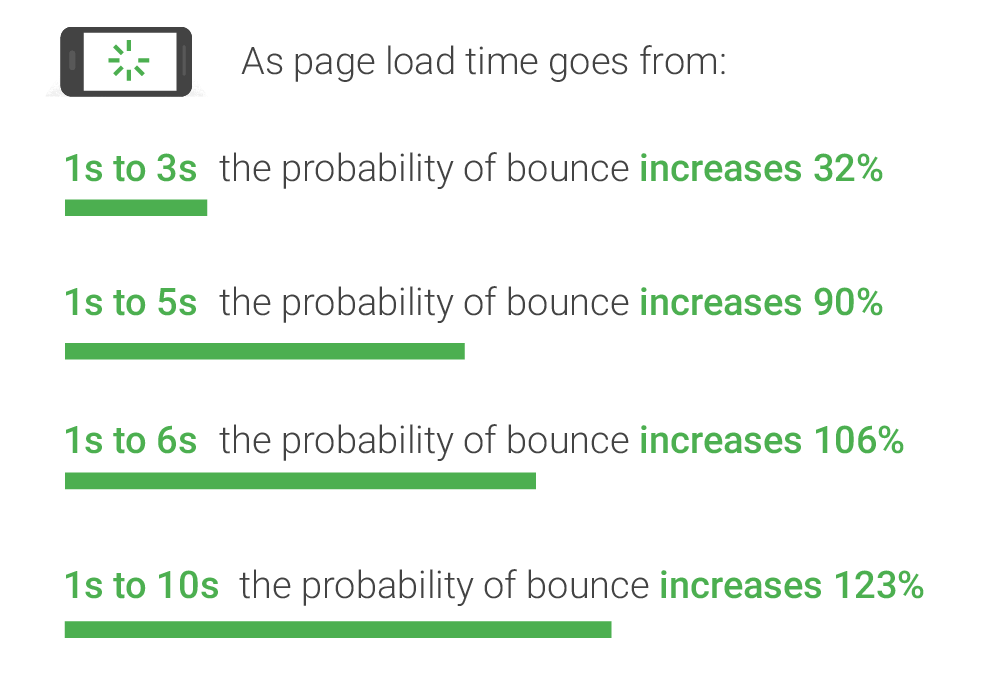
The Bounce Rate Connection: The probability of a user bouncing increases dramatically with every second of delay:
- 1s to 3s: +32%
- 1s to 5s: +90%
- 1s to 10s: +123%
The Business Impact: A fast site makes more money. Publishers with 5-second mobile load times can earn up to 2x more mobile ad revenue than those with 19 seconds. Every 100ms improvement can lift conversion by over 1%.
The Google Factor: A very slow site can be a negative Google ranking factor and will cause Google to crawl your site less frequently. While content and relevance are primary, speed is a confirmed signal.
Part 1: Why Speed Is a Critical User Experience (UX) Factor
Long before site speed was a confirmed Google ranking factor, it was a fundamental principle of good web design. A slow website creates frustration, erodes trust, and drives users away. Research has consistently shown that user patience is incredibly thin.
Note we learned in the recent Google Vs US DOJ Trial that “Google encouraged webmasters to create mobile-friendly and fastloading pages by giving them a slight ranking boost if they optimized for mobile”.
The User Abandonment Threshold
Studies over the last 15 years tell a consistent story: users will not wait. Even in the early days of e-commerce, the expectation for speed was clear.
47 percent of consumers expect a web page to load in two seconds or less. — Akamai/Forrester (2009)
The consequences of failing to meet this expectation are severe. The same 2009 study found that 40% of consumers will wait no more than three seconds before abandoning a site. Slow load times are a primary reason visitors abandon a checkout process.
This isn’t just a momentary loss. A poor experience has a lasting impact on brand perception and loyalty.
People would not return to websites that took longer than four seconds to load and formed a “negative perception” of a company with a badly put-together site or would tell their family and friends about their experiences. — Akamai (2006)
The study also found that 52% of online shoppers stated that quick page loading is important to their site loyalty. Shoppers become distracted; 14% will begin shopping at another site, and 23% will stop shopping or walk away from their computer entirely.
More recent data from Pingdom confirms this, finding the average web page load time to be 3.21 seconds. Their analysis concluded:
As soon as the page load time surpasses 3 seconds, the bounce rate soars, to 38% by the time it hits 5 seconds! — Pingdom (2018)
The speed of your site doesn’t just affect a single pageview; it has a ripple effect on the entire user session. A 2016 experiment by the Financial Times concluded that “the speed of the site negatively impacts a user’s session depth, no matter how small the delay.”
Part 2: The Bottom Line – How Speed Translates to Revenue
Every millisecond your site takes to load has a potential financial cost. For e-commerce, publishing, and lead-generation sites, the correlation between speed and revenue is undeniable.
Conversions, Sales, and Ad Viewability
Google, a company with a vested interest in a fast web, has published extensive research on the commercial impact of speed, especially on mobile, where the average page takes a staggering 19-22 seconds to load on a 3G connection.
How fast your website loads is critical but often a completely ignored element… The average time it takes to fully load a mobile landing page is 22 seconds… Yet 53% of visits are abandoned if a mobile site takes longer than three seconds to load. That’s a big problem. — Daniel An, Google (2017)
Google’s models project that publishers whose mobile sites load in 5 seconds earn up to 2x more mobile ad revenue than those whose sites load in 19 seconds. This is driven by 25% higher ad viewability, 70% longer average sessions, and 35% lower bounce rates.
The impact on direct sales is just as stark. Data shared by Mobify showed a clear lift in e-commerce conversions with every fractional improvement:
For every 100ms decrease in homepage load speed, Mobify’s customer base saw a 1.11% lift in session-based conversion, amounting to an average annual revenue increase of $376,789. Similarly, for every 100ms decrease in checkout page load speed, customers saw a 1.55% lift in session-based conversion, amounting to an average annual revenue increase of $526,147. — WPOstats, quoting Mobify (2016)
This demonstrates that speed optimisation isn’t about massive, multi-second improvements alone. Small, incremental gains deliver substantial financial returns:
If you are a webmaster or web development manager, you can use this free SEO checklist to help you manage your SEO project
Every second does count
“there have been studies by Akamai who found that two seconds is actually the threshold for e-commerce site acceptability. Meaning that that’s what users like to shop with. At Google, we aim for under a half second.” Maile Ohye, Google, 2010
People like fast sites.
And so does Google. In fact, Google likes blistering fast sites so much it has moved to what it is calling a ‘mobile-first‘ index.
“Speed is definitely a ranking factor? YES.” John Mueller, Google 2019
‘Site Speed, ‘ as confirmed by Google in the above quote, is a ranking factor. But as with any factor, Google confirms is a ranking signal, it’s usually a small, ‘nuanced’ one.
Bing wants fast sites, too:
“Page load time: Slow page load times can lead a visitor to leave your website, potentially before the content has even loaded, to seek information elsewhere. Bing may view this as a poor user experience and an unsatisfactory search result. Faster page loads are always better, but webmasters should balance absolute page load speed with a positive, useful user experience.” Bing Webmaster Guidelines 2020
How fast should websites load? Well, Google.
“don’t really have a threshold to give away but basically the recommendation….. is just make sites fast for users that’s what it boils down to.” Martin Splitt, Google, 2019
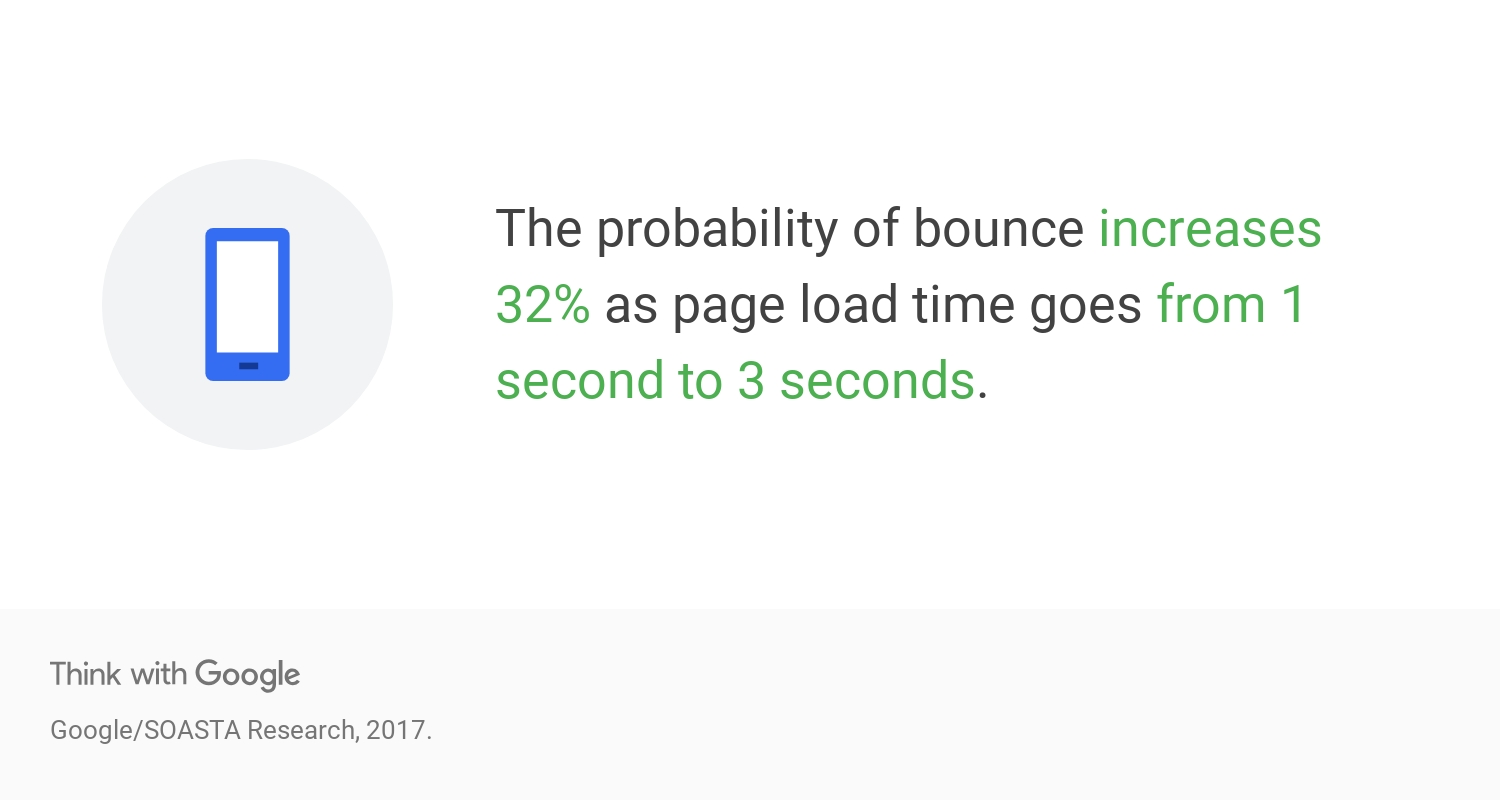
A fast site is a good user experience (UX), and a satisfying UX leads to higher conversions.
“How fast your website loads is critical but often a completely ignored element in any online business and that includes search marketing and search engine optimisation. And that includes page load times on mobile devices: The average time it takes to fully load a mobile landing page is 22 seconds, according to a new analysis. Yet 53% of visits are abandoned if a mobile site takes longer than three seconds to load. That’s a big problem.” Dainial An, Google, 2017
Very slow sites are a bad user experience, and Google is all about a good user experience these days.
The fact is, a faster website is a net positive for everyone, from Google to your client. If you have a web team and don’t know what else to do (and you’ve maximised other areas of opportunity for the time being) instruct your developers to improve the speed of your website for you and Google’s users.
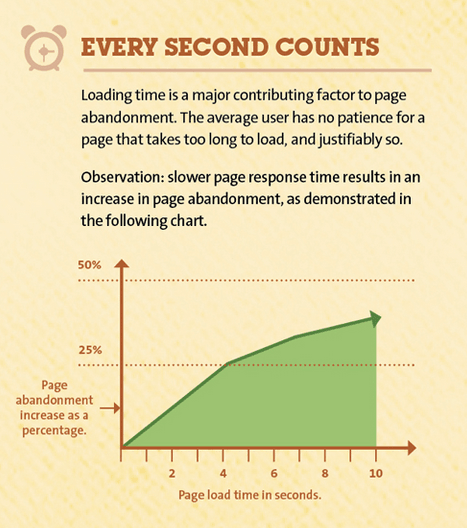
Is website speed a Google ranking factor?
Yes.
A SLOW SITE can be a NEGATIVE Ranking factor. Google:
Google may also crawl your website more slowly if you have a slow website or server.
“(Google is) seeing an extremely high response-time for requests made to your site (at times, over 2 seconds to fetch a single URL). This has resulted in (Google) severely limiting the number of URLs we’ll crawl from your site.” John Mueller, Google, 2015
That’s bad news if you are publishing lots of new content or making lots of edits to content on your website. John specifically said 2 seconds disrupts crawling activity, not ranking ability, but you get the picture.
John also declared Google:
“have a small factor in there for pages that are really slow to load where (Google) take that into account.” John Mueller, Google, 2015
And you must:
“Make sure [web pages] load fast, for your users….aim for less than 2-3 secs”John Mueller, Google, 2016
Another Googler (when asked about a site that was loading in 5 seconds) responded that he:
“wouldn’t worry about it too much. Make it as fast as you reasonably can.” Gary Illyes, Google, 2016
and
“… there are two aspects here when you look at server speed. On the one hand there’s the kind of perceived speed in the browser, in the time it takes to render a page, and that is something that is definitely a ranking factor, it’s probably not the biggest ranking factor. And usually …to differentiate between sites that are really slow, and sites that are kind of normal. So just optimizing on a millisecond basis is not going to affect anything in the search results…. the other part of server speed is more in regards to crawling, so how quickly (Google) can crawl pages from your website, and that’s not directly a ranking factor, but it does affect how quickly (Google) can pick up new and changed content on your site.” John Mueller, Google, 2016
In 2017, Google stated, with regards to crawling and indexing your site:
“For Googlebot a speedy site is a sign of healthy servers, so it can get more content over the same number of connections. On the flip side, a significant number of 5xx errors or connection timeouts signal the opposite, and crawling slows down.” Gary Illyes, Google, 2017
With regards to the ‘mobile-first index‘, Google did not immediately use mobile speed as a ranking factor, but it was later confirmed by Google that site speed was now a ranking factor on mobile sites :
“starting in July 2018, page speed will be a ranking factor for mobile searches. The “Speed Update,” as we’re calling it, will only affect pages that deliver the slowest experience to users and will only affect a small percentage of queries. It applies the same standard to all pages, regardless of the technology used to build the page. The intent of the search query is still a very strong signal, so a slow page may still rank highly if it has great, relevant content.” , Google, 2018
Google is focused on improving Core Web Vitals, which includes website page speed as a big part:
“You’ll start to see positive effects once you get out of the “poor” area in core web vitals.” John Mueller, Google 2021
- Largest Contentful Paint (LCP): measures loading performance.
- First Input Delay (FID): measures interactivity.
- Cumulative Layout Shift (CLS): measures visual stability.
If your Google Search Console displays the message “Your site has no URLs with a good page experience“, you should take action.
Average Page Download Speeds
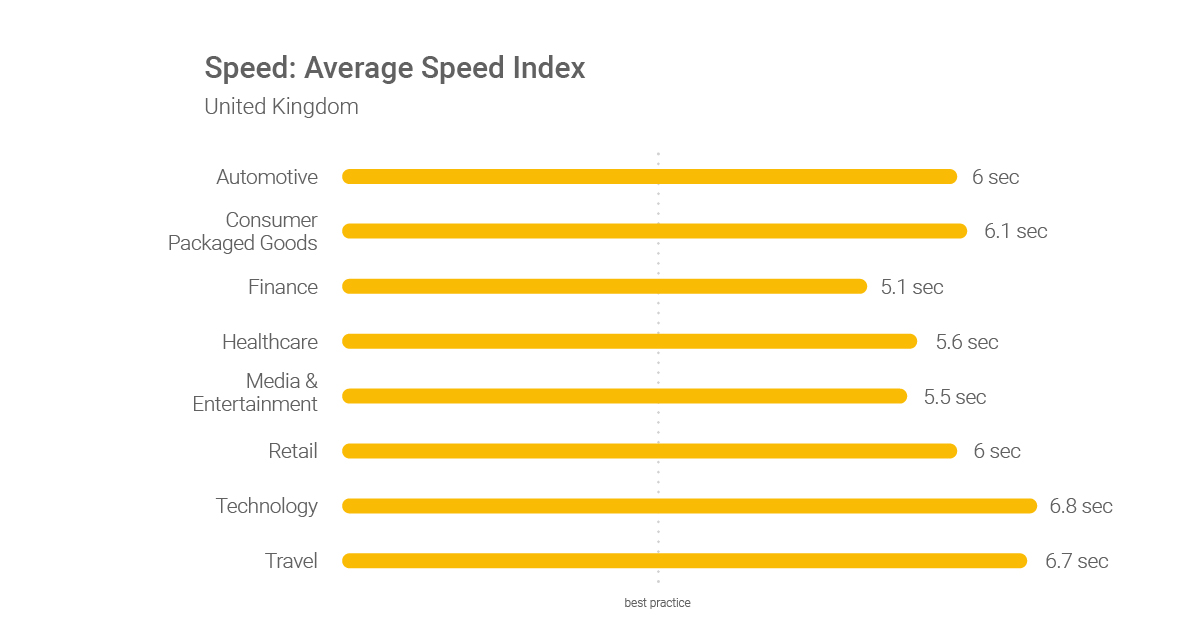
You may have focused on making your desktop versions of our site load as fast as possible, but with Google switching to the mobile-first index and increasing mobile device users, you must focus on mobile speed, too. You can use this mobile SEO checklist to help you manage mobile optimisation.
Research from Doubleclick (owned by Google) published in September 2016 by , DOUBLECLICK, 2016 suggests:
‘The average load time for mobile sites is 19 seconds over 3G connections.’
and
‘Slow loading sites frustrate users and negatively impact publishers. In our new study, “The Need for Mobile Speed”, we found that 53% of mobile site visits are abandoned if pages take longer than 3 seconds to load.’
and
‘sites that load in 5 seconds vs 19 seconds observed: 25% higher ad viewability (and) 70% longer average sessions (and) 35% lower bounce rates’
The report concludes:
‘While there are several factors that impact revenue, our model projects that publishers whose mobile sites load in 5 seconds earn up to 2x more mobile ad revenue than those whose sites load in 19 seconds.’
, Google, 2018 has also produced the following infographic on page load industry benchmarks:
Case studies on website page speed performance
“Consider this: Mobile sites lag behind desktop sites in key engagement metrics such as average time on site, pages per visit, and bounce rate. For retailers, this can be especially costly since 30% of all online shopping purchases now happen on mobile phones. The average U.S. retail mobile site loaded in 6.9 seconds in July 2016, but, according to the most recent data, 40% of consumers will leave a page that takes longer than three seconds to load. And 79% of shoppers who are dissatisfied with site performance say they’re less likely to purchase from the same site again.”
At the start of 2018, Pingdom offered webmasters some new insight into how load time affects bounce rate:
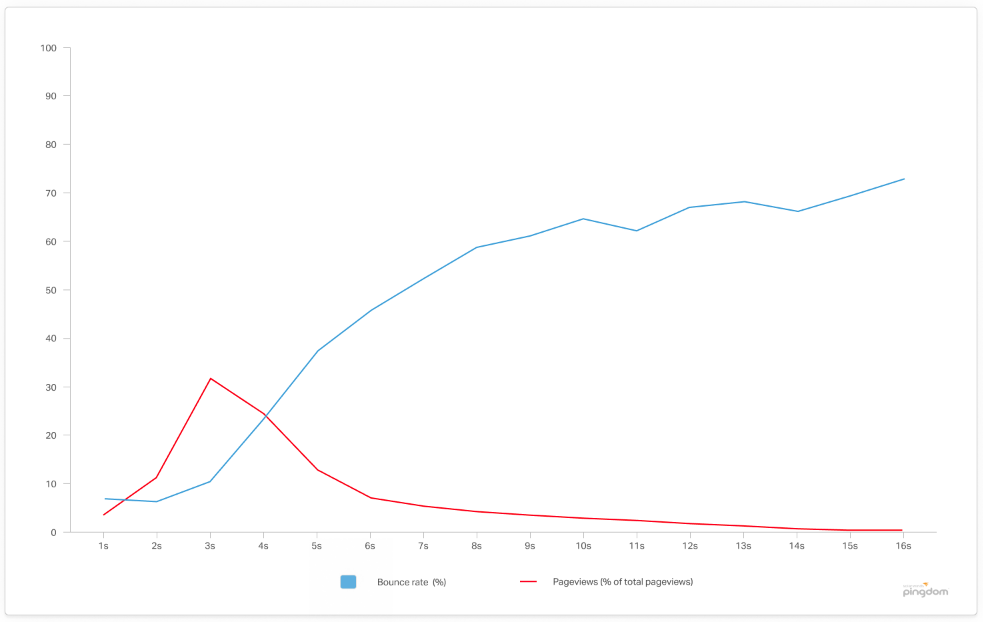
“From the millions of tests performed using our website speed tests, we found that the average load time for a webpage is 3.21 seconds…[] What we found was that, unsurprisingly, a page’s load time directly impacts bounce rate….[] as soon as the page load time surpasses 3 seconds, the bounce rate soars, to 38% by the time it hits 5 seconds!” Pingdom, 2018
There are now many third-party website speed case studies available to back these findings from Google, Pingdom, and DoubleClick:
- In 2025, QuintoAndar, a Brazilian proptech company, reduced its Interaction to Next Paint (INP) by 80%, which resulted in a 36% increase in conversions
- In 2024, PAIGE, the apparel retailer, re-architected its e-commerce platform, which led to a 22% increase in Black Friday revenue and a 76% increase in conversion rates.
- In 2024, Desenio, the online art seller, achieved a 37% lower bounce rate, 48% longer sessions, and a 34% improvement in site conversions after platform improvements.
- In 2024, PubTech’s Consent Management Platform improved INP by up to 65% for its customers, resulting in up to a 1.5% increase in ad viewability.
- In 2023, The Economic Times reduced its INP from nearly 1000ms to 257ms and its Total Blocking Time (TBT) by 30x, which led to a 50% decrease in bounce rate and a 43% increase in pageviews.
- In 2023, redBus, the online bus ticketing platform, improved its INP, which resulted in a 7% increase in sales.
- In 2023, Trendyol, the e-commerce platform, reduced its INP by 50%, which led to a 1% increase in click-through rate.
- In 2023, a non-profit working with SiteCare improved its LCP from 4.6s to 2.3s and its INP from 230ms to 133ms, which resulted in a 35,000 increase in monthly search impressions and 7,000 more sessions per month.
- In 2023, Parachute, the home goods brand, improved its page load time by 60% in one month after a platform migration.
- In 2022, Rakuten 24‘s investment in Core Web Vitals increased revenue per visitor by 53.37% and conversion rate by 33.13%
- In 2022, Sunday Citizen was able to show over 6% improvement in conversion and 4% decrease in bounce rate. Users were also almost 4% more likely to add products to the cart, leading to more selling opportunities
- In 2021, Yelp reduced the Yelp Page Complete (75th percentile) by 25% and the First Contentful Paint (75th percentile) by 45% which resulted in their conversion rate improving by 15%.
- In 2021, Yahoo! Japan News reduced its CLS by .2, which decreased the number of poor-performance URLs in search consoles by 98%. This saw an increase in page views per session of 15.1%, session durations lasted 13.3% longer, and a decrease in bounce rate of 1.72 percentage points.
- In 2021, Vodafone improved its LCP by 30%. This saw an increase in their lead-to-visit rate of 15%, their cart-to-visit rate increasing by 11%, and an overall 8% increase in sales.
- In 2021, Tokopedia improved its LCP by 55% which resulted in the average session duration increasing by 23%.
- In 2021, iCook improved its CLY by 15% which resulted in ad revenue increasing by 10%.
- In 2021, Swappie was able to reduce its load time by 23%, the LCP by 55%, CLS by 91%, and FID by 90%. These improvements saw an increase in mobile revenue of 42% and a 10 per cent increase in relative conversion rate.
- In 2020, Aldo discovered that with their single-page app, mobile users with fast rendering times brought 75% more revenue than average, and compared to slow rendering times, this increased to 327%. With the desktop platform, it was 212% more revenue compared to the average and 572% more than slow.
- In 2020, Google completed a study looking at millions of page impressions. They discovered that when a site meets the recommended thresholds for the Core Web Vitals metrics, it results in users being at least 24% less likely to leave a page before it loads.
- In 2020, Rossignol.com increased its load time by 1.9 seconds while also cutting its Speed Index by a factor of 10. Compared to the previous year, this contributed to a 94% improvement in conversion rate.
- In 2020, SnipesUSA.com was able to reduce its page load speed by 30% which saw their average conversion rate double from 1% to 2%.
- In 2020, SportShoes.com found that mobile visits that were faster than average were 41% more likely to convert compared to slower-than-average visits.
- In 2020, Agrofy implemented improvements to a number of performance metrics, including LCP, CLS, and Long Task Time. This resulted in a reduction in their abandonment rate of 76% alongside a significant boost in engagement.
- In 2020, Revelry, the Bridesmaid dress retailer, relaunched its site, ensuring that it was on the updated version of its eCommerce platform and optimised with smaller images. This has resulted in the site loading 43% faster, conversion rates up 30%, and an 8% decrease in bounce rates.
- In 2020, NDTV, which is one of India’s top websites and news stations, saw improvements of 55% with LCP and a reduction in bounce rate of 50%.
- In 2019, Google Search decided to include speed as a ranking signal, although a very small element. Following this, they have seen an improvement of 15%-20% in user-centric perf metrics of pages loaded from search results alongside a reduction in the abandonment of 20%.
- In 2018, Missguided decided that for Android visitors, they would remove BazaarVoice. This meant an improvement of 4s for the median page load time and resulted in an increase of 26% in revenue.
- In 2018, Tokopedia delivered a render time decrease from 14s to 2s for 3G connections. Delivering this reduction resulted in an impressive 19% increase in visitors; new users increased by 7%; total sessions improved by 35%; active users improved by 17% and sessions per user went up 16%.
- In 2018, Zalando completed work that reduced its load time by 100ms, and this resulted in a revenue increase of 0.7%.
- In 2018, Web Studio Sparkbox deployed performance updates and AMP Pages to their site, which resulted in them improving their Driver Solution conversion within Organic traffic. This rate increased to 5.57%, which was more than double the initial rate of 2.69%.
- In 2018, Carousell implemented changes that reduced its page load time by 65%. This reduction resulted in a 63% increase in organic traffic; saw a three-fold increase in advertising click-through rate, and first-time chatters increased by 46%.
- In 2017, the BBC declared that they lost an additional 10% of users for every additional second it takes for their site to load
- In 2017, Pinterest’s performance optimisation resulted in a 40% decrease in wait time, a 15% increase in organic traffic, and a 15% increase in sign-up conversion rate.
- In 2017, COOK increased the conversion rate by 7% after reducing the average page load time by 0.85 seconds. The bounce rate also fell by 7%.
- In 2017, Zitmaxx Wonen reduced load time to 3 seconds, and conversions jumped 50.2%. Revenue from mobile increased by 98.7%.
- In 2016, FT declared that tests of the new, faster FT.com resulted in users being up to 30% more engaged with the site.
- In 2016, Instagram increased impressions and user profile scroll interactions by simply speeding up its site.
- In 2016, The Trainline reduced latency by 0.3s across their funnel, and revenue increased by an extra £8 million a year.
- In 2016, Artificial latency added to the Telegraph resulted in page views dropping by 11% for a 4s delay and 44% for a 20s delay.
- In 2016, A presentation by AliExpress claimed they reduced load time for their pages by 36% and recorded a 10.5% increase in orders and a 27% increase in conversion rates for new customers.
- In 2016, Ancestry.com recorded a 7% positive rise in conversions after improving the render time of web pages by 68%, reducing page bloat by 46% and reducing load time by 64%.
- In 2006, Akamai claimed 75% of the 1,058 people asked would not return to websites that took longer than *four* seconds to load.
Very interestingly:
‘For every 100ms decrease in homepage load speed, Mobify’s customer base saw a 1.11% lift in session based conversion, amounting to an average annual revenue increase of $376,789. Similarly, for every 100ms decrease in checkout page load speed, Mobify’s customers saw a 1.55% lift* in session based conversion, amounting to an average annual revenue increase of $526,147′ (from wpostats, 2016)
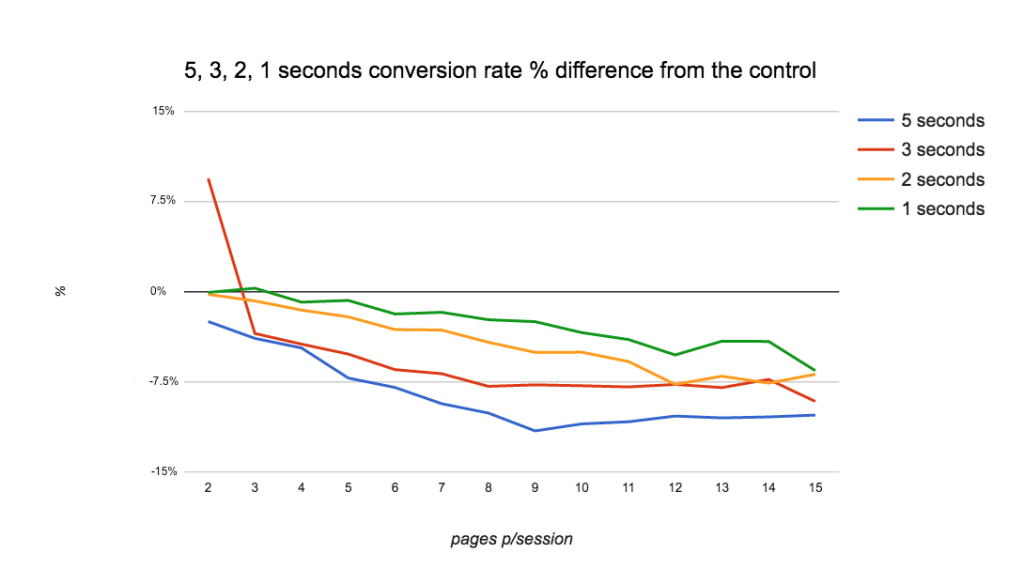
Another very interesting speed experiment, run at Forbes in 2016, also concluded:
“over the testing period users read fewer articles each day whilst experiencing delays loading each web page.”
| Page load time | 7 days impact | 28 days |
| 1 second slower | -4.9% | -4.6% |
| 2 seconds slower | – | -5.0% |
| 3 seconds slower | -7.2% | -7.9% |
“It’s clear from our test that the speed of our website affects both of these revenue streams, over the short term, to the tune of hundreds of thousands of pounds, and in the long-term millions. The speed of the site negatively impacts a user’s session depth, no matter how small the delay. Slow sites also have a detrimental effect on the number of articles people read. Largely, the slower the site, the greater the effect. The data suggests, both in terms of user experience and financial impact, that there are clear and highly valued benefits in making the site even faster. From this research we’ve chosen to invest even more time in making every aspect of the new FT.com website even faster over the coming months.” FORBES, 2016
Other research is hard to find, but it would indicate as fast as possible.
Research (way back in 2013) would suggest that slow load times are having an increased impact on e-commerce websites:
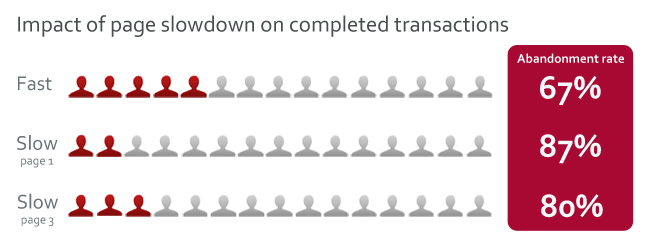
“a 2-second delay in load time during a transaction resulted in abandonment rates of up to 87%. This is significantly higher than the baseline abandonment rate of 67%.” Tammy Everts, Radware, 2013
In a 2012 study, it was found that:
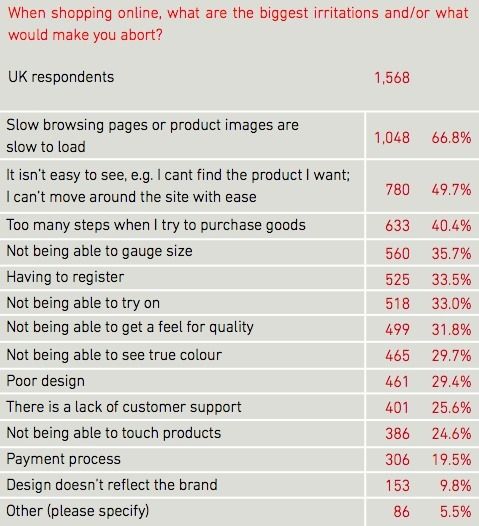
“two thirds of UK consumers (67%) cite slow loading times as the main reason they would abandon an online purchase.” David Moth, Econsultancy.com, 2012
Maile Ohye, from Google, in 2010, claimed:
“2 seconds is the threshold for ecommerce website acceptability. At Google, we aim for under a half second.“
That claim was based on independent research commissioned by a company called Akamai back in 2009:
“Based on the feedback of 1,048 online shoppers that were surveyed, Forrester Consulting concluded the following key findings:
- 47 percent of consumers expect a web page to load in two seconds or less
- 40 percent of consumers will wait no more than three seconds for a web page to render before abandoning the site.
- 52 percent of online shoppers stated that quick page loading is important to their site loyalty.
- Shoppers often become distracted when made to wait for a page to load. 14 percent will begin shopping at another site, and 23 percent will stop shopping or walk away from their computer.
- Retail and travel sites that underperform lead to lost sales. 79 percent of online shoppers who experience a dissatisfying visit are less likely to buy from that site again. 64 percent would simply purchase from another online store.
Additional findings indicate that quick page loading is a key factor in a consumer’s loyalty to an eCommerce site, especially for high spenders. 79 percent of online shoppers who experience a dissatisfying visit are less likely to buy from the same site again while 27 percent are less likely to buy from the same site’s physical store, suggesting that the impact of a bad online experience will reach beyond the web and can result in lost store sales.” Akamai 2009
The research by Akamai in 2006 revealed users’ dwindling patience with websites that take time to show up.
The time it took a site to appear on screen came second to high prices and shipping costs in the list of shoppers’ pet hates, the research revealed. Akamai consulted a group who shopped regularly online to find out what they like and dislike about e-tailing sites.
About half of mature net-shoppers – who have been buying online for more than two years or who spend more than $1,500 (£788) a year online – ranked page-loading time as a priority.
Akamai claims that one-third of those questioned abandon sites that take time to load, are hard to navigate or take too long to handle the checkout process.
The four-second threshold is half the time that previous research, conducted during the early days of the web-shopping boom, suggested that shoppers would wait for a site to finish loading. To make matters worse, the research found that the experience shoppers have on a retail site colours their entire view of the company behind it.
About 30% of those responding said they formed a “negative perception” of a company with a badly put-together site or would tell their family and friends about their experiences. Further research by Akamai found that almost half of the online stores in the list of the top 500 US shopping sites take longer than the four-second threshold to finish loading.
The survey questioned 1,058 net shoppers during the first six months of 2006. Consultants Jupiter Research did the survey for Akamai.
Whether this research is 100% valid is explored by your own experience. For instance, if you KNOW that the information you need is probably on a specific web page, you’ll probably wait a lot longer than ten seconds to see the info. But if you do not…
Undeniably, though, it’s been a long-held belief in good practice website design that your website needs to load fast if you want to keep visitors happy. This research only backed this up.
And that was many years ago.
Today, Site speed is a critical area of website development and profitable e-commerce.
Desktop users expect a site to load within a second or two.
Mobile users are a little more patient, for now.
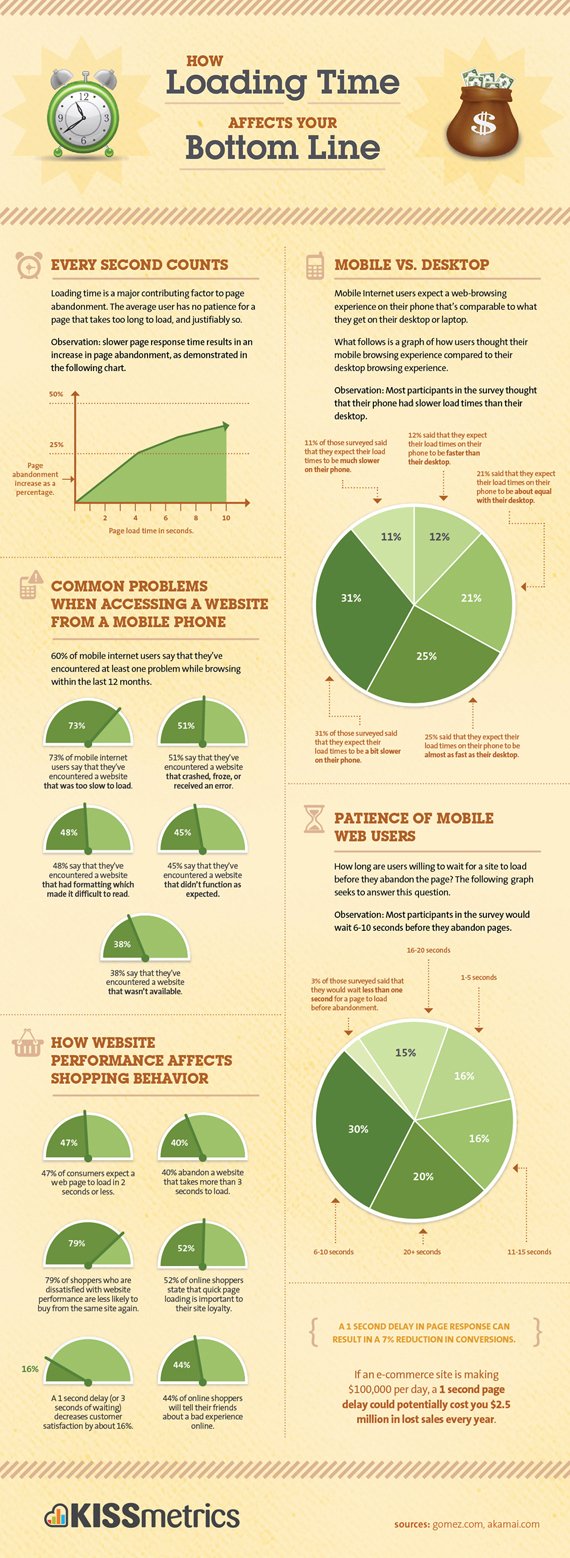
See below how slow load times impact your business:
Download speeds
Google provides a lot of help for webmasters to help make a website faster.
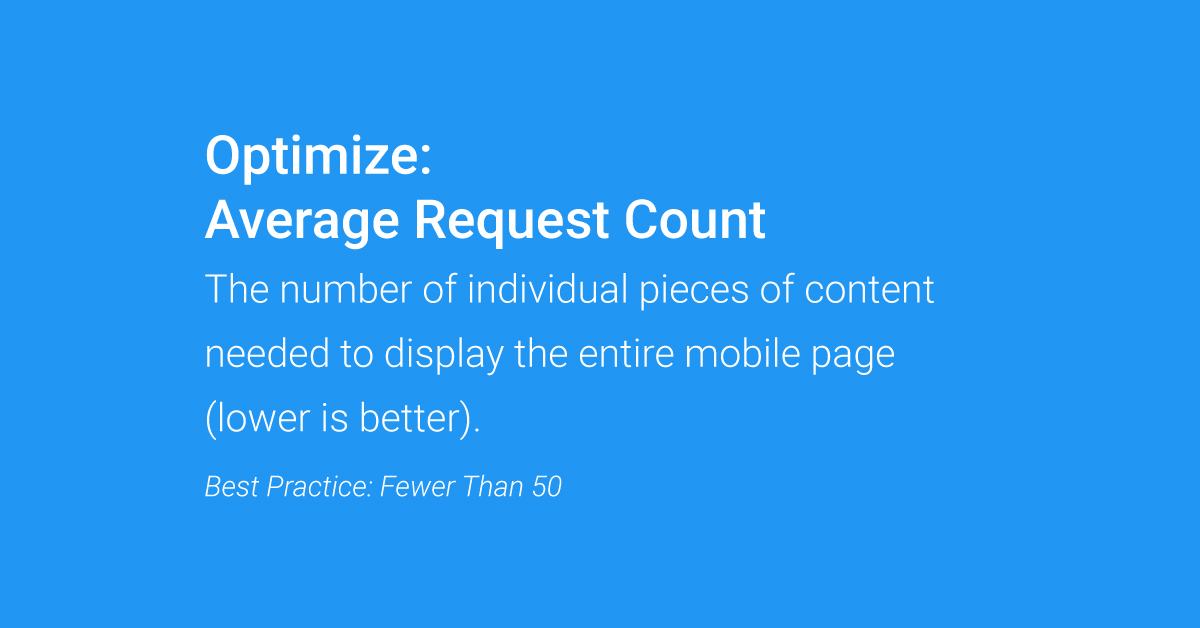
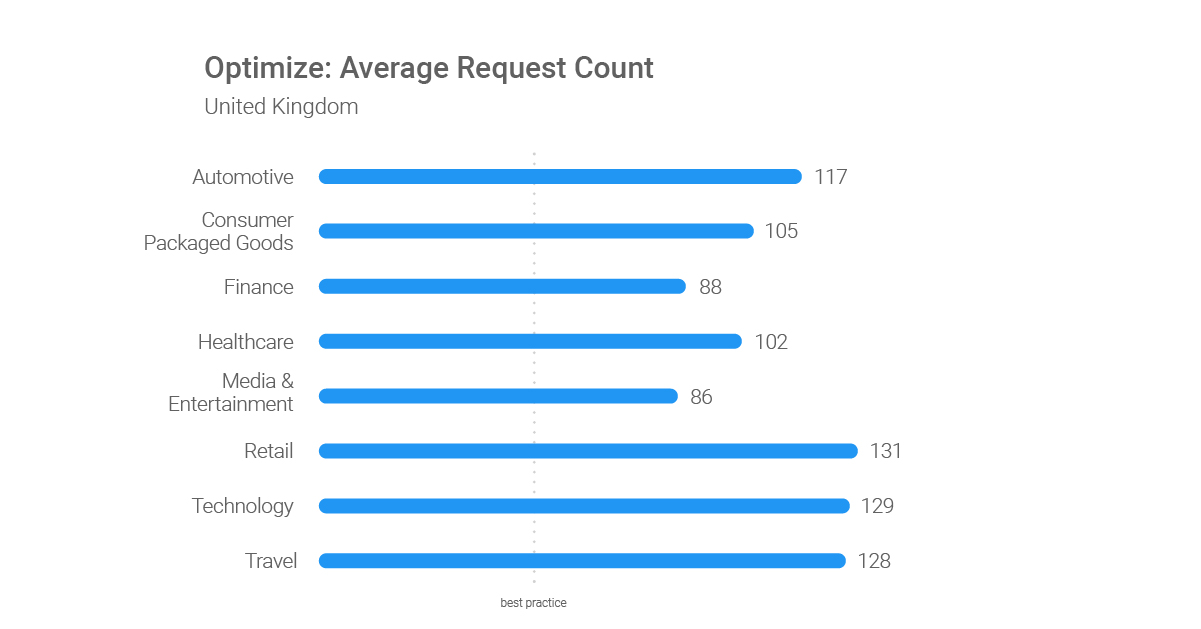
The following research is also provided by Google:
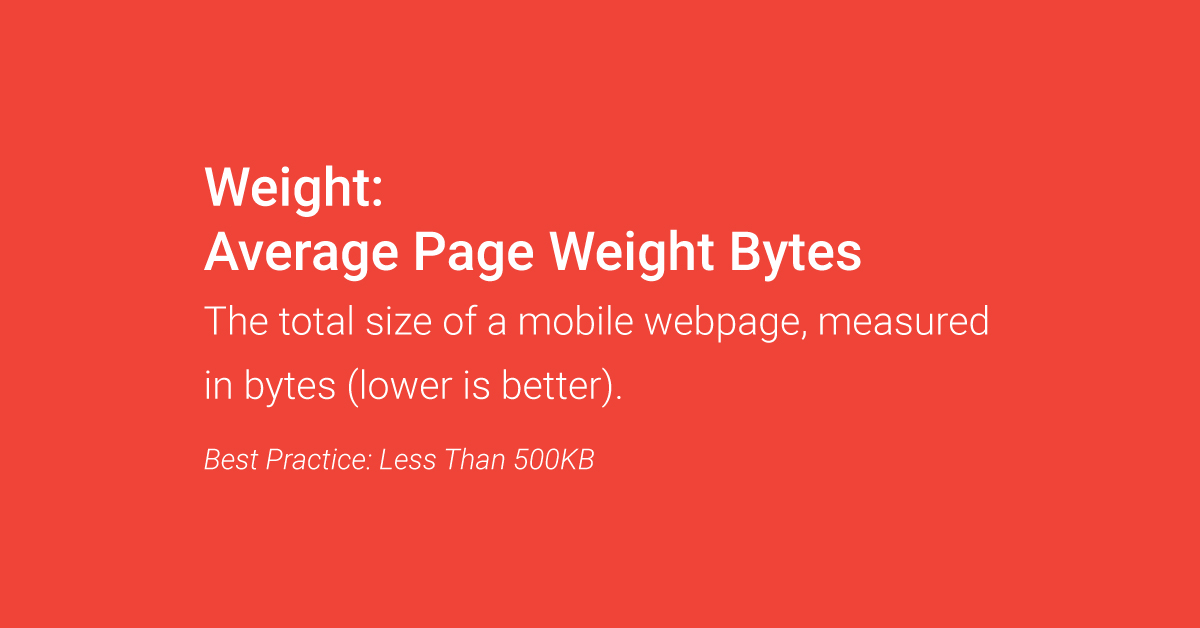
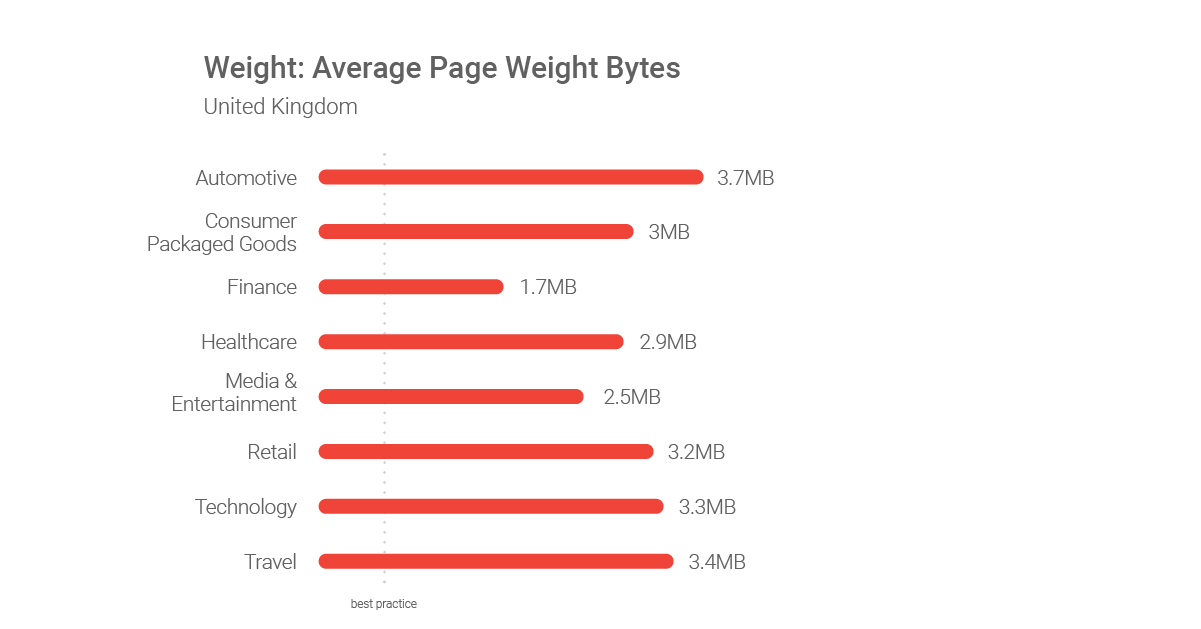
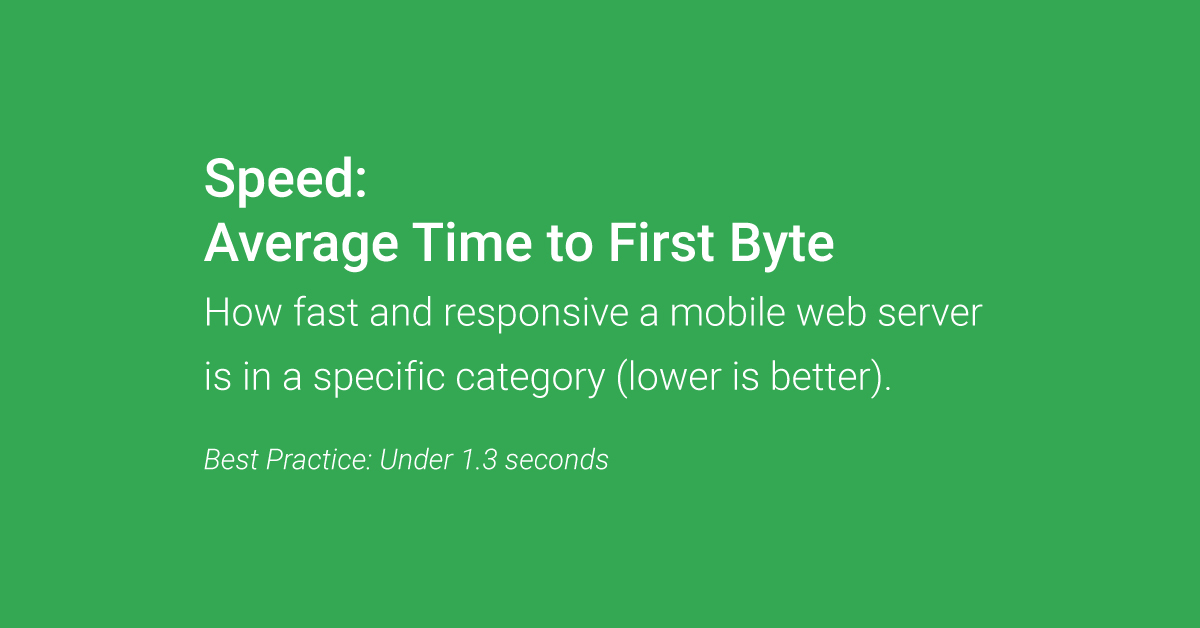
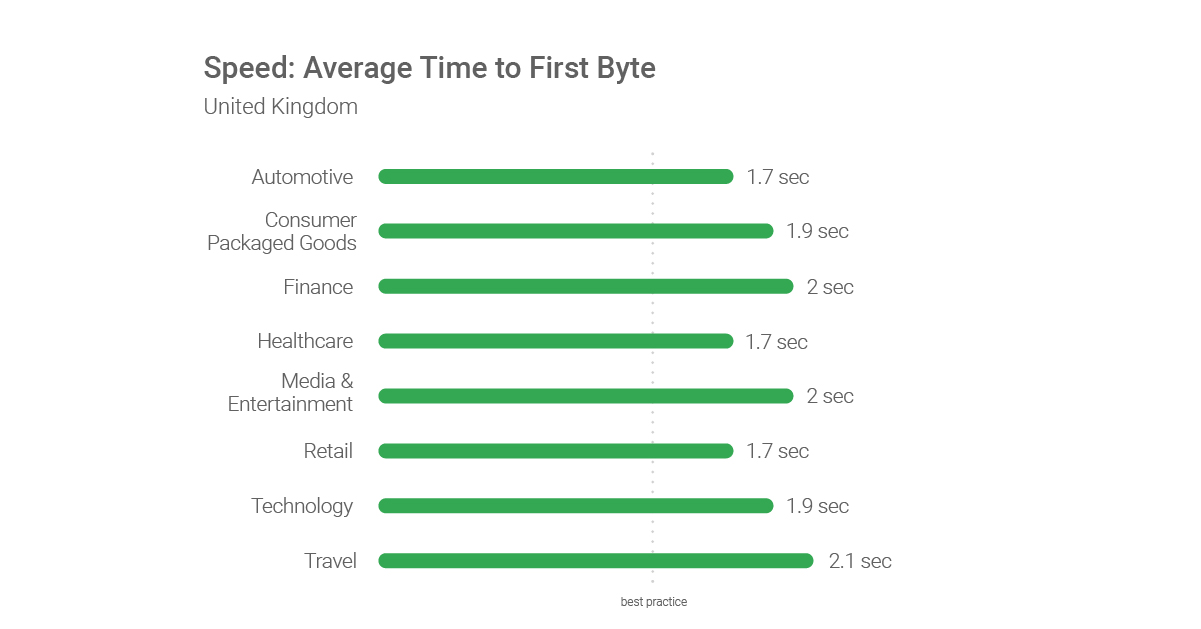
Bandwidth, or the capacity to send and receive data,a is an important consideration when designing an electronic document for distribution over the Internet.
It is important that the link to the Internet (from the computer serving the pages to customers) has sufficient capacity to be able to handle the expected load.
Otherwise, the response to users will be unsatisfactorily slow.
Some people today STILL connect to the Internet over a phone line, using a modem with a speed of 28.8 to 56 kilobits per second (kbit/s).
This “narrowband” communication requires users to wait while a dial-up connection is made before they can access the Internet, and means that Internet use, when connected, is slow.
Broadband services offer significantly faster data rates, enabling the delivery of services, such as high-speed Internet access. These may also be “always-on” connections to the Internet.
However, what looks great and downloads quickly within the confines of the Web manager’s high-speed network connection does not necessarily work as well for the average user of the Internet.
It is probably best for you to presume that your user has a SLOW connection capability and aim to deliver to them a satisfying user experience as possible.
Then – everybody wins.
What happens to your Google rankings when you improve page speed scores?
Search engine optimisation is a complex topic.
Improving your website page speed scores in isolation from developing a compelling user experience will not magically lead to BETTER rankings in Google in the short term.
As many SEO said back in the day, and Maile Ohye confirmed in the video from 2010:
“Rankings is a nuanced process and there is over 200 signals, but now speed is one of them. Know that ‘content’ and relevance’ are still primary.” Maile Ohye, Google, 2010
A technical approach to improving user experience begins with improving site speed.
A faster site should improve visitor satisfaction levels and the number of conversions, for instance. This very well might have a second-order effect on your rankings over time, as many SEO think that QUERY COMPLETION & SATISFACTION SIGNALS are significant measurements in how Google orders search engine results pages.
Do not expect a faster website load time to directly improve the rankings of your website in the short term.
Website & page load speed is a Google ranking factor, but
Relevance truly is the number 1 ranking factor. Page speed is also a relatively small Google ranking factor in comparison, but:
‘content’ and relevance’ are still primary’ Maile Ohye, Google, 2010
A fast host is a prerequisite for your business, and a fast site too. If your server is poor and your webpage takes 10+ seconds to load, then site speed can be a negative ranking for your site.
Avoid this by having a fast website.
Free page load speed tests & tools
There are a few excellent page speed tools you can run free reports with to help you create a fast-loading website:
- https://developers.google.com/speed/pagespeed/insights/
- https://www.webpagetest.org/
- https://gtmetrix.com/
- https://tools.pingdom.com/
- https://www.uptrends.com/tools/website-speed-test
Website Loading Speed FAQ
Why is website loading speed important?
Website loading speed is important for providing a positive user experience, reducing bounce rates, and improving search engine rankings. Slow-loading websites can frustrate users and cause them to leave your site, which can negatively impact your business goals.
How fast should a website load?
Website loading speed should ideally be under three seconds. Google considers a loading time of two seconds or less to be fast, and a loading time of three seconds or more to be slow.
What are some factors that can affect website loading speed?
Factors that can affect website loading speed include large image and video files, poor hosting or server performance, excessive use of plugins or scripts, and bloated code or design. Poor internet connection or outdated devices can also impact loading speed for some users.
How can I improve my website’s loading speed?
Here are some tips for improving your website’s loading speed:
- Optimise image and video file sizes to reduce page weight
- Use a content delivery network (CDN) to reduce server response time
- Minimise the use of plugins or scripts and eliminate unnecessary code or design
- Use browser caching and compression to reduce load times for repeat visitors
- Choose a reliable web hosting provider with fast server performance
How can I test my website’s loading speed?
You can test your website’s loading speed using online tools such as Google PageSpeed Insights, GTmetrix, or Pingdom. These tools can provide insights into your website’s performance, identify areas for improvement, and provide actionable recommendations to speed up your website.
Disclosure: Hobo Web uses generative AI when specifically writing about our own experiences, ideas, stories, concepts, tools, tool documentation or research. Our tool of choice is in this process is Google Gemini Pro 2.5 Deep Research (for text) and Google NotebookLM (for videos and audio). This assistance helps ensure our customers have clarity on everything we are involved with and what we stand for. It also ensures that when customers use Google Search to ask a question about Hobo Web software, the answer is always available to them, and it is as accurate and up-to-date as possible. All content was verified as correct. Edited and checked by Shaun Anderson, creator of the Hobo SEO Dashboard and founder of Hobo Web. See our AI policy.