
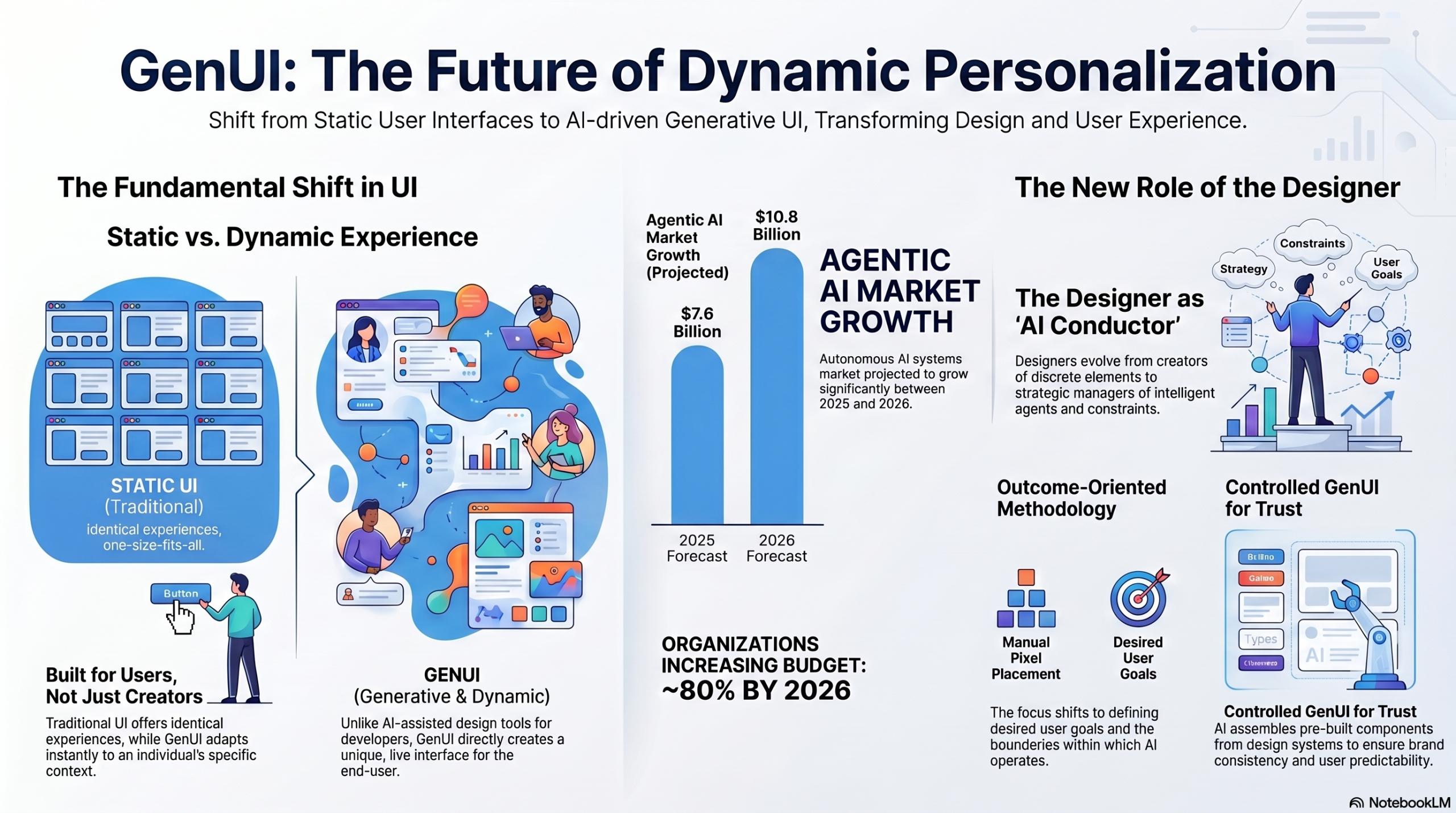
This article explores my research (very much inspired by Shubham Saboo) on the emergence of Generative User Interface (GenUI) Optimization, or GUIO for short, a technology that uses artificial intelligence to create unique, real-time digital experiences for individual users. Unlike traditional static design, this approach focuses on outcome-oriented design, where designers act as strategic conductors defining goals rather than fixed layouts.
My article distinguishes this dynamic personalization from standard AI-assisted design tools, noting that GenUI directly benefits the end-user through immediate interface adaptation. To maintain user trust and predictability, the research suggests using established design systems to provide a familiar framework for AI-generated components.
Ultimately, the shift toward GenUI promises significant business value and higher engagement by tailoring every interaction to a user’s specific context and needs. This evolution marks a transition into the Agentic Era, fundamentally changing the relationship between human designers and intelligent systems.
Generative User Interface (GenUI) Optimization represents a transformative shift in how digital experiences are crafted, moving from static, one-size-fits-all designs to dynamic, AI-driven personalisation. For you, whether a product manager, UX/UI designer, or business leader, understanding this evolution is crucial for staying competitive.
My article addresses key questions about GenUI, clarifying its function, distinguishing it from AI-assisted design, and exploring how it balances innovation with user predictability.
You will gain insights into the strategic implications of GenUI, its technical underpinnings, and how it empowers product teams to deliver highly customized and effective user experiences.
Understanding Generative User Interface Optimization (GUIO)
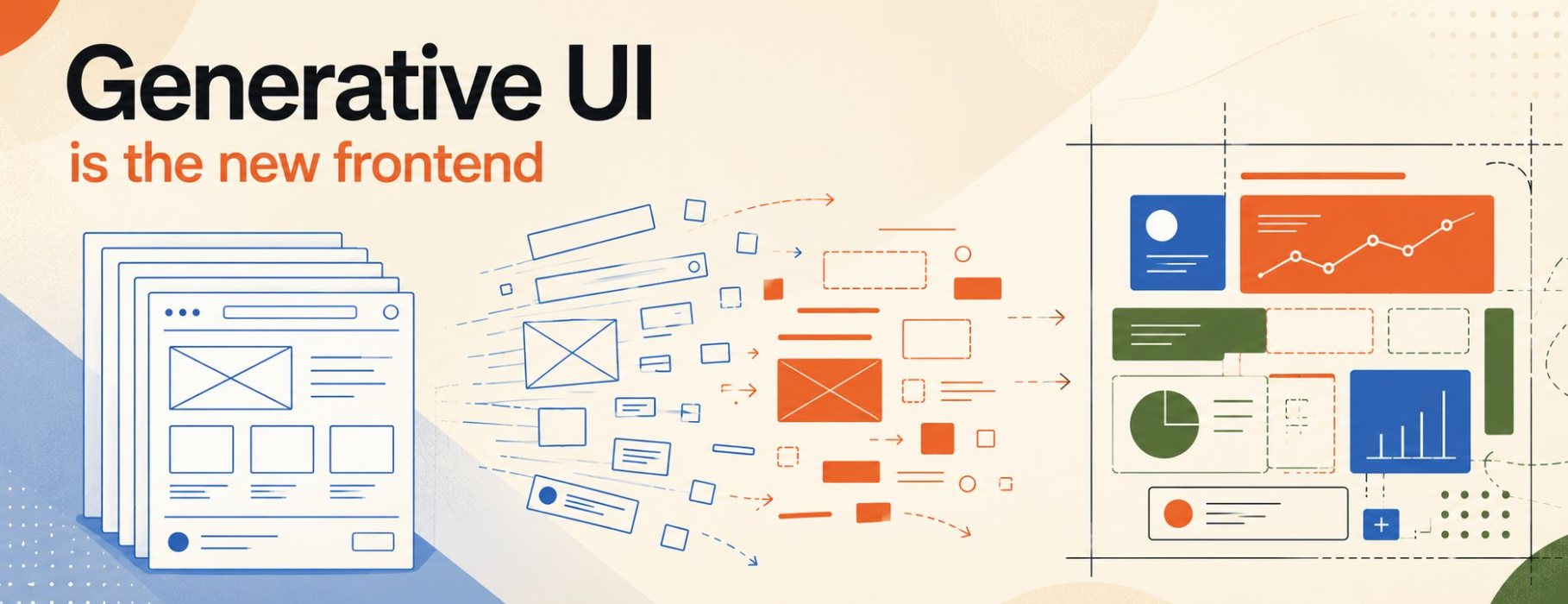
The frontend used to be a fixed thing. Designers drew it. Engineers built it. Users got what shipped. That’s over. The interfaces shipping in 2026 are drawn partly by the agent itself, in real time, from what the user actually asked for. Ask for a table, get a table. Not a paragraph describing one. Generative UI is the layer that lets agents stop describing and start showing. Three patterns have emerged for how to build it, and the differences between them matter more than most teams realize. ” Shubham Saboo @Saboo_Shubham_ Senior AI Product Manager Google
Generative User Interface Optimization (GUIO) refers to the process of designing and refining user interfaces that are dynamically generated in real-time by artificial intelligence. The core purpose is to create an experience precisely customized to fit an individual user’s specific needs, context, and behavior at any given moment, thereby optimizing engagement and outcomes.
This represents a significant shift from traditional UI design, which involves creating static, pre-defined interfaces that offer a largely identical experience to all users, as detailed in a Nielsen Norman Group article on outcome-oriented design.
The promise of GenUI is to deliver highly personalized, tailor-made interfaces that adapt to individual user needs. This moves beyond the limitations of a single-experience design model, which often struggles to make every user perfectly satisfied. Instead, GenUI aims to craft experiences that are unique and context-aware, ensuring a fluid and highly relevant interaction for each individual. The interface is created, adapted, and reconfigured instantly as the user interacts with it or as their context changes, allowing for immediate responsiveness to individual needs and situations.
Generative UI vs. AI-Assisted Design: A Clear Distinction
It is crucial to distinguish Generative UI from AI-assisted design tools. Generative UI directly impacts the end-user experience by producing a dynamic, custom interface in real-time. The output is a live, adaptive interface tailored specifically for a particular end user based on their current needs and context. Conversely, AI-assisted design tools are used by designers and product teams to accelerate their design process, generating UI designs and code to streamline ideation, prototyping, and implementation, rather than serving the end-user directly.
Designers and product teams are the primary beneficiaries of AI-assisted design, as these tools significantly accelerate the ideation, design, and implementation phases of interfaces. Examples include tools that convert text prompts and hand-drawn sketches into mockups or turn text prompts into simple coded prototypes. In contrast, end users are the primary beneficiaries of generative UI, interacting with an interface specifically built for them and their needs in that particular moment, leading to a highly customized experience.
The Shift to Outcome-Oriented Design
Generative UI forces a fundamental shift in design methodology towards an outcome-oriented approach. This means designers prioritize defining desired user goals and establishing clear constraints for the artificial intelligence to operate within. This shifts the focus from manually designing discrete interface elements to strategically guiding the AI to achieve specific, measurable user outcomes through dynamically generated interfaces, as highlighted in a Nielsen Norman Group analysis of GenUI.
In a Generative UI environment, the designer’s role evolves from a direct creator of interface elements to an ‘AI conductor’ or ‘middle manager of agents.’ They focus on defining desired user outcomes and the boundaries or constraints within which the AI can generate interfaces, providing strategic guidance and oversight rather than pixel-perfect design. This transformation aligns with broader trends in the Agentic Era, where human value increasingly lies in strategic oversight, problem-solving, and collaboration with intelligent agents.
Addressing User Concerns: Predictability and Trust in Dynamic Interfaces
A significant concern users often raise about Generative UI is the potential for a lack of predictability. The idea of an interface that ‘changes all the time’ can lead to usability concerns and a preference for consistent, familiar product experiences, as noted by Sam Z Liu and Shubham Saboo in recent discussions. This initial reaction underscores the importance of balancing dynamic adaptation with user trust.
Generative UI can maintain predictability through ‘Controlled GenUI’ approaches. This involves the AI agent selecting and arranging pre-built components from an established design system, ensuring brand consistency and familiarity. Designers define the ‘rules’ and ‘boundaries’ for the AI, allowing for dynamic personalization without disorienting users or sacrificing usability. This integration with existing design systems ensures that while the layout may adapt, the core brand identity and user experience principles remain intact, as discussed in a Nielsen Norman Group article on GenUI.
Measurable ROI from GenUI
The primary benefits of implementing Generative UI include hyper-personalization, leading to increased user engagement and satisfaction. It can also accelerate development cycles by automating interface creation, improve accessibility by tailoring interfaces to individual needs, and potentially deliver significant return on investment (ROI) by optimizing user journeys for specific business outcomes. By allowing businesses to rapidly iterate and optimize internal tools, they can gain invaluable experience and insights into the practical challenges and benefits of agentic systems, fostering operational maturity rapidly.
Generative UI can deliver measurable ROI by optimizing user journeys, which can lead to increased conversion rates, improved customer lifetime value, and reduced development costs through efficient component reuse. This provides tangible strategic advantages and concrete results from AI investments, aligning with leadership teams’ demands for concrete results from their Generative AI investments, a trend observed in early 2026 where nearly 80% of organizations planned to increase their Generative AI budgets.
Technical Foundations and Challenges of Generative UI
Generative UI systems are powered by advanced artificial intelligence models, often including large language models (LLMs) for understanding user intent and context. These models integrate with data pipelines that feed real-time user information, API integrations for interacting with backend systems, and sophisticated rendering engines to dynamically assemble and display interface elements. This complex technical architecture is essential for creating truly adaptive and responsive user experiences.
Key challenges in implementing Generative UI include ensuring a balance between dynamic adaptation and user predictability, maintaining consistent brand identity, and addressing data privacy concerns. Technical complexities involve developing robust AI models, managing data pipelines for user context, and integrating with existing enterprise systems. Despite rapid advancements, an ‘infrastructure gap’ persists, where the ability to build and deploy reliable, observable, and secure agents in real business contexts lags behind the rapid development of the AI models themselves.
The Agentic Era and the Future of UI
Generative UI is a key component of the broader Agentic Era, characterized by artificial intelligence systems, known as autonomous agents, that can perceive goals, plan multi-step processes, and execute actions across enterprise systems with minimal human intervention. This signifies a profound evolution from earlier forms of Generative AI, moving beyond conversational interactions to impactful, real-world operations within organizations. The long-term impact of Generative UI on the design field is anticipated to be profound, fundamentally changing how users interact with products and transforming the design field itself.
This shift will move the focus from designing static layouts to defining outcomes, constraints, and intelligent systems, leading to deeply personalized and continuously optimized digital experiences. The evolving role of human designers as ‘conductors’ or ‘middle managers of agents’ underscores this future, where strategic oversight and collaboration with intelligent agents become paramount. The market for agentic AI is experiencing substantial growth, with projections indicating an expansion from an estimated $7.6 billion in 2025 to $10.8 billion in 2026, reflecting increasing enterprise adoption across diverse sectors.
The Core Protocol Stack
-
MCP (Model Context Protocol): Handles the connection between the AI agent and external backend tools, data sources, or execution environments.
-
A2A (Agent-to-Agent): Governs the mesh networking layer where autonomous agents communicate directly with one another.
-
AG-UI (Agent-to-User Interface): A streaming protocol layer running over Server-Sent Events (SSE). It manages bi-directional state transport between the user and the agent (e.g., streaming tool calls, UI schema updates, and client mutations).
-
A2UI (Agent-to-User Interface Spec): Google’s open standard that allows an agent to emit its interface layouts as standardized JSON schemas riding on top of the AG-UI stream.
Technical Implementations: The Three Design Patterns
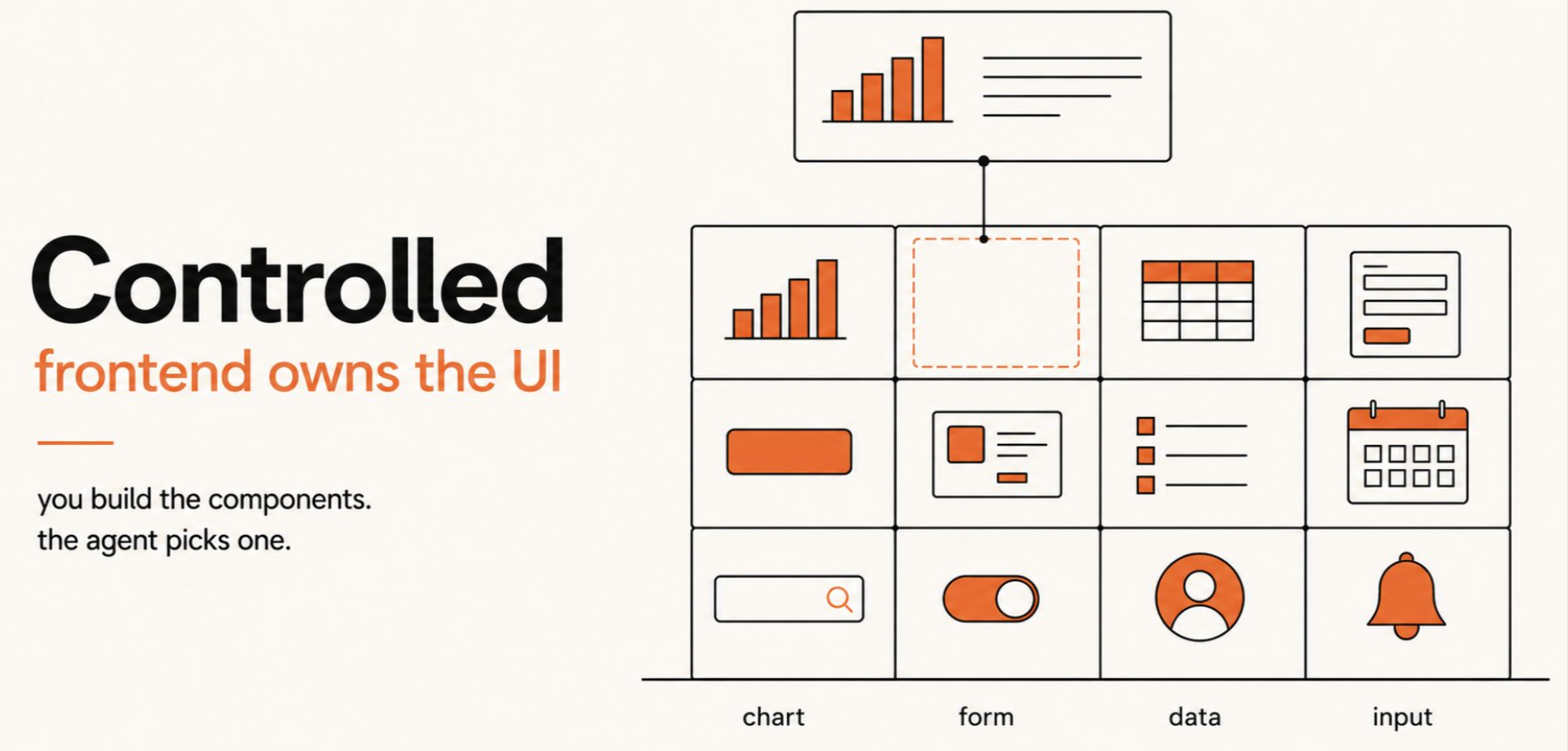
1. Controlled Pattern (Frontend-Owned UI)
-
Mechanism: React components are built natively on the client and statically bound to explicit tool names using a framework hook (like CopilotKit’s
useComponent). The agent passes functional parameters to the frontend, which handles rendering. -
The Token Tax: Every registered component requires its full JSON schema and description to sit inside the LLM context window (~400 tokens per tool). Registering more than 15–20 components balloons context window costs and induces model confusion over overlapping tool scopes.
-
Shared State Exception: Writing backend agent-side state allows elements to mutate concurrently (e.g., adding rows to a database updating an adjacent canvas panel) via a single tool call without forcing secondary LLM generations.
-
Ideal Use Case: 10 or fewer high-value, strictly defined flows where brand control and pixel-perfect design system uniformity are mandatory.
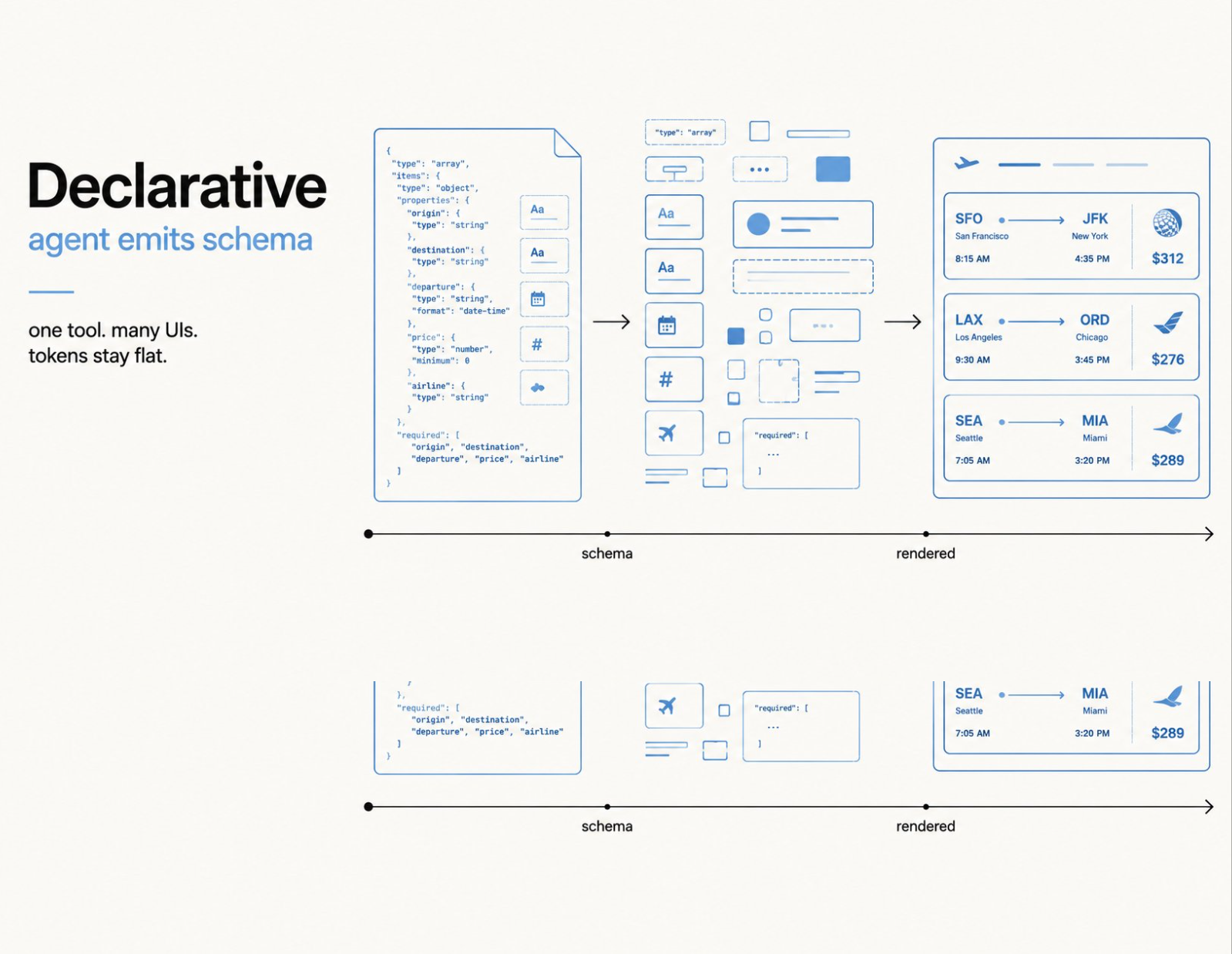
2. Declarative Pattern (A2UI Schema-Driven)
-
Mechanism: The agent emits structural JSON schemas instead of calling unique hardcoded components. The tool triggers three distinct chronological operations:
create_surface,update_components, andupdate_data_model. -
The Component Catalog: The frontend holds an explicit catalog mapping these generic structural schema signatures directly to native platform components (React, Svelte, Flutter).
-
Token Efficiency: Scaling from 50 to 500 distinct UI states incurs flat token economics because the agent interacts via one unified schema-generating tool interface rather than distinct structural descriptions.
-
Common Failure State: Mismatched
CATALOG_IDdefinitions between the agent code and frontend mapping engine cause silent failures, making the UI fallback to generic basic layout slots. -
Ideal Use Case: High-variety product states (dashboards, varying data forms, dynamic research cards) where token containment is necessary.
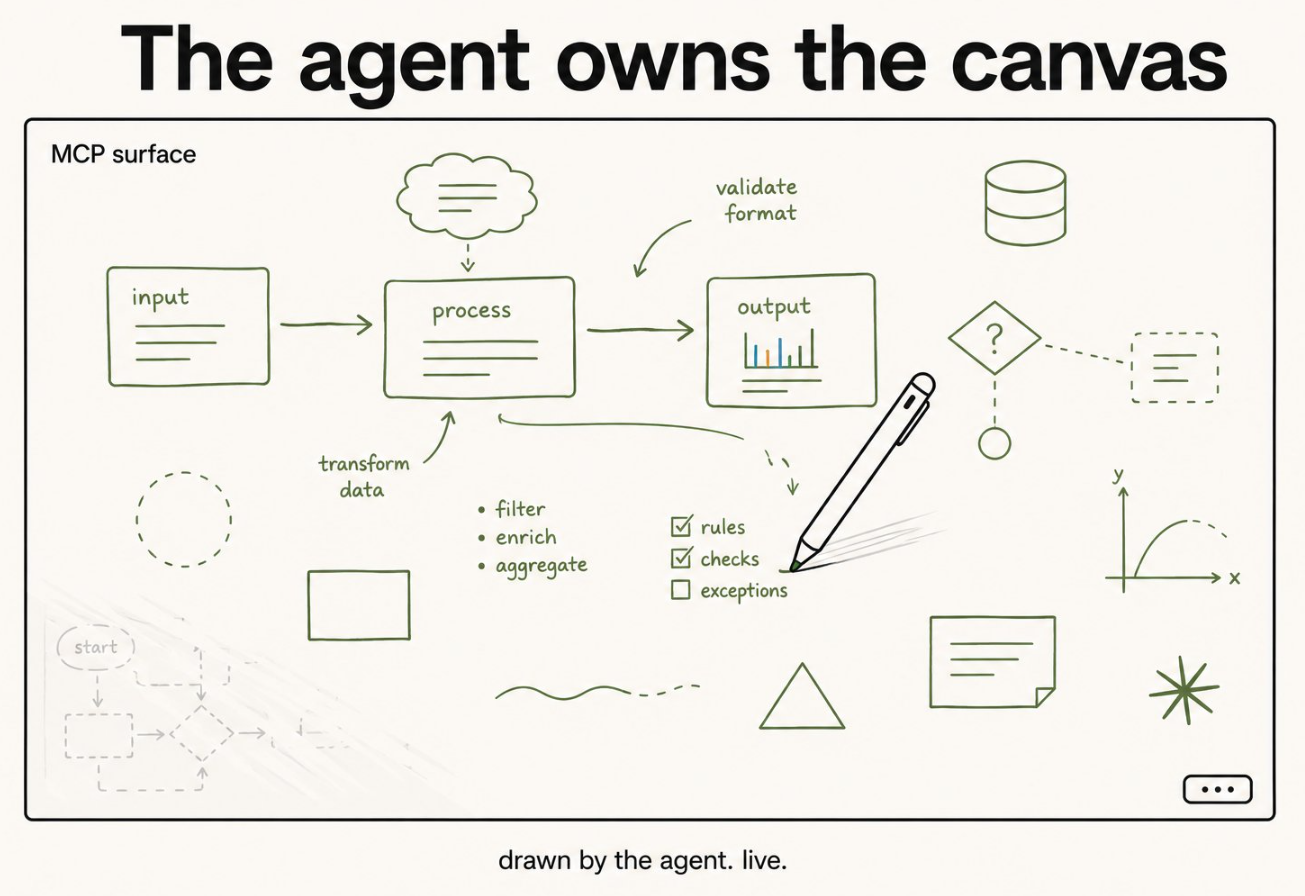
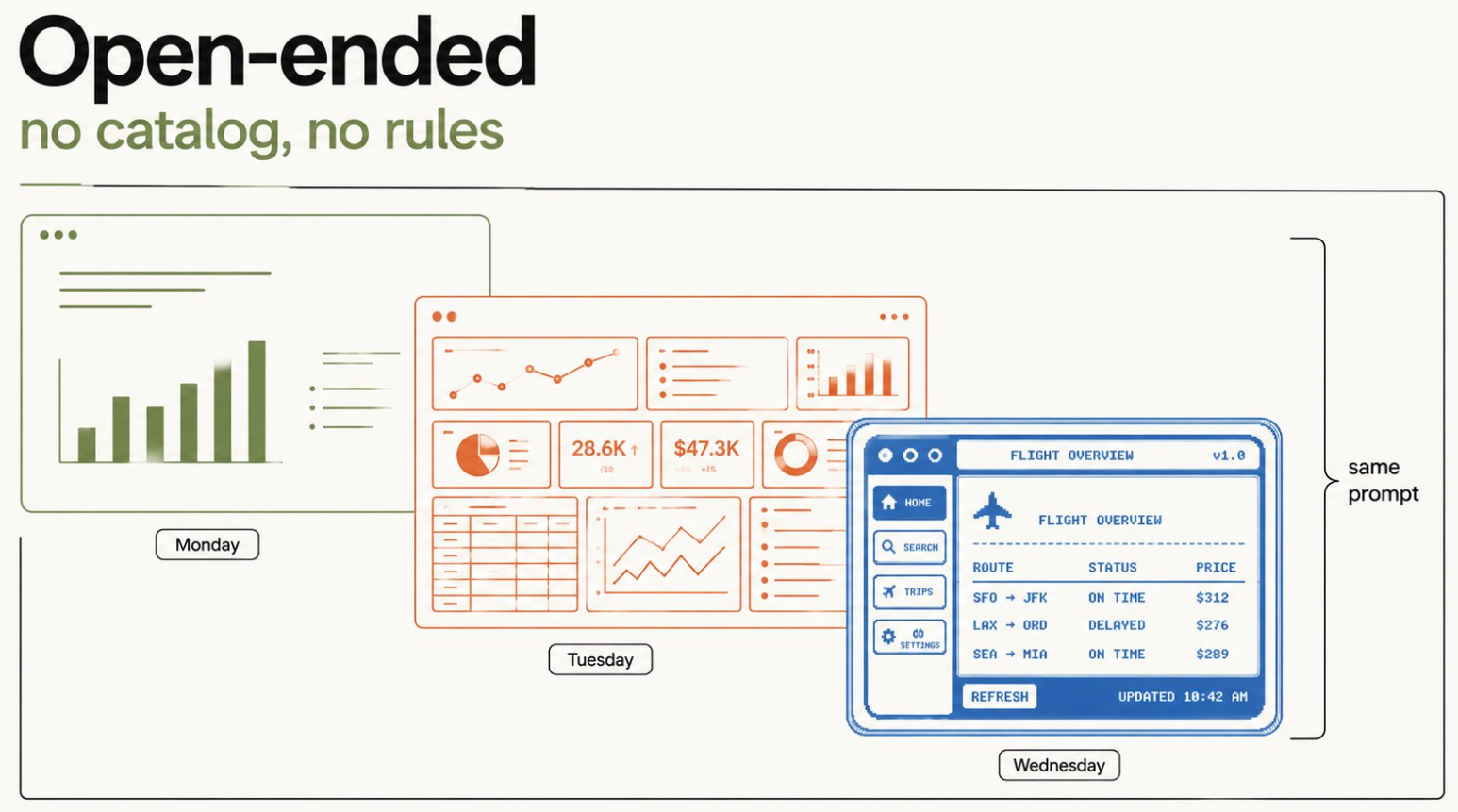
3. Open-Ended Pattern (Raw Sandboxed HTML & MCP Apps)
-
Mechanism: The agent either connects directly to a visual-first canvas server via an application middleware (e.g., an Excalidraw instance driven over MCP) or generates raw HTML blocks directly.
-
Isolation Security: Generated HTML markup must be confined inside an
iframesandbox configured to strictly allow scripts and forms, while fundamentally prohibitingallow-same-origintags to eliminate script-injection attacks. -
The Aesthetic Problem: Free-text HTML emission suffers heavily from brand drift, returning radically inconsistent design aesthetics (“Neo-brutalist” layouts vs “iOS 4 clones”) based on model weights if strict system instructions (like forcing pure neutral Tailwind tokens) are omitted.
-
Ideal Use Case: Single-turn, disposable interactive mockups, API payload abstractions, or one-shot learning visualizations.
If you want to dig deeper technically, I suggest you start with Shubham Saboo’s post on X.
Frequently Asked Questions
What is a generative UI (genUI)?
A generative UI is a user interface that is dynamically generated in real time by artificial intelligence. Its purpose is to provide an experience customized to fit the user’s specific needs and context at that moment.
What is the primary promise of Generative UI?
GenUI promises highly personalized interfaces, representing a significant shift from designing for a broad audience to tailoring experiences for each individual user. This aims to make every user perfectly happy with their unique interface.
How does Generative UI differ from AI-assisted design?
Generative UI produces a dynamic, custom interface for end users in real time, directly impacting their experience. AI-assisted design, conversely, generates UI designs and code to accelerate the design process for designers and product teams.
Who benefits from generative UI?
End users are the primary beneficiaries of generative UI. Each end user interacts with an interface specifically built for them and their needs in that particular moment, leading to a highly customized experience.
Who benefits from AI-assisted design?
Designers and product teams benefit from AI-assisted design. These tools significantly accelerate the ideation, design, and implementation phases of interfaces, streamlining the overall product development process.
What is the output of generative UI?
The output of generative UI is a dynamic, custom interface that is generated in real time. This interface is tailored specifically for a particular end user based on their current needs and context.
What is the output of AI-assisted design?
The output of AI-assisted design consists of AI-generated UI designs and code. These outputs serve as tools to aid designers in creating and prototyping interfaces more quickly and efficiently.
What is outcome-oriented design in the context of GenUI?
Outcome-oriented design is an approach where designers prioritize defining user goals and establishing constraints for AI to operate within. This shifts the focus from designing discrete interface elements to achieving desired user outcomes.
What is the role of the outcome-oriented designer?
The outcome-oriented designer’s role is to define the desired user outcomes and the boundaries or constraints within which the AI can generate interfaces. This moves their focus from pixel-perfect design to strategic guidance and goal setting.
What are some current examples of AI-assisted design tools?
Examples include UIzard, which converts text prompts and hand-drawn sketches into mockups, Canonic for creating AI-generated full-stack applications without code, and v0 by Vercel for turning text prompts into simple coded prototypes.
What is the anticipated long-term impact of generative UI?
Generative UI is expected to have an even greater long-term impact on the design field than AI-assisted tools. It will fundamentally change how users interact with products by providing deeply personalized experiences.
How does GenUI address the limitations of designing for many people?
GenUI addresses this by shifting from a single-experience design model to personalized experiences for each individual. This aims to overcome the downside of never making anyone perfectly happy with a one-size-fits-all approach.
What is the core shift GenUI forces in design methodology?
GenUI forces a fundamental shift to an outcome-oriented design approach. This means designers must prioritize defining user goals and constraints for the AI, rather than focusing on the direct creation of interface elements.
What are the challenges associated with Generative UI?
The article mentions ‘Challenges of GenUI’ as a key topic, implying that adapting to dynamic, AI-generated interfaces and the new design paradigm will present significant hurdles for both designers and users.
What does ‘real-time’ generation mean for a user interface?
Real-time generation means the interface is created and adapted instantly as the user interacts with it or as their context changes. This allows for immediate responsiveness to individual needs and situations.
How does personalization in GenUI differ from current customization options?
Current personalization and customization typically offer minor adjustments. GenUI, however, aims for highly personalized, tailor-made interfaces that are dynamically created to perfectly suit the needs of each individual user.
What is the timeline for the widespread adoption of Generative UI?
While the exact timeline for this transformative change is currently unclear, it is anticipated that generative UI will eventually allow for highly personalized, tailor-made interfaces in the future.
What is the initial reaction people often have to Generative UI?
The initial reaction often involves concerns about predictability, with some users preferring consistent products. However, the concept is more nuanced than simply constant change, as indicated by the research context.
How does GenUI relate to existing design systems?
In some conceptual models, GenUI can operate within existing design systems, using pre-built components. An ‘agent’ or AI would then pick and arrange these components, ensuring design consistency while generating dynamic layouts.
What is the ultimate goal of Generative UI?
The ultimate goal of Generative UI is to dynamically create customized user interfaces in real-time that perfectly fit the user’s needs and context, leading to optimal and highly individualized user experiences.
What is a Generative User Interface (UI)?
A Generative User Interface (UI) is a type of interface that is dynamically created in real-time by artificial intelligence. Instead of a one-size-fits-all design, the UI adapts to each user’s specific needs, context, and behavior, providing a personalized experience.
How does Generative UI work?
Generative UI utilizes advanced AI models, such as large language models (LLMs), to analyze user behavior, intent, and context. Based on this analysis, the AI assembles and optimizes UI components in real-time from a predefined design system or even generates new interface elements on the fly.
What is the difference between Generative UI and traditional UI?
Traditional UI is static and pre-designed, offering the same experience to all users, while Generative UI is dynamic and adapts to each individual. Traditional design focuses on creating a single, optimal layout, whereas Generative UI focuses on creating a system of components and rules that the AI can use to build personalized interfaces.
What are the main benefits of Generative UI?
The primary benefits of Generative UI include hyper-personalization of the user experience, faster development cycles, and increased user engagement. It can also improve accessibility by tailoring the interface to individual needs and cater to both novice and expert users simultaneously.
What are the challenges of implementing Generative UI?
Key challenges include ensuring a predictable and non-disorienting user experience, maintaining brand consistency, and addressing potential privacy concerns related to data collection. There is also the technical complexity of developing and training the AI models that power the interface.
Conclusion
Generative User Interface Optimization is poised to redefine digital interaction, offering unparalleled personalization and efficiency.
While initial concerns about predictability are valid, the concept of ‘Controlled GenUI’ demonstrates how AI can deliver dynamic, tailor-made experiences within established design frameworks.
For your organization, embracing this shift means prioritizing outcome-oriented design, understanding the evolving role of designers as AI conductors, and strategically leveraging AI to drive measurable business value. This comprehensive approach will be key to unlocking the full potential of next-generation user interfaces.
Get ready for GUIO! https://t.co/HSORtrQ8fp
— Shaun Anderson (@Hobo_Web) June 4, 2026
Disclosure: I use generative AI when specifically writing about my own experiences, ideas, stories, concepts, tools, tool documentation or research. My tool of choice for this process is Agency, my own platform, using Google Gemini Pro 2.5, deep reasoning and flash. This content is a direct result of cutting-edge HITL AI content production, using a process I designed myself and described in my 2025 ebook, Strategic AI SEO. Also note: This content has not been created to “pass off” as human, or “write as Shaun Anderson”. It is raw, factually correct content, which I then edited. Agency can produce content with certain styles, but it is not my aim to fool readers. This is the state of AI content in June 2026, an example of the default Agency creative output. All content was conceived, edited, fact-checked and verified as correct by me (and is under constant development). This article represents the second “beta-test” of Agency, an autonomous AI-powered Agency as hinted at in my March 2026 SMX Paris keynote. Edited by Shaun Anderson AKA Hobo. Corrections welcome. See my AI policy.