
A manual action for unnatural links is a penalty for abusing Google webmaster guideline terms and conditions of use. In this case, building unnatural links to your site.
There are 2 main types of unnatural links.
Links you made yourself and the links you didn’t.
If you didn’t make any of the links then you usually don’t need to worry about manual actions for unnatural links, and you very probably don’t need to ever use the disavow tool.
If you have a manual action for “a pattern of unnatural artificial, deceptive, or manipulative links pointing to pages” then you will very probably need to use the disavow tool to clean up the links you commissioned or made yourself.
A lot of Google penalties (called “manual actions” by Google) are aimed at industrial-strength-manipulation of either Google’s popularity, reputation or relevance reward systems, which it relies on to create SERPs (search engine results pages) – and MOST smaller businesses won’t have come across the challenges caused by unnatural links (unless they paid a company in the past to ‘promote’ them using industrial-strength-manipulation such as low-quality link building).
However, if you have been competing in your niche for positions using artificial backlinks – chances are, you are affected.
QUOTE: “Any links intended to manipulate PageRank or a site’s ranking in Google search results may be considered part of a link scheme and a violation of Google’s Webmaster Guidelines. This includes any behavior that manipulates links to your site or outgoing links from your site.” Google Webmaster Guidelines, 2020
Google has made a lot of noise in the past (circa 2012-2017) about unnatural, manipulative or artificial links pointing at your site so you cannot simply ignore them. Google has chosen NOT to ignore your links anymore if they detect a REAL-TIME INTENT to rank for specific keywords using lower quality means – or link schemes, in other words.
My primary interest is SEO for real business websites, and this post is about something that’s probably going to hit a lot of businesses that, in the past, promoted their site using low-quality SEO services – resulting in unnatural links, which in turn can lead to a perceived increased risk of ‘negative SEO‘.
Google undeniably is taking a softer approach to low-quality backlinks than in previous years. It seems to me they are more interested in real-time spamming than historic link building activities.
If you haven’t been building links, you probably have next-to-nothing to worry about.
QUOTE: “Random links collected over the years aren’t necessarily harmful, we’ve seen them for a long time too and can ignore all of those weird pieces of web-graffiti from long ago. Disavow links that were really paid for (or otherwise actively unnaturally placed), don’t fret the cruft.” John Mueller, Google 2019
I think it is inferred by Google if are involved in real-time web spamming you are still in danger of a manual action, drop in traffic and a merry-go-round of time-wasted in areas with little ROI for your business. Historic link building activity may be less of a concern though.
QUOTE: “Most sites don’t have “toxic” links, or at least, created them on their own.” John Mueller, Google 2020
If you are worried about your backlinks and you want your backlinks reviewed, Hobo Web penalty lifting specialists can review them.
If you’re doing SEO yourself, read on:
Does Google Want You To Use The Disavow Link Tool?
I think this is worth mentioning prominently.
Not entirely, and only if you need to:
QUOTE: “That’s why the disavow tool isn’t like a main feature in Search Console, you kind of have to look for it explicitly. That’s all done on purpose because for most sites, you really don’t need to focus on links that much.” – John Mueller, Google 2019
and
QUOTE: “I think for most websites out there, pretty much the really largest majority of websites, you don’t need to use the disavow tool. That’s why we have the disavow tool so separate from search console so that you don’t get tempted to using the disavow tool because it looks like this normal part of search console
that everyone should be using. It’s really something that you only really need to use in really extreme cases.” John Mueller, Google 2019
Experience tells you that if Google thought your links were the priority to focus on, this feature would certainly be front and center in Google Search Console. It isn’t.
Join our Free SEO training course to find out more.
Should You Monitor The Links That Point To Your Site?
I check my backlinks every few months out of interest using third-party tools. I check for spammy links every year or two and consider them for disavowing. I have done this since my first disavow in 2012. After the first clean-up, unnatural links were never my priority again.
Quotes from Google would indicate this is a sensible way for most in my position to proceed:
QUOTE: “It’s interesting to take a look from time to time and maybe you can spot things that that you should have cleaned up in the past but for the most part kind of this mix of weird web pages everywhere you’re linking to other web pages that are just not only not a part of the web something that you’d need to kind of go through with a comb and clean out all of the slightly unnatural ones that you run across” John Mueller, Google 2018
Most website owners need not worry too much about backlinks, in isolation, in general.
It is evident that Google spokespersons believe that the links Search Console provides is enough for most webmasters.
When Should You Use The Disavow Tool?
QUOTE: “Anyone with an unnatural link warning. It also mentions anyone hit by Penguin, but I keep getting asked about this. I’m going to reiterate that if you were hit by Penguin and know or think you have bad links, you should probably use this too.” Matt Cutts, Google 2012
You really only should be using the disavow tool if you know there’s been unnatural backlinking activity you’ve been behind in the past, OR if you have a manual action OR an experienced SEO tells you that what you are currently up to is worth a manual action if the webspam team identify you as a manipulative agent:
QUOTE: “1. definitely the cases where there is a manual action and 2. also the cases where you (who have also seen) a lot of manual actions would say, well, if the web spam team looked at this now, they would give you a manual action…. Kind of the cases where you’d say, well, the manual action is more a matter of time and not kind of like it’s based on something that was done, I don’t know, where it’s clearly done a couple of years ago and it was kind of borderline not awesome. That’s the kind of stuff I’d say is no problem, that we would deal with more anyway…. But the kind of stuff where you look at it and say, if someone from the web spam team kind of got this as a tip, they would take a manual action, and that’s definitely the kind of thing where I would clean that up and do like a disavow for that…. Yeah, I think it’s hard to say if there is like a specific timeline. But in general, if the web spam team looked at this and said, like, things have moved on… this was clearly done a couple years ago, it was not totally malicious; then they probably wouldn’t take manual action for that…. I think if you’re in a case where it’s really clear that the web spam team would give you a manual action based on the current situation, then that’s what I would disavow….Yeah, I think for the vast majority of sites that kind of have that normal mix of things where it’s like you followed some bad advice in the past, and it’s like you moved on and things are pretty natural now, then they really don’t have to do that.”- John Mueller, Google 2019
You should really only use the tool if you know, or Google knows that you have “a pattern of unnatural artificial, deceptive, or manipulative links pointing to pages on your site.”
Should You Be Worried About Spammy Links Pointing To Your Website That You Didn’t Build Yourself?
Do you need to worry about any “pattern of unnatural artificial, deceptive, or manipulative links pointing to pages on your site” that you have nothing to do with?
Probably not.
QUOTE: “For the most part unless you’re aware of kind of regular activity that at a previous SEO or like someone in the past has been doing for your website with regards to links then I wouldn’t worry about it, that’s something where if a website has been around for a long time then it has links from all kinds of crazy places and even if you look at those pages you go like I don’t know why this website is linking to our site or it looks like someone did a typo or dropped a bunch of URLs into a forum and it includes links to our site as well these are things that we see on the web all the time so unless you’re really aware of kind of dedicated activity of someone going out and buying a lot of links and kind of really doing a lot of things that are against our webmaster guidelines.” – John Mueller, Google 2018
You will hear plenty of opinions on this if you read into it.
Join our Free SEO training course to find out more.
What If A Competitor Is Trying To Decrease Your Rankings Using Spammy Links? (AKA Negative SEO)
When asked “My website gets hundreds of links that seem to be spammy. I suspect that maybe one of my competitors is trying to decrease my rankings. Do I need to keep disavowing these links week after week? Or should I only be worried if I get an unnatural links manual action?” – which is essentially asking about Negative SEO….
John replied:
QUOTE: “In general we do automatically take these into account and we try to… ignore them automatically when we see them happening. For the most part, I suspect that works fairly well. I see very few people with actual issues around that. So I think that’s mostly working well. With regards to disavowing these links, I suspect if these are just normal spammy links that are just popping up for your website, then I wouldn’t worry about them too much. Probably we figured that out on our own.” John Mueller, Google 2019
He continued:
QUOTE: “If you’re worried about them regardless if it’s something that you’re not sure about, you’re losing sleep over these links and you just want to make sure that Google handles them properly then using the disavow tool is perfectly fine. The disavow tool is not an admission of guilt or anything like that. You’re essentially just telling our systems these links should not be taken into account for my website. And there are multiple reasons why you might want links not to be taken into account. That’s not something our algorithms would try to judge for your website…. if you feel that these links are pretty normal spammy and something that any algorithm would figure out then you can just leave them alone and just kind of move on.” – John Mueller, Google 2019
Another Google employee is on record as stating:
QUOTE: “First and foremost we haven’t seen a single case a single one where those toxic link campaigns work we spend tons of time with the ranking team looking at these cases and we haven’t seen a single one where it worked.” Gary Illyes, Google Nov 2016
Will Your Competitor Be Penalised For Unnatural Links That Make Them Rank Above You?
Sometimes they will, sometimes they won’t.
Sometimes they have been, and you will never know about it.
QUOTE: “I think another tricky part there is like you don’t really know if they get away with it. In the sense that for the webspam team as well we try to recognize those kind of links and just ignore them. And the webspam team when they run across like a bigger pattern of links like that they also apply manual action there and they essentially neutralize those links. So you wouldn’t see that any of the link tools. And a site might continue to rank fairly well despite all of these links essentially being ignored. So what ends up happening is they spend a lot of time doing all of this stuff to kind of build these unnatural links and in the end they don’t really have an effect. And they could have spent that time actually doing something useful for the long term for their website.” John Mueller, Google 2017
You can always tell Google about them, or out them in Google forums. If you have the energy to be bothered with that – perhaps focusing some of this on making your site a better user experience for Google’s users is a more productive use of your time.
Eventually, Google will catch up with a competitor’s low-quality links, unless they know what they are doing, of course, and most will not.
What Happens To Your Rankings In Google If Google Penalises Your Site For Unnatural Links?
QUOTE: “If you have a manual action against your site for unnatural links to your site, or if you think you’re about to get such a manual action (because of paid links or other link schemes that violate our quality guidelines), you should try to remove those links from the other site. If you can’t get these links removed, then you should disavow those links to your website.” Google Webmaster Guidelines, 2020
If you receive a manual action it’s clean-up time.
Your rankings are probably going to be very noticeably negatively impacted.
Other times the indicators might be more subtle.
- You might not rank at all in Google for something you used to rank for very well for.
- Your traffic might reduce month by month.
- You might disappear overnight for valuable keywords associated with your content.
- You might disappear for one keyword phrase.
- You might be reviewed, manually
- Fresh content seems to struggle a bit more to get into Google’s index
If you are, indeed, penalised, you’re going to have clean your links up if you want to restore your ‘reputation’ in Google. Penalties can last a long time (if no clean-up is undertaken).
In the very worst cases – your site and all its pages can be removed from Google. It can be ‘de-indexed‘ and a ‘pure spam‘ classification.
When you get a penalty revoked, things start to get back to normal, but this process takes time too.
Join our Free SEO training course to find out more.
Will Disavowing Backlinks To Your Website Help Google Trust Your Backlinks More?
Maybe.
I have approached this over the years that yes, at some point in the process of a chain of events that leads to your rankings, a disavow file can lead to Google trusting your site more.
This is dependent on your circumstances:
QUOTE: “It’s something where our algorithms, when we look at it, and they see, oh, they’re a bunch of really bad links here, then maybe they’ll be a bit more cautious with regards to the links in general for the website. So if you clean that up, then the algorithms look at it and say, oh, there’s kind of, it’s ok. It’s not bad.” John Mueller, Google 2019
What we have been told about the disavow file has been clarified over the years:
QUOTE: “So disavow is again, basically, **just a label internally**. It’s applied on the links and anchors. And then you can see that, as well. Basically, you could have like a link from, I don’t know, WhiteHouse.gov, and it has labels Penguin RT, footer and disavow. And then they would see that — they would know that someone or the webmaster or content owner is actively tackling those links.” Gary Illyes Google 2016
and
QUOTE: “If you do not have a manual action then you do not need to submit a disavow!” Search Engine Roundtable, 2017
With this in mind, you should probably have a very good reason in the first place to submit a disavow such as cleaning up a manual action or identifying a clear case of negative SEO if you have nothing better to do:
QUOTE: “we recommend it in case you’re worrying about negative SEO.” Gary Illyes, Google 2017
I treat important sites as if they are going to get a manual review at some point.
If Google labels links for a manual reviewer so that “they would know that someone or the webmaster or content owner is actively tackling those links” then it is still useful (for some) to disavow risky links (however you quantify that) but for most webmasters, it may be the case that Google is already ‘discarding ‘ and devaluing your lowest-quality links anyway.
If the disavow file is:
QUOTE: **just a label internally**Gary Illyes Google 2016
and Penguin:
QUOTE: “doesn’t demote it will just discard the incoming spam toward the side and it will just ignore the spam and that’s it no penalty no demotion and it works in real time” Gary Illyes, Google 2016
Then chances are Google is already discarding your low-quality links today rather than penalise you, so ‘cleaning’ your backlinks would be something to leave for a rainy day:
QUOTE: “If you have better things to do, as you should, then don’t use it.” Gary Illyes, Google 2017
I went ‘full disclosure’ on my own backlink profile using the disavow file in 2012 and it helped me in the long-run both to get record traffic levels, top rankings and to recover quickly from a negative SEO hack and multiple negative SEO attacks.
I always treated the disavow file as something that would be manually reviewed at some point.
I’d lean towards focusing on other things than spending a lot of time on managing a disavow file (unless you are at real risk of ‘real-time’ penalty or have a manual action for unnatural links).
If you have sorted all other site quality issues out, I would then disavow low-quality links in case it has some second-order benefit down the road.
The Disavow Links Tool is a tool provided by Google in Google Search Console (formerly Google Webmaster Tools).
You can specify which domains you want to disavow the links from (you can also specify individual pages).
Generally speaking, if disavowing a link, you are better of disavowing the entire domain (if it is a spammy domain).
The disavow.txt is just a simple text file with the following list of domains e.g.:
- domain:google.com
- domain:plus.google.com
The way it appears to work is you tell Google which links to ignore when are calculating the quality of your backlinks.
Google does want you to actually remove spammy links if you can, first, before disavowing the links you cannot get removed:
QUOTE: “If you have a manual action against your site for unnatural links to your site, or if you think you’re about to get such a manual action (because of paid links or other link schemes that violate our quality guidelines), you should try to remove those links from the other site. If you can’t get these links removed, then you should disavow those links to your website.” Google Webmaster Guidelines 2020
Google has said that they will treat links found in your disavow file as nofollow links. These links will not pass PageRank or contextual relevance signals, and will not be able to negatively impact your site any longer.
QUOTE: “Google recommends that webmasters qualify outbound links so that these type of links do not artificially affect rankings. Simply: Use rel=”sponsored” or rel=”nofollow” for paid links. Use rel=”ugc” or rel=”nofollow” for user generated content links.” Shaun Anderson, Hobo 2020
Should You Submit ALL Your Backlinks To The Disavow Tool?
Definitely not.
QUOTE: “Even after removing the disavow file, my ranking never recovered. Will they ever?” Cyrus Shephard, 2013
Even if Google was just manually making an example of someone abusing the disavow file, the disavow file is clearly for ‘disavowing’ yourself from domains. Perhaps Google was only too happy to oblige in this instance, which is unfortunate.
QUOTE: “Disavowing backlinks is really mostly for the case where there are really problematic links pointing to your page and you want to say I want nothing to do with that” John Mueller, Google 2016
Nobody knows exactly how this process is handled, so you are probably better listening to Google’s advice than not.
It’s evident that the disavow file is relevant in a manual review of your site.
Keep the disavow for “really problematic links“.
Join our Free SEO training course to find out more.
Do You Need To Submit A Disavow File to All Versions of Your Site in Search Console?
Yes.
If you have a manual action (or had a manual action in the past) then YES and especially if you’ve changed to HTPPS then you probably should submit your disavow file to all versions of your site (just in case):
QUOTE: “Okay, checked with the team: yes, you need to re-upload the disavow file to the https site profile in SC (Search Console)” Gary Illyes, Google 2015
This is unless you have the new “Domain Properties” set up in Google Search Console, which aggregates the data from all the alternate versions of your website into one location:
QUOTE: “Google announced it has launched “domain properties,” a feature that lets you see data from a whole domain in one view within Google Search Console. This can consolidate your http, https, www, non-www, m-dot, etc into a single property to get an aggregate view of your site’s performance and errors/warnings in a single Google Search Console property…. Firstly, this brings back a feature that was going away with the old Search Console – specifically property sets. Secondly, since this is automated via DNS verification, it requires you to have access to your DNS records and understand how to change those records. You may need to consult your hosting provider when making DNS record changes.” Barry Schwartz, 2019
and
QUOTE: “Google recommends verifying all versions of a website — http, https, www, and non-www — in order to get the most comprehensive view of your site in Google Search Console. Unfortunately, many separate listings can make it hard for webmasters to understand the full picture of how Google “sees” their domain as a whole. To make this easier, today we’re announcing “domain properties” in Search Console, a way of verifying and seeing the data from Google Search for a whole domain.” Erez Bixon, Google 2019
Should You Use The Google Backlinks Disavow Tool Yourself?
QUOTE: “It is a big gun and can destroy your rankings in a matter of hours if you are misusing it” Gary Illyes, Google 2017
The answer is probably NOT if you do not know what you are doing but there is some question about what the disavow tool actually does. I have found it most of use to help lift a manual action for unnatural links:
QUOTE: “This is an advanced feature and should only be used with caution. If used incorrectly, this feature can potentially harm your site’s performance in Google’s search results. We recommend that you disavow backlinks only if you believe you have a considerable number of spammy, artificial, or low-quality links pointing to your site, and if you are confident that the links are causing issues for you. In most cases, Google can assess which links to trust without additional guidance, so most normal or typical sites will not need to use this tool.” Google Search Console Notification
Some might recommend removing links instead of just using this disavow tool from Google. Lots of people have different angles.
I have used BOTH methods to recover sites from manual actions and algorithmic penalties.
If you have a manual penalty, you will probably also need to get some of these links physically removed or at least try and get them removed. Yes, that means emailing Webmasters and keeping a record of that endeavour.
If you get a manual penalty, have lots of links and removing the low-quality links is going to be a hard task – you WILL need to employ the disavow file.
If you do not have a manual action, the risk to your site from Penguin (at least) is reduced:
QUOTE: “I have a site with [about] 100,000 visits every two weeks and I haven’t looked at the links for two years, but I know I have some porn links because someone pointed it out and I’m fine with that – I don’t use disavow. If it makes you feel better, then use it, just make sure you’re not overusing it. It is a big gun and can destroy your rankings in a matter of hours if you are misusing it. Don’t be afraid of sites that you don’t know. There are hundreds of millions – billions probably — of sites on the Internet. There’s no way you’ll know each of them. If they have content and are not spammy, why would you disavow? It’s extremely likely it won’t hurt you.” Gary Illyes, Google 2017
I have in the past proactively disavowed links it on sites that are obviously algorithmically penalised for particular keywords or on links I expect will cause a problem later on. One would expect penalties are based on algorithmic detection on some level for some sites.
If you’ve ever attempted to manipulate Google, now’s the time to at least quantify the risk attached to those links.
I recommend you go that one step further and consider disavowing very low-quality links YOU HAVE MADE pointing to your site, as:
- Google is better at identifying your low-quality links.
- Google already knows about your crap links.
- Google is very definitely ignoring most of your links.
- Google has probably already has penalised you in areas and you probably are not aware of it. I’ve helped a few sites that got the unnatural links message that was clearly algorithmically slapped a year before and never noticed it until it started to hurt.
- Some competitors will ‘negative SEO‘ your website (I go into this below).
How To Use the Backlinks Disavow Tool
Upload a list of links to disavow:
- Go to the disavow links tool page.
- Select your website.
- Click Disavow links.
- Click Choose file.
Google says:
QUOTE: “It may take some time for Google to process the information you’ve uploaded. In particular, this information will be incorporated into our index as we recrawl the web and reprocess the pages that we see, which can take a number of weeks.” Google
… and they are telling it like it is.
This process is designed, by Google, to take TIME to fix, if you had an unfair competitive advantage because of historic low-quality link building practices.
Join our Free SEO training course to find out more.
What Are ‘Unnatural Links‘?
QUOTE: “in general I try to avoid that so that you really sure that your content kind of stands on its own. We do use links as part of our algorithms but we used lots and lots of other factors as well so only focusing on links is probably going to cause more problems for your website than it actually helps” John Mueller, Google 2015
Unnatural links are links you have placed deliberately to manipulate where you rank in Google.
Well, if you’ve been actively promoting your website, sit back for a moment and think about all the links you managed to generate to your site because you DID NOT come from a position of actually building a rich, informative site – yes – all those links.
If you paid a link building company to get you links, yes, those links (probably).
If you are using cheap submission services that are not a scam, yes those links. Those tactics to get easy-to-get links you got that were linking to your competitors’ websites?
Yes, those links.
QUOTE: “From my point of view if you’re jumping in with a question like this and you’re saying I’m going to get 200 backlinks in two days… then that sounds a lot like you’re not getting natural backlinks. That sounds a lot like you’re going off and just buying them or having someone buy them for you. And that itself would be kind of the thing that we would not be happy with…..So it’s not so much a matter of how many links you get in which time period. It’s really just… if these are links that are unnatural or from our point of view problematic then they would be problematic.It’s like it doesn’t really matter how many or in which time.” John Mueller, Google 2019
In short – if you are using unnatural links to get top positions and don’t deserve them Google will nuke your site when it detects them.
Google knows which keywords to penalise you for to destroy your ability to attract useful organic visits.
Sometimes this happens on a keyword level, sometimes page-by-page – sometimes site-by-site!
The important thing to realise is there is a certain amount of risk now associated with link building to any site and any page.
My initial recommendations then were to beware:
- Sitewide links and site interlinking, and ESPECIALLY if using rich anchor text, and or managing the links in any way (like changing the keyword text)
- Blog comment links
- Article marketing links
- Manipulative RSS syndication links
- Low-quality SEO friendly directory links
- Private blog networks (PBN)
- Low-quality press releases
And do MORE of the following:
- Get links from real websites
- Focus on getting links to inner pages of your site
- Build natural domain authority
- Add lots of new content to your site
- Make sure your web page is OPTIMISED for EVERY keyword phrase for which you want to rank.
- Make sure your content is shareable
My first observations included:
- Google will not just ignore links it doesn’t like if it thinks you have built them. Now, these links can well get you penalised – and quickly – and a lot more noticeable.
- No longer can you be cavalier about where you get your links. I, have been happy to take links from anywhere in the past, safe in the knowledge links are not toxic, and that Google will ignore low-quality links before penalising you for them.
- Your website CAN have a toxic link profile. It’s evidently about YOUR INTENT. If your intent was to rank high in Google for particular keywords using low-quality links, I think that’s enough for Google, these days, to sink your site.
- Ensure your link does not end up duplicated across LOTS and LOTS of low-quality sites. Too many of these types of links DECLARE AN INTENT to Google to manipulate rankings.
Google is serious when dealing with what it calls link schemes (ways to get easy links):
What Google says about link schemes:
QUOTE: “Your site’s ranking in Google search results is partly based on analysis of those sites that link to you. The quantity, quality, and relevance of links influences your ranking. The sites that link to you can provide context about the subject matter of your site, and can indicate its quality and popularity. Any links intended to manipulate a site’s ranking in Google search results may be considered part of a link scheme. This includes any behavior that manipulates links to your site, or outgoing links from your site. Manipulating these links may affect the quality of our search results, and as such is a violation of Google’s Webmaster Guidelines. The following are examples of link schemes which can negatively impact a site’s ranking in search results” Google Webmaster Guidelines, 2018
and
QUOTE: “Creating links that weren’t editorially placed or vouched for by the site’s owner on a page, otherwise known as unnatural links, can be considered a violation of our guidelines” Google Webmaster Guidelines, 2020
Some examples include:
- Buying or selling links that pass PageRank. This includes exchanging money for links, or posts that contain links; exchanging goods or services for links, or sending someone a “free” product in exchange for them writing about it and including a link
- Excessive link exchanging (“Link to me and I’ll link to you”)
- Linking to web spammers or unrelated sites with the intent to manipulate PageRank
- Building partner pages exclusively for the sake of cross-linking
- Using automated programs or services to create links to your site
- Text advertisements that pass PageRank
- Links that are inserted into articles with little coherence
- Low-quality directory or bookmark site links
- Links embedded in widgets that are distributed across various sites
- Widely distributed links in the footers of various sites
- Forum comments with optimised links in the post or signature
QUOTE: “The best way to get other sites to create high-quality, relevant links to yours is to create unique, relevant content that can naturally gain popularity in the Internet community. Creating good content pays off: Links are usually editorial votes given by choice, and the more useful content you have, the greater the chances someone else will find that content valuable to their readers and link to it.” Google Webmaster Guidelines, 2018
Google’s algorithms apparently label links it classifies:
QUOTE: “The manual actions team… can look at the labels on the on the links or a site gets. Basically, we have tons of link labels; for example, it’s a footer link, basically, that has a lot lower value than an in-content link. Then another label would be a Penguin real-time label. If they see that most of the links are Penguin real-time labelled, then they might actually take a deeper look and see what the content owner is trying to do. So, if you think about it, there are tons of different kinds of links on the internet. There are footer links, for example. There are Penguinized links, and all of these kinds of links have certain labels internally attached to them, basically for our own information. And if the manual actions team is reviewing a site for whatever reason, and they see that most of links are labeled as Penguin real-time affected, then they might decide to take a much deeper look on the site and see what’s up with those links and what could be the reason those links exist — and then maybe apply a manual action on the site because of the links.” Gary Illyes, Google 2016
Google seems to be taking a softer approach than they once did. No doubt they are more confident in their ability to protect against manipulation.
Will Your Rankings Return To Normal After Getting A Penalty Lifted?
QUOTE: “Cleaning up these kinds of link issue can take considerable time to be reflected by our algorithms (we don’t have a specific time in mind, but the mentioned 6-12 months is probably on the safe side)” John Mueller, Google 2018
Sometimes.
This depends on what, if any, quality signals are left in your backlink profile and what’s happening on your website and in your niche. If you have high-quality links, individual rankings can come back, that is for sure.
I’ve yet to see a site without high-quality links hit by an unnatural link penalty where traffic levels have returned to previous best positions. Sometimes there are just better, more information-rich pages out there these days for Google to rank above your page.
QUOTE: “it’s almost never going to be that we will just restore the previous state because things evolved on the internet…” John Mueller, Google 2016
But YES, I’ve seen rankings come back after a manual penalty. Sometimes better than they were before IF a lot of work was done to improve quality in all areas.
I’ve yet to see site-wide traffic levels return to normal in most cases, without significant investment in many areas.
Recovery from a links based penalty is a two-step process; a clean-up process and a growth process and this growth process involve investment in higher quality web marketing.
Are you penalised, or is Google just ignoring your links?
Here is something to think about, which may help you direct your efforts:
If you start with nothing, get top rankings in 3 months, and then end up with nothing.
Are you penalised? Really?
Or is Google just ignoring your links and ranking your website it should rank?
If the ‘penalty’ is an algorithmic shift, then by the very nature of it, getting good links (links Google has no reason to believe are suspect) to your website should tip the balance in your favour again.
It is worth noting that in some business cases, and with some business models – starting again on an entirely new domain might just be a better option, after a link penalty – especially if you think you need these type of link schemes to compete in the first place – and you have NO organic links.
If You Have A Manual Action, Will Google Tell You About Unnatural Links?
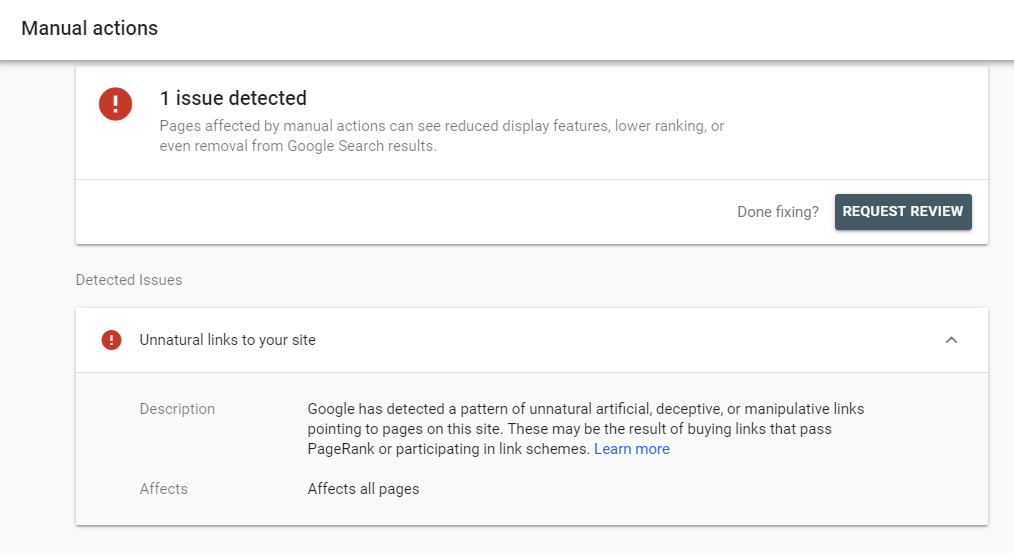
In most cases, yes.
Join our Free SEO training course to find out more.
A recent message in Google Search Console states:
QUOTE: “Google has detected a pattern of unnatural artificial, deceptive, or manipulative links pointing to pages on this site. These may be the result of buying links that pass PageRank or participating in link schemes.” Google Search Console, 2020
Google tells webmasters if they have a problem with your links by email through Google Search Console.
If you have a manual action for manipulative links you’ll get an email from Google, like this:
QUOTE: “Dear site owner or Webmaster of http://www.example.com/, We’ve detected that some of your site’s pages may be using techniques that are outside Google’s Webmaster Guidelines. Specifically, look for possibly artificial or unnatural links pointing to your site that could be intended to manipulate PageRank. Examples of unnatural linking could include buying links to pass PageRank or participating in link schemes. We encourage you to make changes to your site so that it meets our quality guidelines. Once you’ve made these changes, please submit your site for reconsideration in Google’s search results. If you find unnatural links to your site that you are unable to control or remove, please provide the details in your reconsideration request. If you have any questions about how to resolve this issue, please see our Webmaster Help Forum for support. Sincerely, Google Search Quality Team” Google Message To Webmasters, 2012
Google is moving in various directions, and can penalise your entire site or parts of it in a much more granular process than used to be the case:
QUOTE: “In less severe cases, we sometimes target specific spammy or artificial links created as part of a link scheme and distrust only those links, rather than taking action on a site’s overall ranking. The new messages make it clear that we are taking “targeted action on the unnatural links instead of your site as a whole.” Matt Cutts, Google 2012
If you have unnatural links you really need to worry about – the best place I think to detect any issues is Google Analytics. If you have been algorithmically penalised, traffic will have plummeted.
Things have changed over the last few years. You can expect to get a manual action by the Google webspam team if your unnatural links flag your site for breaking the rules but also you will find the algorithm itself will also devalue your links (rather than penalise you for them).
At the end of the day, your intent is what is important. If you are building unnatural links today, you can probably expect an email from Google.
You can see if you have a manual action for manipulative links using the Search Console Manual Action Report.
If You Have A Manual Action, Do You Need To Physically Remove ALL Unnatural Links Pointed At Your Site?
QUOTE: “We know that perhaps not every link can be cleaned up, but in order to deem a reconsideration request as successful, we need to see a substantial good-faith effort to remove the links, and this effort should result in a decrease in the number of bad links that we see.” Google, 2012
NO, but you may have to try and remove the worst offenders if you receive a manual action notice to do so.
QUOTE: “First, we wanna know that the issue has been corrected. We wanna know that the link spam has been taken down. Or made sure that it doesn’t pass page-rank. And second, we want some assurance or some idea that it’s not gonna come up again. That it’s not gonna be an issue in the future…. We’d like to see as much of the link spam to go away. As much as possible. And so that’s your first goal. To try to get as much down. And then we need to know that ideally, we’re not gonna see this sort of link spam in the future.” Matt Cutts, Google 2013
Google wants you to clean up things as much as you possibly can.
If You Have A Manual Action, Your Backlinks Will Very Probably Need MANUALLY Checked
QUOTE: “Google works very hard to make sure that actions on third-party sites do not negatively affect a website. In some circumstances, incoming links can affect Google’s opinion of a page or site. For example, you or a search engine optimizer (SEO) you’ve hired may have built bad links to your site via paid links or other link schemes that violate our quality guidelines. First and foremost, we recommend that you remove as many spammy or low-quality links from the web as possible.” Google Webmaster Guidelines, 2020
If you have a manual action for unnatural links your backlinks will need manually checked at some point.
Only a manual review can properly identify problematic links in a backlink profile.
A tool can work out obvious spammy sites but no link analysis tool can determine the overall intent of every site or every link, on every occasion.
I’ve lost count of the number of times I have come across a link I expected to be crap (based on a popular metric) and found it was ok.
And similarly the other way.
The thing about managing ‘link risk’ is that somebody who knows what they are talking about (when it comes to crap links) NEEDS, at some point, to review your links – MANUALLY – – even if they ARE categorised by risk.
You, or somebody on your behalf, is going to have to review your backlinks and strip out the borderline cases, to ensure you keep every link you’ve ‘earned’ and only submit to your disavow the worst offenders.
I say that because:
- Not all directories are crap
- Not all blog links are crap
- Not all syndicated duplicate articles are crap
- Not all duplicate content is crap
- Not all optimised anchor text links are crap
- Not all press releases are crap
- Not all scrapers are bad
- Not all site-wide links are bad
- Not all blogroll links are bad
Sometimes you have a good article on a crap site – sometimes you have a crap link on an excellent site
The makers of link analysis tools know that too – and they have got to err on the right side of telling you which links to disavow – as you don’t want to disavow links that are not problematic.
Some of these are editorial, natural links, the type Google says it will reward (in the future, if not now, you would hope).
I can tell looking at a site within a few seconds if that site is a site I want to be dissociated from (yes, that statement still looks strange to me, a former link builder, after all these years).
I make my decisions based on how well maintained the site looks, how relevant it is to my site if it’s original content if there are any obvious paid links if it breaks Google’s guidelines, what I think Google may think of it on a few levels. I also make my decisions on EXPECTING GOOGLE TO GET EVEN MORE AGGRESSIVE in dealing with ‘manipulation’.
If a site linking to you indicates that its main intent is to manipulate Google using low-quality techniques – you do not want to be associated with it.
These type of artificial links are probably not going to improve with age, and Google isn’t going to ‘lighten up’ anytime soon.
I’m a control freak. If a link analysis tool tells me there are 100 risky links in my profile, I need to look at them. If I know I will need to look, why run these tools in the first place? Why not just look?
Most of these tools I’ve used will need to be greatly improved before I trust them on their own to do what I do myself.
It is clear that Google wants you to invest – or waste – your time cleaning up old low-quality backlinks rather than creating any new low-quality backlinks.
If you don’t dig deep enough to remove low-quality links – you’ll find yourself going back and forth with Google through MULTIPLE Google reconsideration requests.
I think this very fact makes link risk tools without a manual review from an experienced link builder a little redundant.
I would say this of course – because I sell manual reviews.
I’ve built tools in-house to help me process manual reviews, but I still choose to provide a service to carry out human-based reviews.
QUOTE: “Unnatural links: Google rejects reconsideration request multiple times; Recently my website received the manual penalty for unnatural links. Here’s the text of the issue: “Google has detected a pattern of unnatural artificial, deceptive, or manipulative links pointing to pages on this site. These may be the result of buying links that pass PageRank or participating in link schemes.” I removed the backlinks that we bought and submitted reconsideration request several times, but each time Google team rejected it. Last time I submitted the request and included the following spreadsheet that contains information about every backlink that was in the list, I downloaded in Google Search Console. But the request was rejected.” Google Webmaster Help Forum, 2019
Sometimes, it appears evident that you need a professional link-spammer to clean up link spam efficiently.
You have a Manual Action. Which Links Are You Supposed To Clean Up?
PAID LINKS or DELIBERATELY ENGINEERED LINKS are the REAL toxic links Google is looking to penalise you for, and these leave a nasty footprint e.g.:
- a high % of backlinks on low-quality sites
- a high % of backlinks on duplicate articles
- a high % of links with duplicate anchor text
- links from irrelevant sites or articles
- footer links on unrelated sites
You are looking for the non-editorial links or links from very low-quality websites that link to your site.
Google may penalise you for these links if a clear real-time intent to manipulate results is evident.
Most, if not all, low-quality links are (probably) easy for Google to detect algorithmically. Most low-quality links Google will ignore, in time.
How To Deal With Unnatural Links Pointed At Your Site
QUOTE: “In most cases, Google can assess which links to trust without additional guidance, so most sites will not need to use this tool.” Google Webmaster Guidelines, 2020
If you are a small business – you probably don’t want to start again with a new domain, and you cannot just 301 redirect your site out of a penalty – and there is probably a lot less reason to do this.
Google probably already devalues your low-quality links.
If you want to make sure Google can trust your site explicitly (even in a manual review) the best choice for a real site is to clean toxic links up and disavow those you cannot remove from the web.
First, you’ll need to download your backlinks from Google (although Google never tells you the entire picture when it comes to your backlink profile – you may need to use third-party tools too.
Download links to your site
- On the Search Console home page, click the site you want.
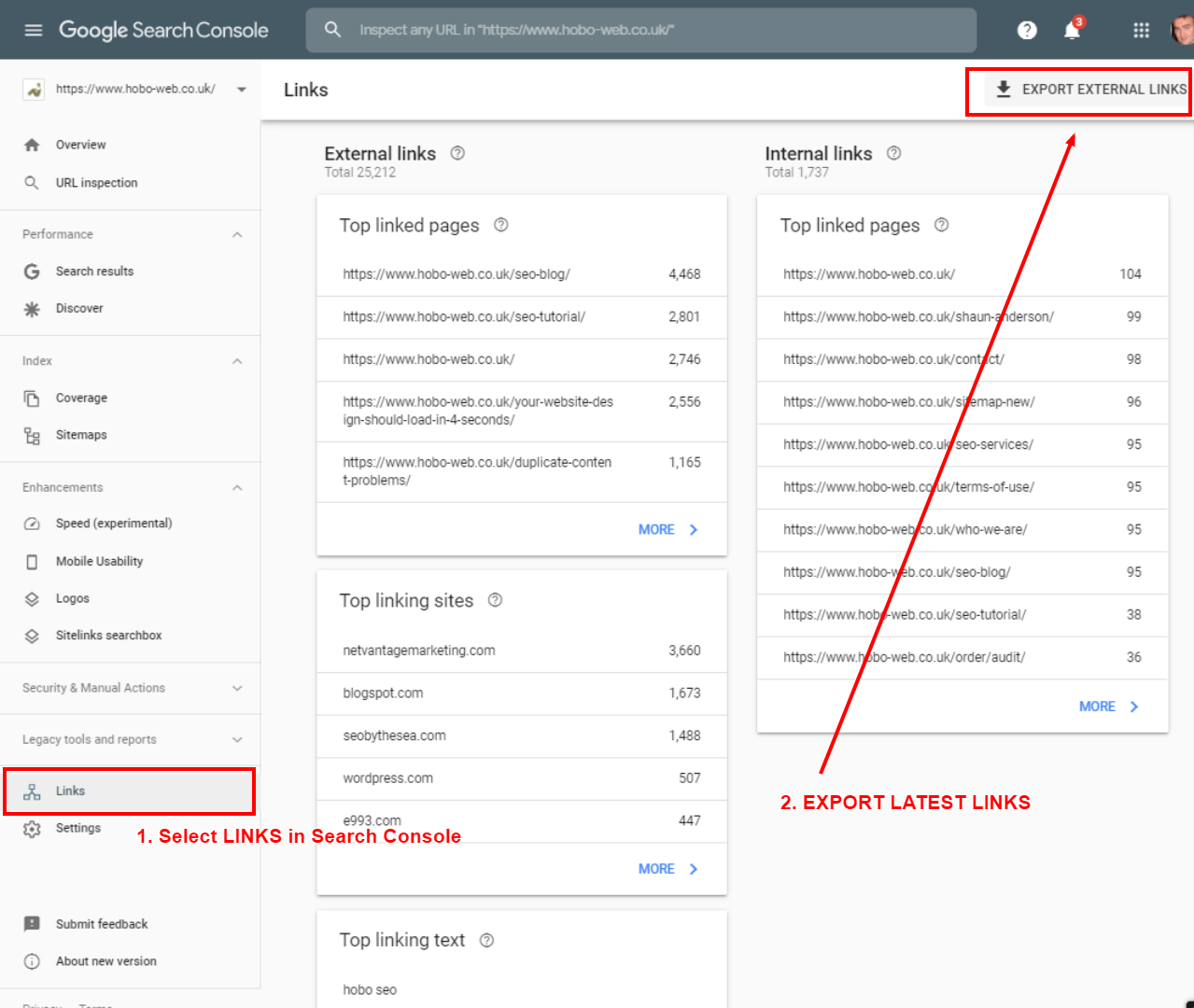
- On the Dashboard, click LINKS, and then click EXPORT EXTERNAL LINKS.
- Select LATEST LINKS to export your links with dates crawled
Note: When looking at the links to your site in Search Console, you may want to verify both the www and the non-vww version of your domain in your Google Search Console account. To Google, these are entirely different entities.
Take a look at the data for all 4 primary versions of your site.
Do I need to manually audit my backlinks?
Probably – BUT ESPECIALLY if you have had a manual action applied to your site.
Whether or not you use the Disavow Tool in Google, you should be looking at your backlink profile and see what various links are doing to your rankings. You should, at least, know who links to you, so you can calculate the risk to your organic traffic that is attached to those links.
Here are some options for you to handle unnatural links:
- Delete pages that are the target of unnatural links (by making them return a 404 or 410 server header response to disconnect links from spammy websites
- Contact website owners and ask them to nofollow any manipulative links pointing to your site
- Download your links from Google Search Console, pop them into Excel. You can use SEO tools like URL Profiler or SEO Tools for Excel to pull metrics for the URLs in question
- Identify the root domain of each link and check its Majestic Trust Flow & Citation Flow – this can help you group together really low-quality domains linking to you. Most of those links with very low Trust Flow or Citation Flow on the domain are worth looking at. Do the same for the actual page your links are on (on domains with Trust Flow)
- If you have a LOT of links (tens of thousands) filtering, in Excel, for unique domains can speed up this process.
- I normally get the PAGE TITLE of the linking page too (using URL Profiler or SEO Tools for Excel), so I can easily detect duplicate articles on lower-quality sites.
Of course, there are some false positives.
Trust Flow, for instance, can be misleading. So a human eye is always needed to reduce these false positives.
Using this method I’ve successfully identified lower quality sites relatively quickly. To be fair, I know a crap link when I see one. I built enough, back in the day (pre-2012)
Ultimately, if you have a lot of links, you can never be too sure which particular links are ‘toxic’.
It may very well be the volume of a particular tactic used that gets your site in trouble – and not one individual link.
If you have a load of low-quality directory submissions in your backlink profile or have taken part in low-quality article marketing recently, the next Google update might just be targeted at you (if it hasn’t already had an impact on your rankings).
The important links to identify are PAID LINKS from previous SEO campaigns or MANUFACTURED LINKS designed to manipulate where your site ranks in Google.
Once you’ve examined your links and identified low-quality links, you can then submit a list of links to Google in a simple text file called disavow.txt.
What Links Should You Begin With When Reviewing Links For A Disavow File?
When asked “would you recommend us to use just search console links for the disavow” (or third-party tools) John responded:
QUOTE: “For the most part the search console links would be enough for the disavow I think things a little bit yeah so for normal websites even if you’ve been doing something sneaky with links in the past and the search console links are enough for for disavow for manual spam action as well if you’re a really large website and you have a really big problem with regards to links then sometimes third-party tools make it a lot easier to find – to aggragate them or to test them and see which ones of these are already know into nofollow which one of these are ones that are really problematic so if you recognize that you had an issue with directory submissions the third-party tool might go out and check the titles of these pages and say oh like here’s I don’t know the thousand URLs that have directory in the title therefore maybe these are ones that you should put in your disavow file so for for really large sites or if you’re doing this on a regular basis for a lot of clients then these third-party tools can certainly make sense there are some really great tools out there but our normal basis for normal sites the new search console links should really enough.” John Mueller, Google 2018
While most third-party tool providers would naturally advocate the benefits of a subscription-based deep dive into your backlinks, it’s evident that Google would advise you at least start with the links you identify in Search Console, IF you know of manipulative link building activity in the past.
How To Submit “Reconsideration Requests” After A Manual Action
If you did get a Google Search Console notice of detected unnatural links message, Google had some advice for you and some tips when requesting reconsideration of your site:
It was clear this was not going away, and we had to deal with these unnatural links. My initial recommendations were:
- Stop link building **whether** or not you are fighting fire with fire
- Make an effort to remove your crap links (especially the ones with a lot of similar phrases – there are a lot of phrase match penalties being handed out and some are reporting their websites and blogs deindexed)
- Accept responsibility and take your penalty
- Reconsider where you are getting your links from – and definitely,
- KNOW where you are getting your links from
- Pay attention to site-wide links from other sites…. not only are most of them useless, now they can make your link profile toxic – (confirmed in an example included in Google’s recommendations to webmasters)
- Focus on getting links from REAL sites, and ideally, sites with REAL online business authority
- AVOID generating a lot of anchor text rich links fast on low-quality sites
- Concentrate on earning backlinks with a brand signal, paying particular attention to the QUALITY of the sites.
Unnatural anchor text was extremely risky from 2012 onwards…. and ESPECIALLY if those links were on low-quality sites like private blog networks or low-quality directories.
Later iterations of Google Penguin targeted obvious spam, obvious out of context links and obvious brute force linking (examples given are footer links, blogrolls and some PBNs (private blog networks) – i.e., not the sort of links you want to point at your main site.
Webmasters reported 301s hit too – home pages disappearing and affiliate sites penalised (although a black hat affiliate site isn’t going to last long these days without somebody who knows what they are doing at the helm).
Black hats ARE, however, very much worth listening to at times like this.
How Long Does A Reconsideration Request Take Google To Process?
This is entirely up to Google.
In my experience, it takes about a few days to a few weeks but I have heard of up to 6 weeks recently (2020) after some webmasters complained about a delay in processing these reconsideration requests.
QUOTE: “Sometimes they do take quite a bit of time to be reprocessed.” John Mueller, Google 2020
A Google spokesperson once stated that:
QUOTE: “Laura wants to know, “I’ve been waiting for two months to hear back regarding a reconsideration request. Is this normal? There’s no one I can contact about it.” OK, that’s not normal…..Typically, two months is way too long to hear back. If it’s been more than a couple of weeks, then I would start to ask about it on the webmaster forum ” Matt Cutts, Google 2012
Why Does Google Penalise Unnatural Links?
QUOTE: “The penalty box (sometimes called the sin bin, bad box, or simply bin) is the area in ice hockey, rugby league, rugby union and some other sports where a player sits to serve the time of a given penalty, for an offense not severe enough to merit outright expulsion from the contest.” Wikipedia
If…
- Google identifies you have unnatural links pointing to your site, and
- a history of ‘webspam’ activity Google is confident about, and
- you get a manual actions message in Google Search Console
- or your traffic or rankings tank overnight
…you can probably consider your site “sin-binned” – penalised – until you sort the unnatural links out.
I see a lot of people complaining this doesn’t work and that doesn’t work to lift these penalties – manual or algorithmic – [Google isn’t fair!!! Google is telling lies!!!] – but they seem to miss the point.
Punishment
QUOTE: “If you want to stop spam, the most straight forward way to do it is to deny people money because they care about the money and that should be their end goal. But if you really want to stop spam, it is a little bit mean, but what you want to do, is sort of break their spirits. There are lots of Google algorithms specifically designed to frustrate spammers. Some of the things we do is give people a hint their site will drop and then a week or two later, their site actually does drop. So they get a little bit more frustrated. So hopefully, and we’ve seen this happen, people step away from the dark side and say, you know what, that was so much pain and anguish and frustration, let’s just stay on the high road from now on.” Matt Cutts, Google 2013
Punishment is the point. Google wants you to feel the pain. Google wants you to lose time. It wants you to refocus your efforts away from investment in low-quality link building services.
Google wants you removing these links from the web – which for some involves a lot of emails to Webmasters of sites you’ve dropped links on, numerous times. Google wants to see you’re rehabilitated. That you’ve learned the error of your ways. From this point on – it’s all quality stuff. They want to stop you buying links.
Whether or not you agree with it, that’s how it is – or at least, the message Google is ramming down our throats.
Using the disavow tool as a last choice
The disavow tool is presented as the last choice. I find this rather contrary as the disavow file would surely be a MUCH faster way of showing “good faith” in dissociating a site from artificial links.
It’s where I start, especially on bigger link cleanup jobs.
QUOTE: “You know, whether you’re tracking things in a spreadsheet. Or you’re just doing a good job of monitoring. How many sites you’ve asked to take things down. Essentially we just wanna know you’ve done a prolonged, sustained effort to try to clean things up as much as possible. So the mental model we want you to have is this. We’d like to see as much of the link spam to go away. As much as possible. And so that’s your first goal. To try to get as much down. And then we need to know that ideally, we’re not gonna see this sort of link spam in the future. And so that’s where the documentation comes into effect.” Matt Cutts, Google 2013
Community Service
Google wants us cleaning up the links that were made in your name.
Google doesn’t want folk seeing how low-quality links manipulate Google results. If you’ve looked at link spam, or been involved with it, you’ll know that linkspam can make Google look stupid, and render proclamations about good content ranking above spam ‘untrue’ in some instances.
If you get a penalty for unnatural links – you just bought some community service cleaning up the neighbourhood.
Don’t like that? Tough luck!
QUOTE: “What about the people optimizing really hard and doing a lot of SEO. We don’t normally pre-announce changes but there is something we are working in the last few months and hope to release it in the next months or few weeks. We are trying to level the playing field a bit. All those people doing, for lack of a better word, over optimization or overly SEO – versus those making great content and great site. We are trying to make GoogleBot smarter, make our relevance better, and we are also looking for those who abuse it, like too many keywords on a page, or exchange way too many links or go well beyond what you normally expect. We have several engineers on my team working on this right now.” Matt Cutts, Google 2012.
A Defensible Link Strategy
Google now has an army of unpaid website reviewers working for it. A link that can’t pass a manual review, or is on a site that wouldn’t exist if Google didn’t count links – is not defensible anymore.
Well, lots of them are not.
It’s easier, and cheaper, to get a competitor (who is outright breaking the rules) penalised than beat them at their own game – although this, like everything to do with Google, takes time.
When grey-hat becomes black-hat, you’re better off leaving that stuff to the people who know what they are doing, and what to expect from it. It’s too easy for your activity to be reported to Google these days – it doesn’t matter if it ‘works’ to change your rankings if you don’t have a long-term plan to deal with the fallout.
Google is siding with the “user” in a classic move where Google can’t lose. A sensible move for SEO is to do the same, whether you like it or not.
Google guidelines are (effectively) laws for ranking in Google now, where once, they were just a list of things that you could use to rank in Google. Google is more than happy to crack down on them now. Since 1998, it wanted us to live under rules that were not policed properly and so, by definition, unfair. These rules are so ‘unfair, even Google found it difficult to play by them. But Google is certainly policing them more effectively.
Google WANTS its SERPs a certain way, rightly or wrongly, and now ADMITS freely that sometimes, its algorithms are not always up to the job and it’s happy to manually edit listings and manually penalise sites, to get the SERPs it WANTS to serve to users.
It’s all part of a great move on Google’s part, for Google’s long-term benefit. It benefits Google’s users, too.
The message is clear – stay away from low-quality link building tactics.
Most of these shortcuts are EASILY DETECTABLE and will only hurt you in time. Link building isn’t dead, it can’t die, only change.
Is link building Dead?
No – this is what SEO (I use the term collectively) is all about. If Google didn’t do this every now and again, ‘search engine optimisation‘ wouldn’t exist. The opportunity will exist as long as Google doesn’t do away with organic listings because they can’t be trusted or produce a ‘frustrating’ user experience in themselves. Not until Google convince people of that.
One thing’s been constant in Google since day 2. SPAM, or Sites Positioned Above Me.
I think it’s safe to say there will always be spam, some of your competition will always use methods that break the rules and beat you down. There will be ways to get around Google – at least, there always has, for a while.
Obviously, manipulative backlinks aren’t going to increase in quality over time, and if Google is true to its word, it might just slap you for them.
Low-quality link building IS dead.
Google HAS ‘leveling’ the playing field, in many niches and it’s probably best for small businesses to stay out of Google’s way where it comes to paid links.
Fair?
It all depends on who you are talking to, and how you make money online.
Bad Neighbourhoods
Unnatural Links From Your Site
QUOTE: “Any links intended to manipulate PageRank or a site’s ranking in Google search results may be considered part of a link scheme and a violation of Google’s Webmaster Guidelines. This includes any behavior that manipulates links to your site or outgoing links from your site.” Google Webmaster Guidelines, 2020
Google is mostly concerned with unnatural links from your site, and specifically paid links. If Google is confident your website hosts paid links or you link to a link seller, you may receive a message from Google’s webspam team in Google Search Console.
Links like these on your site usually impact the trust of the links on your site (or your Pagerank), but not normally your rankings or Google search engine traffic.
Traffic and ranking penalties can depend on the infraction, and the intent and effort behind the tactics employed. Google makes the rules as it has always done, and reserves the right to make its judgement as to what you have been up to and how much of a penalty you ‘deserve’.
Removing unnatural links from your site is certainly a lot easier than removing them from external sites.
You need to be very careful about who you link to. Don’t worry about linking to sites if you trust them, but beware becoming entangled in somebody else’s paid for link scheme, or some black hat’s 3 tiered link building efforts.
Paid Link Schemes & Blog Networks
Low-quality sites, more often than not made just for Google, link out to other spam sites, or sell links that improve other website rankings in a way that violates Google’s guidelines. Google calls these guys web spammers (as opposed to email spammers). You don’t want to be linking to these sites, for much of the same reasons as I go into below.
Be aware of guest posters for instance, and the sites they link to. Be aware of a user-generated forum or blog comments or signatures, ESPECIALLY if those links do not have rel nofollow.
Website Hacked?
QUOTE: “If the URLs with hacked content now return 404, they’ll be dropped automatically over time, as Google recrawls & reprocesses them from your site,” he said. “You generally don’t need to use the URL removal tools for hacked content like this. Regarding the number of 404s, it’s fine to have URLs return 404 when they no longer serve valid content — that’s normal, and not something that Google would count against a website.” John Mueller, Google 2019
You might be linking to sites, and you don’t even know about it. Hackers are interested in stealing your traffic or your ranking power. They might hack you to place your site in part of a network of sites all pointing to one recipient site to fool Google. Not only is this against Google’s rules, but it is illegal too – not that that stops them.
Hackers know that these spam networks (or bad neighbourhoods) need links from trusted sites to earn reputation. Links from trusted sites transfer trust and votes of relevance (Google Juice, whatever) to the receiving sites, allowing these sites to improve their positions in Google’s index. So, they hack your site, place hidden links in the code, and leave you none the wiser. You may find yourself part of a tiered system to manipulate Google – a LINK NETWORK – and you might never find out about it.
Google hates hidden links, spam networks, and ESPECIALLY paid links. Rather than let your site “heat” up and validate a spam neighbourhood so that it can start receiving visitors from Google, it might just remove your site from the index, by classing your site as part of that bad neighbourhood.
Google may reduce the reputation of your external links – leaving your traffic ok.
That may be of concern to you, or it may be not, but TRUST, when it comes to ranking in Google is a BIG DEAL and not something to take lightly.
Determining if a site is in a bad neighbourhood can take some experience, but there’s plenty of professional SEO tools out there to help identify these links.
Being hacked can certainly impact your rankings and your site can be labelled with “This Site May Harm Your Computer” in Google SERPs – which is a click-through killer.
If you’ve spotted it before you’ve seen your rankings drop, there are measures you can take (apart from deleting the offensive links immediately!).
This has happened to me before, and as long as you take action immediately, you’ll probably be OK.
Linking To A Bad Neighbourhood.
Here’s an interesting quote from the Official Google Webmaster Blog;
QUOTE: “Q: I’ve cleaned it up, but will Google penalize me if the hacker linked to any bad neighborhoods?
A: We’ll try not to. We’re pretty good at making sure good sites don’t get penalized by actions of hackers and spammers. To be safe, completely remove any links the hackers may have added.” Google Webmaster Central, 2008
Bad neighbourhoods, to Google, are typically identified by spammy on-page ‘SEO’ techniques and dubious backlink and interlink profiles. A good example would be a blog network – set up just to spam Google for links. You do not want to link to neighbourhoods like that, because who you link to matters.
If you’ve been penalised by Google (i.e., removed from the search engine index) because you now link to a bad neighbourhood, you should read Google’s official advice if you’ve been hacked.
Google now helps you with notifications if your website is hacked, and Google also clearly punishes you for bad neighbourhoods linking TO your site – so watch out.
Negative SEO
QUOTE: “First and foremost we haven’t seen a single case a single one where those toxic link campaigns work we spend tons of time with the ranking team looking at these cases and we haven’t seen a single one where it worked.” Gary Illyes, Google Nov 2016
The basic premise of links-based negative SEO is that a competitor can use it against you to destroy your rankings in Google’s organic SERPs. Google has gone some way to offering Webmasters a way to disavow unnatural links you may be worried about, but there is still a lot of controversy as to why this is the case, that a competitor CAN hurt your rankings, just by pointing manipulative links at your site.
Can a competitor hurt your site by pointing lots of links to it? If you can negative SEO yourself (which you can), you can negative SEO someone else, just by faking the same intent, ESPECIALLY if there is already present an attempt, hitherto going unnoticed, to manipulate rankings.
Some time ago an interesting case came to light.
Dan apparently annoyed a few people:
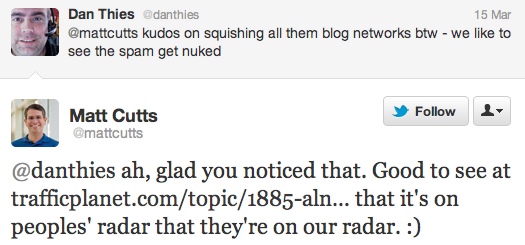
And they decided to use his site as an example how NSEO can work to destroy website rankings. Dan got a message from Google about unnatural links…..apparently, the person who had a problem with his communication with Matt Cutts (who was head of the webspam team at the time) decided to make an example of him…..
QUOTE: “Pixelgrinder and I conducted a little experiment on whether negative SEO was possible in the current climate – we felt it was important to know whether it was possible for a site to be negatively affected completely by outside influences. We carried out a massive scrapebox blast on two sites to ensure an accurate result.” Traffic Planet
You can see the results of this activity below:
Dan commented:
QUOTE: “Both sites have received “unnatural links” messages in Webmaster Tools. Neither site has had a “link building” campaign ever. By using 3rd party tools (e.g. Majestic) I can see a lot of unnatural links pointing at both sites, but I didn’t put those links there.” Dan Thies
Someone in the forum mentioned:
QUOTE: “Also if you look at the changes Google has made to their guidelines, it paints another picture again.
“Can competitors harm ranking? There’s nothing a competitor can do to harm your ranking or have your site removed from our index. If you’re concerned about another site linking to yours, we suggest contacting the Webmaster of the site in question. Google aggregates and organizes information published on the web; we don’t control the content of these pages.” Then, in November, it got “slightly” modified… just a TINY fraction too:
“Can competitors harm ranking? There’s ALMOST nothing a competitor can do to harm your ranking or have your site removed from our index. If you’re concerned about another site linking to yours, we suggest contacting the Webmaster of the site in question. Google aggregates and organizes information published on the web; we don’t control the content of these pages.”
Wow, what a difference one word can make! So hang on, saying “almost nothing” means “can”, no matter which way you spin it. Then on March 14th, they caved.
“Google works hard to prevent other Webmasters from being able to harm your ranking or have your site removed from our index. If you’re concerned about another site linking to yours, we suggest contacting the Webmaster of the site in question. Google aggregates and organizes information published on the web; we don’t control the content of these pages.” In case you missed it, the key difference is in that first line: You can see it’s changed from “nothing” to “almost nothing” to “perfect political answer” Traffic Planet
So – can a competitor hurt your rankings? On their own? Or do you need to be doing other things as well….?
Tell me, someone, who has heard of Google, and who IS NOT trying to rank higher…..?
You now seem to HAVE to keep an eye on the types of links you have pointed to your site, ESPECIALLY if you are actively promoting your site on top of this – I know this only too well, too.
I would say this test has proved to be a test Positive. Keyterm: SEO Book
Check Date Rank URL FoundApr 18, 2012 —- Position 41
Mar 28, 2012 —- Position 3
Mar 26, 2012 —- Position 3
Mar 23, 2012 —- Position 3
Mar 22, 2012 —- Position 3
Mar 21, 2012 —- Position 8
Mar 20, 2012 —- Position 8
The people behind this activity think this attack example has been successful.
Dan was kind enough to leave a response in the comments…..
QUOTE: “Hi Shaun. Unfortunately, this “test” hasn’t yielded anything yet. Two SERPs they claim to have moved are [SEO] and [SEO book]. For [SEO] I didn’t get any referrals (nearly zero) from this SERP until March 22, right after they started. Spiked all the way up to page 1 about 4 days in, held up for a few days, then dropped back down to a lower position. Probably higher than it was before still, since I am getting a handful of referrals per day now.
Verdict: Negative SEO Fail. Possibly the opposite of the intended result since I got traffic I never got before. Still am getting more.
For [SEO book] they drove it up from the middle of page 1 (5-9 is pretty normal, page 2 is not unusual) all the way to #2, then it dropped down to #3.
I moved the site from Rackspace Managed to Rackspace Cloud last week, because the old server literally could not handle the latest WordPress.
Unfortunately, theme I’ve been using since 2007 broke on the WP upgrade, and I had to deploy a new theme, more or less chosen at random because I was running out of time. Which changed run-of-site internal links from [SEO book] to [Home]. Last time I did that it dropped to page 4 within a week. In this case, it dropped to page 3.
It’s possible that the drop was not more dramatic, because the “negative SEO” linking is actually providing some ranking boost. Verdict: Inconclusive, but I will gladly take your even-money bets that it will be back on page 1 in a week or so.” Dan Thies
So – what I know for sure is that competitors CAN get your site reviewed by the webspam team, by using negative SEO tactics.
Depending on the history of your site, that may or not be a bad thing.
How To Check For A Negative SEO Attack?
Tools like Majestic have a very useful historical backlinks graph (shown above) while not 100% accurate, that can help understand historical link building activity.
For most – the best place to check for an attack is in Google Search Console. Download recent backlinks from Search Console and review them and look for low-quality links pointing to your site.
NOT ALL low-quality links are spam, but if these are the links you are being judged on, are they doing you any good? You can also check at Majestic for recent link patterns because do remember, Google never shows you ALL the links pointing to your site.
Google Search Console
You can now DOWNLOAD a sample of your BACKLINKS BY DATE in Google Search Console – which makes identifying who’s linking to you a bit easier. It might also be useful if you are cleaning up your backlink profile, too.
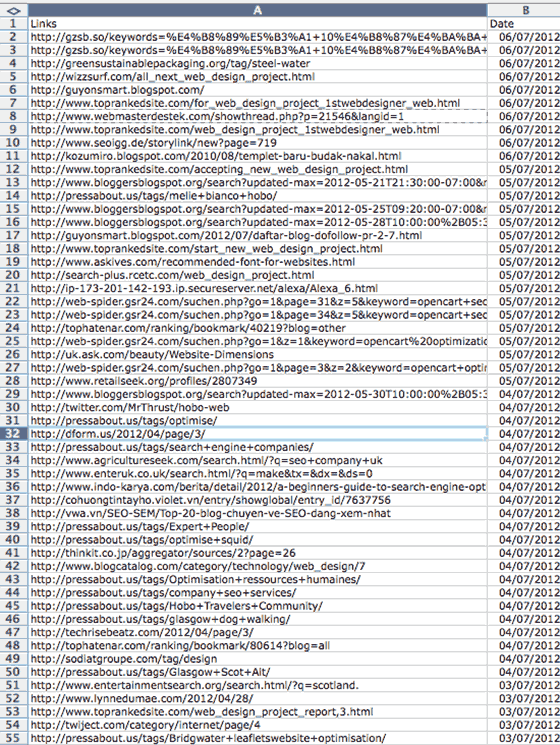
You can easily spot negative SEO posts, though, and who’s scraping and spamming Google with your URL:
Here was a screenshot of the types of low-quality links I was picking up at the time:
How I Stumbled On My First Negative SEO Attack
I actually stumbled upon a negative attack on the Hobo site a few years ago (one of many over the last few years):
I wouldn’t have known this quickly, but for looking at Technorati (which is a service no longer operational).
I disavowed the links by the way, with no apparent major impact.
Google Alerts isn’t that good for links alerts these days and the basic WordPress incoming links feature are pretty much useless, but using Google and searching it for your URL using date-based filters can provide you with an indication of some types of spammy link-building activity to your site.
The first place I’d look at is the Google Search Console Incoming Links report.
What Is Google Penguin?
QUOTE: “Google Penguin is a codename for a Google algorithm update that was first announced on April 24, 2012. The update was aimed at decreasing search engine rankings of websites that violate Google’s Webmaster Guidelines by using now declared black-hat SEO techniques involved in increasing artificially the ranking of a webpage by manipulating the number of links pointing to the page. Such tactics are commonly described as link schemes.” Wikipedia, 2020
The Google Penguin algorithm first unleashed on web spammers like me back in April 2012, is a webspam algorithm designed to target websites that use low-quality link schemes to rank high in Google SERPs.
The important thing to note is that:
QUOTE: “Penguin is now real-time. Historically, the list of sites affected by Penguin was periodically refreshed at the same time. Once a webmaster considerably improved their site and its presence on the internet, many of Google’s algorithms would take that into consideration very fast, but others, like Penguin, needed to be refreshed. With this change, Penguin’s data is refreshed in real time, so changes will be visible much faster, typically taking effect shortly after we recrawl and reindex a page. It also means we’re not going to comment on future refreshes. Penguin is now more granular. Penguin now devalues spam by adjusting ranking based on spam signals, rather than affecting ranking of the whole site. ” Gary Illyes, Google 2016
It is now a “granular” and a “real-time” algorithm.
At one time Google Penguin demoted entire sites and now it devalues links without slapping a penalty on the domain. We are told.
Real-Time Google Penguin
Apparently, it was not so simple to re-run Penguin. Google has since mentioned it might have been too aggressive for too many webmasters, to run it as was.
Penguin ‘penalties’, we now know, can last for over two years(!) and if you get hit with a Penguin-related penalty because of your activities – there’s a really good argument for starting again with a brand new domain.
That’s how serious it is.
A lot of webmasters will spam Google silly if there is no ‘penalty’ for doing so – and I doubt Google is going to let that happen.
QUOTE: ‘Penguin doesn’t… penalize anymore’
After many updates over the years, Google Penguin evolved:
QUOTE: “I think with this release of penguin we did achieve something really nice because it doesn’t like traditionally web some algorithms used to demote sides even entire entire sites that’s not the case anymore with penguin this penguin managed to or can in fact discard links that are bad that’s the one of the nicest changes in this penguin it can be way more granular than the previous releases as I said previous releases usually demoted whole sites while this one can even go to a page level and discount the link but they won’t be penalized that’s the that’s the measure thing penguin doesn’t work or doesn’t penalize anymore doesn’t demote it will just discard the incoming spam toward the side and it will just ignore the spam and that’s it no penalty no demotion and it works in real time so thing major signal that thing when is looking at these links basically if there are many or if there are bad links and other kinds of signals coming towards the side then it will just discard them and that’s what they need to know they can still see those links in search console and they can decide whether they want to disable or remove” Gary Illyes, Google 2016
The original Penguin had an immediate impact when it launched in 2012.
I remember this comment standing out from what Google would call ‘web spammers’:
QUOTE: “Google has dropped the nuke”
Google, it seemed, had declared war on unnatural links – a tried-and-tested means to actually rank a website high in Google – and issued the following statement:
QUOTE: …”this algorithm represents another improvement in our efforts to reduce web spam and promote high-quality content. While we can’t divulge specific signals because we don’t want to give people a way to game our search results and worsen the experience for users, our advice for Webmasters is to focus on creating high-quality sites that create a good user experience and employ white hat SEO methods” GOOGLE
The Original Google Penguin Impact Was Widely Felt
The original Penguin update in 2012 targeted ‘webspam’ and impacted many websites and businesses who were ignorant of the risks of web spam.
There were MANY LOUD complaints on the actual post from Google about the first Penguin Update.
Here’s one:
QUOTE: “I built a public benefit website that for 8 years has helped thousands and thousands of addicts find addiction treatment for free… We were able to provide the service through the industry paying for featured status for their centers in our directory of treatment centers… Harvard’s addiction hospital links to us, as well as a number of super picky super high-quality websites… A few years back I started to notice crap links pointing at the site… Then Panda came and the site lost half it’s traffic… We submitted reinclusion requests, we sent notices for sites to remove links to us and informed Google, and now this! Now our site is nowhere to be found, and competitors (who are no doubt paying link companies to take down certain competitors thanks to the algorithms changes) have won! Well done Google… You took a true public benefit site out of the rankings (one with a database of treatment centers more complete than the U.S. government’s), and replaced it with referral sites (of course, the exact-keyword match .com) and individual treatment centers that charge people in dire need of help (and usually broke) scores of thousands of dollars for treatment, because they can afford to bring down the real good-guys that have been helping people for years by pointing links at them. Well done Google.” Comment on Google Webmaster Blog, 2012
Hmm… perhaps, with hindsight, they should have avoided low-quality link building.
Warnings were available as part of Google Webmaster Guidelines for years before this ‘Titanic’ event in 2012.
The ‘Titanic’ Update
QUOTE: “The folks at Search Engine Land were about to name it the Titanic and then Google got back to us telling us the internal code named was Penguin – or maybe Google just didn’t want us to name it the Titanic and made up Penguin?” Barry Schwartz, 2012
Many link builders and bloggers, including myself, were about to name the update the ‘Titanic‘ Update as the timing was so close to the 100th anniversary of the ship disaster in 1912 – and it did represent a disaster for many businesses using out-dated SEO tactics to rank high in Google.
Google apparently didn’t want that, and quickly the update was named ‘Google Penguin‘.
Iceberg!
The iceberg was pretty obvious:
Google Penguin (SEOs think) targeted unnatural links with rich keyword-stuffed anchor text from low-quality sites and private blog networks.
Perhaps too it was influenced by other ways Google has of identifying spam e.g. on a ‘measure of quality’ based on ‘traffic received by use of those links’ for instance:
QUOTE: “However, some a resource may be linked to by a large number of other resources, while receiving little traffic from the links. For example, an entity may attempt to game the ranking process by including a link to the resource on another web page. This large number of links can skew the ranking of the resources. To prevent such skew, the system can evaluate the “mismatch” between the number of linking resources and the traffic generated to the resource from the linking resources. If a resource is linked to by a number of resources that is disproportionate with respect to the traffic received by use of those links, that resource may be demoted in the ranking process.”” Bill Slawski, 2018
Who knows exactly, for sure?
What I know is that Penguin targeted sites often with a footprint of low-quality paid links.
It got mine, anyway, and many others. So in 2012, I stopped doing that kind of thing.
Low-Quality Link Building Was Nuked From Orbit
Blackhat SEO immediately shared how this algorithm affected them:
QUOTE: “Here we go again. This has gone from an attack to a massacre.”
Blackhat SEO forums are a great litmus test for these type of web spam algorithm updates:
QUOTE: “I think they may have rolled this change out now in the UK. Almost all of my site have been wiped out!”
followed by:
QUOTE: “I got hosed bad too, about 4 hours ago.”
and:
QUOTE: “If these SERP changes I’m seeing hold, we are gong to need to turn off that “profanity” filter because this is a blood bath!”
and:
QUOTE: “Bah, will this madness never end. The fallout from this algorithm change is shaping up to be pretty messy”
and:
QUOTE: “A ton of my sites have just tanked big time…….in fact rankings in a lot of my niches have taken drastic changes. My days as an internet marketer look to be numbered….”
and:
QUOTE: “I think my days as an internet marketer are numbered too.”
The Relationship Between Penguin & Panda
Google’s algorithms seem focused on quality, as Google defines it, and Google has published advice on creating a high-quality website that will rank high in SERPs:
QUOTE: What counts as a high-quality site?
“Our site quality algorithms are aimed at helping people find “high-quality” sites by reducing the rankings of low-quality content. The recent “Panda” change tackles the difficult task of algorithmically assessing website quality. Below are some questions that one could use to assess the “quality” of a page or an articl.:
- Would you trust the information presented in this article?
- Is this article written by an expert or enthusiast who knows the topic well, or is it more shallow in nature?
- Does the site have duplicate, overlapping, or redundant articles on the same or similar topics with slightly different keyword variations?
- Would you be comfortable giving your credit card information to this site?
- Does this article have spelling, stylistic, or factual errors?
- Are the topics driven by genuine interests of readers of the site, or does the site generate content by attempting to guess what might rank well in search engines?
- Does the article provide original content or information, original reporting, original research, or original analysis?
- Does the page provide substantial value when compared to other pages in search results?
- How much quality control is done on content?
- Does the article describe both sides of a story?
- Is the site a recognized authority on its topic?
- Is the content mass-produced by or outsourced to a large number of creators, or spread across a large network of sites, so that individual pages or sites don’t get as much attention or care?
- Was the article edited well, or does it appear sloppy or hastily produced?
- For a health related query, would you trust information from this site?
- Would you recognize this site as an authoritative source when mentioned by name?
- Does this article provide a complete or comprehensive description of the topic?
- Does this article contain insightful analysis or interesting information that is beyond obvious?
- Is this the sort of page you’d want to bookmark, share with a friend, or recommend?
- Does this article have an excessive amount of ads that distract from or interfere with the main content?
- Would you expect to see this article in a printed magazine, encyclopedia or book?
- Are the articles short, unsubstantial, or otherwise lacking in helpful specifics?
- Are the pages produced with great care and attention to detail vs. less attention to detail?
- Would users complain when they see pages from this site?
Writing an algorithm to assess page or site quality is a much harder task, but we hope the questions above give some insight into how we try to write algorithms that distinguish higher-quality sites from lower-quality sites.” Amit Singhal Google, 2011
Those guidelines above are helpful to think about if impacted by Google PANDA or SITE QUALITY algorithms.
They are worth paying attention to – but equally, if you put your link building hat on, you could say they were a guide as to where you might NOT want to see a link to your site – which is where, in obvious cases, Penguin might take over.
Why would Google want to count a link to your site if your link was on any page that didn’t meet these quality guidelines?
Why not considering penalising you if all your links are on pages that “users complain when they see pages from this site?“.
Right or wrong – this is what Google is doing – in its self-styled PR ‘war’ on ‘black hats’ and you don’t want to be pulled into that battle if you can avoid it.
Google doesn’t seem to care about sites hit by Penguin as much as per say a human-reviewed manual action (when a penalty can sometimes be lifted very quickly if the infraction is borderline).
Should you be worried about the Google Penguin Algorithm?
If you run a business that can’t afford to flip domains and change web addresses, then perhaps, especially if you are letting a third party ‘build’ links to your site.
If you are not buying links (and have never done so), then you probably have A LOT LESS to worry about (and should be more concerned with Google Panda and overall site and page quality challenges).
If you are the unfortunate recipient of negative SEO attacks (as my own site has in the few last years) then the only real option you have is to have your disavow file in place at Google Search Console – and make an apparent attempt to disassociate yourself from the most toxic of those links.
Google is a lot better at handling this though and it is not something most webmasters need to be worried about.
Google recently penalised a lot of not-so ‘Private’ Blog Networks (PBNs) that were breaking the rules, and Google’s John Mueller once said that algorithms don’t operate in isolation – which could indicate your site needs to trip more than one quality signal to be heavily punished.
In my opinion, Google Penguin was always more traditionally about the nature of your backlink profile and whether it was ‘real’ or not.
Many of my black hat friends won’t go near a disavow file but they have an entirely different business model.
If you care about a site, you probably should have a disavow file in place – especially if you rank successfully for anything.
Penguin is an algorithm you do not want slapping your site down or alerting the webspam team to the quality of your site – so check your backlinks for obvious, low-quality links.
I presume you are already addressing site quality issues to avoid getting continually pumped by a constantly evolving Google Panda algorithm (which is more focused on content quality).
Penguin Update History Dates:
It is still useful to know the dates around these original Penguin updates for analysis purposes:
- Penguin 1.0 – April 24, 2012 (3.1% of searches)
- Penguin 1.2 – May 26, 2012 (0.1% of searches)
- Penguin 1.3 – October 5, 2012 (0.3% of searches)
- Penguin 2.0 – May 22, 2013 (2.3% of searches)
- Penguin 2.1 – Oct. 4, 2013 ( 1% of searches)
- Penguin 3 – Oct. 17/18 2014 (LESS THAN 1%)
- Penguin 4 – Announced September 2016 (with potential updates into 2017, but not officially announced)
Impact of Historic Penguin Updates
- Many sites were impacted experienced fall-out from Penguin 1 and Penguin 2, and some Webmasters waited YEARS to be ‘released’ by this algorithm – leaving them in a desperate position.
- Google Penguin 2 did a pretty good job of devaluing some lower quality links from obvious link sources. Whether Google just slapped an algorithmic change on you, algorithmically penalised you or started ignoring your links – the result was that previously stable rankings disappeared overnight. If the sites that link to you have a quality issue (from Google’s point of view), expect that ranking problem only to worsen.
- I do see Google rewarding a diverse and natural link profile even in some less spammy verticals. There is still spam, of course.
- Penguin 2 was not initially as aggressive as Penguin 1. Penguin 2 looked like more of a rerun of Penguin 1 with a net that was cast wider. Penguin 1 focused on home pages (with lots of manipulative anchor text) – and Penguin 2 was a rollout of the same algorithm to internal pages on your site (as I understand it).
What If You Do Nothing About Your Historic Toxic Links?
You can also do nothing, and hope Google passes you by, and your rankings do not disappear over the coming months. I think Google is at least inferring that very old link building practices aimed at your site may have already been dealt with algorithmically.
I wouldn’t just do nothing if you have built them yourself.
- You SHOULD be disavowing most risky links IF YOU ENGINEERED THEM from your backlink profile as you are still at risk of manual actions and future algorithm changes.
- You should STILL be link building, too, but start with a piece of content that deserves links. Links STILL make the world turn as far as Google is concerned – just don’t be doing what everyone else is doing.
If you are not involved in any low-quality link building, Penguin will probably not affect you, anyways – but there are lots of other things going on at Google to change your rankings.
Is It OK To Link Out To Related Sites?
QUOTE: “In the most common cases…if you’re linking out naturally from your content to other sites that offer additional value and more context then that’s fine and there’s nothing special that you need to do.” John Mueller, Google 2019
Of course.
I regularly link out to other quality relevant pages on other websites where possible and where a human would find it valuable.
I don’t like to link out to other sites from the homepage (social media links aside). I want the Pagerank of the home page to be shared only with my internal pages as much as possible. I understand this is very old-school thinking. I don’t like out to other sites from my category pages either, for the same reason.
I link to other relevant sites (a deep link where possible) from individual pages and I do it often, usually. I don’t worry about link equity or PR leak because I control it on a page-to-page level.
This works for me, it allows me to share the link equity I have with other sites I admire while ensuring it is not at the expense of pages on my own domain. It may even help get me into a ‘neighbourhood’ of relevant sites, especially when some of those start linking back to my site.
Linking out to other sites, especially using a blog, also helps tell others that might be interested in your content that your page is online. Try it.
I won’t link out to sites using the exact keyword /phrase I am targeting, but I will be considerate, and usually try and link out to a site using keywords other webmasters might appreciate.
I try to be considerate when I have the time as anchor text in external links is ultra important and does have an impact on rankings for others – and me.
If you don’t trust a site you are linking to or don’t want the link to look like a paid link, you can always use rel=nofollow. But remember – the web is built on links.
Everybody wins when you are sensible with your links, and focus on the user.
If you get a manual penalty which will probably be because of PAID self-serving links, you’ll probably have to remove links and use the disavow tool to clean up – which is a tremendous drain on resources and time.
- Audit your backlinks if nothing else.
- Consider using the disavow tool to tackle obvious algorithmic penalties if traffic is taking a nosedive
There are arguments against this, mind you, but low-quality unnatural links are certainly going to have to be addressed for sites with little online business authority themselves – and probably even more so for sites that exist to profit from natural SEO traffic.
You are going to hear a lot about ‘content marketing’ going into the near future.
You still need to be earning backlinks, but avoid low-quality link building practices and avoid the kind of networks on Google’s radar.
Any industrial method of link-building is eventually going to get Google’s attention.
AVOID!
QUOTE: “Disavowed backlinks: If you’ve uploaded a file to disavow links on your old site, we recommend that you re-upload it again using the Search Console account of the new site.” Google Search Central Documentation, 2021
Disclaimer
Disclaimer: “Whilst I have made every effort to ensure that the information I have provided is correct, It is not advice.; I cannot accept any responsibility or liability for any errors or omissions. The author does not vouch for third party sites or any third party service. Visit third party sites at your own risk. I am not directly partnered with Google or any other third party. This website uses cookies only for analytics and basic website functions. This article does not constitute legal advice. The author does not accept any liability that might arise form accessing the data presented on this site. Links to internal pages promote my own content and services.” Shaun Anderson, Hobo
[gravityform id=”1″ title=”true” description=”true”]