Modern, effective SEO is not about tricking algorithms. It’s about providing clear, unambiguous signals to search engines and creating a compelling, helpful experience for users.
As Google stated, “Meta tags are a great way for Webmasters to provide search engines with information about their sites“. They are a foundational layer of that communication – your first, and sometimes only, chance to control your narrative in a crowded digital landscape.
They influence:
- How you appear in Google Search: Your title and description are your digital billboard ad, directly impacting click-through rates (CTR).
- How your content is shared on social media: The right tags ensure your brand looks professional and enticing on platforms like Facebook, X (formerly Twitter), and LinkedIn.
- How search engines crawl and index your site: Technical tags act as the gatekeepers, guiding search bots to your most valuable content.
This guide cuts through the noise. It’s not a list of outdated theories; it’s a definitive, strategic framework based on 25 years of experience and continuous testing. We’ll cover the tags that have a real impact, the ones to ignore completely, and how to integrate them into a holistic SEO strategy that drives results.
How Google Really Ranks Pages in 2025
Thanks to landmark legal cases and data leaks, we now have an evidence-based blueprint of Google’s core ranking architecture. It’s built on two fundamental, top-level signals:
- The Quality (Q*) Signal: This is an internal, site-level score that measures the overall trustworthiness and authority of a domain. It’s the modern evolution of the principles behind the historic Panda update, which targeted low-quality content. A high Q* score acts as a foundational gate for ranking potential.
- The Popularity (P*) Signal: This signal measures how widely visited and engaged with a page is. It is heavily powered by a system called Navboost, which analyses 13 months of aggregated user click data from sources like Chrome to identify patterns of user satisfaction.
Every best practice in this guide is designed to positively influence these two core signals. We are not just optimising tags; we are engineering for Quality and Popularity.
Quick Reference Guide to Essential Meta Tags
For those who need answers fast, this table summarises the most critical meta tags and their strategic purpose.
1.0 The Core Trio – Mastering Your SERP Appearance
While dozens of meta tags exist, only three have a direct and powerful impact on how your website is presented in Google’s search results. Mastering them is non-negotiable.
1.1 The Title Tag – Your Most Powerful Piece of SERP Real Estate
The page title tag (which is not a meta tag, but is often talked about with meta tags because of its importance) is, without question, the most important single element of on-page SEO. It’s the blue link in the search results, the text in the browser tab, and the primary signal to both users and search engines about a page’s topic.
A great title tag is not just a container for keywords; it’s a carefully crafted promise that bridges the gap between a user’s query and your content.
Strategic Best Practices:
- Be Concise and Descriptive: Stick to a shorter, concise title of between 50 and 60 characters. Anything longer will likely be truncated.
- Focus on User Intent: Think about the words a user would search for. Does your title accurately reflect what they will find? A title like “Camera Settings Guide” is good, but “Beginner’s Guide to Manual Camera Settings (ISO, Aperture, Shutter Speed)” is better because it matches a more specific intent.
- Place Keywords Strategically: If it’s natural, place your primary keyword phrase towards the beginning of the title to catch the user’s eye.
- Ensure Uniqueness: Every page on your site should have a unique title tag. Duplicate titles create confusion for search engines and are a sign of low-quality content.
- Avoid Keyword Stuffing: Repeating keywords looks spammy to users and is an immediate red flag for search engines.
I go more in-depth into Title Tags in my article: The Definitive Guide to Title Tag SEO Best Practices Post Google Leak.
1.2 The Meta Description – Your Digital Billboard Ad
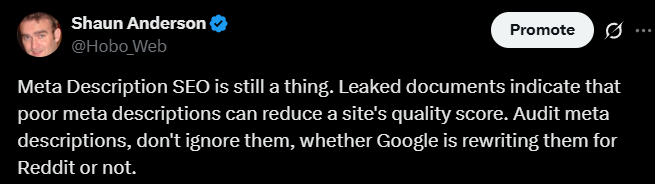
The meta description tag is a summary of a page’s content. It has zero direct positive impact on Google rankings, although leaked documents suggest there are many attributes associated with the page meta description to potentially derank pages or sites. Google stated in 2009 that it does not use the meta description in its ranking algorithms, but it does flag spammy meta descriptions, and they usually do that to derank sites.
The practice of “keyword stuffing” is obsolete and counterproductive to the tag’s true purpose.
So why is it critical? Because it has a massive indirect impact by influencing user behaviour. The contemporary function of the meta description is to serve as organic ad copy – a compelling summary designed to persuade a user to click on your result over competing listings.
Google itself says high-quality descriptions “can go a long way to improving the quality and quantity of your search traffic”.
This directly feeds into Google’s powerful systems that measure user satisfaction. Recent evidence confirms Google uses a system called Navboost, which analyses 13 months of aggregated user click data to refine rankings .
Your meta description is your primary tool to win that click, directly supporting your site’s core Popularity () signal. A higher click-through rate (CTR) from the same number of impressions can attract significantly more traffic, making the meta description a measurable lever for growth.
Strategic Best Practices
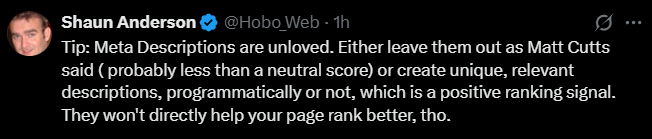
Google looks to your meta description for signs of low quality across your site. You either leave them out (and expect less than something) or create unique descriptions (and avoid negative quality signals). There’s no evident “boost” lever, but there are “demotion” levers.
An inference of logic would indicate either: 1. Leave them out (assume no effort, expect minor derank – as Matt Cutts advised was an option). 2. Screw them up (assume duplicate, low effort, etc, bigger derank) 3. Make them unique, meet Google guidelines (assume effort, no derank). Everything not a unique meta will be deranked, even if it’s only 0.000004 off your Q* of 0.64567. It’s still a demotion. You might not even feel it. It also might be the very first domino to fall in a chain of failure.
Write Compelling Ad Copy
Your description should be a pitch that convinces the user the page is exactly what they’re looking for. Don’t just list keywords; write a descriptive, engaging summary. For example, instead of a keyword list like <meta name="description" content="Sewing supplies, yarn, colored pencils, sewing machines, threads, bobbins, needles">, Google recommends a helpful summary: <meta name="description" content="Get everything you need to sew your next garment. Open Monday-Friday 8-5pm, located in the Fashion District.">. Use an active voice (“Discover how…”) and include a clear call to action (“Learn more,” “Shop now,” “Get your free quote”).
Mind the Length (Pixels, Not Characters)
While there is technically no limit on how long a meta description can be, Google truncates snippets as needed to fit the device width. A mobile-first strategy is essential.
- Mobile SERP: Aim for around 120 characters (~680px) to ensure your key message is visible.
- Desktop SERP: You have more space, up to 150–160 characters (~920px).
Include Relevant Page Data
The meta description is a great place to include specific, structured information that might not otherwise appear in the snippet. For news or blog posts, you can list the author and date of publication. For product pages, you can bring key data like price, age, and manufacturer together. Google gives the following example for a book page: <meta name="description" content="Written by A.N. Author, Illustrated by V. Gogh, Price: $17.99, Length: 784 pages">.
Use Keywords for Relevance, Not Ranking
While keywords in the description don’t affect rankings, they do influence user perception. When a user’s search term appears in your description, Google bolds it, signalling relevance and drawing the eye. Use one or two of your primary keywords naturally within your copy.
Ensure Uniqueness to Avoid Negative Flags
Create unique descriptions that accurately describe each specific page. The Content Warehouse leak confirms that Google has several specific flags to identify non-unique or templated descriptions. Avoiding these is critical.
boilerplateMetadescription: This flag is triggered when a description is identical or highly similar across many pages.partialBoilerplateMetadescription: Google can even detect when only part of your description is templated.rootpageDuplicateMetadescription: When a group of pages has the same meta description, Google can identify the primary or “root” page of that group.
Failing to provide unique descriptions makes your pages less helpful to users and more likely to have their snippets rewritten. If you don’t have time for every page, prioritise critical URLs like your homepage and popular pages.
Maintain Quality and Trustworthiness (Especially for YMYL)
Google doesn’t just look for duplicate content; it assesses quality. The leak reveals several flags that point to poor descriptions, which should be avoided at all costs:
lowQualityMetadescriptionfuzzyMetadescription(likely indicating a vague or unclear description)badMetadescription(a general flag for poor quality)
For pages concerning “Your Money or Your Life” (YMYL) topics—such as health, finance, or safety—the standards for trust are extremely high. The meta description must be impeccably accurate and align with expert consensus. Any exaggeration or misleading statement could trigger these quality flags, damage user trust, and be viewed negatively under Google’s quality guidelines.
Keep the Language Consistent
The leak shows that Google tracks the language of the meta description separately from the page content with variables like metaDescriptionLanguages and can flag a mismatch with foreignMetadescription. Ensure your meta description is in the same primary language as the page it describes to avoid confusion and potential negative signals.
Consider Programmatic Generation (for Large Sites)
For large, database-driven sites (like product aggregators), hand-written descriptions can be impossible. In these cases, programmatic generation is appropriate and encouraged by Google. Good programmatically generated descriptions are human-readable, diverse, and use page-specific data, helping you avoid the boilerplateMetadescription flag at scale.
Key Attributes From the Content Warehouse Data Leak in 2024
The 2024 Google Content Warehouse API leak revealed several modules and flags related to meta descriptions that influence search rankings. These modules are part of Google’s internal systems, such as Trawler, Alexandria, Mustang, and TeraGoogle, which process and evaluate content across the web.
Google tracks various meta description signals to ensure content quality, uniqueness, and relevance. Some of the key flags identified in the leak include:
| Flag / Variable | Description / Purpose | Relevant Module(s) |
|---|---|---|
| boilerplateMetadescription | Triggered when a description is identical or highly similar across many pages | Mustang, Alexandria |
| partialBoilerplateMetadescription | Detected when only part of the description is templated | Mustang, Alexandria |
| rootpageDuplicateMetadescription | Identifies the primary/root page when multiple pages share the same description | Mustang, TeraGoogle |
| lowQualityMetadescription | Indicates a poor-quality meta description | Alexandria, TeraGoogle |
| fuzzyMetadescription | Flags vague or unclear meta descriptions | Alexandria, TeraGoogle |
| badMetadescription | General flag for low-quality descriptions | Alexandria, TeraGoogle |
| foreignMetadescription | Flags when the meta description is in a different language from the page content | Mustang |
| metaDescriptionLanguages | Tracks the language of the meta description separately from page content | Mustang |
Relevant Modules and Systems
-
Trawler
Responsible for crawling and discovering new content across the web. -
Alexandria
Handles content understanding and semantic analysis, including assessing clarity, vagueness, and quality of meta descriptions. -
Mustang
Manages metadata extraction and classification, including duplicate and language-based meta description detection. -
TeraGoogle
Involved in document scoring and ranking, taking into account the quality and uniqueness of meta descriptions.
These systems collectively assess and rank web pages based on a multitude of factors, including the quality, uniqueness, and relevance of meta descriptions.
Ensuring that each page has a unique, clear, and relevant meta description in the same language as the page content is crucial for maintaining search visibility and avoiding potential penalties.
Navigating Google’s Constant Rewrites
Remember, Google is not guaranteed to use your meta description. Its generation of snippets is “completely automated” and designed to “best relate to a user’s specific search”. Studies have shown that Google rewrites meta descriptions frequently—one 2020 analysis found a rewrite rate of over 70% on mobile.
The Content Warehouse variables give us clear insight into why Google might rewrite a snippet. Your meta description is more likely to be ignored if it is:
- Flagged as
lowQualityMetadescription,badMetadescription, orfuzzyMetadescription. - A list of keywords rather than a helpful summary.
- Flagged as
boilerplateMetadescriptionbecause it’s the same one used on many other pages. - Doesn’t align well with a specific, often long-tail, user query, prompting Google to pull a more relevant snippet from the page body.
A Balanced Strategy: To Write or Not to Write?
Given that Google often rewrites descriptions, a nuanced, page-dependent strategy is required.
- Guidance Strategy (Write a Description): This is best for core business pages, key landing pages, and brand-critical assets where controlling the message is paramount. While Google may still overwrite it, your description will be used a portion of the time and serves as the crucial fallback for social media sharing.
- Forced Dynamic Strategy (Omit the Description): This can be effective for pages that rank for thousands of long-tail queries, such as in-depth guides or user-generated content. In these cases, allowing Google to dynamically pull a relevant snippet can sometimes result in better performance.
The most effective approach is to prioritise your efforts based on page value:
- Tier 1 (Core Commercial/Conversion Pages): Always write a handcrafted, optimised description.
- Tier 2 (High-Traffic Informational Pages): These are strong candidates for optimisation and testing.
- Tier 3 (Long-Tail/UGC Pages): Consider omitting the description to leverage Google’s dynamic generation.
- Tier 4 (Large-Scale E-commerce): Use programmatic templates to ensure uniqueness and relevance at scale.
Advanced Snippet Control
For webmasters seeking more granular control, Google provides tools beyond the meta description. You can use the nosnippet meta tag to prevent any snippet from being shown, the max-snippet:[number] tag to suggest a maximum length, and the data-nosnippet HTML attribute to prevent a specific part of your page’s text from appearing in the snippet.
These are typically handled with the meta robots tag and offer another layer of control over your page’s appearance in search results.
1.3 The Meta Robots Tag: The Definitive Gatekeeper
The meta robots tag is the most powerful technical meta tag. It gives direct instructions to search engine crawlers about how to handle a specific page. While incredibly useful, a mistake here can make your entire page—or even your whole site—disappear from search results.
The tag is implemented with two main attributes: name (which specifies the robot, e.g., “googlebot”) and content (which provides the instruction). Using “robots” for the name targets all search engines.
<meta name="robots" content="[directive1], [directive2]">
Evidence from the Google Content Warehouse Leak
The WWWDocInfo data from the Content Warehouse leak in 2024 confirms exactly how Google stores these directives. When Googlebot crawls a page, it parses the meta robots tag and sets specific boolean flags for that URL. This isn’t just a theoretical instruction; it’s a hard-coded attribute of the document in Google’s index.
The leak shows the following variables are used:
seenNoindex: Set totrueifnoindexis present.seenNoarchive: Set totrueifnoarchiveis present.seenNosnippet: Set totrueifnosnippetis present.seenNotranslate: Set totrueifnotranslateis present.seenNopreview: Set totrueifnopreviewis present.
Additionally, the isRoboted flag indicates if a page is disallowed by the host’s robots.txt file, showing that Google stores both page-level and file-level directives.
Essential Directives and Their Corresponding Flags
index / noindex
- Directive:
noindextells search engines not to include the page in their results. This is essential for thin content, internal search results, thank-you pages, and admin login pages.indexis the default and does not need to be specified. - Google’s Flag: When Google sees this directive, it sets the
seenNoindexvariable totruefor that page. This flag is a direct signal to exclude the document from the search index.
follow / nofollow
- Directive:
nofollowtells search engines not to pass any ranking credit through the links on the page.followis the default. - Note: While a specific variable for
nofollowisn’t present in this particular leak snippet, its effect is processed by Google’s link-handling systems, influencing how PageRank and other link signals flow from the page.
noarchive
- Directive: Prevents Google from showing a “Cached” link for a page in the search results.
- Google’s Flag: This corresponds directly to the
seenNoarchivevariable. Iftrue, the option to view a cached version is removed.
nosnippet
- Directive: Prevents a text snippet or video preview from being shown in the search results. This forces Google to only show the title and URL.
- Google’s Flag: This is stored as the
seenNosnippetflag. It gives webmasters direct control over how their result is presented.
none
- Directive: A shortcut equivalent to
noindex, nofollow. - Google’s Flag: This would set the
seenNoindexflag totrueand instruct link processing systems tonofollowall outlinks.
A common combination is noindex, follow. This tells search engines not to show the page but to still crawl the links and pass equity to them. However, be aware that if a page remains flagged with seenNoindex for a long time, Google will eventually stop recrawling it frequently, and as a consequence, will eventually stop following its links.
2.0 Deconstructing the Myths: Legacy & Technical Tags
2.1 The Meta Keywords Tag: A Definitive Post-Mortem
Let’s be unequivocally clear:
The meta keywords tag is ignored by Google and Bing for ranking purposes.
For years, this tag was abused by spammers. Major search engines stopped using it as a ranking signal well over a decade ago. Spending any time on it is a waste of effort and can do more harm than good by giving away your keyword strategy to competitors.
2.2 The Viewport Tag: A Non-Negotiable for Mobile-First SEO
While the keywords tag is a relic, the viewport meta tag is a modern necessity. This tag is critical for responsive design and is a foundational element of mobile-friendliness.
<meta name="viewport" content="width=device-width, initial-scale=1.0">
This code tells the browser how to control the page’s dimensions and scaling to fit the device being used. In Google’s mobile-first indexing world, a proper viewport tag is not optional. Its absence is a strong negative signal that can severely harm your visibility.
3.0 Expanding the Toolkit – Meta Tags for a Social & Connected Web
3.1 Open Graph Tags for Facebook, LinkedIn & More
The Open Graph protocol allows any web page to have rich functionality when shared on social platforms. When you implement OG tags, you control the title, description, and image that appear.
The Four Essential OG Tags:
- og:title: The title of your content.
- og:url: The canonical URL of your page.
- og:image: The URL of the image you want to represent your content. Use high-quality images with an aspect ratio of 1.91:1 (e.g., pixels).
- og:description: A description of the content, similar to your meta description.
3.2 Twitter Cards for Enhanced Visibility on X
X (formerly Twitter) uses its own set of meta tags, though it will fall back on Open Graph tags if they are not present. For optimal presentation, it’s best to implement Twitter Cards.
Key Twitter Card Tags:
- twitter:card: The type of card.
summary_large_imageis almost always the best choice for engagement. - twitter:site: The @username of the publisher’s X account.
- twitter:title: The title of the content.
- twitter:description: The description of the content.
- twitter:image: The URL of the image for the card.
3.3 Strategic Purpose: Building a ‘Connected’ Entity for Trust
Social meta tags are a critical tool for Entity SEO. By explicitly linking your content to your brand’s social media profiles, you are providing clear, machine-readable signals that connect your website to a known, public-facing entity.
This helps build a profile of a “connected,” trustworthy brand, which is a crucial component of your site’s overall Quality (Q*) score.
4.0 Advanced Strategy – Integrating Meta Tags into Your SEO Ecosystem
4.1 The Synergy of Meta Tags and Structured Data (Schema.org)
Meta tags and structured data work together to create a complete picture of your content.
- Meta Tags provide a general summary for SERPs and social platforms.
- Structured Data provides specific, granular details (like cook time, calories, ratings for a recipe) in a machine-readable format.
When Google understands these specific entities via schema, it can reward your page with a rich snippet. This synergy between a compelling meta description (which entices the click) and detailed structured data (which generates an eye-catching rich snippet) is a powerful combination for maximising visibility and CTR.
4.2 A Framework for Auditing and Optimising Meta Tags at Scale
- Crawl Your Site: Use a tool like Screaming Frog SEO Spider to get a complete list of all URLs and their current title tags and meta descriptions.
- Identify Key Issues: Filter the data to find missing tags, duplicate tags, and titles or descriptions that are too long or too short.
- Prioritise Your Efforts: Start with your most important pages: your homepage, top category pages, and pages that already receive significant organic traffic.
- Implement and Monitor: Implement your changes and use Google Search Console to monitor the impact on impressions and CTR.
5.0 Appendix – Other and Deprecated Meta Tags
- Geo Meta Tags: Google does not use geo meta tags for ranking. Use hreflang for geotargeting.
- notranslate: Using
<meta name="google" content="notranslate">tells Google not to offer an automatic translation of your page. - revisit-after: This tag is ignored by Google. Use an XML sitemap with
<lastmod>instead. - NOODP: This tag is obsolete as the Open Directory Project (DMOZ) closed in 2017.
Conclusion – A Principled Approach to Meta Tag Optimisation
The world of meta tags has fundamentally shifted. The practice is no longer about stuffing keywords but about a principled, strategic approach to communication.
By mastering the principles in this guide, you move beyond a simple SEO checklist. You begin to architect how your brand is perceived by both people and machines, systematically improving the two pillars of modern ranking: your site’s fundamental
Quality (Q*) through technical precision and entity verification, and its demonstrated Popularity (P*) by earning the user’s click and trust. This is the foundation of a durable SEO strategy for long-term success.
Download your free ebook.
This article is an excerpt from my SEO book – Strategic SEO 2025.
Disclosure: Hobo Web uses generative AI when specifically writing about our own experiences, ideas, stories, concepts, tools, tool documentation or research. Our tools of choice for this process is Google Gemini Pro 2.5 Deep Research. This assistance helps ensure our customers have clarity on everything we are involved with and what we stand for. It also ensures that when customers use Google Search to ask a question about Hobo Web software, the answer is always available to them, and it is as accurate and up-to-date as possible. All content was verified as correct by Shaun Anderson. See our AI policy.