
 If you are a beginner to SEO (search engine optimisation) or a website developer, manager, or designer wanting to learn about the basics of SEO, you are in the right place.
This SEO tutorial is a beginner’s guide to Google SEO and offers you an introduction to the basics of Google search engine optimisation. I am a professional SEO with over 20 years of experience.
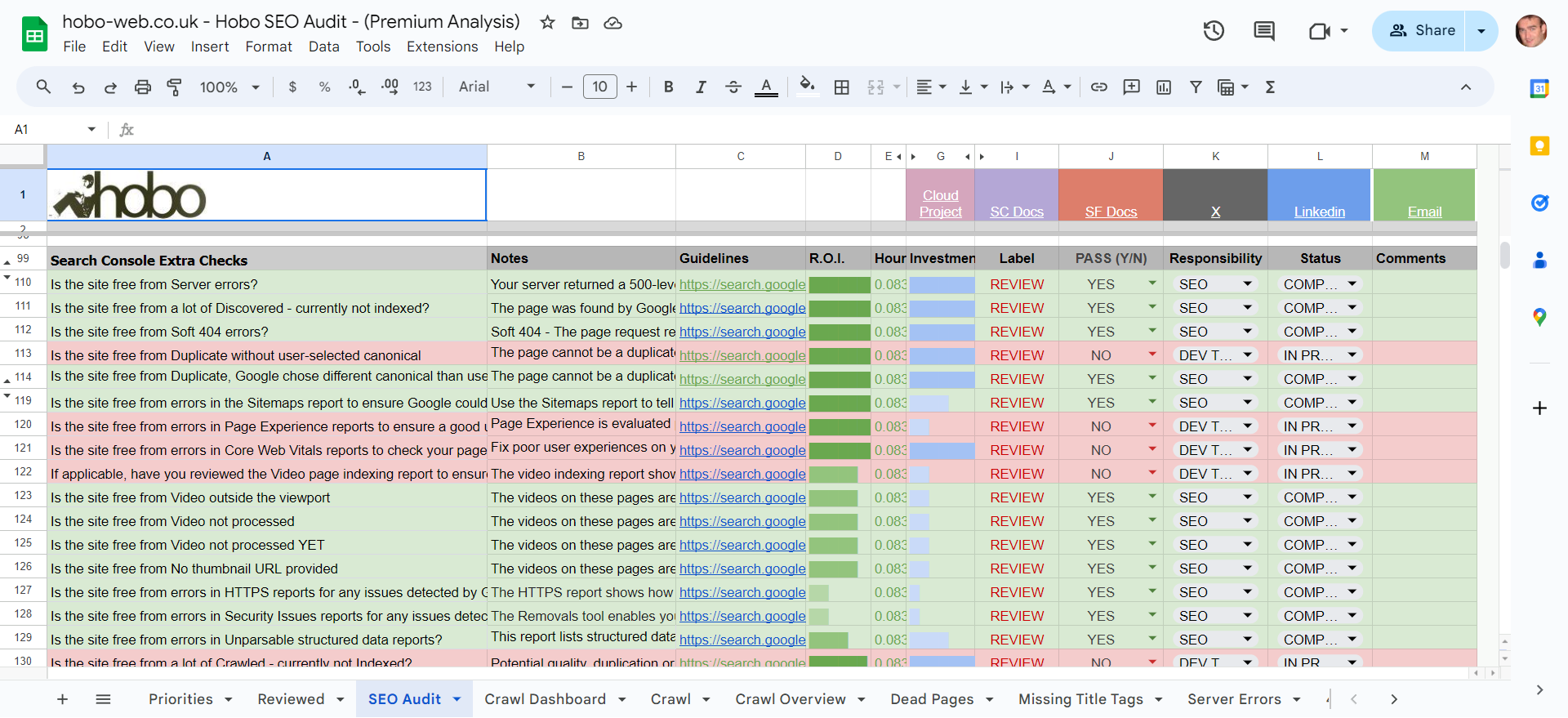
The Hobo SEO Tutorial is available for you to access also as a free checklist in Google Sheets, and a free prompt to test your own pages using Google Gemini AI at the end of this tutorial.
Good luck with your SEO project.
How to start SEO
How to get your site indexed by Google quickly:
- Only publish useful, high-quality, 100% unique content to your site.
- Create pages where the main purpose of the page is given priority.
- Avoid annoying ads and pop-ups (especially on mobile).
- Register your website with Google Search Console.
- Optimise your website’s core web vitals.
- Use a responsive design.
- Have a mobile theme that downloads in under 3 seconds.
- Don’t block search engines from crawling your site in robots.txt or metatags.
- Don’t confuse or annoy a website visitor.
- Don’t block Google from crawling resources on your page or rendering specific elements on your page.
- Optimise for customers local to your business, if that is important.
- Geotarget your site in Search Console (you do not need to do this if you have a country-specific domain).
- Do not use copied content for pages (or even part of a page) – pages should stand on their own.
- Use a simple navigation system on your site.
- Develop websites that meet Google technical recommendations on (for example) canonicalisation, internationalisation and pagination best practices.
- Ensure ‘Main Content’ – or MC, as Google calls it- is of high quality.
- Ensure old-school practices are cleaned up and removed from the site.
- Avoid implementing old-school practices in new campaigns (Google is better at detecting sites with little value-add).
- Provide Clear website domain ownership, copyright, and contact details on the site.
- Share your content on the major social networks when it is good enough.
- Get backlinks from real websites with real domain trust and authority.
- Do not build unnatural links to your site.
- Consider disavowing any obvious low-quality links from previous link-building activity.
- Satisfy visitors (whatever that ‘conversion’ is).
- Monitor VERY CAREFULLY any user-generated content on your site, because it is rated as part of your own site content.
- Pay attention to site security issues (implement secure HTTPS, for example).
- Beware of evaporating efforts (AVOID old-school practices designed to manipulate rankings and REMOVE them when identified).
- Ensure erroneous conversion rate optimisation (CRO) practices are not negatively impacting organic traffic levels (don’t screw this part up!)
- Aim for a good ratio of ‘useful’ user-centred text to affiliate links. Be careful using affiliate links at all! Treat affiliate links as ADS. Review Ad Best Practices.
- Create pages to meet basic usability best practices (Nielsen) – Pay attention to what annoys website visitors.
- Make visitors from Google happy.
… and there’s more.
How to do on-page SEO
Let us presume you “only publish high-quality 100% unique content to your site“, then here is how to do on-page SEO:
- Include the relevant target keyword phrase at least once in the page title tag.
- Keep page titles succinct and avoid adding irrelevant keywords.
- Include your target keyword phrase a couple of times in the Main Content (MC) on the page (in paragraph tags).
- Avoid keyword stuffing the main content or any specific HTML element or attribute.
- Optimise your meta description to have a clickable, useful SERP snippet.
- Ensure the Main Content of the page is high-quality and written by a professional (MOST OF YOUR EFFORT GOES HERE – If your content is not being shared organically, you may have a content quality problem).
- Ensure the keywords you want to rank for are present on your page. The quality of competition for these rankings will determine how much effort you need to put in.
- Use synonyms and common co-occurring words throughout your page copy, but write naturally.
- Add value to pages with ordered lists, images, videos, and tables.
- Optimise for increased ‘user intent’ satisfaction (e.g. increased dwell times on a page or site).
- Keep important pages on your website up-to-date.
- Remove outdated content.
- Avoid publishing and indexing content-poor pages (especially affiliate sites).
- Disclose page modification dates in a visible format.
- Do not push the main content down a page unnecessarily with ads or obtrusive CTA for even your own business.
- Link to related content on your site with useful and very relevant anchor text.
- Avoid keyword stuffing internal anchor text.
- Ensure fast delivery of web pages on mobile (especially!) and desktop.
- Provide clear disclosure of affiliate ads and non-intrusive advertising. Clear disclosure of everything, in fact, if you are focused on quality in all areas.
- Add high-quality and relevant external links to cite sources (if the page is informational).
- Use the target keyword phrase in internal anchor text pointing to the page (at least once).
- If you can, include the target keyword phrase in the short page URL (but avoid changing URLs if you can).
- Aim to create pages to meet basic W3C recommendations on accessible HTML (W3C) (H1, ALT text, etc).
What is SEO (search engine optimisation)?
SEO is an anagram of search engine optimisation if you are in the UK (or search engine optimization, if you are in the US).
QUOTE: “(SEO) is the process of getting traffic from the “free,” “organic,” “editorial” or “natural” search results on search engines.” Search Engine Land, 2020
Professional search engine optimisation (SEO) is a technical, analytical, and creative process to improve the visibility of a website in search engines. In simple terms, SEO is about getting free traffic from Google, the most popular search engine in the world.
What is the value of SEO?
QUOTE: “Google is “the biggest kingmaker on this Earth.” Amit Singhal, Google, 2010
A Mountain View spokesman once called the search engine ‘kingmakers‘, and that’s no lie.
Ranking high in Google is VERY VALUABLE – it’s effectively free advertising on the best advertising space in the world.
Traffic from Google’s natural listings is STILL the most valuable organic traffic to a website in the world, and it can make or break an online business.
The state of play is that you can STILL generate highly targeted leads, for FREE, just by improving your website and optimising your content to be as relevant as possible for a buyer looking for what you do.
As you can imagine, there’s a LOT of competition now for that free traffic – even from Google (!) in some niches.
You shouldn’t compete with Google.
You should focus on competing with your competitors.
SEO is a long-term investment (and this is why I published a free SEO checklist for you to keep track of it).
It takes a lot to rank on merit a page in Google in competitive niches, due to the amount of competition for those top spots.
What is professional SEO?
Hobo Web’s Google search engine optimisation services involve making small modifications to your web pages:
QUOTE: “When viewed individually, these changes might seem like incremental improvements, but…. they could have a noticeable impact on your site’s user experience and performance in organic search results.” Google Starter Guide, 2020
The SEO process itself can be practised successfully, in a bedroom or a workplace, but it has traditionally always involved mastering many skills from website development to copywriting.
A professional SEO has a firm understanding of the short-term and long-term risks involved in optimising rankings in search engines.
When it comes to SEO, there are rules to be followed or ignored, risks to take, gains to make, and battles to be won or lost.
The aim of any SEO campaign is more visibility in search engines, and this would be a simple process if it were not for the many pitfalls.
An experienced SEO helps your business avoid these risks.
Google supports SEO when they take a technical approach, supports us when we improve the web for users and focuses on:
QUOTE: “site content or structure – Technical advice on website development: for example, hosting, redirects, error pages, use of JavaScript – Content development – Management of online business development campaigns – Keyword research – …training – Expertise in specific markets and geographies.” Google Webmaster Guidelines, 2020
What is a successful SEO strategy for your website?
QUOTE: “high quality content is something I’d focus on. I see lots and lots of ….blogs talking about user experience, which I think is a great thing to focus on as well. Because that essentially kind of focuses on what we are trying to look at as well. We want to rank content that is useful for (Google users) and if your content is really useful for them, then we want to rank it.” John Mueller, Google 2015
A successful SEO strategy helps your website get relevant, get trusted, and get popular.
Success in search engine optimisation comes from adding high-quality, keyword-relevant content to your website that meets user needs.
SEO is no longer about the manipulation of Google SERPs beyond what Google expects from your website.
If you are serious about getting more free traffic from Google, get ready to invest time and effort in your website and online marketing.
Be ready to put Google’s users, and yours, FIRST, before Conversion, especially on information-type pages like articles and blog posts.
Help a visitor complete their task and do not annoy them.
Do not put conversion rate best practices before a user’s interaction with the page content. That is, do not interrupt the MC (Main Content) of a page with ADs (Adverts) or CTA (Adverts for your own business).
Google has decided to rank HIGH-QUALITY documents in its results and force those who wish to rank high to invest in higher-quality content or a great customer experience that creates buzz and attracts editorial links from reputable websites.
These high-quality signals are in some way based on Google being able to detect a certain amount of attention and effort put into your site, and Google monitoring over time how users interact with your site.
These types of quality signals are much harder to game than they were in 2011, for instance.
QUOTE: “Another problem we were having was an issue with quality and this was particularly bad (we think of it as around 2008 2009 to 2011) we were getting lots of complaints about low-quality content and they were right. We were seeing the same low-quality thing but our relevance metrics kept going up and that’s because the low-quality pages can be very relevant. This is basically the definition of a content farm in our in our vision of the world so we thought we were doing great our numbers were saying we were doing great and we were delivering a terrible user experience and turned out we weren’t measuring what we needed to so what we ended up doing was defining an explicit quality metric which got directly at the issue of quality it’s not the same as relevance …. and it enabled us to develop quality related signals separate from relevant signals and really improve them independently so when the metrics missed something what ranking engineers need to do is fix the rating guidelines… or develop new metrics.” Paul Haahr, Google 2016
Essentially, the ‘agreement’ with Google is if you’re willing to add a lot of great content to your website and create a buzz about your company, Google will rank you high above others who do not invest in this endeavour.
If you try to manipulate Google using low-quality SEO practices, Google will penalise you for a period, and often until you fix the offending issue, which can LAST for YEARS if not addressed.
QUOTE: “Google’s John Mueller said … that in rare situations some sites can get stuck in some sort of algorithmic penalty limbo ….. and not be able to recover because Google stopped updating that algorithm. He said this can lead to some sites not being able to recover for several years.” Barry Schwartz, 2021
If you are a real business that intends to build a brand online and relies on organic traffic, you can’t use black hat SEO. Full stop.
It can take a LONG time for a site to recover from using black hat tactics, and fixing the problems will not necessarily bring organic traffic back to what it was before a penalty.
QUOTE: “Cleaning up these kinds of link issue can take considerable time to be reflected by our algorithms (we don’t have a specific time in mind, but the mentioned 6-12 months is probably on the safe side). In general, you won’t see a jump up in rankings afterwards because our algorithms attempt to ignore the links already, but it makes it easier for us to trust the site later on.” John Mueller, Google, 2018
Recovery from a Google penalty is a ‘new growth’ process as much as it is a ‘clean-up’ process.
How long does it take to see results from SEO?
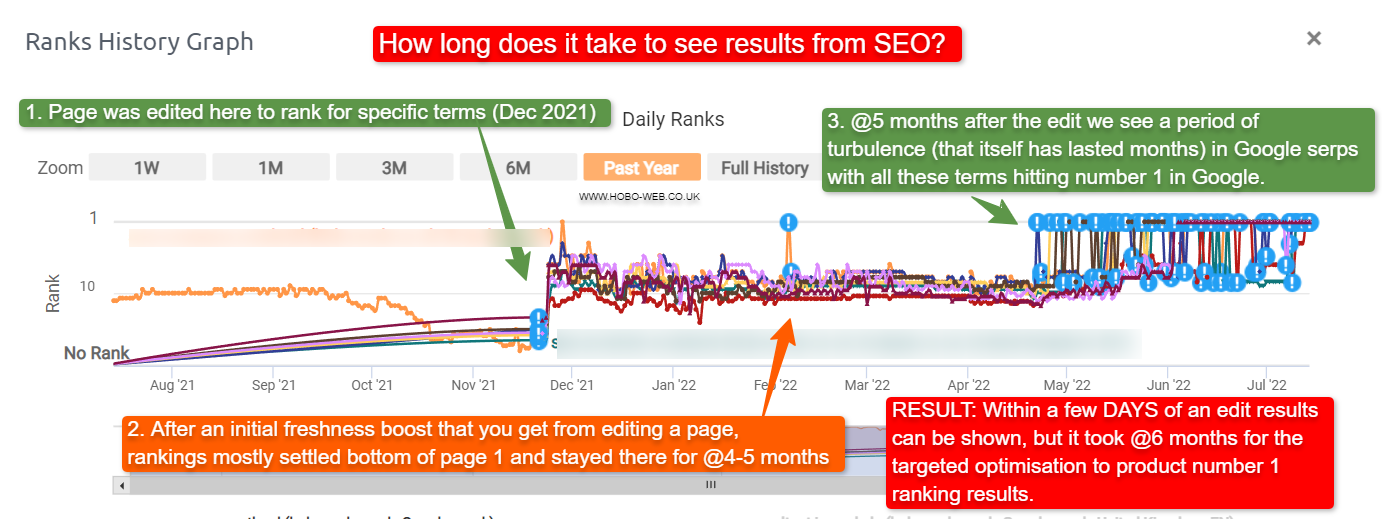
How long it takes to see results from activities depends on many factors.
Sometimes you can see the results from SEO in days.
Optimising a larger site will take more time, naturally.
We have been told it:
QUOTE: “will need four months to a year to help your business first implement improvements and then see potential benefit.” Maile Ohye, Google 2017
Some results can be gained within weeks, and you need to expect some strategies to take months to see the benefit. Google WANTS these efforts to take time. Critics of the search engine giant would point to Google wanting fast, effective rankings to be a feature of Google’s own AdWords sponsored listings.
If you are recovering from previous low-quality activity, it is going to take much longer to see the benefits.
QUOTE: “Even if you make big changes with the design and the functionality, and you add new features and things, I would definitely expect that to take multiple months, maybe half a year, maybe longer, for that to be reflected in search because it is something that really needs to be re-evaluated by the systems overall.. Low-quality pages tend to be recrawled much less frequently by Googlebot – it is not unusual for six months to go by between Googlebot crawls on low quality pages or sections of a site. So it can take an incredibly long time for Google to recrawl and then reevaluate those pages for ranking purposes.” John Mueller, Google, 2020
SEO is not a quick process, and a successful campaign can be judged on months if not years. Most techniques that inflate rankings successfully end up finding their way into Google Webmaster Guidelines, so be wary.
It takes time to build quality, and it’s this quality that Google aims to reward, especially as we are told during Core Updates:
QUOTE: “There’s nothing wrong with pages that may perform less well in a core update. They haven’t violated our webmaster guidelines nor been subjected to a manual or algorithmic action, as can happen to pages that do violate those guidelines. In fact, there’s nothing in a core update that targets specific pages or sites. Instead, the changes are about improving how our systems assess content overall. These changes may cause some pages that were previously under-rewarded to do better.” Danny Sullivan, Google 2020
It takes time to generate the data needed to begin to formulate a campaign, and time to deploy that campaign. Progress also depends on many factors
- How old is your site compared to the top 10 sites?
- How many backlinks do you have compared to them?
- How is their quality of backlinks compared to yours?
- What is the history of people linking to you (what words have people been using to link to your site?)
- How good a resource is your site?
- Can your site attract natural backlinks (e.g. you have good content or are known for what you do) or are you 100% relying on a third party for backlinks (which is very risky)?
- How much unique content do you have?
- Do you have to pay everyone to link to you (which is risky), or do you have a “natural” reason people might link to you?
Google wants to return quality pages in its organic listings, and it takes time to build this quality and for that quality to be recognised.
How to learn SEO
The best way to learn SEO is to practice making optimisations for a real website. You edit a website that ranks in search engines and record how Google responds to your changes.
As an SEO, you monitor organic search engine traffic and track keyword rankings for individual keyword phrases and pages.
You do lots of SEO tests.
But note:
QUOTE: “There aren’t any quick magical tricks…. so that your site ranks number one. It’s important to note that any …. potential is only as high as the quality of your business or website so successful SEO helps your website put your best foot forward.” Maile Ohye, Google 2017
What really matters is the SEO you prioritise today, so that in 3-6 months you can see improvements in the quality of your organic traffic, as we:
QUOTE: “will need four months to a year to help your business first implement improvements and then see potential benefit.” Maile Ohye, Google 2017
You will need to meet Google’s webmaster guidelines and search quality recommendations in every area by serving the user high-quality, useful, and up-to-date website content.
There are no shortcuts to SEO.
QUOTE: “I don’t think there’s one magic trick that that I can offer you that will make sure that your website stays relevant in the ever-changing world of the web so that’s something where you’ll kind of have to monitor that on your side and work out what makes sense for your site or your users or your business.” John Mueller, Google 2019
Expect your website to go up and down in rankings when you perform Google SEO.
The Hobo SEO tutorial is a beginner’s guide to SEO and an introduction to SEO best practices.
Any Hobo SEO tutorial steers clear of SEO techniques that might be ‘grey hat’ SEO, as what is grey today is often ‘black hat’ SEO tomorrow, or at least shady practices, as far as Google is concerned.
QUOTE: “Shady practices on your website […] result in a reduction in search rankings” Maile Ohye, Google 2017
No one-page SEO guide can explore this complex topic in full.
QUOTE: “My strongest advice ….. is to request if they corroborate their recommendation with a documented statement from Google” Maile Ohye, Google 2017
What are the high-quality characteristics of a web page?
QUOTE: “High quality pages exist for almost any beneficial purpose…. What makes a High quality page? A High quality page should have a beneficial purpose and achieve that purpose well.” Google Search Quality Evaluator Guidelines, 2019
The following are examples of what Google calls ‘high-quality characteristics’ of a page and should be remembered:
- “A satisfying or comprehensive amount of very high-quality” main content (MC).
- Copyright notifications are up to date.
- Functional page design.
- The page author has topical authority.
- High-quality main content.
- Positive Reputation or expertise of website or author (Google yourself).
- Very helpful SUPPLEMENTARY content “which improves the user experience.“
- Trustworthy.
- Google wants to reward ‘expertise’ and ‘everyday expertise’ or experience, so you need to make this clear (perhaps using an Author Box or some other widget).
- Accurate information.
- Ads can be at the top of your page as long as it does not distract from the main content on the page.
- Highly satisfying website contact information.
- Customised and very helpful 404 error pages.
- Awards.
- Evidence of expertise.
- Attention to detail.
If Google can detect investment in time and labour on your site, there are indications that they will reward you for this (or at least, you won’t be affected when others are, meaning you rise in Google SERPs when others fall).
Your primary aim is to create useful content for humans, not Google, what Google calls People First Content, as opposed to Search Engine First Content.
What characteristics do the highest-quality pages exhibit?
QUOTE: “The quality of the MC is one of the most important criteria in Page Quality rating, and informs the E-A-T of the page. For all types of webpages, creating high quality MC takes a significant amount of at least one of the following: time, effort, expertise, and talent/skill. For news articles and information pages, high quality MC must be factually accurate for the topic and must be supported by expert consensus where such consensus exists.” Google Search Quality Evaluator Guidelines, 2019
You obviously want the highest quality ‘score’ possible, but looking at the Search Quality Evaluator Guidelines, that is a lot of work to achieve.
Google wants to rate you on the effort you put into your website, and how satisfying a visit is to your pages.
- QUOTE: “Very high or highest quality MC, with demonstrated expertise, talent, and/or skill.“
- QUOTE: “Very high level of expertise, authoritativeness, and trustworthiness (page and website) on the topic of the page.”
- QUOTE: “Very good reputation (website or author) on the topic of the page.”
At least for competitive niches where Google intend to police this quality recommendation, Google wants to reward high-quality pages and “the Highest rating may be justified for pages with a satisfying or comprehensive amount of very high-quality” main content.
If your main content is very poor, with “grammar, spelling, capitalisation, and punctuation errors“, or not helpful or trustworthy – ANYTHING that can be interpreted as a bad user experience – you can expect to get a low rating.
QUOTE: “The quality of the MC is an important consideration for PQ rating. We will consider content to be Low quality if it is created without adequate time, effort, expertise, or talent/skill. Pages with low quality MC do not achieve their purpose well…. Important: The Low rating should be used if the page has Low quality MC. ” Google Search Quality Evaluator Guidelines, 2019
Note – not ALL “content-light” pages are automatically classed as low-quality.
If you can satisfy the user with a page “thin” on text content, you are ok (but probably susceptible to someone building a better page than yours, more easily, I’d say). Now with AI overviews, that sort of thin content will be lucky to generate any Google traffic at all.
Google expects more from big brands than they do from a smaller store (but that does not mean you shouldn’t be aiming to meet ALL these high-quality guidelines above).
Note, too, that if you violate Google Webmaster recommendations for performance in their indexes of the web, you automatically get a low-quality rating.
If your page has a sloppy design, low-quality main content and too many distracting ads, your rankings are very probably going to take a nose-dive.
If a Search Quality Evaluator is subject to a sneaky redirect, they are instructed to rate your site low.
The quality you need to rank in Google always rises
QUOTE: “Put useful content on your page and keep it up to date.” Google Webmaster Guidelines, 2020
It’s important to note that your website quality is often judged on the quality of competing pages for this keyword phrase. This is still a horse race. A lot of this is all RELATIVE to what YOUR COMPETITION is doing, and how fresh competing pages are.
Whether it’s algorithmic or manual, based on technical, architectural, reputation or content, Google can decide and will decide if your site meets its quality requirements to rank on page one.
The likelihood of you ranking stable at number one is almost non-existent in any competitive niche where you have more than a few players aiming to rank number one.
Not en masse, not unless you are bending the rules.
QUOTE: “Over the years, the bar for “legit” content has also gotten higher. “It’s unique” is not enough.” John Mueller, Google, 2022
Google Core ranking updates
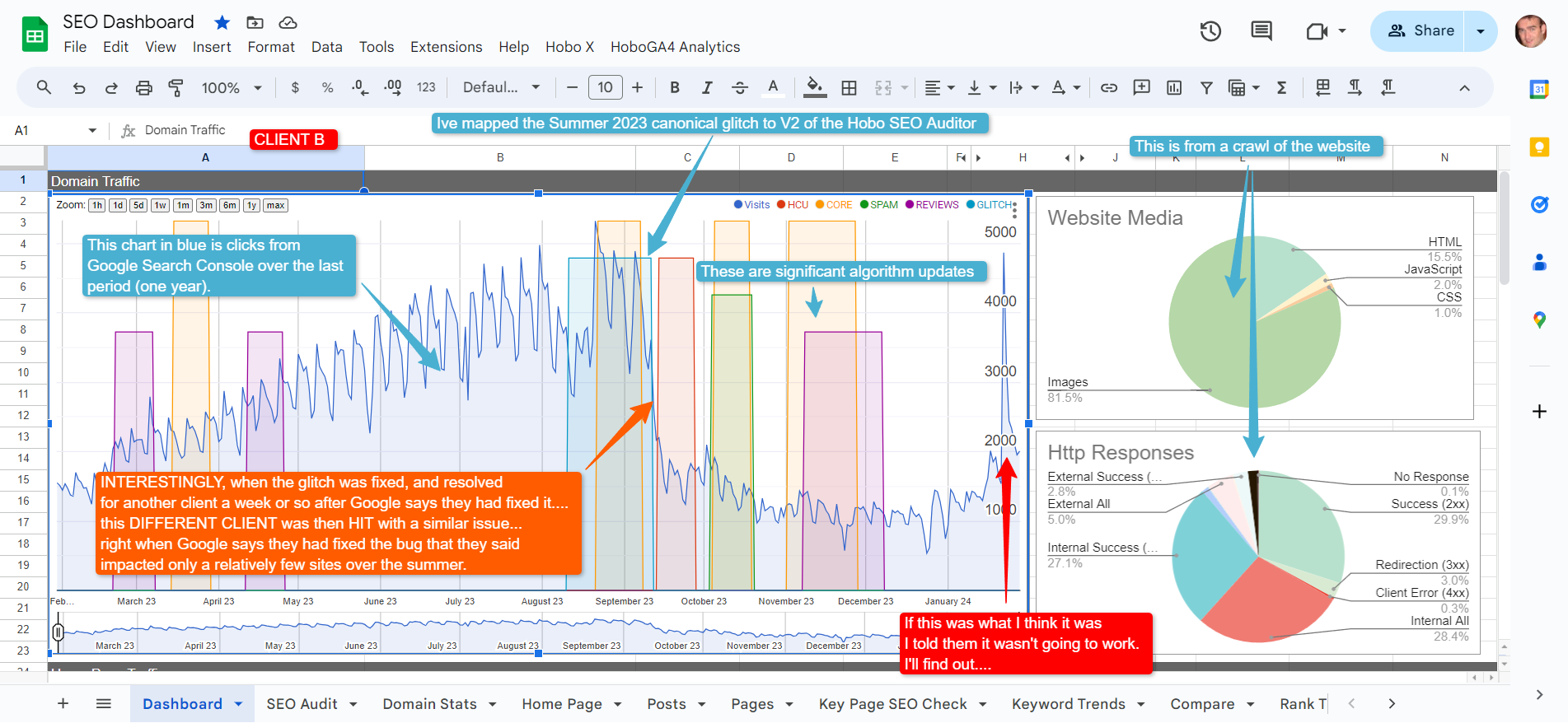
QUOTE: “We have 3 updates a day in average. I think it’s pretty safe to assume there was one recently…” Gary Illyes, Google 2017
Google has many algorithm updates during the year, which reorder rankings and often correct rankings for sites receiving too much traffic.
These focus on demoting ‘low-quality’ SEO techniques or unhelpful content.
Google has 3 or 4 big updates in a year that focus on various things, but they also make changes daily.
QUOTE: “Yes, we do make small changes each day to search. It’s a continual process of improvement. Our core updates only happen 2-4 times per year.” Danny Sullivan, Google 2020
Note also that Google often releases multiple updates and changes to its own GUI (Graphical User Interface – the actual SERPs) at the same time to keep the webmaster guessing as to what is going on.
Google’s SERPs continually change and evolve, and so must SEO (search engine optimisation):
QUOTE: “One way to think of how a core update operates is to imagine you made a list of the top 100 movies in 2015. A few years later in 2019, you refresh the list. It’s going to naturally change. Some new and wonderful movies that never existed before will now be candidates for inclusion. You might also reassess some films and realize they deserved a higher place on the list than they had before. The list will change, and films previously higher on the list that move down aren’t bad. There are simply more deserving films that are coming before them.” Danny Sullivan, Google 2020
As an SEO, you must identify the reasons Google doesn’t ‘rate’ a particular page higher than competing pages.
The answer is either on the page, on the site or in backlinks pointing to the page.
Ask yourself:
- Do you have too few quality inbound links?
- Do you have too many low-quality backlinks?
- Does your page lack descriptive keyword-rich text?
- Are you keyword stuffing your text?
- Do you link out to unrelated sites?
- Do you have too many advertisements above the fold?
- Do you have affiliate links on every page of your site and text found on other websites?
- Do you have broken links and missing images on the page?
- Does your page meet quality guidelines, legal and advertising standards?
- Do ads interrupt the enjoyment of your main content?
- Is your page copy lacking quality?
- Is the site a healthy entity?
Whatever the SEO problems are, you must identify them and fix them.
Get on the wrong side of Google and your site might well be selected for MANUAL review – so optimise your site as if, one day, you will get that website review from a Google Web Spam reviewer.
Avoid SEO myths
Beware, folk, trying to bamboozle you with the science of SEO.
This isn’t a science when Google controls the ‘laws’ and changes them at will.
QUOTE: “They follow the forms you gather data you do so and so and so forth but they don’t get any laws they don’t haven’t found out anything they haven’t got anywhere yet maybe someday they will but it’s not very well developed but what happens is an even more mundane level we get experts on everything that sound like this sort of scientific expert they they’re not scientist is a typewriter and they make up something.” Richard Feynman, Physicist 1981
Just remember, most of what you read about how Google works from a third party is OPINION and just like in every other sphere of knowledge, ‘facts’ can change with a greater understanding over time or with a different perspective.
QUOTE: “Myths to be careful about..: 1. The NLP used by Google is not Neuro-linguistic Processing. 2. Semantic Search at Google is not powered by Latent Semantic Indexing 3. You cannot optimise pages for Hummingbird, RankBrain, or BERT.” Bill Slawski, 2019
Most of the recommendations you will find on Hobo Web can now be corroborated with a verified statement from Google.
SEO checks for your website
Questions to ask yourself:
- Is Googlebot able to find and access the page?
- Does the page have indexable content?
- Is your website showing up on Google when you search for it or its content?
- Do you serve high-quality content to visitors to your website?
- Is your local business showing up on Google?
- Is your content fast and easy to access on all devices?
- Is your website connection secure with HTTPS?
- Does a page return an HTTP 200 (success) status code?
- Submit your site to Google properties
- Submit your site to search engines
- Is your website indexed on Google? Check using the “site:” operator to search for your website.
- Do you provide high-quality content that meets the needs of your target audience? Refer to the Search Essentials for Google-friendly practices.
- Have you claimed your Business Profile on Google if you have a local business? Manage how your business information appears across Google.
- Is your website optimised to load quickly and display properly on all devices? Test your pages for mobile-friendliness.
- Have you submitted your product catalogues digitally to Google Search to promote your products on Google Shopping, Google Offers, and other properties?
- Have you checked what resources Google offers to help your small business succeed online with Google for Small Business?
- Have you invited customers on a virtual tour of your business with Street View?
- Have you suggested changes to your knowledge panel entry to manage your identity as a person, business, or organisation on Google with the Knowledge Panel?
- Have you added a card about yourself to Google search results (if available for users in your country) with the People card?
- Have you promoted your books online and sold your titles through Google’s eBook store with Google Books and eBooks?
- Have you included your scholarly works in Google’s academic index with Scholar?
- Have you appeared in Google News search results or provided digital editions for subscription with Google News?
- If you are an authoritative or official source of regional data, have you published it through Google with Geo Data Upload for local information?
- Have you photographed and shared the world with 360° pictures with Photo Sphere?
- Have you provided a panoramic virtual tour of your property with Street View for local information?
- Have you encouraged the use of public transit by making it easy to locate routes, schedules, and fares with Transit Partner Program for local information?
- If you are an authoritative or official source of regional data, have you published it through Google with Geo Data Upload for media?
- Have you made your videos findable and crawlable by Google Search with Video on Google Search?
- Have you uploaded, distributed, and monetised your videos with YouTube for media?
- Have you added your podcast to Google Podcasts for media?
Technical Priorities
- Have you submitted a sitemap to Google?
- Have you encouraged people to link to your site to increase its visibility?
- Have you used a robots.txt file to block unwanted crawling of non-sensitive information?
- Have you used more secure ways to prevent the crawling of sensitive or confidential material?
- Have you avoided letting your internal search result pages be crawled by Google?
- Have you avoided allowing URLs created as a result of proxy services to be crawled?
Structured markup
- Has structured data markup been added to the website’s pages?
- Have all relevant business entities been marked up, such as products, business locations, opening hours, event listings, recipes, company logo, and others?
- Have tools like Data Highlighter and Markup Helper been used to add markup to the pages?
- Have the pages been checked for errors using the Rich Results Test tool?
- Has the source code of the site been changed only if the implementation of the markup is understood?
- Has the appearance of the website in Google Search results been managed by adding the correct structured data?
- Are the marked-up data visible to users?
- Have fake reviews or irrelevant markups been added to the pages? That is spam!
- Are the Rich result reports in Search Console checked to track how the marked-up pages are performing over the past 90 days?
- Has the gallery of search result types that the website can be eligible for been reviewed?
Title links in search results
- Are the page titles on your website unique and accurately describe the content on the page?
- Do you create unique <title> elements for each page on your website?
- Are your page titles brief but descriptive, with no extremely lengthy or unhelpful text, or unneeded keywords?
- Are the <title> elements descriptive and concise, avoiding vague descriptors like “Home” or “Profile”?
- Are the <title> elements not unnecessarily long or verbose?
- Does the website avoid keyword stuffing in the <title> elements?
- Does the website avoid repeated or boilerplate text in <title> elements?
- Does the website dynamically update the <title> element to better reflect the actual content of the page?
- Does the website brand its titles concisely?
- Is it clear which text is the main title for the page?
- Is the website not allowing search engines to crawl its pages, or if it does, is it using the noindex rule to prevent indexing?
- Is the <title> element written in the same language and writing system as the primary content on the page?
Meta Descriptions
- Have you added a meta description tag to each page of your website?
- Does the meta description accurately summarise the content of the page?
- Is the meta description long enough to provide relevant information to users and fully shown in search results?
- Have you avoided writing a meta description tag that has no relation to the content on the page, using generic descriptions, filling the description with only keywords, or copying and pasting the entire content of the document?
- Have you used unique descriptions for each page?
- If your site has many pages, have you considered automatically generating meta description tags based on each page’s content?
Headings
- Have you used heading tags to emphasise important text?
- Have you thought about the main points and sub-points of the content on the page and decided where to use heading tags appropriately?
- Have you avoided placing text in heading tags that wouldn’t be helpful in defining the structure of the page, using heading tags where other tags may be more appropriate, or erratically moving from one heading tag size to another?
- Have you used headings sparingly across the page, avoiding excessive use of heading tags, very long headings, and using heading tags only for styling text and not presenting structure?
Content
- Is the content interesting and useful to the target audience?
- Does the content anticipate the search behaviour of the target audience and use appropriate keywords?
- Is the text well-written and easy to read, with no spelling or grammatical errors?
- Is the content organised into logical chunks with clear headings and subheadings?
- Is the content unique and not duplicated on other pages on the website?
- Is the website designed around the needs of users, rather than just to rank higher in search engines?
- Does the website build trust with users by providing clear information about who publishes the content and its goals?
- Does the website provide evidence of expertise and authoritativeness on the topic?
- Is there an appropriate amount of content for the purpose of the page?
- Are there any distracting advertisements that might prevent users from accessing the content?
Images on your site:
- Are you using HTML image elements to embed images in your content?
- Have you used the <img> or <picture> elements for semantic HTML markup and specified multiple options for different screen sizes for responsive images?
- Have you avoided using CSS to display images that you want indexed?
- Have you provided a descriptive filename and alt attribute description for each image?
- Have you used the alt attribute to specify alternative text for images that cannot be displayed, and to provide information about the picture for users with assistive technologies such as screen readers?
- Have you used brief but descriptive filenames and alt text?
- Have you avoided using generic filenames like “image1.jpg” or writing excessively lengthy filenames?
- Have you avoided stuffing keywords into alt text or copying and pasting entire sentences?
- Have you supplied alt text when using images as links, to help Google understand more about the page you’re linking to?
- Have you avoided writing excessively long alt text that would be considered spammy, and using only image links for your site’s navigation?
- Have you created an image sitemap to provide Google with more information about the images on your site?
- Have you used standard image formats like JPEG, GIF, PNG, BMP, and WebP, and matched the extension of your filename with the file type?
Mobile-friendly user experience:
- Does the website use responsive web design, dynamic serving, or separate URLs to make the site mobile-ready?
- Has the website been tested using Google’s Mobile-Friendly Test to check if pages meet the criteria for being labeled mobile-friendly on Google Search result pages?
- Has the website been checked using the Search Console Mobile Usability report to identify and fix any mobile usability issues?
- If the website serves lots of static content, has AMP (Accelerated Mobile Pages) been implemented to ensure the site stays fast and user-friendly?
- If using dynamic serving or a separate mobile site, is Google signaled when a page is formatted for mobile, to accurately serve mobile searchers the content in search results?
- If using Responsive Web Design, is the meta name=”viewport” tag used to tell the browser how to adjust the content?
- If using Dynamic Serving, is the Vary HTTP header used to signal changes depending on the user agent?
- If using separate URLs, is the relationship between the two URLs signaled using the <link> tag with rel=”canonical” and rel=”alternate” elements?
- Are all page resources crawlable and not blocked by the robots.txt file?
- Are all important images and videos embedded and accessible on mobile devices, and is all structured data and other metadata provided on all versions of the pages?
- Does the website provide full functionality on all devices, including mobile?
- Are there any common mistakes that frustrate mobile visitors, such as unplayable videos or full-page interstitials that hinder user experience, that can be avoided?
- Has the website been tested with the Mobile-Friendly Test, and both the mobile and desktop URLs tested if using separate URLs for mobile pages?
- Has Google’s mobile-friendly guide been consulted for more information?
URL structure:
- Are unique URLs used for each piece of content?
- Are separate URLs used for different content or modified content?
- Is the website using https:// when possible?
- Are both the www and non-www versions of the website added to Search Console?
- Are the path, filename, and query string used correctly?
- Is the website navigation easy to use for visitors and search engines?
- Is a breadcrumb list used for easy navigation?
- Is a simple navigational page provided for users?
- Is the website hierarchy structured in a natural and easy-to-use manner?
- Is navigation text-based and not reliant on images or animations?
- Is a sitemap provided for search engines?
- Is the navigational page kept up-to-date with working links?
- Is the URL structure simple and easy to read?
- Are URLs constructed logically and in a manner that is most intelligible to humans?
- Are readable words used in the URL when possible, rather than long ID numbers?
- Are localised words used in the URL, if applicable?
- Is UTF-8 encoding used as necessary?
- Are non-ASCII characters avoided in the URL?
- Are unreadable, long ID numbers avoided in the URL?
- If the site is multi-regional, is a URL structure used that makes it easy to geotarget the site?
- Is a country-specific domain or subdirectory used?
- Are hyphens used to separate words in the URL, instead of underscores?
- Are overly complex URLs, especially those containing multiple parameters, avoided?
- Are common causes of unnecessarily high numbers of URLs, such as additive filtering of a set of items, dynamic generation of documents, problematic parameters in the URL, sorting parameters, irrelevant parameters in the URL, and calendar issues, avoided?
- Are descriptive categories and filenames used to organise the website’s documents?
- Are URLs on the website easy to understand and use words that are relevant to the site’s content and structure?
- Are URLs on the website simple, avoiding lengthy URLs with unnecessary parameters, and generic page names?
- Is a simple directory structure used to organise the website’s content, making it easy for visitors to navigate the site and know where they are?
- Are deep nesting of subdirectories avoided, and are directory names related to the content in them?
- Does the website provide one version of a URL to reach a document to prevent users from linking to different versions and splitting the content’s reputation between URLs?
- If multiple URLs access the same content, does the website use a 301 redirect or the rel=”canonical” link element to refer to the dominant URL?
- Are pages from subdomains and the root directory avoided to access the same content?
Links:
- Are all links in the <a> HTML element with an href attribute?
- Are there any links that are not in the <a> element or don’t have an href attribute?
- Are JavaScript links avoided, and when not, are they using the HTML markup shown in the example provided in Google documentation?
- Do all links resolve to an actual web address that Google crawlers can send requests to?
- Is there descriptive anchor text for all links?
- Is the anchor text reasonably concise and relevant to the page it links to?
- Is the anchor text specific enough to make sense by itself?
- Is the anchor text as natural as possible without keyword stuffing?
- Is there context given to each link?
- Are links spaced out with context or chained up next to each other?
Internal linking:
- Are all pages on the site cross-referenced with at least one other page on the site?
- Are anchor texts used for internal links descriptive and relevant to the content they are linking to?
- Are there any pages that seem to have too many internal links?
- Have relevant resources on the site been linked to in context to help readers understand a given page?
External linking:
- Are there any external links on the site?
- Do external links provide context to readers about what they can expect when clicking on them?
- Have sources been properly cited with external links where appropriate?
- Have nofollow tags been added to links for sources that are not trusted or paid for?
- Have sponsored or nofollow tags been added to links that were paid for?
- Have ugc or nofollow tags been added to links added by users on the site?
Link Best Practices
- Is the link text descriptive and provides at least a basic idea of what the page linked to is about?
- Have you avoided using generic anchor text like “page”, “article”, or “click here”?
- Have you avoided using off-topic or irrelevant anchor text?
- Have you used concise text for your anchor text, typically a few words or a short phrase?
- Have you made links easily distinguishable from regular text by using proper formatting?
- Have you considered the anchor text for internal links to help users and Google navigate your site better?
- Have you avoided using excessively keyword-filled or lengthy anchor text just for search engines?
- Have you avoided creating unnecessary links that don’t help with the user’s navigation of the site?
- Have you been careful who you link to and avoided giving your site’s reputation to potentially spammy or irrelevant sites?
- Have you considered using the nofollow attribute for external links in comment sections or message boards to combat comment spam and avoid passing your site’s reputation to potentially spammy pages?
- Have you considered automatically adding the nofollow attribute to user-generated content areas such as guest books, forums, and shout-boards to avoid passing your site’s reputation to potentially spammy pages?
Using JavaScript on Your Web Pages
- Does your website allow Google to access the JavaScript, CSS, and image files used by the website?
- Have you used the URL Inspection tool to see exactly how Google sees and renders your website’s content?
- Are unique and descriptive <title> elements used for every page?
- Are helpful meta descriptions used for every page?
- Is JavaScript used to set or change the meta description as well as the <title> element?
- Is the code compatible with Google, and do you follow the guidelines for troubleshooting JavaScript problems?
- Are meaningful HTTP status codes used, and are they utilised to tell Googlebot if a page can’t be crawled or indexed?
- Are soft 404 errors avoided in single-page apps, and is one of the following strategies used: a. Using a JavaScript redirect to a URL for which the server responds with a 404 HTTP status code. Adding a <meta name=”robots” content=”noindex”> to error pages using JavaScript
- Is the History API used instead of fragments to ensure that Googlebot can parse and extract your URLs?
- Is the rel=”canonical” link tag used and properly injected?
Using JavaScript: Use Robots Meta Tags Carefully
- Is the website using robots meta tags to prevent Google from indexing a page or following links?
- Is the website using the correct syntax for the robots meta tag, i.e., <meta name=”robots” content=”noindex, nofollow”>?
- Is the website using JavaScript to add or change the robots meta tag on a page? If so, is the code working as expected?
- Is there a possibility that the page should be indexed? If so, is the website avoiding using the noindex tag in the original page code?
Using JavaScript: Use Long-lived Caching
- Is the website using long-lived caching to reduce network requests and resource usage?
- Is the website using content fingerprinting to avoid using outdated JavaScript or CSS resources?
- Has the website followed the long-lived caching strategies outlined in the web.dev guide?
Using JavaScript: Use Structured Data
- Is the website using structured data on its pages?
- Is the website using JavaScript to generate the required JSON-LD and inject it into the page?
- Has the website tested its implementation to avoid any issues?
Using JavaScript: Follow Best Practices for Web Components
- Is the website using web components?
- Is the website ensuring that all content is visible in the rendered HTML using the Mobile-Friendly Test or the URL Inspection Tool?
- If the website is using web components, is it using a Slot element to make sure both light DOM and shadow DOM content is displayed in the rendered HTML?
Using Javascript: Fix Images and Lazy-loaded Content
- Is the website using lazy-loading to only load images when the user is about to see them?
- Is the website following the lazy-loading guidelines to implement it in a search-friendly way?
Using JavaScript: Design for Accessibility
- Has the website been designed with the needs of all users in mind, including those who may not be using a JavaScript-capable browser or advanced mobile devices?
- Has the website been tested for accessibility by previewing it with JavaScript turned off or in a text-only browser such as Lynx?
- Is there any content embedded in images that may be hard for Google to see?
Using JavaScript: Identify Problems
- Have you tested how Google crawls and renders the URL using the Mobile-Friendly Test or the URL Inspection Tool in Search Console?
- Have you used the URL Inspection Tool instead of cached links to debug the pages?
- Have you collected and audited JavaScript errors encountered by users, including Googlebot, on your site to identify potential issues that may affect how content is rendered?
- Have you prevented soft 404 errors by redirecting to a URL where the server responds with a 404 status code or by adding/changing the robots meta tag to noindex?
- Have you prevented error pages from being indexed and possibly shown in search results by using the appropriate HTTP status codes?
- Have you ensured that features requiring user permission are optional, and that a way for users to access your content without being forced to allow permission is provided?
- Have you avoided using fragment URLs to load different content and instead used the History API to load different content based on the URL in an SPA?
- Have you avoided relying on data persistence to serve content as WRS loads each URL following server and client redirects, the same as a regular browser, but doesn’t retain state across page loads?
- Have you used content fingerprinting to avoid caching issues with Googlebot?
- Have you ensured that your application uses feature detection for all critical APIs that it needs and provides a fallback behaviour or polyfill where applicable?
- Have you made sure that your content works with HTTP connections?
E-E-A-T (Experience-Expertise-Authoritativeness-Trustworthiness)
- Have you read and understood the concept of E-A-T (Expertise, Authoritativeness, and Trustworthiness) and how it contributes to the ranking of content on Google?
- Have you read the Search Quality Rater Guidelines to understand the criteria that search quality raters use to evaluate content based on E-A-T?
- Have you considered the importance of the “Who, How, and Why” of your content and how it aligns with the E-A-T principles?
- Is it clear who authored the content?
- Are there bylines or author information available?
- Does the byline provide further information about the author’s expertise and background?
- Have you shared details about the process of creating the content, including any automation or AI involvement?
- Is the use of automation or AI evident to visitors through disclosures or other means?
- Are you explaining why automation or AI was seen as useful to create the content?
- Is the content created primarily to help visitors or to attract search engine visits?
- Are you using automation or AI primarily to manipulate search rankings, which is a violation of Google’s spam policies?
- Have you self-assessed your content based on the E-A-T principles and the quality rater guidelines and made any necessary improvements to align with them?
Website Promotion (Continued)
- Have you promoted your new content through blog posts or offline promotion?
- Are you avoiding promoting each new, small piece of content and instead focusing on big, interesting items?
- Are you avoiding involving your site in schemes where your content is artificially promoted to the top of search results?
- Have you reached out to sites in your related community to spark additional ideas for content or build a good community resource?
- Are you avoiding spamming link requests out to all sites related to your topic area or purchasing links from another site with the aim of getting PageRank?
- Have you analysed your search performance and user behaviour to identify issues and improve your site’s performance?
- Have you used Google Search Console or other tools to analyse your search performance, identify crawl issues, test and submit sitemaps, and understand top searches used to reach your site?
- Have you used web analytics programs like Google Analytics to gain insight into how users reach and behave on your site, discover popular content, and measure the impact of optimisations made to the site?
- For advanced users, have you analysed server log files to gain even more comprehensive information about how visitors are interacting with your site?
Ensure You Are Not Creating Web Spam Doorways:
- Does your website have multiple pages or domains with slight variations to rank for specific search queries?
- Does your website have intermediate pages that are not as useful as the final destination?
- Does your website have substantially similar pages that are closer to search results than a clearly defined hierarchy?
Sneaky Redirects:
- Do you have any redirects on your site? If so, what are their intended purposes? Redirects should be in place for the consolidation or redirection of old content to relevant up-to-date content.
- Are any of your redirects intended to deceive users or search engines?
- Have you checked that all of your redirects are functioning as intended?
- Have you monitored your site’s analytics to ensure that users are not unexpectedly redirected to spammy or irrelevant pages?
- Have you reviewed your site’s content to ensure that it provides value to users and is not solely generated for the purpose of manipulating search rankings?
Spammy Automatically-generated Content
- Have you reviewed all of your site’s content for quality and relevance?
- Are there any pages or sections of your site that are primarily generated through automated processes?
- Is the content on your site original and provides value to users?
- Have you monitored your site’s analytics to ensure that users are engaging with your content and not bouncing off your site?
- Have you used tools to exclude any spammy content from your site’s search results?
Thin Affiliate Pages
- Do you have affiliate links on your site? If so, how do they add value for users?
- Are any of your affiliate pages primarily composed of content copied from the original merchant?
- Are your affiliate pages designed to provide value to users beyond simply promoting the affiliate product?
- Have you monitored your site’s analytics to ensure that users are not bouncing off of your thin affiliate pages?
- Have you reviewed your affiliate partnerships to ensure they align with your site’s goals and values?
User-generated Spam on Your Site
- Have you implemented measures to prevent spammy user-generated content?
- Do you monitor your site’s public areas for spam and other inappropriate content?
- Have you provided clear guidelines for users on what is and is not acceptable content on your site?
- Have you implemented tools to allow users to report spammy content?
- Have you reviewed your site’s terms of service to ensure they clearly outline your policies on user-generated content?
Link Spam Regarding Your Website
- Are you buying or selling links for ranking purposes?
- Are you exchanging goods or services for links?
- Are you sending someone a product in exchange for them writing about it and including a link?
- Are you engaging in excessive link exchanges?
- Are you using automated programs or services to create links to your site?
- Are you requiring a link as part of a Terms of Service, contract, or similar arrangement without allowing a third-party content owner the choice of qualifying the outbound link?
- Are you using text advertisements or text links that don’t block ranking credit?
- Are you engaging in advertorials or native advertising where payment is received for articles that include links that pass ranking credit, or links with optimised anchor text in articles, guest posts, or press releases distributed on other sites?
- Are you including low-quality directory or bookmark site links?
- Are you embedding keyword-rich, hidden, or low-quality links in widgets that are distributed across various sites?
- Are you including widely distributed links in the footers or templates of various sites?
- Are you leaving forum comments with optimised links in the post or signature?
Machine-generated Traffic
- Are you sending automated queries to Google?
- Are you scraping results for rank-checking purposes or other types of automated access to Google Search conducted without express permission?
Malware
- Are you hosting malware or unwanted software that negatively affects the user experience?
Misleading Functionality
- Are you intentionally creating sites with misleading functionality and services that trick users into thinking they would be able to access some content or services but, in reality, cannot?
- Are you claiming to provide certain functionality, but intentionally leading users to deceptive ads rather than providing the claimed services?
Scraped Content
- Are you copying and republishing content from other sites without adding any original content or value, or even citing the original source?
- Are you reproducing content feeds from other sites without providing some type of unique benefit to the user?
- Are you embedding or compiling content, such as videos, images, or other media from other sites, without substantial added value to the user?
Cloaking
- Does your website present different content to search engines than to users?
- Does your website insert text or keywords only for search engines and not for human visitors?
- Does your website use technologies that search engines have difficulty accessing without cloaking?
Hacked Content
- Have you checked your website for any unauthorised content placed due to security vulnerabilities?
- Have you checked for any code, page, or content injection, or redirects that may harm your website visitors or performance in search results?
Hidden Text and Links
- Does your website use hidden text or links to manipulate search engines and not easily viewable by human visitors?
- Does your website use design elements that show and hide content in a dynamic way to improve user experience?
Keyword Stuffing
- Does your website contain lists of keywords or numbers without substantial added value?
- Does your website repeat the same words or phrases unnaturally and out of context?
Disclosure: Hobo Web uses generative AI when specifically writing about our own experiences, ideas, stories, concepts, tools, tool documentation or research. Our tool of choice is in this process is Google Gemini Pro 2.5 Deep Research. This assistance helps ensure our customers have clarity on everything we are involved with and what we stand for. It also ensures that when customers use Google Search to ask a question about Hobo Web software, the answer is always available to them, and it is as accurate and up-to-date as possible. All content was verified as correct. See our AI policy.