
If you are a website manager, SEO, or website developer looking for advice on how to optimise internal links on your website within Google Webmaster Guidelines, this article is for you. This article discusses optimising internal links on your website to maximise indexation and ranking in Google.
For 25 years, I’ve been a professional web developer and SEO. I’ve seen strategies come and go, but the principles of a well-structured website have remained remarkably consistent. This guide is the culmination of that experience, combining my own hands-on tests with the latest technical revelations from internal Google documentation.
Recent technical documentation and trial testimonies have provided profound clarification, confirming what many of us in the trenches have long suspected: a link’s power is a dynamic score, continuously re-evaluated by formal systems.
This guide integrates these technical realities with my two decades of experience to create a unified strategy, moving beyond outdated concepts to embrace internal linking as a powerful tool for communication—both with users and search engines.
QUOTE: “Sometimes a website may seem a little neglected: links may be broken, images may not load, and content may feel stale or out-dated. If the website feels inadequately updated and inadequately maintained for its purpose, the Low rating is probably warranted.” Google Quality Evaluator Guidelines, 2017
Part 1: The Strategic Framework for Internal Linking in a User-First Era
1.1 Beyond “Link Juice”: The User-Validation Gate
For years, the SEO vernacular was dominated by the term “link juice,” a metaphor for the authority passed from one page to another. I’ve been telling people to forget this concept for years, and now we have the technical proof why.
QUOTE: ”I’d forget everything you read about “link juice.” It’s very likely all obsolete, wrong, and/or misleading. Instead, build a website that works well for your users.” — John Mueller, Google 2020
The most profound shift in our understanding is that a link’s ability to pass ranking value is conditional, not inherent. Internal documentation reveals that Google maintains a tiered link index. A link on a page that receives no user clicks is relegated to a low-quality tier where it is effectively ignored by ranking algorithms.
For a link to have full value, the page it resides on must be validated by user engagement.
While testimony has confirmed that the anchor signal itself is calculated purely from the web’s link graph, independent of user clicks, the overall value of that link is gated by the traffic and engagement of its source page.
1.2 Internal Linking as a Core Component of Site Quality
For years, many of us have operated on the principle that Google calculates a site-level “quality score.” The Panda update in 2011 was the first clear signal of this, as it was designed to “reduce rankings for low-quality sites” on a site-wide basis. Recent leaks have given us the technical term for this: siteAuthority, a core component of a system called Q* (Quality Score).
This is where internal linking transcends being a simple page-level tactic and becomes a critical site-wide signal.
Optimising internal links, says John Mueller in a webmaster hangout, is:
QUOTE: “not something I’d see as being overly problematic if this is done in a reasonable way and that you’re not linking every keyword to a different page on your site”. John Mueller, Google
Your internal linking structure is a direct, measurable reflection of your site’s overall quality and coherence. A clean, logical structure with no broken links or orphan pages signals a well-maintained, trustworthy resource. This contributes positively to your overall siteAuthority score.
Conversely, a chaotic site with dead ends and irrelevant links is a hallmark of neglect, sending negative signals that can lower your site’s foundational quality score. Every piece of advice in this guide is ultimately aimed at improving this core quality signal.
1.3 The Mechanics of Internal PageRank Flow
Before we get to architecture, it’s crucial to understand the foundational mathematics of how authority moves within your site. Back when I started, the PageRank algorithm was the core of Google. While it has evolved into more complex systems like TrustRank and PageRank-NearestSeeds, the fundamental principle still explains how authority is distributed through your internal links.
The original algorithm treats every link as a vote. A page’s PageRank is calculated from the ranks of the pages that link to it. Crucially, that PageRank is divided among all the outgoing links on the page.
1.3.1 The Heat Transfer Analogy of SEO Authority
Imagine your website’s authority is thermal energy, or heat. Some pages, like your homepage or a viral blog post, are “hot” pages—they possess a lot of this energy.
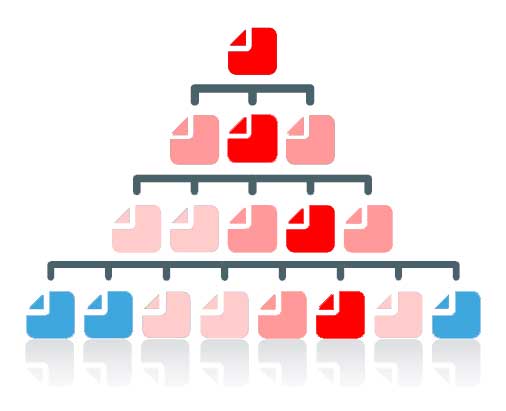
Links are the physical connections that allow this heat to conduct from one page to another.
When a hot page links to other pages, it shares its warmth. This is how authority flows through your site. However, this heat is finite.
- If a very hot page links to just a few other pages, it sends a concentrated flow of energy to each one, making them significantly warmer.
- If that same hot page links out to hundreds of other pages (like in a massive footer), its thermal energy is dissipated across all those connections. Each receiving page only gets a tiny bit of warmth and its temperature barely rises.
1.3.2 The Problem with Cold Pages
Now, consider a page that receives no incoming links. It has no connection to the “hot” parts of your website. Without any incoming thermal energy, this isolated page grows cold.
This is crucial because Google eventually stops paying attention to cold pages. It sees them as unimportant, isolated, and not contributing value to the wider web. Over time, Google will visit them less and less until it ultimately drops these cold pages from its search index entirely, making them invisible to anyone searching.
The goal is to create an efficient system of heat transfer, ensuring all your important pages stay warm and valued by Google.
I came up with that analogy for Pagerank over a decade ago (and it got me a Search Engine Land SEMMY Award nomination that year.
A practice called “PageRank sculpting”, emerged, where SEOs would use the rel="nofollow" attribute on certain internal links to try and channel all the “juice” to more important pages.
Google has since advised against this, but the very existence of the practice confirms a fundamental truth: PageRank flows through your internal links, and its distribution can be managed, for better or worse. I would highly recommend that you do not use nofollow to sculpt PageRank.
1.4 Internal Linking and Navboost: Securing the “Last Longest Click”
The connection between internal links and user satisfaction is not just theoretical; it’s a core component of how modern search rankings work. The Navboost system, confirmed in trial testimony, analyses 13 months of user interaction data to refine search results. One of its most important metrics is the “last longest click” – the final result a user clicks on and dwells on, signalling a successfully completed search.
This is where a thoughtful internal linking strategy becomes a powerful tool. When a user lands on your page from a search result, your goal is to fully satisfy their query so they don’t “pogo-stick” back to the SERP.
Internal links are the pathways you provide to help them do this.
By linking to related articles, definitions, or product pages, you help the user explore a topic thoroughly and find their answer within your site. This increases their dwell time and makes it more likely your page will earn that “last longest click”, sending a strong positive signal to Navboost that your page was a high-quality, satisfying result.
1.5 Architecture as a Blueprint for Authority and User Experience
A website’s internal linking structure is its architecture. At the apex sits the homepage, which functions as a foundational trust anchor. Technical documentation reveals that the PageRank of a website’s homepage is considered for every single document on that site. Every page published inherits a measure of its homepage’s authority, providing a baseline of “trust” from the moment it is indexed. This makes investing in high-quality links to the homepage one of the most efficient levers for increasing the ranking velocity of all content on the site.
QUOTE: “If you have pages that you think are important on your site don’t bury them 15 links deep within your site… if there’s a page that’s important or that has great profit margins or converts really – well – escalate that put a link to that page from your root page that’s the sort of thing where it can make a lot of sense.” – Matt Cutts, Google 2011
This principle of “escalating” important pages is crucial. Proximity to the homepage, measured in clicks, signals importance to search engines, leading to faster and more frequent crawling.
QUOTE:” Assigning relevance of one web page to other web pages could be based upon distance of clicks between the pages and/or certain features in the content of anchor text or URLs. For example, if one page links to another with the word “contact” or the word “about”, and the page being linked to includes an address, that address location might be considered relevant to the page doing that linking.” 12 Google Link Analysis Methods That Might Have Changed – Bill Slawski, SEO By The Sea, 2012
This aligns with patent filings that describe the “propagation of relevance” between pages, where relevance can be assigned based on the “distance of clicks” between them.
QUOTE: “So what will happen is, we’ll see the home page is really important, things linked from the home page are generally pretty important as well. And then… as it moves away from the home page we’ll think probably this is less critical.” — John Mueller, Google 2020
This architectural planning finds its most sophisticated expression in the implementation of content silos and topic clusters. This model organises content into a pyramid-like structure where a broad, authoritative “pillar page” serves as the hub for a specific topic, linking out to multiple, more detailed “cluster pages,” which in turn link back to the pillar.
Part 2: Designing for Usability and Crawlability
A technically sound architecture must be paired with a user-friendly design. How users and crawlers navigate the site is determined by practical elements like menus, sitemaps, and consistent layouts.
2.1 Make a User-Friendly Navigation Menu
QUOTE: “home pages” are where “we forward the PageRank within your website” and “depending on how your website is structured, if content is closer to the Home page, then we’ll probably crawl it a lot faster, because we think it’s more relevant” and “But it’s not something where I’d say you artificially need to move everything three clicks from your Homepage”. John Mueller, Google 2014
The most important thing for me when designing website navigation systems is simple: make it easy for the user to navigate, and make it easy for Google to get to your content. Years ago, in the Google Webmaster Forum, a user with a 5,000-product site asked about using a large, two-level drop-down menu.
The advice I gave, which was endorsed by Google’s John Mueller at the time, was to avoid cumbersome JavaScript menus and instead opt for a simple, solid structure: Home > Categories > Products. This keeps code and page load times down and provides a better user experience.
The question was:
QUOTE: “Building a new site with over 5000 product pages. Trying to get visitors to a product page directly from the homepage. Would prefer to use a two-level drop-down on homepage containing 10 brands and 5K products, but I’m worried a huge source code will kick me in the pants.Also, I have no idea how search engines treat javascript links that can be read in HTML. Nervous about looking like a link farm.”
I answered:
QUOTE – “I’d invest time in a solid structure – don’t go for a javascript menu it’s too cumbersome for users. Sometimes google can read these sometimes it can’t – it depends on how the menu is constructed. You also have to remember if google can read it you are going to have a big template core code (boilerplate) on each and every page vying alongside flimsy product information – making it harder for google to instantly calculate what the individual products page is supposed to rank for.
I would go for a much reduced simple sitewide navigation in the menu array,
Home page links to categories > Categories link to products > Products link to related products
when you go to category links the links relevant in that category appear in the menu. Don’t have all that pop down in a dropdown – not good for users at all. Keep code and page load time down to a minimum…” Shaun Anderson
QUOTE:” JohnMu (Google Employee) + 2 other people say this answers the question:” Google Webmaster Forums
I thought that, as somebody from Google agreed, it was worth posting on my own blog.
The most important thing for me when designing website navigation systems is:
- Make it easy for the user to navigate.
- Make it easy for Google to get to your content and index your pages.
In terms of navigation from a landing page (all your pages are potential landing pages), what do you think the benefits are of giving people 5000 navigation options?
Surely if the page meets their requirements, all you need is two buttons. Home, and “Buy Now!”; OK – a few more – but you get what I mean.
Less is more, usually.
Google says:
QUOTE: “Limit the number of links on a page to a reasonable number (a few thousand at most).” Google Webmaster Guidelines, 2018
There are benefits to a mega-menu:
QUOTE: “Mega menus may improve the navigability of your site. (Of course, it’s always best to test.) By helping users find more, they’ll help you sell more.” Jakob Nielsen, NN Group, 2017
And there are drawbacks to mega-menus:
QUOTE: “In the bigger scheme of things, the usability problems mentioned here aren’t too serious. They’ll reduce site use by a few percent, but they won’t destroy anyone’s business metrics. But still: why degrade the user experience at all, when the correct design is as easy to implement as the flawed one?” Jakob Nielsen, NN Group, 2010
Once you realise getting your product pages indexed is the key, don’t go for a mega-menu just because you think this is a quick way to solve your indexing problem.
With a site structure, it’s all about getting your content crawled and indexed. That’s the priority.
2.2 Keep Navigation Consistent
A key element of accessible website development is a clean, consistent navigation system coupled with a recognisable layout. This allows users to instantly find important information and quickly find comfort in their new surroundings, which is especially important as every page on your website is a potential landing page.
QUOTE: “Presentation, content and navigation should be consistent throughout the website” — Guidelines for UK Government websites
2.3 Know the 3-Click Rule of Website Design
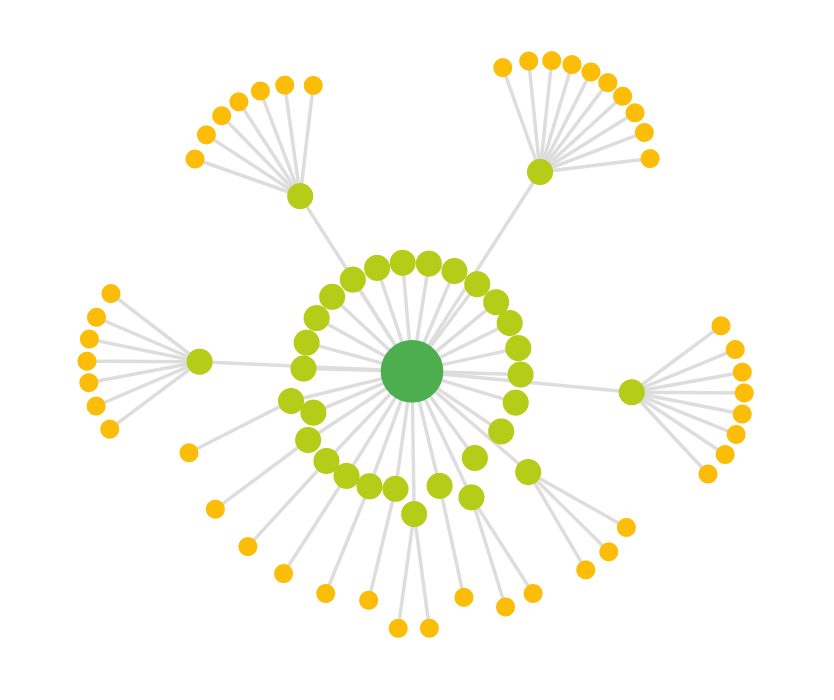
The “3-Click Rule” is a long-standing usability heuristic which posits that important information should be no more than three clicks away from an entrance page.
RULE: “Don’t put important information on your site that is more than 3 clicks away from an entrance page” — Zeldman
While its status as an unbreakable law has been debated, I’ve always found its value as a guiding principle to be immense. It forces you to design intuitive, logical hierarchies and to consciously consider the user’s journey to critical content. Google’s own advice aligns with this principle, confirming that proximity to the homepage is a signal of relevance.
QUOTE: “…depending on how your website is structured, if content is closer to the Home page, then we’ll probably crawl it a lot faster, because we think it’s more relevant” and “But it’s not something where I’d say you artificially need to move everything three clicks from your Homepage”. — John Mueller, Google 2014
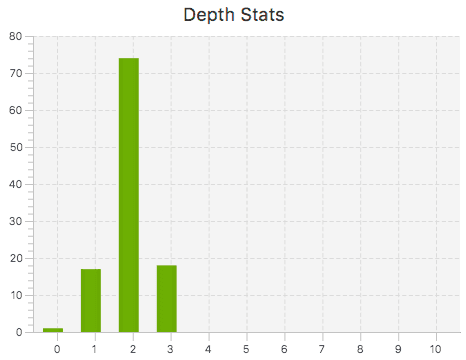
This is the click depth of my content on this website (as discovered by Screaming Frog):
2.4 Use an HTML Sitemap
While XML sitemaps are crucial for helping Google discover your pages, a basic HTML sitemap is an old friend that helps both users and crawlers find all your pages and ensures PageRank is spread effectively.
These are simple and easy for Google to crawl and spread Pagerank and they help you at least ensure Google can find all your pages and spread Pagerank:
QUOTE: “Ensure that all pages on the site can be reached by a link from another findable page. The referring link should include either text or, for images, an alt attribute, that is relevant to the target page.” Google Webmaster Guidelines, 2018
A basic HTML sitemap is an old friend, and Google actually does say in its guidelines for Webmasters that you should include a sitemap on your site – for Googlebot and users – although this can naturally get a bit unwieldy for sites with a LOT of pages:
QUOTE: “Provide a sitemap file with links that point to the important pages on your site. Also provide a page with a human-readable list of links to these pages (sometimes called a site index or site map page).” Google Webmaster Guidelines, 2018
Part 3: The Anatomy of an Optimised Internal Link
Transitioning from high-level architecture to on-page execution requires a granular understanding of the components that constitute an effective internal link.
3.1 The Art and Science of Anchor Text
QUOTE: “When calling the user to action, use brief but meaningful link text that: 1) provides some information when read out of context 2) explains what the link offers 3) doesn’t talk about mechanics and 4) is not a verb phrase” W3C
Anchor text is the visible, clickable text in a hyperlink. Its primary function is to provide context. Vague phrases such as “click here” are wasted opportunities. Recent testimony from Google’s Vice President of Search, Pandu Nayak, confirmed that anchor text is “another very important signal” that provides “a very valuable clue in deciding what the target page is relevant to.” This signal is a core component of Google’s foundational relevance scoring system, known as Topicality (T*).
From my own testing over the years, it’s clear that even a single, well-placed internal link can have a noticeable impact. In one experiment I ran, a target page was ranking for keywords where the exact phrase was not present on the page itself. By adding just one internal link from another high-quality page with the exact-match anchor text, the target page began to rank for that term. When I removed that single link, the ranking disappeared. This, for me, was a clear demonstration of the direct influence of contextual anchor text.
Internal documentation now confirms that Google separates on-site (internal) and off-site (external) anchors, maintaining distinct scores for each. This presents a powerful strategic lever I’ve used for years: because you have complete control over internal linking, you can use it to strategically modulate the risk associated with your external anchor text profile. If an external profile is becoming too aggressive with exact-match anchors, you can adjust your internal linking to increase the proportion of branded or generic anchors, creating a more balanced overall profile. A critical tactic is to avoid using the exact same anchor text to point to two different pages, as this can confuse search engines about which page is the most relevant resource for that term.
Furthermore, a punitive attribute named anchorMismatchDemotion is applied when the anchor text of a link does not align with the topic of the target page. This underscores the absolute importance of maintaining strong topical relevance. An exact-match anchor on an irrelevant page is not just a wasted link; it can be actively harmful.
Table 1: Anchor Text Strategy Matrix
3.2 Link Placement, Priority, and Attributes
Google has said it doesn’t matter where the links are on your page, Googlebot will see them:
QUOTE: “So position on a page for internal links is pretty much irrelevant from our point of view. We crawl, we use these mostly for crawling within a website, for understanding the context of individual pages within a website. So if it is in the header or the footer or within the primary content, it’s totally more up to you than anything SEO wise that I would worry about.” John Mueller, Google 2017
As an aside, that statement on its own does not sit nicely with some patents I’ve read, where link placement does seem to matter in some instances. Prominence – the likelihood a link is clicked – is the most critical thing in building any kind of link if you want the full power from it. And if you want the full power, users need to find it and click it.
The long-standing theory of “first link priority” suggests that when two links on a page point to the same destination, only the first link’s anchor text is considered (by the topicality system). While Google’s official guidance is intentionally ambiguous, past tests I conducted indicated that Google only counted the first link when it came to ranking the target page. The safest approach, and the one I’ve followed since, is to assume the first link carries the most weight and plan accordingly.
QUOTE: “I know some people do SEO experiments and try to figure this out and kind of work out ‘Oh Google currently does it like this’ but from our point of view can change and it’s not something that we have so even if you manage to figure out how we currently do it today then that’s not necessarily how we’ll do tomorrow or how it’s always it’s across all websites.” John Mueller, Google 2018
The last time I tested ‘first link priority’ was a long time ago.
From this test, and the results on this site anyway, testing links internal to this site, it seems Google only counted the first link when it came to ranking the target page.
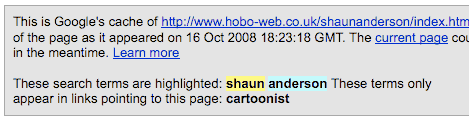
Assume also that the most prominent link is the most valuable link on the page.
The placement of a link also has a profound impact on its value. This is supported by concepts like “Page Segmentation,” where Google gives different weights to links based on where they appear.
QUOTE: “Basically, we have tons of link labels; for example, it’s a footer link, basically, that has a lot lower value than an in-content link.” — Gary Illyes, Google
This is conceptually underpinned by Google’s “Reasonable Surfer” model. This model reflects that a real user is more likely to follow editorially placed links within the main content than boilerplate links in a footer. The algorithm is designed to mimic this behaviour, giving more weight to the links a reasonable person would find most useful.
Part 4: Content Strategy and Internal Linking Synergy
QUOTE: “How important is the anchor text for internal links? Should that be keyword rich? Is it a ranking signal? We do use internal links to better understand the context of content on your site so if we see a link that’s saying like red car is pointing to a page about red cars that helps us to better understand that but it’s not something that you need to keyword stuff in any way because what generally happens when people start kind of focusing too much on the internal links is that they have a collection of internal links that all say have like four or five words in them and then suddenly when we look at that page we see this big collection of links on the page and essentially that’s also text on a page so it’s looking like keyword stuff text so I try to just link naturally within your website and make sure that you kind of have that organic structure that gives us a little bit of context but not that your keyword stuffing every every anchor text there.” John Mueller, Google 2015
An effective internal linking strategy must be deeply integrated with a site’s content strategy. When aligned, content creation and internal linking form a powerful symbiotic relationship.
4.1 From Keywords to Clusters: A Data-Driven Linking Strategy
The bedrock of any modern SEO strategy is comprehensive keyword research. This involves grouping related queries into broader topics to identify “pillar” topics and more specific “cluster” sub-topics. This data-driven approach allows for the deliberate construction of the hub-and-spoke model, which is a tangible, crawlable structure that demonstrates a website’s expertise and authoritativeness on a subject.
4.2 Linking to What Matters: Prioritising Cornerstone and Conversion Content
Not all pages on a website are created equal. An effective internal linking strategy must be deliberate in how it distributes attention and authority toward pages that are most critical to the site’s goals.
Once these key pages have been identified, they should become the primary beneficiaries of internal link equity. This involves a proactive strategy of linking to these pages from other relevant content across the site, with a preference for linking from pages that already receive significant traffic and user engagement to ensure the links are activated.
Part 5: Auditing and Maintaining a Healthy Link Ecosystem
A website’s internal link structure is a dynamic system that requires ongoing monitoring and maintenance to prevent issues like broken links, unnecessary redirects, and orphaned pages.
5.1 Diagnosing and Curing Link Rot: A Guide to Link Health
QUOTE: “Most links do provide a bit of additional context through their anchor text. At least they should, right?” John Mueller, Google 2017
The state of a site’s internal links is a direct signal of its overall quality. Google’s Search Quality Evaluator Guidelines state that a website that “may seem a little neglected: links may be broken… and content may feel stale” can warrant a “Low Quality” rating. The most common issue is the broken internal link (404 error), which creates a dead end for users and crawlers. These can be identified using tools like Screaming Frog, Ahrefs, or Semrush and should be fixed promptly.
5.2 Rescuing Orphan and Under-Linked Pages
QUOTE: “If you have pages that you think are important on your site don’t bury them 15 links deep within your site and I’m not talking about directory length I’m talking about actual you have to click through 15 links to find that page if there’s a page that’s important or that has great profit margins or converts really – well – escalate that put a link to that page from your root page that’s the sort of thing where it can make a lot of sense.” Matt Cutts, Google 2011
An orphan page is a page with no incoming internal links. A related issue is the “under-linked” page, which may only have one incoming internal link, signalling to search engines that it is of low importance. The user-validation model adds another layer of urgency: any outbound links on these pages would be worthless because the page itself receives no clicks to qualify for the high-quality link index. Finding and integrating these pages into the site’s link graph is therefore critical.
5.3 Proactive Link Maintenance
QUOTE: “So what will happen is, we’ll see the home page is really important, things linked from the home page are generally pretty important as well. And then… as it moves away from the home page we’ll think probably this is less critical. That pages linked directly from the home page are important is fairly well known but it’s worth repeating. In a well organized website the major category pages and any other important pages are going to be linked from the home page.” John Mueller, Google 2020
A healthy link profile requires proactive maintenance. Two key processes I’ve implemented in my own work can make a significant difference:
- New Content Protocol: I have a simple rule: no new page goes live unless it has at least two or three internal links pointing to it from older, related content. This ensures it gets discovered, crawled, and indexed faster.
- Retroactive Linking: I regularly review older, authoritative articles on my site and look for opportunities to add internal links to newer, relevant content. This passes authority to new pages and keeps your content interconnected.
QUOTE: “The web changes, sometimes old links break. Googlebot isn’t going to lose sleep over broken links. If you find things like this, I’d fix it primarily for your users, so that they’re able to use your site completely. I wouldn’t treat this as something that you’d need to do for SEO purposes on your site, it’s really more like other regular maintenance that you might do for your users.” John Mueller, GOOGLE – 2014
5.4 Beware of Automated Linking Plugins
While it may seem like a time-saver, I strongly advise against using plugins to automate the creation of internal links.
Technical documentation and patents reveal sophisticated systems for identifying unnatural patterns. Google monitors for “spiky” growth in anchor text profiles—a sudden increase in the number of identical or similar anchors.
Automated tools can easily create these unnatural patterns, triggering defensive filters that can devalue or ignore the links entirely. Matt Cutts warned us about them.
I would avoid using most plugins to optimise your internal links. Yes, it’s a time-saver, but it can also look spammy.
Google has been known to frown upon such activities.
Case in point:
QUOTE: “As happened to a friend of a friend, whose rankings went deep into the well of despair shortly after installing and beginning to use SEO Smart Links. Since there hadn’t been any other changes to the site, he took a flyer on a reconsideration request and discovered that yes, indeed, there had been a penalty”:
“So, what had this site owner done to merit a successful reconsideration request? Simple – he removed the SEO Smart Links plugin and apologized for using it in the first place” Dan Theis, Marketers Braintrust, 2012
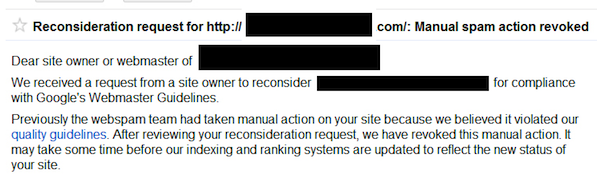
You get the most from such optimisations if they are manual and not automated, anyway.
Table 2: Internal Link Issue Troubleshooting Guide
5.5 How many words will Google count as anchor text?
Google effectively tells you exactly what to do to optimise your website to meet their guidelines.
10-20 years ago when I was doing SEO, we had to test everything ourselves.
I thought it would be useful to include these tests and observations as anecdotal evidence.
Not many people link to you with very long anchor text links, so when people do, it is a chance to see how many keywords Google is counting as a keyword phrase in anchor text.
This blogger linked to me with an anchor text containing 21 keywords in the link:
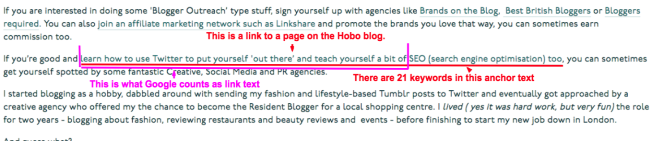
From this observation, we can use Google to check a few things:
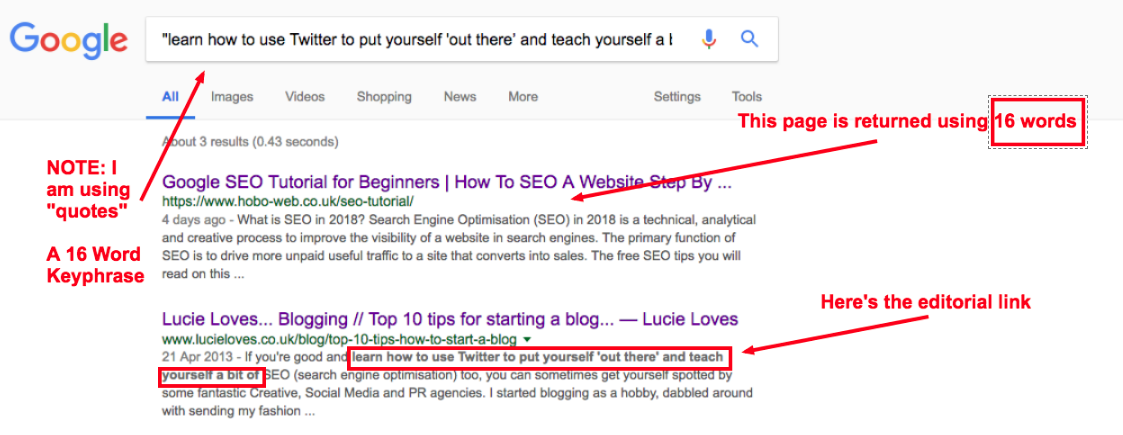
In Google.co.uk the answer is consistently 16 words in anchor text for maximum contextual value.
Any signal within the 16-word limit in anchor text can be detected, nothing above the 16-word threshold was detected:
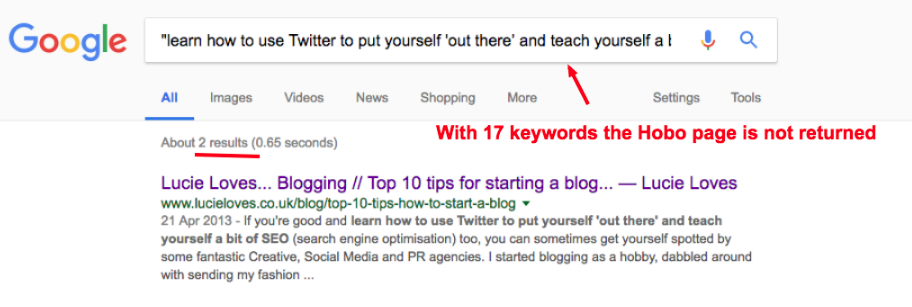
Ironically, the 17th keyword in anchor text was ‘SEO’, which the Hobo page ranked page one in the UK at the time, so it is ‘relevant’ for the query on many other ranking factors but this imposed limit is an instance where the document is not selected as a result of the limit.
Google has since made all this much harder to detect if this is even still the case today.
5.6 How about if the link is in ALT text?
QUOTE: “One thing to think about with image links is if you don’t have an alt text for that then you don’t have any anchor text for that link. So I definitely make sure that your images have alt text so that we can use those for an anchor for links within your website. If you’re using image links for navigation make sure that there’s some kind of a fallback for usability reasons for users who can’t view the images.” John Mueller, Google 2017
Google limits keyword text in ALT attribute to 16 words too, so it may be reasonable to think it is the same.
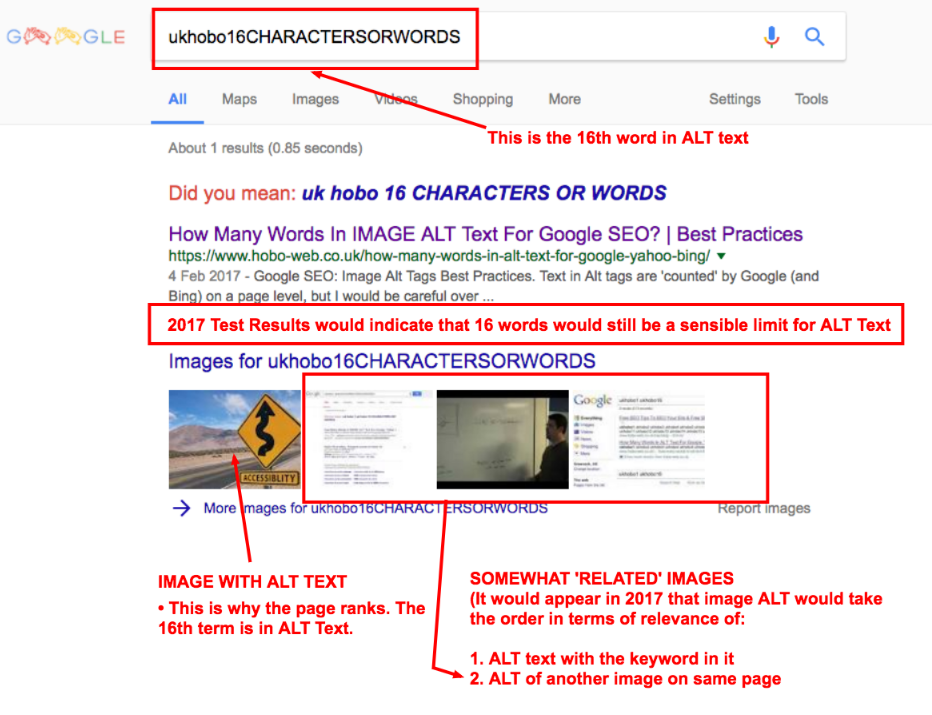
and
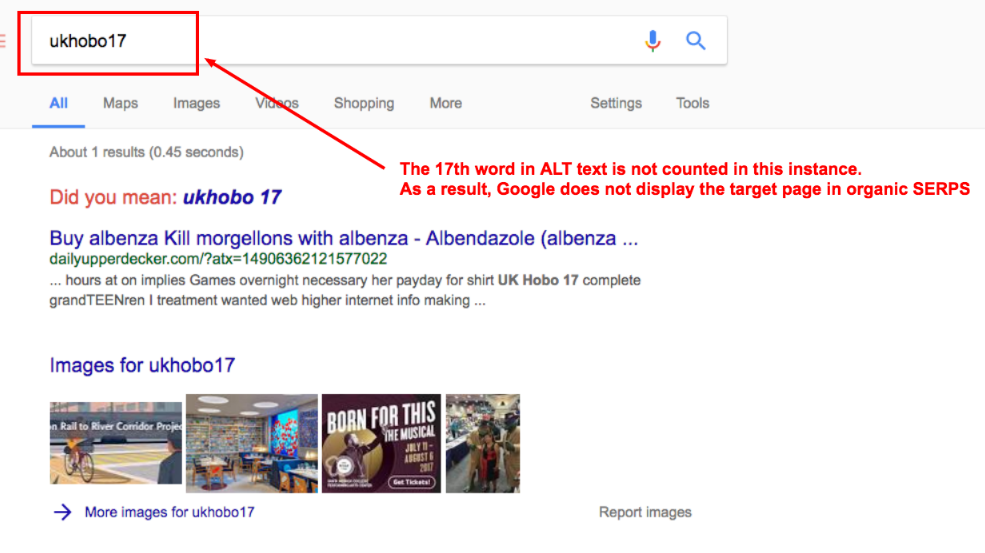
See my article Alt text SEO checklist for more on optimising alternative text in images on your website.
5.7 What if the link passes through a 301 redirect?
The same limits were in place.
In Google.co.uk the answer is consistently 16 words in anchor text for maximum contextual value:
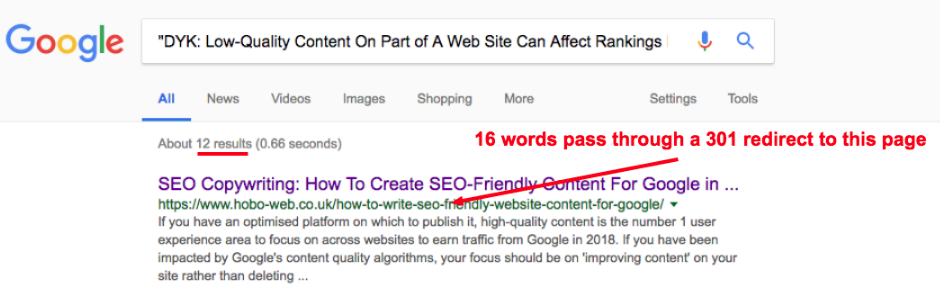
Any signal within the 16-word limit in anchor text can be detected, nothing above the 16-word threshold was detected:
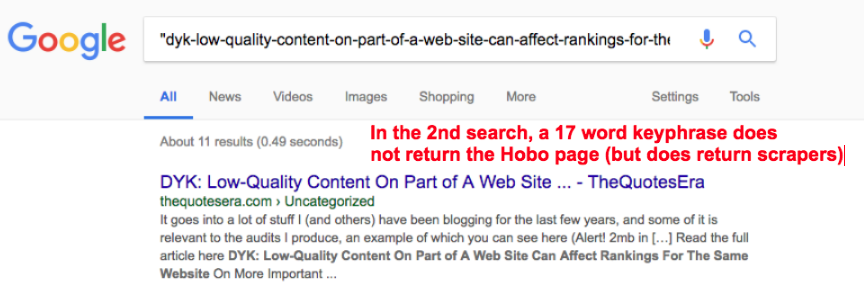
AGAIN – When you start testing this stuff, I believe Google starts messing back with you in some way. It’s extremely hard to identify such instances these days.
Do not link large blocks of text as Google only counts the first 16 words it finds in the anchor text link and the rest of the keywords ‘evaporate’ from the anchor text link leaving you with a 16-keyword maximum anchor text phrase to be descriptive and get the most out of links pointing to the page.
Something to think about.
QUOTE: “301 Redirects are an incredibly important and often overlooked area of search engine optimisation. Properly implemented 301 Redirects are THE cornerstone SEO consideration in any website migration project. You can use 301 redirects to redirect pages, sub-folders or even entire websites and preserve Google rankings that the old page, sub-folder or website(s) enjoyed.“ Shaun Anderson, Hobo 2020
Google tells you to keep anchor text concise.
5.8 Does Google count internal keyword-rich links to your home page?
The last time I tested this was a long time ago, and it was an age-old SEO trick that sometimes had some benefits.
A long time ago I manipulated the first link priority to the home page of a site for the site’s main keyword – that is, instead of using ‘home‘ to link to my homepage, I linked to the home page with “insert keyword“). Soon afterward the site dropped in rankings for its main term from a pretty stable no6 to about page 3 and I couldn’t really work out exactly any other issue.
Of course, it’s impossible to isolate if making this change was the reason for the drop, but let’s just say after that I thought twice about doing this sort of SEO ‘trick‘ in future on established sites (even though some of my other sites seemed to rank no problem with this technique).
I formulated a little experiment to see if anchor text links had any impact on an established home page (in as much a controlled manner as possible).
Result:
Well, look at the graph below.
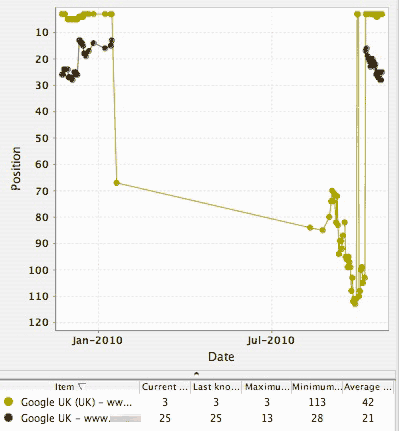
It did seem to have an impact.
It’s possible linking to your home page with keyword-rich anchor text links (and that link being the ONLY link to the home page on that page) can have some positive impact in your rankings, but it’s also quite possible that attempting this might damage your rankings too!
Trying to play with first link priority is for me, a bit too obvious and manipulative these days, so I don’t really bother much, unless with a brand new site, or if it looks natural, and even then not often, but these kinds of results make me think twice about everything I do in SEO.
I shy away from overtly manipulative on-site SEO practices – and I suggest you do too.
5.9 How can I optimise anchor text across a website?
Optimising your anchor text across an entire site is actually a very difficult and time-consuming process. It takes a lot of effort to even analyse internal anchor text properly.
You can use tools like SEMRush, SiteBulb Crawler, DeepCrawl, Screaming Frog or SEO Powersuite Website Auditor to check the URL structure and other elements like anchor text on any site sitewide.
The advice would be to keep it simple but diverse.
5.9.1 Does Google count keywords in anchor text in internal Links?
Many years ago I tested to see if Google counts keywords in the URL to influence rankings for specific keywords and how I investigated this.
In this article, I am looking at the value of an internal link and its impact on rankings in Google.
My observations from these tests (and my experience) include:
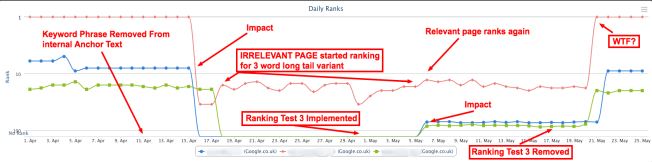
- witnessing the impact of removing contextual signals from the anchor text of a single internal link pointing to a target page (April 15 impact in the image below)
- watching as an irrelevant page on the same site takes the place in the rankings of the relevant target page when the signal is removed (19 April Impact)
- watching as the target page was again made to rank by re-introducing the contextual signal, this time to a single on-page element e.g. one instance of the keyword phrase in exact match form (May 5 Impact)
- potential evidence of a SERP Rollback @ May 19/20th
- potentially successfully measuring the impact of one ranking signal over another (a keyword phrase in one element via another) which would seem to slightly differ from recent advice on MOZ, for instance.
Will Google count keywords in internal anchor text links?
QUOTE: “we do use internal links to better understand the context of content of your sites” John Mueller, Google 2015
Essentially my tests revolve around ranking pages for keywords where the actual keyphrase is not present in exact match instances anywhere on the website, in internal links to the page, or on the target page itself.
The relevance signal (mentions of the exact match keyword) IS present in what I call the Redirect Zone – that is – there are backlinks and even exact match domains pointing at the target page but they pass through redirects to get to the final destination URL.
In the image below where it says “Ranking Test Implemented” I introduced one exact match internal anchor text link to the target page from another high-quality page on the site – thereby re-introducing the ‘signal’ for this exact match term on the target site (pointing at the target page).
Where it says ‘Test Removed’ in the image below, I removed the solitary internal anchor text link to the page, thereby, as I think about it, shortcutting the relevance signal again and leaving the only signal present in the ‘redirect zone’.
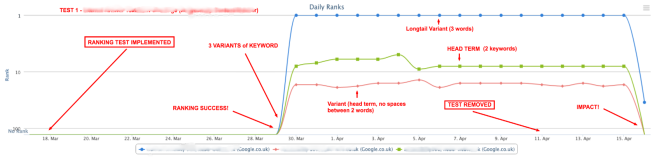
It is evident from the screenshot above that something happened to my rankings for that keyword phrase and long tail variants exactly at the same time as my tests were implemented to influence them.
Over recent years, it has been difficult for me, at least, to pin down, with any real confidence anchor text influence from internal pages on an aged domain. Too much is going on at the same time, and most are out of an observer’s control.
I’ve also always presumed Google would look at too much of this sort of onsite SEO activity as attempted manipulation if deployed improperly or quickly, so I have kind of just avoided this kind of manipulation and focused on improving individual page quality ratings.
TEST RESULTS
- It seems to me that, YES, Google does look at keyword-rich internal anchor text to provide context and relevance signal, on some level, for some queries, at least.
- Where the internal anchor text pointing to a page is the only mention of the target keyword phrase on the site (as my test indicates) it only takes ONE internal anchor text (to another internal page) to provide the signal required to have a NOTICEABLE influence in specific keyword phrase rankings (and so ‘relevance’).
——————————————————-
Test Results: Removing Test Focus Keyword Phrase from Internal Links and putting the keyword phrase IN AN ALT TEXT ELEMENT on the page
To recap in my testing: I am seeing if I can get a page to rank by introducing and removing individual ranking signals.
Up to now, if the signal is not present, the page does not rank at all for the target keyword phrase.
I showed how having a keyword in the URL impacts rankings, and how having the exact keyword phrase in ONE internal anchor text to the target page provides said signal.
Ranking WEIRDNESS 1: Observing an ‘irrelevant’ page on the same site rank when the ranking signal is ‘shortcutted’.
The graph above illustrates that when I removed the signal (removed the keyword from internal anchor text) there WAS a visible impact on rankings for the specific keyword phrase – rankings disintegrated again.
BUT – THIS TIME – an irrelevant page on the site started ranking for a long tail variant of the target keyword phrase during the period when there was no signal present at all in the site (apart from the underlying redirect zone).
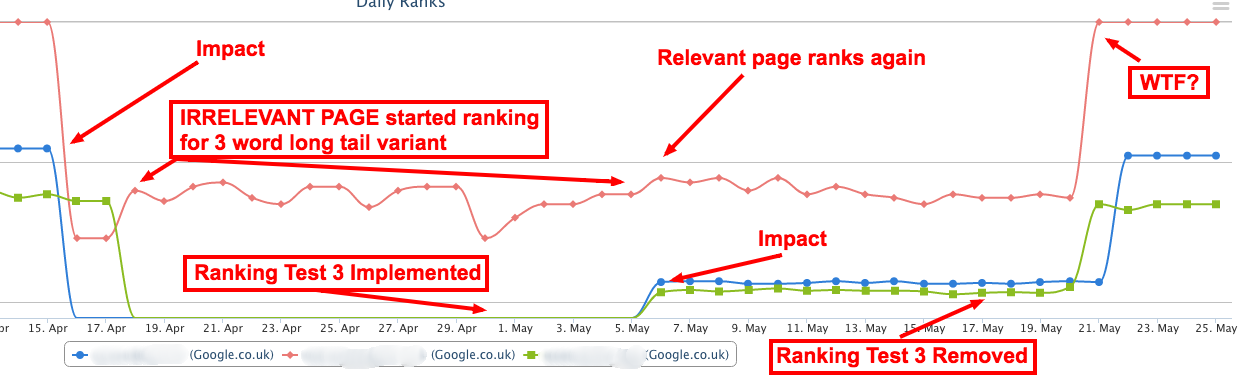
This was true UNTIL I implemented a further ranking test (by optimising ANOTHER ELEMENT actually on the page this time, that introduced the test focus keyword phrase (or HEAD TERM I have it as, in the first image on this page) again to the page – the first time that the keyword phrase was present on the actual page (in an element) for a long time).
In the most recent tests I did, I could not even detect the impact of internal links in the same way. Not in the same format on the page, at least.
I think it’s useful to keep these test results up for others to see, but I keep internal linking very simple these days.
Do not keyword stuff internal links.
Part 6: The Ultimate Internal Linking Audit Checklist
This consolidated checklist synthesises the strategic principles and tactical execution steps detailed throughout this report.
I. Architecture & Strategy
- [ ] Homepage Links to Priority Pages: Verify that the homepage contains direct links to the most critical pages to leverage its foundational authority.
- [ ] Logical Site Hierarchy: Review the main navigation and URL structure to ensure they follow a clear, logical hierarchy.
- [ ] Audit Crawl Depth (3-Click Rule): Identify important pages that are more than three clicks from the homepage and create more direct link paths to them.
- [ ] Topic Cluster Implementation: Confirm that pillar pages link to all their respective cluster pages, and that each cluster page links back to the pillar.
- [ ] Consistent Navigation: Ensure the primary navigation menu is simple, clear, and consistent across all pages of the website.
II. On-Page & Technical Execution
- [ ] Crawlable Link Format: Ensure all navigational links are in standard
<a href="...">HTML tags and resolve to an actual web address. - [ ] Descriptive & Relevant Anchor Text: Audit anchor text to eliminate generic phrases and ensure strong topical alignment to avoid a potential
anchorMismatchDemotion. - [ ] Balance Internal Anchor Profile: Review the internal anchor text profile (e.g., ratio of exact-match vs. branded) to ensure it balances the external backlink profile.
- [ ] Link Placement for Clicks: Prioritise placing internal links on high-traffic, high-engagement pages to ensure their value is activated.
- [ ] Correct
relAttribute Usage: Audit for and correct the misuse ofrel="nofollow"on internal links that should be passing authority.
III. Content & Context
- [ ] Link to Cornerstone Content: Ensure that relevant supporting pages contain contextual links pointing to the site’s main pillar and money pages.
- [ ] Contextual Relevance: Review in-content links to verify that they are placed within relevant surrounding text that adds context to the link.
- [ ] New Content Integration: Implement a process to ensure that every new piece of content is linked to from at least one older, relevant page on the site.
IV. Health & Maintenance
- [ ] Fix Broken Internal Links: Run a regular site crawl to identify and fix all internal links that lead to 404 errors.
- [ ] Minimise Internal Redirects: Identify internal links pointing to redirected URLs and update them to point directly to the final destination URL.
- [ ] Find and Remediate Orphan Pages: Regularly compare a site crawl against a full URL list to find and integrate orphan pages.
FAQ
What are internal links? Internal links are links on your website that point to other pages on your website, rather than external sites.
Why is optimising internal links important? Optimising internal links can help with the following:
- Improved website navigation and user experience.
- Increased crawling and indexability by search engines.
- Enhanced relevance and authority of internal pages.
- Improved distribution of link equity and PageRank.
- Boosted search engine rankings and organic traffic.
How can I optimise internal links? Here are some tips for optimising internal links:
- Use descriptive anchor text that accurately reflects the content on the linked page.
- Link to relevant and authoritative internal pages to establish topical relevance and authority.
- Place links on pages that receive traffic and user clicks to ensure their value is recognised.
- Ensure that all internal links are working properly and don’t lead to broken pages.
- Use a clear and organised site structure with a logical hierarchy to help users and search engines navigate your site.
Conclusion
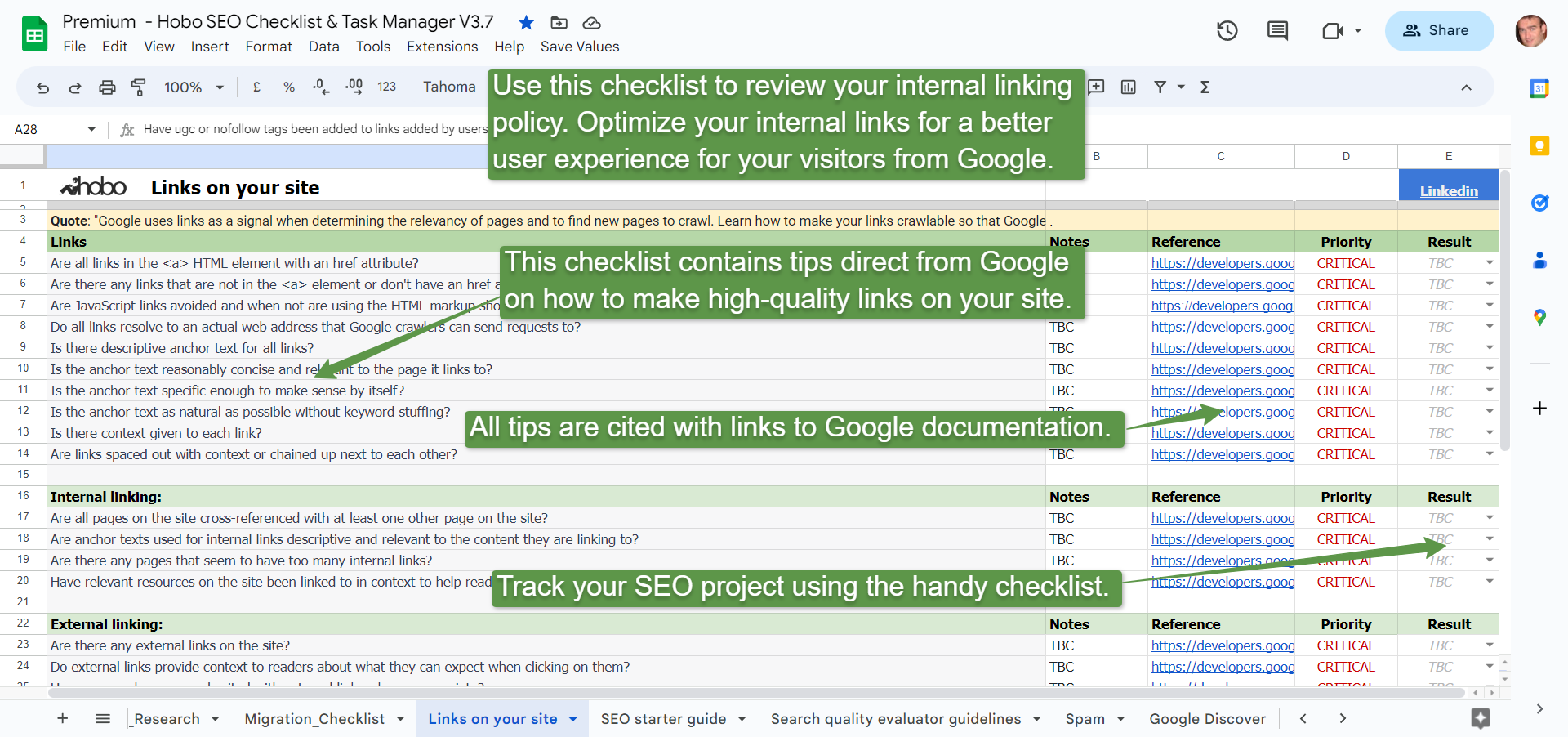
The SEO checklist is also available as a spreadsheet free on Google Sheets, or alternatively, you can subscribe to Hobo SEO Tips and get your checklist as a Microsoft Excel spreadsheet.
The strategic management of internal links has transcended its origins as a simple, technical SEO task. It is now a fundamental discipline that sits at the intersection of user experience, content strategy, and technical optimisation. Recent insights into search engine architecture confirm that a link’s value is not static but is dynamically activated by user engagement. An effective internal linking strategy is architected with purpose, executed with precision, synergistic with content creation, and maintained with diligence.
By embracing this holistic framework, SEO managers can unlock the full potential of their websites, creating a virtuous cycle where a superior user experience generates the powerful ranking signals that drive sustained organic growth. Internal linking is no longer just one item on a checklist; it is the blueprint for a website’s success.
Comments are closed.