
If you are a beginner to SEO (search engine optimisation) and link building, this article is for you. Perhaps you learned that backlinks pointing to your website largely determine where your website ranks in Google Search for highly competitive, valuable key terms with commercial intent.
This article discusses modern link-building tactics and strategies. It is focused on the beginner who wants to understand the benefits and risks of link-building. This article focuses on legitimate link-building tactics and strategies, not black-hat link-building tactics.
The author has over 20 years of experience in SEO and link building and is a veteran of many Google link spam updates over the years.
Watch the video for more:
How to build links to your website
You should outsource link-building services to a third-party link-building company with extreme caution and only when an actual link-building strategy has been properly planned.
Don’t buy links or spam other websites to get links.
You may get penalised and then have to pay to clean them up.
You can use the following professional link-building strategy to build links to your site.
Here’s how to build links to your site:
- Research a relevant topic for your website.
- Write a high-quality, original article on the topic.
- Create useful content as linkable assets.
- Cite and link to sources.
- Publish the article on your website and newsletter.
- Focus on internal links and site structure.
- Join social networks to build connections and authorship.
- Syndicate your post on Twitter, Facebook, and LinkedIn.
- Participate in relevant forum conversations.
- Obtain links from reputable sites for domain reputation.
- Get links from niche authority websites.
- Review competitors’ tactics for earning links.
- Occasionally go off-topic for diverse links.
- Obtain links from related industry sites.
- Seek links from high PR, trusted resources like universities or government pages.
- Reach out to specific high-value bloggers for coverage.
- Create content that bloggers may link to.
- Produce content addressing forum users’ needs.
- Obtain links from unrelated but non-abusive sites.
- Aim for links on blog posts and useful links pages.
- Utilize social media for sentiment analysis and exposure.
- Update and republish the article yearly.
- Get listed in niche-specific directories.
- Submit your site to high-quality directories.
- Write unique descriptions for each directory submission.
- Use your brand name or URL for directory listings.
- Obtain links from relevant ‘useful links’ pages.
- Be cautious with reciprocal links.
- Avoid unnatural link-building techniques.
- Don’t annoy webmasters or spam friends with link requests.
- Link out without nofollow links to help others.
- Engage in guest blogging on reputable websites in your niche.
- Establish partnerships or collaborations with related websites.
- Attend industry events and conferences to network with others in your niche.
- Offer valuable resources or tools on your website that others would want to link to.
- Monitor brand mentions and request links when your brand is mentioned without a link.
- Create and promote infographics or other visually appealing content.
- Participate in expert roundups or industry interviews.
- Build relationships with influencers in your niche.
- Sponsor local events, charities, or organizations to gain links.
- Create press releases for newsworthy events or achievements.
- Offer testimonials for products or services you genuinely support, which may lead to a link back.
- Comment on relevant blogs or forums, providing valuable insights or information.
- Create a resource page on your website for others to link to.
- Leverage broken link building by identifying broken links on other websites and suggesting your content as a replacement.
That is a comprehensive list of activities you should be involved in when it comes to getting links that will have a positive impact on your rankings.
If you want to understand the full risks of building links, read disavowing unnatural links.
Read on for my collected notes over 20 years in link building in the age of links.
QUOTE: “Let us look at the big traders or the warren buffets of this world. …. Shaun Anderson…. are top search results when you type anything related to “SEO”, try it! The tips & tricks of these masters influence many websites.” StartupHungry, Testimonials
What is link building?
QUOTE: “We do use links as part of our algorithms” John Mueller, Google, 2015
Professional link building is the process of earning links on other websites. Earned natural links directly improve the reputation of a website and where it ranks in Google. Self-made links are unnatural. Google penalises unnatural links.
Building links can be a very risky strategy and one that you should avoid until you have (at least) first dealt with the inevitable quality issues on your website. If your business or website content is not attracting organic links or social shares you may have a big problem on your hands, and unnatural links will not help you in the long run.
QUOTE: “Links are definitely not the most important SEO factor.” John Mueller, Google 2020
You can have all the links you want, but without relevance and quality, you might not rank at all.
It is important to know that Google “discards” and “discounts” lots of links to your site, especially the low-quality links it identifies.
Links still matter in most situations but Google is looking to demote sites that have no EEAT or E-E-A-T (Experience, Expertise, Authoritativeness, Trustworthiness) and a big part of EEAT is getting mentions and links on authoritative sites.
Google still rewards high-quality links, actively aims to ignore lower-quality links, and will still penalise real-time spamming activity using manual actions.
QUOTE: “I asked Gary (Illyes from Google) about E-A-T. He said it’s largely based on links and mentions on authoritative sites. i.e. if the Washington post mentions you, that’s good. He recommended reading the sections in the QRG on E-A-T as it outlines things well.” Marie Haynes, Pubcon 2018
Before you ‘build links’ to a site then it is recommended to check the site for quality issues first and improve website content. It’s easier, cheaper, and an investment in a proactive activity that Google isn’t actively devaluing as aggressively.
For more on EEAT see the EEAT SEO checklist for your website.
How to do link building
QUOTE: “In general I try to avoid that so that you really sure that your content kind of stands on its own. We do use links as part of our algorithms but we used lots and lots of other factors as well so only focusing on links is probably going to cause more problems for your website than it actually helps” John Mueller, Google 2015
There are many ways to build links.
Some techniques are legitimate, ‘white hat’ and ‘natural’, and many – perhaps most – are classified as ‘black hat’. Such techniques violate Google’s Webmaster Guidelines and are labeled ‘webspam’.
This guide is for beginners – it’s not a guide on how to spam Google.
Off-page SEO can be a tricky business and, for some, is a tactic to avoid altogether. Some would claim that is because Google has, very successfully, equated it with web spam, and the industry news machine is started almost entirely – all the time – and fueled by Google PR saying something or enforcing its quality guidelines.
Building links is still an incredibly important aspect of SEO.
It is just not the only thing to focus on.
High-quality links usually do not live in isolation from a high-quality product, service, or website.
Hopefully, this article helps you make a sensible choice when considering building links to your site.
What to avoid when link building
There are some practices you should avoid when link building:
- Dofollow blog comments – Penalty material.
- Paid sitewide links and blogrolls – generally low-quality in terms of anchor text transference, used to be good for PR transference but not nearly as useful as it used to be – Penalty material.
- Article submission and syndication services – Penalty material.
- Low-quality directory links – Penalty material.
- Forum signatures and forum profile pages – generally low-quality, dependent on-page and forum, perhaps dependent on the number of links too – Penalty material.
- Building links with widgets unless nofollow is used – Penalty material if abused.
- Unnatural sitewide links – Penalty material.
- Private blog networks (PBNs), directory networks, and just about any other type of link network – Penalty material if discovered.
- Any unnatural links – potential penalty material, eventually.
- Paid links of any sort (if you are rumbled) – Penalty material.
- Overdoing keyword stuffing rich anchor text links with important keywords in links to your site.
- Links pages with no review policy or that link to many other unrelated sites, as they normally link to low-quality sites.
- Obvious ‘link to me and I will link to you’ schemes.
- Keyword stuffing rich anchor text links with important keywords in any directory link to your site.
- Directories with no review policy, as they normally link to low-quality sites.
- Directory submission programs as often link your site into a low-quality link network.
- A large percentage of your links come from directories.
- Specifically, directories that spout SEO-friendly offerings.
- Paying for blog links or any blog article marketing scheme.
- Posting to forums that are unrelated to the content on your website.
- Posting on forums that are purely self-serving and self-promotional.
- Sitewide links from forums using spammy anchor low-quality.
- Low-quality forums with lots of self-promotional spam.
- Self-promotional forum spam.
Should you copy your competitor’s link-building strategy?
You do not need the same links as your competitors, nor do you need the same content.
But if you lack the inspiration to create something unique, you might want to, at least copy what your competitors do well.
As part of competitor analysis in an SEO audit, for example, review the top competitors’ backlinks to see if they have managed to earn any extremely high-quality links and determine how they did it and if it can be replicated.
You won’t be able to get every link your competitor has but you may be able to spot links you should have or could get.
Look for evidence of high-quality content marketing on competitor sites and identify the top linkable assets in the niche and who links to them.
With this information is possible to copy, learn from or emulate successful competitor strategies.
You can also use a tool like Majestic to look at the links of any site and a tool like SEMRush to identify the top-ranking pages on a site, for instance.
You are only looking for examples of high-quality marketing.
You don’t want to engage in any low-quality SEO techniques just to take on one or two competitors. You have no way of knowing if those links are disavowed or devalued.
You may wonder how they get away with it and you don’t (lol) but competitors might rank despite unnatural links or because of them:
QUOTE: “How do they get away with it? I think another tricky part there is like you don’t really know if they get away with it. In the sense that for the webspam team as well we try to recognize those kind of links and just ignore them. And the webspam team when they run across like a bigger pattern of links like that they they also apply manual action there and they essentially neutralize those links. So you wouldn’t see that any of the link tools. And a site might continue to rank fairly well despite all of these links essentially being ignored. So what ends up happening is they spend a lot of time doing all of this stuff to kind of build these unnatural links and in the end they don’t really have an effect. And they could have spent that time actually doing something useful for the long term for their website.” John Mueller, 2017
and
QUOTE: “Our algorithms (and the manual webspam team) often take very specific action on links like these; just because the sites are still indexed doesn’t mean that they’re profiting from those links” John Mueller, 2017
It’s not worth it – you’re probably better off just outing your competitor on Google’s forums (or competing with them with another domain).
What you do want to do is find out what pages on your competitor’s sites are driving links to the site.
You are looking to identify the very best links your competitor has earned, and let historic competitor marketing activity inform yours today.
Competitor analysis is just one aspect of successful SEO.
Content marketing
QUOTE: “There are lots of ways to work on getting links that are fine, and useful for both the site and the rest of the web. To say all link building is bad would be wrong.” John Mueller, Google 2020
Content marketing, it is arguable, is the most legitimate and best tactic you as a business can employ to build links to your site.
What you will find, if you do it right, and you are passionate about your subject matter and clear about the purpose of your blog, is that simply creating useful and unique content on your website will generate natural backlinks to your site IF the content resonates with the target audience.
Content marketing coupled with outreach (the act of actively promoting your content to those who might link to it) is a very powerful tactic indeed
When you make useful content people will link to it, and over time, that practice will inform Google of your level of E-E-A-T.
What are ‘natural’ & ‘unnatural’ links?
QUOTE: “You should never know in advance a link is coming, or where it’s coming from. If you do, that’s the wrong path”. Duane Forrester, Bing, 2014
A natural link is a freely given editorial link and an unnatural link is a link you make yourself. Both affect rankings in Google.
Google is on record saying it does not want to count any link that is not editorial.
Google wants to reward high-quality ‘user value add’ content that has earned organic or natural links. They want to reward a ‘good user experience’ and unnatural links don’t form any part of that concept.
Google has never wanted to count manufactured links – but its algorithms don’t work as well as they would like or at least, they say they do. So, some marketers shortcut the ‘value add’ task of the job and just build unnatural links to a site. This affects how a link-based search engine – like Google – rates the ‘popularity’ – and so ranking ability – of a particular website.
The more links Google hasn’t classed as spam – the higher you rank – and the more traffic you get. Sort of.
The type of links Google wants to count does not scale easily, and in fact, the type of links that scale easily is exactly the type of links Google wants to (at best) ignore or retroactively punish the violation. Perhaps that is the whole point.
Critics will say this is because SEO is the biggest ‘threat’ to Adwords, Google’s sponsored advertising channel – but if Google didn’t take action on industrial scale manipulation – it would make the existence of their guidelines redundant.
If a link is manipulative – it is spam – according to Google.
You don’t need machine automation to be classed as a spammer. Somebody sitting at a desk making these low-quality links all day – manually – to fool only Google – that’s spam too – manual or not.
Posting lots of low-quality guest posts or low-quality press releases on sites with a history of spamming Google – that’s spam too. It all comes down to the end product – the type of link you generate as a result of your activity.
If links are designed ‘JUST’ to manipulate Google – Google calls them unnatural links – and if you have too many of them – you get a ‘penalty’ – or at least swept up in the carnage of the next negative algorithm update designed specifically to de-rank sites with those kinds of links. Ranking adjustments could be based on how long you got away with fooling Google – and what Google thinks that deserves.
The industry was largely based on that kind of unnatural activity. Many still do practice those techniques now, clearly, ignoring the guidelines. Many first links ever ‘built’ would today be labeled ‘unnatural’ today – and so would many first optimisation techniques – but it’s a recognisable trend in Google what’s grey hat SEO today is black hat SEO tomorrow.
Take note that if it works to manipulate Google without you jumping through the value-add hoop in the middle of that strategy, which Google demands you jump through – it’s spam. In short, it is evident if it is a scalable approach to manipulating Google – it’s spam.
The professional services industry, which is led heavily by the Google PR machine, has little chance of deviating from Google’s Webmaster Guidelines, for fear of, some say, Google’s heavy-handed approach.
Consider this one patent from Google on the matter:
QUOTE: “A sudden growth in the number of apparently independent peers (e.g., unrelated web sites), incoming and/or outgoing, with large number of links to individual pages may indicate a potentially synthetic web graph, e.g., which in turn may signal an attempt to spam the search engine. This indication may be strengthened if the growth corresponds to anchor text that is unusually coherent or discordant. This information can be used to demote the impact of such links– e.g., in a link-based ranking system such as the one proposed by Brin et al. either as a binary decision item (e.g., demote score by fixed amount) or a multiplicative factor.” The Original Historical Data Patent Filing and its Children – Bill Slawski, SEO By The Sea, 2011
Building links is easier when you have content worth linking to
QUOTE: “The best way to get other sites to create high-quality, relevant links to yours is to create unique, relevant content that can naturally gain popularity in the Internet community. Creating good content pays off: Links are usually editorial votes given by choice, and the more useful content you have, the greater the chances someone else will find that content valuable to their readers and link to it.” Google Webmaster Guidelines, 2018
Getting other sites to link to yours is easy when you have content worth linking to. It is that simple in some cases.
Your content should be original, but it doesn’t need to set the world on fire. The more content you add to your site, the more likely people will link to it, today or in the future.
How-To articles, or articles that discuss a common problem often discussed in forums, etc. – some call it evergreen, timeless, in-depth, or flagship content – are best suited to link-bait (and visitors!).
High-quality In-depth content is always going to get linked to or shared on social, at some point if it’s presented slightly differently, and interesting.
Once you get enough links, and you feature in the top 3 results, you’ll find you start to pick up more and more natural links.
Where to start?
See that little FAQ on your site? That page needs to be improved. Each FAQ could be an individual page with a good page title, which meets its purpose, in a well-structured site.
Alternatively – you could turn a smaller FAQ into a long-form in-depth content piece focused on the topic at hand.
You are reading one of these expanded FAQs now.
You need to ask yourself what do people want to know about your products, or your industry – not just your business. And you need to add that content to your website.
Having content on your site makes it so much easier to pick up links. If you have no content, while you can still rank in Google via links alone, you’re limiting yourself in a way you might not recover from. Try not to add content to your website that’s not just about your boring company. Most folks are not interested.
Remember – Google wants to reward UNIQUENESS. It’s a pretty simple extrapolation to mean that translates into unique IN-DEPTH – or LONG FORM, INFORMATIVE PAGE COPY and guess what – that type of content picks up links when it DOES rank in Google.
How link building has evolved
The practice of link building has always been designed to manipulate Google Pagerank and/or actual rankings based on anchor text manipulation and Pagerank:
QUOTE: “DYK that after 18 years we’re still using* PageRank (and 100s of other signals) in ranking?” Gary Illyes from Google – Search Engine Roundtable, 2017
You can only presume Google still uses Pagerank (or something like it) in its ordering of web pages.
QUOTE: “A method assigns importance ranks to nodes in a linked database, such as any database of documents containing citations, the world wide web or any other hypermedia database. The rank assigned to a document is calculated from the ranks of documents citing it. In addition, the rank of a document is calculated from a constant representing the probability that a browser through the database will randomly jump to the document. The method is particularly useful in enhancing the performance of search engine results for hypermedia databases, such as the world wide web, whose documents have a large variation in quality.” The Original PageRank Patent Application – Bill Slawski, 2020
and
QUOTE: “A high pagerank (a signal usually calculated for regular web pages) is an indicator of high quality and, thus, can be applied to blog documents as a positive indication of the quality of the blog documents” Positive and Negative Quality Ranking Factors from Google’s Blog Search (Patent Application) – Bill Slawski, SEO By The Sea, 2012
Links have always affected your position in Google SERPS, but in 2012 it changed forever (for real businesses).
Just before April 2012, after years of Google doing little to combat this type of off-page SEO at scale, even an inexperienced link builder could make just about anything rank in Google, for any keyword phrase, without much consequence.
Simply by creating a 300-word article and building (for instance) 500 unnatural links to it from (even very low-quality blogs) with unique anchor text, spread out over a few months, you could achieve top rankings. Link builders could do this largely free from fear that Google would do much about it – because everybody seemed to be ‘doing it’ (in competitive niches).
It was relatively VERY easy, compared to today.
Industrial scale services were dictating the very SERPs owned by Google, just by taking advantage of the way Google works in counting links as votes and ‘ranking factors’.
So, just as many were about to turn the dial on article spinning to blogs up to 11 and go on holiday, Google nuked this and a lot of other low-quality links with the Google Penguin update, and an old mantra shouted even louder – earn rankings based on merit and uniqueness, or be punished.
It can still be effective, but this activity comes with an increased risk of Google penalty, even when you are an experienced black hat. This practice is still offered, today, as services and packages to unsuspecting business owners – when it is not a suitable route for real companies to take with a single website.
Maybe it shouldn’t be THAT important going forward, to have only one website, but that’s beyond the scope of this article.
Google has a few surprises for Webmasters bending the rules using what they call spammy links.
QUOTE: “The manual actions team… can look at the labels on the on the links or a site gets. Basically, we have tons of link labels; for example, it’s a footer link, basically, that has a lot lower value than an in-content link. Then another label would be a Penguin real-time label. If they see that most of the links are Penguin real-time labelled, then they might actually take a deeper look and see what the content owner is trying to do.”
“So, if you think about it, there are tons of different kinds of links on the internet. There are footer links, for example. There are Penguinized links, and all of these kinds of links have certain labels internally attached to them, basically for our own information. And if the manual actions team is reviewing a site for whatever reason, and they see that most of links are labeled as Penguin real-time affected, then they might decide to take a much deeper look on the site and see what’s up with those links and what could be the reason those links exist — and then maybe apply a manual action on the site because of the links.”
“So disavow is again, basically, just a label internally. It’s applied on the links and anchors. And then you can see that, as well. Basically, you could have like a link from, I don’t know, WhiteHouse.gov, and it has labels Penguin RT, footer and disavow. And then they would see that — they would know that someone or the webmaster or content owner is actively tackling those links.” Gary Illyes, Search Engine Land, 2016
As well as investing more manpower to hand out MANUAL ACTIONS (penalties), Google introduced a myriad of algorithm changes including the Google Panda Update; in Hobo’s opinion, to deal with those low-quality pages, and GOOGLE PENGUIN; again, in Hobo’s opinion, to deal with those low-quality links.
Google says Google PANDA and PENGUIN are algorithm modifications (as opposed to penalties) – but critics will say that is splitting hairs.
FYI this article very much simplified these two algorithm changes in Google, but trip a PANDA/CORE QUALITY or PENGUIN flag, and traffic levels can take a nosedive overnight – and they might never come back.
A kick in the balls is a kick in the balls – you’ll think you’re penalised, and it will feel like one, looking at your traffic from Google.
This blog is not a black hat SEO blog. It won’t go into link wheels, link hubs, blog networks, three-way links, tiered service, illegal hacks, PBNs or redirects (other than mention them) because Hobo don’t do any of that anymore (not that Hobo did much of that).
For our team (at least) the focus since Google Penguin in April 2012 (and especially since the introduction of the disavow links device) has focused entirely on building something useful on the site that will attract links so they don’t need to build unnatural links and be fearfully looking over my shoulder at every major algorithm change.
Note that in 2016, Google modified Google Penguin to ignore links, rather than penalise you for them, with the ever-present threat of a manual action if flagged as spam by the algorithm.
QUOTE: ‘Penguin doesn’t… penalize anymore’ Gary Illyes, Google 2016
and
QUOTE: “I think with this release of penguin we did achieve something really nice because it doesn’t (like traditionally web some algorithms used to demote sides, even entire entire sites.
That’s not the case anymore with penguin this penguin managed to or can in fact discard links that are bad that’s the one of the nicest changes in this penguin it can be way more granular than the previous releases.
As I said previous releases usually demoted whole sites while this one can even go to a page level and discount the link but they won’t be penalized that’s the that’s the measure thing.
Penguin doesn’t work or doesn’t penalize anymore.
It doesn’t demote it will just discard the incoming spam toward the side and it will just ignore the spam and that’s it.
No penalty no demotion and it works in real time …basically if there are many or if there are bad links and other kinds of signals coming towards the side then it will just discard them and that’s what they need to know they can still see those links in search console and they can decide whether they want to disavow or remove.” Gary Illyes, Google 2016
Negative SEO
QUOTE: “With negative SEO, most people mean that a competitor is creating bad links for your website…we work really hard to prevent these things from causing any problems. We work hard on our algorithms to try to recognize these kind of problems and catch them ahead of time. In practice I rarely see any issues around that and when I do see an issue where I think that maybe this is created by a competitor then usually the team is willing to look into the details and see what happened there and make sure that this isn’t an issue that is artificially causing problems for a website.” John Mueller, 2013
The perceived risk of negative SEO has reduced with the change to the Google Penguin algorithm in 2016, but it is still a real phenomenon some webmasters fret about despite Google claiming:
QUOTE: ““we haven’t seen a single case a single one where those toxic link campaigns work” Gary Illyes, Google 2016
There is documented evidence negative SEO can get you reviewed by the webspam team. That may or not be a problem for you.
The notes in this article are for money sites – real business sites – sites you DO NOT want to burn in Google – sites you want to build something useful to people (that makes money). If you know your only option is to break the rules and have a short-term focus, hire a PR, link buyer or specialist who can help you with your business model, too, because you’ll need it.
Hobo work with companies who are thinking of the long-term health of their business and who understands that the key to ranking in Google in the future is by making the website better, richer in content and the best user experience it can be.
It’s much easier to get links to something that’s useful, and when you earn rankings, it’s a more stable existence in Google these days. Too many people submit spam reports and too many people engage in negative SEO for Hobo to invest any budget in unnatural links these days:
QUOTE: “Thanks for the report, Attila! I believe the team already saw this from the other forum, but thank you for taking the time to put it all together. The tricky part about issues like these is that our algorithms (and the manual webspam team) often take very specific action on links like these; just because the sites are still indexed doesn’t mean that they’re profiting from those links. In general I’d recommend using the normal webspam report forms for issues like these, it’s also fine to send bigger compilations to us directly. I realize it can be frustrating to see these kinds of sites seemingly profit from such spammy tactics, so thanks for your calm post with all the details.” John Mueller, 2017
There has been at least TEN Negative SEO attacks counted against this site in the last five years (as expected).
Today’s negative SEO efforts now look almost indistinguishable from genuine efforts a few years ago – but that’s the point – negative SEO efforts want to make it look like YOU built the links yourself – when they submit your site to Google next month to get you penalised for a year.
That kind of negative SEO CAN work to get you on the webspam team radar.
Seriously.
It was a smart move by Google to turn the game on its head – and get SEO fighting themselves to kill low-quality services.
Fortunately, the truth is, if you work on your site and put a bit – OK a massive amount – of effort into creating a unique offering, you can still win top rankings and better traffic, month on month, while your competition is chased down by Google’s algorithms.
If you are totally new to building links to your website – it is recommend you focus on some sort of content marketing and create the best page on the web for what you want to rank for – and then think ‘where is my next great link prospect’.
Or – find a good link prospect with a history of linking out, and create content for them to attract links.
Google agreed with Bing that a good link is a link you don’t know where it’s coming from. Our team don’t agree with that in every case because they have spent careers looking for links on really good, relevant sites then creating content that might get that link. For Hobo – an editorial link is just that – editorial. If you put content in front of someone and THEY CHOOSE to link to it freely – that’s editorial enough, and a good way to track down some links – even today. Authors have long aimed to be cited by the media, and specific media journals.
You can also identify the types of great content being linked to in your niche – and emulate that, to chase down similar links. If you want to rank in Google with any confidence in the long-term, you are going to have to INVEST in GOOD, IN-DEPTH content, and earn a few GREAT links. If you don’t want to do that – you better hire a great black hat spammer and get some backup domains at the ready.
The number of low-quality links pointing at your site will affect your rankings adversely as Google devalues them, and not many paid links age well. Eventually – those unnatural links will catch up with you. Get links from REAL sites that don’t sell links and you’ll soon see results and keep them.
You can ALWAYS pick up the odd decent link to good content.
Hobo has spent the last few years cleaning up the blog, for this is ‘new seo’.
This page is an example. Some old posts were deleted on the Hobo blog, reworked some stale content and merged similar content.
Some videos from Google were added, who now advise on the subject-matter where they once did not, and this in-depth page was created that is of some use for beginners wishing to market a website successfully in Google.
Hobo essentially focuses on creating content these days – and recommend you do the same (to start with, at least). This post may stand as an epitaph to days gone by and Hobo don’t expect to be publishing again on this topic.
Hobo didn’t want any links advice on the blog that could hurt someone’s business.
Most of the posts from this point forward will deal with offering a UNIQUE offering via traditional efforts focused on IMPROVING TRUST and RELEVANCE SIGNALS, meeting USER EXPECTATIONS and QUERY SATISFACTION – the essence of search engine optimisation.
At any rate – this type of optimisation is what Hobo have forced themselves to reacquaint with since Penguin 2012.
Because – even after a penalty – you can still increase free traffic from Google month-to-month without old-school techniques (or adding much new content as my case below illustrates when the team was working on it):
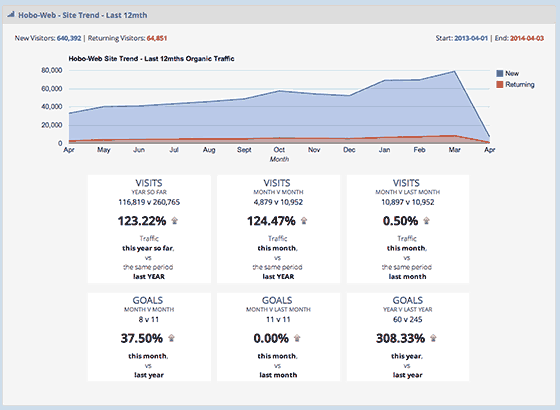
Over the last few years, Hobo wanted to see if plain old SEO still worked – that is – SEO without unnatural links – and they effectively had to do it without publishing new content (in the very first instance).
Some bloggers did notice, however.
QUOTE: “But before that, let us look at the big traders or the warren buffets of this world. Neil Patel, Shaun Anderson, Jacob King are top search results when you type anything related to “SEO”, try it!. The tips & tricks of these masters influence many websites.” Staruphungey, 2014
Including one or two of industry peers:
QUOTE: “Interestingly, you can easily see which sites you are in competition with in the SERPs by looking for similar ranking keywords. Take for example Hobo-Web.co.uk – which I would say is a really good ranking site for SEO terms in the UK:” Rishi Lakhani, Refugeeks, 2014
and
QUOTE: “Everything I learned about SEO was from books, videos and by following the work of a select few really good SEO professionals such as Shaun Anderson, Martin Macdonald and Rishi Lakhani.” Gordon Campbell, 2014
The good news for me is YES – the kind of SEO that Hobo is passionate about still works – but the bad news for some people is – it’s a LOT OF WORK.
NOTE – Hobo published the free SEO guide if you are totally new to all this, and want to learn more.
Is link building dead?
QUOTE: “A webmaster is out of his mind to still rely on techniques that were common practice 8 months ago. Purchasing links was always risky but resembled a game of roulette, you could get caught but many people also got away with it. Today it’s not a question IF you get caught, it’s merely a question of WHEN you’ll get caught.” Andre Weyher, Ex-Google 2012 (disavowed statement by Google)
NO, but unnatural links can’t be the day job for any professional SEO, who has the responsibility for a real business’s website traffic.
Some will always say it is but the fact is building links (any kinds of links) STILL affects your rankings in Google, in a BIG way, either positively – if from a trusted source – OR – negatively – if flagged as suspicious, over time.
Getting and keeping a variety of different ‘INDEPENDENT’ high-quality links to your website is still THE most important factor in getting unpaid traffic from Google in competitive niches not riddled with spam.
For the most part, Google will ignore a lot of your links and will reward any site with what practitioners call, rightly or wrongly, domain authority, over time, based on the ‘quality’ of the links you have managed to have pointed at your site.
It’s been the case historically that more domain authority you have, the less unique offering you need when it comes to ‘content’ – although recent Google Quality Updates seem to focus heavily on CONTENT QUALITY, too!
High-quality seo copywriting has never been so important.
Avoid low-quality links
When you build a wall, you do it bit by bit, with the same kind of identical bricks until you have a lot of bricks that all look the same… presto, you have a wall. That’s building. You can’t build links that way and EXPECT to win the ranking wars in Google as Google is actively fighting to devalue your efforts.
A lot of cheap tactics are crap (no other word to describe it). Depending on how good the search engine optimisation company is of course – there are different varying colours of crap but generally speaking, you stand in it when you open your email, and it says:
QUOTE: “We noticed you don’t rank for any of your keywords….”
They’ll come from spammy blog and forum comments that might hurt your brand or web hosting companies with an obvious unnatural paid link profile.
Even if the company are good at their job – a competitor will just report you for buying links if you do it too much. It will stick out like a sore thumb you’re buying links, and that’s against Google TOS. Beware buying any ‘affordable’ service promising you guaranteed top rankings, even if they do have apparently great reviews on forums or blogs.
There’s no automated program that builds high-quality links.
Free software will probably have lots of free software you don’t know you’re installing on your PC.
Sign up for Hobo’s Free SEO training course to find out more.
TACTIC: “Backlink Reclamation”
You can also often find potential broken links using Google Analytics or a tool like Majestic, by looking into any old pages on the site that have been deleted or moved. This process is called backlink reclamation.
Backlink reclamation is one of the most legitimate forms of useful link manipulation for sites that have gone through multiple site designs and restructuring over the years.
Essentially what you do is you look at your website backlink profile and make sure that all and any backlinks pointing to the site are pointing to pages that return a 200 OK server header.
Any 301 redirects should be checked to ensure they point to EQUIVALENT content.
QUOTE: “301 Redirects are an incredibly important and often overlooked area of search engine optimisation. Properly implemented 301 Redirects are THE cornerstone SEO consideration in any website migration project. You can use 301 redirects to redirect pages, sub-folders or even entire websites and preserve Google rankings that the old page, sub-folder or website(s) enjoyed.” Shaun Anderson, Hobo 2020
TACTIC: Earn media links
Hobo love picking up media links. The best way to get them is to be an authority on a subject, and that usually means WRITING posts that illustrate some expertise on the matter. A PR agency is a great way of getting you these types of links – they have the contacts. Legitimate PR is one of the most valuable assets in your link earning strategy.
Hobo also like trying to get (or give) testimonials for links although don’t overdo it – and only do it for products you like.
Media links are often as good as links get, in terms of quality. Media links are usually best gathered as the result of an intentional marketing/PR push to get such links, and as such, can often be hard to acquire.
The best media links are organic media links generated from some sort of PR or content production. Low-quality PR and ARTICLE sites that actually manipulate Google’s SERPS are to be avoided.
The more popular the media site, the better the link will be if it is organic.
Media links inform your website E-A-T.
TACTIC: Broken links
This is all about hunting for and spotting an opportunity.
A long time ago (site-wide links are not really in fashion now – although they are still valuable if they are editorial):
QUOTE: “Generally speaking, site-wide links can be fine. That’s not something where we would say that if a link is across a whole website then it’s automatically considered bad. So, I wouldn’t automatically treat those site-wide links as being problematic. Sometimes what happens is that we will run across site wide links where it’s like, “Oh, these are our partners.” And, you look at those partner websites and they also have this partner block on the side that point to the same sites and it’s more like a link exchange. But, those are essentially just normal unnatural links. It’s not that because they are site-wide they would be considered bad. It’s more that there is just this link exchange happening.” John Mueller, Google 2013
Hobo used a very simple method to get 500 site-links from a PR 5 site with over 3000 links to it. Yes, a real site.
They’ve used the same method to contact ten other sites with the same request about the same matter.
This method has been used a bit over the last couple of years.
Looking at the SERPs they were interested in, they spotted an expired, suspended domain that was ranking for a term that was cherished. The site was suspended and had been like that for the last six months.
There was no content on the site, so it was immediately obvious it was the strength of the incoming backlinks alone that was keeping this high.
An option, of course, was to look to buy the expired domain (but it belongs to a competitor – expressing a value in it would probably mean losing out!).
The team ran the expired suspended domain through a backlink checker, identified the most powerful links, contacted the site owners in question and explained to them:
- They were linking to a dead site (and had been that way for six months)
- Hobo had the same (perhaps better and more up-to-date) content on a site that they could link to if they wished.
Not only was a friendly email expressing thanks for pointing out they had broken links on their site received (broken links are never a good thing), Hobo now have 500 new links on a real site pointing to the site.
Backlink creation is all about opportunity – spotting it and actioning it to get real backlinks from real sites. If you can see a win-win (something as simple as links in return for pointing out another site has broken links on it) jump on it. If you can’t see win-wins – you’re not a link builder – hire somebody.
By the way, the result is Hobo now rank and that suspended domain has sunk – oops :)
TIP – Find a site you want a link from, spider it, find broken links – see if you have content that matches it.
Email them (and send them the list of all the broken links).
It’s not as easy to find such dropped domain sites in Google today, but you still can crawl sites easily to look for broken links.
TACTIC: Links on ‘links to useful sites’ pages
Do you want a link to your site on a ‘Links To Useful Sites’ page? Sometimes, yes!
The problem is that a lot of these type of pages are created just to manipulate ranking in Google search engine result pages and if there are lots (100+) of links on there, any benefit to your site could be microscopic (and potentially damaging to your rankings if the site in question is of a very low-quality).
Do not buy any of these types of links, and AVOID like the plague any of these types of pages where you can spot obvious anchor text abuse, often to unrelated sites.
When you have a choice of where a link is going, don’t just take a link from “useful links” pages, unless the ‘useful links’ page is on a reputable site, with a lot of backlinks to it itself. The more relevant the page is to your business, the better.
There are some indications the ‘useful links’ pages are, after all, helpful’ link:
- Check if the links page is indexed by Google at all using the site: operator
- Consider how authoritative the site is. Is it an important site within your industry or known as a reputable source throughout the world? (If it is, get a link if you can!)
- Check how many backlinks point to the links page from within the actual site (our team’s favourite tool is probably Majestic.
- Check how the site itself performs in third party tools like SEMRush. A site that ranks for many keywords and gets a lot of organic traffic itself from Google is probably a good site to get a link from. You can also use Semrush to rank link prospects.
Links pages can be a useful target for any link hunter if the page is on a very authoritative site, but a lot of link pages go the way of the Dodo within time. Stick to higher quality sites and well managed ‘links-to-useful’ pages.
‘Useful links’ pages are an age-old tactic and much abused in the past.
Some of these types of pages do have incredible value. It is also perfectly natural to have some of these types of links in your link profile if you have a reputable site.
These type of link opportunities are worth investigating.
AVOID:
- AVOID overdoing keyword stuffing rich anchor text links with important keywords in links to your site
- AVOID links pages with no review policy or that link to many other unrelated sites, as they normally link to low-quality sites.
- AVOID (where possible) obvious ‘link to me and I will link to you’ schemes
DO:
- GET links from sites with ‘useful links’ pages related to the topic of your website and that link out to competing sites of yours.
- You can get links from ANY useful links page that is kept high quality and offers some real value, but most of these higher quality opportunities WILL be more related to your niche, anyway.
TIP:
Use Google and ‘operators’ to find resource pages that link to the type of content you are promoting – just type into Google some variation or combination of the following search operator and keyword phrase:
- “Keyword Phrase” + inurl:”useful-links”
- “Keyword Phrase” + inurl:”external-links”
- “Keyword Phrase” + “helpful resources”
- “Keyword Phrase” + “useful resources”
- “Keyword Phrase” + “useful links”
- “Keyword Phrase” + inurl:resources
- “Keyword Phrase” + intitle:resources
- “Keyword Phrase” + inurl:links
- “Keyword Phrase” + intitle:links
You can also search for specific type of sites and pages on them:
- site:.edu“Keyword Phrase” + “resources”
- site:.edu“Keyword Phrase” + “links”
- site:.ac.uk “Keyword Phrase” + “resources”
- site:.ac.uk “Keyword Phrase” + “links”
SUMMARY
‘Useful Links’ pages are a decent opportunity and there ARE some pages like this that offer great value to your site.
TACTIC: “LinkBait” with information-rich content
QUOTE: “If you’re making it easy for other people to link to your site, then that’s absolutely fine. On the other hand if you’re trying to trick people into linking to your site or doing some kind of link scheme like, ‘You link to me and I’ll link to you,’ then that’s something that we treat as an unnatural link.” John Mueller, Google, 2013
Adding information-rich content to your site is a great method of attracting natural links from forums and blogs, and the more in-depth the article, the more chance of it ranking high in Google for(especially) long tail variations of high traffic high-value keywords.
When you are at the top of the SERPs for particular keywords, particularly how to tutorials, you start picking up organic links from forums and blogs who see these articles as trusted articles because, well, they are at the top of Google!
When helping each other out, forum contributors often use Google to find an authority article and link to it to help newbies. Often they will usually just copy and paste the URL like so: https://www.hobo-web.co.uk/***** Not ideal.
Sometimes it’s worth it go one step further and provide them with the BBcode and HTML versions of a nice anchor text rich link to start getting those keyword rich links to your site. Every now and again, change the anchor text to mix your backlink profile a little. Sometimes you do pick up that natural looking keyword rich link.
Link to this page using BBcode
Check Out[URL=www.hobo-web.co.uk/blog-forum-baiting-get-anchor-text-rich-links/]
 Blog & Forum Baiting - Get Anchor Text Rich Links From Forums & Blogs[/URL]
on the Hobo website.
Link to this page using HTML
Take a look at <a href="
https://www.hobo-web.co.uk/link-building-strategy-for-beginners-a-month-of-free-tips/">
Blog & Forum Baiting - Get Anchor Text Rich Links</a> on Hobo.
Hobo have used this with varying degrees of success in the past. Might work for some of your very best articles, especially if desperate to get particular anchor text in your profile.
But it is not recommended to overdo this, though. In fact, do not overdo anything these days.
It’s kind of the same strategy as the now more traditional INFOGRAPHIC (although if you are embedding links in infographics with keyword rich anchor text, experience show for a FACT that is penalty material after advising a client against it, who subsequently got a penalty for it – and it took MONTHS for a third party to get the penalty lifted).
Social media platforms have all but replaced the old forums – but some can STILL drive a lot of traffic, and some can also offer some SEO value. If you do nothing else to help people share your content – ADD SOCIAL MEDIA BUTTONS for the most appropriate social media channels. Those links themselves might not carry much weight, but secondary links from such activity can.
A few years back Lyndon Antcliff was kind enough to share some insights of ‘Linkbait’ – or ‘Baiting Links’ using social media – and that advice is still sensible.
QUOTE: “Social media marketing is more complicated than you think, in certain ways it’s simple, but you have to adapt tactics to suit the situation and that’s wear instinct is important.” Lyndon Antcliff, Cornwall SEO, 2018
Five things you need to think about before you post a piece of linkbait:
- Headline: Hobo would say the headline is the most important as if you don’t have this you have nothing. But a good headline can still get people to look at bad content.
- Formatting: This is actually quite important, by formatting it means the way the thing looks. There are specific looks which certain people associate with something they would like to link to, the aim is to emulate the “look”, which is different to different target groups.
- Images: The web is multimedia, so use it. A great picture can do the work for you, a video even more so. If you can get an image in your linkbait do it, but not everyone has a good eye, check it with friends you know will tell you it’s crap if it is before you press submit.
- Audience: Absolutely crucial, you have to know who the piece is intended for. You have to craft your idea to be able to fit snuggly into the minds of your intended audience.
- Spelling: Some of the Hobo team work very fast, so spelling mistakes can occur, and grammar is sometimes optional lol. But diggers, for example are Nazis for grammar and spelling, so if you do not want anything dugg, it’s best to triple check.
If you are new to social media marketing:
QUOTE: “Social Media is basically communication online. That doesn’t sound too complicated, huh? But for many beginners, it can be. There are many different forms of Social Media… many different ways of communicating online.” Shaun Anderson, Hobo 2020
TACTIC: Guest posting on blogs & sites for links
Avoid.
QUOTE: “Okay, I’m calling it: if you’re using guest blogging as a way to gain links in 2014, you should probably stop. Why? Because over time it’s become a more and more spammy practice, and if you’re doing a lot of guest blogging then you’re hanging out with really bad company. I wouldn’t recommend relying on guest posting, guest blogging sites, or guest blogging SEO as a …. strategy.There are still many good reasons to do some guest blogging (exposure, branding, increased reach, community, etc.). Those reasons existed way before Google and they’ll continue into the future. And there are absolutely some fantastic, high-quality guest bloggers out there. I changed the title of this post to make it more clear that I’m talking about guest blogging for search engine optimization (SEO) purposes.” Matt Cutts, Google 2014
Google does not want you guest posting on blogs for links. If you are guest blogging for links, they should have a nofollow attribute on the links.
QUOTE: “Think about whether or not this is a link that would be on your site if it weren’t for your actions…It can make sense to guest blog on other people’s sites to drive some traffic to your site… but you should use a nofollow.” John Mueller, Google 2013
and
QUOTE: “I would almost go so far as to say well, even those those kind of guest posts where you do contribute significantly to the site maybe it makes sense just to have those links as nofollow.” John Mueller Google 2017
TACTIC: Attracting editorial links from bloggers
These types of links can be very valuable, but you should probably avoid paying for blog links (most links, in fact). Google is on record as having a real issue with ‘low-quality’ blogging for link benefits.
If you have a piece of content worth sharing, it can often be useful to try and get bloggers to cover it.
You can also see from these posts the type of content that picks up links in your niche.
AVOID:
- Paying for blog links or any blog article marketing scheme
DO:
- create useful content on the site bloggers may link to
- reach out to specific bloggers with high-value sites and request coverage of your site
TACTIC: Forum links
Forum owners TYPICALLY add rel=nofollow to outbound links if the forum in question follows Google guidelines on user-generated content. Some forums drive some decent traffic, though, so it could be useful monitoring the feeds of particular forums and actually be answering questions on forums that in turn drive traffic to your site.
This type of activity is a significant effort, over a long time, with NO first-order effect on your Google organic traffic levels and rankings.
HOWEVER – the second-order benefit to forum activity is that is DOES drive real traffic to your site, and can lead to a greater exposure for your site.
MOST REPUTABLE FORUMS require some activity on the forum before you can post links, however, adding another hurdle to get over with this strategy.
AVOID:
- posting to forums that are unrelated to the content on your website
- posting on forums that are purely self-serving and self-promotional
- sitewide links from forums using spammy anchor low-quality
- low-quality forums with lots of self-promotional spam
- don’t ALWAYS just link to your own site, unless you want to be labelled a spammer
DO:
- Create content for the site users in forums are looking for, and have that URL on hand when answering questions
- participate in the conversation on forums where the conversation is relevant
TACTIC: Links from university & college sites
These types of educational links from universities and colleges can be invaluable.
Any (reputable) link on the primary domain and pages of a major university, college or school website is (usually) going to be of a great help to your site in terms of Google traffic.
If you have any reason for any university, for instance, to link to you, then you should take FULL advantage of it.
Some tactics Hobo has used in the past are:
- Job Vacancies for graduates
- Sponsorships for students
- Discounts for alumni, students and staff
- Scholarships for students
- Interviews with alumni
Take care: Any tactic you come across is often abused and as such comes with some risk to your business.
TACTIC: ‘Partner’ links
It is essentially the responsibility of the site in question to nofollow these type of links. It would be very cynical of Google to punish these type of links. Some partners do not know they will receive links from recipients.
HOWEVER. If ALL your links come from these type of sources and are created in a manipulative way that could be seen as a problem.
Links from obvious PARTNERS may be counted as ‘self-made’ or ‘self-promotional’ links designed to manipulate Google and as such should NOT be used for the purposes of manipulating any SPECIFIC SERP (using keyword rich anchor text). Those type of links should come from better sources.
AVOID:
- AVOID overdoing keyword stuffing rich anchor text links with important keywords in links to your site
- AVOID obvious ‘link to me and I will link to you’ schemes
DO:
- GET links from reputable high-quality sites where possible
NOTE:
‘Partner Links’ pages are a low-level opportunity, but there are some pages like this that offer some value in terms of organic traffic and referral traffic. The more reputable or popular the site is the more useful this type of link will be.
TACTIC: ‘EVENT’ links
Event links can be VERY powerful links indeed. If you are at exhibiting at an event or supplying any service to an event, AIM to get a link form the event website.
These websites tend to be trusted websites, and in turn, liked-to by more reputable sites like news and media sites. This type of linking is the type of linking that Google rewards.
AVOID:
- AVOID overdoing keyword stuffing rich anchor text links with important keywords in links to your site. One or two of these type of sites would be ideal, though, if it can be done naturally.
- AVOID obvious ‘link to me and I will link to you’ schemes
- AVOID obvious deals where you offer a service SPECIFICALLY for a link, where that deal is not entirely PRIVATE. Avoid emailing details of this sort of thing to anyone, too.
DO:
- GET links from high-quality reputable sites where possible
- GET the odd important anchor text if you can.
- GET more links than one, to multiple pages on your site if possible.
NOTE:
‘Event Links’ pages are an excellent opportunity for those where it is practical. The more reputable or popular the site is the more useful this type of link will be.
TACTIC: NHS health service links
National Health Service sites are usually very reputable because they are in turn linked-to from other online authority websites. As such an ideal link to get to increase the trust and reputation of your own site – IF your content is related, of course.
AVOID:
- AVOID anything too obvious or spammy
DO:
- GET links from high-quality reputable sites where possible
- GET important anchor text if you can on a trusted site like this
- GET more links than one, to multiple pages on your site if possible.
NOTE:
NHS and Health Service Site links are an excellent opportunity for those where it is practical. The more reputable or popular the site is the more useful this type of link will be.
TACTIC: “Local links”
A quality link is an editorial link on a real site – a site that’s been around for years.
The site in question is well linked to itself, and doesn’t sell links – and is careful who they link to. These sites are kind of hard to get links from – but that’s the point…
Strategy? Well, you live somewhere. You live in a town or a city, in a region, in a wider region. Just type these three regions – one at a time – into Google, and Google will return a list of potential link partners. Hundreds of them. Live in the wilderness? Look at your nearest city.
Deployment? Offer a discount, or give away stuff (Google does this) for a mention on their site IF they don’t have any real reason to link to you.
Other sites will link to your site if you give them a reason to:
- Your local Council – a lot of council sites have local business directories
- Your local College or University – offer a student discount
- Your local Chamber of Commerce – join, or offer a discount to members
- Your local Newspaper – you should always be trying to get a mention in the local press – consider a competition
- Local football club & supporters club – discount = mention on their site
- Local sports clubs – there’s a ton of them in every town usually with crusty old sites – offer them a discount, donate or sponsor them for a mention on their site.
- Local Business Directories – More often than not, somebody has built a local biz directory covering your local area. Get in there, as long as they are not a low-quality directory just made to spam Google.
- Local faith groups or other local community groups – When it comes to business, have no denomination. Discount anybody?
- Local charities – a link you can probably buy! Sponsor a charity site for a mention – Google would be MEAN to penalise this sort of link buying on a small-scale – and anyway, their attention is probably on bigger sites.
- Local businesses – offer a discount to staff
These links aren’t all easy to get and will take time to get (if you’re comparing them to how fast you can buy or get links on sites these days that offer no value to your site in the long term). See what was did there.
So while your competitors are off buying links on crap third world domain hosting companies, submitting to 100,000 useless search engines, submitting to 100 useless directories, spamming dofollow blogs and forums or hiring a social media consultant to get 10,000 non-paying visitors from Stumbleupon or Facebook etc., YOU are picking up nice little, quality long-term links on trusted sites that probably are not being abused, and will fly right under any Google manipulation-radar, and all will help to build your domain authority and trust on Google. And all these kind of links above can be mixed and match to a national campaign if you know how to scale your efforts in a sensible manner.
These are good links for beginners to chase down – but remember – the best links will need some GREAT CONTENT to point to.
When hunting for links – always remember some advice Jim Boykin gave to Shaun (our director):
QUOTE: “Well, if I were to see a link somewhere, and were ask to value it’s SEO’s worth, then I’d look at the page where the link is located on, and compare it where that link links to. From the “ad” page, I’d see what percent of the internal links link to that page, then I’d check the internal link text used to link to that page, then I’d check external links to that page, and link text used from other sites that link to that page, then I’d look at the title tag of the page, then I’d look at the content of that page, I could peek at the age of the url, edu’s, edu’s to page, other links on that page (co-citation), related pages of that page, and a few other things too….there’s tons you can analyze, and all have a certain value. In the end it comes to “you get what you can get”, it’s not always the “perfect link”.” Jim Boyking, Internet Marketing Ninjas, 2020
TACTIC: Directory submissions
Are directory submissions worthwhile for SEO?
If Hobo did submit a site to any directory, it would meet these criteria from Google:
QUOTE: Directory entries are often mentioned as another way to promote young sites in the Google index. There are great, topical directories that add value to the Internet. But there are not many of them in proportion to those of lower quality. If you decide to submit your site to a directory, make sure its on topic, moderated, and well structured. Mass submissions, which are sometimes offered as a quick work-around SEO method, are mostly useless and not likely to serve your purposes.” Google, 2010
Not many links are worth paying to be ‘reviewed’ by, and many of these SEO friendly directories end up turning into low-quality link farms.
Most directories send you VERY little or no referral traffic and on their own in little numbers have little impact in SERPs. Low-quality directory links are clearly not the type of links Google wants to count as a ‘vote’ – which render most SEO-friendly directory submission services redundant.
In short – do not bother with directory submissions at all if you’re focusing on creating good content on your site, and you have an ‘aged’ site. If you have a new site, a site with low-quality links or in a difficult niche to build links, then submission to high-quality directories is an option for you.
It’s worth remembering that just because a strategy may work on some level, it still might get you into trouble further down the line. You’ll probably end up paying another link cleaning company to remove the link next year!
Directory links are an age-old tactic. As such, Google will probably ‘frown’ upon a lot of manipulative links from low-quality directories.
Directory links should NOT be the main focus of any campaign – creating content or buzz that attracts links should be. However, if you are desperate for links, having a % of links from relatively high-quality directories WILL be of some (limited) use.
Links from directories are ‘self-made’ links and as such should NOT be used for the purposes of manipulating any SERP (using keyword rich anchor text). Those type of links should come from better sources.
Some directories probably do have some citation value. It is also perfectly natural to have some directories in your link profile. Links from directories can also help place you in a topical niche online. Remember what Google said about being ‘on-topic’.
You can pay for a review, but the rules state you cannot pay for a link. It is a bit of a catch-22 with directories. You are unlikely to get into severe issues with directory links (in terms of penalties) if you avoid low-quality techniques to manipulate the SERPS (in the short-term).
QUOTE: “Don’t dismiss directories completely. I have heard people talking about directories being altogether bad and advise people to avoid them. This is not the case, good quality, moderated directories, or niche directories are still worth looking in to.” Andre Weyher, Ex-Google 2012 (disavowed statement by Google)
AVOID:
- AVOID keyword stuffing rich anchor text links with important keywords in any directory link to your site
- AVOID directories with no review policy, as they normally link to low-quality sites.
- AVOID directory submission programs as they often link your site into a low-quality link network
- AVOID having a large percentage of your links coming from directories.
- AVOID specifically directories that spout ‘seo-friendly’ offerings
DO:
STICK to using your brand name or URL for your directory listing. If your brand name has a valuable ‘rich’ keyword, it is recommended to usually stick to the URL, and avoid TOO many directory links.
- Use a unique description for every submission to any directory.
- ONLY submit your site to a number of high-quality directories
- Get listed in directories that specialise in the niche the website operates in
NOTE:
Directories are a low-level opportunity. While a few links from a few select directories might be worth a listing, do not rely on directories as large part of your future marketing campaigns. If you have very few links or a poor link profile, a few directories can be useful. Stick to higher quality directories.
If you have a very poor link profile – non-manipulative links from high-quality directories probably won’t hurt.
Learn the basics
When you are not spamming the algorithm, and the Google web spam team is not on holiday, ranking in Google today is about patience, ACCESSIBILITY, RELEVANCE, CONTENT QUALITY, REPUTATION, USER EXPERIENCE and above all – TRUST – however, Google works that last one out.
It is evident Google wants to reward UNIQUENESS – because that scales not.
Hobo prefer focusing on improving those signals above, rather than just manipulating link popularity. A campaign devoid of any quality, or of any use (or ‘value add’) to anyone, is not the type of backlink profile Google wants to reward with any long-term consistency.
Google calls that spam and will punish you for it if it detects an intent to deceive its algorithms. Not that that stops a good spammer of course. If you’re reading this, chances are you are not a good spammer, so it is recommended to keep it clean until you know what you are doing – and maybe even then:
QUOTE: “the manual actions team… can look at the labels on the on the links or a site gets. Basically, we have tons of link labels; for example, it’s a footer link, basically, that has a lot lower value than an in-content link. Then another label would be a Penguin real-time label. If they see that most of the links are Penguin real-time labelled, then they might actually take a deeper look and see what the content owner is trying to do. So, if you think about it, there are tons of different kinds of links on the internet. There are footer links, for example. There are Penguinized links, and all of these kinds of links have certain labels internally attached to them, basically for our own information. And if the manual actions team is reviewing a site for whatever reason, and they see that most of links are labeled as Penguin real-time affected, then they might decide to take a much deeper look on the site and see what’s up with those links and what could be the reason those links exist — and then maybe apply a manual action on the site because of the links.” Gary Illyes, Google 2016
What do search engines advise?
QUOTE: “if you want to please Google with your SEO, then forget about SEO. Google wants you to create a site as if you don’t intend to manipulate their algo, but as if you are doing it because your passionate about the topic of your site. If you really are, your content will be great and your target audience will love you, this will do the best possible SEO you can imagine” Andre Weyher, Ex-Google 2012 (disavowed statement by Google)
Which Search Engine Gives The Best Advice?
Unless you think GooglePlus counts are the number one ranking factor, you’ll realise building high-quality links to your site is STILL the single most important thing you can be doing to improve the rank of an already relevant high-quality page (if you haven’t been doing anything shady in the past, that is. If you have, you need to concentrate on dissociating yourself first from unnatural links).
In competitive verticals – you can easily follow Bing/Yahoo clear guidelines to rank in Google, but forget to try and rank in Bing/Yahoo with this same technique because to do so, you need to use Google Webmaster Guidelines as a rulebook for success, and that will penalise you in Google, which no sensible person wants.
Bing and Yahoo recently encouraged you to outreach for relevant links to improve the rank of your website: Bing said:
QUOTE: “simply ask websites for them” BING, 2020
Yahoo said:
QUOTE: “Correspond with Webmasters of related sites and other providers of relevant content in order to increase the number of links to your site.” Yahoo, 2020
Google has a different view. Google says:
QUOTE: “Any links intended to manipulate ….a site’s ranking in Google search results may be considered part of a link scheme and a violation of Google’s Webmaster Guidelines. Additionally, creating links that weren’t editorially placed or vouched for by the site’s owner on a page, otherwise known as unnatural links, can be considered a violation of our guidelines.” Google, 2020
Two of the 3 major (UK) search engines (recently) encouraged you to ask websites for links to improve the ranking of your site, and the biggest, Google, tells you not to do it at all.
Bing’s SERPs (which power Yahoo searches) look pre-penguin and pre-EMD (Exact Match Domain Update) Google SERPs.
You can easily rank in Bing and tank in Google, these days.
Actionable advice from Yahoo and Bing: Get links from related sites. Ask for links to increase the number of links to your site. (quotes)
Honesty from Google: If we spot a footprint we will f*** you. (paraphrased)
Bing’s position clarified
Here’s a post on the Bing search blog, 2009.
- You contact Webmasters of other, related websites and let them know your site exists.
- If the value that you have worked so hard to instill in your site is evident to them, they will assist their own customers by linking back to your site.
- Relevance is important to end users… We see the content they possess and the content you possess. If there is a clear disconnect, the value of that inbound link is significantly diminished, if not completely disregarded.
- If relevance is important, the most highly regarded, relevant sites are best of all. Sites that possess great content, that have a history in their space, that have earned tons of relevant, inbound links – basically, the sites who are authorities in their field – are considered authoritative sites.
- When probable manipulation is detected, a spam rank factor is applied to a site, depending upon the type and severity of the infraction. If the spam rating is high, a site can be penalized with a lowered rank. If the violations are egregious, a site can be temporarily or even permanently purged from the index.
Interesting and it gives an insight into penalties for manipulation – we know the same sort of thing is happening at Google too.
Bing’s policy:
QUOTE: “Bing’s position …. is straightforward – we are less concerned about the …..techniques used than we are about the intentions behind the effort. That said, techniques used are often quite revealing of intent.” Bing
That ‘spam rank factor’ is interesting. Think Google has a similar approach? – it certainly feels like it.
Tell the world about your site but don’t get caught asking for links
Google used to say:
QUOTE: “Have other relevant sites link to yours.” Google, 2008
Then it’s guidelines changed to:
QUOTE: “Tell the world about your site”. Google, 2020
and:
QUOTE: “create unique, relevant content that can naturally gain popularity in the Internet community. Creating good content pays off: Links are usually editorial votes given by choice, and the more useful content you have, the greater the chances someone else will: “find that content valuable to their readers and link to it.” Google, 2020
It’s clear.
Google does not want you asking specifically for links or building links you make yourself because this is a clear attempt to manipulate rankings. It’s a bit slack advice when the key to ranking and traffic success in Google is getting other relevant authority sites link to your site.
Links are what the web is about though, and it is why Google is the number 1 search engine. Links were about before Google, though. There’s nothing wrong with getting other sites to link to you as long as it doesn’t stick out like a sore thumb you’re looking for Pagerank or improved rankings for particular terms. Private discussions with people you know are another thing, but when Hobo asks for links (which is not very often), they no longer ask for specific keyword anchor text.
If Hobo send out an email, they will point someone in the direction of the page, and point out that linking to it might have some benefit to their audience. On some occasions in the (long gone) past, maybe offered to reciprocate the link IF it is of benefit to the readers of the other page. Never specify any attribute of the link either e.g. whether or not it is search engine friendly, or not. And would not go on record these days sending an email out saying:
QUOTE: “Link to me using the following keyword text on a page with Pagerank of minimum 2….”
… and neither should you.
You never know who will end up reading that, and it makes it clear you don’t have a clue what you are on about and will take links from and link back to anybody.
If you want people to link to you in a particular way, make sure the title of the page you want links to, has the keywords you want to rank for featured, and a lot of folks will use those words to link to you. Hobo sometimes change the title of pages for this exact reason.
This is presuming, of course, the page is useful in some way!
And don’t send out spam email requests. Hobo have had thousands of bottom-feeder link requests, and don’t answer any of them.
It is a waste of time for most of us – and harmful in the long-run.
There are many ways to skin a cat of course.
Hobo don’t build links to crap sites (not even crap links).
How do you tell the world about your site?
Twitter. Stumbleupon. Facebook. TV. Press Ads. Articles. Blogging. LinkedIn.
You pick – but start with building something on your website somebody will find useful.
That is the start point.
Get links from REAL sites (sites that do NOT exist JUST to link to other sites)
Sometimes it’s hard to explain to people what a quality link is but in simple terms Google wants you thinking nothing but a natural link is a good link.
Links do not have to be relevant to your industry to build your domain reputation (far from it).
The linking site you earn a link from doesn’t have to be an authority in its niche, and it doesn’t have to be the same links as your competitors to get the same rankings.
Even if the site is unrelated to your site (and you just bagged a lucky link on a well-managed website) – THAT is a GREAT link.
Any editorial link is a good link, as long as the PAGE it is on, is relevant to the PAGE it is linking to.
What it should NOT be is a website (or websites) that ONLY exist to provide links to other sites to boost rankings.
Sites that are designed just to link out to other websites to help seo are toxic and Google has a bit of an after-hours hobby of going after a lot of link schemes in these days.
Just about every specialist, the team talk to today, LOVES EARNED LINKS – loves white hat – although a lot of experienced link builders just won’t give up on manufactured links while spam prevails in Google’s listings – and there’s a lot of that, still.
Our team think about how to get links from real sites, and the more authoritative the site, the better, of course.
Ideally:
- You don’t just want a link on a useful links page, but as long as the links page is a valuable resource, and not abusing anchor text, then it could still be a good link – perhaps even a great link
- You don’t want your link on a page, on a site, openly selling links as chances are the links will not age well, at least.
- You do want it on a page that’s in Google’s index, on a legitimate website that ranks in Google for what is in the title tag.
Earned contextual links are the holy grail of building links, for me, but if the link is on a good domain, with a suspected high PR and is not abusing anything, just about any link is a great link.
If you want to increase Google Pagerank of your site, you better make sure the pages that link to you have PR, can transfer it and are making your link the focus of the article.
This takes a bit of experience, though…. you’ll naturally accrue Pagerank if you invest in remarkable or compelling content on your site – and that can take just about any form you can think of.
Do the stuff above (and a lot of it) and you’ll have a natural link profile as is possible that will probably stand the test of time. Hobo don’t use that many tools to identify opportunity because ultimately don’t want the same links as the competitors for my clients – you just need Google and your brain, in some cases.
There are many ways to to it (and don’t IGNORE competitor research), but if the role as a link builder just picking through competitors backlinks instead of trying to think a bit more creatively about building a brand online, then that would be soul destroying. Hobo filter competition backlinks and identify quality linking patterns – but often, competitor research is best for inspiration, rather than getting the exact same link as your competitor.
Focus on building better content, a better user experience, and get links from REAL SITES. Remember that….and you will probably always be ok.
Are off-topic links to your website valuable?
QUOTE: “getting a link from a high PR page used to always be valuable, today it’s more the relevance of the site’s theme in regards to yours, relevance is the new PR.” Andre Weyher, Ex-Google 2012 (disavowed statement by Google)
Yes – although not as valuable as they once were. A lot of SEO & Internet marketing blogs will say pump out a lot of relevant content on your blog, build a resource all around a specific subject.
Even Google says to do the same.
What you won’t normally hear is to improve your traffic, improve the number and quality of your links to your website is to go slightly off topic…. write about anything that is timely – especially when it’s even slightly topical.
News-jacking stories **in related** niches (or your own) is still a great way of picking up natural, socially driven links.
Plenty of time the initial plan has gone off topic on a number of times to chase links. Because of that, Hobo has been linked to by authority sites that wouldn’t have any reason to link to a company like this.
Hobo once had a PR 9 link once because it published an article about something ‘off-topic’.
Recently Hobo was editorially linked to, from a .edu on a ‘slightly‘ off topic subject to an article that was wrote two years ago.
Once the site got a home page link on what can only determined as the Brazilian version of TechCrunch and sent nearly 5,000 visitors on a link that was buried four pages in on the article (to an article that was a year old).
The link was to an off-topic post on my site that ranks pretty good because of the domain authority – for want of a better word – and that new link will only increase that domain authority.
When you go off topic into less competitive niches, you can sometimes have a better chance of ranking on the first page of Google – and so – pick up natural links even further down the line.
The Best Way To Earn Natural Links Is TO Be Top Of Google!
Ranking no1 in Google makes all this that much easier!
If you are the number 1 link in a SERP, you wouldn’t believe the number of natural links you get just because you are already No1 – it truly is a self re-enforcing effect and can be a powerful way to attract links over time.
The number 1 position truly is a self-reinforcing position especially if there’s any semblance of a natural linking profile in that particular keyword vertical – i.e., tutorials, research, how-to, etc. So – a strategy is to rank for as much as possible from the start – even if that is LONG-TAIL queries – and so that starts with IN-DEPTH CONTENT on YOUR SITE. If you are building links to 500-word articles – that’s not going to stand the test of time over even the next year or two.
These links from trusted sites help ranking your content – especially your new content. A natural link from a trusted site (or even a more trusted site than yours) can do nothing but help your site. Experience shows that when a trusted site links to your site, the trust Google places in your site because of that link raises your trust levels, and while not helping you rank immediately for your main terms, can help you when you publish new content in the future. Of course, if the off topic trusted site links to you with good keywords, you don’t get much better.
The art is to pull all that together in a way that benefits you the most, without giving Google a reason to place less trust in your site.
Now for sure, it is not recommended to go that far off topic and expect to get links that will count.
But indeed, going off topic every now and again, especially with a helpful article on your blog certainly gets you links, sometimes tons of traffic, some you wouldn’t normally receive in your boring niche.
You know you can monetise anything if you can be bothered and take advantage of any page that’s been linked to heavily, but the point is the natural links you earn from this type of activity might well be the only links you need to beat off a competitor.
Sometimes – it’s surprising the quality of links you get with a bit of off-topic content.
Which links affect a website’s ranking in google SERPs?
QUOTE: “There are a good few elements taken into account here, like how many links are there in total? A very important one; what is the quality of the pages they come in from? Do the pages look “real” or are they just there to host the links? What anchors are used? The commercial vs. non commercial ratio of the anchors. In reality it’s very easy to recognise a blackhat profile” Andre Weyher, Ex-Google 2012 (disavowed statement by Google)
Any link that sends you human traffic could be seen as a good link, but what are quality links, what are good links and what are crap links, when it comes to improving the actual ranking of your pages in Google SERPs?
First, you need to be aware that the quality of a link (that affects a ranking improvement for your site in Google) is dependant on the page the link is found and site it is on.
Is the site trusted, is the page trusted, is the page in Google’s index at all, how many links point to the actual page your link is on, are people going to click this link (that in itself is a good measure of the quality of a real link)? Most importantly, it’s all about the page the link is on.
Just because you get a link on a high PR domain does not automatically make that a useful link.
It’s the page you need to evaluate, and how important that page is on the site.
The relevance of the page is probably even more important.
Testing Google
Google used to tell you through their cache results if a link was being ‘counted’ at least in some fashion.
Back in Nov 2011, Google removed the cached message:
QUOTE: “these terms only appear in links pointing to this page”
While this was regularly an inaccurate statement for the cached pages to declare I always found this information in cached pages useful – when looking at backlink profiles to investigate weird ranking results – or ranking anomalies/false positives – that shed light on how Google worked on some level.
This feature of Google cache was also very useful when testing, for example, first link priority.
It was also helpful to investigate why a page ranked for a keyword, for instance, when the word was not on the actual page.
You could often catch a glimpse of what was working under-the-hood looking at this – which led to a few surprises, more often than not.
Now Google cache only tells us:
QUOTE: “These search terms are highlighted:”
Pity.
Another small window on determining how Google might ‘work,’ at a granular level, disappeared to lead to more obfuscation.
Which links are worth addressing?
You should have a light mixture of focused anchor text links, unfocused anchor text links and URL citations (www.hobo-web.co.uk, etc.) in your link profile to ensure long standing rankings (e.g., a natural link profile).
Links to avoid include any link that is self-made and obviously self-made, on a site with only self-made links.
It doesn’t matter if THEY WORK to manipulate Google in the short term – if you use a lot of low-quality techniques, and there is an obvious INTENT to rank using low-quality means, these links might very well cause you ranking troubles a few months later.
In the team’s experience, you can still get away with quite a lot, but actual penalty material as detailed above is all to do with your INTENT as GOOGLE interprets it to be.
Google Penguin devalues a LOT of links in realtime but if you are flagged to the webspam team to deal with you have a greater risk of receiving a manual action.
Nofollowed links (like those on most blog comments – are not counted as links (though can be used to generate traffic if you link to a popular blog post or comment on one). NOTE many claim Google DO follow nofollow links in certain cases – but Hobo perform SEO not expecting nofollowed links to have much impact on the rankings either way. If they do – good – but don’t rely on them.
Remember that links need to be complemented by well-structured title tags, GOOD IN-DEPTH content, and a good site architecture.
It’s not enough to be ‘popular’ – you also need to be ‘relevant’ and ‘unique’.
Another rule of thumb is, often, the EASIER a link is, that everyone else can get, the LESS quality it is for you in the long run.
Links like lasers
QUOTE: “stay focussed on quality of pages linking in to you, Google judges your link profile by the quality of pages linking to your site, getting 3 links from authentic pages will do much more than 1000 links from splogs, so invest your time into getting quality, not quantity” Andre Weyher, Ex-Google 2012 (disavowed statement by Google)
Google often still relies on links to find, index, categorise and rate websites (and pages).
Content will always be king (especially in the future) but without links, content can still be a moot point.
You can have the best content in the world, but if you don’t have links pointing to it from other sites, it may lose out to optimised content on ‘hotter’ sites, even if that content is of poorer quality.
To properly visualise this ‘lasers’ or “SEO heat” analogy, you’ve got to accept success in search engines for competitive terms comes down very largely to links – the number of links, the number of right links… the number of ‘hot’ links.
 Links are like lasers. A link to another site “heats” that site up a little. Links have the potential to make a site hot and send that site to the top of the results.
Some links get hotter in time, some get colder, and some disappear as each site is affected by those linking to it and from it.
With this constant shift, every site’s heat signature is in constant flux, and there’s little you can do to it except getting more of the right links to keep your site hotter than the competition for particular terms.
Some burn hot and then go cold, and vice versa.
OK – Now Forget about the links. That’s been worked out – Google’s counted the links, and filtered the crap.
In the diagram below, you can see in any collection of pages, there is natural heat and naturally hot and cold sites, because of the natural interlinking going on between pages.
In this model, popular sites are hotter than unpopular sites, and this is a reflection of the real web
Hot sites and those out in the cold
So Google now has Hot sites in its index, and Cold sites.
Everywhere in-between, Google has sites that generate some “heat signature”.
Hot sites are well known and well linked to and more likely to rank for any term if a page is properly optimised on-page and via the internal navigation structure of the website.
Hot sites are relatively trusted to inject content “directly” into Google’s index, especially if it’s “unique”, probably with a good amount of natural words to keywords.

‘Cold’ sites are not well connected (by links) to any neighbourhood or heat signature and virtually invisible in Google, except for very specific terms.
Hot sites are authoritative and trusted.
Cold sites are sites starved of heat, with a linking profile that’s very cold. Hello, Google Supplemental Index! Or whatever Google calls it these days.
A hot site has the potential to rank in Google SERPs regardless of site-theme & domain relevance although from the team’s observations these ‘irrelevant’ pages can disappear in time.
Over the years – Google has done a really good job of balancing domain authority, relevance and a whole host of other ranking factors to spread that free traffic about and stop sites ranking for terms they probably should not rank for (think, Google Panda).
If its on-site architecture is tuned to promote a certain term leading to an optimised page, it will rank – if the page itself meets ranking requirements on page quality, utility and user experience.
Why Google hates paid links
Google hates paid links because it is an obvious way to generate heat signature, and ranking ability, a site might not deserve.
Identifying one or two hot sites, and purchasing links on hot pages within that site, is enough to ignite an “undeserving” site and entire network and send it to the top of the SERPs.
Google likes it natural, because, that way, we do Google’s work for it and identify hot sites by linking to them. One thing is for sure, though.
If Google were confident they could via algorithmic calculation clearly identify paid links, the whole internet marketing industry would not have been talking about the war on paid links.

In this example we see a hot site linking to a cold site – instantly generating a heat source on this new site.
This is not natural in Google’s eyes. It’s not democratic in ‘that’ sense.
 An example of a ‘hot’ site
Wikipedia is an example of a hot site. Everybody links to it.
It’s probably one of the hottest sites on the planet alongside Google, regarding link equity.
Wiki ranks for just about anything, and could be optimised further to rank for everything – (and not ONLY because it’s a REAL AUTHORITY – it’s an INFORMATION site! Many critics ask if this the real reason Google ranks Wikipedia at the top of a LOT of TRANSACTIONAL SERPs).
Of course, Wiki’s a natural phenomenon now.
It has links from cold sites and hot sites in both related and unrelated markets.
Features of a hot site
- A hot site is one which a lot of sites link to it from other sites, all with a different heat signature.
- Hot sites can rank for anything if a page on the site is optimised in both the architecture of the site and on-page SEO.
- Hot sites are natural phenomenon created by other sites linking to them – the more popular the site, the more hot and cold links it will accumulate. Its possible neighbourhood and relevance are just natural occurrences of sites dividing the heat up within a particular network.
- Hot sites link to other hot sites. Generally speaking, a hot site won’t link to a typically cold site unless that site has content on it that’s nowhere else or is “new”, in turn making that a hot(ter) site. e.g. a high-quality site rarely links to a spam site.
 What you need to do to get more visitors from Google
Let’s assume your page is optimised, you need heat. The hotter a site, or rather a page, the better the link for your site.
If a keyword is in the anchor text of the link, even better, but only if it is an EDITORIAL LINK. Most ‘link builders’ build ‘brand’ links these days (links without important keywords in them).
The problem is the easiest links to find out there are on pages with very cold, or at least very diluted heat signatures.
It’ll take a lot of these to get hot – and now – too many ‘cold’ links could be a sign of unnatural link activity – and they often leave a nasty footprint Google can easily identify!
Should you buy links to improve google rankings?
QUOTE: “If money changed hands in order for a link to be placed on a website then it should not flow PageRank, in essence, it shouldn’t affect search engines rankings …. we’ve taken action on this sort of thing you know for years and years and we’re going to keep taking strong action” Matt Cutts, Google 2013
The SHORT ANSWER is no – ESPECIALLY IF THEY LOOK LIKE PAID LINKS!
Buying links that are search engine friendly and “flow Pagerank” is against Google TOS.
If you buy links, you take the risk that Google will penalise you for unnatural links.
If buying links were ineffective, it wouldn’t be against Google TOS. Think about what that means.
The Hobo team can’t remember the last vertical they checked there weren’t people buying links to improve search engine placement – so the competition is doing it. Last time they checked, they were ranking pretty good, but it’s not all plain sailing.
Google is getting better at dealing with some form of paid links. It depends on what you are trying to achieve – although just to reitterate, Google will take you down if it finds out.
If you are buying links, make sure your links aren’t obviously paid links, though.
That is, don’t buy links from prominent places. If Google gets better at detecting these, it’s the obvious paid links that will be hit first.
Hobo don’t buy links, and would recommend you not do either.
It is too risky, and there are still plenty of ways to get links without paying for them.
Link sellers are rarely discreet
Hobo don’t ‘out’ individuals for SEO tactics, and don’t ‘out’ the myriad of purveyors of link prospects who contact the site every day, non-stop.
Here’s why.
This one takes some beating, from a MIDDLE EASTERN NEWSPAPER:
QUOTE: “…is currently offering outside companies to purchase links from within our articles. To place a bid, simply send a document with the keywords you would like to purchase, and your price bid. Feel free to search the site for yourself, to find the perfect article for you. Since we are just starting this venture, we have no fixed price, thus you can choose the amount of links, period of time, and so on. We are allowing the first 1000 S.E.O. companies to send in their bids, without the limitation of a starting price. We will accept lucrative offers. Mind you, we also sell conventional links, such as: * Link on “sites of xxxxxxxx” (footer of master page) priced @ $500 per month (6 months minimum). * Text link on the home page priced @ $1,300 per month. * Text link on the inner pages priced @ $1,000 per month. Once a bid is accepted, you will be contacted by a sales representative, to process the campaign’s details. Have a good day.” ((A MIDDLE EASTERN NATIONAL NEWSPAPER)).
Looking at the available links, and sure enough, a list of totally unrelated sites.
Visibly Paid links.
Now, say there is a competitors in there?
You could just report the site for selling links and my competitors for buying them.
Or you could expose them on a public blog.
Lucky Hobo don’t ‘out’ SEO tactics and this is because outing SEO tactics is self-serving and slimy.
If Hobo did buy links in footers like this (which they don’t), they wouldn’t be happy there was an email to 1000 SEO companies telling THEM the clients were buying links.
Would a rival newspaper use this information against you too if they knew, especially given the polarising nature of your content?
If you are buying or selling links that are search engine friendly you better be doing it more covertly than this….. you need to build relationships to get decent links, even like the ones above.
Start, for instance, with a private email address, and open up a conversation before you show folks what you have got? Hobo sent the email back with a link to this post to see what they say….. DOH!
Note – expectedly – these newspaper websites soon got hit by Google – the first public indicator being a lack of toolbar Pagerank…..
Thought’s from the team are it is quite funny the situation between the mainstream media v Google.
Some media sites say it’s all one-sided, and Google is stealing their content, are putting up pay-walls, even when SEO have been saying for years about how Google is falling over themselves giving them tons of trust, tons of traffic AND making their links some of the most valuable on the web.
Google uses big trusted sites like news media sites, and their links, to help them sort out the cesspool of the web (when they Google is not ranking news sites own content above smaller businesses). A quick look at some newspapers websites (the top UK ones) and some of the SEO efforts are shocking – they don’t even seem to know how to make subdomains rank well.
Yes, some newspaper sites HAVE woken up to the fact they have massive domain authority and are rolling out everything from dating sites to low-quality business directories.
If in the same position then the company would do some of that too probably. You can see that Google has made newspaper sites authority sites in niches like online dating.
A quick look at some local newspapers too and you see they don’t link out to anyone, anywhere. Oh wait – there are some paid link articles to personal injury lawyers lol and an advertising network of links that have clearly affected the site’s ‘trust’.
Yeah – you need to know when to get out of those things before it goes t*ts up as they say in Scotland.
Hobo don’t buy links but at the same time don’t you think it’s hypocritical, to say the least, that search engines frown on bloggers selling links and do little to deter newspaper sites obvious link selling tactics.
Some newspaper sites are so stupid they send out crazy link selling emails too, like above, and indeed, some folk do out them. The fact is – only SHOCKINGLY bad – not just bad – SEO will get these sites penalised in a NOTICEABLE WAY – and even then – only if outed, then a discussion about inappropriate domain authority, in particular, niches might focus the spotlight.
Hobo doesn’t ‘out’ other people’s SEO strategies.
Our team think like link builders and it’s more appropriate NOT to ‘out’ others under just about any circumstances.
Are reciprocal links with unrelated websites safe?
Many new clients send me unsolicited emails from companies that ask for “reciprocal links between their site and yours”, usually because it will “improve search engine rankings” for both websites.
Hobo usually ignore all reciprocal link exchange requests via unsolicited emails and recommend you do too.
Time has been spent looking for quality links within these and NONE has been found in ANY email as I describe above.
It’s also against Google TOS to do this type of reciprocal link exchange:
QUOTE: “Your site’s ranking in Google search results is partly based on analysis of those sites that link to you. The quantity, quality, and relevance of links count towards your rating. The sites that link to you can provide context about the subject matter of your site, and can indicate its quality and popularity. However, some Webmasters engage in link exchange schemes and build partner pages exclusively for the sake of cross-linking, disregarding the quality of the links, the sources, and the long-term impact it will have on their sites. This is in violation of Google’s Webmaster guidelines and can negatively impact your site’s ranking in search results. Examples of link schemes can include……” Google, 2020
- “Excessive reciprocal links or excessive link exchanging (“Link to me and I’ll link to you.”)”
Now you can say that’s rich advice coming from an SEO (whose meant to be manipulating search engines if you listen to some of the bollocks some big name web designers link-bait with these days).
Reciprocal link exchanges, like the one mentioned above offer NO MASSIVE SEO benefit to YOUR site (especially when they are on link partner pages) and Google says link schemes will NEGATIVELY impact your rankings.
IF YOU TAKE A SECOND AND VISUALISE in your head the link scheme in place and the relationship between pages via links in the reciprocal links hub scenario, you can see how easy it is to do so.
Google can probably compute and identify that one a lot faster than you can its so obvious. HOBO IGNORE ALL SPAM EMAILS ASKING FOR RECIPROCAL LINKS especially if they are from some company who sells something totally unrelated to the site.
Honestly can’t even remember the 0.1% that were responded to, but assume there was at least once back in the day – They were asked for when I started out over a decade ago, now, but that’s when this type of link was of some use.
Usually, they will put your link on a “useful links” page that’s not useful at all to anyone.
A useful links page out to unrelated sites on a low-quality domain is just spam to Google and more often or not the pages your links are on will just be ignored by Google, so there is no point getting a link from these pages.
Too many of them and you WILL get a notice of unnatural links.
Unrelated Sites
- Should you reciprocate links with irrelevant, unrelated websites? NO – It’s a waste of time and potentially damaging.
- Should you link out to other unrelated sites at any other time? OF COURSE, YOU SHOULD BUT NOT JUST TO MANIPULATE SEARCH RANKINGS. If the page is relevant to an article on your site, then it’s a good link. These types of links are the currency of the web.
- Should you worry if unrelated sites link to you? Generally speaking, NO. Although Negative SEO is a concern for some and should be checked out.
Linking is the foundation of the web. Without links, there would be no web as we know it, no Google even, so never be scared of linking to useful sites or pages. In fact, Google WANTS or, at least, EXPECTS you to do this and will thank you for it at some level…. probably.
Bear in mind reciprocal links with a website may indicate to Google the two sites are ‘related’ in some fashion. Do you really want that?
One-way links
Of course, you should ALWAYS be LOOKING for high-quality links, whether you link back to those sites or not. One-way links are better for ranking in search engines as they indicate editorially approved links from other sites to yours.
That’s the best kind of links you can get.
Hobo is currently working with a client at the moment in a global market that makes something amazing a lot of blue-chip companies pay a lot of money for.
Their website has a very poor link profile.
A strategy is currently asking for them to contact all these big brand companies and ask them for a link on their websites to the client website because this COULD NEVER HURT ANY OF THE SITES INVOLVED and links from these big brand websites who have bought their products – i.e., testimonial links from REAL sites that don’t just link to anybody, are good quality links.
The client will probably reciprocate those links (if they ask us) but only AFTER Google sees the big brand sites linking to them first (that’s a habit) – there are a few methods to ensure this is the case.
The aim is to get the BRAND websites to VOTE for the client site FIRST, so THEIR search engine rankings improve because Google now TRUSTS their site because of these new quality links on sites it already trusts.
The brand websites don’t need the client’s links for search engine purposes – all it is needed is to ensure they are linking out to their brand sites in a more appropriate manner that is probably more useful to them.
All Brand managers would like another good-news-page in the SERPs, so creating a case study for their brand, on your website, is probably better than a link on a links page Google will probably eventually ignore.
Easier to tweet, also.
Reciprocal links
QUOTE: “‘You link to me and I’ll link to you,’ then that’s something that we treat as an unnatural link.” John Mueller, Google 2013
Scenario: If someone links to your site, and you don’t link back to them, that’s said to be a good link. A one-way link. When you link back to that site, that’s what a reciprocal link is.
If a very trusted site links to your site and gave you a ranking boost, do you believe that linking back to them will remove my ranking boost? Hobo don’t believe that to be the case. It doesn’t align with what Google is trying to do (when not trying to make money) – i.e., improve their search results for the end user looking for information (and that the vast majority of Google users).
When a trusted site, or a site with online business authority, links to a site it deems trustworthy and boosts rankings to improve it’s SERPs in line with its algorithms, it’s not going to dump that site back down the rankings just because it reciprocates.
Linking back to a site that links to you is a very common thing on the web.
Consider the small site that links to its industry body, and a year down the line the small site is a big player, with links from the industry body. Is that link useless? Surely Google is a lot smarter than that, at some level.
Surely, Google would, at all times, take into account the trust and authority of the sites in question, and whether or not it has any reason not to trust the sites. The rule of thumb for Hobo is that reciprocating links is fine, especially if the other site is more authoritative or is highly relevant to the audience.
Hobo don’t use low-quality reciprocal linking between untrusted sites as an actual ranking improvement strategy, whether it works or not.
Hobo never link to a site JUST BECAUSE THEY LINK TO THEIR SITE because the chances are, they are linking to ANY site out there regardless or not if it is a bad neighbourhood.
Google reserves the right to penalise you badly if you link to one of these, or are linked from one of them.
So:
- avoid low-quality reciprocal links where possible, and avoid get-links-quick schemes
- try and get other sites to link to you first
- don’t worry about reciprocating links with real trusted sites
- don’t use reciprocal links as a ranking improvement strategy
- don’t just link to just anyone, especially just because they link to you
Of course, you could robots.txt out of nofollow links you give to other sites but, generally speaking, it’s bad karma – better to play nice, where possible.
What is the best way to build links?
QUOTE: “You should never know in advance a link is coming, or where it’s coming from. If you do, that’s the wrong path”. Duane Forrester, Bing, 2014
The best piece of advice Hobo can give you is to FOCUS ON BUILDING A LINKABLE ASSET and VARY your linking strategy while ensuring to avoid low-quality links.
QUOTE: “Try to work on your website as if SEO was not part of your plan, create content out of a sincere interest and enthusiasm for the topic of your page. This is what Google and your users want from you, I know it’s tempting to think about financial gain but remember that Googles primary concern is valuable information!” Andre Weyher, Ex-Google 2012 (disavowed statement by Google)
It’s the only way to be sure you’ll achieve good rankings, and keep them – which was surely always the point. Remember that what works today might not work “tomorrow” – so it’s worth experimenting while, all the time, hunting for those “quality” links.
Bearing in mind “Content Is King” on the web, no matter how great your content is, no matter how search engine optimised your page is, if you don’t have inbound links, you’re usually next to nowhere in the Google SERPs. Especially in competitive markets – probably because a competitor has got in there first and generated some content and links before you.
But what is the perfect link?
What is the best linking strategy?
The answer is – everybody has a different view of a perfect link, and everybody has different ways of measuring exactly what a perfect link is.
Here is Hobo’s take on what to look for when link hunting (all are worth thinking about and in no particular order).
- EARNED only interested in organic e.g. non-paid links.
- Anchor Text Anchor text is simply the text in the link. If you want to rank for something, and have an optimised page waiting to get links to it, then you would like a link with my actual desired keyword or keyword phrase in the actual link i.e., “keyword phrase” instead of “click here” or something. The thinking is, your not trying to rank for “click here” are you? Be VERY careful, though – Google is on the lookout for anchor text abuse. Hobo would encourage it, rather than overtly advertise it. For instance – what you put in your page title often ends up in links…. so changing your page title every now and again can mix this up. Remember, too, that what Google can easily identify in your link profile, it can penalise, filter or demote your for.
- Contextual Link within the text, surrounded by text Google can easily spot a long list of links (like navigation arrays, etc.) so always try and get a link from within the actual text on a page, so it looks more “natural”. Ideally, the surrounding text would also be relevant to the page. Sometimes the only sure way of generating these links is to write good content on your site to “force” people to link to you (unless you own the other site of course). These type of links are arguably, the creme de la creme of links (which is why some SEO’s buy these type of links (Hobo don’t).
- Trust / Authority Trusted sites pass “trust factor”. The thinking is, trusted sites rank well in Google, because they are, well, trusted! (ask questions if this gets too complicated!). Trusted authority sites rarely link to spammy sites – they only link to quality, probably related, sites. If you can manage to get a link from a trusted site in your niche, this could be worth its weight in Gold. How do you tell if a website (or page within a website) is trusted? Well, that’s the question that’s on the lips of every SEO! How can you determine it? Well, if you think simply if it’s all about HTML links, then trust would be calculated by Google by the number and quality of links to that site/web page. Simply, get links from sites with links and pages with links!
- Relevance / Relationship / Theme How relevant is the page that is linking to you? Are you trying to get links from websites related to you? Where possible, try and get a link on a page that is actually about the same subject matter as the web page you want a link to. However, a site with massive domain trust that has NOTHING to do with your site is still a very powerful link in building your sites REPUTATION (E-A-T).
- Hub / Neighbourhood Every niche has an authority hub, an inner network of sites every other site in the niche links to. This is the “neighbourhood” link builders, including myself, harp on about. Getting a link from these sites has got to be a good idea in any campaign, as these sites, that Google already trusts and rates, pass along a portion of this “trust” thingy Google calculates. Linking out to these sites is also thought to be useful, as these links determine the online neighbourhood your site resides within.
- Any old link! Don’t misunderstand, your site should take a link from anyone! Feel Free! But links vary in everything from quality and trust etc. – It is recommended to spend your time trying to get quality links where possible, and at least from relevant pages. It’s this kind of link that will help you in Google. There are a lot of SEO blogs on the subject and within Hobo, we try and take a subjective view on what’s best for the individual purposes and what sounds “intelligent” for the circumstances, while always experimenting with every option. It’s always a good idea to vary your strategies, so you’re not susceptible to massive ranking algorithm changes when one strategy is devalued.
The best piece of advice is if you are intent on coming at it from this angle is to vary your linking strategy. Mix it up. Remember that what works today might not work “tomorrow”.
While you’re mixing it up, you’ll also make it harder for others to reverse engineer your hard work, creating “noise” in the search engines, but be VERY CAREFUL – avoid unnatural links – and you can avoid somebody copying you by coming up with something original or valuable in the first place.
The aim is to build E.A.T., not just links.
Why vary anchor text when building links?
QUOTE: “What anchors are used? The commercial vs. non commercial ratio of the anchors. In reality it’s very easy to recognise a blackhat profile” Andre Weyher, Ex-Google 2012 (disavowed statement by Google)
The theory is simple. Mix up your anchor text to avoid important links being filtered out of your link profile. But – it’s got a lot to do with the ratio of low-quality sites involved – rather than just the anchor text used.
This is the sort of thing you do not need to worry about if you keep things “natural”.
Imagine you could see Googlebot record your links as it finds them by spidering sites in real time.
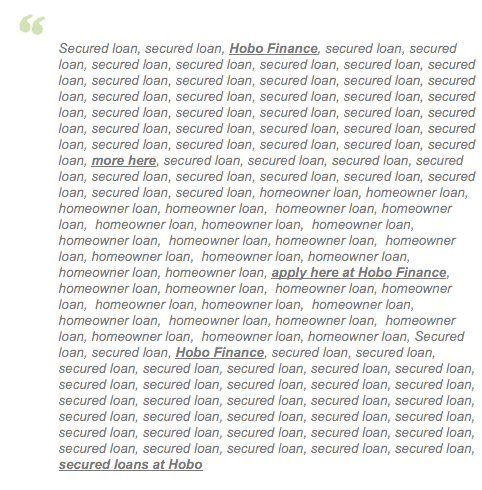
If you consider that’s your link profile, it is probably not that hard for the smartest people in web spam to pick out your natural links (the INDEPENDENT links Google wants to count) and ignore, devalue or penalise you for the rest of them.
Consider this too:
Ranking based on ‘unique words, bigrams, phrases in anchor text‘
QUOTE: “In one embodiment, the link or web graphs and their behavior over time may be monitored and used for scoring, spam detection or other purposes by a search engine. Naturally developed web graphs typically involve independent decisions. Synthetically generated web graphs-usually indicative of an intent to spam a search engine are based on coordinated decisions; as such, the profile of growth in anchor words/bigrams/phrases is likely to be relatively spiky in this instance. One reason for such spikiness may be the addition of a large number of identical anchors from many places; another possibility may be addition of deliberately different anchors from a lot of places. With this in mind, in one embodiment of the invention, this information could be monitored and factored into scoring a document by capping the impact of suspect anchors associated with links thereto on the associated document score (a binary decision). In another embodiment, a continuous scale for the likelihood of synthetic generation is used, and a multiplicative factor to scale the score for the document is derived.” The Original Historical Data Patent Filing and its Children – Bill Slawski, SEO By The Sea, 2011
Ranking based on ‘changes over time in anchor text‘
QUOTE: “In one embodiment of the invention, the time-varying behavior of anchortext (e.g., the text in which a hyperlink is embedded, typically underlined or otherwise highlighted in a document) associated with a document may be used to score the document. For example, in one embodiment, changes over time in anchortext corresponding to inlinks to a document may be used as an indication that there has been update or even change of focus in the document; a relevancy score may take this change(s) into account.” The Original Historical Data Patent Filing and its Children – Bill Slawski, SEO By The Sea, 2011
AVOID: Article marketing syndication
Article syndication (for search engine optimisation purposes) is generally a big no-no. You just don’t know where that article will end up, or on how many low-quality sites.
Hobo have learned to live without it, after a few years of abusing it a little. Hobo believe the place for your articles should be on your blog, on the whole, to attract traffic and links, and to build your reputation as an authority.
Article syndication can be useful for finding the odd trusted site willing to link to your content, albeit on a more trusted domain than your own. In the past one of the articles had a signature link back to the site, and while testing how well it had penetrated the SERPs and in how many instances, there was one trusted domain with the content republished, and THAT had attracted a link from a then PR 9 page on a very old trusted site. Bonus!
The team immediately contacted the PR 9 (page) site owners and asked them to link to the source of the article, on the site, and they did – which was nice. It was also found another couple of sites that were willing to link to that kind of content for future reference. The moral of the story is – track where your content is being published if you publish a lot of it, and watch out article syndication does not backfire on you if you’re using it for SEO purposes.
Be wary of extremely low coast article marketing services, article submissions services & free press releases. In today’s SEO, you do not want your article links duplicated across only low-quality domains – and that is where most of these type of articles end up.
Use sparingly and with GREAT caution. The problem is – you lose control of where you syndicate your articles to, and that can turn problematic very quickly. It is recommended to avoid article submission sites these days. Period.
The first place for your articles is your blog, next, it’s getting those article noticed via social media sites.
AVOID: Low-quality press releases & advertorials
Some traditional companies create press releases and don’t think for a minute how these could be used to successfully promote their website when syndicated online. Every time you send out a press release, you should be ensuring you’re getting a few things right.
For instance, you should know by now you should always include your web address – but you should also include a ‘nofollow’ tag on any links.
A big thing to remember is to watch Google doesn’t think you’re intent is to spam their algorithm with press releases. A responsible press release agency will add rel=nofollow to your links to prevent it from passing Pagerank (and possibly prevent you from getting an unnatural links notice, in the future).
Google wants the secondary links (from buzz about the news in your press releases) to count toward your ranking, not the actual press release links.
Example: If you are sending out a press release to a third party and relying on them to publish it (which Hobo don’t but hey!) then ensure the web address was in it. Ensure the website address was written in the correct manner i.e., https://www.hobo-web.co.uk (with the HTTP:// because on some sites they’ll automatically make this a link.)
Your web address appearing just like www.hobo-web.co.uk (not a clickable link) won’t obviously help in Google rankings when compared to an HTML link.
Be careful publishing too many press releases without rel=nofollow on the links.
Stay WELL AWAY from anchor text rich article marketing, press releases and advertorials. Google made that clear when they added the following to their guidelines about what not to do:
QUOTE: “Links with optimized anchor text in articles or press releases distributed on other sites.” Google, 2013
Google published a pretty comprehensive video on advertorials, too (above).
Are social shares the ‘new links’?
Are tweets or Facebook likes the new links?
No. The team at Hobo don’t think so, just yet….. the consensus is that they don’t think Google is about to throw away it’s multi-billion a quarter link-count scraper to rank tweets above links. Not just now, and not in isolation.
The idea of people picking the best sites, rather than counting links the traditional way, is an ideal situation, of course. Google certainly has lots of manual quality raters.
But there doesn’t seem to be much real evidence of this in competitive verticals so traditional links are still relied on HEAVILY, by Google at the very least – and what you should rely on if given a choice.
While there doesn’t seem to be much of evidence of tweets having a massive impact (compared to traditional HTML links) in Google’s competitive SERPs – it is worth considering what search engines SAY they are working towards with regards to social ‘buzz’:
The following table was compiled by web SEO analytics based on an article (some time ago now) at Search Engine Land:
| Bing | ||
| Are Regular Search Results affected by social media buzz? | Yes. It is used as a signal, especially for news. | Yes, it is a signal. Some weight is passed, and regular results are affected. |
| Are Social/Realtime Search Results affected by buzz? | Heavily affected | Heavily affected, Authority metrics are used to determine the hot posts. |
| Are Twitter links taken into account (aka do they pass link juice)? | In some limited situations, the data are used. | The data are used. The weight depends on how often a link is posted, the number of tweets & retweets and the authority of the people that post it. |
| Are Facebook links taken into account? | The shared links from Fan pages are treated similarly to Twitter links. No links from personal walls are used. | Only the publicly shared links from Fan Pages and Profiles are taken into account. |
| Is there an Authority Rank for Twitter Profiles? | Yes, the author quality is measured. Google calls this Author Authority. | Yes. Several metrics are taken into account. Bing calls this Social Authority. |
| Is there an Authority Rank for Facebook Profiles? | They are treated similarly to Twitter Profiles.Note: Normally if this is true, they measure only public profiles like Fan pages. | No. They take into account only the Facebook data that are publicly available. |
| Does the Twitter Authority have an impact on the weight of the links that are shared? | Yes. The weight depends on the authority of the person. The Author Authority is used in limited situations and it is independent of PageRank. | The Author Authority affects the link weight. |
| Does the Facebook Authority have an impact on the weight of the links that are shared? | Similarly to Twitter. The weight of each link depends on the authority of the profile. | They don’t use Facebook authority. Instead, to find if something is popular, they compare Twitter & Facebook shares. |
It’s clear that search engines are looking at social signals and these WILL only increase in value.
This has been thought for a long time, though. Eric Ward (RIP) calls it right:
QUOTE: “the rankings effect can be directed at specific known circles, friends, connections, etc. The one size fits all search result is headed for the museum. Also, I believe the highest caliber most credible link sources will become that much more important as a trust signal for engines” Eric Ward, 2011
The rewards from building artificial links will narrow – as the rewards from the social activities increase – that’s for sure.
Even at the moment – to compete in Google organic results, a top 2 or 3 is essential – and you need links from websites to do that.
Hobo agree with Eric on this too:
QUOTE: “I’d take the blog post link because it can continually provide traffic, new tweets, shares, etc., whereas a single tweet, even if by an authority, is fleeting and has a shorter half-life. Much more hit or miss.” Eric Ward, 2011
If you get a choice between a 100 Tweets and a one link on a real website, today – take the links from real websites or blog posts every time. The safe answer is, yes, you should be on social sites – and you should be getting your site mentioned on these sites, regardless of exactly where the search engines are on social links at this point – as they will only get better at determining links to trust.
‘Great content’ probably has lots of links from many sources, and lots of tweets, too. The members of the Hobo team are not active on Facebook or Twitter to help the search engine rankings improve – especially with new sites. Part of the strategy man be to use Twitter or Facebook to get new content INDEXED (Bing apparently followed FB fan pages links) but don’t expect aged content to rank that much better because of tweets- NOT at the moment, in Google, at least.
Hobo prefers to use social sites to reach real people, and don’t expect Google to factor in any ranking signal they can’t control themselves. Would they base their algorithms around a 3rd party metric? It would be surprising if that were the case.
Ten things Hobo cares more about than most social media links
- Google’s classification system: How Google classes your site – or rather YOUR INTENT, will have a major impact on your rankings. If your intent is to be an end-point of the traffic stop – to make money from Google’s free traffic – and offer little in return – then Google is not your friend. If you are willing to play the long game Google’s way (which isn’t easy), there are still plenty of opportunities, plenty of organic listings to be filled – even if they are under a number of ads Google’s top heavy algorithm would choke on.
- Domain Reputation: the terminology is always being updated – but this is about how much Google trusts your site. This is the main reason as to why certain pages rank at the top of Google without (many) inbound links and sometimes have lots of social activity noise, and hence why we see crazy articles about social media having a bigger impact on rankings than links. Domain trust – or online business authority, through experience – is based on factors detailed below. But getting, and keeping, domain trust, is all important now for real businesses that want to rank in natural listings using a quality content programme.
- Low-quality links: The low-quality links well is poisoned. Get out, now. Disavow them, remove them. Google killed low-quality techniques in most of the competitive niches that our team has been involved in – probably yours, too. It’s NOT just a matter of ‘does this technique” work anymore. Low-quality links are not a defensible link strategy for most small businesses these days.
- Low-Quality SEO: If Google has a reason to put you in the sin bin, they will. Usually – they will do this by algorithmic means or lately by MANUAL ACTIONS in Google Webmaster Tools. So if flagged for manual review, your site had better not scream “SEO!”. You don’t want to be caught milking Google’s cash cow for yourself, whether that be pushing limits of technical SEO or just plain old keyword stuffing. Not unless your business model allows for this.
- High-quality links. Still, one the most important ranking factors. It just got HARDER, and MORE EXPENSIVE, just as Google wants it to. Low-quality is not defensible anymore and WILL get you into trouble, now that Google is policing its guidelines. The game now is to get high-quality links your competition CANNOT get (by hook, or by crook, you don’t want to be caught doing it). This is not an easy task when Google’s PR is making people even scared of linking out to reputable sites, for fear of appearing manipulative.
- Original, in-depth, passionate content: If you side with the visitor, you will win, Google says. Ultimately – it’s a moot point if you believe them or not. If you want free traffic from Google, you better get used to giving it free, high-quality content that will satisfy their visitors. Google wants to be the best search engine – it does want to satisfy certain users intent to find information. Google wants in-depth articles in organic listings – there is even the new code for ‘in-depth articles’ too.
- The correct keywords – this is genuinely the simplest thing you can do in SEO to get free traffic – proper keyword research. Sometimes – having A word on the page can be the difference between ranking no. 1 and not ranking at all, even with very relevant traffic. This is one way Google uses to share all that lovely free traffic about.
- Availability of your site – if Google can’t find your site for a few days – you will lose rankings that in some cases take some time to regain (smaller sites). If you block content from Google, you don’t rank. It’s a simple error that is still evident and a lot of folk making – even theoretical physicists can foul of this**.
- User Satisfaction – the duration of time people dwell on your site, and the ‘success’ rate of your visitor actions (e.g. did you help Google satisfy their customer? Did they stay on your site for a long time, and not go back to carry out the same search?) And it’s not just visitors from Google – if you want a page to rank – it better satisfy the curiosity of a Google web spam team reviewer, too, or a Human Quality Evaluator.
- The speed of your web pages: Hobo believe this is more important today than first introduced. Google even said that mobile sites rankings WILL suffer if not fast enough(and our team believe they have seen evidence of this). It’s all about – user experience and satisfaction. If you make your website faster, everybody is probably happier.
Even as this article is being written – there are still other factors. In fact, Hobo can say they don’t factor Google Plus votes – or any other social share – in at all (at this time).
Google Plus, for purposes, is a channel to get the word out – to get real links to a post (if Hobo has its SEO hat on). If they are in play – it’s far too lightweight a factor to have noticed above other things that are expected to have an impact.
QUOTE: “While social media links themselves hold little value to Google because they are ‘nofollowed’, the buzz made possible by social media can lead to organic links and other positive ranking signals …” Shaun Anderson, Hobo 2020
Are there more ranking signals?
TONS. The above are some of the main things you can do SOMETHING ABOUT without knowing the most technical aspects of SEO or falling foul of Google’s guidelines.
Google is in constant flux, constant testing, constant UI change. Where you are in the world, and how often you’ve used Google from that location, and whether Google knows it’s YOU that is searching, has a MASSIVE impact on the listings Google personalise for you.
This article is not not saying ignore Google+ – there ARE reported benefits in other areas – just not when it comes to ranking your content about other content using more traditional methods.
Hobo, through experience and evidence, just don’t think Google is turning off links as a source of identifying quality anytime soon, not when they are raking in the cash, and not when they are putting so much effort into punishing low-quality efforts.
How to write the best link request email
First, there’s probably no PERFECT link request email but here are elements Hobo link builders have used to use to get high-quality links:
- Don’t send that many out (none, in fact, in the last 3 or 4 years).
- Keep the email short and to the point
- Use a title like “FAO Organisation Website Name” Website
- Never automate them – each one is crafted personally and (much like the blog) in a laid-back manner.
- IDENTIFY the exact PAGE you want a link on (after identifying it’s a relevant page also look to see if the site and page rank high in Google, or is indexed at all, whether it gets traffic and is itself internally (at least) well linked to.
- It’s never a low-quality links page that is targeted.
- Never ask for links on their homepage.
- Never ask them to link to your homepage.
- Correctly IDENTIFY if they have a habit of linking out to relevant articles.
- Always provide them with the URL you desire them to link to
- ALWAYS have a piece of content that’s of value and WORTH linking to – after all, Hobo wouldn’t link to pap.
- NEVER specify anchor text that should be used.
- NEVER even mention reciprocal links
- Only contact them once (ok, maybe twice over the course of a year, as it turned out)
- Be honest as to who you are when doing it
Most importantly – be honest about why you want a link.
Hobo don’t tell them it will help them, the tactic (usually) is tell them it’s more up to date information than they currently link to and it will help us and might be useful to their readers. And it is. Don’t tell them it will help their rankings, or that you were “browsing the web and came across their site”.
The above tactic is not exactly obviously ‘killer’, but this method works more often than not. Lastly, if Hobo spot something amiss on their site, they will point it out in a friendly manner, and tell them to contact them if they need any assistance in the subject of what they do – SEO. Not exactly rocket science is it.
Summary
You SHOULD STILL be thinking of WHERE your NEXT BEST LINK should be coming from – it’s incredibly important if you have no links. You should avoid unnatural links.
It would be better to focus on building better in-depth content than your competitors have and spend time making friends online who might throw you a bone and share your content, so you have a chance of picking up those EDITORIAL LINKS you need to rank in Google with.
A critical message would be to certainly avoid (like the plague) packages with promises of guaranteed ranking – even with ‘no footprint’ claims – even those you spot on Adwords. Those are VERY rarely going to be expert black hats pimping those services – and often – the end result is your site will ‘burn’. If you don’t want to jump through all these hoops and avoid penalties – get some aged domains together for your business and hire a good black hat – it’s ‘redirect it’, ‘burn and churn’ time – but look out – Google is out to burn you :)
Good luck!
——————————————————-
Hobo hope’s you found these tips useful enough to comment or share.
Hobo Web is a high-quality link-building services company in the UK. Based in Scotland, professional link builders in the UK have over 2 decades of experience in link building. If you are looking for link-building services in the UK, you have come to the right place.
Hobo link-building experts have built tens of thousands of natural links for over a decade.
Hobo link-building specialists based in Scotland, in the UK, provide high-quality natural link-building advice for businesses that need links to their website, as part of our SEO consulting service.
You can contact the Hobo Web UK link-building team to find out more.
Disclaimer
Disclaimer: “Whilst Hobo have made every effort to ensure that the information they have provided is correct, It is not advice. Hobo cannot accept any responsibility or liability for any errors or omissions. The author does not vouch for third party sites or any third party service. Visit third party sites at your own risk. Hobo are not directly partnered with Google or any other third party. This website uses cookies only for analytics and basic website functions. This article does not constitute legal advice. The author does not accept any liability that might arise form accessing the data presented on this site. Links to internal pages promote my own content and services.” Hobo