
For over two decades, keyword research was the bedrock of SEO. It was a simple transaction: find a high-volume term, put it on a page, and build links. That era is definitely over for most.
The release of internal Google documentation from the U.S. v. Google antitrust trial has replaced years of speculation with hard evidence.
We now know that modern search ranking is not about simply matching keywords; it’s about satisfying user intent, demonstrating verifiable expertise, and building a trustworthy online entity.
This new reality replaces outdated and misunderstood concepts, such as the myth of “LSI Keywords for SEO“, with a concrete understanding of Google ranking systems like QBST (Query-Based Salient Terms), which “memorises” the words it expects to see on a relevant page.
This guide will not give you a “fast” shortcut.
Instead, it will provide you with a durable, strategic framework for conducting keyword research that aligns with how Google’s core ranking systems – including Navboost and Topicality – actually operate in 2025.
We will move beyond simplistic metrics like search volume and focus on the strategic intelligence that drives meaningful business results and contributes to a high site-level Authority Score (and an encompassing overall Quality Score known as Q-Star or Q*).
What is Keyword Research in the Age of AI Search?
In its simplest form, keyword research is the process of understanding the language your target audience uses when searching for your products, services, or information.
Your customers will almost certainly use different words and phrases to find what you offer than you would use to describe it.
However, the modern definition is far more strategic:
Keyword research is the process of mapping the entire user search journey to identify opportunities where a demonstrable investment in Content Effort can create the most satisfying user experience, thereby proving your expertise and building topical authority.
This shift is critical. We are no longer just collecting a list of “strings” (keywords).
We are identifying “things” (entities and concepts) and understanding the complex questions and problems users have at each stage of their journey. In competitive niches, you can think of it this way: backlinks and authority are largely responsible for where your page ranks, but the occurrence and prominence of keywords on that page are fundamentally responsible for what it can rank for.
The goal is to create content that provides the most satisfying experience. This is not just a theoretical objective; it is measured.
Success is earning what Google’s internal systems call the “last longest click” – the definitive behavioural signal that a user’s query has been successfully answered.
Why Intent Matters More Than Volume
For years, search volume was the primary metric for prioritising keywords. This led to the creation of vast amounts of “search engine-first” content designed to capture traffic but not necessarily to help users. Google’s Helpful Content Update (HCU) was designed specifically to demote this type of content on a site-wide basis.
Today, user intent is the most important factor to consider. Intent is the “why” behind a search query. Understanding it allows you to create content that truly serves the user’s needs.
There are four primary types of search intent:
- Informational Intent: The user is seeking information or an answer to a specific question.
- Navigational Intent: The user is trying to find a specific website or brand.
- Commercial Intent: The user is researching products or services before making a purchase decision.
- Transactional Intent: The user is ready to make a purchase or take a specific action.
Your content strategy must cater to each of these intents. A page targeting an informational query should be comprehensive and educational, while a page targeting a transactional query should be clear, concise, and facilitate a conversion.
Mapping Intent to E-E-A-T Signals
The true strategic power of intent analysis is realised when it is integrated with Google’s E-E-A-T (Experience, Expertise, Authoritativeness, and Trustworthiness) framework. The user’s intent dictates the specific type of E-E-A-T signal that will be most credible and effective.
- Informational Intent is the prime opportunity to showcase Expertise.
- Commercial Intent is the ideal stage to demonstrate first-hand Experience.
- Transactional and Navigational Intent both rely on and build Trustworthiness and Authoritativeness.
The following table provides a clear, actionable model for this strategic alignment:
| User Search Intent | Primary E-E-A-T Opportunity | Actionable Content Strategy |
| Informational | Expertise | Create comprehensive, factually accurate guides. Feature detailed author bios with credentials. Cite reputable primary sources. |
| Commercial | Experience | Publish hands-on reviews with original photos/videos. Share unique personal insights and real-world usage details. |
| Transactional | Trustworthiness | Ensure HTTPS security. Provide clear contact info, shipping/return policies. Display trust seals and customer testimonials. |
| Navigational | Authoritativeness | Reinforce brand identity. Ensure the target page is the clear, official source. Fulfil the user’s expectation of finding the brand’s canonical home. |
A 4-Step Strategic Research Framework (Tool-Agnostic)
Before you open any tool, you need a strategic framework. This process ensures your efforts are focused and aligned with your business objectives.
Step 1: Define Your Core Topics and Business Goals
Start by brainstorming the primary topics or “pillars” that define your business. Don’t think in keywords yet; think in broad concepts. Strategically, each pillar represents an opportunity to build a “Canonical Source of Ground Truth” – an authoritative digital hub that Google’s systems recognise as the definitive resource for that topic.
Step 2: Identify User Personas and Their Search Journeys
Who are you trying to reach? Create simple user personas and map out their potential search journey across the different intents: Awareness (Informational), Consideration (Commercial), and Decision (Transactional). This transforms a flat list of keywords into a dynamic map of user needs.
Step 3: Brainstorm Seed Keywords and Questions
For each stage of the user journey, brainstorm the seed keywords your persona might use. Use question-based starters (“How to…”) for Awareness, comparison-based terms (“vs,” “review”) for Consideration, and action-oriented terms (“buy,” “price”) for Decision.
Step 4: Expand and Validate with SEO Tools
Now it’s time to use an SEO tool. Historically, SEOs could find rich opportunity data in Google Analytics. However, since Google began encrypting searches in 2011, this data now appears as “keyword (not provided).” This shift made third-party tools like SEMrush or Ahrefs valuable for modern keyword research.
How to Choose the Right Keywords: A Modern Checklist
- [✓] Relevance and Intent Alignment: Does this keyword perfectly match the content you can create and the intent you want to serve? This is the most important question.
- [✓] Strategic Value: Does this keyword contribute to a primary business goal or help establish your site’s topical authority?
- [✓] Structural Value and Internal Linking Potential: Does this keyword logically fit within a topic pillar? Mapping keywords to single, canonical pages is crucial to avoid “keyword cannibalisation,” where multiple pages on your own site compete for the same term and dilute your authority.
- [✓] Competitive Landscape (SERP Analysis): Manually search for the keyword. Can you realistically create a resource that is 10x better than what currently exists?
- [✓] Search Volume as a Tie-Breaker: Use search volume as a relative indicator of demand, not as the primary decision-making factor.
The Critical Link: “Exact Match” vs. “Near Match” Relevancy
Finding the right keywords is only half the battle. A significant part of SEO is placing those specific keywords in specific places to send a clear “Body” signal to Google’s Topicality ($T$)* system. The importance of the exact phrase cannot be overstated.
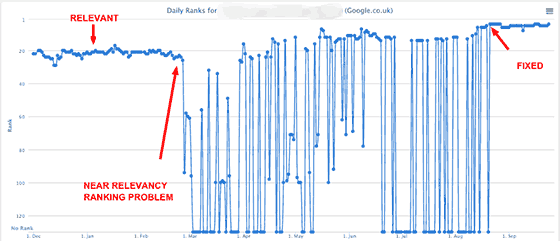
Over years of testing, I’ve observed a phenomenon I call “Near Relevancy vs. Exact Match Relevancy.” You can have a high-quality, authoritative page that is 100% relevant to a four-word phrase, but if that exact phrase in that exact word order isn’t on the page, its ranking can be incredibly unstable.
I have tracked keywords that would rank #2 one day and be completely gone from the top 100 the next.
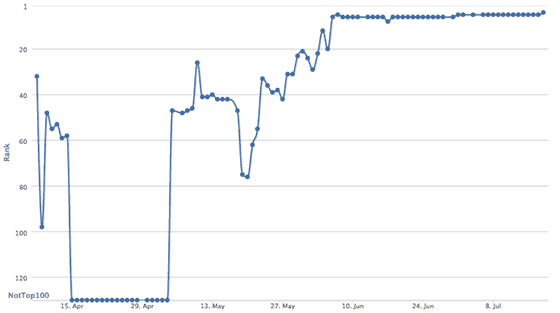
The fix is simple and has proven effective time and again: add the actual keyword phrase to that page, at least once. By adding just one unique word from a valuable search phrase—a word that was previously absent – I’ve seen a page’s ranking for that exact term jump from nowhere to the first page, stabilising its performance across all of Google’s indexes.
Your most important keywords should therefore appear naturally in: The page’s URL, the Title Tag, the main heading (<h1>), at least one subheading (<h2>), and within the first paragraph. This isn’t about “keyword stuffing”; it’s about creating an unambiguous signal of relevance.
The Niche SEO Philosophy: A Strategic Summary
This entire framework can be distilled into a single, powerful philosophy. At its core, modern, effective SEO is about a three-step strategic process:
Niche SEO is essentially finding an opportunity without a lot of competition where you can find keywords that have the potential for you to go deep, and introduce information gain for the user within that keyword space.
This is a virtuous cycle built on three pillars:
- Opportunity Analysis (Find Low Competition): This is the hunt for an underserved SERP. “Low competition” doesn’t just mean fewer backlinks; it means finding a results page filled with outdated, thin, or generic content that lacks true expertise.
- Topical Authority Play (Go Deep): This is the commitment to becoming the definitive resource. Instead of one page for one keyword, you identify a topic cluster and build the most comprehensive hub of content available, covering the subject from every angle.
- Execution with Information Gain (Introduce Value): This is the key to winning. You must provide unique value that doesn’t already exist on the SERP. This is where you leverage your E-E-A-T: first-hand experience, original data, expert insight, or simply a better, clearer synthesis of complex information.
Conclusion: From Keyword Research to Topical Command
Effective keyword research in 2025 is not a one-time task. It is an ongoing strategic process of understanding your audience, mapping their journey, and creating content that demonstrates unparalleled expertise and trustworthiness.
By shifting your focus from raw volume to user intent and strategic value, you move beyond simply competing for traffic. You begin the process of building true topical authority, establishing your website as the Canonical Source of Ground Truth in your niche. Ultimately, this is how you construct a defensible Brand Entity—one that earns user trust, remains resilient to algorithmic updates, and serves as an authoritative source for the AI-driven answer engines of tomorrow.
Foundational Keyword Research Principles: An FAQ with Aaron Wall
Much of the foundational wisdom in SEO is timeless. Many years ago, I asked Aaron Wall, founder of the one-time very influential SEO Book – to share his beginner’s guide to keyword research. While tools and algorithms have changed, the strategic thinking remains as relevant today as it was then. Here are his complete, unedited answers.
Q: What Is Keyword Research?
A: “In the offline world, companies spend millions of dollars doing market research to try to understand market demand and market opportunities. Well, with search, consumers are telling marketers exactly what they are looking for – through the use of keywords. And there are tons of free and paid SEO tools out there to help you understand your market. In addition to those types of tools, lots of other data points can be included as part of your strategy, including:
- data from your web analytics tools (if you already have a website)
- running test AdWords campaigns (to buy data and exposure directly from Google…and they have a broad match option where if you bid on auto insurance, it will match queries like cheap Detroit auto insurance)
- competitive research tools (to get a basic idea of what is working for the established competition)
- customer interactions and feedback
- mining and monitoring forums and question and answer type websites (to find common issues and areas of opportunity)”
Q: Just how important is keyword research in the mix for a successful SEO campaign?
A: “Keywords are huge. Without doing keyword research, most projects don’t create much traction (unless they happen to be something surprisingly original and/or viral and/or of amazing value). If you are one of those remarkable businesses that, to some degree, create a new category (say an iPhone) then SEO is not critical to success. But those types of businesses are rare. The truth is, most businesses are pretty much average, or a little bit away from it, with a couple of unique specialities and/or marketing hooks. SEO helps you discover and cater to existing market demand and helps you attach your business to growing trends through linguistics. You can think of SEO implications for everything from what you name your business, which domain names you buy, how you name your content, which page titles you use, and the on-page variation you work into page content. Keyword research is not a destination, but an iterative process. For large authority sites that are well-trusted, you do not have to be perfect to compete and build a business, but if your site is thin or new in a saturated field, then keyword research is absolutely crucial. And even if your website is well-trusted, then using an effective keyword strategy helps create what essentially amounts to free profits and expanded business margins because the cost of additional relevant search exposure is cheap, but the returns can be great because the traffic is so targeted. And since a number one ranking in Google gets many multiples of the traffic that a #3 or #4 ranking would get, the additional returns of improving rankings typically far exceed the cost of doing so (at least for now, but as more people figure this out, the margins will shrink to more normal levels.)”
Q: Where do you start with keyword research?
A: “What kind of ambitions do you have? Are they matched by an equivalent budget? How can you differentiate yourself from competing businesses? Are there any other assets (market data, domain names, business contacts, etc.) you can leverage to help build your new project? Does it make sense to start out overtly commercial, or is there an informational approach that can help you gain traction quicker? I recently saw a new credit card site launching off the idea of an industry hate site, “Credit Cards Will Ruin Your Life”. After they build link equity, they can add the same stuff that all the other thin affiliate websites have, but remain different AND well-linked to. Once you get the basic business and marketing strategy down, then you can start to feel out the market for ideas as to how broad or narrow to make your website and start mapping out some of your keyword strategy against URLs. And if you are uncertain about an idea I am a big fan of launching a blog and participating in the market and seeing what you can do to find holes in the market, build social capital, build links, and build an audience – in short, build leverage…once you have link equity you can spend it any way you like (well almost). And (especially if you are in a small market with limited search data), before you spend lots of money on building your full site and link building it makes sense to run a test campaign on AdWords and build from that data. Doing so can save you a lot of money in the long run, and that is one of the reasons my wife was so eager to start a blog about PPC. Her first few campaigns really informed the SEO strategy, and she fell in love with the near-instantaneous feedback that AdWords offers.”
Q: What does keyword research involve?
A: “Keyword research can be done in many different stages of the SEO process – everything from domain name selection, to planning out an initial site map, to working it into the day-to-day content creation process for editorial staff of periodical content producers. And you can use your conversion, ranking, and traffic data to help you discover new topics to write about, ways to better optimise your existing site and strategy, and anchor text to target when link building. Keyword research helps define everything from what site hosts the content, to the page title, right on through to what anchor text to use when cross-linking into hot news. Google has the best overall keyword data because of their huge search market share. Due to that selective and random filtering of Google’s data, it also makes it important to use other keyword research tools to help fill in the gaps. In addition, many search engines recommend search queries to searchers via search suggest options that drop down from the search box. Such a search suggests tools are typically driven by search query volume, with popular keyword variations rising to the top.”
Q: How much keyword research do you do on a project?
A: “It depends on how serious a commitment the project is. Sometimes we put up test sites that start off far from perfect and then iteratively improve and reinvest in the ones that perform the best. If we know a site is going to be core to our overall strategy, I wouldn’t be against using 10 different keyword tools to create a monster list of terms, and then run that list through the Google AdWords API to get a bit more data about each. On one site, I know we ended up making a list of 100,000+ keywords, sorted by value, then started checking off the relevant keywords.”
Q: Do the keywords change as the project progresses?
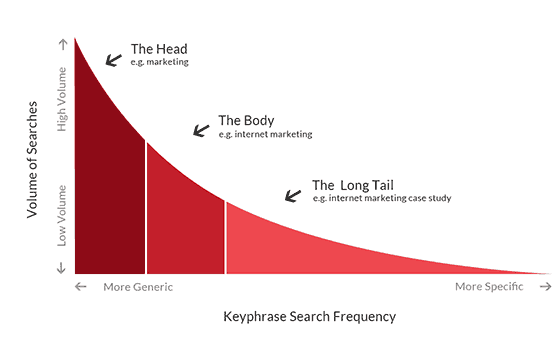
A: “Yes and no. Meaning, as your site gains more link authority, you will be able to rank better for broader keywords that you might not have ranked for right off the start. BUT that does not mean that you should have avoided targeting those keywords from the start. Instead, I look for ways to target easier keywords that also help me target harder, higher traffic keywords. For example, if I aim to rank a page for “best credit cards” then that page should also be able to rank well (eventually) for broader keywords like “credit cards.” You can think of your keyword traffic profile as a bit of a curve (by how competitive the query is and the number of keywords in the search query). This type of traffic distribution curve starts off for new sites far to the right (low competition keywords with few matches in the search index that are thus easy to rank for based on on-page optimization, often with many words in each search query) and then as a site builds link authority and domain authority that curve moves left, because you are able to compete for some of the more competitive keywords … which often have their results determined more based on links-based metrics.”
Q: Can you give an example of how you would research and analyse a specific niche?
A: “Everything is custom based on whether a site exists or is brand new. And if it exists, how much authority does the site have? How much revenue does it have? There is not really a set norm. Sometimes, while doing keyword research, I come to the conclusion that the costs of ranking are beyond the potential risk-adjusted returns. Other times, there is a hole in the market that is somewhat small or large. Depending on assets and resources (and how the project compares to our other sites) we might have vastly different approaches.”
Q: How would you deploy your research in 3 areas – on page, on site, and in links?
A: “As far as on-page optimisation goes, in the past it was all about repetition. That changed around the end of 2003, with the Google Florida update. Now it is more about making sure the page has the keyword in the title and maybe sprinkling a bit about the page content, but also that there is adequate usage of keyword modifiers, variation in word order, and variation in plurality. Rather than worrying about the perfect keyword density, try to write a fairly natural-sounding page (as though you knew nothing about SEO), and then maybe go back to some keyword research tools and look at some competing pages for keyword modifiers and alternate word forms that you can try to naturally work into the copy of the page and headings on the page. As far as links go, it is smart to use some variation in those as well. Though the exact amount needed depends in part on site authority (large authoritative sites can generally be far more aggressive than smaller lesser lesser-trusted websites can). The risk of being too aggressive is that you can get your page filtered out (if, say, you have thousands of links and they all use the exact same link anchor text). There is not a yes/no exact science that says do xyz across the board, but generally, if you want to improve the ranking of a specific page, then pointing targeted link anchor text at that page is generally one of the best ways to do so. But there is also a rising tides lift all boats effect to where if you get lots of links into any section of your website, that will also help other parts of your site rank better – so sometimes it makes sense to create content around linking opportunities rather than just trying to build links into an unremarkable commercial web page.”
Q: Is there anything people should avoid when compiling their data?
A: “I already sorta brushed off keyword density. In addition, many people worry about KEI or other such measures of competition, but as stated above, even if a keyword is competitive, it is often still worth creating a page about it, which happens to target it AND keywords that contain it + other modifiers (i.e. best credit cards for credit cards). Don’t look for any keyword tool to be perfect or exact. Be willing to accept rough ranges and relative volumes rather than expecting anything to be exactly perfect. A huge portion of search queries (over 25%) are quite rare and have few searches. Many such words do not appear on public keyword tools (in part due to limited sampling size for 3rd party tools and in part because search engines want advertisers to get into bidding wars on the top keywords rather than buying cheap clicks that nobody else is bidding on).”